

Page 1
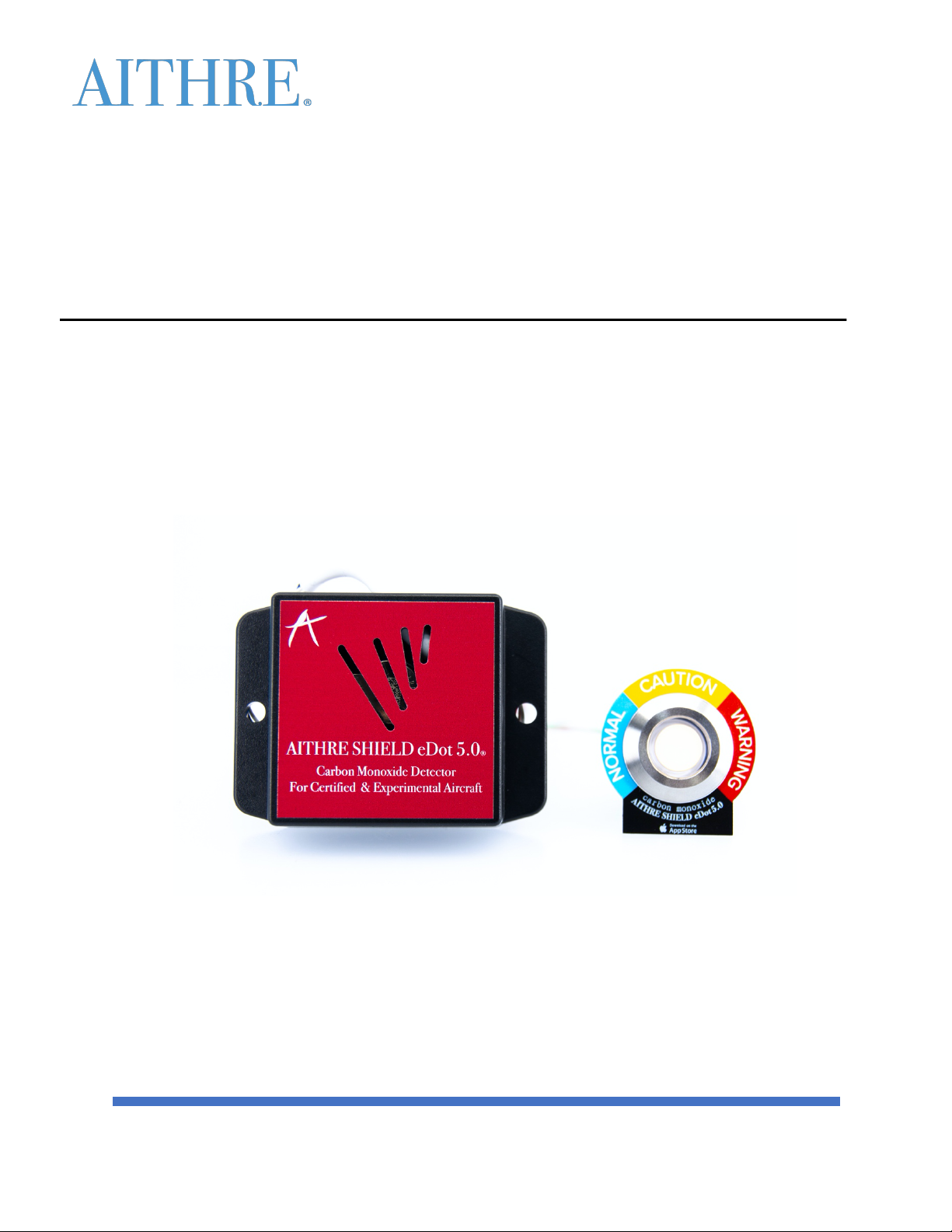
AITHRE SHIELD EDOT 5.0 INSTALLATION MANUAL
1
Aithre Shield eDot 5.0, Part No. AS-5
INSTALLATION, USER INSTRUCTIONS, AND MAINTENANCE MANUAL
Carbon Monoxide Detector
Document 001-022, Revision 01
Dated July 6, 2022
Page 2

AITHRE SHIELD EDOT 5.0 INSTALLATION MANUAL
2
TABLE OF CONTENTS
INTRODUCTION .................................................................................................................................... 3
GENERAL INFORMATION ...................................................................................................................... 3
INSTALLATION ...................................................................................................................................... 3
WIRING INSTRUCTIONS ........................................................................................................................ 3
MOUNTING DIAGRAMS ........................................................................................................................ 4
MOUNTING INSTRUCTIONS .................................................................................................................. 5
CONFIGURATION AND SETUP ................................................................................................................ 5
USER OPERATION INSTRUCTIONS ......................................................................................................... 6
MAINTENANCE ..................................................................................................................................... 8
OPERATING LIMITATIONS ..................................................................................................................... 9
AITHRE SUPPORT ................................................................................................................................ 10
Document 001-022, Revision 01
Dated July 6, 2022
Page 3
AITHRE SHIELD EDOT 5.0 INSTALLATION MANUAL
3
INTRODUCTION
GENERAL INFORMATION
FAA approved for Certified Aircraft but also available for experimental Aircraft builders: The Aithre Shield
eDot 5.0 is the first behind-the-panel device that puts carbon monoxide indications to a panel mounted
LED light and to your iOS device. Features a simple power/ground wiring installation, a small lightweight
footprint, and 10 years without recalibration for the CO ppm.
INSTALLATION
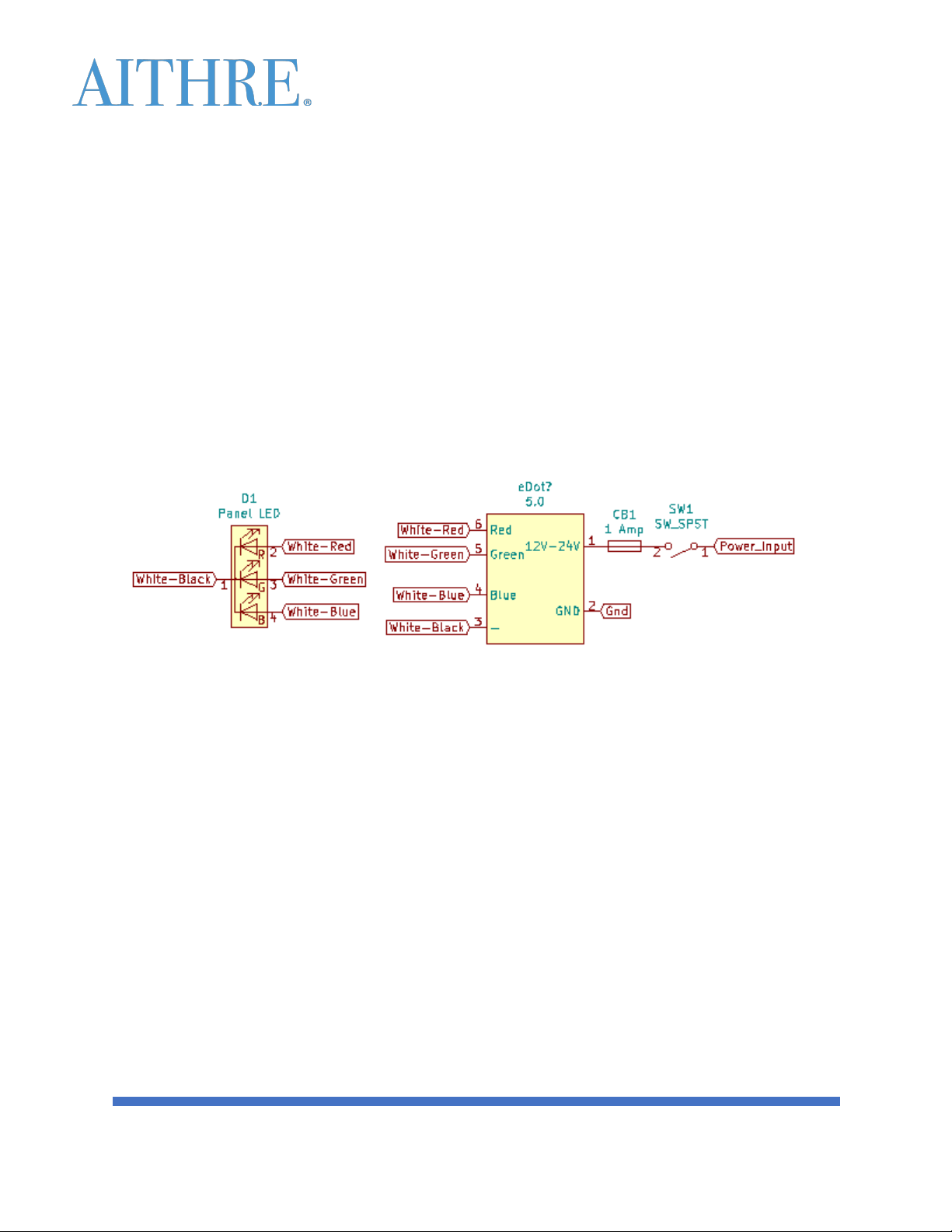
WIRING INSTRUCTIONS
o Red – 12V-24V power input
• Use 22 AWG Hookup Wire
• Use 1 Amp Circuit Breaker/Fuse
• Power must not be obtained from any system that is either required or essential
• The circuit breaker/fuse must not be connected to a critical, required, or essential
aircraft bus
o Black – Aircraft Ground
o White/Red Stripe – "R" pin on LED
o White/Green Stripe – "G" pin on LED
o White/Blue Stripe – "B" pin on LED
o White/Black Stripe – "-" pin on LED
Document 001-022, Revision 01
Dated July 6, 2022
Page 4
AITHRE SHIELD EDOT 5.0 INSTALLATION MANUAL
4
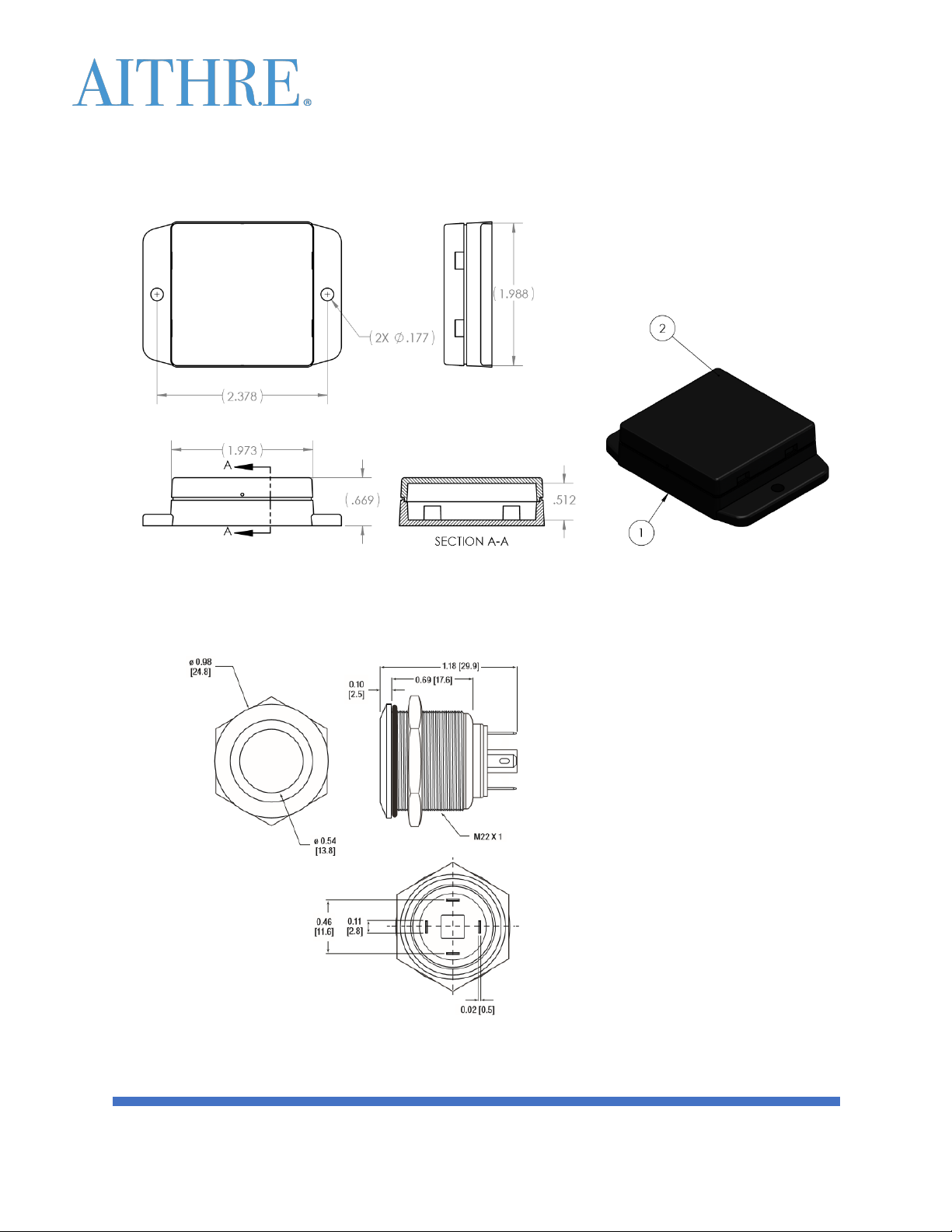
MOUNTING DIAGRAMS
o Housing Dimensions
o LED Indicator Dimensions
Document 001-022, Revision 01
Dated July 6, 2022
Page 5

AITHRE SHIELD EDOT 5.0 INSTALLATION MANUAL
5
MOUNTING INSTRUCTIONS
o Mount housing inside the cabin at any location with access to general cabin air.
• Test mounting position to ensure adequate wireless range is achieved prior to
permanent installation using an enabled device (e.g., the Aithre Connect app on iOS
device)
• Ensure that mounting position is exposed to cabin ambient light (not sealed off
completely) to ensure that the auto-dimming feature is able to sample ambient light
• Ensure that mounting position is exposed to general cabin air (not sealed off
completely) to ensure that the CO sensor is able to sample cabin air
• Line of sight with the device will ensure maximum wireless range
• Mounting away from communication radio or large sources of current will ensure
maximum wireless range
o Mount LED light on the panel outside primary field of view
• Solder striped wires to pins on LED as instructed above
• Choose a position to ensure the LED indicator can be included in the pilot scan, but is
not directly in the primary field of view
• Apply supplied label or placard around the LED light to indicate the LED purpose
o Do NOT tape or cover over the housing intake holes
o Do not expose the product to liquids or extreme dust
o Use only aircraft approved hardware and wire for installation (e.g., AN-3-7 bolt and nut
combination)
CONFIGURATION AND SETUP
o On initial startup (e.g., master switch ON), the LED light will cycle from BLUE to AMBER to RED
and repeat this cycle a total of 3 times before returning to blue. This visually indicates that
the device is receiving power and has been activated.
o After the startup routine, normal operation ensues, and the color of the LED will indicate the
level of CO ppm present.
o The wireless data will be broadcast, including CO values, temperature (C), and device data
after the startup routine.
o The wireless data can be accessed by another device capable of receiving wireless data
• The Aithre Connect app on iOS may be used to confirm wireless data is received.
§ Download the Aithre Connect iOS app from the Apple store on an iPhone or
iPad
§ Go to the CARBON MONOXIDE tab and the pairing status should
automatically show "PAIRED"
§ If pairing does not automatically occur, confirm wireless com is ON in your
iOS settings
§ CO and temperature data will be presented automatically on the Aithre
Connect iOS app
Document 001-022, Revision 01
Dated July 6, 2022
Page 6

AITHRE SHIELD EDOT 5.0 INSTALLATION MANUAL
6
o A user can specify the level of LED light intensity using a wireless input
• The Aithre Connect app on iOS may be used to set the LED light intensity
§ Go to settings and select the LED light intensity
USER OPERATION INSTRUCTIONS
o Once installed, CO readings and notifications can be displayed on any wireless enabled device,
including iPhone, iPad, Apple Watch (e.g., using the Aithre Connect iOS app), or other avionics
configured to receive Aithre wireless data.
o The panel mounted LED light will present as a solid color indication corresponding to the
following levels of CO ppm. The placard colors correspond to the following ranges.
• NORMAL/BLUE = 0-9 CO ppm
• CAUTION/AMBER = 10-49 CO ppm
• WARNING/RED = 50-255 CO ppm
o The panel mounted LED light automatically dims relative to amount of ambient light detected
o The panel mounted LED light can be manually adjusted using a wireless input (e.g., using the
Aithre Connect iOS app)
o In an event that carbon monoxide is detected, attempt to reduce carbon monoxide levels by
increasing clean air flow and turning off cabin heat.
• Do not take emergency action based solely on the output of the device, whether it is
the LED or the CO level displayed on an external wireless enabled device (iPhone,
iPad, Apple Watch).
§ Compare the indicated CO values to another CO detector value
§ Evaluate your symptoms for carbon monoxide poisoning (CDC Source):
à headache
à dizziness
à weakness
à upset stomach
à vomiting
à chest pain
à and confusion
à CO symptoms are often described as flu-like.
• If the device readings correlate with another detector output OR individuals are
presenting with some of the carbon monoxide poisoning symptoms, then land the
plane safely at the next available safe airport as soon as practicable and advise ATC
of the issue.
• If the CO detector has failed, return the unit to Aithre Inc., 1104 SW Matrix Loop, Suite
110, Port Orchard, WA 98367
Document 001-022, Revision 01
Dated July 6, 2022
Page 7

AITHRE SHIELD EDOT 5.0 INSTALLATION MANUAL
7
o Possible failure modes include:
• Always indicates slightly high or slightly low carbon monoxide values (e.g., +/- 5%)
§ Caused by a potentially correctable calibration drift.
§ The CO sensor has been UL demonstrated to be stable over 10 years with no
more than a +/- 5% deviation in calibration
§ The annunciation difference of the LED and wireless data will not be
practically different within +/- 5% error (e.g., 9ppm detected vs. 10ppm
actual).
§ The effect of slightly high CO indications is that exposure to CO is less than
indicated.
§ The effect of slightly low CO indications is that exposure to CO is greater than
indicated.
§ There is no practical health difference within +/- 5 % error.
• False low: always indicates low or 0 CO levels when high CO level is present.
§ Caused by permanent damage to the electronics or sensor or circuit
breaker/fuse.
§ Indicated by the LED light not changing to Amber or Red despite presence of
CO gas.
§ Indicated by the wireless CO values not increasing to the presence of CO gas.
§ The effect of low or 0 CO indications is that exposure to CO is greater than
indicated. This is no worse than not having a CO detector.
§ If you are flying and the system indicates LOW CO values when it is actually
high, you do not know the system is not working properly. This is where you
must rely on your senses to detect the presence of HIGH CO levels when the
system indicates false LOW CO readings.
à headache
à dizziness
à weakness
à upset stomach
à vomiting
à chest pain
à there also two other references:
- AC 20-32B Carbon Monoxide Contamination in Aircraft Detection
and Prevention
- Ar0949 à DOT/FAA/AR-09/49, Detection and Prevention of
Carbon Monoxide Exposure in General Aviation Aircraft
§ Land and test the unit to verify it properly responds to HIGH CO condition.
à Detected in the field using incense smoke (no open flame and away
from flammable gas in fresh air). Incense smoke produces excess of
255 ppm and the device should respond within 1 minute.
à The LED should be labeled as INOP if test fails until corrected.
Document 001-022, Revision 01
Dated July 6, 2022
Page 8

AITHRE SHIELD EDOT 5.0 INSTALLATION MANUAL
8
• False high when CO is actually low: always indicates high CO levels even when no CO
is present.
§ Caused by permanent damage to the electronics or sensor.
§ Indicated by the LED light persisting at Amber or Red despite there being no
CO gas present.
§ Indicated by the wireless CO values not decreasing despite there being no CO
gas present.
§ The effect of high CO indications is that exposure to CO is less than indicated.
§ If you are flying and the system indicates HIGH CO levels when actual CO level
is LOW, the response should be as follows:
à close heating vents,
à open fresh air vents to bring in as much fresh air possible,
à land and test the unit to verify it properly responds to LOW CO
condition.
- Note that CO gas can persist in the cabin after a flight until
flushed with clean air.
- Place detector in clean fresh air and observe whether the Amber
or Red light returns to Blue or the wireless CO values decrease.
- The LED should be labeled as INOP if test fails until corrected.
MAINTENANCE
o The lifespan of the device is 10 years from the date of calibration as indicated on the warranty
card.
o Never try to dismantle or open the product yourself, or push objects of any kind into the
product.
o The Aithre Shield eDot 5.0 CO detector levels are calibrated at the factory during
manufacturing. No recalibration is required for 10 years under normal operating conditions.
• Testing of CO on the aircraft may be accomplished using incense but no open flame
should be used in proximity to AVGAS or other combustible materials. Incense smoke
will produce more than 255 ppm and should yield a response from the detector LED
and BLE data within 1 minute.
• Optional recalibration is available upon request and for a fee only from Aithre Inc.
o Inspect the device for loose or disconnected wires and to confirm that the vent holes in the
housing are not obstructed.
o Do not expose device to temperatures outside the range of -40°C to 60°C.
o Do not expose device to extreme dust or liquids.
o Software
• Changes or updates of the software can only be done by Aithre Inc.
• The unit must be returned to Aithre Inc., 1104 SW Matrix Loop, Suite 110, Port
Orchard, WA 98367 for software updates.
Document 001-022, Revision 01
Dated July 6, 2022
Page 9

AITHRE SHIELD EDOT 5.0 INSTALLATION MANUAL
9
OPERATING LIMITATIONS
o The Aithre Shield eDot 5.0 is not a required system and may not be used as a substitute for
any required or essential certified aircraft system.
o The lifespan of the Aithre Shield eDot 5.0 is 10 years from the date of calibration as indicated
on the warranty card.
o No operational credit may be taken for installation of the Aithre Shield eDot 5.0.
o The operating cabin temperature range of the Aithre Shield eDot 5.0 is limited to -10°C to
+50°C
• COMMENT: cabin heat is likely on at operating temperatures below -10°C
o The Aithre Shield eDot 5.0 must be connected to a 12V-24V power supply independent of
(e.g., not receiving power source from) another system that is either required or essential.
Document 001-022, Revision 01
Dated July 6, 2022
Page 10

AITHRE SHIELD EDOT 5.0 INSTALLATION MANUAL
10
AITHRE SUPPORT
Support for Aithre products is available on our website www.aithreaviation.com, phone 208-481-8310,
and email [email protected]
Location
Aithre Inc.
Port Orchard Airport (4WA9)
1104 SW Matrix Loop, Suite 110
Port Orchard, WA 98367
Mailing
Aithre Inc.
PO Box 1029
Seabeck, WA 98380
Phone
208-481-8310
Website
www.aithreaviation.com
Document 001-022, Revision 01
Dated July 6, 2022
 Loading...