

Page 1
Distributed Exclusively in North America by:
MT-4 Telemetry
Temperature Sensor
99151
The 99151 Temperature Sensor is compatible with the Airtronics 92010 (RX-461) receiver that is used with the Airtronics MT-4 2.4GHz FHSS-4T radio control system. The Temperature
Sensor can be afxed to any number of different components on your model, such as your battery pack, electric motor or gas- or glow-powered engine’s cylinder head to give you real-time
temperature readings that are displayed on your MT-4 2.4GHz FHSS-4T transmitter’s Telemetry screen. This allows you to monitor and keep track of temperature readings while you’re driving.
The range of the Telemetry System is approximately 260 feet (80 meters), although the range can vary based on many environmental factors. Use the Telemetry Signal Indicator
on the MT-4 2.4GHz FHSS-4T transmitter to determine the quality of the signal.
Plugging the Temperature Sensor into the Receiver
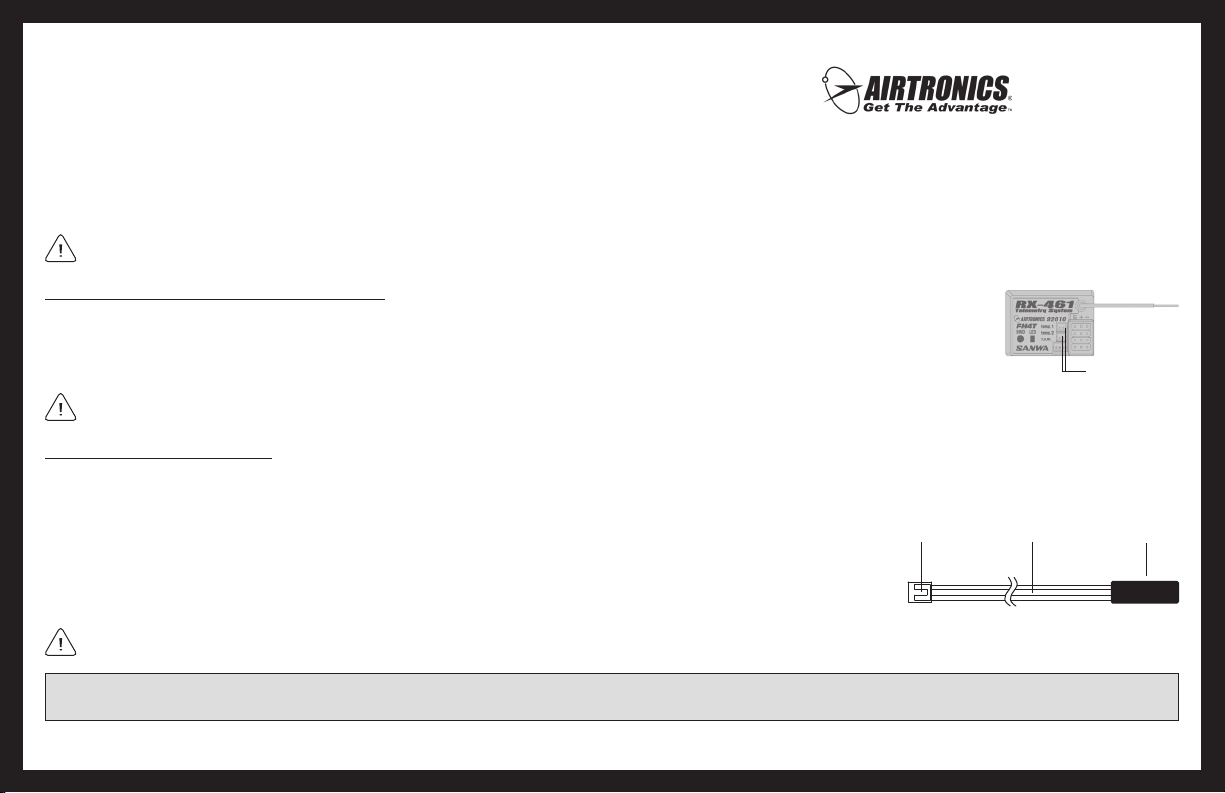
1) Use your ngernail to carefully pry up and remove the plastic dust cover from over the Telemetry Sensor inputs on your 92010 (RX-461) receiver.
2) Plug the Temperature Sensor into the desired Temperature input in the receiver. The Temperature Sensor can be plugged into either the TEMP 1 or the
TEMP 2 input. The input plug is indexed so it can be plugged in only one direction.
Make sure to push the input plug rmly into its input in the receiver to ensure a good connection. Included with your receiver are rubber dust boots that we recommend installing
into any empty Telemetry Sensor inputs to keep out dust, debris, oil, etc.
Mounting the Temperature Sensor
The Sensor End is what reads the temperature from the component that it’s attached to. The method used to mount the Sensor End to your model will vary from model to model. In
general, when mounting the Sensor End to your engine to monitor cylinder head temperatures, we recommend using a nylon cable tie. When mounting the Sensor End to your electric
motor or battery pack, we recommend using clear tape.
The Sensor End should be secured directly against the part of your engine, motor or battery you want to monitor temperature readings
from. For example, to monitor the cylinder head temperature of your nitro-powered model, the best place to secure the Sensor End is
where the bottom of the cylinder head meets the top of the engine case. The Sensor End can be held in place using a nylon cable tie
wrapped around your engine. To monitor the temperature of your battery pack or electric motor, clear tape can be used to secure the
Sensor End to the spot you want to monitor.
Do not attempt to bend the Sensor End or damage it in any way. The Sensor End should be held in place with a nylon cable tie (tightened only enough to hold the Sensor End
securely) or clear tape. In some cases, you may need to use high-temperature tape to ensure strong adhesion at higher temperatures.
Operating Instructions
Input Plug
Sensor Wire
Global Hobby Distributors
18480 Bandilier Circle
Fountain Valley, CA 92708
Telephone: (714) 963-0329
Fax: (714) 964-6236
Email: [email protected]
http://globalservices.globalhobby.com
http://www.airtronics.net
Temperature Inputs
Sensor End
IMPORTANT: The sensor wire and Sensor End should be securely mounted and protected against damage. When routing the sensor wire inside your model, be careful that it
cannot come into contact with any moving parts or that it cannot be damaged in the event of a crash.
Features and Specications are Subject to Change Without Notice. All contents © 2011 Airtronics, Inc. All Rights Reserved. Revision 1-02.04.2011
 Loading...