

Page 1
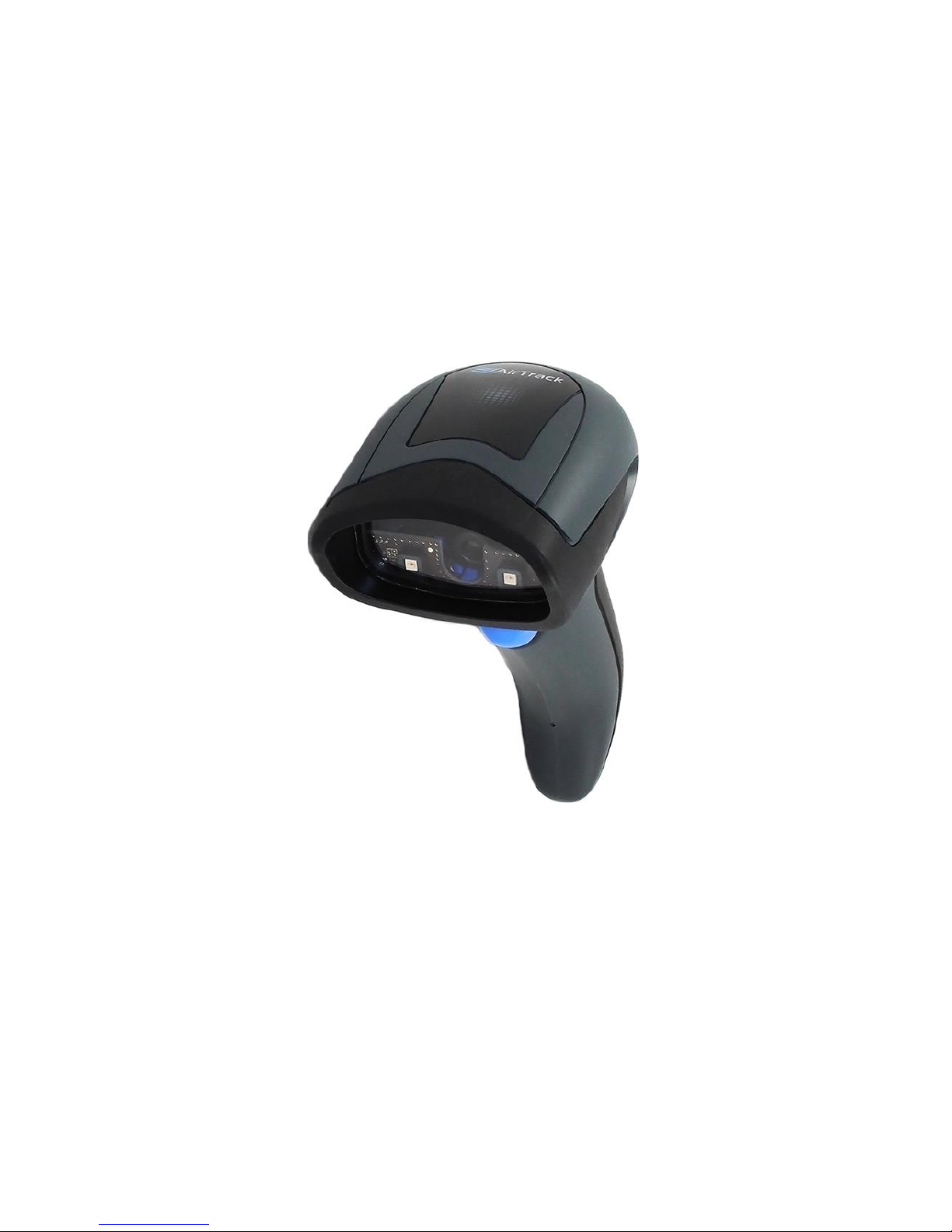
S2
General Purpose Corded Handheld
Area Imager Bar Code Reader
Quick Reference Guide
Page 2

AirTrack, Inc.
200 West Monroe Street, 10th Floor
Chicago, IL 60606
USA
Telephone: (855) 235-1718
©2016 AirTrack, Inc.
An Unpublished Work - All rights reserved. No part of the contents of this
documentation or the procedures described therein may be reproduced or
transmitted in any form or by any means without prior written permission of
AirTrack, Inc. or its subsidiaries or affiliates ("AirTrack" or “AirTrack”).
Owners of AirTrack products are hereby granted a non-exclusive,
revocable license to reproduce and transmit this documentation for the
purchaser's own internal business purposes. Purchaser shall not remove or
alter any proprietary notices, including copyright notices, contained in this
documentation and shall ensure that all notices appear on any
reproductions of the documentation.
Should future revisions of this manual be published, you can
acquire printed versions by contacting your AirTrack representative.
Electronic versions may either be downloadable from the AirTrack
website (www.AirTrack.com) or provided on appropriate media. If you
visit our website and would like to make comments or suggestions about
this or other AirTrack publications, please let us know via the "Contact
AirTrack" page.
Disclaimer
AirTrack has taken reasonable measures to provide information in this
manual that is complete and accurate, however, AirTrack reserves the right
to change any specification at any time without prior notice.
AirTrack and the AirTrack logo are registered trademarks of AirTrack. in
many countries, including the U.S.A.
and the
E.U. All other brand and
product names may be trade-marks of their respective owners.
Page 3

Quick Reference
i
Table of Contents
END USER SOFTWARE LICENSE AGREEMENT
(EULA)
............ iii
Software Product Policy
.............................................................
vi
Description
............................................ . .......................................
1
Setting Up the Reader
.................................................................
2
Connect/Disconnect Cable to Reader
...............................
2
Using the S2 … …………… … …
...................................................
3
Selecting the Interface Type
.......................................................
4
Interface Selection
..............................................................
4
Configuring the
Interface
.......................................... 5
Keyboard Interface .................................................... 6
Scancode Tables......................................................... 9
Country
Mode
............................................................. 9
Programming
..............................................................................
13
Using Programming Bar Codes
.......................................
13
Configure Other Settings
..................................................
13
Resetting Product Defaults
.............................................
13
Caps Lock
State
........................................................ 14
Numlock
.................................................................... 15
Reading Parameters
..................................................................
16
Aiming System
..................................................................
16
Good Read Green Spot Duration
.....................................
16
Operating Modes
................................... .....................................
17
Scan Mode
.........................................................................
17
Pick Mode
...........................................................................
19
Multiple Label Reading
.....................................................
20
Technical Specifications
........................................... .................
20
LED and Beeper Indications
......................................................
23
Programming Mode
..........................................................
24
Error Codes
.......................................... .. .....................................
25
Cleaning
................................................ .. .....................................
26
AirTrack
Limited Factory Warranty
................................................
27
Ergonomic Recommendations
.................................................
29
Services and Support
.................................................................
30
Page 4

ii
NOTES
Page 5

ide
iii
AIRTRACK, INC.
END USER SOFTWARE LICENSE AGREEMENT (EULA)
FOR THE S2
Notice to End User: There are two types of software covered by this END
USER LICENSE AGREEMENT ("EULA"): (1) The AirTrack Product you have
acquired contains embedded software ("Embedded Software") which is
integral to the Product's operation; and (2) Optional Application Software
provided to you on an optional basis ("Application Software"). Embedded
Software and Application Software are collectively referred to as "Software"
and are subject to the terms and conditions contained in this EULA.
Software is provided only for use with, and for authorized end users of, the
AirTrack S2 ("Product"). Portions of the Embedded Software include or
operate with Open Source software or libraries ("Open Source").
This EULA (End User Software License Agreement) ("EULA” or "Agreement") is
a legally binding agreement governing the licensing of the Software and
Documentation by AirTrack, Inc. and its subsidiaries and affiliates ("AirTrack") to
the entity or person who has purchased or otherwise acquired a AirTrack Product
("End User"). For purposes of this Agreement, any software that is not Embedded
Software or Application Software is software associated with a separate end-user
license agreement is licensed to you under the terms of that license agreement.
AirTrack and End User hereby agree as follows:
1.
Definitions.
1.1 "Affiliate" means a business entity currently existing or later acquired that
controls, is controlled by, or is under common control with AirTrack.
1.2 "Documentation" means materials such as user's guides, program reference
guides, quick reference guides, manuals, or similar materials associated with
or related to the AirTrack Product, whether in printed, "online", or other form.
1.3 "Proprietary Information" means: (a) source code, object code, software,
documentation, and any related internal design, system design, data base
design, algorithms, technology, technical data or information, implementation
techniques, and trade secrets related to the Software, (b) any other trade
secrets marked appropriately or identified as proprietary or confidential, and
(c) any information that End User, under the circumstances, should recognize
as confidential. Proprietary Information does not include any information that
the receiving party can establish was (1) in the public domain, (2) already in
the receiving party's possession or rightfully known prior to receipt, (3)
rightfully learned from a third party not in violation of any other's proprietary
rights, or (4) independently developed without access to Proprietary
Information.
1.4 "AirTrack Product" means the AirTrack® S2 series scanner product, including
all embedded Software in and all Documentation related to such product,
which has been purchased or otherwise acquired by End User, whether
obtained directly or indirectly from AirTrack.
1.5 "Software" means any software or computer programs of AirTrack or its third
party licensors in machine readable form which is embedded in the AirTrack
Product, whether obtained directly or indirectly from AirTrack, including any
replacement, update, upgrade, enhancement or modification.
2.
Scope of License Granted.
2.1 AirTrack grants to End User a non-exclusive, non-transferable, perpetual
license to use the Software, solely on the AirTrack Product in which it is
embedded ("designated AirTrack Product"), in machine-readable form only,
solely for End User's internal business purposes. This Agreement does not
convey ownership of the Software to End User. Title to the Software shall be
and remain with AirTrack or the third party from whom AirTrack has obtained
a licensed right. As used in this Agreement, the term "purchase" or its
equivalents when applied to the Software shall mean "acquire under license."
End User is not entitled to receipt or use of the source code to any Software.
2.2 End User shall not copy, modify, decompile, disassemble, reverse engineer,
or otherwise reproduce or remanufacture the Software, whether modified or
unmodified, nor sell, assign, sublicense, distribute, lend, rent, give, or
otherwise transfer the Software to any other person or organization, for
purposes other than as expressly provided in this Agreement, without
AirTrack’s prior written consent.
3.Transfers,
Support.
3.1 Any copying, installing, reproduction, remanufacture, reverse engineering,
electronic transfer, or other use of the Software on other than the designated
Page 6

iv
AirTrack Product will be a material breach of this Agreement. However,
AirTrack may elect not to terminate this Agreement or the granted licenses,
but instead may elect to notify End User that End User is deemed to have
ordered and accepted a license for each breaching use. End User shall pay
AirTrack the applicable list price for such licenses as of the date of such
breach.
3.2 End User shall not sell, assign, sublicense, distribute, lend, rent, give, or
otherwise transfer the AirTrack Product to any third party unless such third
party agrees with AirTrack in writing to be bound by the terms and conditions
of this Agreement. Any such transfer of the AirTrack Product absent such
agreement shall be null and void.
3.3 End User may obtain support for Software from AirTrack at AirTrack’s
standard support fees and under AirTrack’s standard support terms and
conditions in effect at the time the support is requested.
4.
Intellectual Property.
End User acknowledges that the Software constitutes valuable trade secrets of
AirTrack or AirTrack’s third party licensors and that the Software is protected by
intellectual property laws and treaties. The license set forth in this Agreement
does not transfer to End User any ownership of AirTrack’s or its third party
licensors' copyrights, patents, trademarks, service marks, trade secrets, or other
intellectual property rights and End User shall have no right to commence any
legal actions to obtain such rights. End User shall not remove, modify, or take any
other action that would obscure any copyright, trademark, patent marking, or other
intellectual property notices contained in or on the AirTrack Product.
5. Proprietary Information.
5.1 End User acknowledges that Proprietary Information is the confidential,
proprietary, and trade secret property of AirTrack and AirTrack’s third party
licensors and End User acquires no right or interest in any Proprietary
Information.
5.2 End User shall not disclose, provide, or otherwise make available the
Proprietary Information of AirTrack or its third party licensors to any person
other than End User's authorized employees or agents who are under
confidentiality agreement, and End User shall not use the Proprietary
Information other than in conjunction with use of the AirTrack Product
exclusively for End User's internal business purposes. End User shall take
steps to protect the Proprietary Information no less securely than if it were
End User's own intellectual property.
5.3 The provisions of this Proprietary Information Section shall survive and
continue for five (5) years after the termination of this Agreement.
6. Limited Warranty.
6.1 AirTrack warrants that, under normal use and operation, the AirTrack Product
will conform substantially to the applicable Documentation for the period
specified in the Documentation. During this period, for all reproducible nonconformities for which AirTrack has been given written notice, AirTrack will
use commercially reasonable efforts to remedy nonconformities verified by
AirTrack. End User agrees to supply AirTrack with all reasonably requested
information and assistance necessary to help AirTrack in remedying such
nonconformities. For all defects reported to AirTrack within the warranty
period, AirTrack’s liability is limited to providing End User with one copy of
corrections or responding to End User's problem reports according to
AirTrack's standard assistance practices. AirTrack does not warrant that the
product will meet End User's requirements or that use of the product will be
uninterrupted or error free, or that AirTrack’s remedial efforts will correct any
nonconformance. This limited warranty does not cover any product that have
been subjected to damage or abuse, whether intentionally, accidentally, or by
neglect, or to unauthorized repair or unauthorized installation, and shall be
void if End User modifies the product, uses the product in any manner other
than as established in the Documentation, or if End User breaches any of the
provisions of this Agreement.
6.2 EXCEPT AS PROVIDED IN THIS AGREEMENT, THE AIRTRACK
PRODUCT IS PROVIDED "AS IS" AND AIRTRACK MAKES NO
WARRANTIES OF ANY KIND, EXPRESS OR IMPLIED, WRITTEN OR
ORAL, WITH RESPECT TO THE PRODUCT, AND SPECIFICALLY
DISCLAIMS THE IMPLIED WARRANTIES OF MERCHANTABILITY AND
FITNESS FOR A PARTICULAR PURPOSE.
7. Infringement.
7.1 AirTrack will defend End User against any claim in a lawsuit that the AirTrack
Product furnished hereunder infringe a United States patent or copyright of a
third party and AirTrack will pay any damages finally awarded against End
User by a court of competent jurisdiction that are attributable to such claim or
will pay End User's part of any settlement that is attributable to such.
Page 7

Quick Reference
v
claim, provided, that 1) End User notifies AirTrack promptly in writing of the
claim, 2) AirTrack controls the defense or settlement of the claim, and 3) End
User cooperates fully with AirTrack in such defense or settlement. All notices
of a claim should be sent to AirTrack, Inc., Legal Department, 200 West
Monroe Street, Chicago, IL 60606.
7.2 In the defense or settlement of any such claim, AirTrack may, at its option,
1) procure for End User the right to continue using the AirTrack Product, 2)
modify the AirTrack Product so that it becomes non-infringing, 3) replace the
AirTrack Product with an equivalent product not subject to such claim, or 4)
provide End User an opportunity to return the AirTrack Product and receive a
refund of the purchase price paid, less a reasonable allowance for use.
7.3 AirTrack shall have no liability to End User for claims of infringement based
upon 1) the use of any AirTrack Product in combination with any product
which AirTrack has not either furnished or authorized for use with such
AirTrack Product 2) the use of any AirTrack Product designed, manufactured,
or modified to the specifications of End User, or 3) End User's modification of
the AirTrack Product without written authorization from AirTrack.
7.4 THE FOREGOING STATES AIRTRACK’S COMPLETE AND ENTIRE
OBLIGATION CONCERNING CLAIMS OF PATENT, COPYRIGHT, OR
OTHER INTELLECTUAL PROPERTY INFRINGEMENT, CANCELS AND
SUPERCEDES ANY PRIOR AGREEMENTS, WHETHER ORAL OR
WRITTEN, BETWEEN THE PARTIES CONCERNING SUCH CLAIMS, AND
WILL NOT BE MODIFIED OR AMENDED BY ANY PAST,
CONTEMPORANEOUS, OR FUTURE AGREEMENTS OR DEALINGS
BETWEEN THE PARTIES, WHETHER ORAL OR WRITTEN, EXCEPT AS
SET FORTH IN A FUTURE WRITING SIGNED BY BOTH PARTIES.
8. Limitation Of Liability.
EXCEPT AS PROVIDED IN SECTION 7, AIRTRACK SHALL NOT BE LIABLE
FOR ANY CLAIMS AGAINST END USER BY ANY OTHER PARTY. IN NO
EVENT SHALL AIRTRACK'S LIABILITY FOR DAMAGES, IF ANY, WHETHER
BASED UPON CONTRACT, TORT (INCLUDING NEGLIGENCE), PRODUCT
LIABILITY, STRICT LIABILITY, WARRANTY, OR ANY OTHER BASIS, EXCEED
THE PRICE OR FEE PAID BY END USER FOR THE AIRTRACK PRODUCT.
UNDER NO CIRCUMSTANCES SHALL AIRTRACK BE LIABLE TO END USER
OR ANY THIRD PARTY FOR LOST PROFITS, LOST DATA, INTERRUPTION
OF BUSINESS OR SERVICE, OR FOR ANY OTHER SPECIAL,
CONSEQUENTIAL, CONTINGENT, INDIRECT, INCIDENTAL, PUNITIVE,
EXEMPLARY, OR OTHER SIMILAR DAMAGES, EVEN IF AIRTRACK HAS
BEEN ADVISED OF THE POSSIBILITY OF SUCH DAMAGES.
9. Government Restricted Rights; International
Use.
9.1 Use, duplication, or disclosure of the Software by the U.S. Government is
subject to the restrictions for computer software developed at private expense
as set forth in the U.S. Federal Acquisition Regulations at FAR 52.22714(g), or 52.227-19 or in the Rights in Technical Data and Computer Software
clause at
DFARS 252.227-7013(c)(1)(ii), whichever is applicable.
9.2 If End User is using the AirTrack Product outside of the United States, End
User must comply with the applicable local laws of the country in which the
AirTrack Product is used, with U.S. export control laws, and with the English
language version of this Agreement. The provisions of the "United Nations
Convention on International Sale of Goods" shall not apply to this Agreement.
10. Termination.
10.1 Either party may terminate this Agreement or any license granted under this
Agreement at any time upon written notice if the other party breaches any
provision of this Agreement.
10.2 Upon termination of this Agreement, End User immediately shall cease using
any non-embedded software and shall return to AirTrack or destroy all nonembedded software covered by this Agreement, and shall furnish AirTrack
with a certificate of compliance with this provision signed by an officer or
authorized representative of End User. For embedded software, End User
agrees to sign a waiver prepared by AirTrack concerning further use of the
embedded Software. End User's resumed or continued use of the embedded
Software after termination shall constitute End User's agreement to be bound
by the terms and conditions of this Agreement for such use.
11. General Provisions.
11.1 Entire Agreement; Amendment. This document contains the entire agreement
between the parties relating to the licensing of the Software and supersedes all prior
or contemporaneous agreements, written or oral, between the parties concerning the
licensing of the Software. This Agreement may not be changed, amended, or
modified except by written document signed by AirTrack.
Page 8

vi
Software Product Policy
11.2 Notice. All notices required or authorized under this Agreement shall be given
in writing, and shall be effective when received, with evidence of receipt.
Notices to AirTrack shall be sent to the attention of Contract Administration,
AirTrack, Inc., 200 West Monroe Street, Chicago, IL 60606, or such other
address as may be specified by AirTrack in writing.
11.3 Waiver. A party's failure to enforce any of the terms and conditions of this
Agreement shall not prevent the party's later enforcement of such terms and
conditions.
11.4 Governing Law; Venue: This Agreement and the rights of the parties
hereunder shall be governed by and construed in accordance with the laws
of the State of Oregon U.S.A, without regard to the rules governing conflicts
of law. The state or federal courts of the State of Oregon located in either
Multnomah or Lane counties shall have exclusive jurisdiction over all
matters regarding this Agreement, except that AirTrack shall have the right,
at its absolute discretion, to initiate proceedings in the courts of any other
state, country, or territory in which End User resides, or in which any of End
User's assets are located.
11.5 Attorneys' Fees. In the event an action is brought to enforce the terms and
conditions of this Agreement, the prevailing party shall be entitled to
reasonable attorneys' fees, both at trial and on appeal.
-
END
-
Software Product Policy
AirTrack reserves the right to ship its products with the
latest version of software/firmware available. This
provides our customers with the very latest in AirTrack
software technology.
The only exception to this policy is when the buyer has
a signed contract with AirTrack that clearly defines the
terms and conditions for making software/firmware
changes in products shipped to the buyer.
To arrange for a Software Maintenance and Support
Agreement please contact your AirTrack sales person.
Page 9

Quick Reference
1
S2 Description
The S2 2D imager has been specifically created to meet the
market demand for
omnidirectional
reading performance on
virtually all codes at an affordable price. Elegant design
details are incorporated into a smaller, balanced lightweight
enclosure without sacrificing AirTrack’s well-known
durability.
Ideally suited for applications at the point-of-sale (POS), the
S2 imager features a new illumination and aiming system
developed with the unique intent to reduce visual stress of
the operator during the daily scanning activities. It consists
of a soft, dark red illumination combined with two blue LED
triangles pointing at the targeted bar code. The result is a
precise aiming system which contributes to low eye fatigue,
yet still allows top operator efficiency.
Constructed with a combination of design and
performancebased ideals such as bar code reading
snappiness, motion tolerance, perfect ergonomics and an
attractive price, this 2D imager is the ideal solution for the
customer who is looking to replace their linear only reading
scanners with image-based technology.
OmniDirectional
Operating
To read a symbol simply aim the reader and
pull
the trig ger. The S2 imager is a powerful omnidirectional reader, so the
orienta
tion of the
symbol is not
important.
AirTrack’s exclusive patented ‘Green Spot’
for
good-read feedback helps to improve
productivity
in noisy environments or in
situations
where
silence is required. When using
the product
with
the cradle at a 45° position, the
aiming pattern
can
work as an aiming system to
aid in positioning
the
bar code for quick and
intuitive
reading.
Page 10
2
Setting Up the
Reader
Decoding
Reliably decodes all standard 1D (linear) and 2D bar
codes, including GS1 DataBar™ linear codes,
Postal
Codes (China Post), Stacked Codes (such as
GS1
DataBar Expanded Stacked, GS1 DataBar
Stacked,
GS1 DataBar, Stacked Omnidirectional). The
data
stream — acquired from decoding a symbol —
is
rapidly
sent to the host. The reader is immediately available to
read another
symbol.
Setting Up the Reader
Follow the steps below to connect and get your reader up
and communicating with its host.
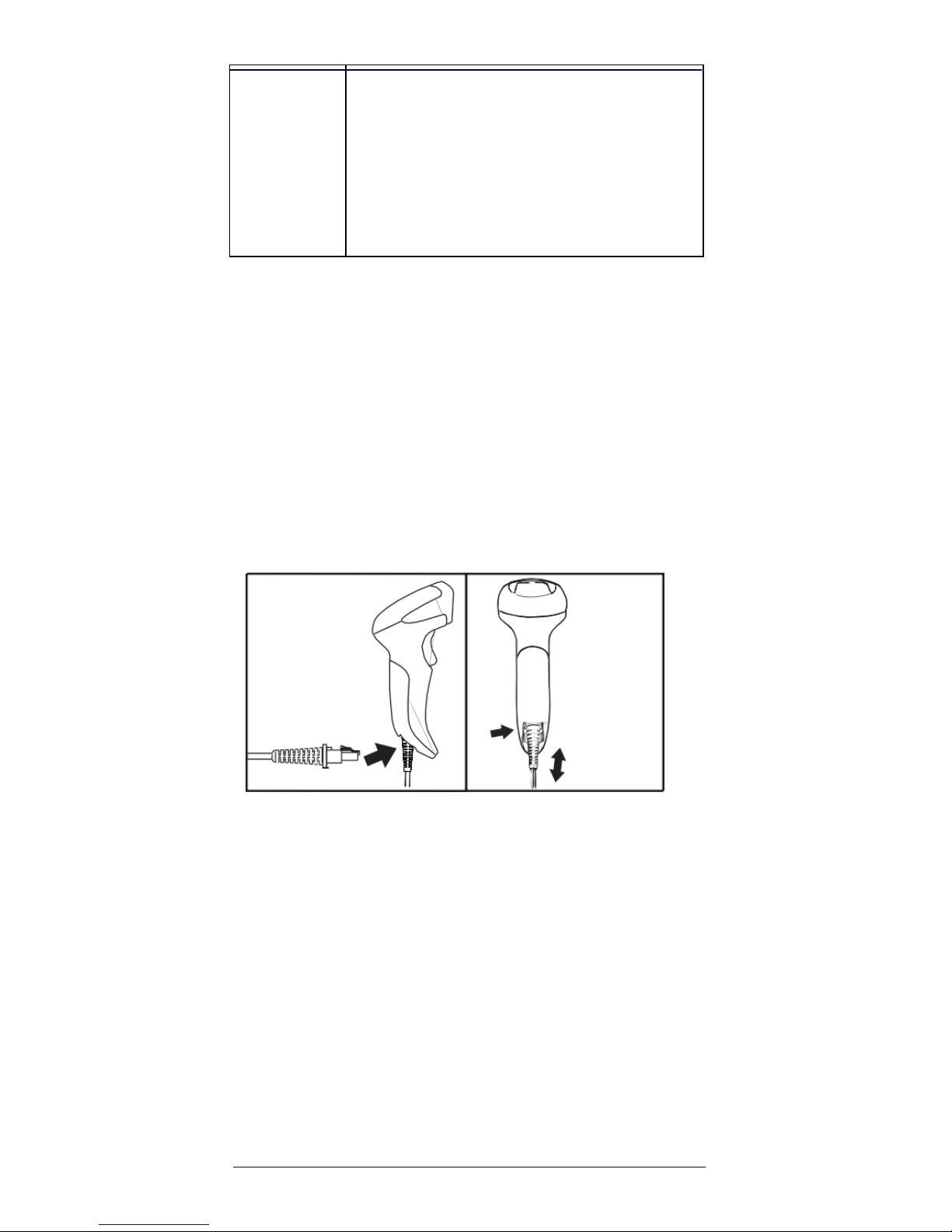
1. Connect the Cable to the reader and the Host.
2. Configure the Interface (see page 5).
3. Configure the Reader starting on page 13
(optional, depends on settings needed).
Connect/Disconnect Cable to Reader
Figure 1. Connecting to the
Reader
Side
View
Rear
View
Host Connection —
The S2 plugs directly into the host
device as shown in Figure 2. The power can also be
supplied through an external power supply via the Interface
Cable supplied with a power jack
Page 11
Quick Reference
3
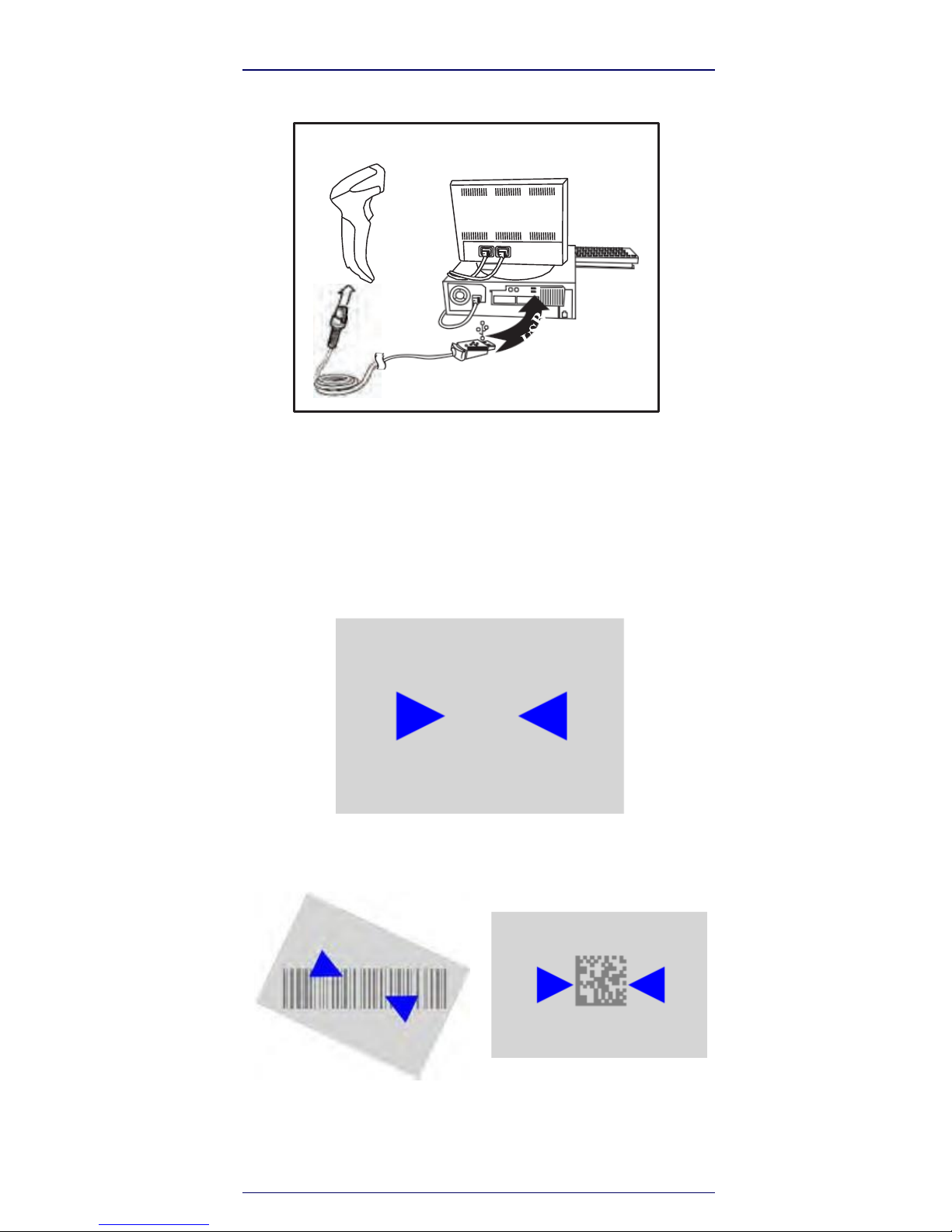
Figure
2.
Connecting to the
Host
Side
View
Using the S2
The S2 normally functions by capturing and decoding codes.
The aiming system is activated on trigger pull and indicates
the center of the field of view which should be positioned
over the bar code:
Aiming
System
Relative Size and Location of Aiming System
Pattern
Linear
bar
2D Matrix symbol
Page 12

4
Selecting the Interface
Type
A beam illuminates the label. The projected pattern of the
aiming system will be smaller when the reader is closer to the
bar code and larger when it is farther from the code.
Symbologies with smaller bars or elements (mil size) should
be read closer to the unit. Symbologies with larger bars or
elements (mil size) should be read farther from the unit.
If the aiming system is centered you will get a good read.
Successful reading is signaled by an audible tone plus a
goodread green spot LED indicator.
Reference the S2 Product Reference Guide (PRG) on the
AirTrack website for more information about this feature
and other programmable settings.
Selecting the Interface Type
Upon completing the physical connection between the
reader and its host, proceed directly to Interface Selection
below for information and programming for the interface
type the reader is connected to (for example: RS-232,
Keyboard Wedge, USB, etc.) and scan the appropriate bar
code to select your system’s correct interface type.
Interface Selection
The reader model will support one of the following sets
of host interfaces:
General Purpose Models —
RS-232, RS-232 OPOS,
USB, Keyboard Wedge.
Retail Point of Sale Models —
RS-232, RS-232 OPOS,
USB. Information and programming options for each
interface type are provided in this section. For defaults and
additional information associated with each interface,
proceed to the corresponding chapter in the S2 PRG.
Page 13
Quick Reference
5
Selecting the Interface
Type
Configuring the Interface
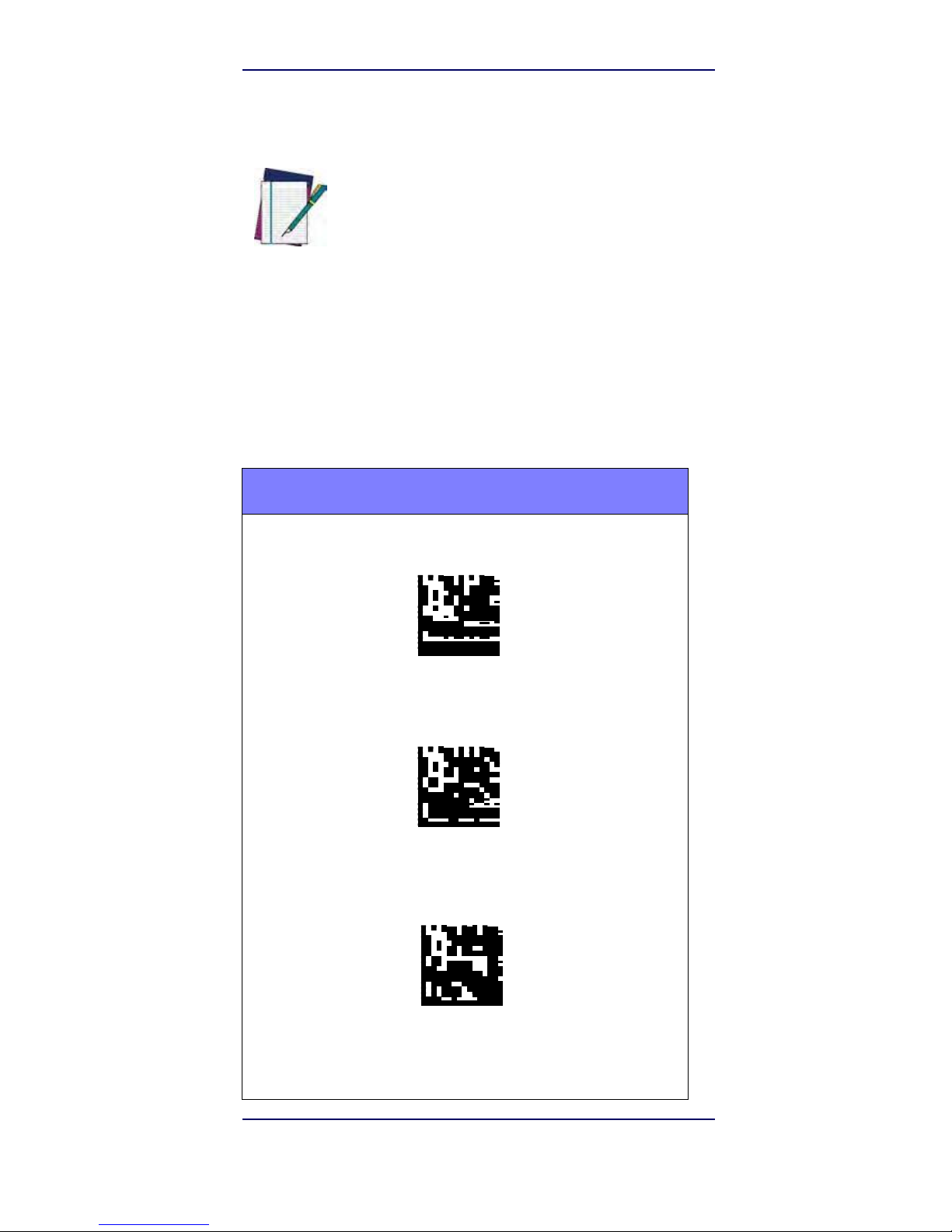
Scan the appropriate programming bar code to select
the interface type for your system.
Unlike some other programming features and
options, interface selections require that you
scan only one programming bar code label. DO
NOT scan an ENTER/EXIT bar code prior to
scanning an interface selection bar code.
NOTE
Some interfaces require the scanner to start in
the disabled state when powered up. If
additional scanner configuration is desired while
in this state, pull the trigger and hold for 5
seconds. The scanner will change to a state that
allows programming with bar codes.
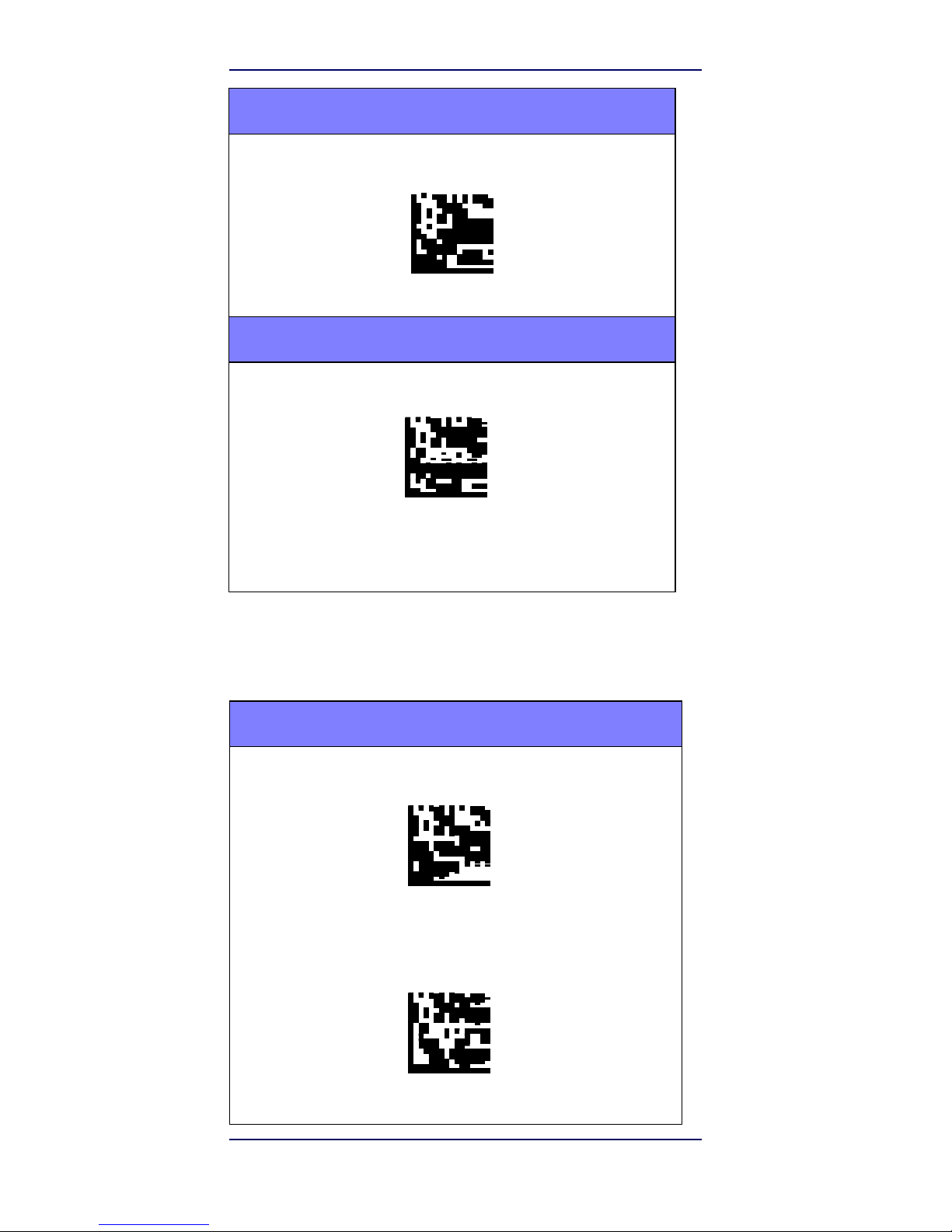
RS-232
RS-232 standard interface
Select RS232-STD
RS-232 Wincor-Nixdorf
Select RS232-WN
RS-232 for use with OPOS/UPOS/JavaPOS
Select RS-232 OPOS
Page 14
6
Selecting the Interface
Type
RS-232 (continued)
USB Com to simulate RS-232 standard interface
Select USB-COM-STD
a
USB-OEM
USB-OEM (can be used for OPOS/UPOS/JavaPOS)
Select USB-OEM
a. Download the correct USB Com driver from
www.AirTrack.com
Keyboard Interface
Use the programming bar codes to select options for
USB Keyboard and Wedge Interfaces.
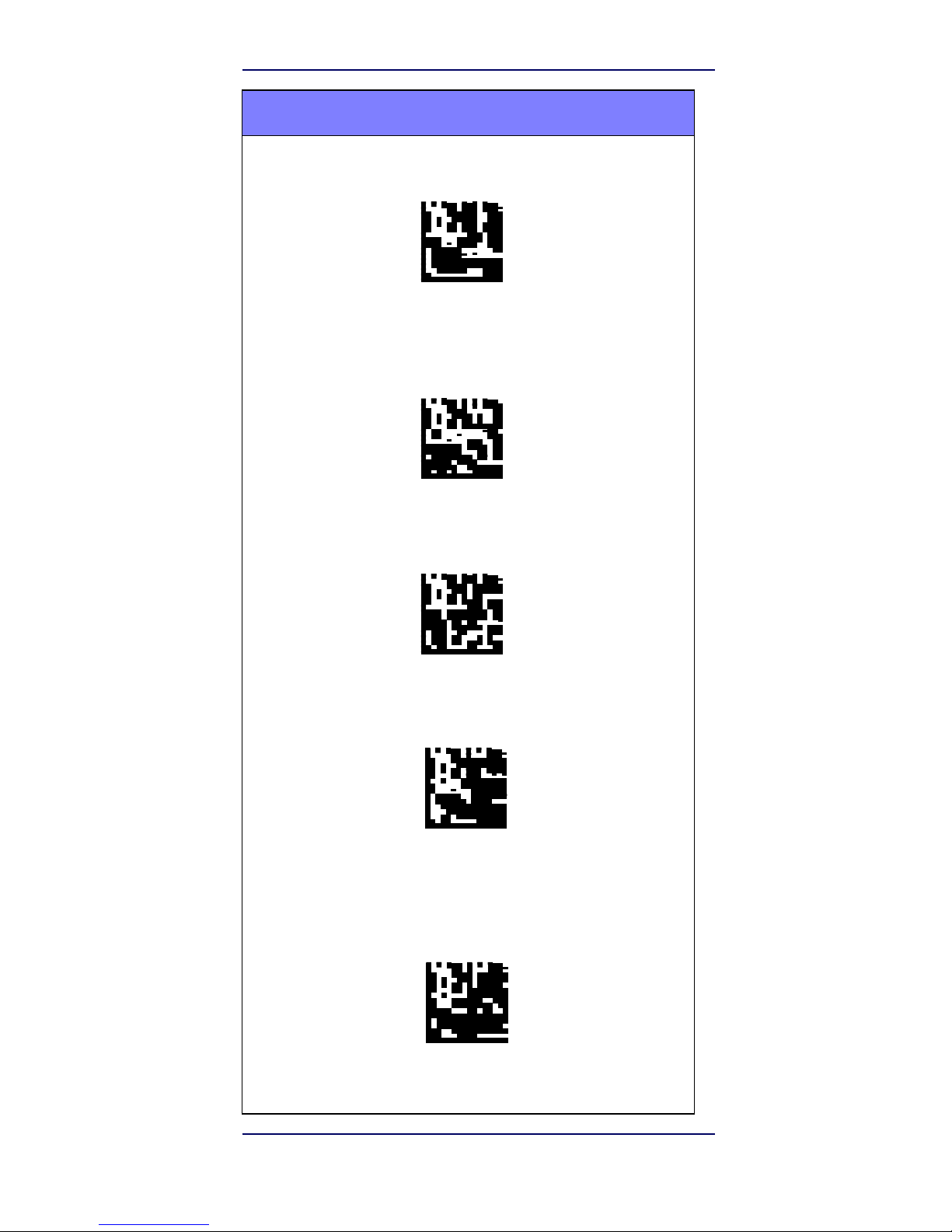
KEYBOARD
AT, PS/2 25-286, 30-286, 50, 50Z, 60, 70, 80, 90 & 95 w/
Standard Key Encoding
Select KBD-AT
Keyboard Wedge for IBM AT PS2 with standard key
encoding but
without external keyboard
Select KBD-AT-NK
Page 15
Quick Reference
7
Selecting the Interface
Type
KEYBOARD (continued)
AT, PS/2 25-286, 30-286, 50, 50Z, 60, 70, 80, 90 &
95
w/Alternate Key
Select KBD-AT-ALT
Keyboard Wedge for IBM AT PS2 with alternate key
encoding
but
without external
keyboard
Select KBD-AT-ALT-NK
PC/XT w/Standard Key Encoding
Select KBD-XT
Keyboard Wedge for IBM Terminal 3153
Select KBD-IBM-3153
Keyboard Wedge for IBM Terminals 31xx, 32xx, 34xx,
37xx make break keyboard
Select KBD-IBM-MB
Page 16
8
S2
Selecting the Interface
Type
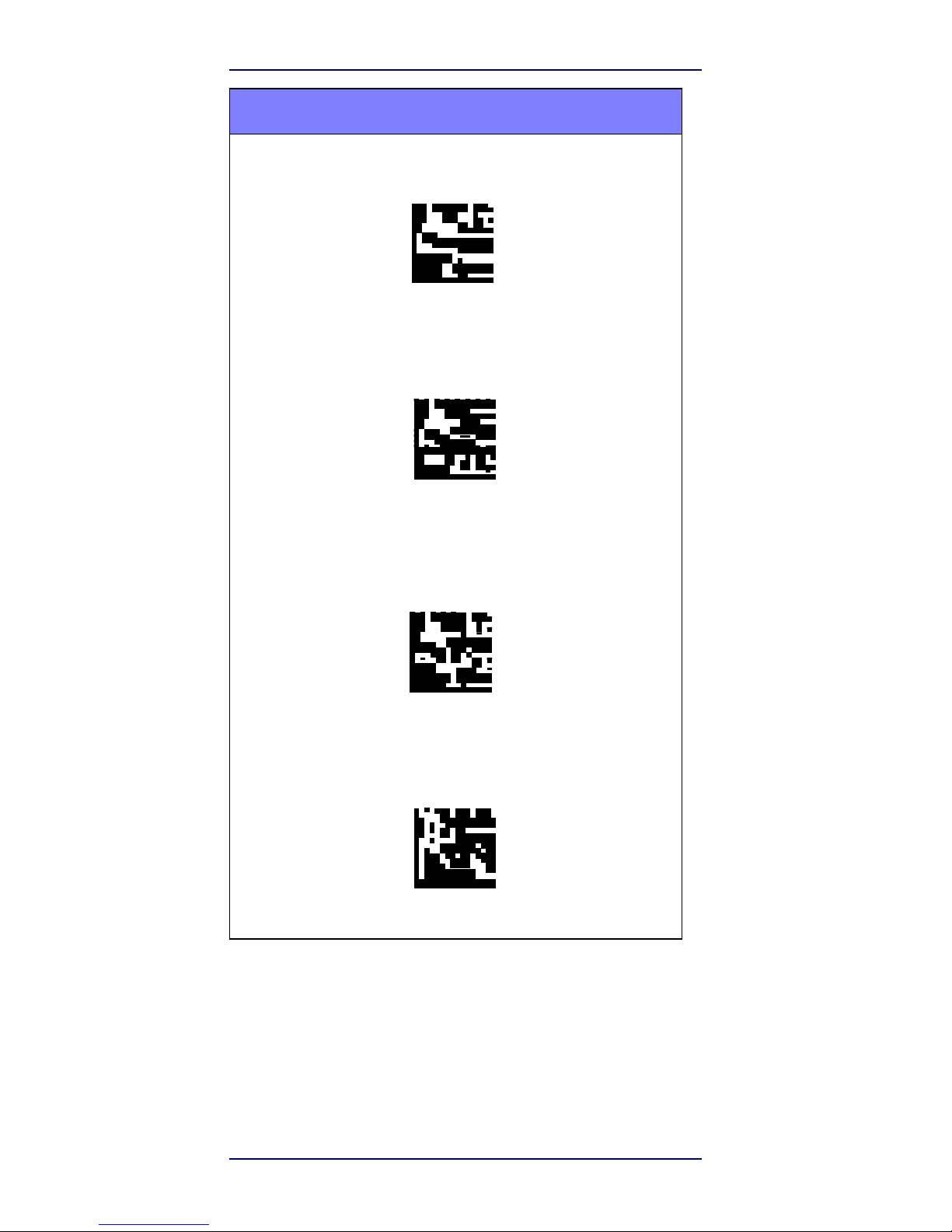
KEYBOARD (continued)
USB Keyboard with alternate key encoding
Select USB Alternate Keyboard
USB Keyboard for Apple computers
Select USB-KBD-APPLE Keyboard
Wedge for DIGITAL Terminals
VT2xx, VT3xx, VT4xx
Select KBD-DIG-VT
USB Keyboard with standard key encoding
Select USB Keyboard
Page 17
Quick Reference
9
Selecting the Interface
Type
Scancode Tables
Reference the S2 PRG for information about control
character emulation for keyboard interfaces.
Country Mode
This feature specifies the country/language supported by the
keyboard. Only these interfaces support ALL Country
Modes:
• USB Keyboard (without alternate key encoding)
• AT, PS/2 25-286, 30-286, 50, 50Z, 60, 70, 80, 90
& 95 w/Std Key Encoding
• Keyboard Wedge for IBM AT PS2 with standard
key encoding but without external keyboard
• AT, PS/2 25-286, 30-286, 50, 50Z, 60, 70, 80, 90
& 95 without Alternate Key
• Keyboard Wedge for IBM AT PS2 without
alternate key encoding but without external
keyboard
All other interfaces support ONLY the following Country
Modes: U.S., Belgium, Britain, France, Germany, Italy,
Spain, Sweden.
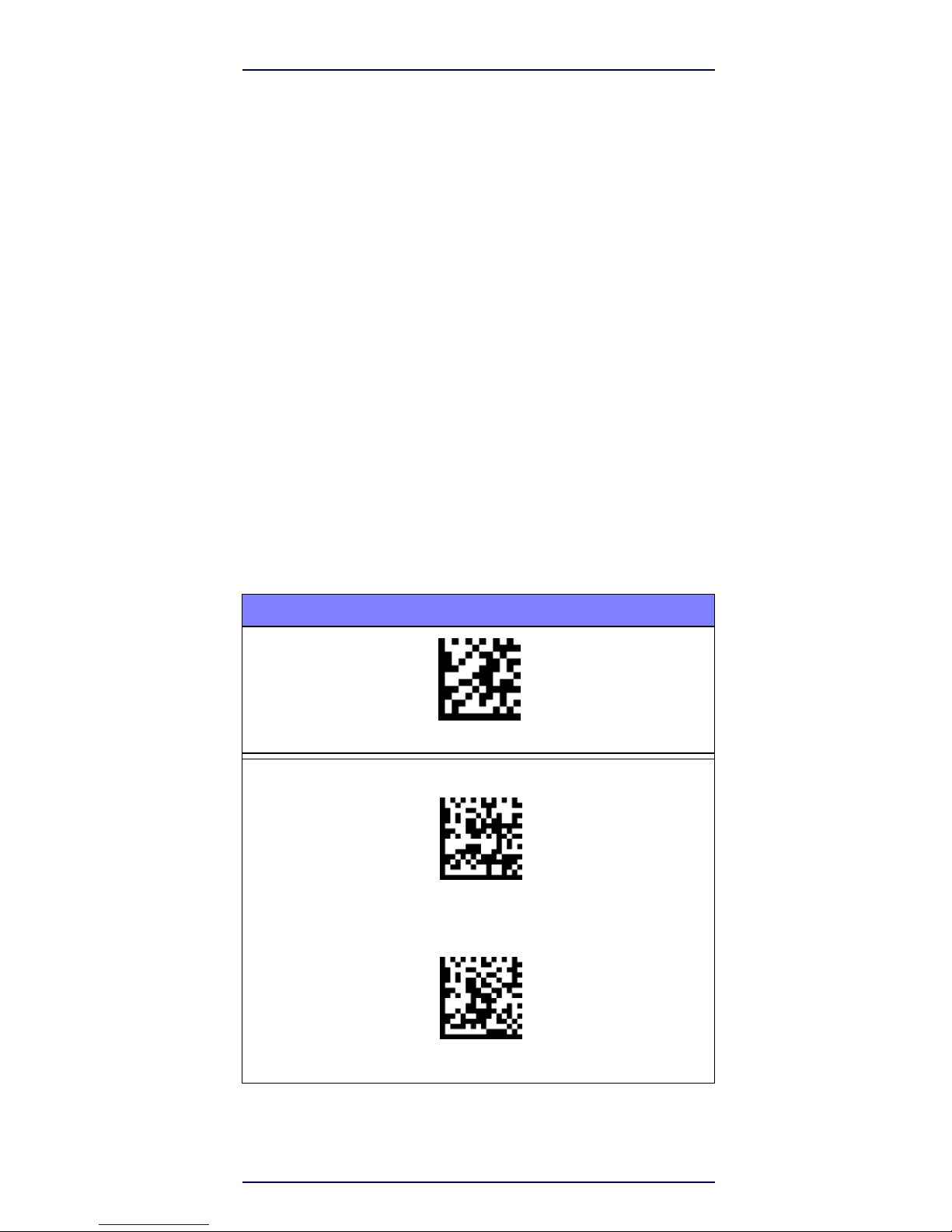
COUNTRY MODE
ENTER/EXIT PROGRAMMING MODE
Country Mode = U.S.
Country Mode = Belgium
Page 18
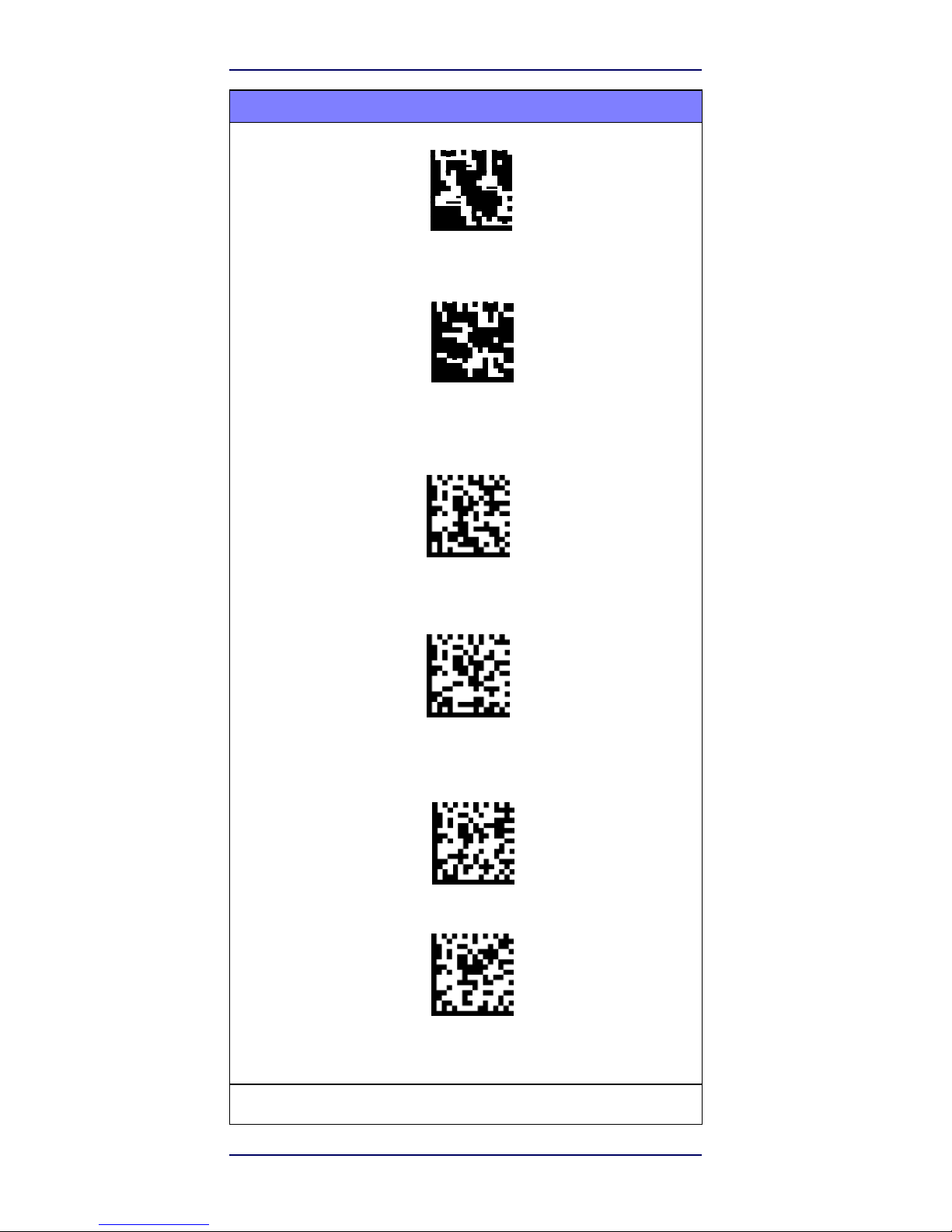
10
S2
Selecting the Interface
Type
COUNTRY MODE (continued)
Country Mode = Croatia
Country Mode = Czec Republic*
Country Mode = Denmark*
Country Mode = France
Country Mode = French Canadian*
Country Mode = Germany
*
Supports only the interfaces listed in the Country Mode feature description
Page 19
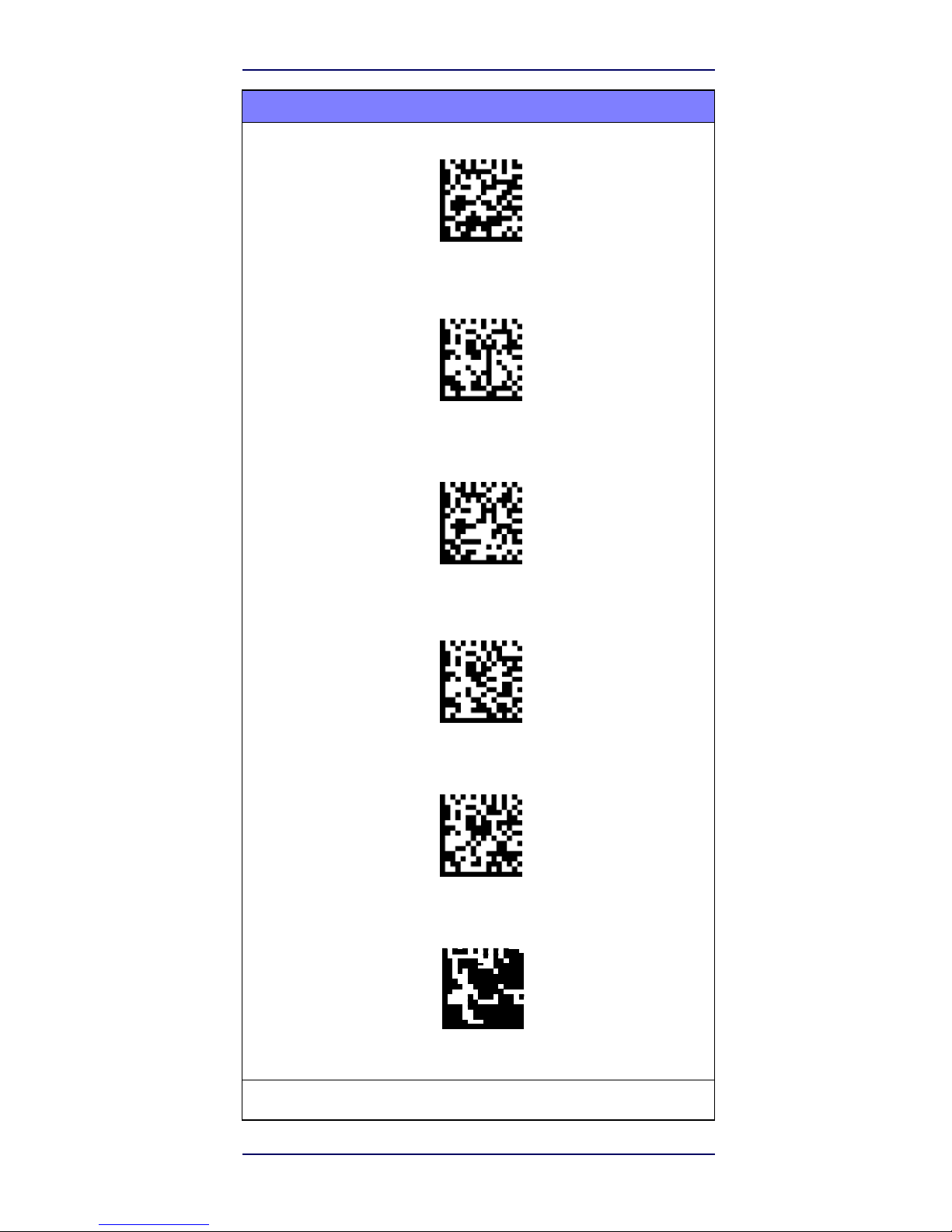
Quick Reference
11
Selecting the Interface
Type
COUNTRY MODE (continued)
Country Mode = Hungary*
Country Mode = Italy
Country Mode = Japanese 106-key*
Country Mode = Lithuanian*
Country Mode = Norway*
Country Mode = Poland*
*
Supports only the interfaces listed in the Country Mode feature description
Page 20
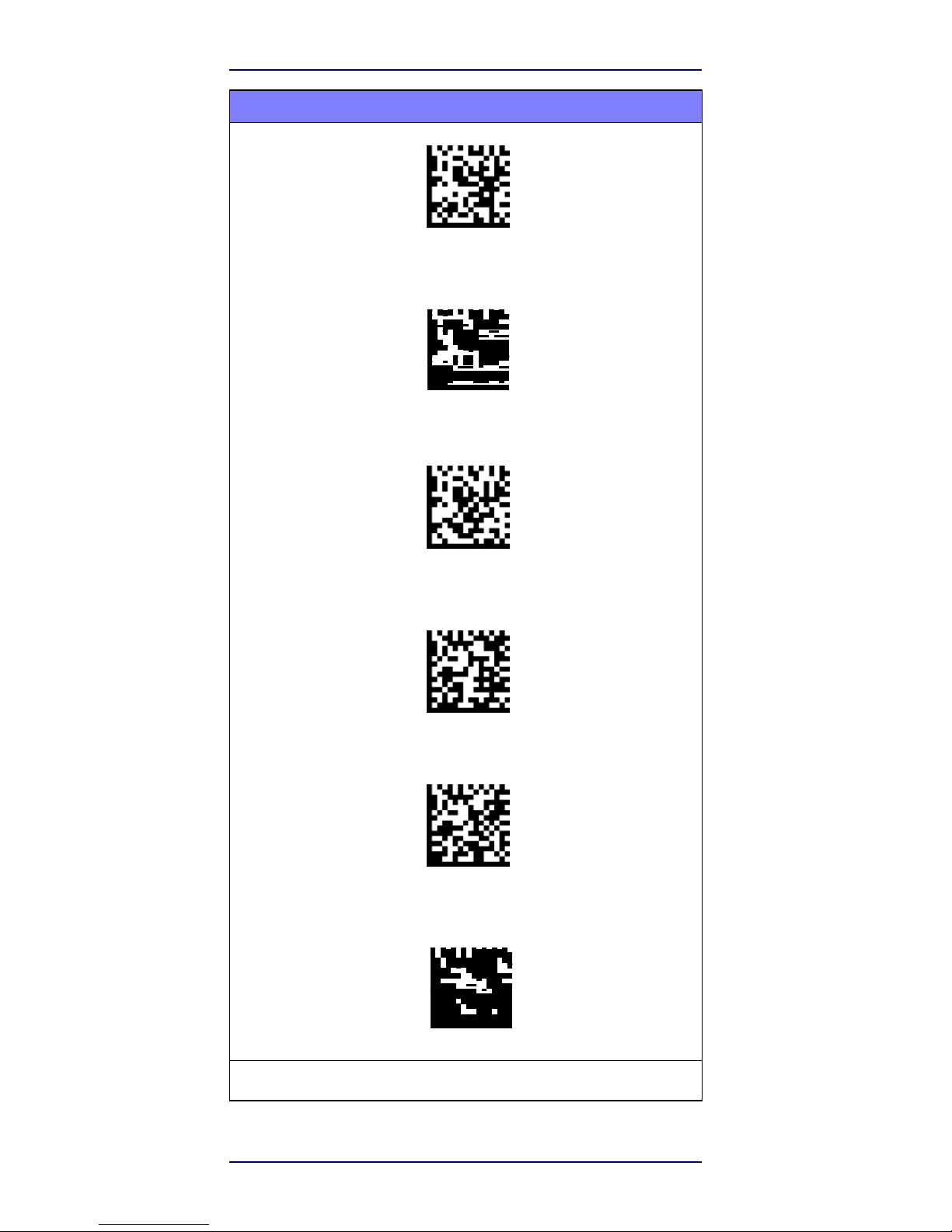
12
S2
Selecting the Interface
Type
COUNTRY MODE (continued)
Country Mode = Portugal*
Country Mode = Romania*
Country Mode = Spain
Country Mode = Sweden
Country Mode = Slovakia*
Country Mode = Switzerland*
*
Supports only the interfaces listed in the Country Mode feature description
Page 21

Quick Reference
13
Programming
The reader is factory-configured with a set of
standard
default
features. After scanning the interface bar code from
the Interfaces section, select other options and customize
your reader through use of the programming bar codes
available in the S2 PRG. Check the corresponding features
section for your interface, and also the Data Editing and
Symbologies chapters of the PRG.
Using Programming Bar Codes
This manual contains bar codes which allow you to
reconfigure your reader. Some programming bar code
labels, like the "Reset Default Settings" on page 13, require
only the scan of that single label to enact the change.
Other bar codes require the reader to be placed in
Programming Mode prior to scanning them. Scan an
ENTER/EXIT bar code once to enter Programming Mode;
scan the desired parameter settings; scan the
ENTER/EXIT bar code again to accept your changes,
which exits Programming Mode and returns the reader to
normal operation.
Configure Other Settings
Additional programming bar codes are available in the PRG
to allow for customizing programming features. If your
installation requires different programming than the standard
factory default settings, refer to the PRG.
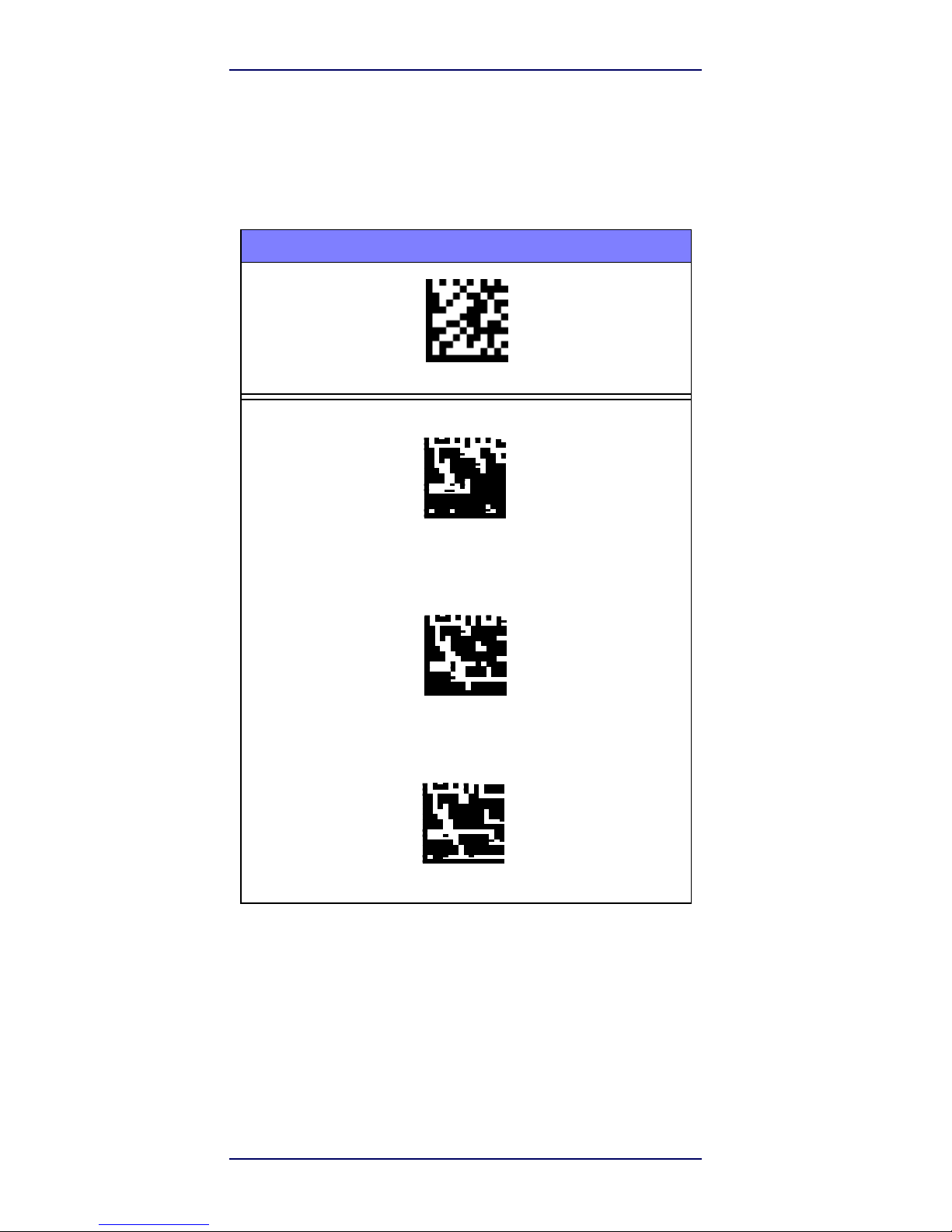
Resetting Product Defaults
If you aren’t sure what programming options are in your
reader, or you’ve changed some options and want your
custom factory settings restored, scan the bar code below to
reset the reader to its initial configuration. Reference the
PRG for other options, and a listing of standard factory
settings.
Factory defaults are based on the interface
type. Be sure your reader is configured for the
correct interface before scanning this label.
See "Selecting the Interface Type" on page
4 for more information.
NOTE
Reset Default
Settings
Page 22
14
S2
Programming
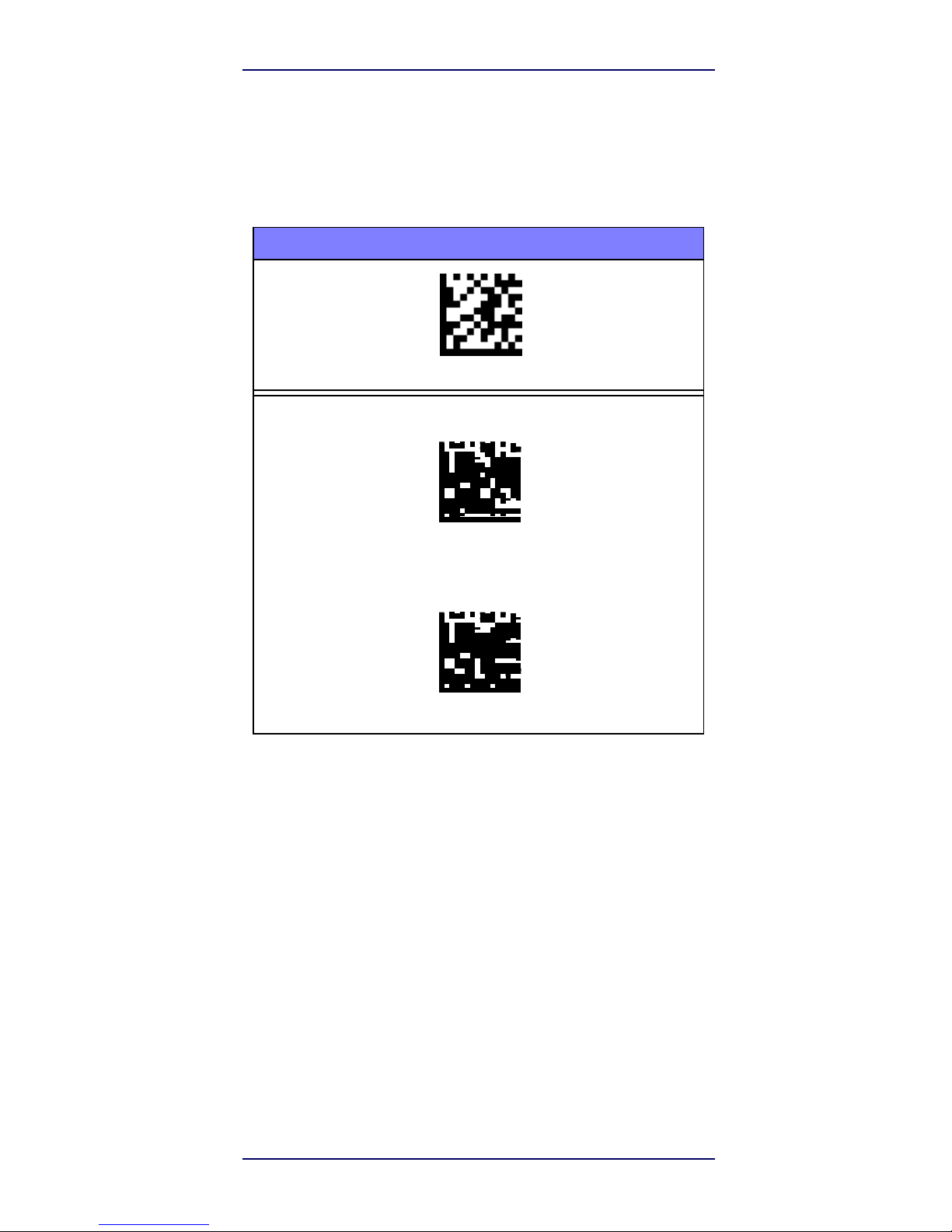
Caps Lock State
This option specifies the format in which the reader sends
character data. This applies to keyboard wedge interfaces.
This does not apply when an alternate key encoding
keyboard is selected.
CAPS LOCK STATE
ENTER/EXIT PROGRAMMING MODE
Caps Lock State = Caps Lock OFF
Caps Lock State = Caps Lock ON
Caps Lock State = AUTO Caps Lock Enable
Page 23
Quick Reference
15
Programming
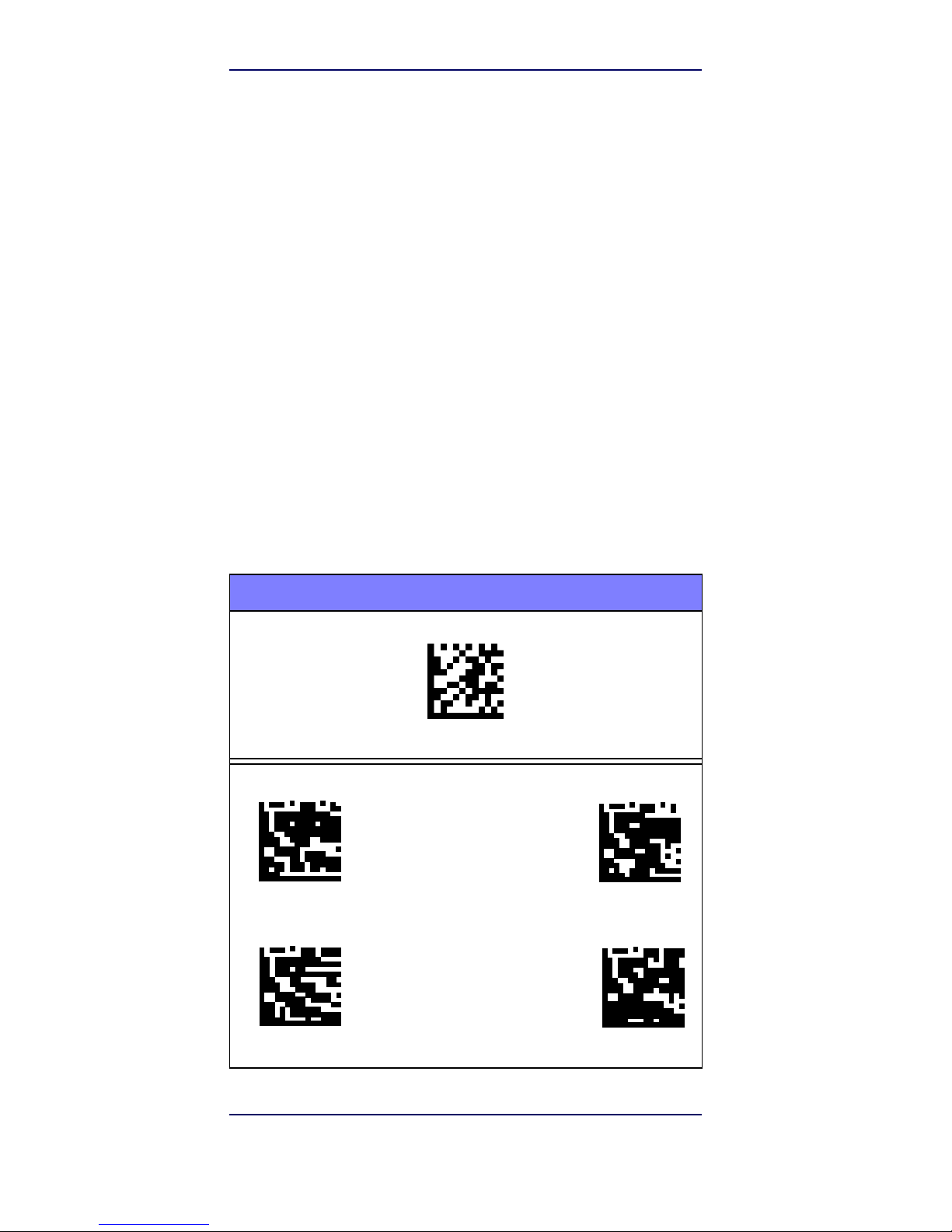
Numlock
This option specifies the setting of the Numbers Lock
(Numlock) key while in keyboard wedge interface. This only
applies to alternate key encoding interfaces. It does not apply
to USB keyboard.
NUMLOCK
ENTER/EXIT PROGRAMMI MODE
Numlock = Numlock key un
changed
Numlock = Numlock key toggled
Page 24
16
S2
Reading
Parameters
Reading Parameters
Move the reader toward the target and center the aiming
pattern and illumination system to capture and decode
the
image. See Using the S2 on page 3 for more information.
The aiming system will briefly switch off after the acquisition
time, and if no code is decoded will switch on again before the
next acquisition. The illuminator will remain on until the
symbol is decoded.
As you read code symbols, adjust the distance at which
you are holding the reader.
Aiming System
A number of options for customizing control of the Aiming
System are available. See the S2 PRG for more
information and programming bar codes.
Good Read Green Spot Duration
Successful reading can be signaled by a good read green
spot. Use the bar codes that follow to specify the duration of
the good read pointer beam after a good read.
GOOD READ GREEN SPOT DURATION
ENTER/EXIT PROGRAMMING MODE
Disabled
♦
Short (300
ms)
Medium (500
ms)
Long (800
ms)
Page 25

Quick Reference
17
Operating Modes
Scan Mode
Operating
Modes
The imager can be set to operate in one of several
scanning modes. See the PRG for more information and
settings for any of the options:
Trigger Single (Default) —
This mode is associated with
typical handheld reader operation. When the trigger is pulled,
illumination is turned on and the scanner attempts to read a
label. Scanning is activated until one of the following occurs:
• the programmable “maximum scan on time”1 has
elapsed
• a label has been read
• the trigger is released
Trigger Pulse Multiple —
Scanning begins when the trigger
is pulled and continues after the trigger is released, until the
trigger is pulled again or until the programmable “maximum
scan on time”1 has elapsed. Reading a label does not
disable scanning. Double Read Timeout1 prevents
undesired multiple reads while in this mode.
Trigger Hold Multiple —
When the trigger is pulled,
scanning starts and the product scans until the trigger is
released or “maximum scan on time”1 has elapsed.
Reading a label does not disable scanning. Double Read
Timeout1 prevents undesired multiple reads while in this
mode.
Always On —
The illuminator is always ON and the reader
is always ready for code reading. Double Read Timeout
1
prevents undesired multiple reads.
Flashing —
The reader illuminator flashes on and off
regardless of the trigger status. Code reading takes place
only during the Flash On2 time. Double Read Timeout
1
prevents undesired multiple reads.
Object Detection —
The scanner looks for changes within
its field-of-view. The Aiming Pattern is always on to show
the optimum reading area. If a predefined amount of
movement is detected, the red illumination switches on.
Scanning continues until a label is read or "maximum scan
on time" is reached.
1. See the Product Reference Guide (PRG) for these
and other programmable features
2. Controlled by Flash On Time and Flash Off Time.
Use the PRG to program these options.
Page 26
18 S2
Operating
Modes
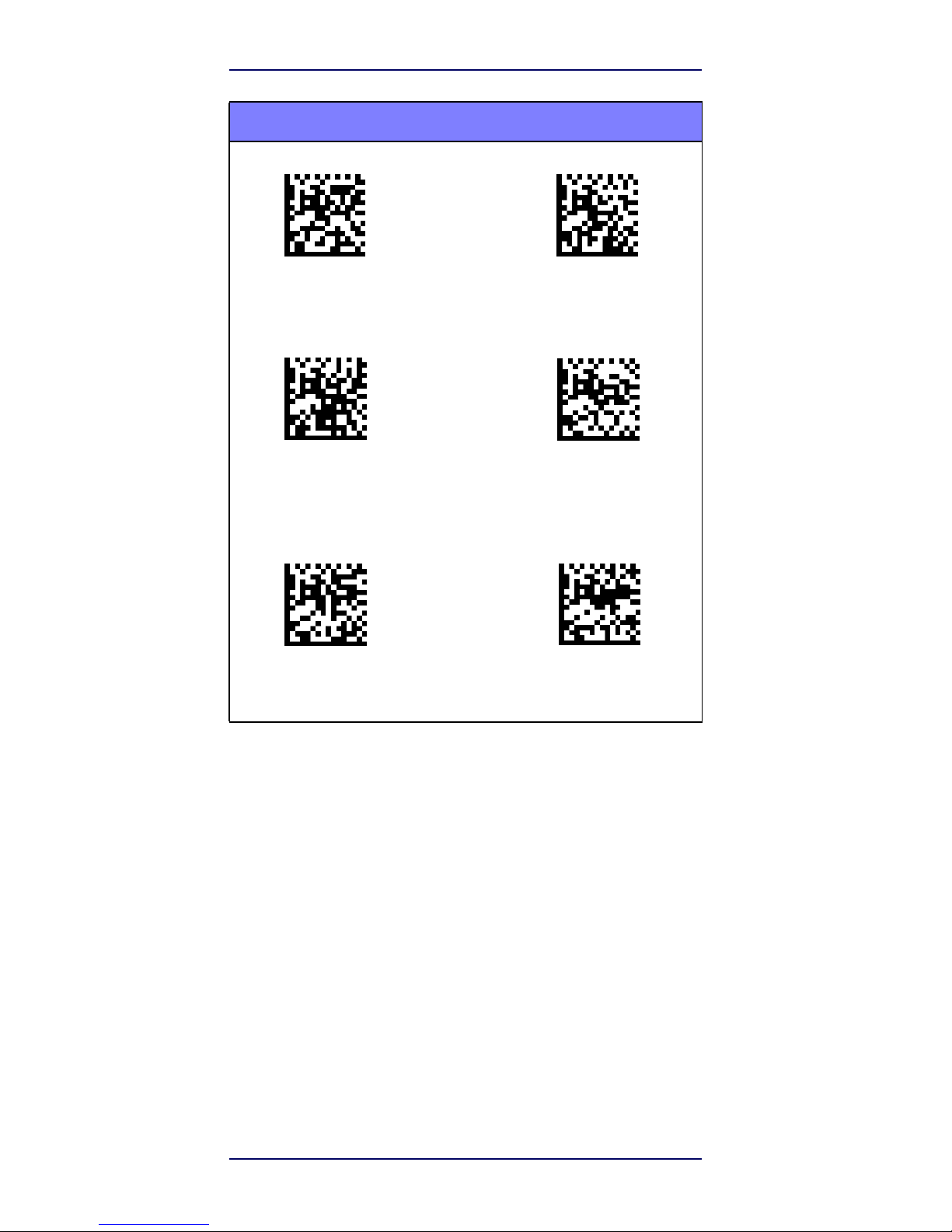
SCAN MODE
♦
Scan Mode = Trigger
Single
Scan Mode
= Trigger
Pulse
Multiple
Scan Mode = Trigger
Hold Multiple
Scan Mode
= Flashing
Scan Mode = Always
On
Scan Mode
=
Object Detection
Page 27
Quick Reference
19
Operating Modes
Pick Mode
Specifies the ability of the reader to decode labels only
when they are close to the center of the aiming pattern,
which is the area indicated by the two blue arrows. Pick
Mode is a Decoding and Transmission process where bar
codes that are not within the configurable distance from the
center of the aiming pattern are not acknowledged or
transmitted to the host. It is active only while the scanner is
in Trigger Single mode. If the scanner switches to a different
Read Mode, Pick Mode is automatically disabled.
NOTE
This feature is not compatible with Multiple
Labels Reading in a Volume. See the PRG
for more information.
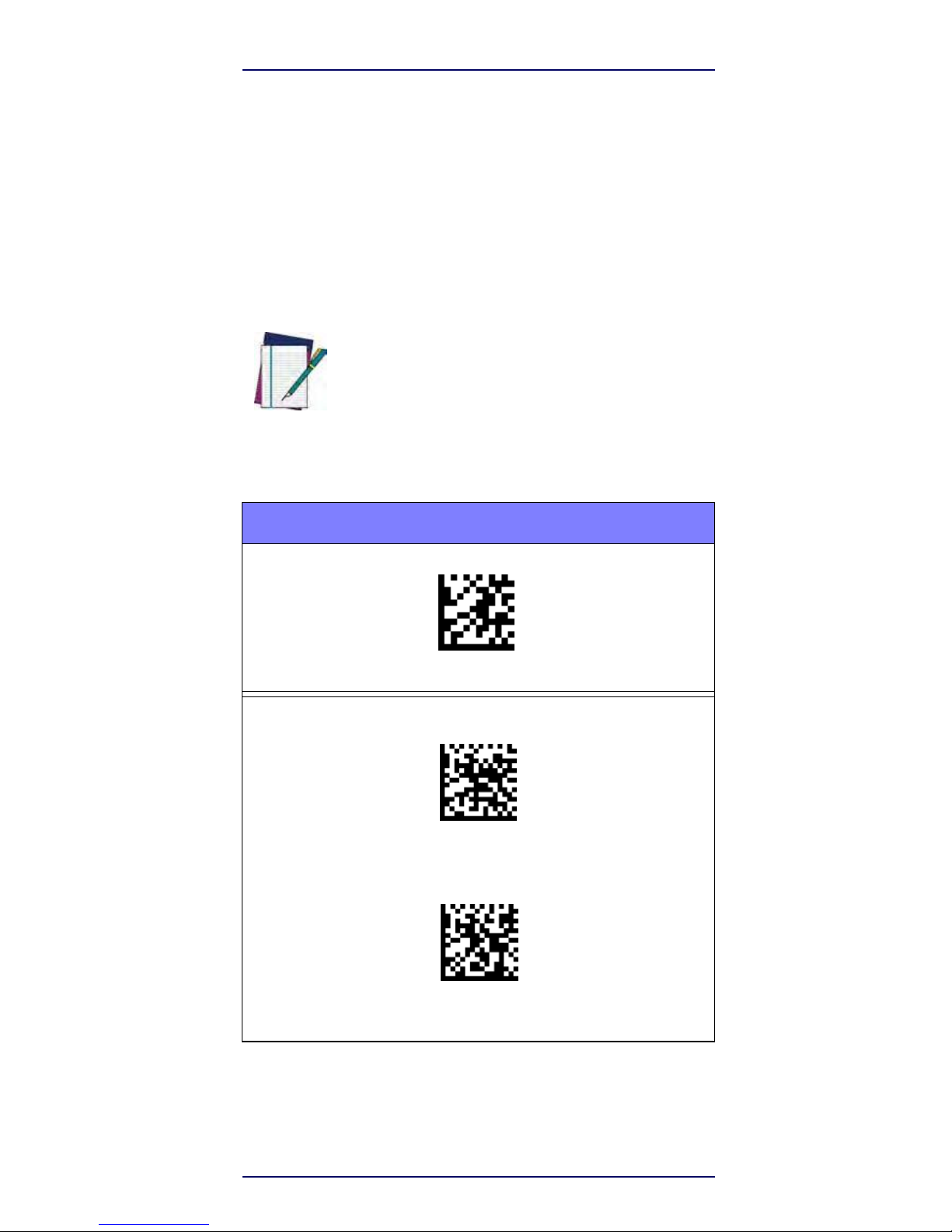
PICK MODE
ENTER/EXIT PROGRAMMING MODE
♦
PIck Mode = Disable
Pick Mode = Enable
Page 28
20
S2
Technical
Specifications
Multiple Label Reading
The reader offers a number of options for multiple label
reading. See the PRG or software configuration tool for
descriptions of these features and programming labels.
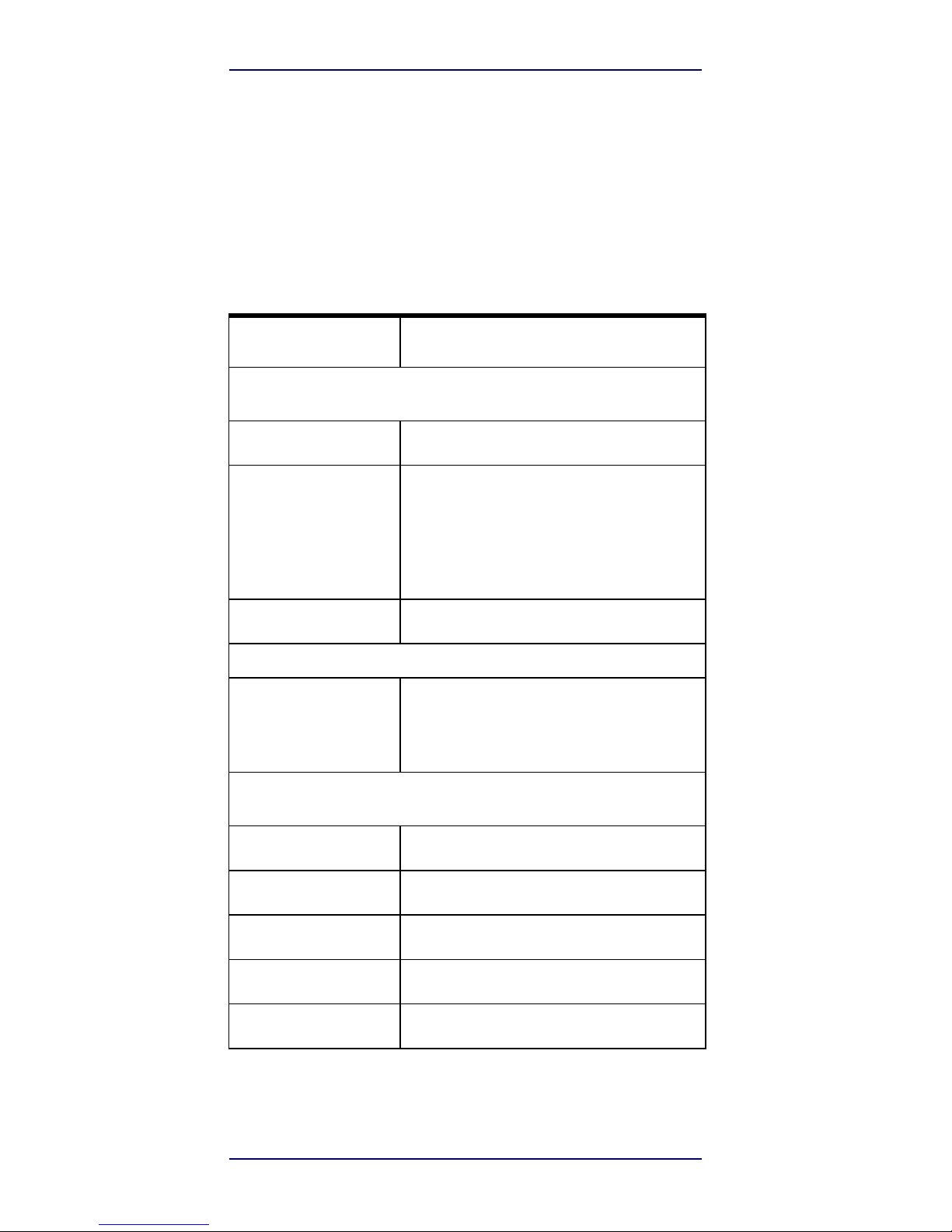
Technical Specifications
The following table contains Physical and Performance
Characteristics, User Environment and Regulatory
information.
Item Description
Physical Characteristics
Color
Black &
white
Dimensions
Height
6.4"/163
mm
Length 3.6"/91
mm
Width 1.6"/41
mm
Weight (without
cable)
Approximately 5.1 ounces/145
g
Electrical
Cha
racte
ristics
Voltage &
Current
Input Voltage: 4.5
- 14.0VDC
Operating (typical): 140mA
Operating (max):
380mA
Idle/standby (typical):
50mA
Performance Characteristics
Light
Source
LEDs
Roll (Tilt)
Tolerance
Up to ±
360°
Pitch
Tolerance
±
65°
Skew (Yaw)
Tolerance
±
60°
Print Contrast
Minimum
25% minimum
reflectance
Page 29
Quick Reference
21
Technical
Specifications
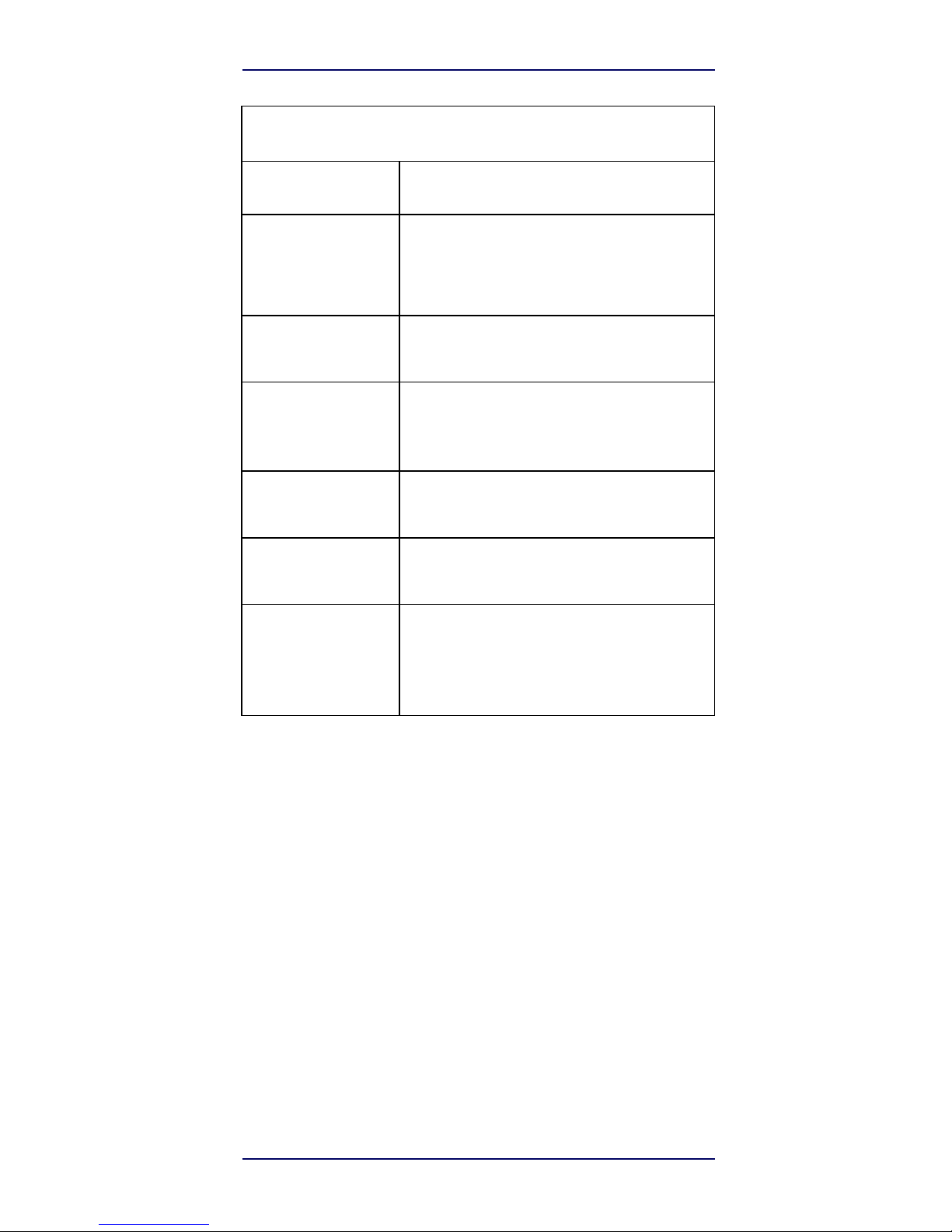
Depth of Field (T
ypical)
a
Symbology
Code
39
5mil: 0.2" - 5.9" (0.5
- 15cm)
10mil: 0" - 8.7" (0
- 22cm)
20mil: up to 16"
(40cm)
EAN
7.5mil: 0" - 5.9" (0
- 15cm)
13mil: 0.2" - 13.8" (0.5
- 35cm)
PDF-417
6.6mil: 0.39" - 5.1" (1.0
- 130cm)
10mil: 0" - 8.3" (0
- 21cm)
15mil: 0.2" - 9.5" (0.5
- 24cm)
DataMatrix
10mil: 0.39" - 5.1" (1.0 - 13
cm)
15mil: 0" - 7.1" (0
- 18cm)
QR
Code
10mil: 0.2" - 5.1" (0.5
- 13cm)
15mil: 0" - 7.1" (0
- 18cm)
Minimum
Element
Width
Standard Range:
1D Min Resolution
= 4 mil
PDF-417 Min Resolution
= 5 mil
Datamatrix Min Resolution = 7.5
mil
a.
13 mils DOF based on EAN. All other 1D codes are Code 39. All labels grade A,
typical environmental
light,
20°C, label inclination
10°
Page 30
22 S2
Technical
Specifications
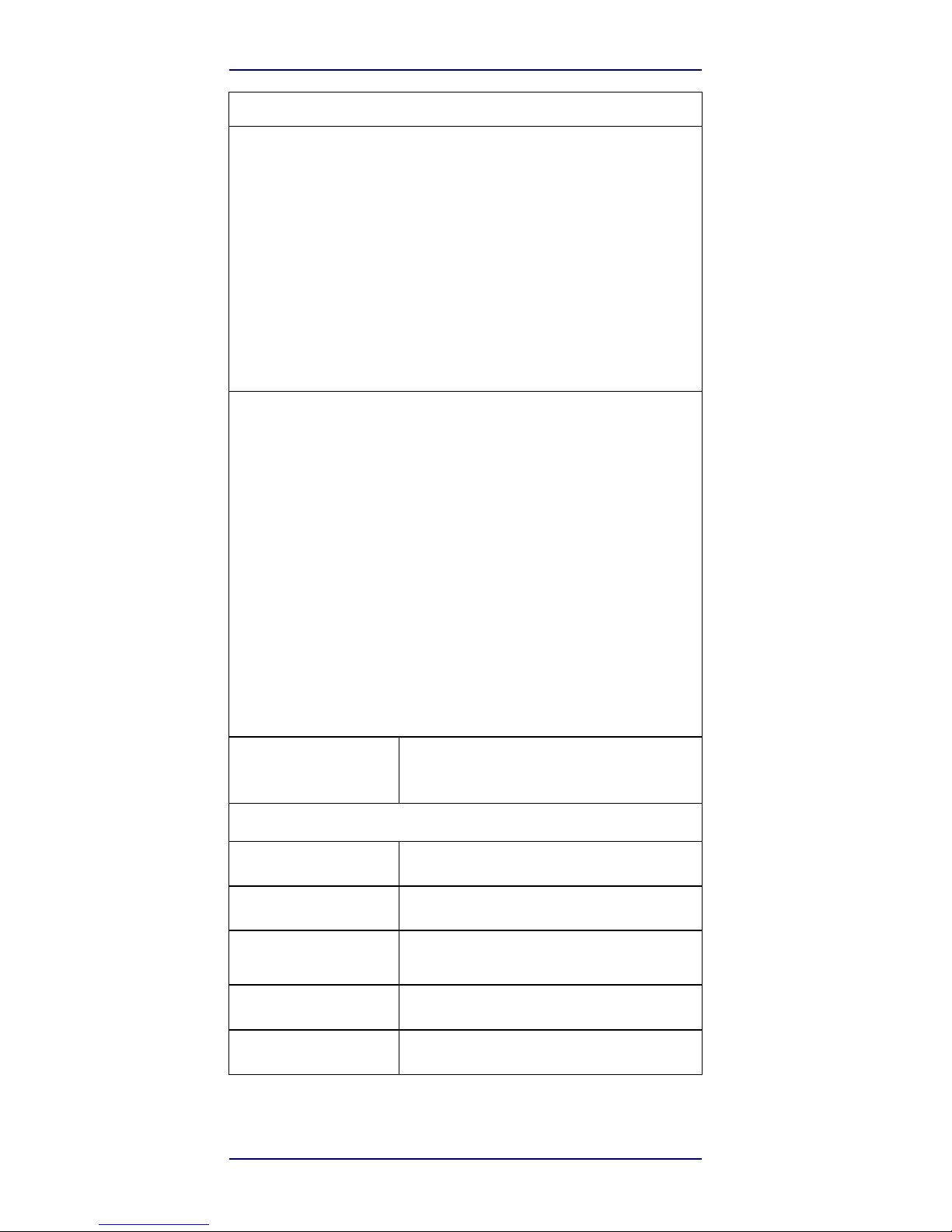
Decode Capabi
lity
1D Bar Codes
UPC/EAN/JAN (A, E, 13, 8); UPC/EAN/JAN (including P2 /P5);
UPC/EAN/JAN (including; ISBN / Bookland & ISSN); UPC/EAN Coupons;
Code 39 (including full ASCII); Code 39 Trioptic;
Code39
CIP (French Pharmaceutical); LOGMARS (Code 39 w/ standard check digit
enabled);
Danish
PPT; Code 32 (Italian Pharmacode 39); Code 128; Code 128
ISBT; Interleaved 2 of 5
; Standard
2 of 5; Interleaved 2 of 5 CIP (HR); Industrial
2 of 5; Discrete 2 of 5; Matrix 2 of 5; IATA 2of5
Air
cargo code; Code 11;
Codabar; Codabar (NW7); ABC Codabar; EAN 128; Code 93 ; MSI;
PZN;
Plessey; Anker Plessey; GS1 DataBar Omnidirectional; GS1 DataBar Limited; GS1
DataBar
Expanded; GS 1 DataBar Truncated; DATABAR Expanded
Coupon.
2D / Stacked Codes
The S2 scanner
is
capable of decoding the following symbologies
using
multiple frames (i.e. Multi-Frame
Decoding):
Datamatrix; Inverse
Datamatrix; Datamatrix
is
configurable for the following
parameters:;
Normal or Inverted; Square or Rectangular Style; Data length (1 - 3600
characters);
Maxi
code; QR Codes (QR, Micro QR and Multiple QR Codes);
Aztec; Postal Codes - (Australian
Post;
Japanese Post; KIX Post; Planet
Code; Postnet; Royal Mail Code (RM45CC); Intelligent
Mail
Barcode
(IMB); Sweden Post; Portugal Post); LaPoste A/R 39; PDF-417; MacroPDF;
Micro
PDF417; GS1 Composites (1 - 12); French CIP13a; GS1 DataBar Stacked; GS1
DataBar
Stacked
Omnidirectional; GS1 DataBar Expanded Stacked; GSI Databar
Composites; Chinese
Sensible
Code; Inverted 2D codesb .
a
It
is
acceptable to
handle this with
ULE
bThe SW can apply the Normal/Reverse Decoding Control
to the following symbologies: Datamatrix,
QR,
Micro QR, Aztec and Chinese
Sensible
Code.
Interfaces
Supported
RS-232, Keyboard Wedge, USB Com Std., USB
Keyboard,
USB
OEM
User Envi
ronm
ent
Operating
Temperature
0° to 50° C (32° to 122°
F)
Storage
Temperature
-40° to 70 °C (-40° to 158°
F)
Humidity
Operating: 0% to 95% relative
humidity, non-condensing
Drop
Specifications
Scanner withstands 18 drops from 1.5 meters (5.0
feet)
to concrete
Ambient Light
Immunity
Up to 86,000
Lux
Page 31

Quick Reference
23
LED and Beeper
Indications
Contaminants
Spray/rain
Dust/particulates
IEC
529-IP42
(IP52 S2 model
only)
ESD
Level
16
KV
Regul
atory
Electrical
Safety
UL 60950, CSA C22.2 No. 60950, IEC
60950
EMI/RFI
North America (FCC) : Part 15 Class B; Canada
(
IC)
: ICES003 Class B; Russia ( EAC); European Union
EMC
Directive;
VCCI-Japan; Korean KCC;
Taiwan EMC
(BSMI);
Australia (RCM); Mexico
(NOM)
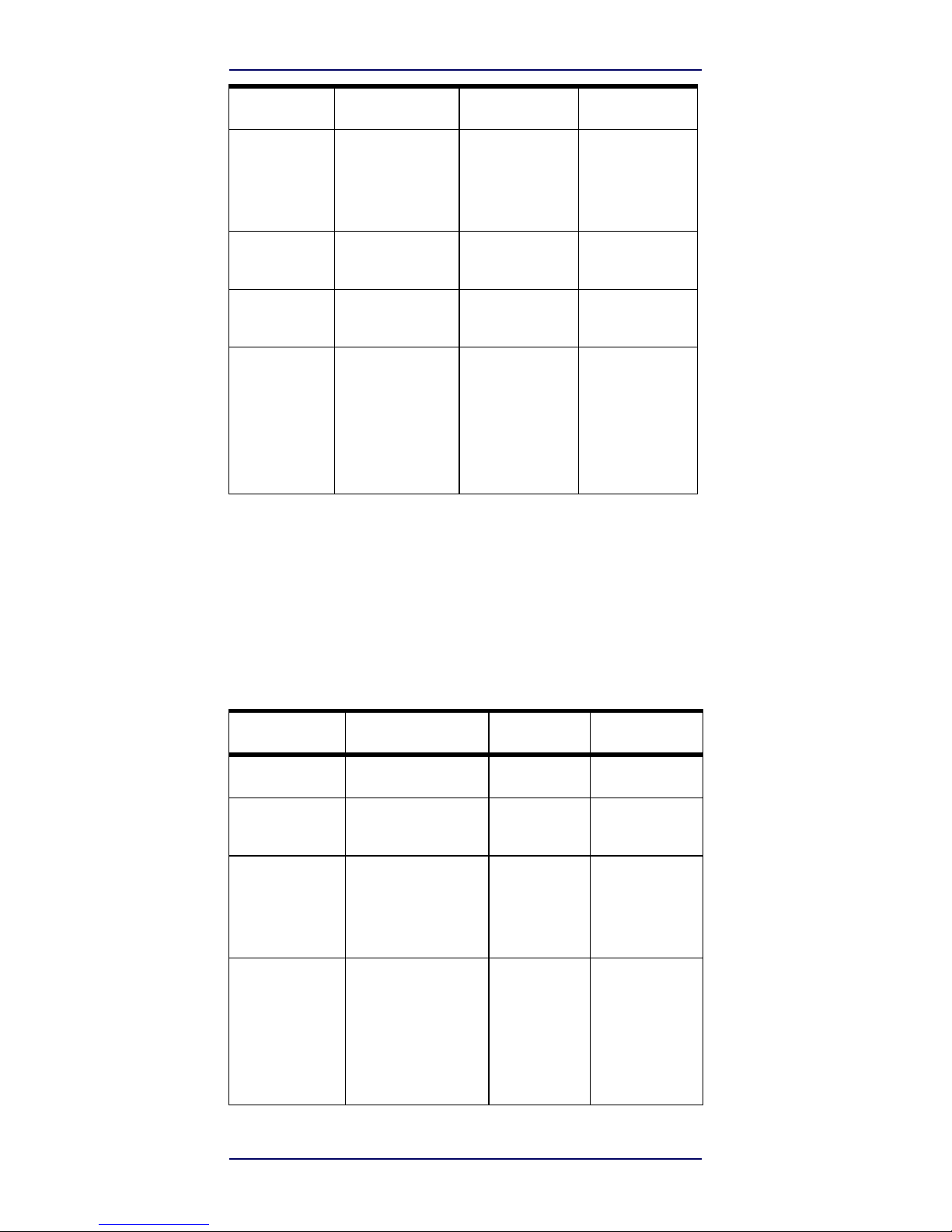
LED and Beeper Indications
The reader’s beeper sounds and its top multicolour LED
illuminates to indicate various functions or errors on the
reader. An optional “Green Spot” also performs useful
functions. The following tables list these indications. One
exception to the behaviors listed in the tables is that the
reader’s functions are programmable, and so may or may
not be turned on. For example, certain indications such as
the power-up beep can be disabled using programming bar
code labels.
Indicator
Description
LED
Beeper
Power-up
Beep
The reader is in the
pro
cess of
powering-
up.
Reader beeps
four
times at highest
fre
quency and
volume
upon
power-up.
Good Read
Beep
A label has been
suc
cessfully scanned
by
the
reader.
LED behavior for
this
indication is
configu
rable via the
feature
“Good Read:
When
to Indicate”
(see the PRG for
infor
mation.)
The reader will
beep
once at current
fre
quency,
volume,
mono/bi-tonal
set
ting
and
duration
upon
a
successful
label
scan.
ROM
Failure
There is an error in
the
reader's
software/pro
gramming
Flashs
Reader sounds
one
error beep at
highest
volume.
Page 32
24
S2
LED and Beeper
Indications
Indicator
Description
LED
Beeper
Limited
Scanning
Label
Read
Indicates that
a host
connection is
not
established.
N/A
Reader 'chirps'
six
times at the
highest
frequency and
current
volume.
Reader Active
Mode
The reader is active
and
ready to
scan.
The LED is lit
steadilya
N/A
Reader
Disabled
The reader has
been
disabled by the
host.
The LED blinks
continuously
N/A
Green Spota flashes
momentarily
Upon successful read
of
a
label, the
software
shall turn the
green
spot
on for the
time
specified
by the
config
ured
value.
N/A
N/A
a
Except when in sleep mo de or when a Good Read LED Duration other than 00
is
selected
Programming Mode
The following indications ONLY occur when the reader is in
Programming Mode.
Indicator
Description
LED
Beeper
Indicator
Description
LED
Beeper
Label
Programming
Mode
Entry
A
valid programming
label
has been
scanned.
LED blinks
continuousl
y
Reader sounds
four
low frequency
beeps.
Label Programming
Mode Rejection
of
Label
A label has been
rejected.
N/A
Reader sounds
three
times at lowest
fre
quency and
current volume.
Label Programming
Mode Acceptance
of
Partial
Label
In cases where
multiple
labels must be scanned
to
program one feature,
this
indication
acknowledges
each portion as
it
is
suc
cessfully
scanned.
N/A
Reader sounds
one
short beep at
highest
frequency and
cur
rent
volume.
Page 33
Quick Reference
25
Error Codes
Indicator
Description
LED
Beeper
Label Programming
Mode Acceptance
of
Programming
Configuration
option(s)
have been successfully
pro
grammed via labels
and
the reader has exited
Pro-
gramming
Mode.
N/A
Reader sounds
one
high frequency
beep
and 4 low
frequency
beeps followed
by
reset
beeps.
Label Programming
Mode Cancel
Item
Entry
Cancel label has
been
scanned.
N/A
Reader sounds
two
times at low
fre
quency and
current volume.
Error Codes
Upon startup, if the reader sounds a long tone, this means
the reader has not passed its automatic Self test and has
entered FRU (Field Replaceable Unit) isolation mode. If the
reader is reset, the sequence will be repeated. Press and
release the trigger to hear the FRU indication code.
The following table describes the LED flashes/beep
codes associated with an error found.
Number
of
LED
Flashes/
Beeps
Error
Corrective Action
1 Configuration
Contact Helpdesk for
assistance
2
Interface
PCB
6
Digital PCB
11
Imager
Page 34
26
S2
Cleaning
Cleaning
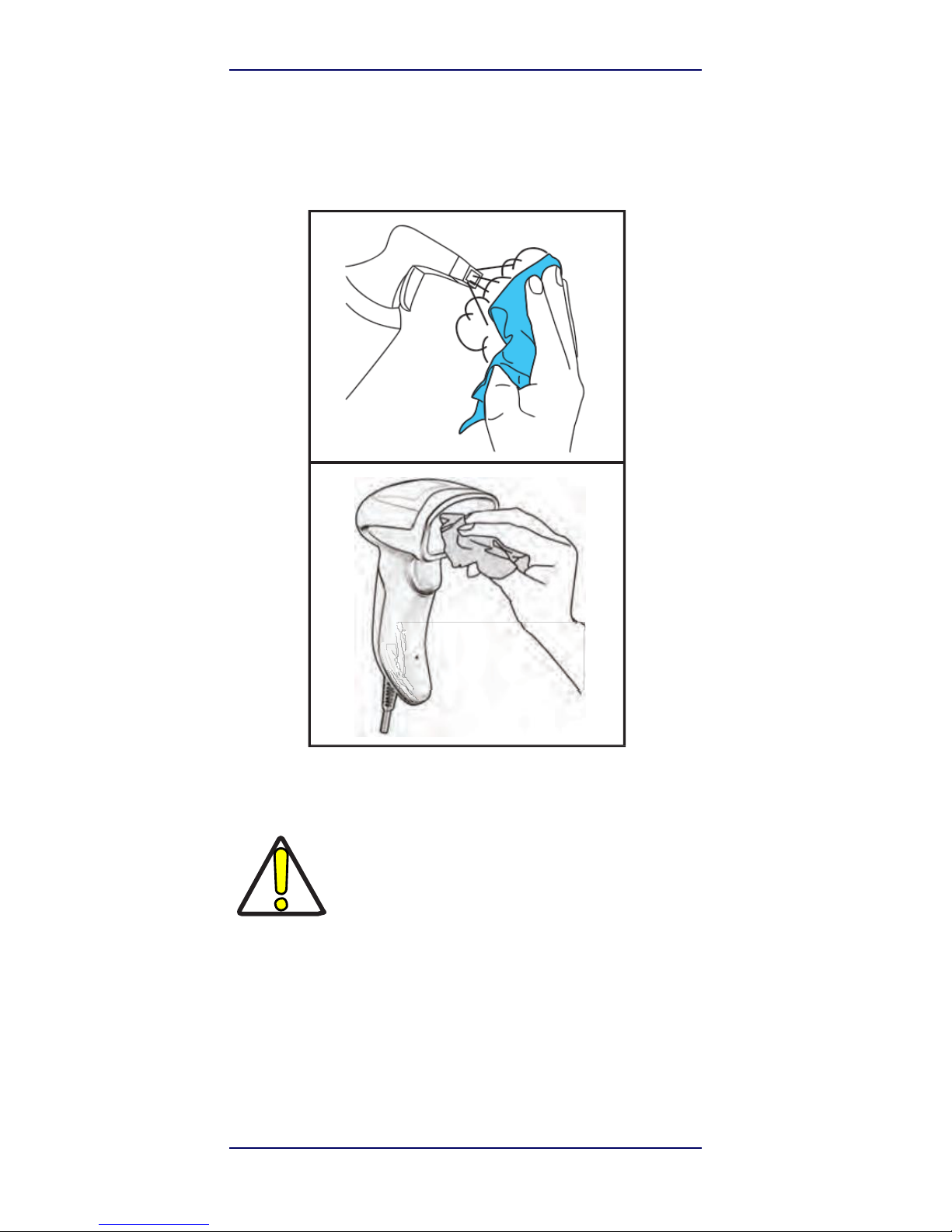
Exterior surfaces and scan windows exposed to spills,
smudges or debris require periodic cleaning to ensure
best performance during scanning.
Use a soft, dry cloth to clean the product. If the product is very
soiled, clean it with a soft cloth moistened with a diluted nonaggressive cleaning solution or diluted ethyl alcohol.
Do not use abrasive or aggressive cleansing
agents or abrasive pads to clean scan windows
or plastics.
Do not spray or pour liquids directly onto the
CAUTIO
N
unit.
Page 35

Quick Reference
27
AirTrack
Limited Factory Warranty
Warranty
Coverage
Cleaning
AirTrack warrants to Customer that AirTrack’s products will be
free
from defects in materials and workmanship for a period of five
years
from product shipment. AirTrack (“AirTrack”) hardware
prod
ucts
are warranted against defects in material and workmanship under
normal and proper use. The liability of AirTrack under
this
warranty
is limited to furnishing the labor and parts necessary
to
remedy any
defect covered by this warranty and restore the
product
to its
normal operating condition. Repair or replacement of
product
during the warranty does not extend the original warr anty
term.
Products are sold on the basis of specifications applicable at the
time
of manufacture and AirTrack has no obligation to modify or
update
products once
sold.
If
AirTrack determines that a product has defects in material
or
workmanship, AirTrack shall, at its sole option repair or replace
the
product without additional charge for parts and labor, or credit or
re
fund the defective products duly returned to AirTrack. To perform
re
pairs, AirTrack may use new or reconditioned parts,
components,
subassemblies or products that have been tested as
meeting
appli
cable specifications for equivalent new material and
products.
Cus
tomer will allow AirTrack to scrap all parts removed
from
the
repaired product. The warranty period shall extend from
the date
of
shipment from AirTrack for the duration published by
AirTrack
for
the product at the time of purchase (Warranty period).
AirTrack
war
rants repaired hardware devices against defects in
workmanship
and
materials on the repaired assembly for a 90 day
period starting
from
the date of shipment of the repaired product
from AirTrack or
until
the expiration of the original warranty period,
whichever is longer.
AirTrack
does not guarantee, and it is not
responsible for, the
mainte
nance of, damage to, or loss of
configurations, data, and applications on the repaired units and at its
sole discretion can return the units
in
the “factory default”
configuration or with any software or
firmware
update available at
the time of the repair (other than the firmware
or
software installed
during the manufacture of the product).
Customer
accepts
responsibility to maintain a backup copy of its software
and data.
Warranty Claims
Process
In order to obtain service under the Factory Warranty, Customer
must
notify AirTrack of the claimed defect before the expiration of
the applicable Warranty period and obtain from AirTrack a return
authori
zation number (RMA) for return of the product to
a
designated
AirTrack service center.
If
AirTrack determines
Customer’s claim
is
valid, AirTrack will repair or replace product
without
additional
charge for parts and labor. Customer shall be
responsible for packaging and shipping the product to the
designated AirTrack service
cen
ter, with shipping charges prepaid.
AirTrack shall pay for the
return
of the product to Customer if the
shipment is to a location within
the
country in which the AirTrack
service center is located.
Customer
shall be responsible for paying
all shipping charges, duties, taxes,
and
any other charges for
products returned to any other locations.
Fail
ure to follow the
applicable RMA policy, may result in a processing
fee.
Customer
shall be responsible for return shipment expenses
for
products
which AirTrack, at its sole discretion, determines are
not
Page 36

28
S2
Cleaning
defective or eligible for warranty
repair.
Warranty
Exclusions
The AirTrack Factory Warranty shall not apply
to:
(i)
any product which has been damaged, modified,
altered,
repaired or upgraded by other than AirTrack service
person
nel or its authorized
representatives;
(ii)
any claimed defect, failure or damage which
AirTrack
determines was caused by faulty operations, improper
use,
abuse, misuse, wear and tear, negligence, improper
storage
or use of parts or accessories not approved or
supplied
by AirTrack;
(iii)
any claimed defect or damage caused by the use of
product
with any other instrument, equipment or
apparatus;
(iv)
any claimed defect or damage caused by the failure to
provide proper maintenance, including but not limited to
clean
ing the upper window in accordance with product
manual;
(v)
any defect or damage caused by natural or
man-made
disaster such as but not limited to fire, water damage,
floods,
other natural disasters, vandalism or abusive events
that
would cause internal and external component damage
or
destruction of the whole unit, consumable
items;
(vi)
any damage or malfunctioning caused by
non-restoring
action as for example firmware or software upgrades,
soft-
ware or hardware reconfigurations
etc.;
(vii)
the replacement of upper window/cartridge due to
scratch
ing,
stains or other degradation
and/or
(viii)
any consumable or equivalent (e.g., cables, power
supply,batteries, keypads, touch screen, triggers
etc.).
No
Assignment
Customer may not assign or otherwise transfer its rights or
obliga
tions under this warranty except to a purchaser or transferee
of
prod
uct. No attempted assignment or transfer in violation of
this
provision shall be valid or binding upon
AirTrack.
AIRTRACK’S LIMITED WARRANTY IS IN LIEU OF ALL OTHER
WAR
RANTIES, EXPRESS OR IMPLIED, ORAL OR WRITTEN,
STATUTORY
OR
OTHERWISE, INCLUDING, WITHOUT
LIMITATION, ANY IMPLIED
WAR
RANTIES OF
MERCHANTABILITY, FITNESS FOR A PARTICULAR
PUR
POSE,
OR NONINFRINGEMENT. AIRTRACK SHALL NOT BE
LIABLE
FOR ANY DAMAGES SUSTAINED BY CUSTOMER ARISING
FROM DELAYS IN THE REPLACEMENT OR REPAIR OF
PRODUCTS UNDER
THE
ABOVE. THE REMEDY SET FORTH IN
THIS WARRANTY STATEMENT
IS
THE CUSTOMER’S SOLE
AND EXCLUSIVE REMEDY FOR
WARRANTY
CLAIMS. UNDER
NO CIRCUMSTANCES WILL AIRTRACK BE LIABLE
TO
CUSTOMER OR ANY THIRD PARTY FOR ANY LOST PROFITS,
OR
ANY
INCIDENTAL, CONSEQUENTIAL IN-DIRECT, SPECIAL
OR
CONTINGENT
DAMAGES REGARDLESS OF WHETHER
AIRTRACK HAD
ADVANCE
NOTICE OF THE POSSIBILITY OF
SUCH
DAMAGES.
Risk of
Loss
Customer shall bear risk of loss or damage for product in transit
to
AirTrack. AirTrack shall assume risk of loss or damage for
product
in AirTrack’s possession. In the absence of specific wri tten
instruc
tions for the return of product to Customer, AirTrack will
select
the
carrier, but AirTrack shall not thereby assume any liability
in
connec
tion with the return
shipment.
Page 37

Quick Reference
29
Ergonomic
Recommendations
Ergonomic Recommendations
In order to avoid or minimize the potential risk
of ergonomic injury follow the recommendations
below. Consult with your local Health & Safety
Manager to ensure that you are adhering to your
CAUTION
company’s safety programs to prevent employee
injury.
• Reduce or eliminate repetitive motion
• Maintain a natural position
• Reduce or eliminate excessive force
• Keep objects that are used frequently within easy
reach
• Perform tasks at correct heights
• Reduce or eliminate vibration
• Reduce or eliminate direct pressure
• Provide adjustable workstations
• Provide adequate clearance
• Provide a suitable working environment
• Improve work procedures.
Page 38

30 S2
Services and
Support
Services and Support
AirTrack provides several services as well as technical
sup-port through its website. Log on to www.AirTrack.com
and click on the links indicated for further information.
Products
Search through the links to arrive at your product page
where you can download specific Manuals and Software &
Utilities
Service & Support
• Technical Support - Product documentation
and programming guides and Technical
Support Department in the world
• Service Programs - Warranty Extensions and
Maintenance Agreements
• Repair Services - Flat Rate Repairs and Return
Material Authorization (RMA) Repairs
• Downloads – Manuals & Documentation,
Data
Sheets, Product Catalogues, etc.
Contact Us
• Information Request Form and Sales & Service
Network
Page 39

Page 40

www.AirTrack.com
©2016 AirTrack, Inc. • All rights
reserved.
AirTrack and the AirTrack logo are registered trademarks
of
AirTrack. in many countries, including the U.S.A.
AirTrack,
Inc.
200 West Monroe Street | Chicago |IL 60606
| USA
Telephone: 1 (
855) 235-1718
 Loading...