

Page 1
1
User manual
Page 2
2 3
What AirPatrol Lite does?
AirPatrol Lite is an air conditioner (A/C) controller you operate with
a mobile phone. It is compatible with all major manufacturers’ air
conditioners and all mobile phones (see AirPatrol.eu for the complete list).
The easiest way to use AirPatrol Lite is with a Smartphone, using the
AirPatrol app downloadable from the Google Play (for Android phones
), Windows Store (for Windows Phone 8) or App Store (for iPhone). It
can also be controlled with regular mobile phone text messages (SMS).
AirPatrol Lite allows you to have long distance control over the mode of
the A/C, room temperature and fan speed settings.
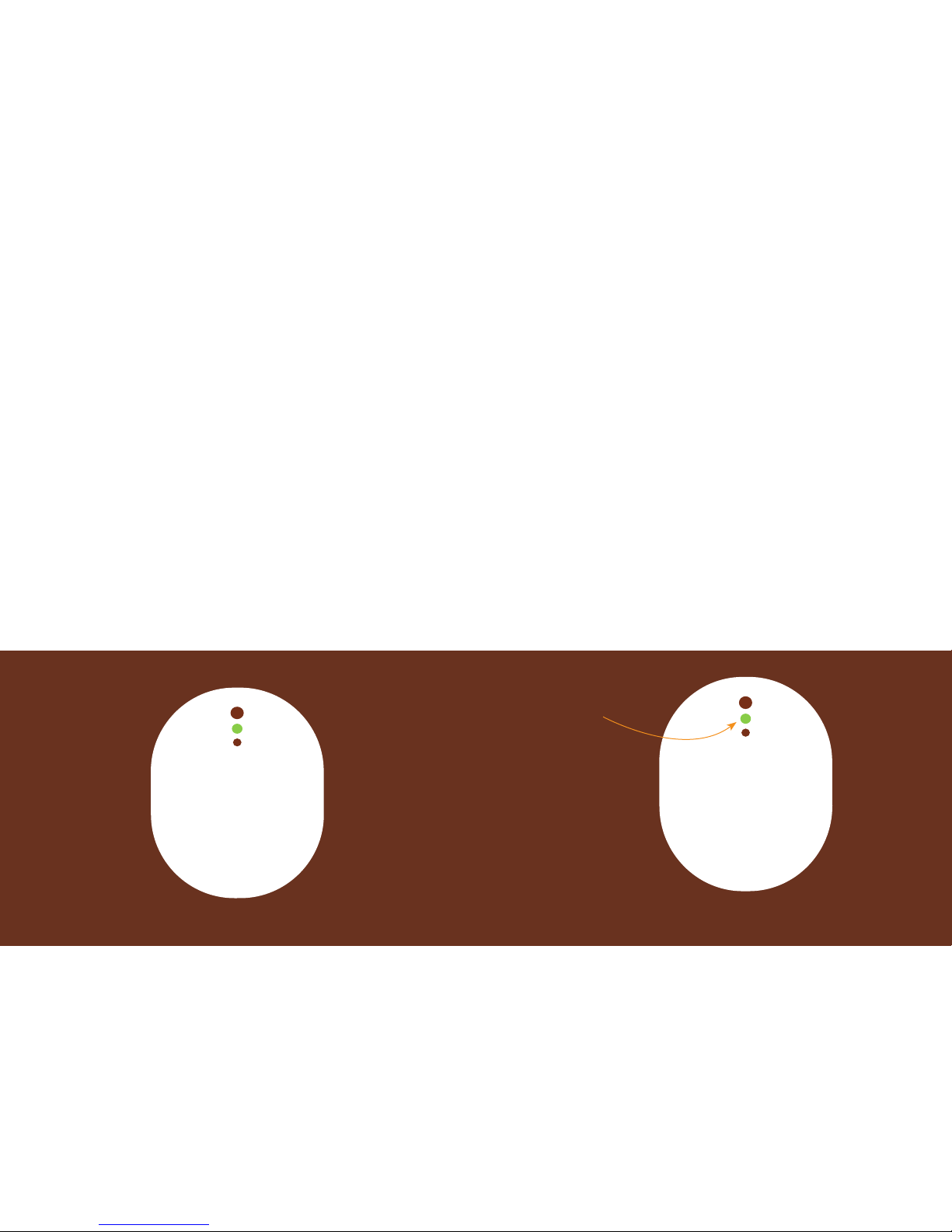
Indicator light
The controller has 1 LED indicator and 1 button for
easy setup. It has also 2 infrared LEDs that transmit
your commands to the air conditioner.
LED
ON Controller busy
OFF Controller switched OFF (no power)
1 Blink (3s interval) normal status
3 Blinks (3s interval) no network
Blinking (500ms interval) DataCall session is active
LED
Page 3
4 5
Button
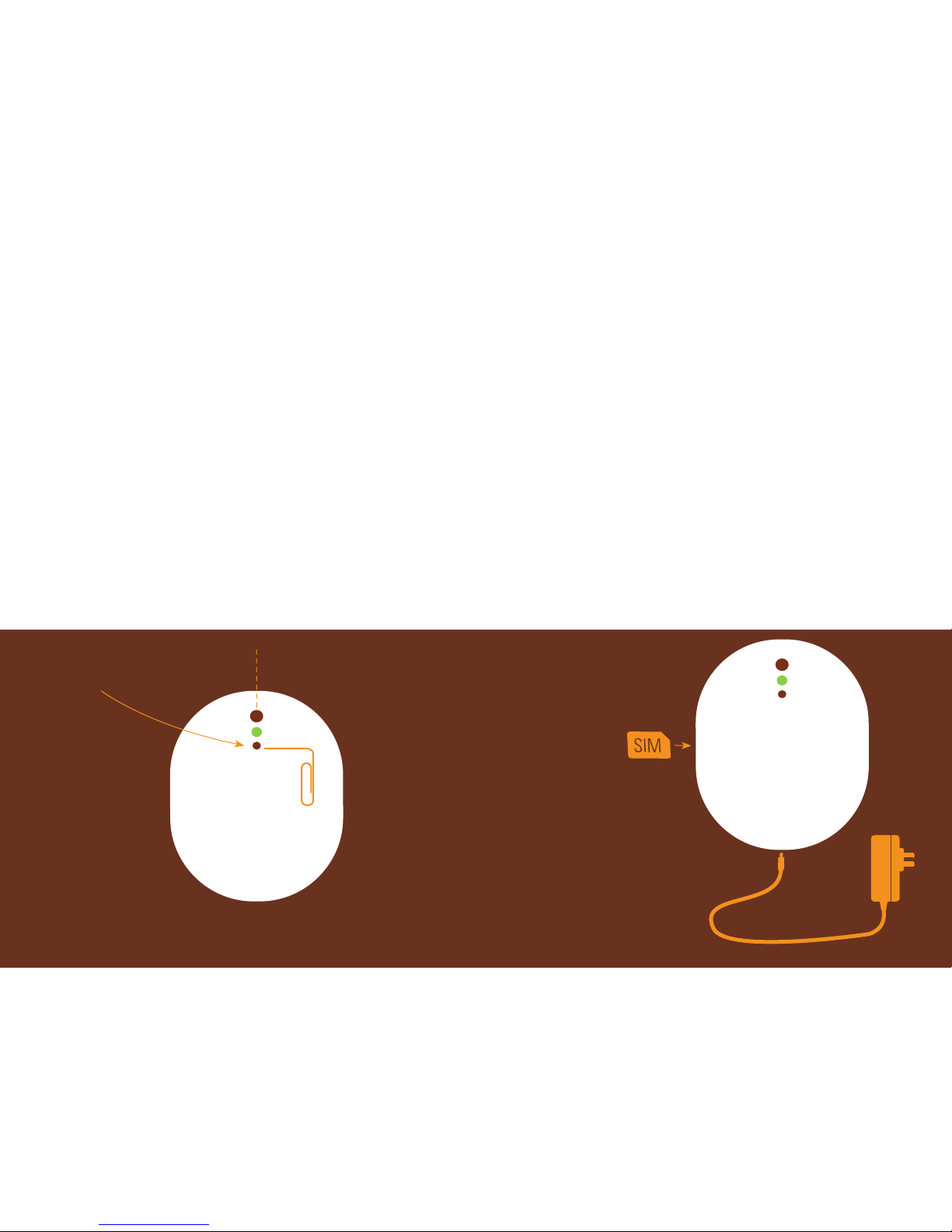
Use a straightened paper clip or something similar to push the recessed button.
Short push turns the air conditioner ON/OFF. Use the TEST button to confirm that
the IR beam from the controller reaches the air conditioner.
Long push (3s) resets the controller, clears settings.
IR beam
SIM card
NB! Make sure you disable the PIN code of the SIM card you use in AirPatrol
Lite.
NB! Make sure the SIM card you use in AirPatrol Lite can access 2G network.
AirPatrol Lite is not compatible with SIM cards that use only 3G network.
A) Make sure that
you have previously
disabled the SIM card
PIN code. Insert SIM
card as shown into
AirPatrol Lite.
B) Plug the adapter
into the socket under
the AirPatrol Lite.
A
B
Button
Page 4
6 7
Installing AirPatrol Lite
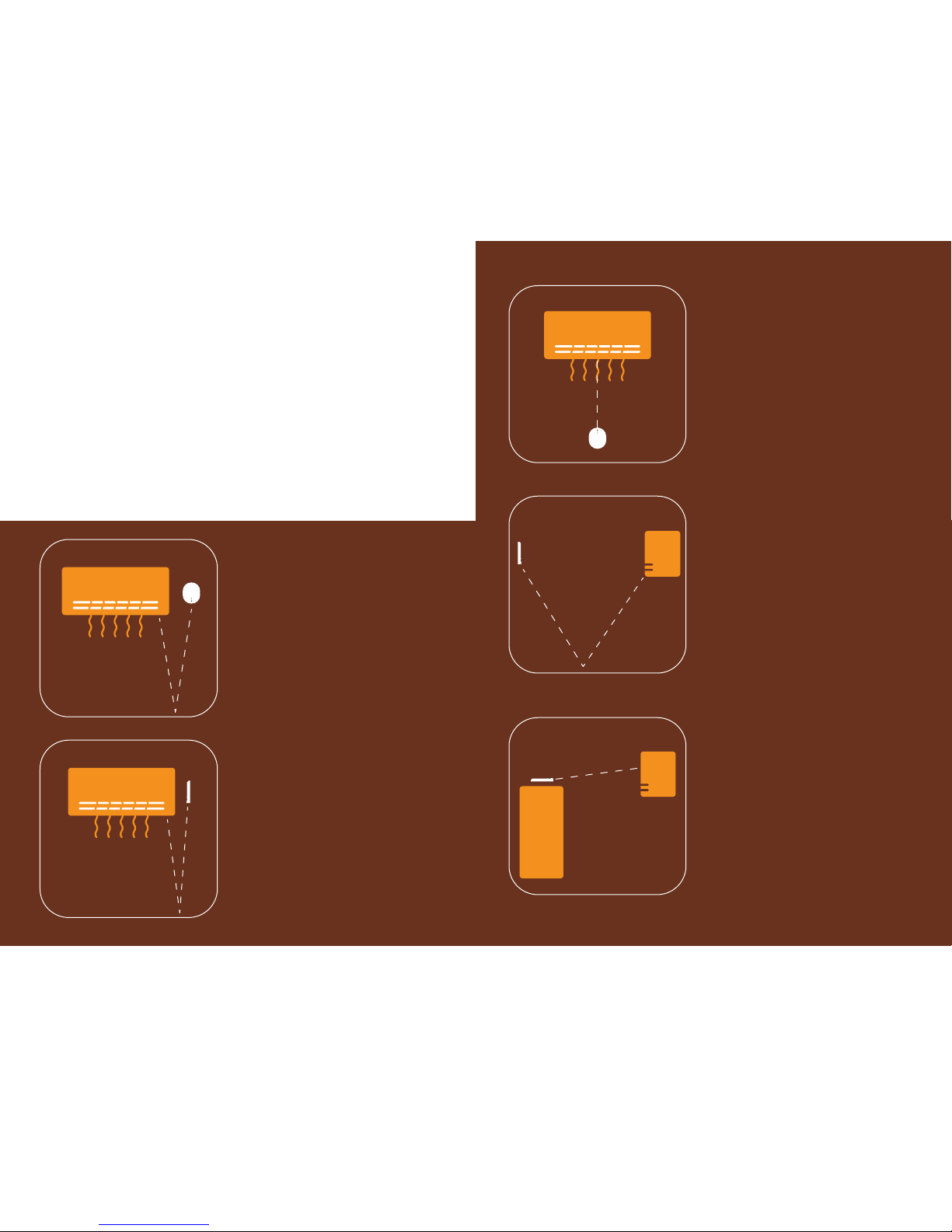
AirPatrol Lite should be mounted on the wall to the right of your air conditioner’s
indoor unit (see fig. 1), with its IR transmitter pointing down. This way the IR
beam is reflected from the floor and reaches the air conditioner’s sensor most
efficiently.
Other mounting configurations are possible too as long as IR transmission from
the controller to the pump works.
NB! Thick carpets and dark floors can distort the IR beam. Make sure the IR
beam reaches the pump’s sensor by using the controller’s Test function.
Fig. 1
On the right side of
the indoor unit
Fig. 2
Attached to the right side of
the indoor unit
Fig. 3
Beneath the indoor unit
Fig. 4
On the wall, opposite to
the indoor unit
Fig. 5
On a ledge, opposite to the
indoor unit
Page 5
8 9
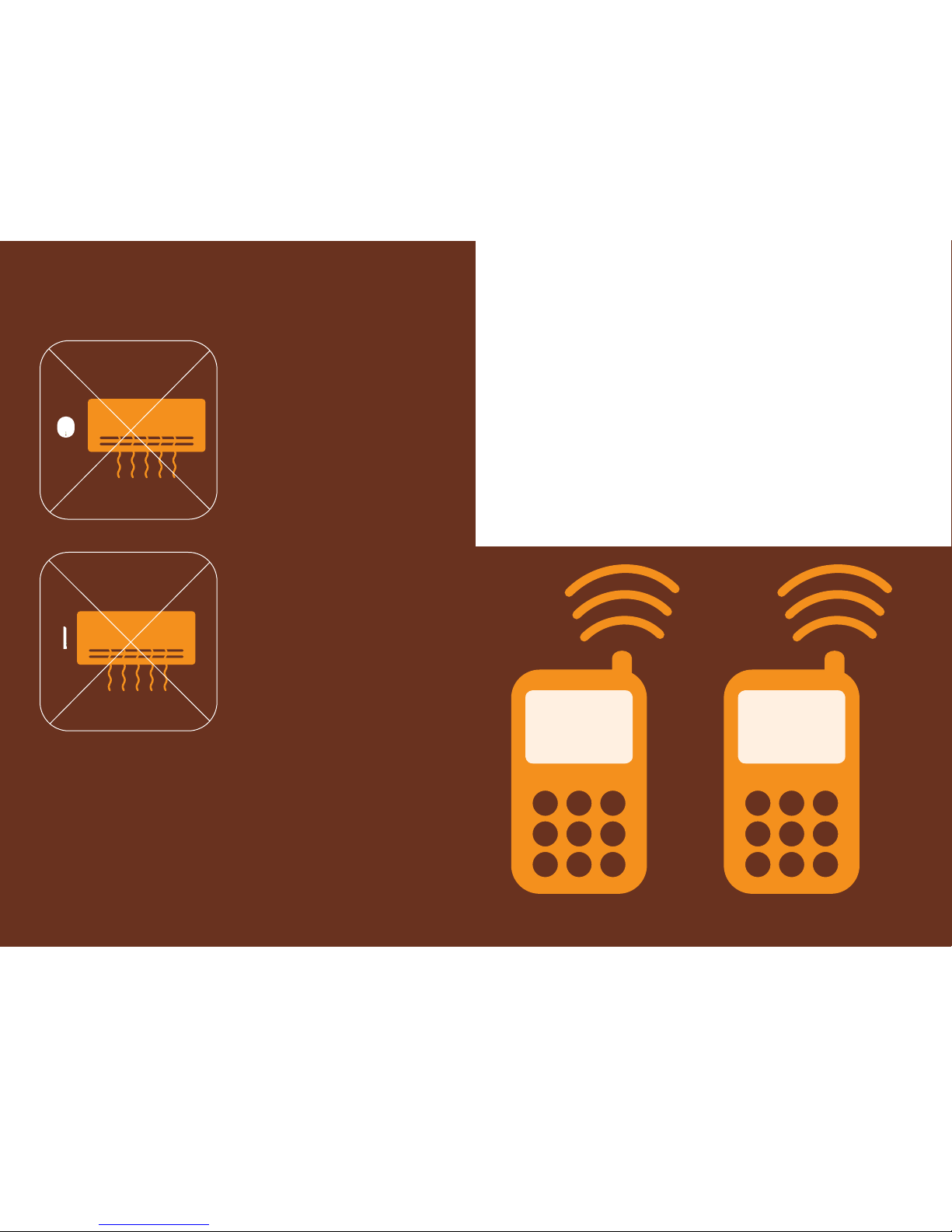
Fig. 6, 7
Do not place AirPatrol Lite
on the left side of the indoor
unit!
Indoor unit’s internal
condenser might block
AirPatrol Lite’s signal.
Testing AirPatrol Lite
To see if AirPatrol Lite can send commands to your air conditioner, turn off
the pump and press the controller’s button shortly. When the connection is
established, AirPatrol Lite turns the pump on with its last settings and you can
proceed using the controller.
Turning air conditioner ON/OFF
SMS Command ON turns air conditioner on.
SMS Command OFF turns air conditioner off.
ON
sms: sms:
OFF
turns air conditioner on turns air conditioner off
Page 6

10 11
Commands
The range of air conditioner temperature values AirPatrol Lite controls is 16-30 °C
(default +20 °C) and the fan speeds are MIN, NORM, MAX (default is NORM).
After selecting a mode (AUTO, DRY, COOL, HEAT, T8, T10) air conditioner is turned
on with 20 °C default temperature and normal fan speed.
The pump can be assigned different temperature and fan speed values with
AirPatrol Lite.
For example, the SMS: “COOL 19 MAX” orders the pump to cool until 19 °C and
fan at maximum speed. When you change an air conditioner function AirPatrol
Lite always responds with an SMS that reports its STATUS.
MIN
NORM
MAX
AUTO
DRY
COOL
HEAT
T8; T9; T10
16
18
...
28
30
Combine the pump mode, room temperature and fan speed values for a
home atmosphere you like the best.
Advanced setup
For the brave!
Page 7

12 13
Air conditioner model setup
The pump can be chosen on 3 levels of precision:
1. The precise name of the pump: the manufacturer and the model. This is
recommended for the most efficient operation.
2. Pump manufacturer.
If you only choose the pump manufacturer, functions T8/T9/T10 will not be
checked and the command will be sent even if the pump does not have
T8/T9/T10 mode. If the exact pump model is not listed on our webpage or in this
manual, AirPatrol Lite may or may not work with the air conditioner, for which
the AirPatrol Lite manufacturer will not be held responsible.
3. All pump models.
If you choose All pump models (SMS: “950”), then all supported brands IR
commands will be sent to the pump, and AirPatrol Lite can be used without
choosing the pump more precisely.
Setup SMS
command
you send
Air conditioner model and
series
T8/T10*
950 All pump models T8/T10
951 Fujitsu T10
953 Panasonic T8
954 Mitsubishi Electric T10
955 Bosch T10
956 IVT T10
957 Mitsubishi Heavy
958 LG T9
95A Electrolux
95B Midea T8
95C Daikin T10
95D Hitachi
Setup SMS
command
you send
Air conditioner model and
series
T8/T10*
95E Samsung
95F Sharp T10
95G General T10
95H Fuji T10
95J Altech T8
Report messages
You can send report requests to AirPatrol Lite about your air conditioner status,
controller status and the setup of the controller. Report messages are sent only to
the sender of the request.
SMS
command
you send
SMS
command
function
Response SMS example
STATUS
Pump status
request
Pump: ON; Mode: HEAT; Fan: MAX; Temp: 21C;
VERSION
Controller
status request
Ver:1.01bxx; Device:name; Pump:ON/OFF; GSM:sq,cell;
Life:mm.dd;
SETUP Setup request Device:name;
Pump ”STATUS” report explanation
Pump “STATUS” report
SMS Format
Response SMS example
Pump: ON/OFF Pump ON/OFF
Mode: AUTO/DRY/COOL/HEAT/T8/T10 Pump mode
Fan: AUTO/MIN/NORM/MAX Fan speed
Temp: xxC Pump temperature
Page 8

14 15
Controller “VERSION” report explanation
SMS format Explanation
Ver: version number AirPatrol Lite firmware version
Pump: ON/OFF Pump status: ON/OFF
GSM: sq, cell
GSM signal strength (0-31,99) and GSM area
info (1-local network, 5-roaming)
Life: mm.dd Controller run time: months, days
AirPatrol Lite command sheets
Air conditioner ON/OFF
Command SMS Air conditioner function
ON Pump ON
OFF Pump OFF
Commands
Command SMS Air conditioner function
AUTO AUTO (+20 °C, fan: NORM)
DRY DRY (+20 °C, fan: NORM)
COOL COOL (+20 °C, fan: NORM)
HEAT HEAT (+20 °C, fan: NORM)
T8 T8 mode
T9 T9 mode
T10 T10 mode
Error messages
“Error command: text”
SMS will be sent if there was an error in your command.
For example, an SMS “cool19max” receives the response “Error command:
cool19max”. Note that AirPatrol Lite will only return your incorrect command
without suggesting a correct one (the error in the example is the absence of
spaces between commands).
“Error pump command: text“
SMS means the operation T8/T9/T10 is not available for the specified pump.
When AirPatrol Lite fails to send an SMS it will retry after 1 minute.
For more information please visit www.AirPatrol Lite.eu For support please contact us support@AirPatrol Lite.eu
Page 9

16 17
Page 10
18
 Loading...