

Page 1
Troubleshooting Guide
Problem Reason Solution
Unit does not turn on. 1. Power Cord
2. Switch
3. AHPCO™ Cell
Unit is not reducing
odors.
1. Defective AHPCO™
Cell
1. Check to make sure
power cord is plugged
in.
2. Check to make sure
switch is in the on position.
3. Check to make
sure UV lamp within AHPCO™ Cell is
plugged in completely.
1. Check to make sure
the AHPCO™ Cell has
a blue glow. If you see
no glow or the glow has
turned to a purple color,
contact Air Oasis.
Air Oasis 5000
Owner’s
Manual
3401 Airway Blvd
Amarillo, TX 79118
Toll-Free: 1-800-936-1764 Fax: 1-806-373-7799
www.AirOasis.com
Copyright© 2007 Air Oasis All Rights Reserved
This Manual Includes:
• Warranty
• Safety Warnings
• Operating Instructions
• Replacement Directions
• Troubleshooting Tips
• Cleaning and Maintenance Tips
Before operating this unit carefully
read the contents of this manual.
Page 2
Important Safety Instructions
Step 3
When operating electrical appliances, basic precautions should always be followed.
WARNING To reduce the risk of re, electric shock or injury:
• Do not use outdoors or on wet surfaces.
• Use only as described in this manual.
• Do not use with damaged cord or plug. If appliance is not working as it should,
has been dropped, damaged, left outdoors, or dropped into water, call customer
service at 1-800-936-1764.
• Do not unplug by pulling on cord. To unplug, grasp the plug, not the cord.
• Do not handle plug or appliance with wet hands.
• Do not put any object into openings.
• Turn off all controls before unplugging.
CAUTION
AHPCO™ Cell contains Hg (Mercury) and should be disposed of according to
disposal laws. Find disposal centers at www.earth911.org.
If the UV lamp is broken do not touch the cell or glass with your hands.
UV lamp may be hot and could cause serious burns if not handled properly. Please
wait until the AHPCO Cell has cooled to room temperature to remove from unit.
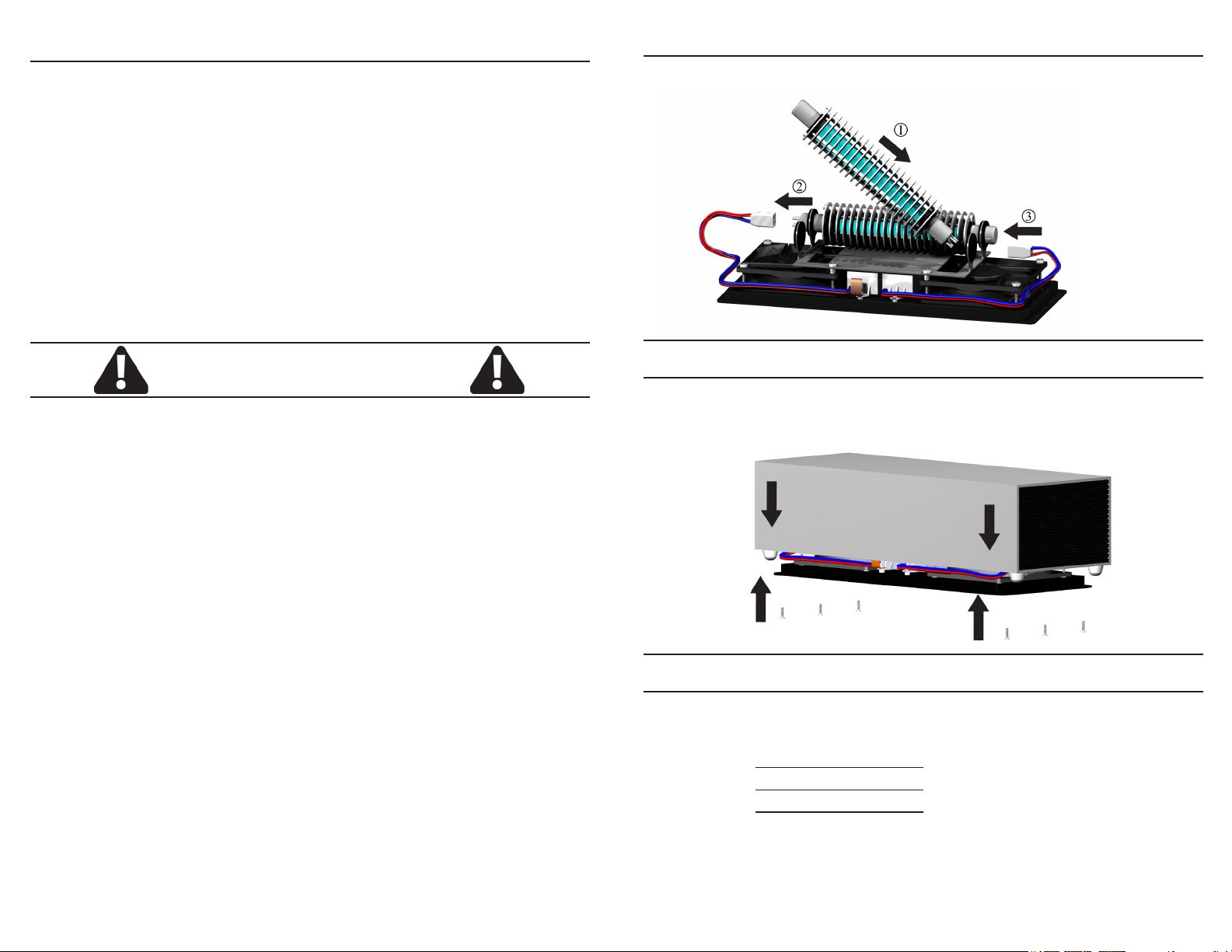
3. Replace with new cell.
Be sure the UV lamp is completely
plugged in.
Step 4
4. Slide shell down onto base and replace screws.
(Cord and switch are to the back.)
WARNING: UV Light Hazard. Harmful to skin and eyes. Can cause
temporary or permanent loss of vision. Never look at the lamp while
illuminated. To prevent exposure to ultraviolet light, be sure the power is disconnected before servicing.
WARNING: RISK OF ELECTRICAL SHOCK. CAN CAUSE INJURY
OR DEATH: DISCONNECT ALL POWER SUPPLIES BEFORE ANY
SERVICING.
CAUTION: The Air Oasis 5000 is for commercial use only. Not intended for occupied areas.
1 6
Replacement Date Reminder
The AHPCO™ Cell should be replaced every three years.
3 Years Date:
6 Years Date:
9 Years Date:
Hg lamp contains mercury. Manage in accord with disposal laws.
Find disposal centers at www.earth911.org.
Page 3
AHPCO™ Cell Replacement
Step 1
CAUTION: Before attempting to service the Air Oasis 5000 unit, be sure
the power is off and unplugged.
DANGER - NEVER LOOK DIRECTLY AT ILLUMINATED AHPCO CELL
Read all instructions carefully before operating
your air purier.
Table of Contents
Safety Instructions and Cautions 1
Table of Contents 2
Warranty 3
Maintenance and Customer Service 4
Placement and Operation 4
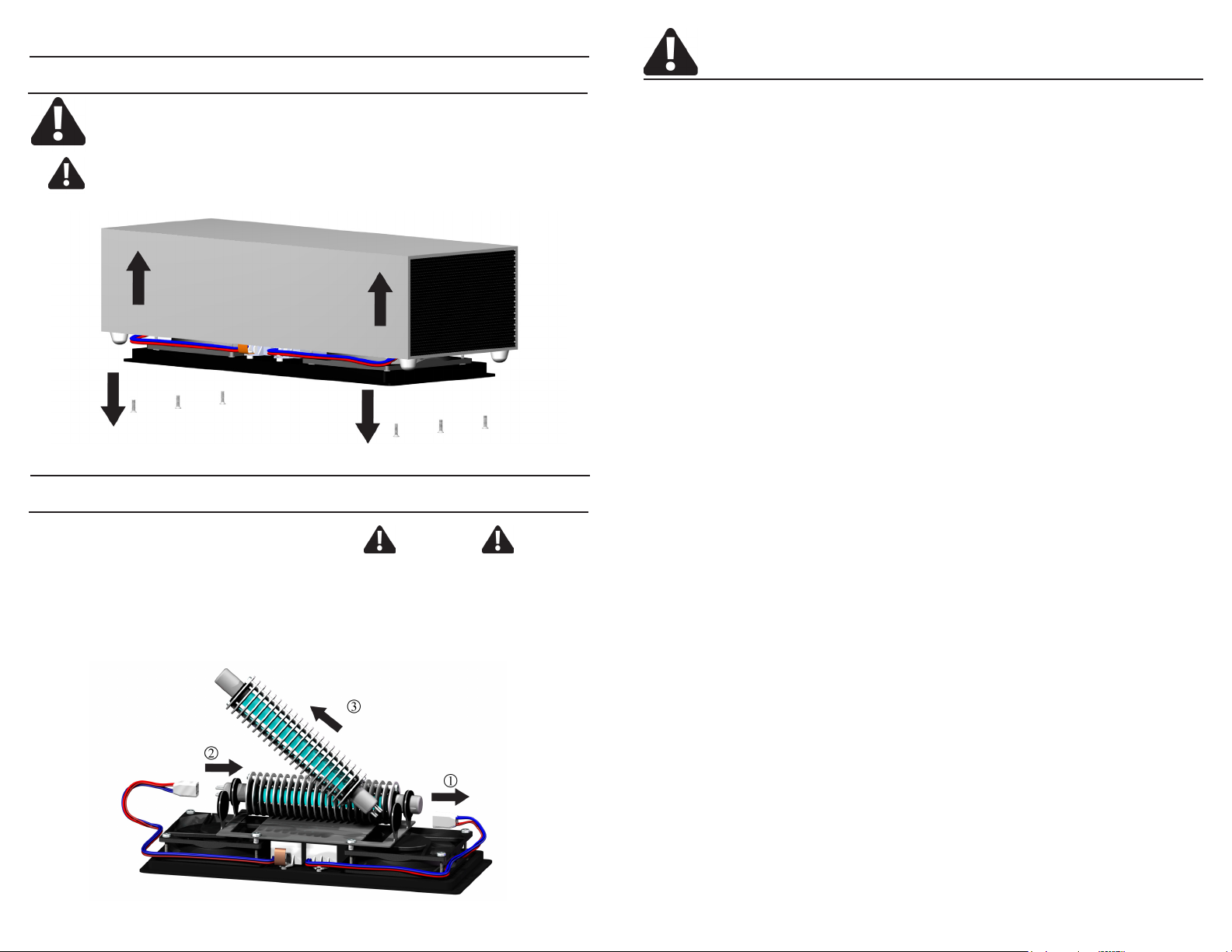
2. (1) Pull the lamp connector
off of the AHPCO Cell. (2) Then
pull to one side. (3) Pull AHPCO
Cell at an angle up and out of the
bracket.
Step 2
CAUTION
UV lamp may be hot and could
cause serious burns if not handled properly. Please wait until
AHPCO Cell has cooled to room
temperature to remove from unit.
5 2
Cleaning 4
AHPCO™ Cell Replacement 5-6
Troubleshooting Guide 7
Page 4
Warranty Maintenance and Customer Service
Air Oasis gives you the following limited warranty for this product only if it was originally purchased for residential or commercial use but, not resale from Air Oasis or
an Air Oasis Authorized Retail Dealer.
Air Oasis will repair or replace, free of charge, to the original purchaser, any part
that is found to be defective in material or workmanship within three (3) years of
the date of purchase.
This limited warranty covers the replacement of a defective AHPCO Cell for a period of three years.
This limited warranty does not apply to any part subjected to accident, abuse, certain commercial uses, alteration, misuse, damage caused by act of God, the use
of voltages other than indicated on the label displayed on this product or service of
this product by anyone other than Air Oasis.
Air Oasis does not authorize any person or representative to assume or grant any
other warranty obligation with the sale of this product.
Air Oasis’s limited warranty is valid only if you retain proof of purchase from Air Oasis or an Air Oasis Authorized Retail Dealer for this product. If you purchase this
product from any other source, your purchase is “AS IS”, which means Air Oasis
grants you no warranty, and that you, not Air Oasis, assume the entire risk of the
quality and performance of this product, including the entire cost of any necessary
servicing or repairs of any defects.
If you require any additional information or have problems with your Air Oasis appliance, you may call Air Oasis customer service at:
1-800-936-1764
Please have your serial and model numbers, found on bottom of the unit, handy
when calling.
Save your sales receipt to show if your Air Oasis appliance should ever need any
warranty service.
Placement and Operation
For best results the unit should be placed in a central location and three
feet or higher from the ground.
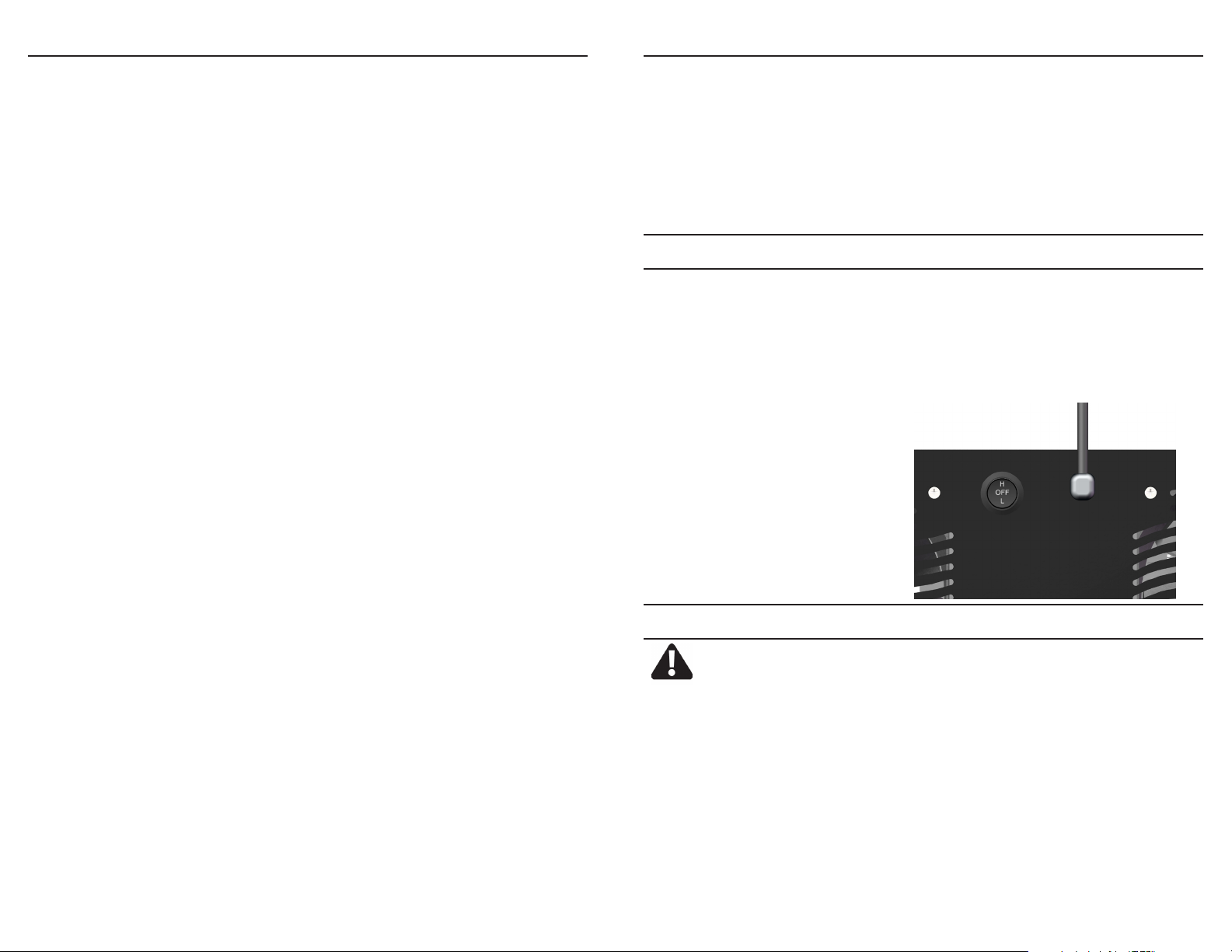
Operation is very simple. Remove the Air Oasis from the packaging. Place
in desired location, plug it in and rock the switch to the high or low position.
The unit can remain in the on position 24/7.
NOTE: Only one fan and one
lamp runs on the low setting.
High / Off / Low
Switch
Air Oasis’ liability for damages to you for any costs whatsoever arising out of this
statement of limited warranty shall be limited to the amount paid for this product
at the time of original purchase, and Air Oasis shall not be liable for any direct,
indirect, consequential or incidental damages arising out of the use or inability to
use this product.
ALL EXPRESS AND IMPLIED WARRANTIES FOR THIS PRODUCT, INCLUDING
IMPLIED WARRANTIES OF MERCHANTABILITY AND FITNESS FOR A PARTICULAR PURPOSE, ARE LIMITED IN DURATION TO THE WARRANTY PERIOD,
AND NO WARRANTIES, WHETHER EXPRESS OR IMPLIED, WILL APPLY AFTER THIS PERIOD.
Some states do not allow limitations on the duration of implied warranties, so the
above limitation may not apply to you. This warranty gives you specic legal rights,
and you may also have other rights which vary from state to state.
To obtain warranty service and return authorization number, contact us at:
NOTE: All returned packages that do not have an RMA# will be refused.
3
Optional Cleaning
Make sure that the power cord is unplugged prior to cleaning.
Honeycomb - Use soft pipe cleaners or compressed air to remove any dust buildup from the honeycomb vent located at both sides of the unit.
Aluminum Shell - We recommend using stainless steel/aluminum spray on polish
or multi-surface cleaners. Make sure the polish or cleaner is recommended for
use on aluminum.
Internal - Take dry cloth and wipe inside the shell and around the aluminum brackets and the ballast or spray with compressed air.
Base - Take a damp cloth and wipe the base of the unit.
4
 Loading...