

Page 1
The AI Companion for Kids
TYCHE
USER GUIDE
For
AGE
8+/E
nglish
Copyright © 2015 AIBrain Inc., all rights reserved.
Page 2
TYCHE
Contents
TYCHE
Introduction
1 Contents
Introduction 2
MANUAL CONTENT
S
02 Introduction 04 Information 06 Overview 08 APP Installation 09 Talk to Tyche
10 Plan and Move 12 BYOI 13 Vision App 14 Remote Communication 15 Avatar
Mode 16 Voice Communication 17 FAQs 18 Warranty
The AI Companion for Kids
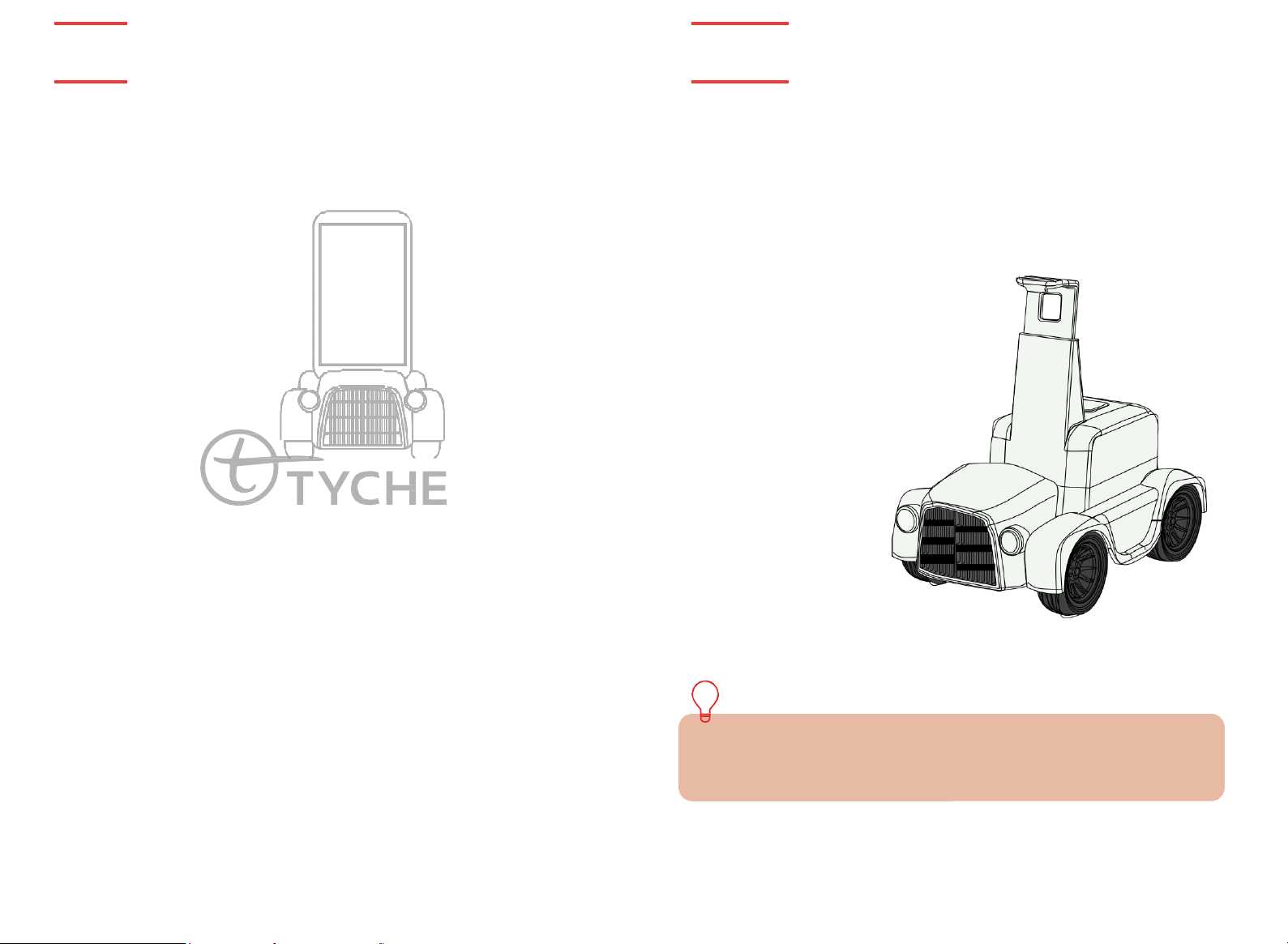
Thank you for purchasing TYCHE, a product of AIBrain Inc,
Tyche is an AI companion robot named after the Greek goddess of fortune. Tyche brings good
fortunes by creating an atmosphere that promotes learning, socializing, and playing, and
enhances the imagination and creativity of young minds. Using a smartphone as its brain, Tyche’s
talking, listening, thinking, reasoning, planning, and problem solving abilities continue to improve
with each release.
available for download on both Google Play
Several cutting-edge technologies have been built and integrated to bring Tyche to life.
Interested developers can also innovate and add to Tyche’s capabilities.
Tyche can help your child live a smarter, more creative life through technology.
Enjoy!
PACKAGE CONTENTS:
1 x TYCHE
1 x User’s guide
1 x Power adapter
1 x Ni-MH battery pack
*Smartphone is NOT include
An
ever-growing number of applications that show off Tyche’s capabilities
TM
and Apple Store.
SPECIFICATIONS:
- Version: Tyche Classic 1.0
- Color: White
- Sensor: Ultrasonic sensor
- Communication: BLE (Bluetooth 4.0)
- Size: 260 x 170 x 210 (mm)
- Net Weight: - 612g
- Battery: Ni-MH battery pack
- Battery Charger: 7.5V, 250mA
Smartphone’s Minimum System Requirements to run Tyche Applications:
*Android
*Apple’s iOS 10 and above supported.
TM
5.0 and above
*Smartphone is NOT included
Page 3
TYCHE
Information
TYCHE
Information
3 Information
Information 4
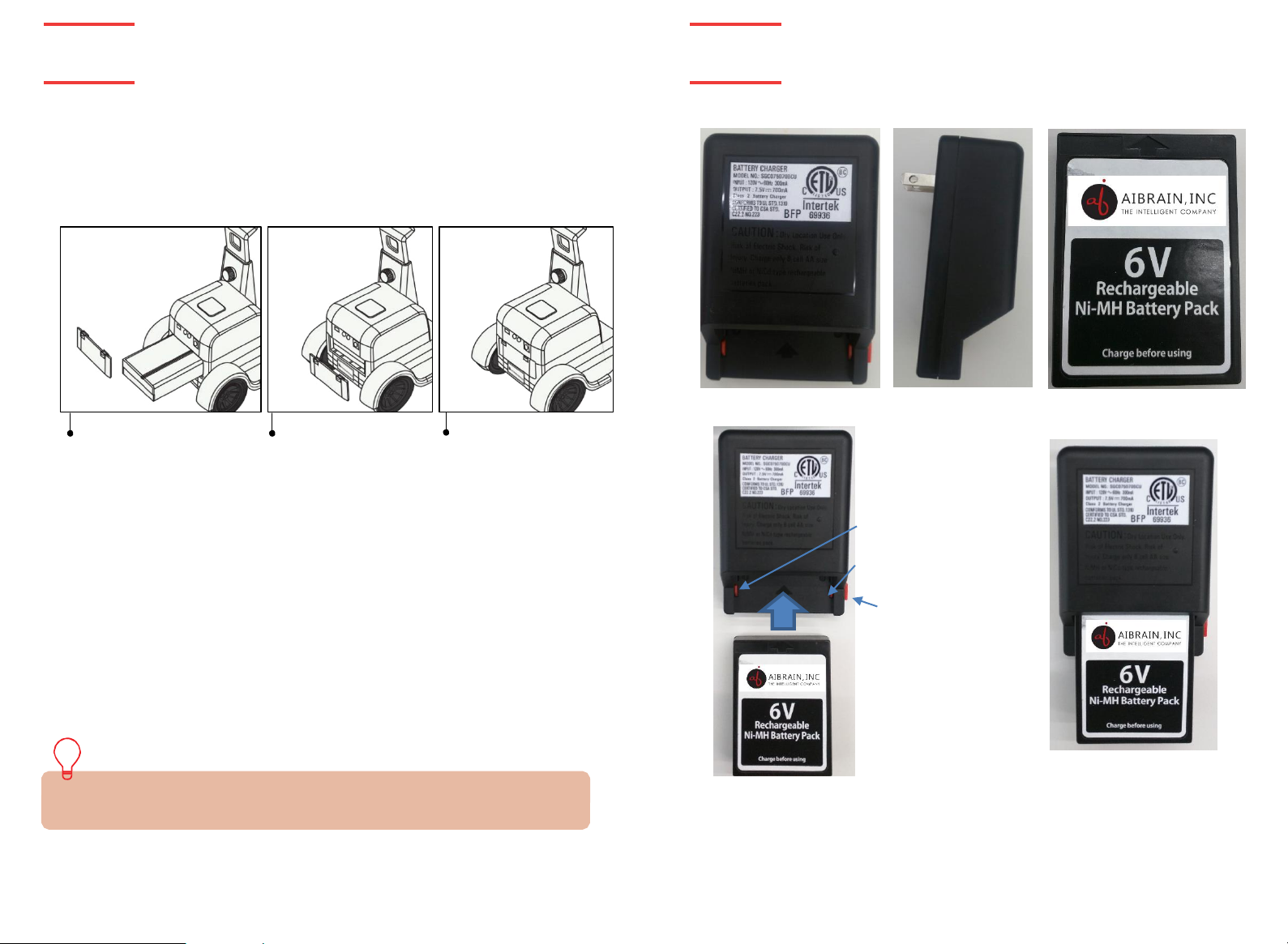
Battery Charger
Battery
Positive terminal
Negative terminal
Red Button
- Insert the battery as shown by the arrows.
- Press the red button on the charger for ease of insertion or removal of the
battery from the charger.
BATTERY PACK INSTALLATION:
Tyche’s Battery Pack and the car body are separately included in the box. Follow the
instructions below to install the Battery Pack into the car.
*Note: The Battery Pack ships uncharged. See the section labeled “Charging the Battery
Pack” on Page 4 for instructions
CHARGING THE BATTERY PACK:
Be sure the robot power switch
is in the
inserting battery pack.
BATTERY INSTALLATION:
- Be sure the robot power button is in the
- Install the provided battery as shown with the polarity on the correct position.
- Replace the battery cover tightly.
- Charge the battery while properly inserted into battery charger as shown.
- Remove from the charger after 4 hours of straight charging. (100%).
- Remove the battery from the robot body if Tyche is not going to be used for some time.
LOW
- When Tyche’s battery is low, the movement speed and general performance will be affected.
Please power
*Tyche battery DOES NOT charge/recharge
Smartphone.
*Power OFF Tyche while not in use.
off
BATTERY IN
off
position before
DICATOR
and recharge the battery as recommended.
Push the battery
pack completely.
off
:
position before installing the battery.
Replace the battery
pack cover tightly
Page 4
TYCHE
TYCHE
5 Overview
Overview 6
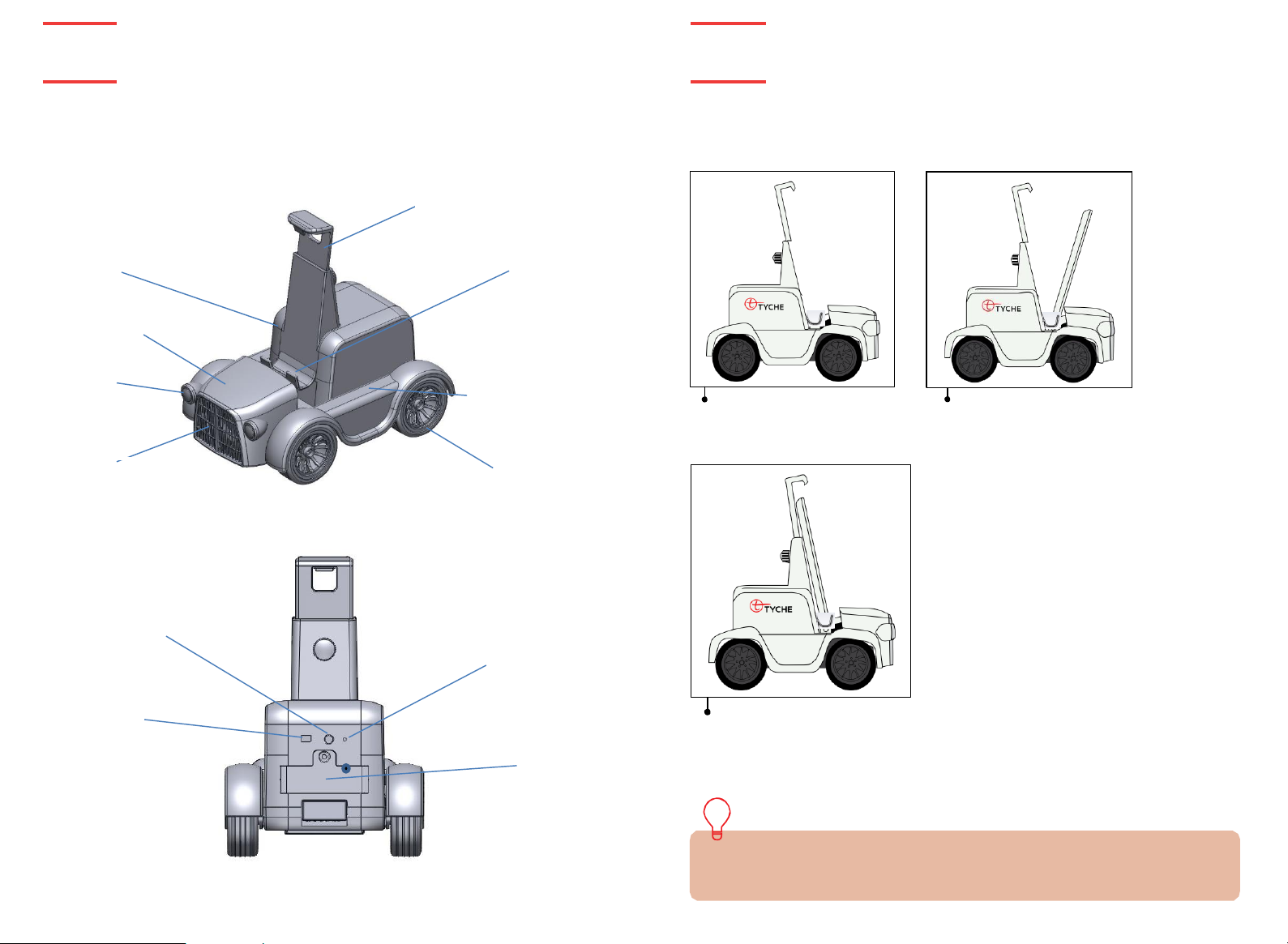
Device holder
Front accessory
Headlight LED
Side accessory
Wheel
Ultra Sonic Sensor
Reset Button
On/Off LED
Device gripper
Overview
Overview
COMPONENTS OVERVIEW
:
*
SIDE
Battery cover
*BACK
Body
CONNECTING SMART DEVICE:
Unscrew the support
frame and pull it upwards
to find space for
smartphone.
Lower the support frame
after docking the phone and
tighten the screw at the
back for tight grip.
Dock the smartphone
onto the smartphone
holder
*The phone screen should be facing the front of the robot body. Tyche uses the smart
device web- cam for some of the applications.
Page 5
TYCHE
TYCHE
Getting Started
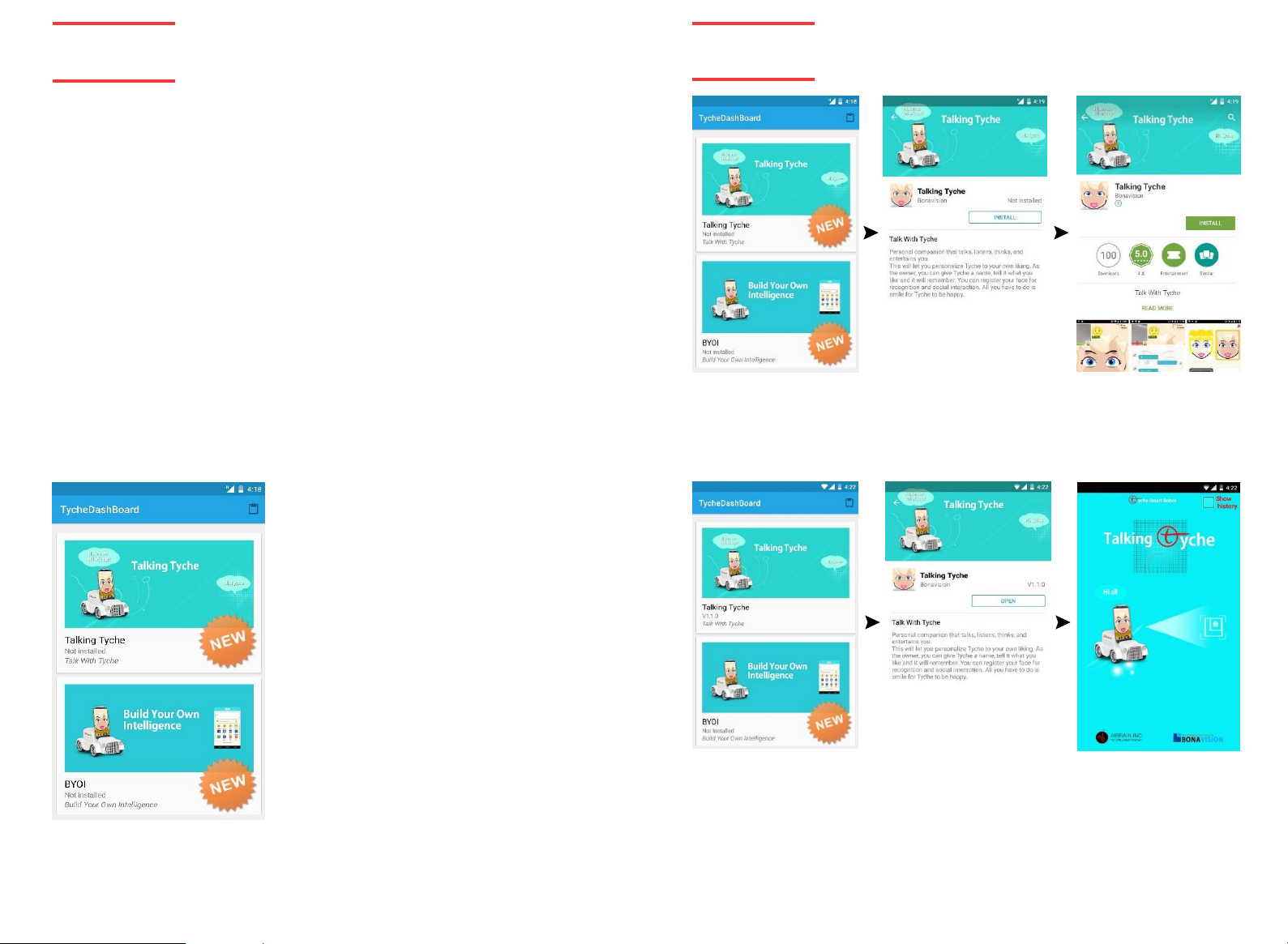
GETTING STARTED:
After
confirming that the battery of Tyche and the smartphone is fully charged, you are ready
to get started. Search & install Tyche AI Dashboard
your smartphone on and dock it on the smartphone holder tight. On the back of the Tyche
r
obot, turn the power switch to the
Tyche AI Dashboard app.
TYCHE iOS APPLICATIONS:
For iOS devices, go to Apple Store and search for Tyche AI Dashboard App by AIBrain.
The rest of the process remain the same as the Android version explained below. Follow the
instructions to install all Tyche apps on your device.
*Full functionality requires Internet connection
on
position. On the smartphone display window, execute
BASIC FUNCTIONS:
Tyche relies on your Android
In each app, you can connect to Tyche by touching the connection button. If
your smart phone turns off Bluetooth, remember to turn on Bluetooth by
accepting the request in the app. Once the smartphone is connected to Tyche through
Bluetooth, the power to think, reason, plan, execute actions and talk can now be unleashed!
TM /
iOS powered smartphone to be the brain that runs its body.
TYCHE OPERATION TEST:
- Place your smart device on Tyche.
- Turn on Tyche and
Dashboard app
- Click on the icon at the top-right corner of the Tyche
Dashboard to run the test
tool.
- Follow the instructions from the test tool for basic operations of Tyche such as movements and lights on
and off actions.
*If Tyche is functioning normally, you can now
proceed to install Tyche’s currently available
applications listed on the Dashboard.
app
from Google PlayTM or Apple Store. Turn
execute Tyche AI
.
APP Installation
INSTALL AND EXECUTE TYCHE APPLICATIONS:
Tyche applications: Talking Tyche, Build Your own intelligence (BYOI), Tyche Vision, Tyche
r
emote Communication, and Plan and Move. Select an application and click to install. Talking
Tyche
app
way.
installation is provided here as an example.
All
other apps can be installed the same
7 Getting started
MAIN FEATURES
Talking Tyche:
him/her special privileges.
BYOI: A jumpstart to learning how to progr am through building your own AI implementations.
Tyche Vision: shows detection and tracking capabilities of Tyche, including facial expressions, face, ball, and markers.
Remote Communication: Control Tyche remotely and see what it sees!
Plan and Move: Draw a path for Tyche to follow.
:
allows
you to talk to Tyche freely and intelligently. Tyche knows who the owner is and gives
APP
Installation 8
Page 6
TYCHE
Talk to Tyche
TYCHE
Plan and Move
9 Talk to Tyche
Plan and Move 10
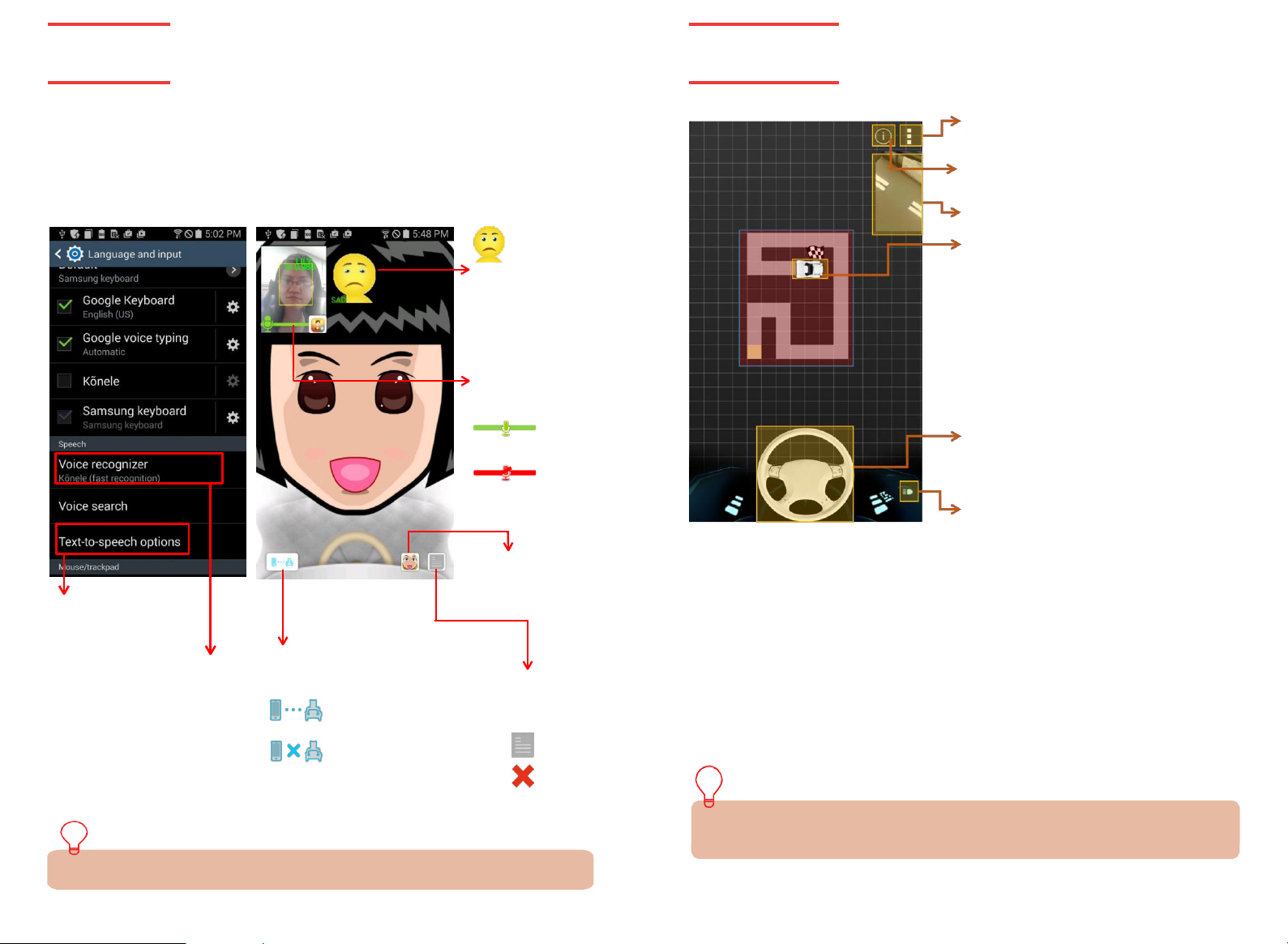
TALK TO TYCHE:
Personal companion that talks with, listens to, and entertains you. You can personalize Tyche
to your own liking. Give it a name, tell it what you like, register your face for recognition and
social interaction, smile for Tyche to be happy, and many other interesting talks!
- Preparation 1: setting your device to improve Talking Tyche performance
- Preparation 2: Download Talking Tyche
app
from google PlayTM. (Keyword: Tyche or AIBrain Inc,)
Tyche can
recognize/ show
your facial
expressions:
neutral, angry,
sad, happy,
and surprised.
Microphone condition
on : You can
speak to Tyche
Mute : Please
wait for seconds.
Make sure your
phone supports Text
To speech for
English.
Make sure your phone
r
Download the full guide of Tyche conversation topics at www.tyche.club
supports google Voice
ecognition service for English.
The performance of Tyche
listening capacity depends on
the version of google recognition service of your phone.
Tyche ca r body and phone
connection
Connected successfully.
Not connected.
(Please check if Tyche and/or
Bluetooth is turned on)
Change
h
conversation
content (text)
Tyche’s
avatar
s
etting.
Show /
ide the
S
how
H
ide
Setting Page
Tutorial Page
Camera View
Animated
Tyche
Animated steering
Turn
on/off
the light
PLAN AND MOVE APPLICATION:
Draw a path for Tyche to follow
- Tyche moves along the defined path.
- Check the collision detection box to avoid obstacles.
- Can take a picture and return with the go n back execution.
Download Plan and Move App manual from www.tyche.club for more explanation
Page 7
TYCHE
BYOI APP
TYCHE
BYOI APP
11 BY
OI
BYOI 12
1
2 3
4 5
6 7
8
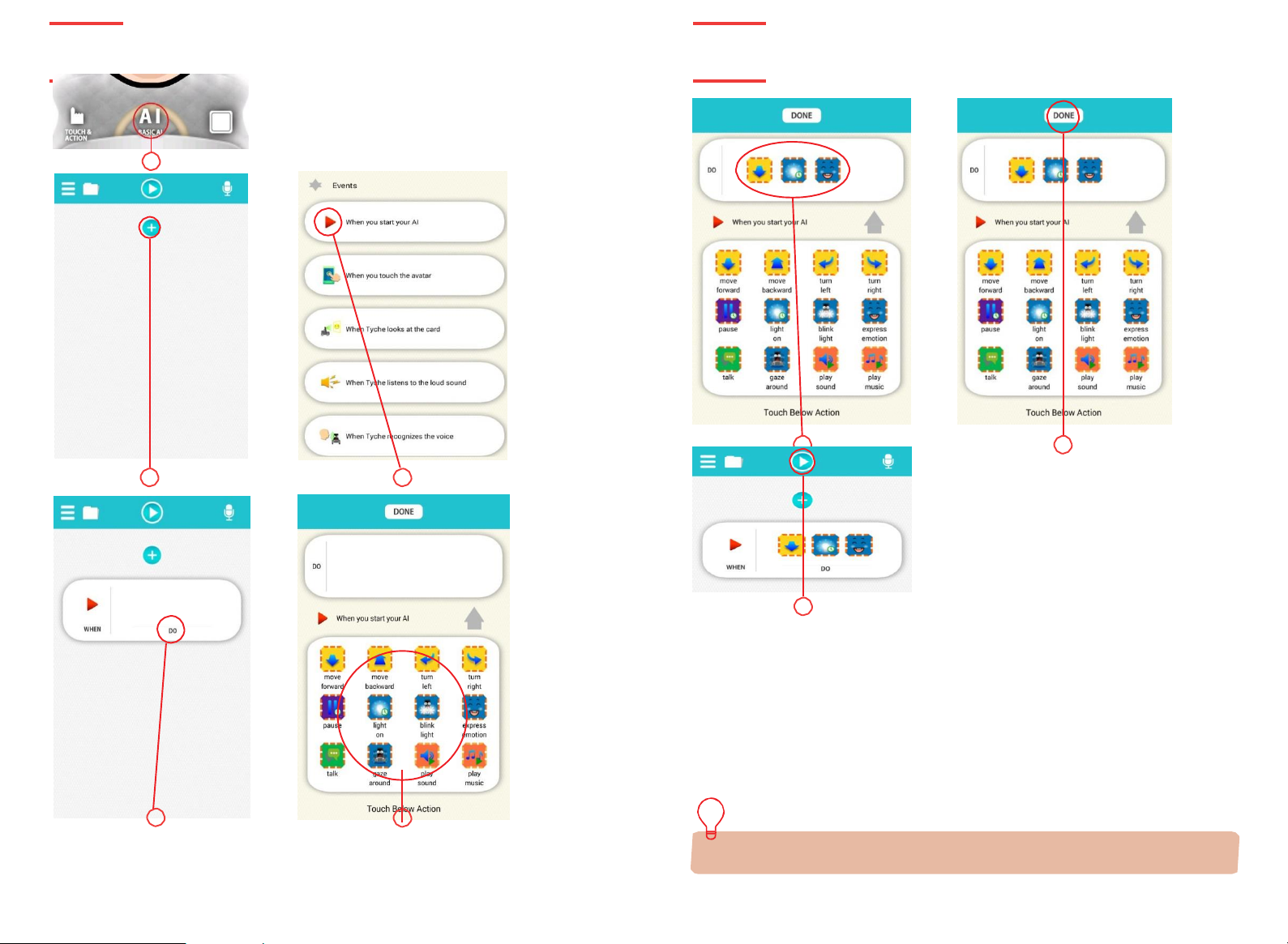
BUILD YOUR OWN INTELLIGENCE (BYOI) APPLICATION:
BYOI is based on intelligent Robot Software Platform (iRSP), an advanced robot building and
control tool that can be used to extend and customize Tyche and other robots. For iRSP, follow
the link below the page to learn more. BYOI application provides the basics to assemble simple
actions through simplified event buttons. Some of the fun events include Music, sound, Move,
Vision, and many others. The
- imagine, create, learn, and have fun with BYOI
- Jumpstart your programming skills
- Play social interaction games with other Tyches
Download BYOI App manual from www.tyche.club for more explanation.
app
will give you the power to;
Page 8
TYCHE
Vision APP
TYCHE
Remote Communication
13 Vision
R
emote Communication 14
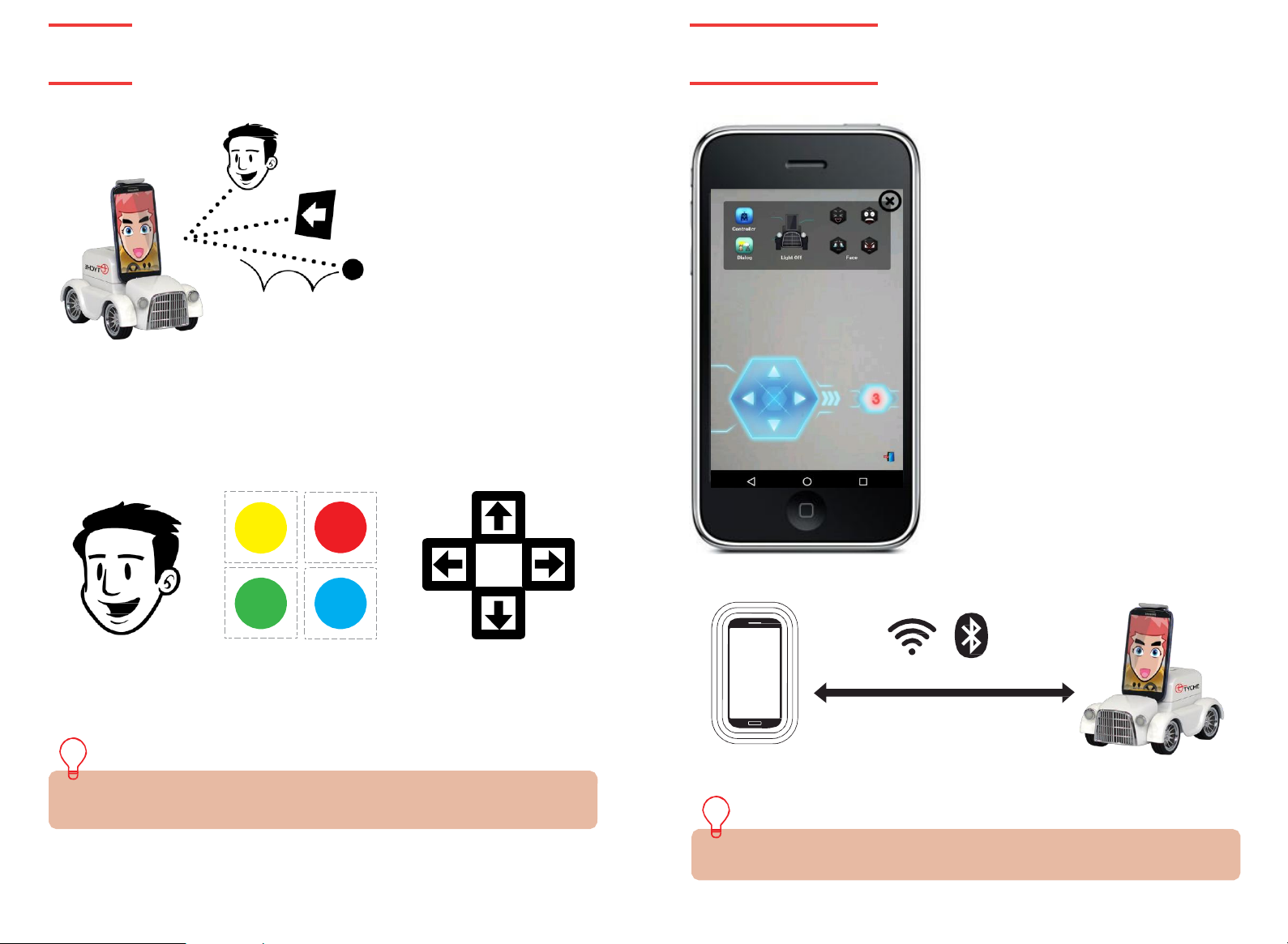
VISION APPLICATION
F
ace tracking, ball tracking, and marker tracking are some fun features of Tyche. Tyche knows
what you look like and can follow your face to keep you in its view. Hold up arrows to direct
Tyche and have it navigate around the house.
FACE BALL MARKER
:
REMOTE COMMUNICATION:
Two devices can be connected through Wi-Fi
or Bluetooth® services. The online manual
explains the connection process. When
connected, you can see through Tyche’s eyes!
TM
®
TM
Download Vision App manual and the tracking symbols (balls and markers) from
www.tyche.club for more explanation.
Download Remote Communication App manual from www.tyche.club for more explanation.
Page 9
TYCHE
Avatar Mode
TYCHE
Voice Communication
15 A
vatar
Voice Communication 16
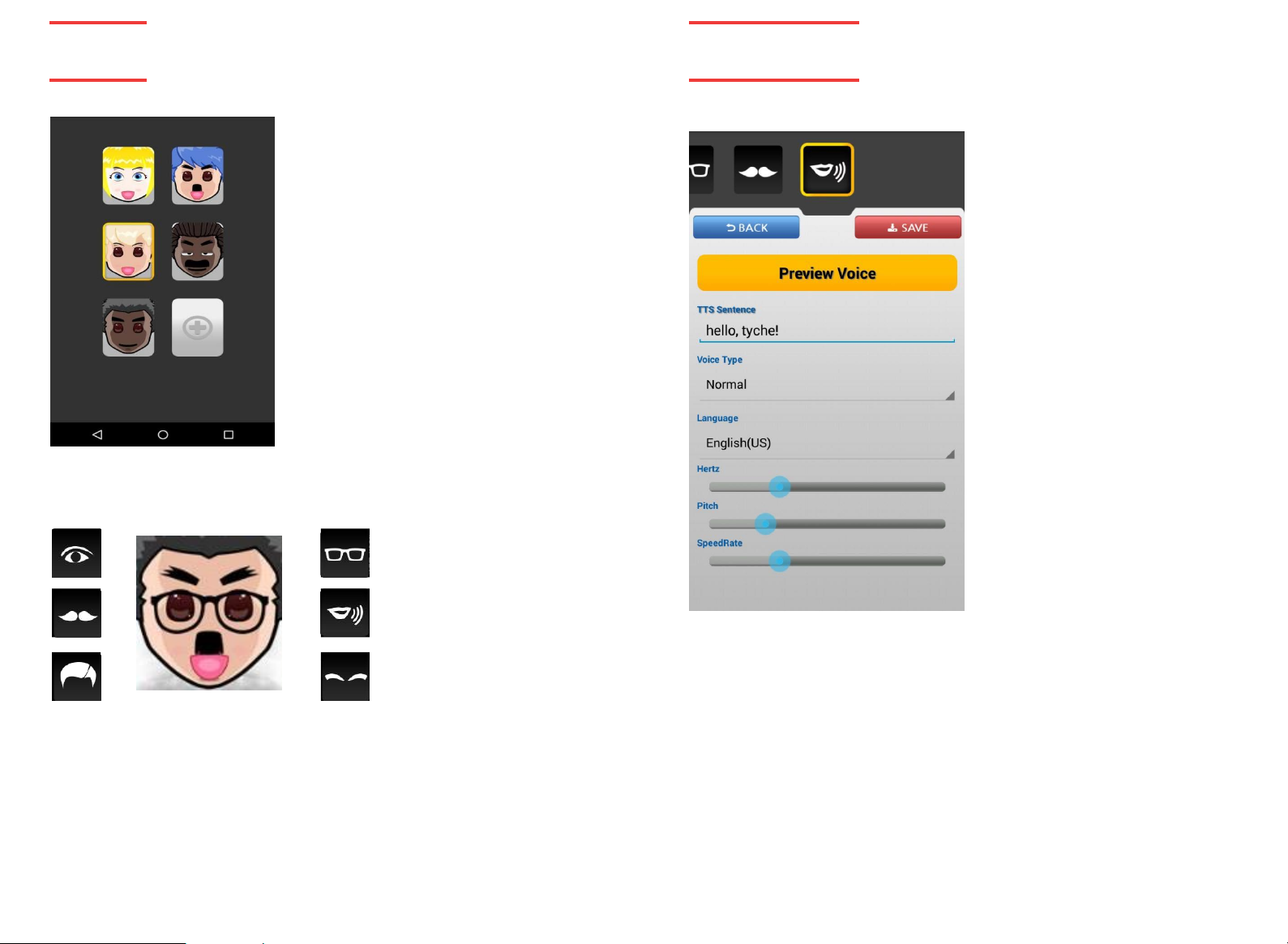
AVATAR CREATION:
Customize Tyche to your liking! Choose from
different face shapes, hair styles, and many other
features to bring Tyche to life.
Tyche’s avatar even responds to touch events.
Play around and see how Tyche reacts!
1. The list shows the created avatars
2. A yellow rectangle forms around the
currently selected avatar
3. Up to 9 different avatars can be added by
clicking on the plus (+) button
4. Click on any avatar to make it main, edit or
delete
AVATAR
Swipe through the choices to select the best combination for your own Tyche
avatar. Save for the changes made to take effect.
COMPONENTS
SUPPO
RTED:
VOICE CUSTOMIZATION:
Tyche’s voice can also be customized by adjusting the settings as
shown. Save for changes to take effect.
Page 10

TYCHE
TYCHE
FAQs
FAQS
Q. TYCHE DOES NOT RESPOND WHEN I GIVE IT COMMANDS.
A. after
checking the connection between Tyche and your smartphone device, please try
executing the commands again. Some applications like Talking Tyche and BYOI depend on the
internet for speech recognition. Make sure you are connected and try again.
Q. ALTHOUGH THE APPLICATION IS TERMINATED, TYCHE CONTINUES TO MOVE AND TURN ON
THE LIGHTS.
A.
Please turn off Tyche’s power button to reset the robot.
Q. TYCHE MOVEMENTS ARE SLOW AND IMPRECISE.
A.
This happens due to low battery. This problem can be solved by recharging Tyche.
CERTIFICATION AND SAFETY
FCC ID: 2AJ3Z-TYCHEV10
This device complies with Part 15 of the FCC Rules.
Operation is subject to the following two conditions:
(1) this device may not cause harmful interference, and
(2) this device must accept any interference received, including interference that may cause
undesired operation.
Warning: Changes or modifications to this unit not expressly approved by the party responsible
for compliance could void the user’s authority to operate the equipment.
NOTE: This equipment has been tested and found to comply with the limits for a Class B digital
device, pursuant to Part 15 of the FCC Rules. These limits are designed to provide reasonable
protection against harmful interference in a residential installation. This equipment generates, uses
and can radiate radio frequency energy and, if not installed and used in accordance with the
instructions, may cause harmful interference to radio communications.
However, there is no guarantee that interference will not occur in a particular installation. If this
equipment does cause harmful interference to radio or television reception, which can be
determined by turning the equipment off and on, the user is encouraged to try to correct the
interference by one or more of the following measures:
o Reorient or relocate the receiving antenna.
o Increase the separation between the equipment and receiver.
o Connect the equipment into an outlet on a circuit different from that to which the receiver is
connected.
o Consult the dealer or an experienced radio/TV technician for help.
:
CERTIFICATIONS:
- ASTM and CPSIA certification (USA):
Testing/inspection for hazardous substances that are either banned for use or restricted to
certain limits in toys and stationary products to protect children from possible danger that
could happen while playing.
- FCC certification (USA):
Electromagnetic wave safety inspection
- UL certification (USA & Canada):
The Battery Pack stability.
- Un DOT certification (USA & Canada):
Battery Pack safety during transportation by aircraft.
- KCC (Korea):
Electromagnetic wave safety inspection
- KC Battery certification (Korea):
Battery Pack safety during transportation.
- KC Safety Inspection Standards (Korea):
Testing/inspection for hazardous substances that are either banned for use or restricted to
certain limits in toys and stationary products to protect children from possible danger that
could happen while playing.
ANDROID LICENSE
Android is a trademark of Google Inc. The Android robot is reproduced or modified from
work created and shared by Google and used according to terms described in the
Creative Commons 3.0 attribution license.
:
Page 11

TYCHE
TYCHE
Thank you for purchasing Tyche™ from AIBrain Inc,. Our warranty obligations for Tyche™ are
limited to the terms set forth below. AIBrain Inc, warrants to the original end-user purchaser
that this Product (Tyche™), will be free from defects in materials and workmanship under
normal use for a period of 1year from the date of retail purchase (the “Warranty Period”). This
warranty is extended only to the original end-user purchaser of a new product that was not sold
“as is”.
if a defect arises:
(1) you may within 30 days from the date of retail purchase (or such other period specified by the
return policies of the place of purchase) return this Product to the place of purchase, together with
the original proof of purchase and either the original box or the UPC code label from the box, and
this Product will be replaced or, in the event that a replacement for this Product is not available at the
place of purchase, either a refund of the purchase price for this Product or a store credit of equivalent
retail value will be provided; or
(2) you may after the day that is 30 days from the date of retail purchase (or such other period specified the return policies of the place of purchase) and within the Warranty Period contact AIBrain Inc,
Customer support to arrange for the replacement of this Product. notwithstanding the foregoing
terms of this warranty, AIBrain Inc, reserves the right at all times, at its sole option and discretion, to
refund to you the purchase price paid by you for this Product in full and final settlement of Bonavision’s obligations under this warranty. A purchase receipt or other proof of the date of retail purchase
and purchase price is required in order to claim the benefit of this warranty. If this Product is replaced,
the replacement product becomes your property and the replaced Product becomes AIBrain Inc,’s
property. If the place of purchase refunds the purchase price of this Product or issues a store credit of
equivalent retail value, this Product must be returned to the place of purchase and becomes Bonavision’s property. If AIBrain Inc, refunds the purchase price of this Product, this Product must be returned
to AIBrain Inc, and becomes AIBrain Inc,’s property.
EXCLUSIONS AND LIMITATIONS
This warranty covers the normal and intended use of this Product. This warranty does not apply: (a) to
damage caused by accident, abuse, unreasonable use, improper handling and care or oth- er external
causes not arising out of defects in materials or workmanship; (b) to damage caused by service
performed by anyone who is not an authorized representative of AIBrain Inc,; (c) to any hardware,
software or other add-on components installed by the end-user; (d) if this Prod- uct has been
disassembled or modified in any way; (e) to cosmetic damage, including but not limited to scratches,
dents or broken plastic, or normal wear and tear, (f ) items intended to be periodically replaced by the
purchaser during the normal life of the Product, including, without limitation, batteries, bulbs, or cables .
AIBRAIN’S RE SPONSIBILIT Y FO R PRODUCT DEFECTS IS LIMIT ED TO THE REPLACEM ENT OF THIS
PRODUCT OR THE REFUND OF THE PURCHASE PRICE FOR THIS PRODUCT. ALL EXPRESS AND
IMPLIED WARRANTIES, INCLUDING BUT NOT LIMITED TO ANY IMPLIED
CONDITIONS OF MERCHANTABILITY AND FITNESS FOR A PARTICULAR PURPOSE, ARE LIMITED
IN TIME TO THE TERM OF THIS LIMITED WARRANTY. NO WARRANTIES, WHETHER IMPLIED OR
EXPRESS, WILL APPLY AFTER THE EXPIRATION OF THE LIMITED WARRANTY PERIOD
of this warranty is held to be illegal or unenforceable, the legality or enforceability of the remaining terms
shall not be affected or impaired.
EXCEPT AS PROVIDED IN THIS WARRANTY AND TO THE EXTENT PERMITED BY LAW, AIBRAIN INC, IS
NOT RESPONSIBLE FOR DIRECT SPECIAL, INCIDENTAL OR CONSEQUENTIAL DAMAGES
HOWSOEVER CAUSED RESULTING FROM THE BREACH OF WARRANTY OR CONDITION OR UNDER
ANY OTHER LEGAL THEORY, INCLUDING BUT NOT LIMITED TO LOSS OF USE. THE FORGOING
LIMITATION SHALL NOT APPLY TO DEATH OR PERSONAL INJURY CLAIMS, OR ANY STATUTORY
LIABILITY FOR INTENTIONAL AND GROSS NEGLIGENT ACTS AND/OR OMISSIONS.
:
WARANTIES AND
17
FA
QS Warranty 18
.
If any term
Page 12

The AI Companion for Kids
FOR AGE 8+ / ENGLISH
Manufactured and distributed by © 2015 AIBrain Inc.
Product names, designations, and logos are trademarks or registered trade-
marks of AIBrain Inc. All rights reserved.
Customer service: [email protected] / www.tyche.club
Customer support is only available in English for international and Korean
for Korean market. We recommend that you retain our address for future
reference. Product and colors may vary. Packaging printed in Korea.
WARNING! This product is recommended for children of 8 years and above.
This user manual should be kept as it contains important information.
Made in Korea
AIBRAIN INC. USA
68 Willow Rd. Menlo Park, CA 94025
AIBRAIN INC.Asia
511, Institute of Computer Technology, Seoul National University 1,
Gwanak-ro, Gwanak-gu, Seoul, Korea 08826
www.tyche.club
 Loading...