

Page 1

Agilent 6000 Series Oscilloscopes Programmer's
Reference
Version 04.00.0000
Copyright © 2005-2007 Agilent Technologies, Inc.
Warranty
Technology License
Restricted Rights Legend
Safety Notices
Trademarks
Page 1 of 412Agilent 6000 Series Oscilloscopes Programmer's Reference
January 5, 2007
Table of Contents
In This Book
What's New
Commands Quick Reference
Commands by Subsystem
What's New in Version 4.00
What's New in Version 3.50
What's New in Version 3.00
Command Differences From 54620/54640 Series Oscilloscopes
:ACQuire Commands
:BUS<n> Commands
:CALibrate Commands
:CHANnel<n> Commands
Common (*) Commands
:DIGital<n> Commands
:DISPlay Commands
:EXTernal Trigger Commands
:FUNCtion Commands
:HARDcopy Commands
:MARKer Commands
:MEASure Commands
:POD Commands
Root (:) Commands
:SBUS Commands
:SYSTem Commands
:TIMebase Commands
:TRIGger Commands
08/21/07file://C:\Documents and Settings\tmh\Local Settings\Temp\~hh43DB.htm
Page 2

General :TRIGger Commands
:TRIGger:CAN Commands
:TRIGger:DURation Commands
:TRIGger:EBURst Commands
:TRIGger[:EDGE] Commands
:TRIGger:GLITch Commands
:TRIGger:IIC Commands
:TRIGger:LIN Commands
:TRIGger:SEQuence Commands
:TRIGger:SPI Commands
:TRIGger:TV Commands
:TRIGger:USB Commands
:WAVeform Commands
Commands A
Obsolete and Discontinued Commands
:CHANnel:ACTivity
:CHANnel:LABel
:CHANnel:THReshold
:CHANnel2:SKEW
:CHANnel<n>:INPut
:CHANnel<n>:PMODe
:DISPlay:CONNect
:DISPlay:ORDer
:ERASe
:EXTernal:INPut
:EXTernal:PMODe
:FUNCtion:VIEW
:HARDcopy:DESTination
:HARDcopy:DEVice
:HARDcopy:GRAYscale
:MEASure:LOWer
:MEASure:SCRatch
:MEASure:TDELta
:MEASure:THResholds
:MEASure:TMAX
:MEASure:TMIN
:MEASure:TSTArt
:MEASure:TSTOp
:MEASure:TVOLt
:MEASure:UPPer
:MEASure:VDELta
:MEASure:VSTArt
:MEASure:VSTOp
:PRINt?
:TIMebase:DELay
:TRIGger:CAN:ACKNowledge
:TRIGger:CAN:SIGNal:DEFinition
:TRIGger:LIN:SIGNal:DEFinition
:TRIGger:THReshold
-Z
-
-
-
-
-
-
-
-
-
-
-
-
-
-
-
-
-
-
-
-
-
-
-
-
-
-
-
-
-
-
-
-
Page 2 of 412Agilent 6000 Series Oscilloscopes Programmer's Reference
-
-
08/21/07file://C:\Documents and Settings\tmh\Local Settings\Temp\~hh43DB.htm
Page 3

:TRIGger:TV:TVMode -
Syntax Elements
Number Format
<NL> (Line Terminator)
[ ] (Optional Syntax Terms)
{ } (Braces)
::= (Defined As)
< > (Angle Brackets)
... (Ellipsis)
n,..,p (Value Ranges)
d (Digits)
Quoted ASCII String
Definite
Error Messages
Status Reporting
Status Reporting Data Structures
Status Byte Register (STB)
Service Request Enable Register (SRE)
Trigger Event Register (TER)
Output Queue
Message Queue
(Standard) Event Status Register (ESR)
(Standard) Event Status Enable Register (ESE)
Error Queue
Operation Status Event Register (:OPERegister[:EVENt])
Operation Status Condition Register (:OPERegister:CONDition)
Arm Event Register (AER)
Hardware Event Event Register (:HWERegister[:EVENt])
Hardware Event Condition Register (:HWERegister:CONDition)
Clearing Registers and Queues
Status Reporting Decision Chart
More About Oscilloscope Commands
Command Classifications
-Length Block Response Data
Core Commands
Page 3 of 412Agilent 6000 Series Oscilloscopes Programmer's Reference
Non
-Core Commands
Obsolete Commands
Valid Command/Query Strings
Program Message Syntax
Command Tree
Duplicate Mnemonics
Tree Traversal Rules and Multiple Commands
Query Return Values
All Oscilloscope Commands Are Sequential
Programming Examples
SICL Example in C
08/21/07file://C:\Documents and Settings\tmh\Local Settings\Temp\~hh43DB.htm
Page 4
Page 4 of 412Agilent 6000 Series Oscilloscopes Programmer's Reference
VISA Example in C
VISA Example in Visual Basic
VISA COM Example in Visual Basic
Agilent 6000 Series Oscilloscopes Programmer's Reference
In This Book
This programmer's reference gives detailed information on all the commands available for controlling these
oscilloscope models:
6000 Series Oscilloscope Models:
Input Bandwidth
Channels
1 GHz 500 MHz 300 MHz 100 MHz
4 analog + 16 digital (mixed-signal) MSO6104A/L MSO6054A/L MSO6034A MSO6014A/L
2 analog + 16 digital (mixed-signal) MSO6102A MSO6052A MSO6032A MSO6012A
4 analog DSO6104A/L DSO6054A/L DSO6034A DSO6014A/L
2 analog DSO6102A DSO6052A DSO6032A DSO6012A
The command descriptions in this reference show upper and lowercase characters. For example, :AUToscale
indicates that the entire command name is :AUTOSCALE. The short form, :AUT, is also accepted by the
oscilloscope.
Command arguments and syntax are described for each command. Some command descriptions have
example code.
z
What's New
z
Commands Quick Reference
z
Commands by Subsystem
z
Commands A-Z
z
Obsolete and Discontinued Commands
z
Syntax Elements
z
Error Messages
z
Status Reporting
z
More About Oscilloscope Commands
z
Programming Examples
See the Agilent 6000 Series Oscilloscopes Programmer's Quick Start Guide for information on installing the IO
libraries, connecting the oscilloscope to the controller PC, and getting started with oscilloscope programming.
08/21/07file://C:\Documents and Settings\tmh\Local Settings\Temp\~hh43DB.htm
Page 5

Page 5 of 412Agilent 6000 Series Oscilloscopes Programmer's Reference
See your oscilloscope's User's Guide for more information on front-panel operation.
Mixed-Signal Oscilloscope Channel Differences
Because both the "analog channels only" oscilloscopes (DSO models) and the mixed-signal oscilloscopes (MSO
models) have analog channels, topics that describe analog channels refer to all oscilloscope models. Whenever
a topic describes digital channels, that information applies only to the mixed-signal oscilloscope models.
Example Programs
The example programs are designed to work with multiple 6000 Series oscilloscopes. Therefore, the
commands may not match the example code exactly, but the example code should run because of the
designed-in backward compatibility with earlier commands.
Agilent 6000 Series Oscilloscopes Programmer's Reference
What's New
What's New in Version 4.00
What's New in Version 3.50
What's New in Version 3.00
Command Differences From 54620/54640 Series Oscilloscopes
What's New in Version 4.00
New features in version 4.00 of the 6000 Series oscilloscope software are:
z
The ability to :AUToscale selected channels only and specify the acquisition type and mode that is set
after an :AUToscale.
z
The :BUS command subsystem for controlling up to two buses made up of digital channels.
z
Additional :CALibrate commands for starting the user calibration procedure, displaying the status of the
last user calibration, and displaying the temperature change since the last user calibration.
More detailed descriptions of the new and changed commands appear below.
New Commands
Command Description
:AUToscale:AMODE
:AUToscale:CHANnels
Specifies whether to keep the current acquisition type and mode after subsequent
autoscales.
Specifies whether to autoscale the currently displayed channels or all channels.
What's New
:BUS<n>:BIT<m>
:BUS<n>:BITS
:BUS<n>:CLEar
:BUS<n>:DISPlay
Includes or excludes a list of bits in a bus definition.
Excludes all digital channels from a bus definition
Includes or excludes the selected bit in a bus definition.
Displays or hides the bus on the oscilloscope display.
08/21/07file://C:\Documents and Settings\tmh\Local Settings\Temp\~hh43DB.htm
Page 6

:BUS<n>:LABel Assigns a label string to a bus.
Page 6 of 412Agilent 6000 Series Oscilloscopes Programmer's Reference
:BUS<n>:MASK
:CALibrate:STARt
:CALibrate:STATus?
:CALibrate:TEMPerature?
Includes or excludes bits in a bus definition according to a mask.
Starts the user calibration procedure.
Displays the summary results of the last user calibration procedure.
Displays the change in temperature since the last user calibration procedure.
Changed Commands
Command Differences
:AUToscale
:BLANk
:DIGitize
:STATus
You can now specify which channels to autoscale.
Now, you can also use this command with digital channel buses.
Now, you can also use this command with digital channel buses.
Now, you can also use this command with digital channel buses.
:VIEW Now, you can also use this command with digital channel buses.
:WAVeform:SOURce
Now, you can also use this command with digital channel buses.
What's New
What's New in Version 3.50
New features in version 3.50 of the 6000 Series oscilloscope software are:
z
The CAN and LIN options have been added to the :SBUS:MODE (serial decode mode) command.
z
The :SBUS:CAN:COUNt commands have been added to count CAN bus frames, count load utilization,
and reset the counters.
z
The ALLerrors, OVERload, and ACKerror options have been added to the :TRIGger:CAN:TRIGger
command.
z
The :TRIGger:LIN:ID, :TRIGger:LIN:SAMPlepoint, :TRIGger:LIN:STANdard,
and :TRIGger:LIN:SYNCbreak commands have been added.
z
The :SBUS:LIN:PARity command has been added.
z
The ID (for Frame Id) option has been added to the :TRIGger:LIN:TRIGger command.
z
The :HWERegister:CONDition, :HWERegister[:EVENt], and :HWE commands for the hardware event
condition, event, and enable registers have been added.
More detailed descriptions of the new and changed commands appear below.
New Commands
Command Description
:SBUS:CAN:COUNt:ERRor?
Returns the CAN bus error frame count.
:SBUS:CAN:COUNt:OVERload?
:SBUS:CAN:COUNt:RESet
Resets the CAN bus counters.
Returns the CAN bus overload frame count.
08/21/07file://C:\Documents and Settings\tmh\Local Settings\Temp\~hh43DB.htm
Page 7

Page 7 of 412Agilent 6000 Series Oscilloscopes Programmer's Reference
:SBUS:CAN:COUNt:TOTal?
:SBUS:CAN:COUNt:UTILization?
:SBUS:IIC:ASIZe
:SBUS:LIN:PARity
:TRIGger:LIN:ID
:TRIGger:LIN:SAMPlepoint
:TRIGger:LIN:STANdard
:TRIGger:LIN:SYNCbreak
:HWEenable
:HWERegister:CONDition?
Determines whether the Read/Write bit is included as the LSB in the
Determines whether the parity bits are included as the most significant bits
Defines the LIN identifier searched for in each CAN message when the LIN
Sets or reads the hardware event enable mask register.
Returns the CAN bus total frame count.
Sets the point during the bit time where the bit level is sampled to
Sets the LIN standard in effect for triggering and decoding to be LIN1.3 or
Sets the length of the LIN sync break to be greater than or equal to 11,12,
Queries the hardware event condition register.
Returns a percentage showing CAN bus utilization.
display of the IIC address field of the decode bus.
(MSB) in the display of the Frame Id field in the LIN decode bus.
trigger mode is set to frame ID.
determine whether the bit is dominant or recessive. The sample point
represents the percentage of time between the beginning of the bit time to
the end of the bit time.
LIN2.0.
or 13 clock lengths. The sync break is the idle period in the bus activity at
the beginning of each packet that distinguishes one information packet
from the previous one.
:HWERegister[:EVENt]?
Queries the hardware event event register.
Changed Commands
Command Differences
:SBUS:MODE
:TRIGger:CAN:TRIGger
:TRIGger:LIN:TRIGger The ID (for Frame Id) option has been added.
The CAN and LIN serial bus decode modes have been added.
The ALLerrors, OVERload, and ACKerror options have been added.
Obsolete Commands
Obsolete Command Current Command Equivalent Behavior Differences
:TRIGger:CAN:SIGNal:DEFinition
:TRIGger:LIN:SIGNal:DEFinition none
none
What's New in Version 3.00
What's New
New features in version 3.00 of the 6000 Series oscilloscope software are:
z
The :SBUS command subsystem for controlling serial decode bus display, mode, and other options.
z
The EBURst trigger mode and supporting :TRIGger:EBURst commands.
08/21/07file://C:\Documents and Settings\tmh\Local Settings\Temp\~hh43DB.htm
Page 8

z
The :ACQuire:AALias and :ACQuire:DAALias commands.
z
The :WAVeform:POINts:MODE command.
z
The :MEASure:SDEViation command.
z
The :TIMebase:REFClock command.
z
Changes to the :TRIGger:IIC commands.
z
Changes to the :TRIGger:SEQuence:TRIGger command.
z
Changes to the :ACQuire:TYPE and :WAVeform:TYPE commands to add HRESolution type.
z
Changes to the :BLANk, :DIGitize, :STATus, :VIEW, and :WAVeform:SOURce commands to include the
serial decode bus.
z
Changes to the :HARDcopy:FORMat command to support the PNG, ASCiixy, and BINary format types.
z
Changes to the :DISPlay:DATA? query and the :PRINt command to support the PNG format.
z
Changes to the :WAVeform:POINts command to set from 2000 to 8,000,000 points (in 1-2-5 sequence)
when the waveform points mode is MAXimum or RAW.
More detailed descriptions of the new and changed commands appear below.
Page 8 of 412Agilent 6000 Series Oscilloscopes Programmer's Reference
New Commands
Command Description
:ACQuire:AALias?
Returns the current state of the oscilloscope's anti-alias control.
:ACQuire:DAALias Sets the oscilloscope's disable anti-alias mode.
:MEASure:SDEViation
:SBUS:DISPlay
:SBUS:MODE
Controls the decoded serial bus display.
Determines the decode mode for the serial bus.
:SBUS:SPI:WIDTh
Measures the std deviation of a waveform.
Determines the number of bits in a word of decoded data for SPI.
:TIMebase:REFClock Enables or disables the 10 MHz REF BNC input/output.
:TRIGger:EBURst:COUNt
:TRIGger:EBURst:IDLE
:TRIGger:EBURst:SLOPe
Sets the Nth edge of burst edge counter resource.
Sets the Nth edge in a burst idle resource.
Specifies whether the rising edge (POSitive) or falling edge (NEGative) of the
Nth edge in a burst will generate a trigger.
:TRIGger:IIC:PATTern:DATa2
:WAVeform:POINts:MODE
Sets IIC data 2.
Sets the waveform points mode.
Changed Commands
Command Differences
:ACQuire:TYPE
:BLANk
Now, you can also use this command with the serial decode bus.
:DIGitize
:DISPlay:DATA
The HRESolution type has been added for smoothing at slower sweep speeds.
Now, you can also use this command with the serial decode bus.
Now, the PNG format is supported in the query.
08/21/07file://C:\Documents and Settings\tmh\Local Settings\Temp\~hh43DB.htm
Page 9

:HARDcopy:FORMat Now, the PNG, ASCiixy, and BINary formats are also supported.
:PRINt
Now, the PNG option is supported
Page 9 of 412Agilent 6000 Series Oscilloscopes Programmer's Reference
:STATus
:TRIGger:IIC:TRIGger
Now, you can also use this command with the serial decode bus.
The ANACknowledge, R7Data2, and W7Data2 types have been added.
[:TYPE]
:TRIGger:MODE
:TRIGger:SEQuence:TRIGger
The EBURst mode has been added.
The EDGE2,COUNt,NREFind (no re-find) option has been added.
:VIEW Now, you can now use this command with the serial decode bus.
:WAVeform:POINts
Now, you can set from 2000 to 8,000,000 points (in 1-2-5 sequence) when
the waveform points mode is MAXimum or RAW.
:WAVeform:SOURce
:WAVeform:TYPE
Now, you can also use this command with the serial decode bus.
The HRESolution type has been added for smoothing at slower sweep speeds.
What's New
Command Differences From 54620/54640 Series Oscilloscopes
The main differences between the version 1.00 programming command set for the 6000 Series oscilloscopes
and the 54620/54640 Series oscilloscopes are related to:
z
:HARDcopy and :DISPlay command subsystem changes for USB printers and the high resolution color
display.
z
New standards supported by the :TRIGger:TV commands.
z
Support for 113xA Series probes.
z
New "RAW" :WAVeform:POINts option for retrieving raw acquisition record data.
z
Discontinuance of the common commands for macros.
More detailed descriptions of the new, changed, obsolete, and discontinued commands appear below.
New Commands
Command Description
:ACQuire:RSIGnal
:CHANnel<n>:PROBe:ID?
:CHANnel<n>:PROBe:STYPe
Selects the 10 MHz reference signal mode.
Returns the type of probe attached to the specified oscilloscope channel.
Sets the channel probe signal type (STYPe) to differential or single-ended
when using the 113xA Series probes, and determines how offset is applied.
:CHANnel<n>:VERNier
Specifies whether the channel's vernier (fine vertical adjustment) setting is ON
(1) or OFF (0).
:DIGital<n>:SIZE
Specifies the size of digital channels on the display.
:EXTernal:PROBe:ID
Returns the type of probe attached to the external trigger input.
:EXTernal:PROBe:STYPe
Sets the external trigger probe signal type (STYPe) to differential or single-
ended when using the 113xA Series probes, and determines how offset is
08/21/07file://C:\Documents and Settings\tmh\Local Settings\Temp\~hh43DB.htm
Page 10
applied.
Page 10 of 412Agilent 6000 Series Oscilloscopes Programmer's Reference
:HARDcopy:FILename
:HARDcopy:PDRiver
:HARDcopy:IGColors
:HARDcopy:PALette
:OPERegister:CONDition?
:POD<n>:SIZE Specifies the size of digital channels on the display.
:TIMebase:VERNier
Sets the output filename for print formats whose output is a file. Replaces the
5462x/4x :HARDcopy:DESTination command.
Sets the hardcopy printer driver.
Specifies whether graticule colors are inverted.
Sets the hardcopy palette color. Replaces the 5462x/4x :HARDcopy:GRAYscale
command.
Returns the integer value contained in the Operation Status Condition Register
(a new register in addition to the Operation Status Event Register
is returned by the :OPERegister[:EVENt]?
Specifies whether the time base control's vernier (fine horizontal adjustment)
setting is ON (1) or OFF (0).
query).
Changed Commands
Command Differences From 5462x/4x Oscilloscopes
:ACQuire:COUNt
:DISPlay:DATA
The count can be set to any value from 1 to 65536 (instead of 16383).
The BMP8bit <format> option has been added to the query. There is a new
<palette> option which can be MONochrome, GRAYscale, or COLor in the query,
or just MONochrome in the command.
whose value
:DISPlay:SOURce
:HARDcopy:FORMat
*LRN
The Learn Device Setup query return format matches the IEEE 488.2 specification
:MERGe
*OPT
:OVLRegister
:PRINt
*RCL (Recall)
*SAV (Save)
The number of pixel memory locations is 10 (instead of 3).
The Option Identification query return format now has license information (in
The options are now: COLor (instead of HIRes), GRAYscale (instead of LORes),
The number of pixel memory locations is 10 (instead of 3).
There is now the BMP8bit format (instead of TIFF) and the PRINter0 or PRINter1
formats (in place of LASerjet, DESKjet, EPSon, or SEIKo). See the
new :HARDcopy:PDRiver
which says that the query result must contain ":SYST:SET " before the binary
block data. (This was not the case in the 5462x/4x oscilloscopes.)
addition to the I/O module ID information fields which are now always zero).
The Overload Event Register is now a 16-bit register (instead of 8-bit) and it
contains bits that identify when faults occur on the oscilloscope channels (in
addition to the bits that identify when overloads occur).
PRINter0 (instead of PARallel), BMP8bit (instead of TIFF). (The PCL option is now
invalid.)
The number of instrument state locations is 10 (instead of 3 for the 54620 Series
oscilloscopes or 4 for the 54640 Series oscilloscopes).
The number of instrument state locations is 10 (instead of 3 for the 54620 Series
oscilloscopes or 4 for the 54640 Series oscilloscopes).
command for setting the hardcopy printer driver.
*TRG (Trigger)
:TRIGger:TV:MODE
The *TRG has the same effect as the :DIGitize command with no parameters
(instead of the :RUN command).
The modes have been renamed (however, old forms of the mode names are still
08/21/07file://C:\Documents and Settings\tmh\Local Settings\Temp\~hh43DB.htm
Page 11

accepted).
s
<
n
Page 11 of 412Agilent 6000 Series Oscilloscopes Programmer's Reference
:TRIGger:TV:STANdard
:VIEW
The number of pixel memory locations is 10 (instead of 3).
:WAVeform:COUNt?
:WAVeform:POINts There is a new RAW "number of points" option for retrieving the raw acquisition
:WAVeform:PREamble
:WAVeform:XINCrement
:WAVeform:YREFerence
The P480L60HZ, P720L60HZ, P1080L24HZ, P1080L25HZ, I1080L50HZ, and
I1080L60HZ standards are supported (in addition to GENeric, NTSC, PALM, PAL,
and SECam).
The count can be any value from 1 to 65536 (instead of 16383).
record data. Also the maximum number of points that can be retrieved from the
normal measurement record is 1000 (instead of 2000).
The xincrement format is 64-bit floating point NR3 (instead of 32-bit), and the
yreference format is 32-bit NR1 (instead of 16-bit).
The x-increment value from the preamble is returned in 64-bit (instead of 32-bit)
floating point NR3 format.
The y-reference value from the preamble is returned in 32-bit (instead of 16-bit)
NR1 format.
Obsolete Commands
Current Command
Obsolete Command
:HARDcopy:DESTination
Equivalent Behavior Differences
:HARDcopy:FILename
:HARDcopy:GRAYscale
:PRINt?
:DISPlay:DATA? The options are now: COLor (instead of HIRes),
:HARDcopy:PALette
Discontinued Commands
Command Description
*DMC Define Macro.
*EMC Enable Macro.
*GMC Get Macro Contents.
*LMC Learn Macro.
*PMC Purge Macro.
Commands Quick Reference
GRAYscale (instead of LORes), PRINter0 (instead of
PARallel), BMP8bit (instead of TIFF). (The DISK and PCL
options are now invalid.)
Agilent 6000 Series Oscilloscopes Programmer's Reference
Command Query Options and Query Return
n/a :ACQuire:AALias? {1 | 0}
:ACQuire:COMPlete
<complete> :ACQuire:COMPlete?
complete> ::= 100; an i
NR1 format
08/21/07file://C:\Documents and Settings\tmh\Local Settings\Temp\~hh43DB.htm
Page 12

<
r
<
T
<
e
<
r
<
F
<
t
<
R
<
e
o
<
h
N
{
R
<
f
<
P
<
<
R
<
a
<
f
<
P
o
<
e
Page 12 of 412Agilent 6000 Series Oscilloscopes Programmer's Reference
:ACQuire:COUNt <count> :ACQuire:COUNt?
:ACQuire:DAALias
:ACQuire:MODE <mode> :ACQuire:MODE?
n/a :ACQuire:POINts?
:ACQuire:RSIGnal
<ref_signal_mode>
n/a :ACQuire:SRATe?
:ACQuire:TYPE <type> :ACQuire:TYPE?
:ACTivity
<mode> :ACQuire:DAALias?
:ACQuire:RSIGnal?
:ACTivity? <return value> ::=
count> ::= an integer f
65536 in NR1 format
mode> ::= {DISable | AU
mode> ::= {RTIMe | ETIM
# points> ::= an intege
format
ref_signal_mode> ::= {O
| IN}
sample_rate> ::= sample
(samples/s) in NR3 forma
type> ::= {NORMal | AVE
HRESolution | PEAK}
<edges>,<levels>
edges> ::= presence of
(32-bit integer in NR1 f
levels> ::= logical hig
lows (32-bit integer in
format)
n/a :AER?
:AUToscale [<source>
[,..,<source>]]
:AUToscale:AMODE
:AUToscale:CHANnels <value> :AUToscale:CHANnels?
:BLANk [<source>] n/a
<value> :AUToscale:AMODE?
n/a
0 | 1}; an integer in N
source> ::= CHANnel<n>
models
DIGital0,..,DIGital15 |
POD2} for MSO models
times
<n> ::= 1-2 or 1-4 in NR1
FUNCtion | MATH | SBUS}
models
DIGital0,..,DIGital15 |
2} | BUS{1 | 2} | FUNCti
| SBUS} for MSO models
source> ::= {CHANnel<n>
source> can be repeated
value> ::= {NORMal | CU
value> ::= {ALL | DISPl
source> ::= {CHANnel<n>}
source> ::= {CHANnel<n>
<n> ::= 1-2 or 1-4 in NR1
:BUS<n>:BIT<m>
ON}}
{{0 | OFF} | {1 |
:BUS<n>:BIT<m>? {0 | 1}
n> ::= 1 or 2; an integ
format
<m> ::= 0-15; an integer
08/21/07file://C:\Documents and Settings\tmh\Local Settings\Temp\~hh43DB.htm
Page 13

g
<
e
<
e
<
e
<
<
e
r
r
<
n
f
<
n
<
w
f
<
e
<
<
_
<
e
<
Page 13 of 412Agilent 6000 Series Oscilloscopes Programmer's Reference
:BUS<n>:BITS
| OFF} | {1 | ON}}
:BUS<n>:CLEar
:BUS<n>:DISPlay
| ON}}
:BUS<n>:LABel
<channel_list>, {{0
{{0 | OFF} | {1
<string> :BUS<n>:LABel?
format
:BUS<n>:BITS? <channel_list>, {0 | 1}
<channel_list> ::=
(@<m>,<m>:<m> ...) where
separator and ":" is ran
format
<m> ::= 0-15; an integer
format
n/a
format
:BUS<n>:DISPlay? {0 | 1}
format
up to 16 characters
format
n> ::= 1 or 2; an integ
n> ::= 1 or 2; an integ
n> ::= 1 or 2; an integ
string> ::= quoted ASCII
n> ::= 1 or 2; an integ
:BUS<n>:MASK
n/a :CALibrate:DATE?
:CALibrate:LABel
:CALibrate:STARt n/a n/a
n/a :CALibrate:STATus?
<mask> :BUS<n>:MASK? <mask> ::= 32-bit intege
decimal, <nondecimal>, o
<string>
nondecimal> ::= #Hnn...
n ::= {0,..,9 | A,..,F}
hexadecimal
nondecimal> ::= #Bnn...
n ::= {0 | 1} for binary
string> ::= "0xnn...n"
n ::= {0,..,9 | A,..,F}
hexadecimal
n> ::= 1 or 2; an integ
format
<return value> ::=
day>,<month>,<year>; all
format
<string> :CALibrate:LABel?
string> ::= quoted ASCII
up to 32 characters
<return value> ::=
ALL,<status
code>,<status
status_code> ::= an int
status code
status_string> ::= an AS
08/21/07file://C:\Documents and Settings\tmh\Local Settings\Temp\~hh43DB.htm
Page 14

{
<
e
N
<
d
<
<
o
c
<
f
R
<
A
r
<
r
Page 14 of 412Agilent 6000 Series Oscilloscopes Programmer's Reference
n/a :CALibrate:SWITch?
n/a :CALibrate:TEMPerature?
n/a :CALibrate:TIME?
:CDISplay
:CHANnel<n>:BWLimit
{1 | ON}}
:CHANnel<n>:COUPling
:CHANnel<n>:DISPlay
{1 | ON}}
:CHANnel<n>:IMPedance
<impedance>
{{0 | OFF} |
{{0 | OFF} |
<coupling> :CHANnel<n>:COUPling? <coupling> ::= {AC | DC}
n/a n/a
:CHANnel<n>:BWLimit? {0 | 1}
:CHANnel<n>:DISPlay? {0 | 1}
:CHANnel<n>:IMPedance?
status string
PROTected | UNPRotected}
return value> ::= degre
delta since last cal in
format
<return value> ::=
hours>,<minutes>,<secon
in NR1 format
<n> ::= 1-2 or 1-4 in NR1
<n> ::= 1-2 or 1-4 in NR1
<n> ::= 1-2 or 1-4 in NR1
impedance> ::= {ONEMeg |
<n> ::= 1-2 or 1-4 in NR1
:CHANnel<n>:INVert
{1 | ON}}
:CHANnel<n>:LABel
:CHANnel<n>:OFFSet
[suffix]
:CHANnel<n>:PROBe <attenuation> :CHANnel<n>:PROBe? <attenuation> ::= Probe
n/a :CHANnel<n>:PROBe:ID?
{{0 | OFF} |
<string> :CHANnel<n>:LABel?
<offset>
:CHANnel<n>:INVert? {0 | 1}
:CHANnel<n>:OFFSet?
<n> ::= 1-2 or 1-4 in NR1
string> ::= any series
less ASCII characters en
quotation marks
<n> ::= 1-2 or 1-4 in NR1
offset> ::= Vertical of
value in NR3 format
[suffix] ::= {V | mV}
<n> ::= 1-2 or 1-4; in N
attenuation ratio in NR3
<n> ::= 1-2 or 1-4 in NR1
probe id> ::= unquoted
string up to 11 characte
<n> ::= 1-2 or 1-4 in NR1
:CHANnel<n>:PROBe:SKEW
<skew_value>
:CHANnel<n>:PROBe:STYPe
<signal :CHANnel<n>:PROBe:STYPe?
:CHANnel<n>:PROBe:SKEW? <skew_value> ::= -100 ns
ns in NR3 format
<n> ::= 1-2 or 1-4 in NR1
signal type> ::= {DIFFe
08/21/07file://C:\Documents and Settings\tmh\Local Settings\Temp\~hh43DB.htm
Page 15

<
t
<
t
r
<
e
<
o
c
m
<
<
<
Page 15 of 412Agilent 6000 Series Oscilloscopes Programmer's Reference
type> SINGle}
<n> ::= 1-2 or 1-4 in NR1
:CHANnel<n>:PROTection
:CHANnel<n>:RANGe
[suffix]
:CHANnel<n>:SCALe
[suffix]
:CHANnel<n>:UNITs
:CHANnel<n>:VERNier
{1 | ON}}
<range>
<scale>
<units> :CHANnel<n>:UNITs?
{{0 | OFF} |
:CHANnel<n>:PROTection? {NORM | TRIP}
<n> ::= 1-2 or 1-4 in NR1
:CHANnel<n>:RANGe?
:CHANnel<n>:SCALe?
:CHANnel<n>:VERNier? {0 | 1}
range> ::= Vertical full
range value in NR3 forma
[suffix] ::= {V | mV}
<n> ::= 1-2 or 1-4 in NR1
scale> ::= Vertical uni
division value in NR3 fo
[suffix] ::= {V | mV}
<n> ::= 1-2 or 1-4 in NR1
units> ::= {VOLTs | AMP
<n> ::= 1-2 or 1-4 in NR1
<n> ::= 1-2 or 1-4 in NR1
*CLS
:DIGital<n>:DISPlay
{1 | ON}}
:DIGital<n>:LABel
:DIGital<n>:POSition
:DIGital<n>:SIZE <value> :DIGital<n>:SIZE?
:DIGital<n>:THReshold
[suffix]
{{0 | OFF} |
<string> :DIGital<n>:LABel?
<position> :DIGital<n>:POSition? <n> ::= 0-15; an integer
<value>
n/a n/a
:DIGital<n>:DISPlay? {0 | 1}
:DIGital<n>:THReshold? <n> ::= 0-15; an integer
<n> ::= 0-15; an integer
format
less ASCII characters en
quotation marks
<n> ::= 0-15; an integer
format
format
<position> ::= 0-7 if dis
size = large, 0-15 if siz
medium, 0-31 if size = s
LARGe}
format
<user defined value>}
string> ::= any series
value> ::= {SMALl | MEDi
value> ::= {CMOS | ECL |
user defined value> ::=
NR3 format from -8.00 to
08/21/07file://C:\Documents and Settings\tmh\Local Settings\Temp\~hh43DB.htm
Page 16

[
V
<
f
<
P
o
<
<
m
<
c
<
e
<
<
<
e
y
<
<
d
r
<
N
<
<
Page 16 of 412Agilent 6000 Series Oscilloscopes Programmer's Reference
suffix] ::= {V | mV | u
:DIGitize [<source>
[,..,<source>]]
:DISPlay:CLEar
:DISPlay:DATA
[<area>][,][<palette>]<display
data>
[<format>][,]
n/a
n/a n/a
:DISPlay:DATA?
[<area>][,][<palette>]
[<format>][,]
source> ::= {CHANnel<n>
FUNCtion | MATH | SBUS}
models
source> ::= {CHANnel<n>
DIGital0,..,DIGital15 |
2} | BUS{1 | 2} | FUNCti
| SBUS} for MSO models
source> can be repeated
times
<n> ::= 1-2 or 1-4 in NR1
format> ::= {TIFF} (com
area> ::= {GRATicule} (
palette> ::= {MONochrom
(command)
format> ::= {TIFF | BMP
BMP8bit | PNG} (query)
:DISPlay:LABel
ON}}
:DISPlay:LABList
:DISPlay:PERSistence
:DISPlay:SOURce <value> :DISPlay:SOURce?
:DISPlay:VECTors
| OFF}}
<mask> *ESE?
*ESE
{{0 | OFF} | {1 |
<binary block> :DISPlay:LABList?
<value> :DISPlay:PERSistence?
{{1 | ON} | {0
:DISPlay:LABel? {0 | 1}
:DISPlay:VECTors? {1 | 0}
area> ::= {GRATicule | S
(query)
palette> ::= {MONochrom
GRAYscale | COLor} (quer
display data> ::= data i
488.2 # format
binary block> ::= an or
list of up to 75 labels,
characters maximum, sepa
newline characters
value> ::= {MINimum | I
value> ::= {PMEMory{0 |
3 | 4 | 5 | 6 | 7 | 8 | 9
mask> ::= 0 to 255; an i
in NR1 format:
Bit Weight Name Enables
7 128 PON Power O
6 64 URQ User Re
08/21/07file://C:\Documents and Settings\tmh\Local Settings\Temp\~hh43DB.htm
Page 17

O
<
n
<
<
A
r
<
r
<
t
<
e
<
e
f
<
t
<
t
l
R
Page 17 of 412Agilent 6000 Series Oscilloscopes Programmer's Reference
5 32 CME Command
4 16 EXE Executi
Error
3 8 DDE Device
Depende
Error
2 4 QYE Query E
1 2 RQL Request
Control
n/a *ESR?
:EXTernal:BWLimit
:EXTernal:IMPedance
:EXTernal:PROBe
n/a :EXTernal:PROBe:ID?
:EXTernal:PROBe:STYPe <signal
type>
:EXTernal:PROTection[:CLEar]
:EXTernal:RANGe
[<suffix>]
:EXTernal:UNITs
:FUNCtion:CENTer <frequency> :FUNCtion:CENTer?
<bwlimit> :EXTernal:BWLimit? <bwlimit> ::= {0 | OFF}
<value> :EXTernal:IMPedance?
<attenuation> :EXTernal:PROBe? <attenuation> ::= probe
:EXTernal:PROBe:STYPe?
:EXTernal:PROTection? {NORM | TRIP}
<range>
<units> :EXTernal:UNITs?
:EXTernal:RANGe?
0 1 OPC
status> ::= 0 to 255; a
in NR1 format
impedance> ::= {ONEMeg |
attenuation ratio in NR3
probe id> ::= unquoted
string up to 11 characte
signal type> ::= {DIFFe
SINGle}
range> ::= vertical full
range value in NR3 forma
<suffix> ::= {V | mV}
units> ::= {VOLTs | AMP
frequency> ::= the curr
center frequency in NR3
The range of legal values
0 Hz to 25 GHz.
perati
Complet
:FUNCtion:DISPlay
{1 | ON}}
:FUNCtion:OFFSet
:FUNCtion:OPERation
:FUNCtion:RANGe
{{0 | OFF} |
<offset> :FUNCtion:OFFSet?
<operation> :FUNCtion:OPERation?
<range> :FUNCtion:RANGe? <range> ::= the full-sca
:FUNCtion:DISPlay? {0 | 1}
offset> ::= the value a
screen in NR3 format.
The range of legal values
10 times the current sens
of the selected function.
operation> ::= {SUBTrac
MULTiply | INTegrate |
DIFFerentiate | FFT}
vertical axis value in N
format.
The range for ADD, SUBT,
08/21/07file://C:\Documents and Settings\tmh\Local Settings\Temp\~hh43DB.htm
Page 18

e
-
e
E
p
n
<
r
n
<
r
<
<
r
<
r
<
<
C
t
<
R
<
P
{
V
P
r
n
Page 18 of 412Agilent 6000 Series Oscilloscopes Programmer's Reference
8E-6 to 800E+3. The rang
INTegrate function is 8E
400E+3.
The range for the DIFFer
function is 80E-3 to 8.0
(depends on current swee
The range for the FFT fu
8 to 800 dBV.
:FUNCtion:REFerence
:FUNCtion:SCALe
[<suffix>]
:FUNCtion:SOURce
:FUNCtion:SPAN <span> :FUNCtion:SPAN?
:FUNCtion:WINDow
:HARDcopy:FACTors
{1 | ON}}
<level> :FUNCtion:REFerence?
<scale value>
<source> :FUNCtion:SOURce?
<window> :FUNCtion:WINDow?
{{0 | OFF} |
:FUNCtion:SCALe?
:HARDcopy:FACTors? {0 | 1}
level> ::= the current
level in NR3 format.
The range of legal values
400.0 dBV to +400.0 dBV
(depending on current ra
value).
scale value> ::= intege
format
<suffix> ::= {V | dB}
source> ::= {CHANnel<n>
SUBT | MULT}
<n> ::= 1-2 or 1-4 in NR1
span> ::= the current f
span in NR3 format.
Legal values are 1 Hz to
window> ::= {RECTangula
HANNing | FLATtop}
:HARDcopy:FFEed
| ON}}
:HARDcopy:FILename <string> :HARDcopy:FILename?
:HARDcopy:FORMat
:HARDcopy:IGColors {{0 | OFF} |
{1 | ON}}
:HARDcopy:PALette
:HARDcopy:PDRiver <driver> :HARDcopy:PDRiver?
:HWEenable <n> :HWEenable? <n> ::= 16-bit integer i
{{0 | OFF} | {1
<format> :HARDcopy:FORMat?
<palette> :HARDcopy:PALette?
:HARDcopy:FFEed? {0 | 1}
string> ::= quoted ASCII
format> ::= {BMP[24bit]
BMP8bit | PNG | CSV | AS
BINary | PRINter0 | PRIN
:HARDcopy:IGColors? {0 | 1}
palette> ::= {COLor | G
driver> ::= {AP2Xxx | A
AP2560 | AP25} | {DJ350
| DJ6xx | {DJ630 | DJ63}
DJ6Special | DJ6Photo |
DJ8Special | DJ8xx | DJ9
DJ9xx | GVIP | {PS100 |
CLASer | MLASer | POSTsc
format
08/21/07file://C:\Documents and Settings\tmh\Local Settings\Temp\~hh43DB.htm
Page 19

n
n
r
<
m
<
<
r
n
<
n
o
m
<
e
<
[
<
r
r
<
<
c
<
[
<
r
r
<
<
c
<
t
<
Page 19 of 412Agilent 6000 Series Oscilloscopes Programmer's Reference
n/a :HWERregister:CONDition? <n> ::= 16-bit integer i
format
n/a :HWERegister[:EVENt]?
n/a *IDN?
n/a *LRN?
:MARKer:MODE <mode> :MARKer:MODE?
:MARKer:X1Position
[suffix]
<position>
:MARKer:X1Position?
<n> ::= 16-bit integer i
format
AGILENT
TECHNOLOGIES,<model>,<se
number>,X.XX.XX
model> ::= the model nu
the instrument
serial number> ::= the s
number of the instrument
X.XX.XX> ::= the softwa
revision of the instrume
learn_string> ::= curre
instrument setup as a bl
data in IEEE 488.2 # for
mode> ::= {OFF | MEASur
MANual}
position> ::= X1 cursor
value in NR3 format
suffix] ::= {s | ms | us
ps | Hz | kHz | MHz}
:MARKer:X1Y1source <source> :MARKer:X1Y1source?
:MARKer:X2Position <position>
[suffix]
:MARKer:X2Y2source <source> :MARKer:X2Y2source?
n/a :MARKer:XDELta?
:MARKer:X2Position?
return_value> ::= X1 cu
position value in NR3 fo
source> ::= {CHANnel<n>
FUNCtion | MATH}
<n> ::= 1-2 or 1-4 in NR1
return_value> ::= <sour
position> ::= X2 cursor
value in NR3 format
suffix] ::= {s | ms | us
ps | Hz | kHz | MHz}
return_value> ::= X2 cu
position value in NR3 fo
source> ::= {CHANnel<n>
FUNCtion | MATH}
<n> ::= 1-2 or 1-4 in NR1
return_value> ::= <sour
return_value> ::= X curs
delta value in NR3 forma
:MARKer:Y1Position <position>
[suffix]
:MARKer:Y1Position?
position> ::= Y1 cursor
value in NR3 format
08/21/07file://C:\Documents and Settings\tmh\Local Settings\Temp\~hh43DB.htm
Page 20

[
B
<
r
r
<
[
B
<
r
r
<
t
<
<
o
<
e
<
<
A
{
<
R
<
<
o
<
Page 20 of 412Agilent 6000 Series Oscilloscopes Programmer's Reference
suffix] ::= {V | mV | d
return_value> ::= Y1 cu
position value in NR3 fo
:MARKer:Y2Position <position>
[suffix]
n/a :MARKer:YDELta?
:MEASure:CLEar n/a n/a
:MEASure:COUNter
:MEASure:DEFine
spec>
[<source>] :MEASure:COUNter? [<source>]
DELay, <delay
:MARKer:Y2Position?
:MEASure:DEFine? DELay <delay spec> ::=
position> ::= Y2 cursor
value in NR3 format
suffix] ::= {V | mV | d
return_value> ::= Y2 cu
position value in NR3 fo
return_value> ::= Y curs
delta value in NR3 forma
source> ::= {CHANnel<n>}
models
source> ::= {CHANnel<n>
DIGital0,..,DIGital15} f
models
<n> ::= 1-2 or 1-4 in NR1
return_value> ::= count
frequency in Hertz in NR3
edge_spec1>,<edge_spec2>
:MEASure:DEFine
<threshold spec>
:MEASure:DELay
[,<source2>]
:MEASure:DUTYcycle
THResholds,
[<source1>]
:MEASure:DEFine? THResholds
:MEASure:DELay? [<source1>]
[,<source2>]
[<source>] :MEASure:DUTYcycle? [<source>]
edge_spec1 ::= [<slope>]
<occurrence>
edge_spec2 ::= [<slope>]
<occurrence>
<slope> ::= {+ | -}
<occurrence> ::= integer
threshold spec> ::= {ST
<threshold mode>,<upper>
<middle>,<lower>}
threshold mode> ::= {PE
ABSolute}
source1,2> ::= {CHANnel<
FUNCtion | MATH}
<n> ::= 1-2 or 1-4 in NR1
return_value> ::= floati
number delay time in sec
NR3 format
source> ::= {CHANnel<n>
FUNCtion | MATH} for DSO
08/21/07file://C:\Documents and Settings\tmh\Local Settings\Temp\~hh43DB.htm
Page 21

<
F
<
p
<
<
F
<
r
f
<
<
F
<
e
<
<
F
<
m
<
<
e
e
<
<
F
Page 21 of 412Agilent 6000 Series Oscilloscopes Programmer's Reference
source> ::= {CHANnel<n>
DIGital0,..,DIGital15 |
| MATH} for MSO models
<n> ::= 1-2 or 1-4 in NR1
return_value> ::= ratio
positive pulse width to
NR3 format
:MEASure:FALLtime [<source>] :MEASure:FALLtime? [<source>]
:MEASure:FREQuency [<source>] :MEASure:FREQuency? [<source>]
:MEASure:NWIDth
[<source>] :MEASure:NWIDth? [<source>]
source> ::= {CHANnel<n>
FUNCtion | MATH} for DSO
source> ::= {CHANnel<n>
DIGital0,..,DIGital15 |
| MATH} for MSO models
<n> ::= 1-2 or 1-4 in NR1
return_value> ::= time i
seconds between the lowe
upper thresholds in NR3
source> ::= {CHANnel<n>
FUNCtion | MATH} for DSO
source> ::= {CHANnel<n>
DIGital0,..,DIGital15 |
| MATH} for MSO models
<n> ::= 1-2 or 1-4 in NR1
return_value> ::= frequ
Hertz in NR3 format
source> ::= {CHANnel<n>
FUNCtion | MATH} for DSO
:MEASure:OVERshoot [<source>] :MEASure:OVERshoot? [<source>]
:MEASure:PERiod
[<source>] :MEASure:PERiod? [<source>]
source> ::= {CHANnel<n>
DIGital0,..,DIGital15 |
| MATH} for MSO models
<n> ::= 1-2 or 1-4 in NR1
return_value> ::= negati
width in seconds-NR3 for
source> ::= {CHANnel<n>
FUNCtion | MATH}
<n> ::= 1-2 or 1-4 in NR1
return_value> ::= the p
the overshoot of the sel
waveform in NR3 format
source> ::= {CHANnel<n>
FUNCtion | MATH} for DSO
source> ::= {CHANnel<n>
DIGital0,..,DIGital15 |
08/21/07file://C:\Documents and Settings\tmh\Local Settings\Temp\~hh43DB.htm
Page 22

<
o
<
<
h
n
<
<
e
<
<
F
<
<
<
t
<
<
<
<
F
Page 22 of 412Agilent 6000 Series Oscilloscopes Programmer's Reference
:MEASure:PHASe
[,<source2>]
:MEASure:PREShoot
:MEASure:PWIDth
[<source1>]
[<source>] :MEASure:PWIDth? [<source>]
:MEASure:PHASe? [<source1>]
[,<source2>]
[<source>] :MEASure:PREShoot? [<source>]
| MATH} for MSO models
<n> ::= 1-2 or 1-4 in NR1
return_value> ::= wavef
period in seconds in NR3
source1,2> ::= {CHANnel<
FUNCtion | MATH}
<n> ::= 1-2 or 1-4 in NR1
return_value> ::= the p
angle value in degrees i
format
FUNCtion | MATH}
<n> ::= 1-2 or 1-4 in NR1
preshoot of the selected
in NR3 format
FUNCtion | MATH} for DSO
source> ::= {CHANnel<n>
return_value> ::= the p
source> ::= {CHANnel<n>
:MEASure:RISEtime
:MEASure:SDEViation
:MEASure:SHOW
[<source>] :MEASure:RISEtime? [<source>]
{1 | ON} :MEASure:SHOW? {1}
[<source>] :MEASure:SDEViation? [<source>]
source> ::= {CHANnel<n>
DIGital0,..,DIGital15 |
| MATH} for MSO models
<n> ::= 1-2 or 1-4 in NR1
return_value> ::= width
positive pulse in seconds
format
FUNCtion | MATH}
<n> ::= 1-2 or 1-4 in NR1
seconds in NR3 format
FUNCtion | MATH}
<n> ::= 1-2 or 1-4 in NR1
deviation in NR3 format
source> ::= {CHANnel<n>
return_value> ::= rise
source> ::= {CHANnel<n>
return_value> ::= calcul
:MEASure:SOURce
[,<source2>]
[<source1>]
:MEASure:SOURce?
source1,2> ::= {CHANnel<
FUNCtion | MATH} for DSO
source1,2> ::= {CHANnel<
DIGital0,..,DIGital15 |
08/21/07file://C:\Documents and Settings\tmh\Local Settings\Temp\~hh43DB.htm
Page 23

<
r
<
<
n
<
<
F
<
<
<
<
<
t
<
<
F
<
<
m
<
Page 23 of 412Agilent 6000 Series Oscilloscopes Programmer's Reference
n/a :MEASure:TEDGe?
<slope><occurrence>[,<source>]
| MATH} for MSO models
<n> ::= 1-2 or 1-4 in NR1
return_value> ::= {<sou
NONE}
slope> ::= direction of
waveform
occurrence> ::= the tra
to be reported
source> ::= {CHANnel<n>
FUNCtion | MATH} for DSO
source> ::= {CHANnel<n>
DIGital0,..,DIGital15 |
| MATH} for MSO models
<n> ::= 1-2 or 1-4 in NR1
return_value> ::= time i
seconds of the specified
transition
n/a :MEASure:TVALue?
[<slope>]<occurrence> [,<source>]
:MEASure:VAMPlitude
[<source>] :MEASure:VAMPlitude? [<source>]
<value>,
value> ::= voltage level
the waveform must cross.
slope> ::= direction of
waveform when <value> is
occurrence> ::= transiti
reported.
return_value> ::= time i
seconds of specified vol
crossing in NR3 format
source> ::= {CHANnel<n>
FUNCtion | MATH} for DSO
source> ::= {CHANnel<n>
DIGital0,..,DIGital15 |
| MATH} for MSO models
<n> ::= 1-2 or 1-4 in NR1
source> ::= {CHANnel<n>
FUNCtion | MATH}
<n> ::= 1-2 or 1-4 in NR1
return_value> ::= the a
of the selected waveform
in NR3 format
:MEASure:VAVerage
[<source>] :MEASure:VAVerage? [<source>]
source> ::= {CHANnel<n>
FUNCtion | MATH}
08/21/07file://C:\Documents and Settings\tmh\Local Settings\Temp\~hh43DB.htm
Page 24

<
o
<
<
g
e
<
<
u
w
<
<
u
w
<
<
g
w
<
<
t
<
m
<
g
r
<
<
F
Page 24 of 412Agilent 6000 Series Oscilloscopes Programmer's Reference
<n> ::= 1-2 or 1-4 in NR1
return_value> ::= calcul
average voltage in NR3 f
:MEASure:VBASe [<source>] :MEASure:VBASe? [<source>]
:MEASure:VMAX
:MEASure:VMIN
[<source>] :MEASure:VMAX? [<source>]
[<source>] :MEASure:VMIN? [<source>]
source> ::= {CHANnel<n>
FUNCtion | MATH}
<n> ::= 1-2 or 1-4 in NR1
base_voltage> ::= volta
base of the selected wav
NR3 format
source> ::= {CHANnel<n>
FUNCtion | MATH}
<n> ::= 1-2 or 1-4 in NR1
return_value> ::= maxim
voltage of the selected
in NR3 format
source> ::= {CHANnel<n>
FUNCtion | MATH}
<n> ::= 1-2 or 1-4 in NR1
return_value> ::= minim
voltage of the selected
in NR3 format
:MEASure:VPP
:MEASure:VRMS
n/a :MEASure:VTIMe? <vtime>
[<source>] :MEASure:VPP? [<source>]
[<source>] :MEASure:VRMS? [<source>]
[,<source>]
source> ::= {CHANnel<n>
FUNCtion | MATH}
<n> ::= 1-2 or 1-4 in NR1
return_value> ::= volta
to-peak of the selected
in NR3 format
source> ::= {CHANnel<n>
FUNCtion | MATH}
<n> ::= 1-2 or 1-4 in NR1
return_value> ::= calcul
RMS voltage in NR3 forma
vtime> ::= displayed ti
trigger in seconds in NR3
return_value> ::= volta
specified time in NR3 fo
source> ::= {CHANnel<n>
FUNCtion | MATH} for DSO
source> ::= {CHANnel<n>
DIGital0,..,DIGital15 |
| MATH} for MSO models
08/21/07file://C:\Documents and Settings\tmh\Local Settings\Temp\~hh43DB.htm
Page 25

<
<
g
R
<
<
o
N
<
<
o
N
<
o
h
e
d
n
n
n
<
<
f
<
<
<
<
<
<
M
Page 25 of 412Agilent 6000 Series Oscilloscopes Programmer's Reference
<n> ::= 1-2 or 1-4 in NR1
:MEASure:VTOP
:MEASure:XMAX [<source>] :MEASure:XMAX? [<source>]
:MEASure:XMIN
:MERGe
<pixel memory> n/a
[<source>] :MEASure:VTOP? [<source>]
[<source>] :MEASure:XMIN? [<source>]
source> ::= {CHANnel<n>
FUNCtion | MATH}
<n> ::= 1-2 or 1-4 in NR1
return_value> ::= volta
top of the waveform in N
source> ::= {CHANnel<n>
FUNCtion | MATH}
<n> ::= 1-2 or 1-4 in NR1
return_value> ::= horiz
value of the maximum in
format
FUNCtion | MATH}
<n> ::= 1-2 or 1-4 in NR1
value of the maximum in
format
| 2 | 3 | 4 | 5 | 6 | 7 |
source> ::= {CHANnel<n>
return_value> ::= horiz
pixel memory> ::= {PMEM
*OPC
:OPEE <n> :OPEE? <n> ::= 16-bit integer i
n/a :OPERegister:CONDition?
n/a :OPERegister[:EVENt]?
n/a *OPT?
*OPC? ASCII "1" is placed in t
queue when all pending d
operations have complete
format
<n> ::= 16-bit integer i
format
<n> ::= 16-bit integer i
format
return_value> ::= 0,0,<l
info>
license info> ::= <All
reserved>, <Factory MSO>
Upgraded MSO>, <Probe fi
Memory>, <Low Speed Seri
<reserved>, <reserved>
All field> ::= {0 | All}
<reserved> ::= 0
Factory MSO> ::= {0 | MS
Upgraded MSO> ::= {0 |
<Probe field> ::= 0
08/21/07file://C:\Documents and Settings\tmh\Local Settings\Temp\~hh43DB.htm
Page 26

<
<
r
g
u
u
u
u
g
L
L
L
L
<
R
r
t
<
t
<
<
[
V
<
t
<
r
M
F
<
p
Page 26 of 412Agilent 6000 Series Oscilloscopes Programmer's Reference
Memory> ::= {0 | mem2M |
Low Speed Serial> ::= {0
:OVLenable
<reserved> ::= 0
<reserved> ::= 0
<mask> :OVLenable? <mask> ::= 16-bit intege
format as shown:
Bit Weight Input
10 1024 External Tri
9 512 Channel 4 Fa
8 256 Channel 3 Fa
7 128 Channel 2 Fa
6 64 Channel 1 Fa
4 16 External Tri
3 8 Channel 4 OV
2 4 Channel 3 OV
1 2 Channel 2 OV
Fault
OVL
n/a :OVLRegister?
:POD<n>:DISPlay {{0 | OFF} | {1
| ON}}
:POD<n>:SIZE <value> :POD<n>:SIZE?
:POD<n>:THReshold
:PRINt [<options>] n/a
<type>[suffix] :POD<n>:THReshold? <n> ::= 1-2 in NR1 forma
:POD<n>:DISPlay? {0 | 1}
0 1 Channel 1 OV
value> ::= integer in N
format. See OVLenable fo
<n> ::= 1-2 in NR1 forma
value> ::= {SMALl | MEDi
LARGe}
type> ::= {CMOS | ECL |
<user defined value>}
user defined value> ::=
NR3 format
suffix] ::= {V | mV | u
options> ::= [<print op
[,..,<print option>]
print option> ::= {COLo
GRAYscale | PRINter0 | B
BMP | PNG | NOFactors |
print option> can be re
08/21/07file://C:\Documents and Settings\tmh\Local Settings\Temp\~hh43DB.htm
Page 27

<
<
<
r
<
r
<
r
o
<
C
<
<
t
<
t
t
o
O
Page 27 of 412Agilent 6000 Series Oscilloscopes Programmer's Reference
to 5 times.
*RCL
<value> n/a
*RST
:RUN n/a n/a
*SAV
<value> n/a
n/a :SBUS:CAN:COUNt:ERRor?
n/a :SBUS:CAN:COUNt:OVERload?
:SBUS:CAN:COUNt:RESet
n/a :SBUS:CAN:COUNt:TOTal?
n/a :SBUS:CAN:COUNt:UTILization?
:SBUS:DISPlay
ON}}
:SBUS:IIC:ASIZe
{{0 | OFF} | {1 |
<size> :SBUS:IIC:ASIZe? <size> ::= {BIT7 | BIT8}
n/a See *RST (Reset)
n/a n/a
:SBUS:DISPlay? {0 | 1}
value> ::= {0 | 1 | 2 |
5 | 6 | 7 | 8 | 9}
value> ::= {0 | 1 | 2 |
5 | 6 | 7 | 8 | 9}
frame_count> ::= intege
format
frame_count> ::= intege
format
frame_count> ::= intege
format
<percent> ::= floating-p
NR3 format
:SBUS:LIN:PARity
| ON}}
:SBUS:MODE <mode> :SBUS:MODE?
:SBUS:SPI:WIDTh
n/a :SERial
:SINGle
*SRE
<mask> *SRE?
{{0 | OFF} | {1
<word_width> :SBUS:SPI:WIDTh?
:SBUS:LIN:PARity? {0 | 1}
n/a n/a
mode> ::= {IIC | SPI |
LIN}
word_width> ::= integer
NR1 format
return value> ::= unquo
string containing serial
mask> ::= sum of all bi
are set, 0 to 255; an in
NR1 format. <mask> ::= f
values:
Bit Weight Name Enables
7 128 OPER
6 64 ---- (Not us
5 32 ESB Event S
perati
Status
Registe
Bit
4 16 MAV Message
Availab
3 8 ---- (Not us
2 4 MSG Message
08/21/07file://C:\Documents and Settings\tmh\Local Settings\Temp\~hh43DB.htm
Page 28

<
P
o
<
d
b
i
i
e
m
t
e
d
i
e
p
e
e
y
b
v
i
e
g
e
<
i
<
A
E
E
Page 28 of 412Agilent 6000 Series Oscilloscopes Programmer's Reference
1 2 USR User
0 1 TRG Trigger
n/a :STATus? <display> {0 | 1}
display> ::= {CHANnel<n>
DIGital0,..,DIGital15 |
2} | BUS{1 | 2} | FUNCti
| SBUS}
<n> ::= 1-2 or 1-4 in NR1
n/a *STB?
value> ::= 0 to 255; an
in NR1 format, as shown i
following:
Bit Weight Name "1" In
7 128 OPER An ena
6 64 RQS/
5 32 ESB Enable
operat
status
condit
occurr
Instru
MSS
reques
servic
status
condit
occurr
4 16 MAV An out
3 8 ---- (Not us
2 4 MSG Messag
1 2 USR An ena
0 1 TRG A trig
:STOP n/a n/a
:SYSTem:DATE
<date> :SYSTem:DATE?
date> ::= <year>,<month>
<year> ::= 4-digit year
format
month> ::= {1,..,12 | J
FEBruary | MARch | APRil
JUNe | JULy | AUGust | S
| OCTober | NOVember | D
messag
ready.
been
displa
user e
condit
occurr
occurr
08/21/07file://C:\Documents and Settings\tmh\Local Settings\Temp\~hh43DB.htm
Page 29

<
h
<
r
<
d
<
<
<
o
<
t
e
<
h
<
<
v
<
t
w
o
<
v
r
<
v
r
e
r
<
r
r
Page 29 of 412Agilent 6000 Series Oscilloscopes Programmer's Reference
:SYSTem:DSP
n/a :SYSTem:ERRor?
:SYSTem:LOCK
:SYSTem:SETup
:SYSTem:TIME
n/a :TER?
:TIMebase:MODE
:TIMebase:POSition
<string> n/a
:SYSTem:LOCK? <value> ::= {ON | OFF}
<setup_data> :SYSTem:SETup?
<time> :SYSTem:TIME?
<value> :TIMebase:MODE?
<pos> :TIMebase:POSition?
<day> ::= {1,..31}
string> ::= up to 254 c
as a quoted ASCII string
error> ::= an integer e
error string> ::= quote
string.
See Error Messages
setup_data> ::= data in
488.2 # format.
time> ::= hours,minutes,
in NR1 format
{0 | 1}
value> ::= {MAIN | WIND
ROLL}
pos> ::= time from the
event to the display ref
point in NR3 format
.
:TIMebase:RANGe
:TIMebase:REFClock
{1 | ON}}
:TIMebase:REFerence
CENTer | RIGHt}
:TIMebase:SCALe <scale_value> :TIMebase:SCALe?
:TIMebase:VERNier
{1 | ON}}
:TIMebase:WINDow:POSition
:TIMebase:WINDow:RANGe
<range_value>
:TIMebase:WINDow:SCALe
<scale_value>
*TRG
:TRIGger:CAN:PATTern:DATA
<value>, <mask>
<range_value> :TIMebase:RANGe?
{{0 | OFF} |
{LEFT |
{{0 | OFF} |
<pos> :TIMebase:WINDow:POSition?
:TIMebase:REFClock? {0 | 1}
:TIMebase:REFerence?
:TIMebase:VERNier? {0 | 1}
:TIMebase:WINDow:RANGe?
:TIMebase:WINDow:SCALe?
n/a n/a
:TRIGger:CAN:PATTern:DATA? <value> ::= 64-bit integ
range_value> ::= 5 ns t
500 s in NR3 format
return_value> ::= {LEFT
| RIGHt}
scale_value> ::= scale
seconds in NR3 format
pos> ::= time from the
event to the delayed vie
reference point in NR3 f
range value> ::= range
seconds in NR3 format fo
delayed window
scale_value> ::= scale
seconds in NR3 format fo
delayed window
decimal, <nondecimal>, o
string> (with Option AMS
<mask> ::= 64-bit intege
decimal, <nondecimal>, o
<string>
08/21/07file://C:\Documents and Settings\tmh\Local Settings\Temp\~hh43DB.htm
Page 30

<
n
f
<
n
<
w
f
:TRIGger:CAN:PATTern:DATA:LENGth
m
o
e
r
<
r
r
<
n
f
<
n
<
w
f
<
E
<
<
<
<
<
<
A
r
V
M
<
f
<length>
Page 30 of 412Agilent 6000 Series Oscilloscopes Programmer's Reference
nondecimal> ::= #Hnn...
n ::= {0,..,9 | A,..,F}
hexadecimal
nondecimal> ::= #Bnn...
n ::= {0 | 1} for binary
string> ::= "0xnn...n"
n ::= {0,..,9 | A,..,F}
hexadecimal
:TRIGger:CAN:PATTern:DATA:LENGth?<length> ::= integer fro
in NR1 format (with Opti
:TRIGger:CAN:PATTern:ID <value>,
<mask>
:TRIGger:CAN:PATTern:ID:MODE
<value>
:TRIGger:CAN:SAMPlepoint
:TRIGger:CAN:SIGNal:BAUDrate
<baudrate>
<value> :TRIGger:CAN:SAMPlepoint?
:TRIGger:CAN:PATTern:ID? <value> ::= 32-bit integ
decimal, <nondecimal>, o
string> (with Option AMS
<mask> ::= 32-bit intege
decimal, <nondecimal>, o
:TRIGger:CAN:PATTern:ID:MODE?
:TRIGger:CAN:SIGNal:BAUDrate?
<string>
nondecimal> ::= #Hnn...
n ::= {0,..,9 | A,..,F}
hexadecimal
nondecimal> ::= #Bnn...
n ::= {0 | 1} for binary
string> ::= "0xnn...n"
n ::= {0,..,9 | A,..,F}
hexadecimal
value> ::= {STANdard |
(with Option AMS)
value> ::= {60 | 62.5 |
| 75 | 80 | 87.5} in NR3
(with Option AMS)
baudrate> ::= {10000 | 2
33300 | 50000 | 62500 | 8
100000 | 125000 | 250000
| 800000 | 1000000}
:TRIGger:CAN:SOURce
:TRIGger:CAN:TRIGger
:TRIGger:DURation:GREaterthan :TRIGger:DURation:GREaterthan?
<source> :TRIGger:CAN:SOURce?
<condition> :TRIGger:CAN:TRIGger?
source> ::= {CHANnel<n>
EXTernal} for DSO models
source> ::= {CHANnel<n>
DIGital0,..,DIGital15 |}
models
<n> ::= 1-2 or 1-4 in NR1
Option AMS)
ERRor | IDData | IDEithe
IDRemote | ALLerrors | O
ACKerror} (with Option A
condition> ::= {SOF} (wi
condition> ::= {SOF | D
greater than time> ::=
08/21/07file://C:\Documents and Settings\tmh\Local Settings\Temp\~hh43DB.htm
Page 31

o
[
<
a
o
[
<
<
t
<
<
t
R
<
m
a
<
[
<
R
<
<
P
c
e
<
<
<
Page 31 of 412Agilent 6000 Series Oscilloscopes Programmer's Reference
<greater than time>[suffix] point number from 5 ns t
10 seconds in NR3 format
suffix] ::= {s | ms | us
ps}
:TRIGger:DURation:LESSthan
than time>[suffix]
:TRIGger:DURation:PATTern
<value>, <mask>
:TRIGger:DURation:QUALifier
<qualifier>
:TRIGger:DURation:RANGe
than time>[suffix], <less than
time>[suffix]
<less
<greater
:TRIGger:DURation:LESSthan?
:TRIGger:DURation:PATTern?
:TRIGger:DURation:QUALifier?
:TRIGger:DURation:RANGe?
less than time> ::= flo
point number from 5 ns t
10 seconds in NR3 format
suffix] ::= {s | ms | us
ps}
value> ::= integer or <s
mask> ::= integer or <s
string> ::= ""0xnnnnnn""
{0,..,9 | A,..,F}
qualifier> ::= {GREater
LESSthan | INRange | OUT
TIMeout}
greater than time> ::=
duration from 10 ns to
9.99 seconds in NR3 form
less than time> ::= max
from 15 ns to 10 seconds
format
ps}
suffix] ::= {s | ms | us
:TRIGger:EBURst:COUNt
:TRIGger:EBURst:IDLE
<time_value>
:TRIGger:EBURst:SLOPe
:TRIGger[:EDGE]:COUPling {AC |
DC | LF}
:TRIGger[:EDGE]:LEVel
[,<source>]
<count> :TRIGger:EBURst:COUNt?
<slope> :TRIGger:EBURst:SLOPe?
<level>
count> ::= integer in N
:TRIGger:EBURst:IDLE?
:TRIGger[:EDGE]:COUPling? {AC | DC | LF}
:TRIGger[:EDGE]:LEVel? [<source>] For internal triggers,
time_value> ::= time in
in NR3 format
slope> ::= {NEGative |
<level> ::= .75 x full-s
voltage from center scre
format.
For external triggers,
level> ::= 2 volts with
attenuation at 1:1 in NR3
For digital channels (MSO
models), <level> ::= 8 V.
source> ::= {CHANnel<n>
EXTernal} for DSO models
source> ::= {CHANnel<n>
DIGital0,..,DIGital15 |
EXTernal } for MSO models
08/21/07file://C:\Documents and Settings\tmh\Local Settings\Temp\~hh43DB.htm
Page 32

<
r
<
<
E
<
f
o
[
<
a
o
[
c
e
<
<
<
o
<
<
t
<
<
p
Page 32 of 412Agilent 6000 Series Oscilloscopes Programmer's Reference
<n> ::= 1-2 or 1-4 in NR1
:TRIGger[:EDGE]:REJect
| HF}
:TRIGger[:EDGE]:SLOPe <polarity> :TRIGger[:EDGE]:SLOPe?
:TRIGger[:EDGE]:SOURce <source> :TRIGger[:EDGE]:SOURce?
:TRIGger:GLITch:GREaterthan
<greater than time>[suffix]
:TRIGger:GLITch:LESSthan
than time>[suffix]
{OFF | LF
<less
:TRIGger[:EDGE]:REJect? {OFF | LF | HF}
:TRIGger:GLITch:GREaterthan?
:TRIGger:GLITch:LESSthan?
polarity> ::= {POSitive
NEGative | EITHer | ALTe
source> ::= {CHANnel<n>
EXTernal} for DSO models
source> ::= {CHANnel<n>
DIGital0,..,DIGital15 |
for MSO models
<n> ::= 1-2 or 1-4 in NR1
greater than time> ::=
point number from 5 ns t
10 seconds in NR3 format
suffix] ::= {s | ms | us
ps}
less than time> ::= flo
point number from 5 ns t
10 seconds in NR3 format
suffix] ::= {s | ms | us
ps}
:TRIGger:GLITch:LEVel
[<source>]
:TRIGger:GLITch:POLarity
<polarity>
:TRIGger:GLITch:QUALifier
<qualifier>
<level>
:TRIGger:GLITch:LEVel? For internal triggers,
<level> ::= .75 x full-s
voltage from center scre
format.
For external triggers,
level> ::= 2 volts with
attenuation at 1:1 in NR3
For digital channels (MSO
models), <level> ::= 6 V.
source> ::= {CHANnel<n>
EXTernal} for DSO models
source> ::= {CHANnel<n>
DIGital0,..,DIGital15} f
models
<n> ::= 1-2 or 1-4 in NR1
:TRIGger:GLITch:POLarity?
:TRIGger:GLITch:QUALifier?
polarity> ::= {POSitive
NEGative}
qualifier> ::= {GREater
LESSthan | RANGe}
:TRIGger:GLITch:RANGe
than time>[suffix], <less than
time>[suffix]
<greater
:TRIGger:GLITch:RANGe?
greater than time> ::= s
time from 10 ns to 9.99 s
in NR3 format
less than time> ::= sto
08/21/07file://C:\Documents and Settings\tmh\Local Settings\Temp\~hh43DB.htm
Page 33

[
<
<
f
<
<
<
=
<
<
=
<
<
=
<
<
f
<
<
f
<
e
<
W
e
a
r
Page 33 of 412Agilent 6000 Series Oscilloscopes Programmer's Reference
from 15 ns to 10 seconds
format
ps}
suffix] ::= {s | ms | us
:TRIGger:GLITch:SOURce
:TRIGger:HFReject
{1 | ON}}
:TRIGger:HOLDoff <holdoff_time> :TRIGger:HOLDoff?
:TRIGger:IIC:PATTern:ADDRess
<value>
:TRIGger:IIC:PATTern:DATA
<value>
:TRIGger:IIC:PATTern:DATa2
<value>
<source> :TRIGger:GLITch:SOURce?
{{0 | OFF} |
:TRIGger:HFReject? {0 | 1}
:TRIGger:IIC:PATTern:ADDRess?
:TRIGger:IIC:PATTern:DATA?
:TRIGger:IIC:PATTern:DATa2?
source> ::= {CHANnel<n>
EXTernal} for DSO models
source> ::= {CHANnel<n>
DIGital0,..,DIGital15 }
models
<n> ::= 1-2 or 1-4 in NR1
in NR3 format
| A,..,F}
| A,..,F}
| A,..,F}
holdoff_time> ::= 60 ns
value> ::= integer or <s
string> ::= "0xnn" n ::
value> ::= integer or <s
string> ::= "0xnn" n ::
value> ::= integer or <s
string> ::= "0xnn" n ::
:TRIGger:IIC[:SOURce]:CLOCk
<source>
:TRIGger:IIC[:SOURce]:DATA
<source>
:TRIGger:IIC:TRIGger:QUALifier
<value>
:TRIGger:IIC:TRIGger[:TYPE]
<type>
:TRIGger:LIN:ID <value> :TRIGger:LIN:ID? <value> ::= 7-bit intege
:TRIGger:IIC[:SOURce]:CLOCk?
:TRIGger:IIC[:SOURce]:DATA?
:TRIGger:IIC:TRIGger:QUALifier?
:TRIGger:IIC:TRIGger[:TYPE]?
source> ::= {CHANnel<n>
EXTernal} for DSO models
source> ::= {CHANnel<n>
DIGital0,..,DIGital15 }
models
<n> ::= 1-2 or 1-4 in NR1
EXTernal} for DSO models
DIGital0,..,DIGital15 }
models
<n> ::= 1-2 or 1-4 in NR1
LESSthan | GREaterthan}
| READEeprom | WRITe7 |
NACKnowledge | ANACknowl
R7Data2 | W7Data2 | REST
source> ::= {CHANnel<n>
source> ::= {CHANnel<n>
value> ::= {EQUal | NOT
type> ::= {STARt | STOP
08/21/07file://C:\Documents and Settings\tmh\Local Settings\Temp\~hh43DB.htm
Page 34

r
<
e
{
x
<
n
<
e
{
x
<
<
<
<
o
<
<
<
a
<
a
<
h
<
e
<
e
r
<
Page 34 of 412Agilent 6000 Series Oscilloscopes Programmer's Reference
decimal, <nondecimal>, o
<string> from 0-63 or 0x0
(with Option AMS)
nondecimal> ::= #Hnn wh
0,..,9 | A,..,F} for he
nondecimal> ::= #Bnn...
n ::= {0 | 1} for binary
string> ::= "0xnn" wher
0,..,9 | A,..,F} for he
:TRIGger:LIN:SAMPlepoint <value> :TRIGger:LIN:SAMPlepoint?
:TRIGger:LIN:SIGNal:BAUDrate
<baudrate>
:TRIGger:LIN:SOURce <source> :TRIGger:LIN:SOURce?
:TRIGger:LIN:STANdard
:TRIGger:LIN:SYNCbreak
:TRIGger:LIN:TRIGger <condition> :TRIGger:LIN:TRIGger?
:TRIGger:MODE
<mode> :TRIGger:MODE?
<std> :TRIGger:LIN:STANdard?
<value> :TRIGger:LIN:SYNCbreak?
:TRIGger:LIN:SIGNal:BAUDrate?
value> ::= {60 | 62.5 |
| 75 | 80 | 87.5} in NR3
baudrate> ::= {2400 | 96
19200}
source> ::= {CHANnel<n>
EXTernal} for DSO models
source> ::= {CHANnel<n>
DIGital0,..,DIGital15} f
models
<n> ::= 1-2 or 1-4 in NR1
13}
(without Option AMS)
(with Option AMS)
PATTern | CAN | DURation
EBURst | LIN | SEQuence |
TV | USB}
std> ::= {LIN13 | LIN20}
value> ::= integer = {11
condition> ::= {SYNCbre
condition> ::= {SYNCbre
mode> ::= {EDGE | GLITc
return_value> ::= {<mod
<none>}
none> ::= query returns
if the :TIMebase:MODE is
XY
:TRIGger:NREJect
| ON}}
:TRIGger:PATTern
[,<edge source>,<edge>]
{{0 | OFF} | {1
<value>, <mask>
:TRIGger:NREJect? {0 | 1}
:TRIGger:PATTern? <value> ::= 32-bit integ
<string>
<mask> ::= 32-bit intege
<string>
string> ::= "0xnnnnnn";
{0,..,9 | A,..,F}
08/21/07file://C:\Documents and Settings\tmh\Local Settings\Temp\~hh43DB.htm
Page 35

<
e
<
e
N
<
E
<
R
<
d
<
o
<
N
<
<
T
<
<
t
<
n
t
G
<
o
m
<
T
E
<
P
<
Page 35 of 412Agilent 6000 Series Oscilloscopes Programmer's Reference
edge source> ::= {CHANn
EXTernal | NONE} for DSO
edge source> ::= {CHANn
DIGital0,..,DIGital15 |
MSO models
edge> ::= {POSitive | N
<n> ::= 1-2 or 1-4 in NR1
:TRIGger:SEQuence:COUNt
:TRIGger:SEQuence:EDGE{1|2}
<source>, <slope>
:TRIGger:SEQuence:FIND
:TRIGger:SEQuence:PATTern{1|2}
<value>, <mask>
<count> :TRIGger:SEQuence:COUNt?
<value> :TRIGger:SEQuence:FIND?
:TRIGger:SEQuence:EDGE{1|2}?
:TRIGger:SEQuence:PATTern{1|2}?
count> ::= integer in N
source> ::= {CHANnel<n>
EXTernal} for the DSO mo
source> ::= {CHANnel<n>
DIGital0,..,DIGital15} f
MSO models
slope> ::= {POSitive |
<n> ::= 1-2 or 1-4 in NR1
return_value> ::= query
"NONE" if edge source is
value> ::= {PATTern1,EN
PATTern1,EXITed | EDGE1 |
PATTern1,AND,EDGE1}
value> ::= integer or <s
mask> ::= integer or <s
string> ::= "0xnnnnnn"
{0,..,9 | A,..,F}
:TRIGger:SEQuence:RESet
:TRIGger:SEQuence:TIMer
<time_value>
:TRIGger:SEQuence:TRIGger
<value>
:TRIGger:SPI:CLOCk:SLOPe
:TRIGger:SPI:CLOCk:TIMeout
<time_value>
<value> :TRIGger:SEQuence:RESet? <value> ::= {NONE |
<slope> :TRIGger:SPI:CLOCk:SLOPe?
:TRIGger:SEQuence:TIMer?
:TRIGger:SEQuence:TRIGger?
:TRIGger:SPI:CLOCk:TIMeout?
PATTern1,ENTered |
PATTern1,EXITed | EDGE1 |
PATTern1,AND,EDGE1 |
PATTern2,ENTered |
PATTern2,EXITed | EDGE2 |
Values used in find and
stages not available. ED
available if EDGE2,COUNt
trigger stage.
time_value> ::= time fr
to 10 seconds in NR3 for
value> ::= {PATTern2,EN
PATTern2,EXITed | EDGE2 |
PATTern2,AND,EDGE2 | EDG
| EDGE2,COUNt,NREFind}
slope> ::= {NEGative |
time_value> ::= time in
in NR1 format
08/21/07file://C:\Documents and Settings\tmh\Local Settings\Temp\~hh43DB.htm
Page 36

<
<
<
t
<
w
<
<
d
<
o
<
d
<
o
<
d
<
o
<
a
<
r
<
F
e
<
<
e
<
{
Page 36 of 412Agilent 6000 Series Oscilloscopes Programmer's Reference
:TRIGger:SPI:FRAMing <value> :TRIGger:SPI:FRAMing?
:TRIGger:SPI:PATTern:DATA
<value>, <mask>
:TRIGger:SPI:PATTern:WIDTh
<width>
:TRIGger:SPI:SOURce:CLOCk
<source>
:TRIGger:SPI:SOURce:DATA
<source>
:TRIGger:SPI:PATTern:DATA?
:TRIGger:SPI:PATTern:WIDTh?
:TRIGger:SPI:SOURce:CLOCk?
:TRIGger:SPI:SOURce:DATA?
value> ::= {CHIPselect |
NOTChipselect | TIMeout}
value> ::= integer or <s
mask> ::= integer or <s
string> ::= "0xnnnnnn"
n ::= {0,..,9 | A,..,F}
width> ::= integer from
in NR1 format
value> ::= {CHANnel<n> |
EXTernal} for the DSO mo
value> ::= {CHANnel<n> |
DIGital0,..,DIGital15} f
MSO models
<n> ::= 1-2 or 1-4 in NR1
value> ::= {CHANnel<n> |
EXTernal} for the DSO mo
value> ::= {CHANnel<n> |
DIGital0,..,DIGital15} f
MSO models
:TRIGger:SPI:SOURce:FRAMe
<source>
:TRIGger:SWEep
:TRIGger:TV:LINE <line number> :TRIGger:TV:LINE?
:TRIGger:TV:MODE
:TRIGger:TV:POLarity
:TRIGger:TV:SOURce
<sweep> :TRIGger:SWEep?
<tv mode> :TRIGger:TV:MODE?
<source> :TRIGger:TV:SOURce?
<polarity> :TRIGger:TV:POLarity?
:TRIGger:SPI:SOURce:FRAMe?
<n> ::= 1-2 or 1-4 in NR1
value> ::= {CHANnel<n> |
EXTernal} for the DSO mo
value> ::= {CHANnel<n> |
DIGital0,..,DIGital15} f
MSO models
<n> ::= 1-2 or 1-4 in NR1
sweep> ::= {AUTO | NORM
line number> ::= intege
format
tv mode> ::= {FIEld1 |
AFIelds | ALINes | LINE |
VERTical | LFIeld1 | LFI
LALTernate | LVERtical}
polarity> ::= {POSitive
NEGative}
source> ::= {CHANnel<n>}
<n> ::= 1-2 or 1-4 integ
format
:TRIGger:TV:STANdard
<standard> :TRIGger:TV:STANdard?
standard> ::= {GENeric |
PALM | PAL | SECam | {P48
P480} | {P720L60HZ | P720
P1080L24HZ | P1080} | P1
| {I1080L50HZ | I1080} |
08/21/07file://C:\Documents and Settings\tmh\Local Settings\Temp\~hh43DB.htm
Page 37

I1080L60HZ}
<
d
<
o
<
d
<
o
<
n
r
<
<
P
f
<
M
<
r
<
e
x
f
Page 37 of 412Agilent 6000 Series Oscilloscopes Programmer's Reference
:TRIGger:USB:SOURce:DMINus
<source>
:TRIGger:USB:SOURce:DPLus
<source>
:TRIGger:USB:SPEed
:TRIGger:USB:TRIGger
n/a *TST?
:VIEW
<source> n/a
<value> :TRIGger:USB:SPEed? <value> ::= {LOW | FULL}
<value> :TRIGger:USB:TRIGger?
:TRIGger:USB:SOURce:DMINus?
:TRIGger:USB:SOURce:DPLus?
source> ::= {CHANnel<n>
EXTernal} for the DSO mo
source> ::= {CHANnel<n>
DIGital0,..,DIGital15} f
MSO models
<n> ::= 1-2 or 1-4 in NR1
source> ::= {CHANnel<n>
EXTernal} for the DSO mo
source> ::= {CHANnel<n>
DIGital0,..,DIGital15} f
MSO models
<n> ::= 1-2 or 1-4 in NR1
value> ::= {SOP | EOP |
ENTersuspend | EXITsuspe
RESet}
<result> ::= 0 or non-ze
an integer in NR1 format
source> ::= {CHANnel<n>
PMEMory{0 | 1 | 2 | 3 | 4
| 7 | 8 | 9} | FUNCtion |
SBUS} for DSO models
*WAI
:WAVeform:BYTeorder
n/a :WAVeform:COUNt?
n/a :WAVeform:DATA?
<value> :WAVeform:BYTeorder?
n/a n/a
source> ::= {CHANnel<n>
DIGital0,..,DIGital15 |
| 1 | 2 | 3 | 4 | 5 | 6 |
9} | POD{1 | 2} | BUS{1 |
FUNCtion | MATH | SBUS}
models
<n> ::= 1-2 or 1-4 in NR1
65536 in NR1 format
<binary data>
For example, to transmit
bytes of data, the synta
be: #800001000<1000 bytes
data><NL>
8 is the number of digits
follow
00001000 is the number o
to be transmitted
value> ::= {LSBFirst |
count> ::= an integer f
binary block length byt
08/21/07file://C:\Documents and Settings\tmh\Local Settings\Temp\~hh43DB.htm
Page 38

<
t
<
<
_
<
_
M
<
<
<
r
e
e
y
<
<
<
t
p
p
<
f
<
t
e
Page 38 of 412Agilent 6000 Series Oscilloscopes Programmer's Reference
1000 bytes of data> is
actual data
:WAVeform:FORMat
:WAVeform:POINts
:WAVeform:POINts:MODE
<points_mode>
n/a :WAVeform:PREamble?
<value> :WAVeform:FORMat?
<# points> :WAVeform:POINts?
:WAVeform:POINts:MODE?
value> ::= {WORD | BYTE
# points> ::= {100 | 250
1000 | <points
points mode is NORMal
# points> ::= {100 | 250
1000 | 2000 ... 8000000 i
sequence | <points
waveform points mode is
or RAW
MAXimum | RAW}
MAXimum | RAW}
NR1>, <type NR1>,<points
NR1>,<count NR1>, <xincr
NR3>, <xorigin NR3>, <xr
NR1>,<yincrement NR3>, <
NR3>, <yreference NR1>
format:
points_mode> ::= {NORMal
points_mode> ::= {NORMal
preamble_block> ::= <fo
format> ::= an integer i
mode>} if
mode>}
:WAVeform:SOURce <source> :WAVeform:SOURce?
• 0 for BYTE format
• 1 for WORD format
• 2 for ASCii format
type> ::= an integer in
format:
• 0 for NORMal type
• 1 for PEAK detect ty
• 2 for AVERage type
• 3 for HRESolution ty
count> ::= Average coun
if PEAK detect type or NO
integer in NR1 format
source> ::= {CHANnel<n>
FUNCtion | MATH | SBUS}
models
source> ::= {CHANnel<n>
| 2} | BUS{1 | 2} | FUNC
MATH | SBUS} for MSO mod
<n> ::= 1-2 or 1-4 in NR1
08/21/07file://C:\Documents and Settings\tmh\Local Settings\Temp\~hh43DB.htm
Page 39

<
r
N
g
r
a
r
a
g
N
e
a
Page 39 of 412Agilent 6000 Series Oscilloscopes Programmer's Reference
n/a :WAVeform:TYPE?
:WAVeform:UNSigned
{1 | ON}}
:WAVeform:VIEW
n/a :WAVeform:XINCrement?
n/a :WAVeform:XORigin?
n/a :WAVeform:XREFerence?
n/a :WAVeform:YINCrement?
n/a :WAVeform:YORigin?
n/a :WAVeform:YREFerence?
{{0 | OFF} |
<view> :WAVeform:VIEW? <view> ::= {MAIN}
:WAVeform:UNSigned? {0 | 1}
return_mode> ::= {NORM |
AVER | HRES}
<return_value> ::= x-inc
the current preamble in
format
<return_value> ::= x-ori
in the current preamble i
format
<return_value> ::= 0 (xvalue in the current pre
NR1 format)
<return_value> ::= y-inc
value in the current pre
NR3 format
<return_value> ::= y-ori
the current preamble in
format
<return_value> ::= y-ref
value in the current pre
NR1 format
Agilent 6000 Series Oscilloscopes Programmer's Reference
Commands by Subsystem
Subsystem Description
:ACQuire Commands
:BUS<n> Commands
:CALibrate Commands
:CHANnel<n>
Commands
Common (*) Commands Commands defined by IEEE 488.2 standard that are common to all instruments.
:DIGital<n> Commands
:DISPlay Commands
:EXTernal Trigger
Commands
:FUNCtion Commands
Set the parameters for acquiring and storing data.
Control all oscilloscope functions associated with the digital channels bus display.
Utility commands for determining the state of the calibration factor protection
switch.
Control all oscilloscope functions associated with individual analog channels or
groups of channels.
Control all oscilloscope functions associated with individual digital channels.
Control how waveforms, graticule, and text are displayed and written on the
screen.
Control the input characteristics of the external trigger input.
Control functions in the measurement/storage module.
:HARDcopy Commands
:MARKer Commands
Set and query the selection of hardcopy device and formatting options.
Set and query the settings of X-axis markers (X1 and X2 cursors) and the Y-axis
markers (Y1 and Y2 cursors).
08/21/07file://C:\Documents and Settings\tmh\Local Settings\Temp\~hh43DB.htm
Page 40

Page 40 of 412Agilent 6000 Series Oscilloscopes Programmer's Reference
:MEASure Commands
:POD Commands
Root (:) Commands
:SBUS Commands
:SYSTem Commands
:TIMebase Commands
:TRIGger Commands Control the trigger modes and parameters for each trigger type.
:WAVeform Commands
Select automatic measurements to be made and control time markers.
Control all oscilloscope functions associated with groups of digital channels.
Control many of the basic functions of the oscilloscope and reside at the root level
of the command tree.
Control oscilloscope functions associated with the serial decode bus.
Control basic system functions of the oscilloscope.
Control all horizontal sweep functions.
Provide access to waveform data.
Command Types
Three types of commands are used:
z
Common (*) Commands — See Introduction to Common (*) Commands for more information.
z
Root Level (:) Commands — See Introduction to Root (:) Commands for more information.
z
Subsystem Commands — Subsystem commands are grouped together under a common node of the
Command Tree
time. When the instrument is initially turned on, the command parser is set to the root of the command
tree; therefore, no subsystem is selected.
, such as the :TIMebase commands. Only one subsystem may be selected at any given
Commands by Subsystem
:ACQuire Commands
Set the parameters for acquiring and storing data. See Introduction to :ACQuire Commands.
Command Query Options and Query Returns
n/a :ACQuire:AALias? {1 | 0}
:ACQuire:COMPlete
:ACQuire:COUNt
:ACQuire:DAALias
:ACQuire:MODE
n/a :ACQuire:POINts?
:ACQuire:RSIGnal
<ref_signal_mode>
n/a :ACQuire:SRATe?
<complete> :ACQuire:COMPlete? <complete> ::= 100; an integer in NR1
format
<count> :ACQuire:COUNt? <count> ::= an integer from 1 to 65536 in
NR1 format
<mode> :ACQuire:DAALias? <mode> ::= {DISable | AUTO}
<mode> :ACQuire:MODE? <mode> ::= {RTIMe | ETIMe}
<# points> ::= an integer in NR1 format
:ACQuire:RSIGnal? <ref_signal_mode> ::= {OFF | OUT | IN}
<sample_rate> ::= sample rate (samples/s)
in NR3 format
:ACQuire:TYPE
<type> :ACQuire:TYPE? <type> ::= {NORMal | AVERage | HRESolution
| PEAK}
08/21/07file://C:\Documents and Settings\tmh\Local Settings\Temp\~hh43DB.htm
Page 41

Page 41 of 412Agilent 6000 Series Oscilloscopes Programmer's Reference
Introduction to :ACQuire Commands
The ACQuire subsystem controls the way in which waveforms are acquired. These acquisition types are
available: normal, averaging, peak detect, and high resolution. Two acquisition modes are available: real-time
mode, and equivalent-time mode.
Normal. The :ACQuire:TYPE NORMal command sets the oscilloscope in the normal acquisition mode. For the
majority of user models and signals, NORMal mode yields the best oscilloscope picture of the waveform.
Averaging. The :ACQuire:TYPE AVERage command sets the oscilloscope in the averaging mode. You can set
the count by sending the :ACQuire:COUNt command followed by the number of averages. In this mode, the
value for averages is an integer from 1 (smoothing) to 65536. The COUNt value determines the number of
averages that must be acquired.
Peak Detect. The :ACQuire:TYPE PEAK command sets the oscilloscope in the peak detect mode. In this
mode, :ACQuire:COUNt has no meaning.
Real-time Mode. The :ACQuire:MODE RTIMe command sets the oscilloscope in real-time mode. This mode is
useful to inhibit equivalent time sampling at fast sweep speeds.
Equivalent-time Mode. The :ACQuire:MODE ETIME command sets the oscilloscope in equivalent-time mode.
Reporting the Setup. Use :ACQuire? to query setup information for the ACQuire subsystem.
Return Format. The following is a sample response from the :ACQuire? query. In this case, the query was
issued following a *RST command.
:ACQ:MODE RTIM;TYPE NORM;COMP 100;COUNT 8
:ACQuire Commands
:ACQuire:AALias —
Query Syntax
:ACQuire:AALias?
The :ACQuire:AALias? query returns the current state of the oscilloscope acquisition anti-alias control. This
control can be directly disabled or disabled automatically.
Return Format
<value><NL>
<value> ::= {1 | 0}
See Also
z
Introduction to :ACQuire Commands
z
:ACQuire:DAALias
:ACQuire Commands
08/21/07file://C:\Documents and Settings\tmh\Local Settings\Temp\~hh43DB.htm
Page 42

Page 42 of 412Agilent 6000 Series Oscilloscopes Programmer's Reference
:ACQuire:COMPlete —
Command Syntax
:ACQuire:COMPlete <complete>
<complete> ::= 100; an integer in NR1 format
The :ACQuire:COMPlete command affects the operation of the :DIGitize command. It specifies the minimum
completion criteria for an acquisition. The parameter determines the percentage of the time buckets that must
be "full" before an acquisition is considered complete. If :ACQuire:TYPE is NORMal, it needs only one sample
per time bucket for that time bucket to be considered full.
The only legal value for the :COMPlete command is 100. All time buckets must contain data for the acquisition
to be considered complete.
Query Syntax
:ACQuire:COMPlete?
The :ACQuire:COMPlete? query returns the completion criteria (100) for the currently selected mode.
Return Format
<completion_criteria><NL>
<completion_criteria> ::=
100; an integer in NR1 format
See Also
z
Introduction to :ACQuire Commands
z
:DIGitize
z
:WAVeform:POINts
Example Code
' AQUIRE_COMPLETE - Specifies the minimum completion criteria for
' an acquisition. The parameter determines the percentage of time
' buckets needed to be "full" before an acquisition is considered
' to be complete.
myScope.WriteString ":ACQUIRE:COMPLETE 100"
Example program from the start: VISA COM Example in Visual Basic
:ACQuire:COUNt —
Command Syntax
:ACQuire:COUNt <count>
:ACQuire Commands
08/21/07file://C:\Documents and Settings\tmh\Local Settings\Temp\~hh43DB.htm
Page 43

Page 43 of 412Agilent 6000 Series Oscilloscopes Programmer's Reference
<count> ::= integer in NR1 format
In averaging mode, the :ACQuire:COUNt command specifies the number of values to be averaged for each
time bucket before the acquisition is considered to be complete for that time bucket. When :ACQuire:TYPE
set to AVERage, the count can be set to any value from 1 (smoothing) to 65536.
Query Syntax
:ACQuire:COUNT?
The :ACQuire:COUNT? query returns the currently selected count value for averaging mode.
Return Format
<count_argument><NL>
<count_argument> ::= an integer from 1 to 65536 in NR1 format
See Also
is
z
Introduction to :ACQuire Commands
z
:ACQuire:TYPE
z
:DIGitize
z
:WAVeform:COUNt
:ACQuire Commands
:ACQuire:DAALias —
Command Syntax
:ACQuire:DAALias <mode>
<
mode> ::= {DISable | AUTO}
The :ACQuire:DAALias command sets the disable anti-alias mode of the oscilloscope.
When set to DISable, anti-alias is always disabled. This is good for cases where dithered data is not desired.
When set to AUTO, the oscilloscope turns off anti-alias control as needed. Such cases are when the FFT or
differentiate math functions are silent. The :DIGitize command always turns off the anti-alias control as well.
Query Syntax
:ACQuire:DAALias?
The :ACQuire:DAALias? query returns the oscilloscope's current disable anti-alias mode setting.
Return Format
<mode><NL>
08/21/07file://C:\Documents and Settings\tmh\Local Settings\Temp\~hh43DB.htm
Page 44

<mode> ::= {DIS | AUTO}
See Also
z
Introduction to :ACQuire Commands
z
:ACQuire:AALias
:ACQuire:MODE —
Command Syntax
:ACQuire:MODE <mode>
<
mode> ::= {RTIMe | ETIMe}
Page 44 of 412Agilent 6000 Series Oscilloscopes Programmer's Reference
:ACQuire Commands
The :ACQuire:MODE command sets the acquisition mode of the oscilloscope. The :ACQuire:MODE RTIMe
command sets the oscilloscope in real time mode. This mode is useful to inhibit equivalent time sampling at
fast sweep speeds. The :ACQuire:MODE ETIME command sets the oscilloscope in equivalent time mode.
The obsolete command ACQuire:TYPE:REALtime is functionally equivalent to sending
ACQuire:MODE RTIMe; TYPE NORMal.
Query Syntax
:ACQuire:MODE?
The :ACQuire:MODE? query returns the acquisition mode of the oscilloscope.
Return Format
<mode_argument><NL>
<mode_argument> ::= {RTIM | ETIM}
See Also
z
Introduction to :ACQuire Commands
z
:ACQuire:TYPE
:ACQuire:POINts —
Query Syntax
:ACQuire:POINts?
:ACQuire Commands
08/21/07file://C:\Documents and Settings\tmh\Local Settings\Temp\~hh43DB.htm
Page 45

Page 45 of 412Agilent 6000 Series Oscilloscopes Programmer's Reference
The :ACQuire:POINts? query returns the number of data points that the hardware will acquire from the input
signal. The number of points acquired is not directly controllable. To set the number of points to be
transferred from the oscilloscope, use the command :WAVeform:POINts
return the number of points available to be transferred from the oscilloscope.
Return Format
<points_argument><NL>
. The :WAVeform:POINts? query will
<points_argument> ::= an integer in NR1
format
See Also
z
Introduction to :ACQuire Commands
z
:DIGitize
z
:WAVeform:POINts
:ACQuire:RSIGnal —
Command Syntax
:ACQuire:RSIGnal <ref_signal_mode>
<ref_signal_mode> ::= {OFF | OUT | IN}
The :ACQuire:RSIGnal command selects the 10 MHz reference signal mode.
:ACQuire Commands
z
The OFF mode disables the oscilloscope's 10 MHz REF BNC connector.
z
The OUT mode is used to synchronize the timebase of two or more instruments.
z
The IN mode is used to supply a sample clock to the oscilloscope. A 10 MHz square or sine wave signal
is input to the BNC connector labeled 10 MHz REF. The amplitude must be between 180 mV and 1 V,
with an offset of between 0 V and 2 V.
Do not apply more than ±15 V at the 10 MHz REF BNC connector on the rear panel, or
damage to the instrument may occur.
Query Syntax
:ACQuire:RSIGnal?
The :ACQuire:RSIGnal? query returns the current 10 MHz reference signal mode.
Return Format
<ref_signal_mode><NL>
<ref_signal_mode> ::= {OFF | OUT | IN}
See Also
08/21/07file://C:\Documents and Settings\tmh\Local Settings\Temp\~hh43DB.htm
Page 46

Page 46 of 412Agilent 6000 Series Oscilloscopes Programmer's Reference
z
:TIMebase:REFClock
z
The Agilent 6000 Series Oscilloscope User's Guide for information on using the 10 MHz reference clock.
:ACQuire Commands
:ACQuire:SRATe —
Query Syntax
:ACQuire:SRATe?
The :ACQuire:SRATe? query returns the current oscilloscope acquisition sample rate. The sample rate is not
directly controllable.
Return Format
<sample_rate><NL>
<sample_rate> ::= sample rate in NR3
format
See Also
z
Introduction to :ACQuire Commands
z
:ACQuire:POINts
:ACQuire Commands
:ACQuire:TYPE —
Command Syntax
:ACQuire:TYPE <type>
<type> ::=
The :ACQuire:TYPE command selects the type of data acquisition that is to take place. The acquisition types
are: NORMal, AVERage, HRESolution, and PEAK.
z
{NORMal | AVERage | HRESolution | PEAK}
The :ACQuire:TYPE NORMal command sets the oscilloscope in the normal mode.
z
The :ACQuire:TYPE AVERage command sets the oscilloscope in the averaging mode. You can set the
count by sending the :ACQuire:COUNt command followed by the number of averages. In this mode, the
value for averages is an integer from 1 (smoothing) to 65536. The COUNt value determines the number
of averages that must be acquired.
z
The :ACQuire:TYPE HRESolution command sets the oscilloscope in the high-resolution mode (also
known as smoothing). This mode is used to reduce noise at slower sweep speeds where the digitizer
samples faster than needed to fill memory for the displayed time range.
For example, if the digitizer samples at 200 MSa/s, but the effective sample rate is 1 MSa/s (because of
a slower sweep speed), only 1 out of every 200 samples needs to be stored. Instead of storing one
sample (and throwing others away), the 200 samples are averaged together to provide the value for
08/21/07file://C:\Documents and Settings\tmh\Local Settings\Temp\~hh43DB.htm
Page 47

one display point. The slower the sweep speed, the greater the number of samples that are averaged
together for each display point.
This command is functionally equivalent to :ACQuire:TYPE AVERage and :ACQuire:COUNt 1.
z
The :ACQuire:TYPE PEAK command sets the oscilloscope in the peak detect mode. In this mode,
:ACQuire:COUNt has no meaning.
The obsolete command ACQuire:TYPE:REALtime is functionally equivalent to sending
ACQuire:MODE RTIME; TYPE NORMal.
Query Syntax
:ACQuire:TYPE?
The :ACQuire:TYPE? query returns the current acquisition type.
Return Format
<acq_type><NL>
Page 47 of 412Agilent 6000 Series Oscilloscopes Programmer's Reference
<acq_type> ::= {NORM | AVER | HRES | PEAK}
See Also
z
Introduction to :ACQuire Commands
z
:ACQuire:COUNt
z
:ACQuire:MODE
z
:DIGitize
z
:WAVeform:TYPE
z
:WAVeform:PREamble
Example Code
' AQUIRE_TYPE - Sets the acquisition mode, which can be NORMAL,
' PEAK, or AVERAGE.
myScope.WriteString ":ACQUIRE:TYPE NORMAL"
Example program from the start: VISA COM Example in Visual Basic
Commands by Subsystem
:BUS<n> Commands
Control all oscilloscope functions associated with buses made up of digital channels. See Introduction
to :BUS<n> Commands.
Command Query Options and Query Returns
:BUS<n>:BIT<m> {{0 | OFF} | {1
| ON}}
:BUS<n>:BIT<m>? {0 | 1}
08/21/07file://C:\Documents and Settings\tmh\Local Settings\Temp\~hh43DB.htm
Page 48

Page 48 of 412Agilent 6000 Series Oscilloscopes Programmer's Reference
<n> ::= 1 or 2; an integer in NR1 format
<m> ::= 0-15; an integer in NR1 format
:BUS<n>:BITS
{{0 | OFF} | {1 | ON}}
:BUS<n>:CLEar
:BUS<n>:DISPlay
{1 | ON}}
:BUS<n>:LABel
:BUS<n>:MASK <mask> :BUS<n>:MASK? <mask> ::= 32-bit integer in decimal,
<channel_list>,
{{0 | OFF} |
<string> :BUS<n>:LABel? <string> ::= quoted ASCII string up to 16
:BUS<n>:BITS? <channel_list>, {0 | 1}
<channel_list> ::= (@<m>,<m>:<m> ...)
where "," is separator and ":" is range
<n> ::= 1 or 2; an integer in NR1 format
<m> ::= 0-15; an integer in NR1 format
n/a <n> ::= 1 or 2; an integer in NR1 format
:BUS<n>:DISPlay? {0 | 1}
<n> ::= 1 or 2; an integer in NR1 format
characters
<n> ::= 1 or 2; an integer in NR1 format
<nondecimal>, or <string>
<nondecimal> ::= #Hnn...n where n ::=
{0,..,9 | A,..,F} for hexadecimal
<nondecimal> ::= #Bnn...n where n ::= {0 |
1} for binary
<string> ::= "0xnn...n" where n ::=
{0,..,9 | A,..,F} for hexadecimal
<n> ::= 1 or 2; an integer in NR1 format
Introduction to :BUS<n> Commands
<n> ::= {1 | 2}
The BUS subsystem commands control the viewing, labeling, and digital channel makeup of two possible
buses.
These commands are only valid for the MSO models.
Reporting the Setup. Use :BUS<n>? to query setup information for the BUS subsystem.
Return Format. The following is a sample response from the :BUS1? query. In this case, the query was
issued following a *RST command.
:BUS1:DISP 0;LAB "BUS1";MASK +255
:BUS<n> Commands
08/21/07file://C:\Documents and Settings\tmh\Local Settings\Temp\~hh43DB.htm
Page 49

Page 49 of 412Agilent 6000 Series Oscilloscopes Programmer's Reference
:BUS<n>:BIT<m> —
Command Syntax
:BUS<n>:BIT<m> <display>
<display> ::= {{1 | ON} | {0 | OFF}}
<
n> ::= An integer, 1 or 2, is attached as a suffix to BUS
and defines the bus that is affected by the command.
<
m> ::= An integer, 0,..,15, is attached as a suffix to BIT
and defines the digital channel that is affected by the command.
The :BUS<n>:BIT<m> command includes or excludes the selected bit as part of the definition for the
selected bus. If the parameter is a 1 (ON), the bit is included in the definition. If the parameter is a 0 (OFF),
the bit is excluded from the definition. Note: BIT0-15 correspond to DIGital0-15.
This command is only valid for the MSO models.
Query Syntax
:BUS<n>:BIT<m>?
The :BUS<n>:BIT<m>? query returns the value indicating whether the specified bit is included or excluded
from the specified bus definition.
Return Format
<display><NL>
<display> ::= {0 | 1}
See Also
z
Introduction to :BUS<n> Commands
z
:BUS<n>:BITS
z
:BUS<n>:CLEar
z
:BUS<n>:DISPlay
z
:BUS<n>:LABel
z
:BUS<n>:MASK
Example Code
' Include digital channel 1 in bus 1:
myScope.WriteString ":BUS1:BIT1 ON"
:BUS<n> Commands
08/21/07file://C:\Documents and Settings\tmh\Local Settings\Temp\~hh43DB.htm
Page 50

s
s
Page 50 of 412Agilent 6000 Series Oscilloscopes Programmer's Reference
:BUS<n>:BITS —
Command Syntax
:BUS<n>:BITS <channel_list>, <display>
<channel_list> ::= (@<m>,<m>:<m>, ...) where commas separate bits and colons define bit range
<m> ::= An integer, 0,..,15, defines a digital channel affected by the command.
<display> ::= {{1 | ON} | {0 | OFF}}
<n> ::= An integer, 1 or 2, is attached as a suffix to BUS
and defines the bus that is affected by the command.
The :BUS<n>:BITS command includes or excludes the selected bits in the channel list in the definition of the
selected bus. If the parameter is a 1 (ON) then the bits in the channel list are included as part of the selected
bus definition. If the parameter is a 0 (OFF) then the bits in the channel list are excluded from the definition of
the selected bus.
This command is only valid for the MSO models.
Query Syntax
:BUS<n>:BITS?
The :BUS<n>:BITS? query returns the definition for the specified bus.
Return Format
<channel_list>, <display><NL>
<channel_list> ::= (@<m>,<m>:<m>, ...) where commas separate bits and colons define bit range
<display> ::= {0 | 1}
See Also
z
Introduction to :BUS<n> Commands
z
:BUS<n>:BIT<m>
z
:BUS<n>:CLEar
z
:BUS<n>:DISPlay
z
:BUS<n>:LABel
z
:BUS<n>:MASK
Example Code
' Include digital channels 1, 2, 4, 5, 6, 7, 8, and 9 in bus 1:
myScope.WriteString ":BUS1:BITS (@1,2,4:9), ON"
08/21/07file://C:\Documents and Settings\tmh\Local Settings\Temp\~hh43DB.htm
Page 51

' Include digital channels 1, 5, 7, and 9 in bus 1:
myScope.WriteString ":BUS1:BITS (@1,5,7,9), ON"
' Include digital channels 1 through 15 in bus 1:
myScope.WriteString ":BUS1:BITS (@1:15), ON"
' Include digital channels 1 through 5, 8, and 14 in bus 1:
myScope.WriteString ":BUS1:BITS (@1:5,8,14), ON"
:BUS<n>:CLEar —
Command Syntax
:BUS<n>:CLEar
<
n> ::= An integer, 1 or 2, is attached as a suffix to BUS
and defines the bus that is affected by the command.
Page 51 of 412Agilent 6000 Series Oscilloscopes Programmer's Reference
:BUS<n> Commands
The :BUS<n>:CLEar command excludes all of the digital channels from the selected bus definition.
This command is only valid for the MSO models.
See Also
z
Introduction to :BUS<n> Commands
z
:BUS<n>:BIT<m>
z
:BUS<n>:BITS
z
:BUS<n>:DISPlay
z
:BUS<n>:LABel
z
:BUS<n>:MASK
:BUS<n> Commands
:BUS<n>:DISPlay —
Command Syntax
:BUS<n>:DISplay <value>
<value> ::=
<
n> ::= An integer, 1 or 2, is attached as a suffix to BUS
and defines the bus that is affected by the command.
The :BUS<n>:DISPlay command enables or disables the view of the selected bus.
{{1 | ON} | {0 | OFF}}
08/21/07file://C:\Documents and Settings\tmh\Local Settings\Temp\~hh43DB.htm
Page 52

This command is only valid for the MSO models.
Query Syntax
:BUS<n>:DISPlay?
The :BUS<n>:DISPlay? query returns the display value of the selected bus.
Return Format
<value><NL>
<value> ::= {0 | 1}
See Also
z
Introduction to :BUS<n> Commands
Page 52 of 412Agilent 6000 Series Oscilloscopes Programmer's Reference
z
:BUS<n>:BIT<m>
z
:BUS<n>:BITS
z
:BUS<n>:CLEar
z
:BUS<n>:LABel
z
:BUS<n>:MASK
:BUS<n> Commands
:BUS<n>:LABel —
Command Syntax
:BUS<n>:LABel <quoted_string>
<quoted_string> ::= any series of 16 or less characters as a quoted ASCII string
<
n> ::= An integer, 1 or 2, is attached as a suffix to BUS
and defines the bus that is affected by the command.
The :BUS<n>:LABel command sets the bus label to the quoted string. Setting a label for a bus will also result
in the name being added to the label list.
.
This command is only valid for the MSO models.
Label strings are 16 characters or less, and may contain any commonly used ASCII characters.
Labels with more than 16 characters are truncated to 16 characters.
Query Syntax
08/21/07file://C:\Documents and Settings\tmh\Local Settings\Temp\~hh43DB.htm
Page 53

Page 53 of 412Agilent 6000 Series Oscilloscopes Programmer's Reference
:BUS<n>:LABel?
The :BUS<n>:LABel? query returns the name of the specified bus.
Return Format
<quoted_string><NL>
<quoted_string> ::= any series of 16 or less characters as a quoted ASCII string.
See Also
z
Introduction to :BUS<n> Commands
z
:BUS<n>:BIT<m>
z
:BUS<n>:BITS
z
:BUS<n>:CLEar
z
:BUS<n>:DISPlay
z
:BUS<n>:MASK
z
:CHANnel<n>:LABel
z
:DISPlay:LABList
z
:DIGital<n>:LABel
Example Code
' Set the bus 1 label to "Data":
myScope.WriteString ":BUS1:LABel 'Data'"
:BUS<n>:MASK —
Command Syntax
:BUS<n>:MASK <mask>
<mask> ::= 32-bit integer in decimal, <nondecimal>, or <string>
<nondecimal> ::= #Hnn...n where n ::= {0,..,9 | A,..,F} for hexadecimal
:BUS<n> Commands
<nondecimal> ::= #Bnn...n where n ::= {0 | 1} for binary
<string> ::= "0xnn...n" where n ::= {0,..,9 | A,..,F} for hexadecimal
<
n> ::= An integer, 1 or 2, is attached as a suffix to BUS
and defines the bus that is affected by the command.
The :BUS<n>:MASK command defines the bits included and excluded in the selected bus according to the
mask. Set a mask bit to a "1" to include that bit in the selected bus, and set a mask bit to a "0" to exclude it.
08/21/07file://C:\Documents and Settings\tmh\Local Settings\Temp\~hh43DB.htm
Page 54

This command is only valid for the MSO models.
Query Syntax
:BUS<n>:MASK?
The :BUS<n>:MASK? query returns the mask value for the specified bus.
Return Format
<mask><NL> in decimal format
See Also
z
Introduction to :BUS<n> Commands
z
:BUS<n>:BIT<m>
Page 54 of 412Agilent 6000 Series Oscilloscopes Programmer's Reference
z
:BUS<n>:BITS
z
:BUS<n>:CLEar
z
:BUS<n>:DISPlay
z
:BUS<n>:LABel
Commands by Subsystem
:CALibrate Commands
Utility commands for viewing calibration status and for starting the user calibration procedure. See
Introduction to :CALibrate Commands.
Command Query Options and Query Returns
n/a :CALibrate:DATE?
:CALibrate:LABel
<string>
:CALibrate:STARt
n/a :CALibrate:STATus?
:CALibrate:LABel? <string> ::= quoted ASCII string up to 32
n/a n/a
<return value> ::= <day>,<month>,<year>; all
in NR1 format
characters
<return value> ::=
ALL,<status_code>,<status_string>
n/a :CALibrate:SWITch?
n/a :CALibrate:TEMPerature?
n/a :CALibrate:TIME?
<status_code> ::= an integer status code
<status_string> ::= an ASCII status string
{PROTected | UNPRotected}
<return value> ::= degrees C delta since last
cal in NR3 format
<return value> ::=
<hours>,<minutes>,<seconds>; all in NR1 format
08/21/07file://C:\Documents and Settings\tmh\Local Settings\Temp\~hh43DB.htm
Page 55

Introduction to :CALibrate Commands
The CALibrate subsystem provides utility commands for:
z
Determining the state of the calibration factor protection switch (CAL PROTECT).
z
Saving and querying the calibration label string.
z
Reporting the calibration time and date.
z
Reporting changes in the temperature since the last calibration.
z
Starting the user calibration procedure.
:CALibrate:DATE —
Query Syntax
Page 55 of 412Agilent 6000 Series Oscilloscopes Programmer's Reference
:CALibrate Commands
:CALibrate:DATE?
The :CALibrate:DATE? query returns the date of the last calibration.
Return Format
<date><NL>
<date> ::= day,month,year in NR1
format<NL>
See Also
z
Introduction to :CALibrate Commands
:CALibrate:LABel —
Command Syntax
:CALibrate:LABel <string>
:CALibrate Commands
<string> ::=
not including the quotes
The CALibrate:LABel command saves a string that is up to 32 characters in length into the instrument's nonvolatile memory. The string may be used to record calibration dates or other information as needed.
quoted ASCII string of up to 32 characters in length,
Query Syntax
:CALibrate:LABel?
08/21/07file://C:\Documents and Settings\tmh\Local Settings\Temp\~hh43DB.htm
Page 56

The :CALibrate:LABel? query returns the contents of the calibration label string.
Return Format
<string><NL>
<string>::= unquoted ASCII string of up to 32 characters in length
See Also
z
Introduction to :CALibrate Commands
:CALibrate:STARt —
Command Syntax
Page 56 of 412Agilent 6000 Series Oscilloscopes Programmer's Reference
:CALibrate Commands
:CALibrate:STARt
The CALibrate:STARt command starts the user calibration procedure.
Before starting the user calibration procedure, you must set the rear panel CALIBRATION switch
to UNPROTECTED, and you must connect BNC cables from the TRIG OUT connector to the analog
channel inputs. See the User's Guide for details.
See Also
z
Introduction to :CALibrate Commands
z
:CALibrate:SWITch
:CALibrate:STATus —
Query Syntax
:CALibrate:STATus?
:CALibrate Commands
The :CALibrate:STATus? query returns the summary results of the last user calibration procedure.
Return Format
<return value><NL>
<return value> ::=
<status_code> ::= an integer status code
ALL,<status_code>,<status_string>
08/21/07file://C:\Documents and Settings\tmh\Local Settings\Temp\~hh43DB.htm
Page 57

Page 57 of 412Agilent 6000 Series Oscilloscopes Programmer's Reference
<status_string> ::= an ASCII status string
See Also
z
Introduction to :CALibrate Commands
:CALibrate Commands
:CALibrate:SWITch —
Query Syntax
:CALibrate:SWITch?
The :CALibrate:SWITch? query returns the rear-panel calibration protect (CAL PROTECT) switch state. The
value PROTected indicates calibration is disabled, and UNPRotected indicates calibration is enabled.
Return Format
<switch><NL>
<switch> ::= {PROT | UNPR}
See Also
z
Introduction to :CALibrate Commands
:CALibrate Commands
:CALibrate:TEMPerature —
Query Syntax
:CALibrate:TEMPerature?
The :CALibrate:TEMPerature? query returns the change in temperature since the last user calibration
procedure.
Return Format
<return value><NL>
<return value> ::= degrees C delta since last cal in NR3
See Also
z
Introduction to :CALibrate Commands
format
:CALibrate Commands
08/21/07file://C:\Documents and Settings\tmh\Local Settings\Temp\~hh43DB.htm
Page 58

:CALibrate:TIME —
Query Syntax
:CALibrate:TIME?
The :CALibrate:TIME? query returns the time of the last calibration.
Return Format
<date><NL>
Page 58 of 412Agilent 6000 Series Oscilloscopes Programmer's Reference
<date> ::= hour,minutes,seconds in NR1
format
See Also
z
Introduction to :CALibrate Commands
Commands by Subsystem
:CHANnel<n> Commands
Control all oscilloscope functions associated with individual analog channels or groups of channels. See
Introduction to :CHANnel<n> Commands
Command Query Options and Query Returns
:CHANnel<n>:BWLimit
OFF} | {1 | ON}}
:CHANnel<n>:COUPling
<coupling>
{{0 |
.
:CHANnel<n>:BWLimit? {0 | 1}
<n> ::= 1-2 or 1-4 in NR1 format
:CHANnel<n>:COUPling? <coupling> ::= {AC | DC}
<n> ::= 1-2 or 1-4 in NR1 format
:CHANnel<n>:DISPlay
OFF} | {1 | ON}}
:CHANnel<n>:IMPedance
<impedance>
:CHANnel<n>:INVert
OFF} | {1 | ON}}
:CHANnel<n>:LABel
:CHANnel<n>:OFFSet
[suffix]
{{0 |
{{0 |
<string> :CHANnel<n>:LABel? <string> ::= any series of 6 or less
<offset>
:CHANnel<n>:DISPlay? {0 | 1}
<n> ::= 1-2 or 1-4 in NR1 format
:CHANnel<n>:IMPedance? <impedance> ::= {ONEMeg | FIFTy}
<n> ::= 1-2 or 1-4 in NR1 format
:CHANnel<n>:INVert? {0 | 1}
<n> ::= 1-2 or 1-4 in NR1 format
ASCII characters enclosed in
quotation marks
<n> ::= 1-2 or 1-4 in NR1 format
:CHANnel<n>:OFFSet? <offset> ::= Vertical offset value
in NR3 format
08/21/07file://C:\Documents and Settings\tmh\Local Settings\Temp\~hh43DB.htm
Page 59

Page 59 of 412Agilent 6000 Series Oscilloscopes Programmer's Reference
:CHANnel<n>:PROBe
<attenuation>
n/a :CHANnel<n>:PROBe:ID?
:CHANnel<n>:PROBe:SKEW
<skew_value>
:CHANnel<n>:PROBe:STYPe
<signal type>
:CHANnel<n>:PROTection
:CHANnel<n>:PROBe? <attenuation> ::= Probe attenuation
:CHANnel<n>:PROBe:SKEW? <skew_value> ::= -100 ns to +100 ns
:CHANnel<n>:PROBe:STYPe? <signal type> ::= {DIFFerential |
:CHANnel<n>:PROTection? {NORM | TRIP}
[suffix] ::= {V | mV}
<n> ::= 1-2 or 1-4; in NR1 format
ratio in NR3 format
<n> ::= 1-2 or 1-4r in NR1 format
<probe id> ::= unquoted ASCII string
up to 11 characters
<n> ::= 1-2 or 1-4 in NR1 format
in NR3 format
<n> ::= 1-2 or 1-4 in NR1 format
SINGle}
<n> ::= 1-2 or 1-4 in NR1 format
<n> ::= 1-2 or 1-4 in NR1 format
:CHANnel<n>:RANGe
[suffix]
:CHANnel<n>:SCALe
[suffix]
:CHANnel<n>:UNITs
:CHANnel<n>:VERNier
OFF} | {1 | ON}}
<range>
<scale>
<units> :CHANnel<n>:UNITs? <units> ::= {VOLTs | AMPeres}
{{0 |
:CHANnel<n>:RANGe? <range> ::= Vertical full-scale
range value in NR3 format
[suffix] ::= {V | mV}
<n> ::= 1-2 or 1-4 in NR1 format
:CHANnel<n>:SCALe? <scale> ::= Vertical units per
division value in NR3 format
[suffix] ::= {V | mV}
<n> ::= 1-2 or 1-4 in NR1 format
<n> ::= 1-2 or 1-4 in NR1 format
:CHANnel<n>:VERNier? {0 | 1}
<n> ::= 1-2 or 1-4 in NR1 format
Introduction to :CHANnel<n> Commands
<n> ::= {1 | 2 | 3 | 4} for the four channel oscilloscope models
<n> ::= {1 | 2} for the two channel oscilloscope models
The CHANnel<n> subsystem commands control an analog channel (vertical or Y-axis of the oscilloscope).
Channels are independently programmable for all offset, probe, coupling, bandwidth limit, inversion, vernier,
and range (scale) functions. The channel number (1, 2, 3, or 4) specified in the command selects the analog
08/21/07file://C:\Documents and Settings\tmh\Local Settings\Temp\~hh43DB.htm
Page 60

Page 60 of 412Agilent 6000 Series Oscilloscopes Programmer's Reference
channel that is affected by the command.
A label command provides identifying annotations of up to 6 characters.
You can toggle the channel displays on and off with the :CHANnel<n>:DISPlay command as well as with the
root level commands :VIEW and :BLANk.
The obsolete CHANnel subsystem is supported.
Reporting the Setup. Use :CHANnel1?, :CHANnel2?, :CHANnel3? or :CHANnel4? to query setup information
for the CHANnel<n> subsystem.
Return Format. The following are sample responses from the :CHANnel<n>? query. In this case, the query
was issued following a *RST command.
:CHAN1:RANG +40.0E+00;OFFS +0.00000E+00;COUP DC;IMP ONEM;DISP 1;BWL 0;
INV 0;LAB "1";UNIT VOLT;PROB +10E+00;PROB:SKEW +0.00E+00;STYP SING
:CHANnel<n> Commands
:CHANnel<n>:BWLimit —
Command Syntax
:CHANnel<n>:BWLimit <bwlimit>
<
bwlimit> ::= {{1 | ON} | {0 | OFF}
<n> ::= {1 | 2 | 3 | 4} for the four channel oscilloscope models
<n> ::= {1 | 2} for the two channel oscilloscope models
The :CHANnel<n>:BWLimit command controls an internal low-pass filter. When the filter is on, the bandwidth
of the specified channel is limited to approximately 25 MHz.
Query Syntax
:CHANnel<n>:BWLimit?
The :CHANnel<n>:BWLimit? query returns the current setting of the low-pass filter.
Return Format
<bwlimit><NL>
<bwlimit> ::= {1 | 0}
See Also
z
Introduction to :CHANnel<n> Commands
08/21/07file://C:\Documents and Settings\tmh\Local Settings\Temp\~hh43DB.htm
Page 61

Page 61 of 412Agilent 6000 Series Oscilloscopes Programmer's Reference
:CHANnel<n> Commands
:CHANnel<n>:COUPling —
Command Syntax
:CHANnel<n>:COUPling <coupling>
<coupling> ::= {AC | DC}
<n> ::= {1 | 2 | 3 | 4} for the four channel oscilloscope models
<n> ::= {1 | 2} for the two channel oscilloscope models
The :CHANnel<n>:COUPling command selects the input coupling for the specified channel. The coupling for
each analog channel can be set to AC or DC.
Query Syntax
:CHANnel<n>:COUPling?
The :CHANnel<n>:COUPling? query returns the current coupling for the specified channel.
Return Format
<coupling value><NL>
<coupling value> ::= {AC | DC}
See Also
z
Introduction to :CHANnel<n> Commands
:CHANnel<n> Commands
:CHANnel<n>:DISPlay —
Command Syntax
:CHANnel<n>:DISPlay <display value>
<display value> ::=
<n> ::= {1 | 2 | 3 | 4} for the four channel oscilloscope models
<n> ::= {1 | 2} for the two channel oscilloscope models
The :CHANnel<n>:DISPlay command turns the display of the specified channel on or off.
{{1 | ON} | {0 | OFF}}
Query Syntax
08/21/07file://C:\Documents and Settings\tmh\Local Settings\Temp\~hh43DB.htm
Page 62

:CHANnel<n>:DISPlay?
The :CHANnel<n>:DISPlay? query returns the current display setting for the specified channel.
Return Format
<display value><NL>
<display value> ::= {1 | 0}
See Also
z
Introduction to :CHANnel<n> Commands
z
:VIEW
z
:BLANk
z
:STATus
z
:POD<n>:DISPlay
Page 62 of 412Agilent 6000 Series Oscilloscopes Programmer's Reference
z
:DIGital<n>:DISPlay
:CHANnel<n> Commands
:CHANnel<n>:IMPedance —
Command Syntax
:CHANnel<n>:IMPedance <impedance>
<
impedance> ::= {ONEMeg | FIFTy}
<n> ::= {1 | 2 | 3 | 4} for the four channel oscilloscope models
<n> ::= {1 | 2} for the two channel oscilloscope models
The :CHANnel<n>:IMPedance command selects the input impedance setting for the specified analog channel.
The legal values for this command are ONEMeg (1 MΩ) and FIFTy (50Ω).
The analog channel input impedance of the 100 MHz bandwidth oscilloscope models is fixed at
ONEMeg (1 MΩ).
Query Syntax
:CHANnel<n>:IMPedance?
The :CHANnel<n>:IMPedance? query returns the current input impedance setting for the specified channel.
Return Format
<impedance value><NL>
08/21/07file://C:\Documents and Settings\tmh\Local Settings\Temp\~hh43DB.htm
Page 63

<impedance value> ::= {ONEM | FIFT}
See Also
z
Introduction to :CHANnel<n> Commands
:CHANnel<n>:INVert —
Command Syntax
:CHANnel<n>:INVert <invert value>
<invert value> ::= {{1 | ON} | {0 | OFF}
<n> ::= {1 | 2 | 3 | 4} for the four channel oscilloscope models
Page 63 of 412Agilent 6000 Series Oscilloscopes Programmer's Reference
:CHANnel<n> Commands
<n> ::= {1 | 2} for the two channel oscilloscope models
The :CHANnel<n>:INVert command selects whether or not to invert the input signal for the specified channel.
The inversion may be 1 (ON/inverted) or 0 (OFF/not inverted).
Query Syntax
:CHANnel<n>:INVert?
The :CHANnel<n>:INVert? query returns the current state of the channel inversion.
Return Format
<invert value><NL>
<invert value> ::= {0 | 1}
See Also
z
Introduction to :CHANnel<n> Commands
:CHANnel<n> Commands
:CHANnel<n>:LABel —
Command Syntax
:CHANnel<n>:LABel <string>
<string> ::= quoted ASCII string
<n> ::= {1 | 2 | 3 | 4} for the four channel oscilloscope models
08/21/07file://C:\Documents and Settings\tmh\Local Settings\Temp\~hh43DB.htm
Page 64

Page 64 of 412Agilent 6000 Series Oscilloscopes Programmer's Reference
<n> ::= {1 | 2} for the two channel oscilloscope models
Label strings are six characters or less, and may contain any commonly used ASCII characters.
Labels with more than 6 characters are truncated to six characters. Lower case characters are
converted to upper case.
The :CHANnel<n>:LABel command sets the analog channel label to the string that follows. Setting a label for
a channel also adds the name to the label list in non-volatile memory (replacing the oldest label in the list).
Query Syntax
:CHANnel<n>:LABel?
The :CHANnel<n>:LABel? query returns the label associated with a particular analog channel.
Return Format
<string><NL>
<string> ::= quoted ASCII string
See Also
z
Introduction to :CHANnel<n> Commands
z
:DISPlay:LABel
z
:DIGital<n>:LABel
z
:DISPlay:LABList
z
:BUS<n>:LABel
Example Code
' LABEL - This command allows you to write a name (six characters
' maximum) next to the channel number. It is not necessary, but
' can be useful for organizing the display.
myScope.WriteString ":CHANNEL1:LABEL ""CAL 1""" ' Label channel1 "CAL 1".
myScope.WriteString ":CHANNEL2:LABEL ""CAL2""" ' Label channel1 "CAL2".
Example program from the start: VISA COM Example in Visual Basic
:CHANnel<n> Commands
:CHANnel<n>:OFFSet —
Command Syntax
:CHANnel<n>:OFFSet <offset> [<suffix>]
<offset> ::= Vertical offset value in NR3 format
<suffix> ::= {V | mV}
08/21/07file://C:\Documents and Settings\tmh\Local Settings\Temp\~hh43DB.htm
Page 65

Page 65 of 412Agilent 6000 Series Oscilloscopes Programmer's Reference
<n> ::= {1 | 2 | 3 | 4} for the four channel oscilloscope models
<n> ::= {1 | 2} for the two channel oscilloscope models
The :CHANnel<n>:OFFSet command sets the value that is represented at center screen for the selected
channel. The range of legal values varies with the value set by the :CHANnel<n>:RANGe
and :CHANnel<n>:SCALe
value is automatically set to the nearest legal value. Legal values are effected by the probe attenuation
setting.
commands. If you set the offset to a value outside of the legal range, the offset
Query Syntax
:CHANnel<n>:OFFSet?
The :CHANnel<n>:OFFSet? query returns the current offset value for the selected channel.
Return Format
<offset><NL>
<offset> ::= Vertical offset value in NR3
format
See Also
z
Introduction to :CHANnel<n> Commands
z
:CHANnel<n>:RANGe
z
:CHANnel<n>:SCALe
z
:CHANnel<n>:PROBe
:CHANnel<n>:PROBe —
Command Syntax
:CHANnel<n>:PROBe <attenuation>
<attenuation> ::= probe attenuation ratio in NR3
<n> ::= {1 | 2 | 3 | 4} for the four channel oscilloscope models
format
:CHANnel<n> Commands
<n> ::= {1 | 2} for the two channel oscilloscope models
The obsolete attenuation values X1, X10, X20, X100 are also supported.
The :CHANnel<n>:PROBe command specifies the probe attenuation factor for the selected channel. The probe
attenuation factor may be 0.1 to 1000. This command does not change the actual input sensitivity of the
oscilloscope. It changes the reference constants for scaling the display factors, for making automatic
measurements, and for setting trigger levels.
If an AutoProbe probe is connected to the oscilloscope, the attenuation value cannot be changed from the
sensed value. Attempting to set the oscilloscope to an attenuation value other than the sensed value produces
08/21/07file://C:\Documents and Settings\tmh\Local Settings\Temp\~hh43DB.htm
Page 66

Page 66 of 412Agilent 6000 Series Oscilloscopes Programmer's Reference
an error.
Query Syntax
:CHANnel<n>:PROBe?
The :CHANnel<n>:PROBe? query returns the current probe attenuation factor for the selected channel.
Return Format
<attenuation><NL>
<attenuation> ::= probe attenuation ratio in NR3
format
See Also
z
Introduction to :CHANnel<n> Commands
z
:CHANnel<n>:RANGe
z
:CHANnel<n>:SCALe
z
:CHANnel<n>:OFFSet
Example Code
' CHANNEL_PROBE - Sets the probe attenuation factor for the selected
' channel. The probe attenuation factor may be set from 0.1 to 1000.
myScope.WriteString ":CHAN1:PROBE 10" ' Set Probe to 10:1.
Example program from the start: VISA COM Example in Visual Basic
:CHANnel<n>:PROBe:ID —
:CHANnel<n> Commands
Query Syntax
:CHANnel<n>:PROBe:ID?
<n> ::= {1 | 2 | 3 | 4} for the four channel oscilloscope models
<n> ::= {1 | 2} for the two channel oscilloscope models
The :CHANnel<n>:PROBe:ID? query returns the type of probe attached to the specified oscilloscope channel.
Return Format
<probe id><NL>
<probe id> ::= unquoted ASCII string up to 11 characters
Some of the possible returned values are:
08/21/07file://C:\Documents and Settings\tmh\Local Settings\Temp\~hh43DB.htm
Page 67

z
1131A
z
1132A
z
1134A
z
1147A
z
1153A
z
1154A
z
1156A
z
1157A
z
1158A
z
1159A
z
AutoProbe
z
E2621A
z
E2622A
z
E2695A
Page 67 of 412Agilent 6000 Series Oscilloscopes Programmer's Reference
z
E2697A
z
HP1152A
z
HP1153A
z
NONE
z
Probe
z
Unknown
z
Unsupported
See Also
z
Introduction to :CHANnel<n> Commands
:CHANnel<n>:PROBe:SKEW —
Command Syntax
:CHANnel<n>:PROBe:SKEW <skew value>
:CHANnel<n> Commands
<skew value> ::= skew time in NR3
format
<skew value> ::= -100 ns to +100 ns
<n> ::= {1 | 2 | 3 | 4}
The :CHANnel<n>:PROBe:SKEW command sets the channel-to-channel skew factor for the specified channel.
Each analog channel can be adjusted + or -100 ns for a total of 200 ns difference between channels. You can
use the oscilloscope's probe skew control to remove cable-delay errors between channels.
08/21/07file://C:\Documents and Settings\tmh\Local Settings\Temp\~hh43DB.htm
Page 68

Page 68 of 412Agilent 6000 Series Oscilloscopes Programmer's Reference
Query Syntax
:CHANnel<n>:PROBe:SKEW?
The :CHANnel<n>:PROBe:SKEW? query returns the current probe skew setting for the selected channel.
Return Format
<skew value><NL>
<skew value> ::= skew value in NR3 format
See Also
z
Introduction to :CHANnel<n> Commands
:CHANnel<n> Commands
:CHANnel<n>:PROBe:STYPe —
Command Syntax
This command is valid only for the 113xA Series probes.
:CHANnel<n>:PROBe:STYPe <signal type>
<signal type> ::= {DIFFerential | SINGle}
<n> ::= {1 | 2 | 3 | 4} for the four channel oscilloscope models
<n> ::= {1 | 2} for the two channel oscilloscope models
The :CHANnel<n>:PROBe:STYPe command sets the channel probe signal type (STYPe) to differential or
single-ended when using the 113xA Series probes and determines how offset is applied.
When single-ended is selected, the :CHANnel<n>:OFFset command changes the offset value of the probe
amplifier. When differential is selected, the :CHANnel<n>:OFFset command changes the offset value of the
channel amplifier.
Query Syntax
:CHANnel<n>:PROBe:STYPe?
The :CHANnel<n>:PROBe:STYPe? query returns the current probe signal type setting for the selected
channel.
Return Format
<signal type><NL>
<signal type> ::= {DIFF | SING}
08/21/07file://C:\Documents and Settings\tmh\Local Settings\Temp\~hh43DB.htm
Page 69

Page 69 of 412Agilent 6000 Series Oscilloscopes Programmer's Reference
See Also
z
Introduction to :CHANnel<n> Commands
z
:CHANnel<n>:OFFSet
:CHANnel<n> Commands
:CHANnel<n>:PROTection —
Command Syntax
:CHANnel<n>:PROTection[:CLEar]
<n> ::= {1 | 2 | 3 | 4}
When the analog channel input impedance is set to 50Ω (on the 300 MHz, 500 MHz, and 1 GHz bandwidth
oscilloscope models), the input channels are protected against overvoltage. When an overvoltage condition is
sensed, the input impedance for the channel is automatically changed to 1 MΩ. The :CHANnel<n>:PROTection
[:CLEar] command is used to clear (reset) the overload protection. It allows the channel to be used again in
50Ω mode after the signal that caused the overload has been removed from the channel input. Reset the
analog channel input impedance to 50Ω (see :CHANnel<n>:IMPedance
protection.
) after clearing the overvoltage
Query Syntax
:CHANnel<n>:PROTection?
The :CHANnel<n>:PROTection query returns the state of the input protection for CHANnel<n>. If a channel
input has experienced an overload, TRIP (tripped) will be returned; otherwise NORM (normal) is returned.
Return Format
{NORM | TRIP}<NL>
See Also
z
Introduction to :CHANnel<n> Commands
z
:CHANnel<n>:COUPling
z
:CHANnel<n>:IMPedance
z
:CHANnel<n>:PROBe
:CHANnel<n> Commands
:CHANnel<n>:RANGe —
Command Syntax
:CHANnel<n>:RANGe <range>[<suffix>]
08/21/07file://C:\Documents and Settings\tmh\Local Settings\Temp\~hh43DB.htm
Page 70

Page 70 of 412Agilent 6000 Series Oscilloscopes Programmer's Reference
<range> ::= vertical full-scale range value in NR3 format
<suffix> ::= {V | mV}
<n> ::= {1 | 2 | 3 | 4} for the four channel oscilloscope models
<n> ::= {1 | 2} for the two channel oscilloscope models
The :CHANnel<n>:RANGe command defines the full-scale vertical axis of the selected channel. When using
1:1 probe attenuation, the range can be set to any value from:
z
8 mV to 40 V for the 100 MHz models.
z
16 mV to 8 V for the 300 MHz – 1 GHz models with the input impedance set to 50Ω.
If the probe attenuation is changed, the range value is multiplied by the probe attenuation factor.
Query Syntax
:CHANnel<n>:RANGe?
The :CHANnel<n>:RANGe? query returns the current full-scale range setting for the specified channel.
Return Format
<range_argument><NL>
<range_argument> ::= vertical full-scale range value in NR3 format
See Also
z
Introduction to :CHANnel<n> Commands
z
:CHANnel<n>:SCALe
z
:CHANnel<n>:PROBe
Example Code
' CHANNEL_RANGE - Sets the full scale vertical range in volts. The
' range value is 8 times the volts per division.
myScope.WriteString ":CHANNEL1:RANGE 8" ' Set the vertical range to 8 volts.
Example program from the start: VISA COM Example in Visual Basic
:CHANnel<n> Commands
:CHANnel<n>:SCALe —
Command Syntax
:CHANnel<n>:SCALe <scale>[<suffix>]
<scale> ::= vertical units per division in NR3
format
08/21/07file://C:\Documents and Settings\tmh\Local Settings\Temp\~hh43DB.htm
Page 71

Page 71 of 412Agilent 6000 Series Oscilloscopes Programmer's Reference
<suffix> ::= {V | mV}
<n> ::= {1 | 2 | 3 | 4} for the four channel oscilloscope models
<n> ::= {1 | 2} for the two channel oscilloscope models
The :CHANnel<n>:SCALe command sets the vertical scale, or units per division, of the selected channel.
When using 1:1 probe attenuation, legal values for the scale range from:
z
1 mV to 5 V for the 100 MHz models.
z
2 mV to 1 V for the 300 MHz – 1 GHz models with the input impedance set to 50Ω.
If the probe attenuation is changed, the scale value is multiplied by the probe's attenuation factor.
Query Syntax
:CHANnel<n>:SCALe?
The :CHANnel<n>:SCALe? query returns the current scale setting for the specified channel.
Return Format
<scale value><NL>
<scale value> ::= vertical units per division in NR3
See Also
z
Introduction to :CHANnel<n> Commands
z
:CHANnel<n>:RANGe
z
:CHANnel<n>:PROBe
:CHANnel<n>:UNITs —
Command Syntax
:CHANnel<n>:UNITs <units>
<units> ::= {VOLTs | AMPeres}
format
:CHANnel<n> Commands
<n> ::= {1 | 2} for the two channel oscilloscope models
<n> ::= {1 | 2 | 3 | 4} for the four channel oscilloscope models
The :CHANnel<n>:UNITs command sets the measurement units for the connected probe. Select VOLTs for a
voltage probe and select AMPeres for a current probe. Measurement results, channel sensitivity, and trigger
level will reflect the measurement units you select.
Query Syntax
08/21/07file://C:\Documents and Settings\tmh\Local Settings\Temp\~hh43DB.htm
Page 72

:CHANnel<n>:UNITs?
The :CHANnel<n>:UNITs? query returns the current units setting for the specified channel.
Return Format
<units><NL>
<units> ::= {VOLT | AMP}
See Also
z
Introduction to :CHANnel<n> Commands
z
:CHANnel<n>:RANGe
z
:CHANnel<n>:PROBe
z
:EXTernal:UNITs
:CHANnel<n> Commands
Page 72 of 412Agilent 6000 Series Oscilloscopes Programmer's Reference
:CHANnel<n>:VERNier —
Command Syntax
:CHANnel<n>:VERNier <vernier value>
<vernier value> ::=
<n> ::= {1 | 2 | 3 | 4} for the four channel oscilloscope models
<n> ::= {1 | 2} for the two channel oscilloscope models
The :CHANnel<n>:VERNier command specifies whether the channel's vernier (fine vertical adjustment)
setting is ON (1) or OFF (0).
Query Syntax
:CHANnel<n>:VERNier?
The :CHANnel<n>:VERNier? query returns the current state of the channel's vernier setting.
Return Format
{{1 | ON} | {0 | OFF}
<vernier value><NL>
<vernier value> ::= {0 | 1}
See Also
z
Introduction to :CHANnel<n> Commands
Commands by Subsystem
08/21/07file://C:\Documents and Settings\tmh\Local Settings\Temp\~hh43DB.htm
Page 73

Page 73 of 412Agilent 6000 Series Oscilloscopes Programmer's Reference
Common (*) Commands
Commands defined by IEEE 488.2 standard that are common to all instruments. See Introduction to Common
(*) Commands.
Command Query Options and Query Returns
*CLS n/a n/a
*ESE
<mask>
*ESE? <mask> ::= 0 to 255; an integer in NR1 format:
Bit Weight Name Enables
7 128 PON Power On
6 64 URQ User Request
5 32 CME Command Error
4 16 EXE Execution Error
3 8 DDE Device Dependent Error
2 4 QYE Query Error
1 2 RQL Request Control
0 1 OPC Operation Complete
n/a *ESR? <status> ::= 0 to 255; an integer in NR1 format
n/a *IDN?
n/a *LRN?
*OPC
n/a *OPT?
*OPC? ASCII "1" is placed in the output queue when all pending device
AGILENT TECHNOLOGIES,<model>, <serial number>,X.XX.XX
<model> ::= the model number of the instrument
<serial number> ::= the serial number of the instrument
<X.XX.XX> ::= the software revision of the instrument
<learn_string> ::= current instrument setup as a block of data in IEEE
488.2 # format
operations have completed.
<return_value> ::= 0,0,<license info>
<license info> ::= <All field>, <reserved>, <Factory MSO>,
<Upgraded MSO>, <Probe field>, <Memory>, <Low Speed Serial>, <reserved>,
<reserved>
<All field> ::= {0 | All}
<reserved> ::= 0
<Factory MSO> ::= {0 | MSO}
<Upgraded MSO> ::= {0 | MSO}
08/21/07file://C:\Documents and Settings\tmh\Local Settings\Temp\~hh43DB.htm
Page 74
Page 74 of 412Agilent 6000 Series Oscilloscopes Programmer's Reference
<Probe field> ::= 0
<Memory> ::= {0 | mem2M | mem8M}
<Low Speed Serial> ::= {0 | LSS}
<reserved> ::= 0
<reserved> ::= 0
*RCL
<value>
*RST n/a See *RST (Reset)
*SAV
<value>
*SRE
<mask>
n/a <value> ::= {0 | 1 | 2 | 3 | 4 | 5 | 6 | 7 | 8 | 9}
n/a <value> ::= {0 | 1 | 2 | 3 | 4 | 5 | 6 | 7 | 8 | 9}
*SRE? <mask> ::= sum of all bits that are set, 0 to 255; an integer in NR1
format. <mask> ::= following values:
Bit Weight Name Enables
7 128 OPER Operation Status Register
6 64 ---- (Not used.)
5 32 ESB Event Status Bit
4 16 MAV Message Available
3 8 ---- (Not used.)
2 4 MSG Message
1 2 USR User
0 1 TRG Trigger
n/a *STB? <value> ::= 0 to 255; an integer in NR1 format, as shown in the
following:
Bit Weight Name "1" Indicates
7 128 OPER An enabled operation status condition occurred.
6 64 RQS/ MSS Instrument is requesting service.
5 32 ESB Enabled event status condition occurred.
4 16 MAV An output message is ready.
3 8 ---- (Not used.)
2 4 MSG Message has been displayed.
1 2 USR An enabled user event condition has occurred.
0 1 TRG A trigger occurred.
*TRG n/a n/a
n/a *TST?
<result> ::= 0 or non-zero value; an integer in NR1 format
08/21/07file://C:\Documents and Settings\tmh\Local Settings\Temp\~hh43DB.htm
Page 75
Page 75 of 412Agilent 6000 Series Oscilloscopes Programmer's Reference
*WAI n/a n/a
Introduction to Common (*) Commands
The common commands are defined by the IEEE 488.2 standard. They are implemented by all instruments
that comply with the IEEE 488.2 standard. They provide some of the basic instrument functions, such as
instrument identification and reset, reading the instrument setup, and determining how status is read and
cleared.
Common commands can be received and processed by the instrument whether they are sent over the
interface as separate program messages or within other program messages. If an instrument subsystem has
been selected and a common command is received by the instrument, the instrument remains in the selected
subsystem. For example, if the program message ":ACQuire:TYPE AVERage; *CLS; COUNt 256" is received by
the instrument, the instrument sets the acquire type, then clears the status information and sets the average
count.
In contrast, if a root level command or some other subsystem command is within the program message, you
must re-enter the original subsystem after the command. For example, the program message ":ACQuire:TYPE
AVERage; :AUToscale; :ACQuire:COUNt 256" sets the acquire type, completes the autoscale, then sets the
acquire count. In this example, :ACQuire must be sent again after the :AUToscale command in order to reenter the ACQuire subsystem and set the count.
Each of the status registers has an enable (mask) register. By setting the bits in the enable
register, you can select the status information you want to use.
Common (*) Commands
*CLS (Clear Status) —
Command Syntax
*CLS
The *CLS common command clears the status data structures, the device-defined error queue, and the
Request-for-OPC flag.
If the *CLS command immediately follows a program message terminator, the output queue and
the MAV (message available) bit are cleared.
See Also
z
Introduction to Common (*) Commands
z
*STB (Read Status Byte)
z
*ESE (Standard Event Status Enable)
z
*ESR (Standard Event Status Register)
z
*SRE (Service Request Enable)
z
:SYSTem:ERRor
Common (*) Commands
08/21/07file://C:\Documents and Settings\tmh\Local Settings\Temp\~hh43DB.htm
Page 76
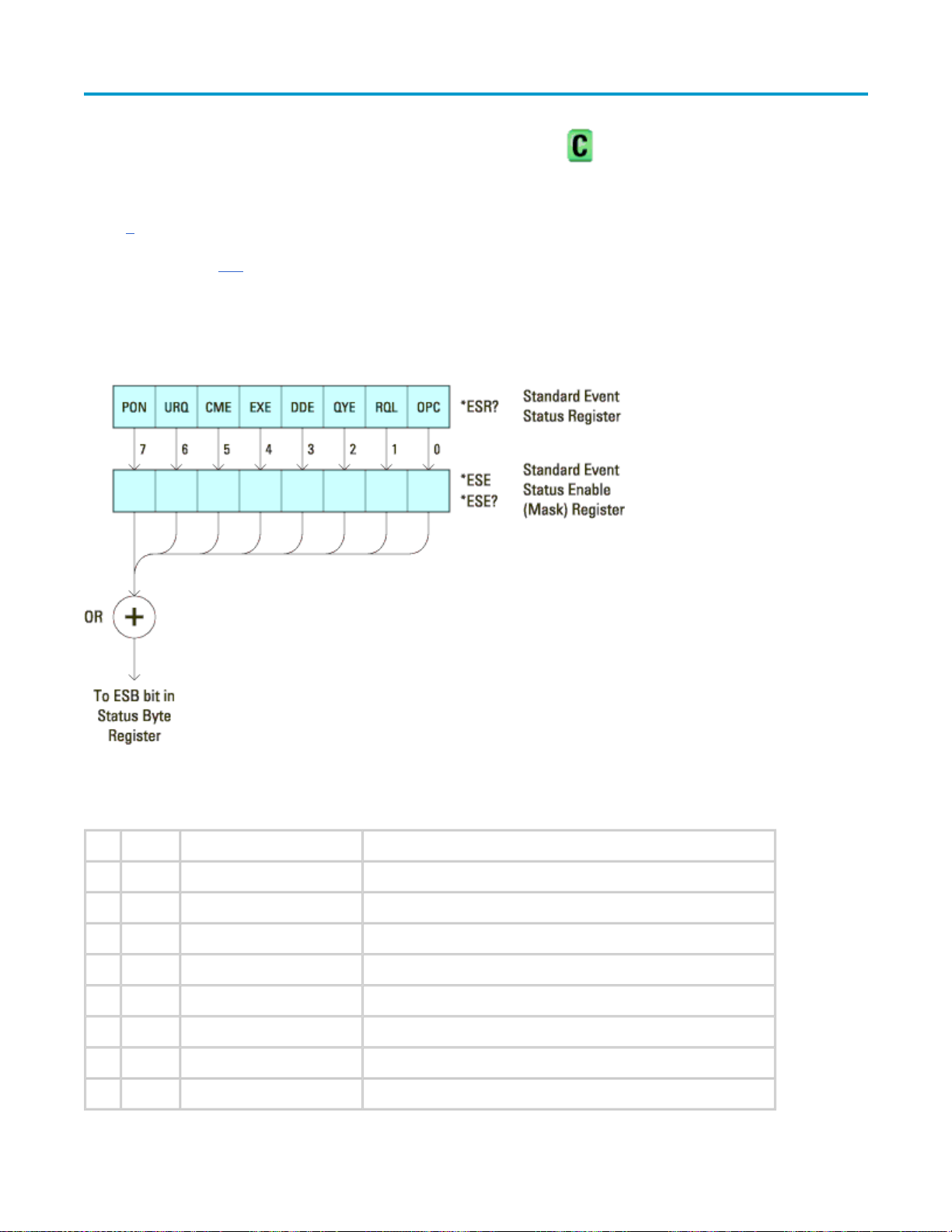
Page 76 of 412Agilent 6000 Series Oscilloscopes Programmer's Reference
*ESE (Standard Event Status Enable) —
Command Syntax
*ESE <mask_argument>
<mask_argument> ::= integer from 0 to 255
The *ESE common command sets the bits in the Standard Event Status Enable Register. The Standard Event
Status Enable Register contains a mask value for the bits to be enabled in the Standard Event Status Register.
A "1" in the Standard Event Status Enable Register enables the corresponding bit in the Standard Event Status
Register. A zero disables the bit.
Standard Event Status Enable (ESE):
Bit Name Description When Set (1 = High = True), Enables:
7 PON Power On Event when an OFF to ON transition occurs.
6 URQ User Request Event when a front-panel key is pressed.
5 CME Command Error Event when a command error is detected.
4 EXE Execution Error Event when an execution error is detected.
3 DDE Device Dependent Error Event when a device-dependent error is detected.
2 QYE Query Error Event when a query error is detected.
1 RQL Request Control Event when the device is requesting control. (Not used.)
0 OPC Operation Complete Event when an operation is complete.
08/21/07file://C:\Documents and Settings\tmh\Local Settings\Temp\~hh43DB.htm
Page 77

Query Syntax
*ESE?
The *ESE? query returns the current contents of the Standard Event Status Enable Register.
Return Format
<mask_argument><NL>
<mask_argument> ::= 0,..,255; an integer in NR1 format.
See Also
z
Introduction to Common (*) Commands
z
*ESR (Standard Event Status Register)
z
*OPC (Operation Complete)
Page 77 of 412Agilent 6000 Series Oscilloscopes Programmer's Reference
z
*CLS (Clear Status)
Common (*) Commands
*ESR (Standard Event Status Register) —
Query Syntax
*ESR
The *ESR? query returns the contents of the Standard Event Status Register. When you read the Event Status
Register, the value returned is the total bit weights of all of the bits that are high at the time you read the
byte. Reading the register clears the Event Status Register.
The following table shows bit weight, name, and condition for each bit.
08/21/07file://C:\Documents and Settings\tmh\Local Settings\Temp\~hh43DB.htm
Page 78

Page 78 of 412Agilent 6000 Series Oscilloscopes Programmer's Reference
Standard Event Status Register (ESR):
Bit Name Description When Set (1 = High = True), Indicates:
7 PON Power On An OFF to ON transition has occurred.
6 URQ User Request A front-panel key has been pressed.
5 CME Command Error A command error has been detected.
4 EXE Execution Error An execution error has been detected.
3 DDE Device Dependent Error A device-dependent error has been detected.
2 QYE Query Error A query error has been detected.
1 RQL Request Control The device is requesting control. (Not used.)
0 OPC Operation Complete Operation is complete.
Return Format
<status><NL>
<status> ::=
0,..,255; an integer in NR1 format.
Reading the Standard Event Status Register clears it. High or 1 indicates the bit is true.
See Also
z
Introduction to Common (*) Commands
z
*ESE (Standard Event Status Enable)
z
*OPC (Operation Complete)
08/21/07file://C:\Documents and Settings\tmh\Local Settings\Temp\~hh43DB.htm
Page 79

z
*CLS (Clear Status)
z
:SYSTem:ERRor
*IDN (Identification Number) —
Query Syntax
*IDN?
The *IDN? query identifies the instrument type and software version.
Return Format
AGILENT TECHNOLOGIES,<model>,<serial number>,X.XX.XX <NL>
Page 79 of 412Agilent 6000 Series Oscilloscopes Programmer's Reference
Common (*) Commands
<model> ::= the model number of the instrument
<serial number> ::= the serial number of the instrument
X.XX.XX ::= the software revision of the instrument
See Also
z
Introduction to Common (*) Commands
z
*OPT (Option Identification)
Common (*) Commands
*LRN (Learn Device Setup) —
Query Syntax
*LRN?
The *LRN? query result contains the current state of the instrument. This query is similar to
the :SYSTem:SETup
result is a valid command that can be used to restore instrument settings at a later time.
? query, except that it contains ":SYST:SET " before the binary block data. The query
Return Format
<learn_string><NL>
<learn_string> ::=
<setup_data> ::= binary block data
<learn string> specifies the current instrument setup. The block size is subject to change with different
firmware revisions.
:SYST:SET <setup_data>
in IEEE 488.2 # format
08/21/07file://C:\Documents and Settings\tmh\Local Settings\Temp\~hh43DB.htm
Page 80

The *LRN? query return format for the 6000 Series oscilloscopes has changed from previous
Agilent oscilloscopes to match the IEEE 488.2 specification which says that the query result must
contain ":SYST:SET " before the binary block data.
See Also
z
Introduction to Common (*) Commands
z
*RCL (Recall)
z
*SAV (Save)
z
:SYSTem:SETup
*OPC (Operation Complete) —
Command Syntax
Page 80 of 412Agilent 6000 Series Oscilloscopes Programmer's Reference
Common (*) Commands
*OPC
The *OPC command sets the operation complete bit in the Standard Event Status Register when all pending
device operations have finished.
Query Syntax
*OPC?
The *OPC? query places an ASCII "1" in the output queue when all pending device operations have completed.
The interface hangs until this query returns.
Return Format
<complete><NL>
<complete> ::=
1
See Also
z
Introduction to Common (*) Commands
z
*ESE (Standard Event Status Enable)
z
*ESR (Standard Event Status Register)
z
*CLS (Clear Status)
*OPT (Option Identification) —
Query Syntax
Common (*) Commands
08/21/07file://C:\Documents and Settings\tmh\Local Settings\Temp\~hh43DB.htm
Page 81

Page 81 of 412Agilent 6000 Series Oscilloscopes Programmer's Reference
*OPT?
The *OPT? query reports the options installed in the instrument. This query returns a string that identifies the
module and its software revision level.
Return Format
0,0,<license info>
<license info> ::= <All field>,<reserved>,<Factory MSO>,<Upgraded MSO>,<Probe field>,
<Memory>,<Low Speed Serial>,<reserved>,<reserved>
<All field> ::= {0 | All}
<reserved> ::= 0
<Factory MSO> ::= {0 | MSO}
<Upgraded MSO> ::= {0 | MSO}
<Probe field> ::= 0
<Memory> ::= {0 | mem2M | mem8M}
<Low Speed Serial> ::= {0 | LSS}
<reserved> ::= 0
<reserved> ::= 0
The <Factory MSO> <Upgraded MSO> fields indicate whether the unit is a mixed-signal
oscilloscope and, if so, whether it was factory installed or upgraded from an analog
channels only oscilloscope (DSO).
The *OPT? query returns the following:
Module Module Id
No modules attached 0,0,0,0,MSO,0,0,mem8M,0,0,0
See Also
z
Introduction to Common (*) Commands
z
*IDN (Identification Number)
*RCL (Recall) —
Command Syntax
*RCL <value>
Common (*) Commands
08/21/07file://C:\Documents and Settings\tmh\Local Settings\Temp\~hh43DB.htm
Page 82

<value> ::= {0 | 1 | 2 | 3 | 4 | 5 | 6 | 7 | 8 | 9}
The *RCL command restores the state of the instrument from the specified save/recall register.
See Also
z
Introduction to Common (*) Commands
z
*SAV (Save)
Common (*) Commands
*RST (Reset) —
Command Syntax
*RST
Page 82 of 412Agilent 6000 Series Oscilloscopes Programmer's Reference
The *RST command places the instrument in a known state. Reset conditions are:
Acquire Menu
Mode Normal
Realtime On
Averaging Off
# Averages 8
Analog Channel Menu
Channel 1 On
Channel 2 Off
Volts/division 5.00 V
Offset 0.00
Coupling DC
Probe attenuation AutoProbe (if AutoProbe is connected), otherwise 1.0:1
Vernier Off
Invert Off
BW limit Off
Impedance 1 M Ohm
Units Volts
Skew 0
Cursor Menu
08/21/07file://C:\Documents and Settings\tmh\Local Settings\Temp\~hh43DB.htm
Page 83

Source Channel 1
Digital Channel Menu (MSO models only)
Channel 0 - 15 Off
Labels Off
Threshold TTL (1.4V)
Display Menu
Definite persistence Off
Grid 33%
Vectors On
Quick Meas Menu
Page 83 of 412Agilent 6000 Series Oscilloscopes Programmer's Reference
Source Channel 1
Run Control
Scope is running
Time Base Menu
Main time/division 100 us
Main time base delay 0.00 s
Delay time/division 500 ns
Delay time base delay 0.00 s
Reference center
Mode main
Vernier Off
Trigger Menu
Type Edge
Mode Auto
Coupling dc
Source Channel 1
Level 0.0 V
Slope Positive
HF Reject and noise reject Off
08/21/07file://C:\Documents and Settings\tmh\Local Settings\Temp\~hh43DB.htm
Page 84

Holdoff 60 ns
External probe attenuation AutoProbe (if AutoProbe is connected), otherwise 1.0:1
External Units Volts
External Impedance 1 M Ohm
See Also
z
Introduction to Common (*) Commands
Example Code
' RESET - This command puts the oscilloscope into a known state.
' This statement is very important for programs to work as expected.
' Most of the following initialization commands are initialized by
' *RST. It is not necessary to reinitialize them unless the default
' setting is not suitable for your application.
myScope.WriteString "*RST" ' Reset the oscilloscope to the defaults.
Page 84 of 412Agilent 6000 Series Oscilloscopes Programmer's Reference
Example program from the start: VISA COM Example in Visual Basic
Common (*) Commands
*SAV (Save) —
Command Syntax
*SAV<value>
<value> ::=
The *SAV command stores the current state of the instrument in a save register. The data parameter specifies
the register where the data will be saved.
See Also
z
z
{0 | 1 | 2 | 3 | 4 | 5 | 6 | 7 | 8 | 9}
Introduction to Common (*) Commands
*RCL (Recall)
Common (*) Commands
*SRE (Service Request Enable) —
Command Syntax
*SRE <mask>
<mask> ::=
integer with values defined in the following table.
08/21/07file://C:\Documents and Settings\tmh\Local Settings\Temp\~hh43DB.htm
Page 85

Page 85 of 412Agilent 6000 Series Oscilloscopes Programmer's Reference
The *SRE command sets the bits in the Service Request Enable Register. The Service Request Enable Register
contains a mask value for the bits to be enabled in the Status Byte Register. A one in the Service Request
Enable Register enables the corresponding bit in the Status Byte Register. A zero disables the bit.
Service Request Enable Register (SRE):
Bit Name Description When Set (1 = High = True), Enables:
7 OPER Operation Status
Register
6 --- --- (Not used.)
5 ESB Event Status Bit Interrupts when enabled conditions in the Standard Event Status
4 MAV Message Available Interrupts when messages are in the Output Queue.
3 --- --- (Not used.)
2 MSG Message Interrupts when an advisory has been displayed on the oscilloscope.
1 USR User Event Interrupts when enabled user event conditions occur.
0 TRG Trigger Interrupts when a trigger occurs.
Interrupts when enabled conditions in the Operation Status Register
(OPER) occur.
Register (ESR) occur.
Query Syntax
*SRE?
08/21/07file://C:\Documents and Settings\tmh\Local Settings\Temp\~hh43DB.htm
Page 86

The *SRE? query returns the current value of the Service Request Enable Register.
Return Format
<mask><NL>
Page 86 of 412Agilent 6000 Series Oscilloscopes Programmer's Reference
<mask> ::= sum of all bits that are set, 0,..,
255; an integer in NR1 format
See Also
z
Introduction to Common (*) Commands
z
*STB (Read Status Byte)
z
*CLS (Clear Status)
Common (*) Commands
*STB (Read Status Byte) —
Query Syntax
*STB?
The *STB? query returns the current value of the instrument's status byte. The MSS (Master Summary
Status) bit is reported on bit 6 instead of the RQS (request service) bit. The MSS indicates whether or not the
device has at least one reason for requesting service.
Return Format
<value><NL>
<value> ::= 0,..,255; an integer in NR1 format
08/21/07file://C:\Documents and Settings\tmh\Local Settings\Temp\~hh43DB.htm
Page 87
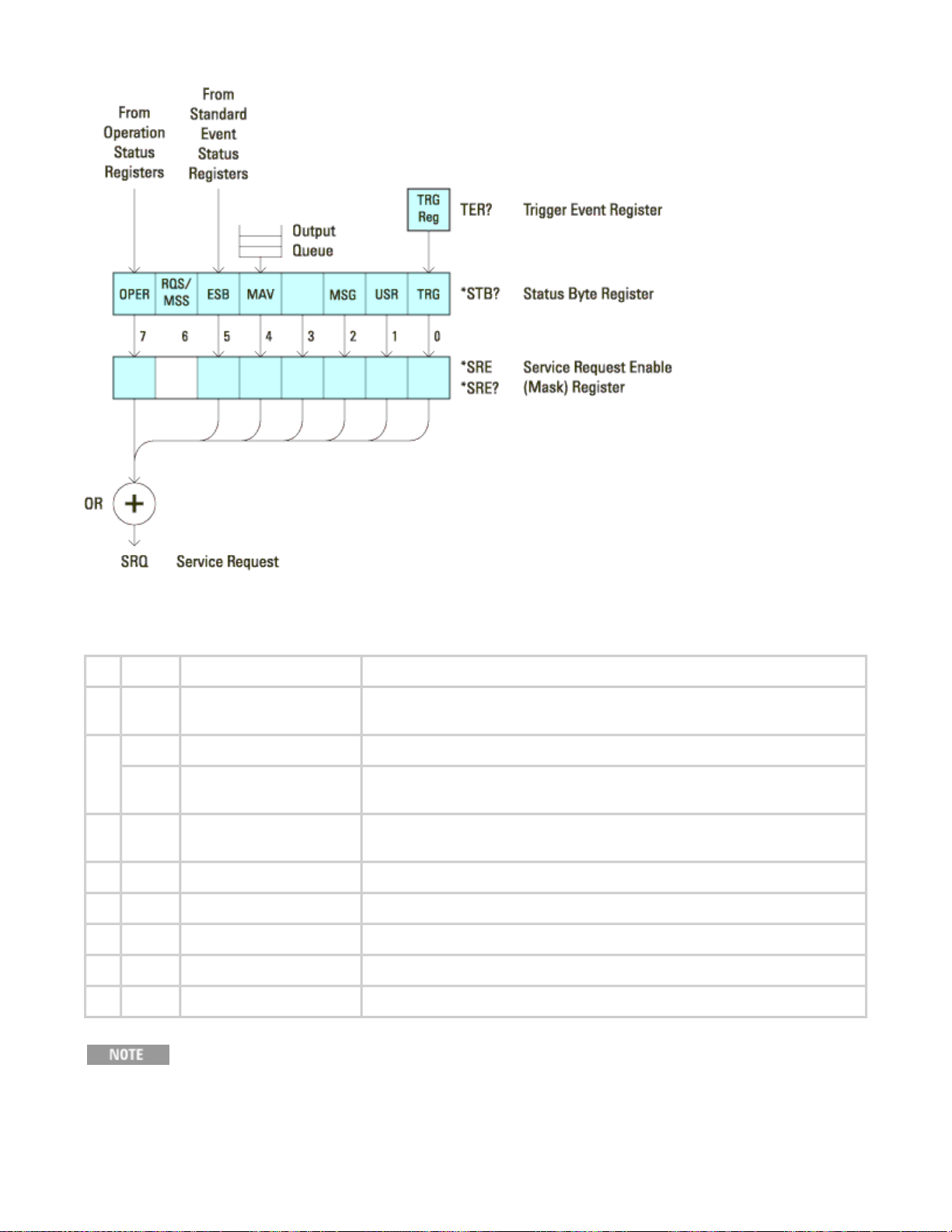
Page 87 of 412Agilent 6000 Series Oscilloscopes Programmer's Reference
Status Byte Register (STB):
Bit Name Description When Set (1 = High = True), Indicates:
7 OPER Operation Status
Register
6 RQS Request Service When polled, that the device is requesting service.
MSS Master Summary
Status
5 ESB Event Status Bit An enabled condition in the Standard Event Status Register (ESR)
4 MAV Message Available There are messages in the Output Queue.
3 --- --- (Not used, always 0.)
2 MSG Message An advisory has been displayed on the oscilloscope.
1 USR User Event An enabled user event condition has occurred.
0 TRG Trigger A trigger has occurred.
An enabled condition in the Operation Status Register (OPER) has
occurred.
When read (by *STB?), whether the device has a reason for
requesting service.
has occurred.
See Also
To read the instrument's status byte with RQS reported on bit 6, use the interface Serial Poll.
08/21/07file://C:\Documents and Settings\tmh\Local Settings\Temp\~hh43DB.htm
Page 88

z
Introduction to Common (*) Commands
z
*SRE (Service Request Enable)
*TRG (Trigger) —
Command Syntax
*TRG
The *TRG command has the same effect as the :DIGitize command with no parameters.
See Also
z
Introduction to Common (*) Commands
Page 88 of 412Agilent 6000 Series Oscilloscopes Programmer's Reference
Common (*) Commands
z
:DIGitize
z
:RUN
z
:STOP
Common (*) Commands
*TST (Self Test) —
Query Syntax
*TST?
The *TST? query performs a self-test on the instrument. The result of the test is placed in the output queue. A
zero indicates the test passed and a non-zero indicates the test failed. If the test fails, refer to the
troubleshooting section of the Service Guide.
Return Format
<result><NL>
<result> ::=
0 or non-zero value; an integer in NR1 format
See Also
z
Introduction to Common (*) Commands
*WAI (Wait To Continue) —
Common (*) Commands
08/21/07file://C:\Documents and Settings\tmh\Local Settings\Temp\~hh43DB.htm
Page 89

Page 89 of 412Agilent 6000 Series Oscilloscopes Programmer's Reference
Command Syntax
*WAI
The *WAI command has no function in the oscilloscope, but is parsed for compatibility with other instruments.
See Also
z
Introduction to Common (*) Commands
Commands by Subsystem
:DIGital<n> Commands
Control all oscilloscope functions associated with individual digital channels. See Introduction to :DIGital<n>
Commands.
Command Query Options and Query Returns
:DIGital<n>:DISPlay {{0 |
OFF} | {1 | ON}}
:DIGital<n>:LABel
:DIGital<n>:POSition
<position>
:DIGital<n>:SIZE
:DIGital<n>:THReshold
<value>[suffix]
<string> :DIGital<n>:LABel? <string> ::= any series of 6 or less
<value> :DIGital<n>:SIZE? <value> ::= {SMALl | MEDium | LARGe}
:DIGital<n>:DISPlay? {0 | 1}
<n> ::= 0-15; an integer in NR1 format
ASCII characters enclosed in quotation
marks
<n> ::= 0-15; an integer in NR1 format
:DIGital<n>:POSition? <n> ::= 0-15; an integer in NR1 format
<position> ::= 0-7 if display size =
large, 0-15 if size = medium, 0-31 if
size = small
:DIGital<n>:THReshold? <n> ::= 0-15; an integer in NR1 format
<value> ::= {CMOS | ECL | TTL | <user
defined value>}
<user defined value> ::= value in NR3
format from -8.00 to +8.00
[suffix] ::= {V | mV | uV}
Introduction to :DIGital<n> Commands
<n> ::= {0,..,15}
The DIGital subsystem commands control the viewing, labeling, and positioning of digital channels. They also
control threshold settings for groups of digital channels (D0-D7, D8-D15).
These commands are only valid for the MSO models.
08/21/07file://C:\Documents and Settings\tmh\Local Settings\Temp\~hh43DB.htm
Page 90

Page 90 of 412Agilent 6000 Series Oscilloscopes Programmer's Reference
Reporting the Setup. Use :DIGital<n>? to query setup information for the DIGital subsystem.
Return Format. The following is a sample response from the :DIGital0? query. In this case, the query was
issued following a *RST command.
:DIG0:DISP 0;THR +1.40E+00;LAB 'D0';POS +0
:DIGital<n> Commands
:DIGital<n>:DISPlay —
Command Syntax
:DIGital<n>:DISPlay <display>
<display> ::=
<n> ::= An integer, 0, 1,..,15, is attached as a suffix to the command
and defines the logic channel that is affected by the command.
The :DIGital<n>:DISPlay command turns digital display on or off for the specified channel.
{{1 | ON} | {0 | OFF}}
This command is only valid for the MSO models.
Query Syntax
:DIGital<n>:DISPlay?
The :DIGital<n>:DISPlay? query returns the current digital display setting for the specified channel.
Return Format
<display><NL>
<display> ::= {0 | 1}
See Also
z
Introduction to :DIGital<n> Commands
z
:POD<n>:DISPlay
z
:CHANnel<n>:DISPlay
z
:VIEW
z
:BLANk
z
:STATus
08/21/07file://C:\Documents and Settings\tmh\Local Settings\Temp\~hh43DB.htm
Page 91

Page 91 of 412Agilent 6000 Series Oscilloscopes Programmer's Reference
:DIGital<n> Commands
:DIGital<n>:LABel —
Command Syntax
:DIGital<n>:LABel <string>
<string> ::= any series of 6 or less characters as a quoted ASCII string.
<
n> ::= An integer, 0,..,15, is attached as a suffix to the command and
defines the logic channel that is affected by the command.
The :DIGital<n>:LABel command sets the channel label to the string that follows. Setting a label for a channel
also adds the name to the label list in non-volatile memory (replacing the oldest label in the list).
This command is only valid for the MSO models.
Label strings are six characters or less, and may contain any commonly used ASCII characters.
Labels with more than 6 characters are truncated to six characters.
Query Syntax
:DIGital<n>:LABel?
The :DIGital<n>:LABel? query returns the name of the specified channel.
Return Format
<label string><NL>
<label string> ::= any series of 6 or less characters as a quoted ASCII string
See Also
z
Introduction to :DIGital<n> Commands
z
:CHANnel<n>:LABel
z
:DISPlay:LABList
z
:BUS<n>:LABel
.
:DIGital<n>:POSition —
Command Syntax
:DIGital<n>:POSition <position>
:DIGital<n> Commands
08/21/07file://C:\Documents and Settings\tmh\Local Settings\Temp\~hh43DB.htm
Page 92

<position> ::= integer in NR1 format.
<
n> ::= An integer, 0, 1,..,15, is attached as a suffix to the command and
defines the logic channel that is affected by the command.
Channel Size Position Top Bottom
Large 0-7 7 0
Medium 0-15 15 0
Small 0-31 31 0
The :DIGital<n>:POSition command sets the position of the specified channel.
This command is only valid for the MSO models.
Query Syntax
Page 92 of 412Agilent 6000 Series Oscilloscopes Programmer's Reference
:DIGital<n>:POSition?
The :DIGital<n>:POSition? query returns the position of the specified channel.
Return Format
<position><NL>
<position> ::= integer in NR1
format.
See Also
z
Introduction to :DIGital<n> Commands
:DIGital<n>:SIZE —
Command Syntax
:DIGital<n>:SIZE <value>
:DIGital<n> Commands
<
n> ::= An integer, 0, 1,..,15, is attached as a suffix to the command
and defines the logic channel that is affected by the command.
<value> ::= {
The :DIGital<n>:SIZE command specifies the size of digital channels on the display. Sizes are set for all
digital channels. Therefore, if you set the size on digital channel 0 (for example), the same size is set on
channels 1 through 15 as well.
SMALl | MEDium | LARGe}
This command is only valid for the MSO models.
08/21/07file://C:\Documents and Settings\tmh\Local Settings\Temp\~hh43DB.htm
Page 93

Query Syntax
:DIGital<n>:SIZE?
The :DIGital<n>:SIZE? query returns the size setting for the specified digital channels.
Return Format
<size_value><NL>
<size_value> ::= {SMAL | MED | LARG}
See Also
z
Introduction to :DIGital<n> Commands
Page 93 of 412Agilent 6000 Series Oscilloscopes Programmer's Reference
z
:POD<n>:SIZE
z
:DIGital<n>:POSition
:DIGital<n>:THReshold —
Command Syntax
:DIGital<n>:THReshold <value>
<value> ::= {CMOS | ECL | TTL | <user defined value>[<suffix>]}
<user defined value> ::= -8.00 to +8.00 in NR3
<suffix> ::= {V | mV | uV}
<
n> ::= An integer, 0, 1,..,15, is attached as a suffix to the command
and defines the logic channel that is affected by the command.
z
TTL = 1.4V
format
:DIGital<n> Commands
z
CMOS = 2.5V
z
ECL = -1.3V
The :DIGital<n>:THReshold command sets the logic threshold value for all channels grouped with the
specified channel (D0-D7, D8-D15). The threshold is used for triggering purposes and for displaying the digital
data as high (above the threshold) or low (below the threshold).
This command is only valid for the MSO models.
08/21/07file://C:\Documents and Settings\tmh\Local Settings\Temp\~hh43DB.htm
Page 94

Query Syntax
:DIGital<n>:THReshold?
The :DIGital<n>:THReshold? query returns the threshold value for the specified channel.
Return Format
<value><NL>
<value> ::= threshold value in NR3 format
See Also
z
Introduction to :DIGital<n> Commands
z
:POD<n>:THReshold
z
:TRIGger[:EDGE]:LEVel
Page 94 of 412Agilent 6000 Series Oscilloscopes Programmer's Reference
Commands by Subsystem
:DISPlay Commands
Control how waveforms, graticule, and text are displayed and written on the screen. See Introduction
to :DISPlay Commands.
Command Query Options and Query Returns
:DISPlay:CLEar n/a n/a
:DISPlay:DATA
[<area>][,][<palette>]
<display data>
[<format>][,]
:DISPlay:DATA?
[,][<area>][,][<palette>]
[<format>]
<format> ::= {TIFF} (command)
<area> ::= {GRATicule} (command)
<palette> ::= {MONochrome}
(command)
<format> ::= {TIFF | BMP |
BMP8bit | PNG} (query)
<area> ::= {GRATicule | SCReen}
(query)
:DISPlay:LABel
{1 | ON}}
:DISPlay:LABList
block>
{{0 | OFF} |
<binary
<palette> ::= {MONochrome |
GRAYscale | COLor} (query)
<display data> ::= data in IEEE
488.2 # format
:DISPlay:LABel? {0 | 1}
:DISPlay:LABList? <binary block> ::= an ordered
list of up to 75 labels, each 6
characters maximum, separated by
08/21/07file://C:\Documents and Settings\tmh\Local Settings\Temp\~hh43DB.htm
Page 95

newline characters
Page 95 of 412Agilent 6000 Series Oscilloscopes Programmer's Reference
:DISPlay:PERSistence
:DISPlay:SOURce
:DISPlay:VECTors
{0 | OFF}}
<value> :DISPlay:PERSistence? <value> ::= {MINimum | INFinite}}
<value> :DISPlay:SOURce? <value> ::= {PMEMory{0 | 1 | 2 |
3 | 4 | 5 | 6 | 7 | 8 | 9}}
{{1 | ON} |
:DISPlay:VECTors? {1 | 0}
Introduction to :DISPlay Commands
The DISPlay subsystem is used to control the display storage and retrieval of waveform data, labels, and text.
This subsystem allows the following actions:
z
Clear the waveform area on the display.
z
Turn vectors on or off.
z
Set waveform persistence.
z
Specify labels.
z
Save and Recall display data.
Reporting the Setup. Use :DISPlay? to query the setup information for the DISPlay subsystem.
Return Format. The following is a sample response from the :DISPlay? query. In this case, the query was
issued following a *RST command.
:DISP:LAB 0;CONN 1;PERS MIN;SOUR PMEM9
:DISPlay Commands
:DISPlay:CLEar —
Command Syntax
:DISPlay:CLEar
The :DISPlay:CLEar command clears the display and resets all associated measurements. If the oscilloscope is
stopped, all currently displayed data is erased. If the oscilloscope is running, all of the data for active channels
and functions is erased; however, new data is displayed on the next acquisition.
See Also
z
Introduction to :DISPlay Commands
z
:CDISplay
:DISPlay Commands
:DISPlay:DATA —
Command Syntax
08/21/07file://C:\Documents and Settings\tmh\Local Settings\Temp\~hh43DB.htm
Page 96

:DISPlay:DATA [<format>][,][<area>][,][<palette>]<display data>
Page 96 of 412Agilent 6000 Series Oscilloscopes Programmer's Reference
<format> ::=
<area> ::= {GRATicule}
<palette> ::= {MONochrome}
<display data> ::= binary block data
The :DISPlay:DATA command writes trace memory data (a display bitmap) to the display or to one of the
trace memories in the instrument.
If a data format or area is specified, the :DISPlay:DATA command transfers the data directly to the display. If
neither the data format nor the area is specified, the command transfers data to the trace memory specified
by the :DISPlay:SOURce
correspond to the INTERN_0-9 files in the front panel Save/Recall menu.
Graticule data is a low resolution bitmap of the graticule area in TIFF format. This is the same data saved
using the front panel Save/Recall menu or the *SAV (Save)
{TIFF}
in IEEE-488.2 # format.
command. Available trace memories are PMEMory0-9 and these memories
command.
Query Syntax
:DISPlay:DATA? [<format>][,] [<area>][,] [<palette>]
<format> ::= {TIFF | BMP | BMP8bit | PNG}
<area> ::= {GRATicule | SCReen}
<palette> ::= {MONochrome | GRAYscale | COLor}
The :DISPlay:DATA? query reads display data from the screen or from one of the trace memories in the
instrument. The format for the data transmission is the # format defined in the IEEE 488.2 specification.
If a data format or area is specified, the :DISPlay:DATA query transfers the data directly from the display. If
neither the data format nor the area is specified, the query transfers data from the trace memory specified by
the :DISPlay:SOURce
Screen data is the full display and is high resolution in grayscale or color. It may be read from the instrument
in 24-bit bmp, 8-bit bmp, or 24-bit png format. This data cannot be sent back to the instrument.
Graticule data is a low resolution bitmap of the graticule area in TIFF format. You can get this data and send it
back to the oscilloscope.
If the format is TIFF, the only valid value area parameter is GRATicule, and the only valid palette
parameter is MONOchrome.
If the format is something other than TIFF, the only valid area parameter is SCReen, and the
only valid values for palette are GRAYscale or COLor.
command.
Return Format
<display data><NL>
<display data> ::= binary block data
in IEEE-488.2 # format.
08/21/07file://C:\Documents and Settings\tmh\Local Settings\Temp\~hh43DB.htm
Page 97

Page 97 of 412Agilent 6000 Series Oscilloscopes Programmer's Reference
See Also
z
Introduction to :DISPlay Commands
z
:DISPlay:SOURce
z
:MERGe
z
:PRINt
z
*RCL (Recall)
z
*SAV (Save)
z
:VIEW
Example Code
' IMAGE_TRANSFER - In this example, we will query for the image data
' with ":DISPLAY:DATA?", read the data, and then save it to a file.
Dim byteData() As Byte
myScope.IO.Timeout = 15000
myScope.WriteString ":DISPLAY:DATA? BMP, SCREEN, COLOR"
byteData = myScope.ReadIEEEBlock(BinaryType_UI1)
' Output display data to a file:
strPath = "c:\scope\data\screen.bmp"
' Remove file if it exists.
If Len(Dir(strPath)) Then
Kill strPath
End If
Close #1 ' If #1 is open, close it.
Open strPath For Binary Access Write Lock Write As #1 ' Open file for output.
Put #1, , byteData ' Write data.
Close #1 ' Close file.
myScope.IO.Timeout = 5000
Example program from the start: VISA COM Example in Visual Basic
:DISPlay:LABel —
Command Syntax
:DISPlay:LABel <value>
<value> ::=
The :DISPlay:LABel command turns the analog and digital channel labels on and off.
Query Syntax
:DISPlay:LABel?
The :DISPlay:LABel? query returns the display mode of the analog and digital labels.
Return Format
{{1 | ON} | {0 | OFF}}
:DISPlay Commands
08/21/07file://C:\Documents and Settings\tmh\Local Settings\Temp\~hh43DB.htm
Page 98

<value><NL>
<value> ::= {0 | 1}
See Also
z
Introduction to :DISPlay Commands
z
:CHANnel<n>:LABel
Example Code
' DISP_LABEL (not executed in this example)
' - Turns label names ON or OFF on the analyzer display.
myScope.WriteString ":DISPLAY:LABEL ON" ' Turn on labels.
Page 98 of 412Agilent 6000 Series Oscilloscopes Programmer's Reference
Example program from the start: VISA COM Example in Visual Basic
:DISPlay Commands
:DISPlay:LABList —
Command Syntax
:DISPlay:LABList <binary block data>
<binary block> ::= an ordered list of up to 75 labels, a maximum of six
characters each, separated by newline characters.
The :DISPlay:LABList command sets the label list. The labels are added in alphabetical order.
Query Syntax
:DISPlay:LABList?
The :DISPlay:LABList? query returns the alphabetical label list.
Return Format
<binary block><NL>
<binary block> ::=
characters each, separated by newline characters.
an ordered list of up to 75 labels, a maximum of six
See Also
z
Introduction to :DISPlay Commands
z
:DISPlay:LABel
z
:CHANnel<n>:LABel
z
:DIGital<n>:LABel
:DISPlay Commands
08/21/07file://C:\Documents and Settings\tmh\Local Settings\Temp\~hh43DB.htm
Page 99

Page 99 of 412Agilent 6000 Series Oscilloscopes Programmer's Reference
:DISPlay:PERSistence —
Command Syntax
:DISPlay:PERSistence <value>
<value> ::= {MINimum | INFinite}
The :DISPlay:PERSistence command specifies the persistence setting. MINimum indicates zero persistence
and INFinite indicates infinite persistence. Use the :DISPlay:CLEar
stored by infinite persistence.
Query Syntax
:DISPlay:PERSistence?
The :DISPlay:PERSistence? query returns the specified persistence value.
or :CDISplay root command to erase points
Return Format
<value><NL>
<value> ::= {MIN | INF}
See Also
z
Introduction to :DISPlay Commands
z
:DISPlay:CLEar
z
:CDISplay
:DISPlay:SOURce —
Command Syntax
:DISPlay:SOURce <value>
<value> ::=
| PMEMory5 | PMEMory6 | PMEMory7 | PMEMory8 | PMEMory9}
{PMEMory0 | PMEMory1 | PMEMory2 | PMEMory3 | PMEMory4
:DISPlay Commands
PMEMory0-9 ::= pixel memory 0 through 9
The :DISPlay:SOURce command specifies the default source and destination for the :DISPlay:DATA
and query. PMEMory0-9 correspond to the INTERN_0-9 files found in the front panel Save/Recall menu.
command
Query Syntax
:DISPlay:SOURce?
08/21/07file://C:\Documents and Settings\tmh\Local Settings\Temp\~hh43DB.htm
Page 100

The :DISPlay:SOURce? query returns the specified SOURce.
Return Format
<value><NL>
Page 100 of 412Agilent 6000 Series Oscilloscopes Programmer's Reference
<value> ::=
| PMEM7 | PMEM8 | PMEM9}
{PMEM0 | PMEM1 | PMEM2 | PMEM3 | PMEM4 | PMEM5 | PMEM6
See Also
z
Introduction to :DISPlay Commands
z
:DISPlay:DATA
:DISPlay Commands
:DISPlay:VECTors —
Command Syntax
:DISPlay:VECTors <vectors>
<vectors> ::=
The :DISPlay:VECTors command turns vector display on or off. When vectors are turned on, the oscilloscope
displays lines connecting sampled data points. When vectors are turned off, only the sampled data is
displayed.
{{1 | ON} | {0 | OFF}}
Query Syntax
:DISPlay:VECTors?
The :DISPlay:VECTors? query returns whether vector display is on or off.
Return Format
<vectors><NL>
<vectors> ::= {1 | 0}
See Also
z
Introduction to :DISPlay Commands
Commands by Subsystem
:EXTernal Trigger Commands
Control the input characteristics of the external trigger input. See Introduction to :EXTernal Trigger
Commands.
08/21/07file://C:\Documents and Settings\tmh\Local Settings\Temp\~hh43DB.htm
 Loading...