

Page 1

Error Messages
Agilent Technologies
PSG Family Signal Generators
This guide applies to the signal generator models and associated serial number prefixes
listed below. Depending on your firmware revision, front panel operation may vary from
descriptions in this guide.
E8241A: US4124
E8244A: US4124
E8251A: US4124
E8254A: US4124
Part Number: E8251-90027
Printed in USA
July 2001
© Copyright 2001 Agilent Technologies Inc.
Page 2

ii
Page 3

Contents
Introduction . . . . . . . . . . . . . . . . . . . . . . . . . . . . . . . . . . . . . . . . . . . . . . . . . . . . . . . . . . . . 2
Error Message Format. . . . . . . . . . . . . . . . . . . . . . . . . . . . . . . . . . . . . . . . . . . . . . . . . . . . 3
Error Message Types . . . . . . . . . . . . . . . . . . . . . . . . . . . . . . . . . . . . . . . . . . . . . . . . . . . . . 4
0: No Error. . . . . . . . . . . . . . . . . . . . . . . . . . . . . . . . . . . . . . . . . . . . . . . . . . . . . . . . . . . . . 6
-499 to -400: Query Errors. . . . . . . . . . . . . . . . . . . . . . . . . . . . . . . . . . . . . . . . . . . . . . . . . 7
-399 to -300: Device-Specific Errors . . . . . . . . . . . . . . . . . . . . . . . . . . . . . . . . . . . . . . . . . 9
-299 to -200: Execution Errors . . . . . . . . . . . . . . . . . . . . . . . . . . . . . . . . . . . . . . . . . . . . 16
-199 to -100: Command Errors . . . . . . . . . . . . . . . . . . . . . . . . . . . . . . . . . . . . . . . . . . . . 34
201 to 702: Device-Specific Errors . . . . . . . . . . . . . . . . . . . . . . . . . . . . . . . . . . . . . . . . . 41
iii
Page 4

Contents
iv
Page 5

Error Messages
1
Page 6

Error Messages
Introduction
Introduction
If an error condition occurs in the signal generator, it is reported to both the front panel
display error queue and the SCPI (remote interface) error queue. These tw o queues are
viewed and managed separately.
NOTE When there is an unviewed message in the front panel error queue, the ERR
annunciator appears on the signal generator’s display.
Characteristic Front Panel Display
Error Queue
Capacity (#errors) 30 30
Overflow Handling Circular (rotating).
Drops oldest error as new error comes
in.
Viewing Entries Press:
(or
Clearing the Queue Press:
Clear Error Queue(s)
Permanent Errors
(errors that must be
resolved.
For ex ampl e:
unlock,
avalanched, and
hi/lo)
Re-reported after queue is cleared. Re-reported after queue
Utility > Error Info > View Next
Previous) Error Message
Utility > Error Info >
SCPI Remote
Interface
Error Queue
Linear, first-in/first-out.
Replaces newest error
with: -350, Queue
overflow
Use SCPI query
Power up
Send a *CLS command
Read last item in the
queue
is cleared.
SYSTem:ERRor? or
STATus:QUEue?
2
Page 7
Error Messages
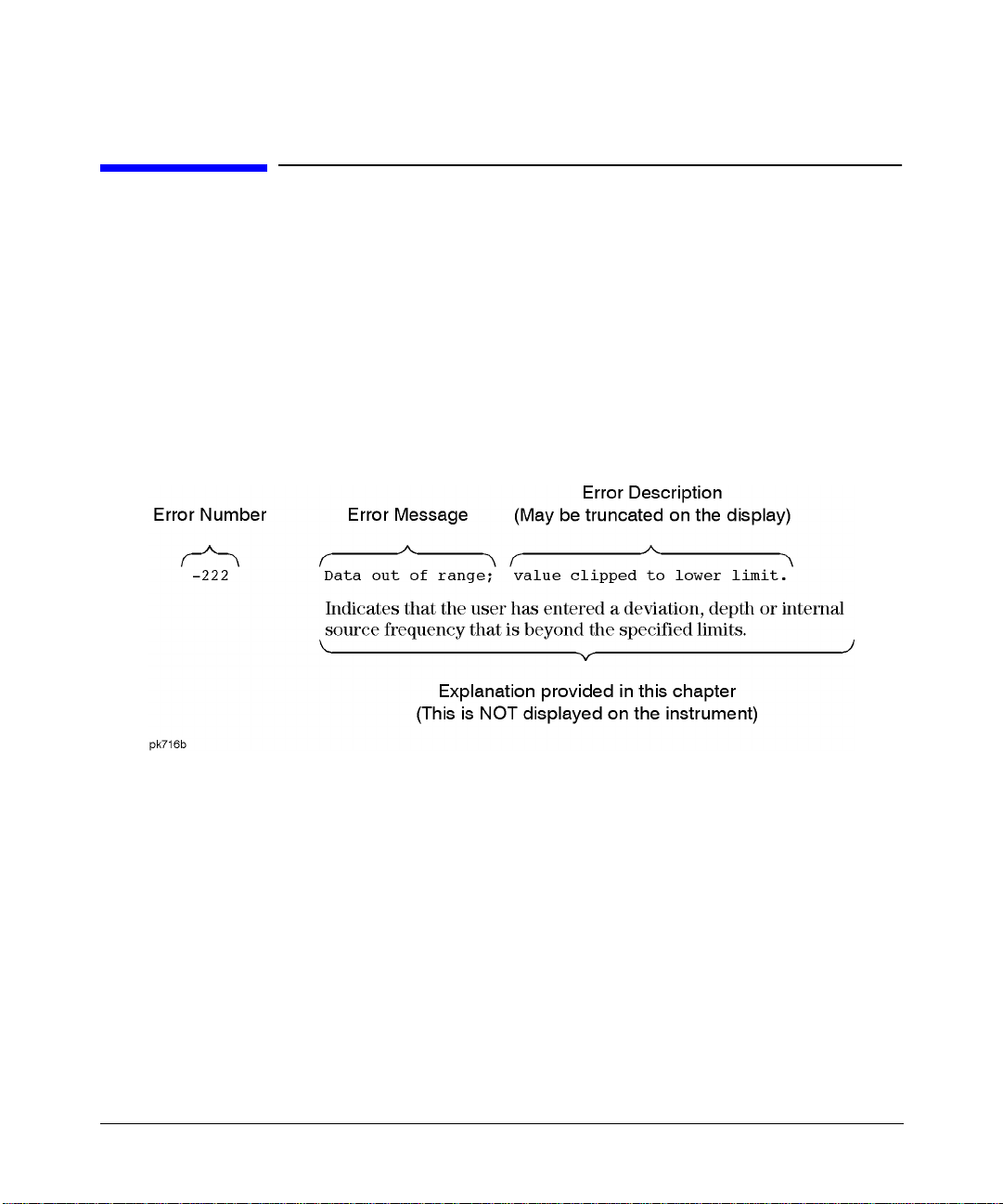
Error Message Format
Error Message Format
The system-defined error numbers are chosen on an enumerated (“1 of N”) basis. The
SCPI-defined error numbers and the <error_description> po rtions of the error query response
are displayed on the instrument.
In this chapter, an explanation is included with each error to further clarify its meaning. The
first error described in each class (for example, -400, -300, -200, -100) is a “generic” error. In
selecting the proper error number to report, more specific error codes are pre ferred.
Error messages appear in the lower-left corner of the display.
3
Page 8

Error Messages
Error Message Types
Error Message Types
Events do not generate more than one type of error. For example, an event that generates a
query error will not generate a device-specific, execution, or command error.
Query Errors (–499 to –400) indicate that the instrument’s output queue control has
detected a problem with the message exchange protocol described in IEEE 4888.2, Chapter 6.
Errors in this class set the query error bit (bit 2) in the event status register (IEEE 488.2,
section 11.5.1). These errors correspond to message exchange protocol errors described in
IEEE 488.2, 6.5. In this case:
• Either an attempt is being made to read data from the output queue when no output is
either present or pending, or
• data in the output queue has been lost.
Device Specific Errors (–399 to –300 and 201 to 702) indicate that a device operation did
not properly complete, possibly due to an abnormal hardware or firmware condition. These
codes are also used for self-test response errors. Errors in this class set the device-specific
error bit (bit 3) in the event status register (IEEE 488.2, section 11.5.1).
The <error_message> string for a positive error is not defined by SCPI. A positive error
indicates that the instrument detected an error within the GPIB system, within the
instrument’s firmware or hardware, during the transfer of block data, or during calibration.
Execution Errors (–299 to –200) indicate that an error has been detected by the
instrument’s execution control block. Errors in this class set the execution error bit (bit 4) in
the event status register (IEEE 488.2, section 11.5.1). In this case:
• Either a <PROGRAM DATA> element following a header was evaluated by the device as
outside of its legal input range or is otherwise inconsistent with the device’s capabilities, or
• a valid program message could not be properly executed due to some device condition.
Execution errors are reported after rounding and expression evaluatio n operations are
completed. Rounding a numeric data element, for example, is not reported as an execution
error.
4
Page 9

Error Messages
Error Message Types
Command Errors (–199 to –100) indicate that the instrument’s parser detected an
IEEE 488.2 syntax error. Errors in this class set the command error bit (bit 5) in the event
status register (IEEE 488.2, section 11.5.1). In this case:
• Either an IEEE 488.2 syntax error has been detected by the parser (a control-to-device
message was received that is in violation of the IEEE 488.2 standard. Possible violations
include a data element that violates device listening formats or whose type is unacceptable
to the device.), or
• an unrecognized header was received. These include incorrect device-specific headers and
incorrect or unimplemented IEEE 488.2 common commands.
5
Page 10

Error Messages
0: No Error
0: No Error
0 No error, No Er ror Messa ge(s) in Queue
The queue is empty. Every error in the queue has been read, or the queue
was purposely cleared using either the
Clear Error Queue(s) softkey or *CLS.
6
Page 11

Error Messages
-499 to -400: Query Errors
-499 to -400: Query Errors
The instrument’s output queue control has detected a problem with the message exchange
protocol described in IEEE 4888.2, Chapter 6. Errors in this class set the query error bit (bit
2) in the event status register (IEEE 488.2, section 11.5.1). These errors correspond to
message exchange protocol errors described in IEEE 488.2, 6.5.
In this case, either an attempt is being made to read data from the output queue when no
output is either present or pending, or data in the output queue has bee n lost.
-440 Query UNTERMINA TED after indefin ite resp onse
A query was received in the same program message in which a query
requesting an indefinite response was executed (see IEEE 488.2, 6.3.7.5).
-430 Query DEADLOCKE D
A condition causing a DEADLOCKED query error occurred (see
IEEE 488.2, 6.3.1.7). For example, both the input buffer and the output
buffer are full and the device cannot continue.
-430 Query DEADLOCKE D
A SCPI output queue has filled, preventing further SCPI command
execution, and there is no more room left in the corresponding SCPI input
queue to accept a query to read from the output queue. The system
automatically discards output to correct the deadlock.
-420 Query UNTERMINA TED
A condition causing an UNTERMINATED query error occurred (see
IEEE 488.2, 6.3.2.2). For example, the device was addressed to talk and an
incomplete program message was received.
-410 Query INTERRUPT ED
A condition causing an INTERRUPTED query error occurred (see
IEEE 488.2, 6.3.2.7). For example, a query was followed by DAB or GET before
a response was completely sent.
7
Page 12

Error Messages
-499 to -400: Query Errors
-400 Query Error
This is a generic query error for devices that cannot detect more specific
errors. The code indicates only that a query error as defined in IEE 488.2,
11.5.1.1.7 and 6.3 has occurred.
8
Page 13

Error Messages
-399 to -300: Device-Specific Errors
-399 to -300: Device-Specific Errors
Some device operations did not properly complete, possibly due to an abnormal hardware or
firmware condition. These code s are also used for self-test re sponse errors . Errors in this class
set the device-specific error bit (bit 3) in the event status register (IEEE 488.2, section 11.5.1).
-362 Framing error i n program message
A stop bit was not detected when data was received (for example, a baud
rate mismatch).
-361 Parity error in program message
The parity bit was not correct when data was received (for example, an
incorrect parity bit on a serial port).
-360 Communication e rror
This is the generic communication error for devices that cannot detect the
more specific errors described for errors -361 and -362.
-350 Queue overflow
This is a specific code entered into the queue in lieu of the code that caused
the error. This message indicates that there is no more room in the queue
and an error occurred but was not recorded.
-340 Calibration failed
The device has detected a failure during its calibration procedure.
-330 Self-test failed
The device has detected a failure during its self-test procedure.
-330 Self-test faile d; EEPROM header checksum error <card_n ame>.
The card identification header for a hardware card is incorrect. If the card is
not properly identified, the instrument is likely to be non-functional. Report
this error to Agilent Technologies.
9
Page 14

Error Messages
-399 to -300: Device-Specific Errors
-330 Self-test faile d; Power supply s elf-test failu re
The self-test for a particular power supply voltage has failed. The
instrument is likely not functional. Report this error to
Agilent Technologies.
-321 Out of memory
An internal operation needed more memory than was available.
-321 Out of memory
There is insufficient working memory available. Report this error to
Agilent Technologies.
-321 Out of memory
If this occurs during a memory catalog display, it means the system did not
have enough free RAM to prepare the catalog.
-321 Out of memory; Cannot cr eate mem ory mana ger
A file system memory manager detected an internal error condition. Report
this error to Agilent Technologies.
-321 Out of memory; Cannot pr ecalcula te frequ encies . Try fe wer
frequencies.
Indicates that memory was exhausted during frequency precalculation
(used to speed the process of sweep/list mode). List mode cannot run until
either fewer frequencies have been supplied or more memory becomes
available and the same set of frequencies are sent again, FREQ:MODE CW is
executed, or :FREQ:MOD E LIST is executed.
-321 Out of memory; Cannot un compress file.
A STATE: file cannot be uncompressed because there is not enough memory
to run the decompression algorithm. Recall will fail and there will be no
instrument state change. Reduce the size of any sweep lists and try again.
10
Page 15

Error Messages
-399 to -300: Device-Specific Errors
-321 Out of memory; Complemen tary Cumulativ e Distribution . Display
cannot function.
There is insufficient working memory available. Report this error to
Agilent Technologies.
-321 Out of memory; Could not copy cu rrent is tate.
An instrument state operation, such as save/recall, could not allocate
enough space to copy an instrument state. The operation is aborted.
-321 Out of memory; Display s ystem ou t of mem ory. A n abnorm al
display may res ult. Memo ry consu mption s hould be reduc ed.
There was not eno ugh me mory in the sys te m to prope rly upd ate the di sp la y.
Some inconsistencies may be seen. The size of any list/sweep should be
reduced, and the source should be preset to clear up any inconsistencies.
Report this error to Agilent Technologies.
-321 Out of memory; Graph sub system c annot fu nction .
There is insufficient working memory available. Report this error to
Agilent Technologies.
-321 Out of memory; Histogram display cannot functi on.
There is insufficient working memory available. Report this error to
Agilent Technologies.
-321 Out of memory; Insuffici ent RAM
A memory comparison between a shadow RAM data area and the
corresponding EEPROM data area could not be performed due to
insufficient working RAM. This does not necessarily imply a memory
problem, since this comparison is only used in stringent diagnostic
situations.
11
Page 16

Error Messages
-399 to -300: Device-Specific Errors
-321 Out of memory; List form ation
The device was unable to allocate space for a lookup table, such as for list
mode precalculation. List mode cannot run until either fewer frequencies
have been supplied or more memory becomes available and the same set of
frequencies are sent again, FREQ: MODE CW is executed, or :F REQ:MODE LIST
is executed.
-321 Out of memory; Memory al location error.
There is insufficient working memory available. Report this error to
Agilent Technologies.
-321 Out of memory; Memory ca talog fa iled.
There is not enough memory to comple te a catalog listing . Reduce the size of
any sweep lists and try again.
-321 Out of memory; Memory re quest fa iled, ou t of i ndices. Memory
request greater than tot al memor y size.
A file system memory manager detected an internal error condition. Report
this error to Agilent Technologies.
-321 Out of memory; Not enoug h memory to buff er pag ing mess age.
There is not enough memory to buffer the asynchronous paging message , so
it will not be played. Reduce the size of any list/sweep, and preset the source
to clear up any inconsistencies. If the problem persists report this error to
Agilent Technologies.
-321 Out of memory; Not enoug h memory to crea te pro gress ba r.
There is not enough memory to create a progress bar. Reduce the size of any
list/sweep, and preset the source to clear up any inconsistencies. If the
problem persists report this error to Agilent Technologies.
12
Page 17

Error Messages
-399 to -300: Device-Specific Errors
-321 Out of memory; Not enoug h memory to read data file.
There is not enough memory to read the specified data file. Try a smaller
file. Reduce the size of any list/sweep, and preset the source to clear up any
inconsistencies. If the problem persists report this error to
Agilent Technologies.
-321 Out of memory; Object Me mory Are a
Indicates that memory was exhausted during instrument power-on. Report
this error to Agilent Technologies.
-321 Out of memory ; The tabl e editor cannot fun ction pr operly unt il
more memory is available .
There is insufficient working memory available. Reduce the size of any
sweep lists and try again.
-321 Out of memory; Unable to allocat e memory for S CPI resp onse.
There is not enough memory to execute this SCPI query. Reduce the size of
any list/sweep, and preset the source to clear up any inconsistencies. If the
problem persists report this error to Agilent Technologies.
-321 Out of memory; Unable to verify instrume nt sta te file.
An instrument state file could not be accessed and verified because of
insufficient memory. Reduce the s ize of any sweep lists and try again.
-320 Storage fault
The firmware detected a fault when using data storage. This error is not an
indication of physical damage or failure of any mass storage element.
-315 Configuration m emory los t
Indicates that non-volatile configuration data saved by the device has been
lost. The meaning of this error is device-dependent.
13
Page 18

Error Messages
-399 to -300: Device-Specific Errors
-315 Configuration m emory los t; Persi stent st ate ch ecksum i s bad.
Using factory d efaults.
The persistent state is corrupt and had to be reinitialized with the factory
preset values.
-315 Configuration m emory los t; Persi stent st ate pr eset. Us ing
factory default s.
The persistent state has been forced to return to factory preset values.
-315 Configuration m emory los t; Persi stent st ate ve rsion is bad.
Using factory d efaults.
The persistent state version is not recognized as valid and is assumed to be
corrupt. The persistent state is reinitialized with the factory preset values.
-314 Save/recall mem ory loss
The non-volatile data saved by the *SAV? command has been lost.
-313 Calibration mem ory lost
Indicates that non-volatile calibration data has been lost.
-312 PUD memory lost
The protected user data saved by the *PUD command has been lost.
-311 Memory error
An error was detected in the device’s memory.
-311 Memory error; U nable to configur e Save R ecall register s from
non-volatile me mory. Sav e Recall registe rs re- initiali zed.
Indicates that saved states are no longer usable. Delete explicitly using
Catalog.
14
Page 19

Error Messages
-399 to -300: Device-Specific Errors
-310 System error; Cannot cha nge manual point un til list mode err or
condition cleared.
An error is keeping the sweep/list from being able to set the frequency
and/or power. Until the problem is addressed, the manual point cannot be
changed.
-310 System error; F ile Not F ound.
The specified file cannot be found. V erify that the file exists in the
instrument file system.
-310 System error; R S232 buff er overf low: cha racter lost.
The RS232 buffer has been e xceeded. The most recent character has been
dropped.
-310 System error; U nable to determin e which attenu ator is
installed.
An invalid attenuato r iden tifi cati on code has been detect ed . Possible causes
include a loose attenuator control cable. The instrument will likely not
produce the proper output power levels . Report this error to
Agilent Technologies.
-300 Device-specific error
This is a generic device-dependent error for devices that cannot detect more
specific errors. The code indicates only that a device-dependent error as
defined in IEEE 488.2, 11.5.1.1.6 has occurred.
15
Page 20

Error Messages
-299 to -200: Execution Errors
-299 to -200: Execution Errors
An error has been detected by the instrument’s execution control bloc k. Errors in this class set
the execution error bit (bit 4) in the event status register (IEEE 488.2, section 11.5.1). In this
case:
• Either a <PROGRAM DATA> element following a header was evaluated by the device as
outside of its legal input range or is otherwise inconsistent with the device’s capabilities, or
• a valid program message could not be properly executed due to some device condition.
Execution errors are reported after rounding and expression evaluatio n operations are
completed. Rounding a numeric data element, for example, is not reported as an execution
error.
-294 Incompatible ty pe
The type or structure of a memory item is inadequate.
-293 Referenced name already exists
A downloaded program attempted to define an element (a variable ,
constant, filename, etc .) that had already been defined.
-292 Referenced name does not exist
A downloaded program attempted to access an undefined element
(a variable, constant, filename, etc.).
-291 Out of memory
A downloaded program required more memory than was available in the
instrument.
-290 Memory use erro r
A user request has directly or indirectly caused an error related to memory
or <data_handles>. This is not the same as “bad” memory.
16
Page 21

-299 to -200: Execution Errors
-286 Program runtime error
A runtime error was detected in a downloaded program.
-286 Program runtime error; F loating- Point Ex ceptio n
A floating-point mat h error (s uch a s a divi de by zero) h as been d etected. The
system will attempt to recover automatically. Report this error to
Agilent Technologies.
-285 Program syntax error
A syntax error appears within a downloaded program. The syntax used
when parsing a downloaded program is device-specific.
-284 Program current ly runnin g
Indicates that certain operations related to programs may be illegal while
the program is running. For example, deleting a running program may be
illegal.
Error Messages
-283 Illegal variable n ame
An attempt was made to reference a nonexistent variable.
-282 Illegal program name
The name used to reference a program was invalid. F or example, redef ining
an existing program, deleting a nonexistent program, or in general,
referencing a nonexistent program.
-281 Cannot create p rogram
An attempt to create a program was unsuccessful. This may be due to
insufficient memory.
-280 Program error
A downloaded program-related execution error occurred. This error message
is used when the device cannot detect the more specific errors described for
errors -281 through -289. The syntax used in a program and the mechanism
for downloading a pro gram is device-specific.
17
Page 22

Error Messages
-299 to -200: Execution Errors
-278 Macro header no t found
A syntactically legal macro label in the *GMC? query could not be executed
because the header was not previously defined.
-277 Macro redefinit ion not a llowed
The macro label defined in the *DMC command could no t be executed because
the macro label was already defined (see IEEE 488.2, 10.7.6.4).
-276 Macro recursion error
A syntactically legal macro program data sequence could not be executed
because the device found it to be recursive (see IEEE 488.2, 10.7.6.4).
-275 Macro definitio n too lon g
A syntactically legal macro program data sequence could not be executed
because the string or block contents were too long for the device to handle
(see IEEE 488.2, 10.7.6.1).
-274 Macro parameter error
The macro definition improperly used a macro parameter placeholder (see
IEEE 488.2, 10.7.3).
-273 Illegal macro l abel
The macro label defined in th e *DMC command wa s a legal string syntax, but
could not be accepted by the device (see IEEE 488.2, 10.7.3 and 10.7.6.2).
For example, the label was too long, the same as a common command
header, or contained invalid header syntax.
-272 Macro execution error
A syntactically legal macro program data sequence could not be executed
due to an error within the macro definition (see IEEE 488.2, 10.7.6.3).
18
Page 23

-271 Macro syntax er ror
A syntactically legal macro program data sequence, written in accordance
with IEEE 488.2, 10.7.2, could not be executed due to a syntax error within
the macro definition (see IEEE 488.2, 10.7.6.3).
-270 Macro error
A macro-related execution error occurred. This error message is used when
the device cannot detect the more specific errors described for errors -271
through -279.
-261 Math error in e xpression
A syntactically legal expression program data element could not be executed
due to a math error. For example, a divide-by-zero was attempted. The
definition of a math error is device-specific.
-260 Expression erro r
An expression data element-related error occurred. This error message is
used when the device cannot detect the more specific errors described for
errors -261 through -269.
Error Messages
-299 to -200: Execution Errors
-258 Media protected
The device or user has attempted to w rite to a re ad-only memo ry s ubsyste m
(msus). The definition of a protected media is device-specific.
-257 File name error
A legal program command or query could not be executed because a file
name on the device media was in error. For example, an attempt was made
to copy to a duplicate filename. The definition of what constitutes a file
name error is device-specific.
-257 File name error; D elete empty sequ ence <sequence_ name>. Delete
sequence ignore d.
The user has attempted to delete a sequence that is empty (all registers
unused). This is informational only. Typically this error is reported (several
times) when the “Delete All Sequences” command is executed.
19
Page 24

Error Messages
-299 to -200: Execution Errors
-257 File name error ; Delete a non-sa ved stat e regi ster. De lete
register ignore d.
The user has attempted to delete a state that is empty (unused). This is
informational only.
-257 File name error ; Directo ry does not supp ort ex tenders.
An extender, which is specified by an @ sign followed by a memory
subsystem name, has been specified for an explicit memory subsystem
which does not allow the @ notation. Only the default (:) memory
subsystem allows extenders.
-257 File name error ; Empty f ilename
A filename of “ “ was specified. This is not a legal filename.
-257 File name error ; Illegal extende r
An illegal memory subsystem name was used after the @.
-257 File name error ; Illegal filenam e charac ter
An illegal character was used within a filename. \, :, @ and all non-printable
ASCII characters are illegal in filenames.
-257 File name error ; Only on e “:” is allowed .
Indicates that only one colon is allowed in any filename specification. The
text before the colon is a user memory subsystem.
-257 File name error ; Only on e “@” is allowed .
Indicates that on ly one @ is allowed in any filename specification. It specifies
the memory subsystem that a user file actually resides in.
20
Page 25

Error Messages
-299 to -200: Execution Errors
-256 File name not f ound
A legal program command or query could not be executed because the file
name on the device media could not be found. For example, an attempt was
made to read or copy a nonexistent file. The definition of what constitutes a
file not being found is device-specific.
-256 File name not f ound; <fi lename>
The user has attempted to delete a file that does not exist, or an internal
table editor column file has been lost.
-256 File name not f ound; The interna l list f ile wa s not fo und.
There is no lis t data to return
An internal list file has been lost, so a new one will have to be created. These
files are the persistent information for list/sweep mode. They contain the
dwell list, the freq uency list, or the power list. Invoking the list editor will
recreate the missing file to a length of one element.
-255 Directory full
A legal program command or query could not be executed because the media
directory was full. The definition of what constitutes a full media directory
is device-specific.
-254 Media full
A legal program command or query could not be executed because the media
was full. For example, there is was no space left on the disk. The definition
of what constitutes full media is device-specific.
-254 Media full; Sav e a state registe r ignore d.
The state memory subsystem STATE: did not have enough room to save a
register. You must free some memory by deleting a file or register using
Catalog. Afterwards, try again.
21
Page 26

Error Messages
-299 to -200: Execution Errors
-254 Media full; Sav e a state registe r failed . Stat e marked
available.
The state memory subsystem STATE: did not have enough room to save a
register, so the register was lost a nd is now marked ava ilable . You must free
some memory by deleting a file or register using Catalog. Afterwards, try
again.
-254 Media full; Una ble to de lete sav ed state from non-vola tile
memory. No inst rument st ate chan ge.
The state memory subsystem STATE: was unable to delete a register. You
must free some memory by deleting a file or register using Catalog.
Afterwards, try again.
-253 Corrupt media
A legal program command or query could not be executed because of corrupt
media, for instance a bad disk or incorrect disk format. The definition of
what constitutes corrupt media is device-specific.
-253 Corrupt media; <media_na me>
A source media (possibly EEPROM) for a data file is corrupt. This error is
usually seen in conjunction with errors concerning a certain file.
-253 Corrupt media; User File System
The main memory area, used for storing instrument states and sequences as
well as other data files, is corrupt. The system automatically clears and
reconfigures this memory area. Potential causes: failing backup battery; the
loss of line power to the instrument during a write operation.
-252 Missing media
A legal program command or query could not be executed because of missing
media, for instance no disk in the disk drive. The definition of what
constitutes missing media is device-specific.
22
Page 27

Error Messages
-299 to -200: Execution Errors
-253 Missing media
If this occurs during a memory catalog display, it means the default memory
system could not be located. The instrument is likely not functioning
properly. Report this error to Agilent Technologies.
-250 Mass storage er ror
A mass storage error has occurred. This message is used when a device
cannot detect the more specific errors described for errors -251 through -259.
-250 Mass storage er ror; EEPR OM write timeout on <f ilename> .
The system was not able to program new data to an EEPROM. The system
is still functional, but files written to EEPROM (such as updated calibration
data) may be lost when the instrument’s line power is cycled. Report this
error to Agilent Technologies.
-241 Hardware missin g
A legal program command or query could not be executed because of missing
device hardware. For example, an option was not installed.
-241 Hardware missin g; <card_ name>
A test communication to a hardware card failed. The instrument is most
likely not functional. Report this error to Agilent Technologies.
-241 Hardware missin g; Instal led opti on board s do n ot match
configuration i nformatio n.
A set of option boards have been installed that do not match the information
that was given to the instrument as part of the installation. If this is the
result of a customer installed option, the wrong option was specified during
installation. If this is seen at any other time, the likely cause is an EEPROM
failure on the option card.
-241 Hardware missin g; no suc h SIO ad dress
The expected board is not installed. Report this error to
Agilent Technologies.
23
Page 28

Error Messages
-299 to -200: Execution Errors
-241 No Source Modul e connect ed
Cannot turn on Source Module Mode if source module is not connected.
Check cable connection.
-240 Hardware error
A legal program command or query could not be executed because of a
hardware problem in the device. The definition of what constitutes a
hardware problem is completely device-specific. This error is used when the
device cannot detect the more specific errors described for errors -241
through -249.
-233 Invalid version
A legal program data element w as pars ed but could no t be execute d becau se
the version of the data is incorrect to the device. This particular error is
used when file or block data elements are recognized by the instrument, but
cannot be executed for reasons of version incompatibility. For example, a
non-supported file version or a non-supported instrument version.
-232 Invalid format
A legal program data element w as pars ed but could no t be execute d becau se
the data format or structure is inappropriate. For example, when loading
memory tables or when sending a SYSTem:SET parameter for an unknown
instrument.
-231 Data questionab le
The measurement accuracy is questionable.
-231 Data questionab le; EEPRO M copy o f <filen ame>.
The EEPROM copy of a file has a correctable error. The system
automatically performs the correction. A potential cause is a failing
EEPROM. Report this error to Agilent Technologies.
-231 Data questionab le; RAM c opy of < filename >.
The non-volatile RAM copy of a file has a correctable error. The system
automatically performs the correction. A potential cause is a failing backup
battery.
24
Page 29

Error Messages
-299 to -200: Execution Errors
-230 Data corrupt or stale
Possibly invalid data. A new reading was started but not completed since
last access.
-230 Data corrupt or stale; < filename >.
The sequence file that you are attempting to run is the wrong size.
-230 Data corrupt or stale; < NAME> di ffers of fset 0 x<VALUE> : NVRAM
0x<VALUE>, EEPR OM 0x<VAL UE>.
This message can occur only if full power-on EEPROM comparison mode is
set by the factory. If this mode is set, this message indicates that the data
that was retained by the EEPROM did not match the shadow data that was
retained by the shadow non-volatile RAM, even though no uncorrectable
errors or CRC mismatch was found in the shadow memory. This error
usually indicates that the instrument lost power during EEPROM
programming. If the instrument was quiescent when it was powered off,
report this error to Agilent Technologies.
-230 Data corrupt or stale; E EPROM @ offset 0 x<VALU E>: wrot e
0x<VALUE>, read 0x <VALUE>.
After writing shadow RAM data to EEPROM, a memory comparison
detected a difference. The EEPROM may not be retaining data properly.
Report this error to Agilent Technologies.
-230 Data corrupt or stale; E EPROM co py of <f ilenam e>.
The EEPROM copy of a file is either corrupt or otherwise unusable. The
system automatically updates the non-volatile RAM copy of the EEPROM
copy using a default initialization. The actual EEPROM file is left as it is.
Report this error to Agilent Technologies.
-230 Data corrupt or stale ; file @ offset 0x<VALUE>: wrote 0x<VALU E>,
retained 0x<VAL UE>.
After writing shadow RAM data to EEPROM, a memory comparison
detected a difference. The EEPROM may not be retaining data properly.
Report this error to Agilent Technologies.
25
Page 30

Error Messages
-299 to -200: Execution Errors
-230 Data corrupt or stale; L icense f ile is o bsolet e, missi ng
entries default ed.
This error can only occur during the instrument’s first power up after
having downloaded new firmware. It indicates that the software license file
is missing entries for options supported by the current revision of firmw are.
The missing entries ha ve been added t o the file , and t heir li cense key v alue s
have been defaulted to zero. This error will occurs during the first power up
after downloading new firmware into the instrument.
-230 Data corrupt or stale; R AM copy of <file name>.
The non-volatile RAM copy of a file is either corrupt or is out of date with
the EEPROM master copy (if one exists). The system automatically
re-initializes the file from EEPROM (if appropriate) or from a default
algorithm. A potential cause is a failing backup battery.
-226 Lists not same length
Attempted to use LIST structure having individual LIS Ts of unequal leng th.
-225 Out of memory
The device has insufficient memory to perform the requested operation.
-224 Illegal paramet er value
Used where exact value, from a list of possibilities, was expected.
-223 Too much data
A legal program data element of block, expression or string type was
received that contained more data than the device could handle due to
memory or related device-specific requirements .
-223 Too Much Data; The numbe r of lis t points excee ds the m aximum
allowed.
Some tables have a maximum number of entries. Sweep/List can only have
401 points, for example.
26
Page 31

Error Messages
-299 to -200: Execution Errors
-223 Too Much Data; The numbe r of lis t points in th e table exceeds
the maximum allowed.
Some tables have a maximum number of entries. Sweep/List can only have
401 points, for example.
-223 Too much data; The numbe r of poi nts in t he tab le excee ds the
maximum allowed .
This occurs when you try to create a table that is too big. For example, if you
enter a list in SCPI that is longer than the maximum allowed length, or if
you attempt to expand a table and the table is already at its maximum
length.
-222 Data out of ran ge
A legal program data element w as pars ed but could no t be execute d becau se
the interpreted value was outside the legal range defined by the device (see
IEEE 488.2 11.5.1.1.5).
-222 Data out of range; Ma nual point exceeds list sizes. Li miting to
maximum point.
The sweep/list manual point has been reassigned to a smaller number value
due to the longe st lis t decre as in g i n s ize or being turned off. Its new valu e is
the length of the longest enabled list (frequency or power).
-222 Data out of ran ge; Manua l point exceeds freque ncy list size.
Limiting to max imum poin t.
The sweep/list manual point has been reassigned to a smaller number value
due to the longe st lis t decre as in g i n s ize or being turned off. Its new valu e is
the length of the frequency list that is the longest enabled list.
-222 Data out of ran ge; Manua l point exceeds power list siz e.
Limiting to max imum poin t.
The sweep/list manual point has been reassigned to a smaller number value
due to the longest list shrinking, or being turned off. Its new value is the
length of the power list, that is the longest enabled list.
27
Page 32

Error Messages
-299 to -200: Execution Errors
-222 Data out of ran ge; Synth esizer: Frequenc y out of bound s.
The signal generator received an internal request for a frequency outside of
its supported frequency range. Report this error to Agilent Technologies.
-222 Data out of ran ge; value clipped to lowe r limi t.
An input value is below the minimum value allowed. Examples are:
frequency setting, reference, or offset; output power; power reference and
offset; modulation depth, deviation, or modulation source frequency;
number of points and start/stop values for list mode; sequence or register
values (save/recall); dwell time.
-222 Data out of ran ge; value clipped to uppe r limi t.
An input value is above the maximum value allowed. Examples: frequency
setting, reference, or offset; output power; power reference and offset;
modulation depth, deviation, or modulation source frequency; number of
points and start/stop values for list mode; sequence or register values
(save/recall); dwell time.
-221 Settings confli ct
A legal program data element was parsed but could not be executed due to
the current device state (see IEEE 488.2 11.5.1.1.5).
-221 Settings confli ct; FM1/P M1 value set les s than FM2/PM2 value.
FM2/PM2 changed to match FM1/PM1 value.
The deviation of FM2/PM2 must always be less than or equal to the
deviation settings for FM1/PM1. This error will be reported to the queue
when FM2/PM2 is enabled and FM1/PM1 is also enabled and an adjustment
to either FM1/PM1 deviation causes the FM1 or PM1 deviation to be less
than the FM2 or PM2 deviation. It will also be reported when FM1/PM1 is
being turned on, and the last FM2/PM2 deviation setting is greater than the
current FM1/PM1 deviation setting. In both cases the FM2/PM2 deviation
will be adjusted to match the FM1/PM1 deviation.
28
Page 33

Error Messages
-299 to -200: Execution Errors
-221 Settings confli ct; FM2/P M2 value set gre ater t han FM1/ PM1
value. FM1/PM1 changed t o match FM2/PM2 value.
FM2/PM2 deviation must be Š FM1/PM1 deviation. This error is reported
when both FM1/PM1 and FM2/PM2 are enabled and an adjustment to
either FM2/PM2 deviation causes the FM2 or PM2 deviation to be greater
than the FM1 or PM1 deviation. It is also be reported as FM2/PM2 is turned
on, and the last FM1/PM1 deviation setting is less than the current
FM2/PM2 deviation setting. In both cases the FM1/PM1 deviation is
adjusted to match the FM2/PM2 deviation.
-221 Settings confli ct; FM & PM not a llowed.
There is a hardware conflict between FM and PM. The most recently
requested modulation will be turned on, the previous modulation will be
turned off.
-221 Settings confli ct; Frequency list and dw ell list are of unequal
size. Set one l ist equal to size one, or make their si zes
equal.
The frequency list has more than one element and the dwell list has more
than one element, and they are not of equal size. If any of the frequency,
power, or dwell lists have more than one element, they must all have the
same number of elements. A list of a single element is the same as a list of
an equal size with the single element repeated the necessary number of
times.
-221 Settings conflict; Frequency list and po wer list are of unequal
size. Turn one list off, set one to size one, or make their
sizes equal.
The frequency list has more than one element and the power list has more
than one element, and they are not of equal size. If any of the frequency,
power, or dwell lists have more than one element, they must all have the
same number of elements. A list of a single element is the same as a list of
an equal size with the single element repeated the necessary number of
times.
29
Page 34

Error Messages
-299 to -200: Execution Errors
-221 Settings confli ct; The f requency spacing has b een limi ted by
the number of t ones.
The product of the multitone number of frequencies and frequency spacing
must be less than or equal to 15 MHz.
-221 Settings confli ct; Incom patible step swe ep fre quency s etting.
Start, stop, ce nter or s pan sett ing chan ged to be comp atible
with last comma nd.
Incompatible step sweep frequency setting. Start, stop, center or span
setting changed to be compatible with last command.
-221 Settings confli ct; Incom patible step swe ep pow er setti ng.
Start, stop, ce nter or s pan sett ing chan ged to be comp atible
with last comma nd.
Incompatible step sweep power setting. Start, stop, center or span setting
changed to be compatible with last command.
-221 Settings confli ct; Power list an d dwell list a re of un equal
size. Set one t o size on e, or ma ke their sizes equal.
Both the dwell list and the pow er list hav e more than on e element, and they
are not of equal size. If any frequency, power, or dwell lists have more than
one element, they must all have the same number of elements. A list of a
single element is the same as a list of an equal size with the single element
repeated the necessary number of times.
-221 Settings confli ct; Pulse period set less than pulse wi dth.
Pulse width cha nged to m atch per iod valu e.
A pulse period has been entered that is smaller than the pulse width. The
instrument automatically adjusts the pulse period to match the pulse width.
-221 Settings confli ct; The s elected external trigg er setti ng
conflicts with the previ ous sett ing.
The external trigger has been set to positive edge for one trigger source and
negative edge for another trigger source.
30
Page 35

-220 Parameter error
A program data element related error has occurred. This particular error
message is used if the device cannot detect a more specific error described
for errors -221 through -229.
-220 Parameter error ; <modula tion fil e name>
The specified file is not a modulation file type.
-215 Arm deadlock
The arm source for the initiation of a measurement is set to GET and a
subsequent measurement query is re ceived. The measu rement cannot begin
until a GET is received, but the GET would cause an INTERRUPTED error.
-214 Trigger deadloc k
A trigger source for the initiation of a measurement is set to GET and a
subsequent measurement query is re ceived. The measu rement cannot begin
until a GET is received, but the GET would cause an INTERRUPTED error.
Error Messages
-299 to -200: Execution Errors
-214 Trigger deadloc k
TRIGger:SOURce BUS was selected when a MEASurement? query was
executed. No data is returned.
-213 Init ignored
A request for a measurement initiation was ignored as another
measurement was already in progress.
-213 Init ignored; C annot ini tiate sw eep in m anual mode.
The manual mode is on and therefore the instrument cannot sweep.
-213 Init ignored; S weep is a lready i nitiated .
The list/sweep is currently initiated and sweeping, therefore th e command
is not legal according to SCPI.
31
Page 36

Error Messages
-299 to -200: Execution Errors
-213 Init ignored; S weep is a lready c ontinuou sly in itiated.
The list/sweep is continuously initiated and sweeping, therefore the
command is not legal according to SCPI.
-213 Init ignored; U nable to sweep du e to swe ep bei ng in an error
state. The swee p error s hould be fixed.
The number of list, power, and/or dwell points are in conflict, or a serious
system error has occurred in list/sweep. A previous error report should have
described the error that is stalling list/sweep.
-212 Arm ignored
An arming signal was received and recognized by the device but was
ignored.
-211 Trigger ignored
A GET, *TRG, or triggering signal was received and recognized by the device,
but was ignored because of device timing considerations. For example, the
device was not ready to respond.
-210 Trigger error
A GET,*TRG, or a triggering signal could not be executed due to an error.
-202 Settings lost d ue to rtl
A setting associated with a hard local control (see IEEE 488.2, 5.6.15) was
lost when the device changed to LOCS from REMS or to LWLS from RWLS.
-201 Invalid while i n local
A command is not executable while the device is in local mode due to a hard
local control (see IEEE 488.2, 5.6.1.5). For example, a device with a rotary
switch receives a message which would change the switch’s state, but the
device is in local so the message cannot be executed.
32
Page 37

-299 to -200: Execution Errors
-200 Execution Error
For devices that cannot detect more spe cific errors, this code indicates only
that an execution error as defined in IEEE 488.2, 11.5.1.1.5 has occurred.
-200 OPC Query Timeo ut Error: Frequen cy not s ettled .
OPC query timeout occurred due to frequency being unsettled. This is
probably related to a hardware failure. Report this error to
Agilent Technologies.
Error Messages
33
Page 38

Error Messages
-199 to -100: Command Errors
-199 to -100: Command Errors
The instrument’s parser detected an IEEE 488.2 syntax error. Errors in this class set the
command error bit (bit 5) in the event status register (IEEE 488.2, section 11.5.1). In this
case:
• Either an IEEE 488.2 syntax error has been detected by the parser (a control-to-device
message was received that is in violation of the IEEE 488.2 standard. Possible violations
include a data element which violates device listening formats or whose type is
unacceptable to the device.), or
• an unrecognized header was received. These include incorrect device-specific headers and
incorrect or unimplemented IEEE 488.2 common commands.
-184 Macro parameter error
A command inside the macro definition had the wrong number or type of
parameters.
-183 Invalid inside macro def inition
The program message unit sequence, sent with a *DDT or a *DMC command,
is syntactically invalid (see IEEE 488.2, 10.7.6.3).
-181 Invalid outside macro de finition
A macro parameter placeholder ($<number) was encountered outside of a
macro definition.
-180 Macro error
This error , as well as errors -181 through -189, are generated when defining
a macro or executing a macro. This particular error message is used if the
device cannot detect a more specific error.
-178 Expression data not allo wed
A legal expression data was encountered, but was not allowed by the device
at this point in parsing.
34
Page 39

-171 Invalid express ion
The expression data element was invalid (see IEEE 488.2, 7.7.7.2). For
example, unmatched parentheses or an illegal character.
-170 Expression data error
This error, as well as errors -171 through -179, are generated when parsing
an expression data element. This particular error message is used if the
device cannot detect a more specific error.
-168 Block data not allowed
A legal block data element was encountered, but not allowed by the device
at this point in the parsing.
-161 Invalid block d ata
A block data element was expected, but was invalid (see IEEE 488.2,
7.7.6.2). For example, an END message was received before the end length
was satisfi ed.
Error Messages
-199 to -100: Command Errors
-160 Block data erro r
This error, as well as errors -161 through -169, are generated when parsing
a block data element. This particular error message is used if the device
cannot detect a more specific error.
-158 String data not allowed
A string data element was encountered, but not allowed by the device at this
point in the parsing.
-151 Invalid string data
A string data element was expected, but was invalid (see IEEE 488.2,
7.7.5.2). For example, an END message was received before the terminal
quote character.
-151 Invalid string data; filename ex ceeds maximum of 23 characters.
The specified filename exceeds the maximum length.
35
Page 40

Error Messages
-199 to -100: Command Errors
-151 Invalid string data; fil ename pl us msus exceed s maximu m of 30
characters.
The specified filename exceeds the maximum length.
-150 String data error
This error, as well as errors -151 through -159, are generated when parsing
a string data element. This particular error message is used if the device
cannot detect a more specific error.
-148 Character data not allow ed
A legal character data element was encountered where prohibited by the
device.
-144 Character data too long
The character data element contains more than twelve characters (see IEEE
488.2, 7.7.1.4).
-141 Invalid charact er data
Either the character data element contains an invalid character or the
particular element received is not valid for the header.
-140 Character data error
This error, as well as errors -141 through -149, are generated when parsing
a character data element. This particular error message is used if the device
cannot detect a more specific error.
-138 Suffix not allo wed
A suffix was encountered after a numeric element which does not allow
suffixes.
-134 Suffix too long
The suffix contained more than twelve characters (see IEEE 488.2, 7.7.3.4).
36
Page 41

-131 Invalid suffix
The suffix does not follow the syntax described in IEEE 488.2, 7.7.3.2, or the
suffix is inappropriate for this device.
-130 Suffix error
This error, as well as errors -131 through -139, are generated when parsing
a suffix. This particular error message is used if the device cannot detect a
more specific error.
-128 Numeric data no t allowed
A legal numeric data element was received, but the device does not accept
one in this position for the header.
-124 Too many digits
The mantissa of a decimal-numeric data element contained more than 255
digits excluding leading zeros (see IEEE 488.2, 7.7.2.4.1).
Error Messages
-199 to -100: Command Errors
-123 Exponent too la rge
The magnitude of an exponent was greater than 32000 (see IEEE 488.2,
7.7.2.4.1).
-121 Invalid charact er in num ber
An invalid character for the data type being parsed was encountered. For
example, an alpha in a decimal numeric or a “9” in octal data.
-120 Numeric data er ror
This error, as well as errors -121 through -129, are generated when parsing
a data element which appears to be numeric, including non-decimal numeric
types. This particular error message is used if the device cannot detect a
more specific error.
-114 Header suffix o ut of ran ge
The value of a header suffix attached to a program mnemonic makes the
header invalid.
37
Page 42

Error Messages
-199 to -100: Command Errors
-113 Undefined header
The header is syntactically correct, but it is undefined for this specific
device. For example, *XYZ is not defined for any device.
-112 Program mnemoni c too lon g
The header contains more than twelve characters (see IEEE 488.2,
7.6.1.4.1).
-111 Header separato r error
A character that is not a legal header separator was encountered while
parsing the header.
-110 Command header error
An error was detected in the header. This message is used when the device
cannot detect the more specific errors described for errors -111 through -119.
-109 Missing paramet er
Fewer parameters were received than required for the header. For example,
the *ESE common command requires one parameter, so receiving *ESE is not
allowed.
-108 Parameter not a llowed
More parameters were received than expected for the header. For example,
the *ESE common command only accepts one parameter, so receiving
*ESE 0,1 is not allowed.
-105 GET not allowed
A Group Execute Trigger was received within a program message (see IEEE
488.2, 7.7). Correct the GPIB controller program so that the GET does not
occur within a line of GPIB program code.
38
Page 43

Error Messages
-199 to -100: Command Errors
-104 Data type error
The parser recognized a data element that is not allowed. For example,
numeric or string data was expected, but block data was encountered.
-103 Invalid separat or
The parser was expecting a separator and encountered an illegal character.
For example, the semicolon was omitted after a program message unit.
-102 Syntax error; Bad comp atibility language ch aracter <character> .
In 8656/57 compatibility mode, illegal language input was received.
-102 Syntax error; B ad compat ibility language token <token> .
In 8656/57 compatibility mode, a known command or termination specifier
was received when it was not expected. F or example , a termination specifier
was received with no currently active function.
-102 Syntax error
An unrecognized command or data type was encountered. For example, a
string was received when the device does not accept strings.
-101 Invalid charact er
A syntactic command contains a character that is invalid for that type. For
example, a header containing an ampersand, SETUP&. This error might be
used in place of error numbers -114, -121, -141 and some others.
-100 Command error; Unable to set new frequen cy wit h UP/DN command.
The instrument is unable to obtain the necessary information to calculate
the new frequency in compatibility mode with the UP/DN command.
-100 Command error; Unable to set new amplitu de wit h UP/DN command.
The instrument is unable to obtain the necessary information to calculate
the new amplitude in compatibility mode with the UP/DN command.
39
Page 44

Error Messages
-199 to -100: Command Errors
-100 Command error; Remote ac tive fun ction IS not a vailable .
The instrument only supports the Increment Set (IS) command for
Frequency (FR) and Amplitude (AP) in compatibility mode. All other uses of
IS are inv alid.
-100 Command error; R0:No sta ndby mod e allowe d.
In 8656/57 compatibility mode, R0 was received via GPIB. This command is
not supported by the compatibility mode.
-100 Command error; Remote ac tive fun ction DN /UP no t availa ble.
In 8656/57 compatibility mode, either DN or UP was received via GPIB.
These commands are not supported by the compatibility mode.
-100 Command error; LO: No lo w bandwi dth ALC mode a llowed.
In 8656/57 compatibility mode, LO was received via GPIB. This command is
not supported by the compatibility mode.
-100 Command error
This is a generic syntax error for devices that cannot detect more specific
errors. The code indicates only that a command error as defined in
IEEE 488.2, 11.5.1.1.4 has occurred.
40
Page 45

Error Messages
201 to 702: Device-Specific Errors
201 to 702: Device-Specific Errors
Some device operations did not properly complete, possibly due to an abnormal hardware or
firmware condition. These code s are also used for self-test re sponse errors . Errors in this class
set the device-specific error bit (bit 3) in the event status register (IEEE 488.2, section 11.5.1).
The <error_message> string for a positive error is not defined by SCPI. A positive error
indicates that the instrument detected an error within the GPIB system, within the
instrument’s firmware or hardware, during the transfer of block data, or during calibration.
208 I/O Error; <fil e name>
Invalid file name.
208 I/O error; Dele te a non- saved st ate regi ster. Delete r egister
ignored.
The user has attempted to delete an unused (empty) state. This error
message is informational only.
208 I/O error; Dele te empty sequence <sequen ce_nam e>. Dele te
sequence ignore d.
The user has attempted to delete a sequence that is empty. This error
message is informational only . Typically, this error is reported several times
when the “Delete All Sequences” command is executed. If the file is
displayed by Catalog, delete explicitly.
208 I/O error; Dire ctory doe s not ha ve a def ault file type.
Report this error to Agilent Technologies.
208 I/O error; Dire ctory ref uses to release owners hip.
Report this error to Agilent Technologies.
208 I/O error; Save a state register ignored .
A STATe: file could not be saved due to insufficient space, file corruption, or
another related problem.
41
Page 46

Error Messages
201 to 702: Device-Specific Errors
208 I/O error; Trai ling zero found i n <filen ame>. Fixing.. .
A compressed state file has a zero at its end. This is a sign of file corruption.
The device fixes the problem by concealing the zero such that it no longer
triggers an error message. The file may be corrupt or unusable.
208 I/O error; Unab le to del ete save d state from n on-volat ile
memory. No inst rument st ate chan ge.
A STATe: file could not be deleted due to the file not being found, file
corruption, or another file-related problem. If the file is displayed by a
memory catalog, delete it explicitly.
208 I/O error; Unab le to rea d bit fi le.
There is an error reading the specified bit file. Try selecting the file again.
208 I/O error; Unab le to rec all from non-vol atile memory. No
instrument stat e change.
The state file is not readable and the recall was aborted.
214 Not owner; Unab le to del ete save d state from n on-volat ile
memory. No inst rument st ate chan ge.
The user has attempted to write to a read-only memory subsystem.
222 Number of param eters are not an even num ber.
The number of user flatness calibration point values entered in the SCPI
command are not an even number. Calibration points specified in the SCPI
command should consist of frequency and amplitude value pairs, therefore
making the total value count an even number. Omitting either a frequency
or amplitude value from a pair will cause this error.
501 Attenuator hold setting over ran ge; Freq uency change f orced
attenuator adju st.
The firmware has changed the attenuator setting because, while in
attenuator hold mode, a change in frequency setting has forced the ALC
beyond its range.
42
Page 47

Error Messages
201 to 702: Device-Specific Errors
501 Attenuator hold setting over ran ge; Powe r set to lower limit.
The firmware has changed the power setting to a value other than the
requested value due to the fact that, while in attenuator hold mode, the user
has requested a power setting that is below the ALC range for the
attenuator setting. The power has been set to the lower limit.
501 Attenuator hold setting over ran ge; Powe r set to upper li mit.
The firmware has changed the power setting to a value other than the
requested value due to the fact that, while in attenuator hold mode, the user
has requested a power setting that is above the ALC range for the
attenuator setting.
508 Frac-N Loop unlocked
The synthesizer is unlocked. Service may be needed.
508 Sampler Loop un locked
The synthesizer is unlocked. Service may be needed.
508 YO Loop unlocke d
The synthesizer is unlocked. Service may be needed.
509 Output Section input ove rdrive
Internal error: report to factory.
511 Output unleveled
The instrument’s output is unleveled .
512 Reference unlocked
The instrument’s reference is unlocked. If an external reference is
connected, check the frequency and power. It is possible for this to occur
during a poor connection/disconnection of an external reference . If this error
reoccurs when no external reference is connected, the instrument may
require service.
43
Page 48

Error Messages
201 to 702: Device-Specific Errors
513 1 GHz Oscillato r unlocke d
The 1 GHz reference oscillator is unlocked. If an external reference is
connected, check the frequency. If this error reoccurs when no external
reference is connected, the instrument may require service.
514 Reference Oven cold
The reference oven is not at the required operating temperature. This is
normal if the instrument has been powered down for a while. If the error
persists, the instrument may require service.
515 Reference board : 10 Mhz referenc e signal bad o r missin g
The instrument’s reference is unlocked. If an external reference is
connected, check the frequency and power. It is possible for this to occur
during a poor connection/disconnection of an external reference . If this error
reoccurs when no external reference is connected, the instrument may
require service.
517 Calibration failur e; DCFM DC overrange
The instrument was unable to perfo rm a DCFM or DCΦM calibration due to
the input signal being outside of the offset range that can be calibrated for.
517 Calibration fai lure; Upg rade cal ibration faile d. Data not
stored.
The calibration stage of the instrument upgrade was not executed
successfully. The calibration data has not been stored. The upgrade is not
functional. Report this error to Agilent Technologies.
520 Sampler unlocke d
One of the signal generator’s samplers is unlocked or one of the sampl er
circuits are malfunctioning. The instrument may require service.
521 Yig unlocked
The Yig oscillator phase lock loop is unlocked. Problem may be due to a bad
calibration. If not, then the instrument may require service.
44
Page 49

Error Messages
201 to 702: Device-Specific Errors
522 Demodulator Unl eveled; I nput amp litude o verran ge.
The signal level is too high. Adjust the signal level for the VSA input.
522 Demodulator Unl eveled; I nput amp litude u nderra nge.
The signal level is too low. Adjust the signal level for the VSA input.
523 Power meter tim eout duri ng user flatness calib ration
The power meter times out when taking a reading during user flatness
calibration. Check GPIB configuration, address, and cable connections.
524 Power meter rea ding inva lid duri ng user flatne ss calib ration
The power meter reading is invalid during user flatness calibration. Check
GPIB configuration, address, and cable connections.
525 Cannot set inst rument in to the G PIB cont roller mode
At the start of user flatness calibration, the instrument could not be set to
the GPIB controller mode. Check GPIB configur ation, address, and cable
connections.
526 GPIB device cou ld not be assigne d
During the initialization of the user flatness calibration, the external power
meter could not be assigned to the GPIB address. Check GPIB
configuration, address, and cable connections.
527 User Flatness f requency calibrat ion tabl e empt y
There were no frequency calibration points entered in the user flatness list
table.
45
Page 50

Error Messages
201 to 702: Device-Specific Errors
600 RPP has tripped .
The reverse power protection circuit has been triggered. Repeated tripping
of this circuit can cause damage to the instrument.
600 **** CAUTION ****
REVERSE POWER PROTECTION (RPP) TRIPPED
Repeated RPP tripping may damage the instrument!
Damage can occur if an external signal was applied at the RF Output or
ESD is detected at RF Output.
Damage will not occur if a poor RF out put port matc h exists when the power
level is set beyond the specified range.
601 Power search fa iled.
While executing power search, the level meter circuit failed to return a
meaningful value. This event indicates that the power is in a range that the
leveling loop cannot properly level. The power will be set to the last properly
leveled power.
615 New wave shap e changes limit fo r internal freque ncy; frequ ency
changed to new limit.
When using the internal modulation source, the upper limit varies for the
different waveforms. If the user changes the waveform when the internal
source frequency is higher than that allowed for the new waveform, the
frequency for the source will be changed, and the user informed of that
change with this message.
46
Page 51

Error Messages
201 to 702: Device-Specific Errors
616 Configuration E rror; Att enuator configur ation does not match
actual installe d attenua tor type .
A mismatch was found between the configured and detected attenuator
types. The instrument may not be fully functional. Report this error to
Agilent Technologies.
616 Configuration E rror; Opt ion reco nfigurat ion fa iled.
As a part of option reconfiguration, the instrument reboots. If the
reconfiguration failed, it is reported when the instrument completes the
reboot. Try repeating the option reconfiguration. Report this error to
Agilent Technologies.
617 Configuration e rror; Cou ld not s tart lic ense s ystem.
The Software License System has failed to operate. The software option
cannot be enabled. Report this error to Agilent Technologies.
617 Configuration e rror; Ill egal com bination of in stalled option
boards.
An option board or board combination that is not supported by the installed
firmware has been specified or detected. Be sure that you have the proper
instrument and firmware to support the option board, and that you have
specified a supported combination of options.
617 Configuration e rror; Ins talled b oard not suppo rted.
An option board or board combination that is not supported by the installed
firmware has been specified or detected. Be sure that you have the proper
instrument and firmware to support the option board, and that you have
specified a supported combination of options.
617 Configuration e rror; Inv alid fil e system confi guration block
size defaulted.
A block size configuration error was detected by the file system. A default
value has been used. Report this error to Agilent Technologies.
47
Page 52

Error Messages
201 to 702: Device-Specific Errors
617 Configuration e rror; Inv alid fil e system confi guration max
files defaulted .
A maximum files configuration error was detected by the file system. A
default value has been used. Report this error to Agilent Technologies.
617 Configuration e rror; Inv alid fil e system confi guration memory
size defaulted.
A memory size configuration error was detected by the file sy stem. A default
value has been used. Report this error to Agilent Technologies.
617 Configuration e rror; Inv alid opt ion boar d conf iguratio n.
An invalid combination of option boards has been configured. If this error
has occurred as the result of a customer-installed option, uninstall all
options and then reinstall the correct options. Report this error to
Agilent Technologies.
617 Configuration e rror; Old bootrom detecte d. Fil e system and
instrument stat e re-init ialized due to f irmwar e upgrad e.
Replace bootrom to avoid this in the fut ure.
The firmware has detected that the instrument contains an old bootrom
version. As a result the user file system and instrument states have been
re-initialized. Instrument calibration files have not been affected. In the
future, to avoid re-initialization of the file system and instrument states
that will occur with firmware upgrades, return the instrument to
Agilent Technologies for bootrom replacement.
617 Configuration e rror; <OP TION>, I nvalid ( incons istent) license
key.
The License Key for the indicated software option is invalid. If the option
has not been purchased, then enter a value of zero for its key to disable the
option, otherwise enter the correct value from the License Key Certificate.
618 RS232 times out ; RS232 r eset.
If further input is not received within the timeout time while a SCPI
command is being processed, the command is aborted and the input buffer is
cleared.
48
Page 53

Error Messages
201 to 702: Device-Specific Errors
624 Lowband coupler detector fault: Power er ror be low 2 GH z.
A lowband coupler detector fault has caused an error in the power level
below 2 GHz. The signal generator may require service if precise power
levels are required below 2 GHz.
625 Internal pulse generator unlocke d
The internal pulse generator clock is unlocked. Service may be needed.
626 Internal modula tion sour ce unloc ked
The internal modulation source clock is unlocked. Service may be needed.
627 Warning: Pulse Width too narrow for ALC
The pulse width is too narrow for the AL C to function properly. Turning off
ALC will improve performance.
700 State Save Reca ll Error; Recall aborted. Unabl e to rec all the
state from non- volatile memory.
The state file was not readable, so the recall was aborted. If state file exists,
delete explicitly using the memory catalog.
700 State Save Reca ll Error; Recall data dif ferent from FW
revision. No in strument state ch ange.
An attempt was made to recall a state that was saved with an incompatible
version of the instrument firmware. This typically occurs when a state file is
copied from an instrument with a newer version of firmware to an
instrument with an older version of firmware. Newer versions of instrument
firmware can read older state files.
700 State Save Reca ll Error; Recall non-save d stat e regist er.
Recall ignored.
A recall was attempted for a state register that is unused. If state file exists ,
delete explicitly using catalog.
700 State Save Rec all Error; Recalled s tate has a bad ch ecksum. No
instrument stat e change.
The state file was corrupt or out-of-date, so the recall was ignored. If state
file exists, delete explicitly using the memory catalog.
49
Page 54

Error Messages
201 to 702: Device-Specific Errors
700 State Save Reca ll Error; The sta te file is fro m a diff erent
firmware revisi on that d oes not support commen ts.
An attempt was made to write a comment to a state file revision that does
not support comments. Comments in saved state files are not supported by
the A.01.00 and A.01.01 releases of the instrument firmware.
702 Load/Store Erro r; Operat ion not allowed in Fai l-Safe P reset
Mode.
This informs you that software or hardware options can not be configured
while in Fail-Safe Preset Mode. Cycle th e instrument power and try again.
702 Load/Store Erro r; Operat ion not allowed in Fai l-Safe P reset
Mode.
A hardware option was installed while in fail-safe preset mode. After a
fail-safe preset, the power must be cycled before a hardware option is
installed.
50
 Loading...