

Page 1
USER MANUAL
AD1 10 and AD1 1 1
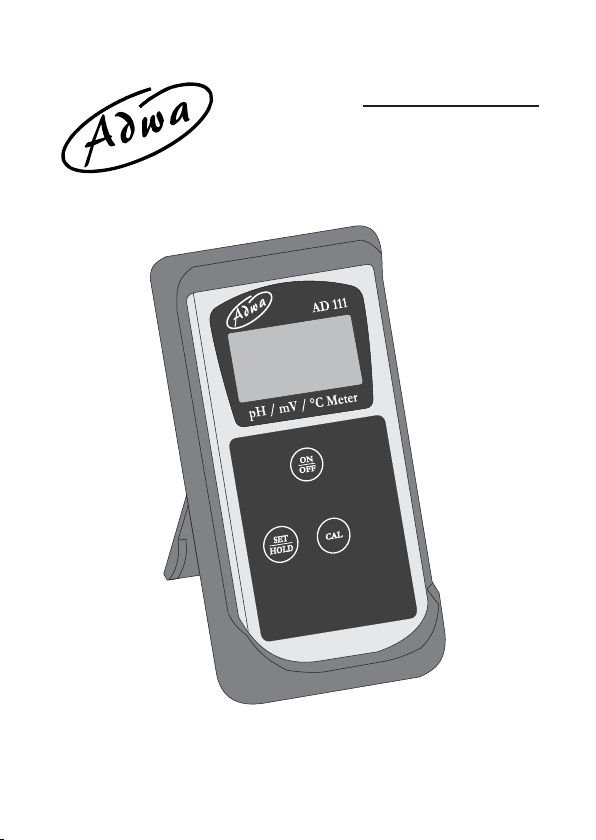
pH/°C and pH/mV/°C Meters
www.adwainstruments.com
Page 2

Page 3

Dear Customer,
Thank you for choosing an Adwa product.
Please read carefully this manual before starting
operations.
This instrument is in compliance with the EMC Directive
89/336/EEC and Low Voltage Directive 73/23/EEC for
electrical equipments.
For additional technical information, please e-mail us at
[email protected].
Page 4

TABLE OF CONTENTS
Introduction ............................................................... 5
Technical Data .......................................................... 6
Display and Keyboard Functions .............................. 7
Measurements .......................................................... 9
Calibration ............................................................... 12
Battery Replacement .............................................. 15
Electrode Maintenance ........................................... 16
Probes and Solutions ............................................... 17
Notes....................................................................... 19
4
Page 5

INTRODUCTION
AD110 and AD111 are compact pH meters featuring
automatic pH calibration, hold function, low battery
indication, temperature measurement and compensation.
In addition, AD111 can measure in the mV range, if
using proper electrode.
Both models are supplied complete with:
• AD1230B pH electrode with Epoxy body , tip protection
bottle, BNC connector and 1 m cable
• AD7662 stainless steel temperature probe, 1 m cable
• pH 4.01 and pH 7.01 calibration buffers (20 ml sachet
each)
• Batteries (4 x 1.5V AA alkaline)
• Instruction manual
5
Page 6

TECHNICAL DATA
AD110 AD111
Range -2.00 to 16.00 pH / -5.0 to 105.0 °C
--- ±1000 mV
Resolution 0.01 pH / 0.1 °C
--- 1 mV
Accuracy@25°C ±0.02 pH
±0.5 °C up to 60 °C / ±1 °C outside
--- ±2 mV
pH Calibration Automatic, 1 or 2 point,
with 3 memorized buffer values
(pH 4.01, 7.01 and 10.01)
mV Calibration --- Factory
Temp. Calibration Factory
Temp. Compensation
Automatic or 25 °C fixed
Battery Type / Life
4 x 1.5V AA / approx. 1500 hours of use
Auto-off After 8 minutes of non-use
Environment 0 to 50 °C; RH max 95%
Dimensions 70 x 145 x 26 mm
Weight Approx. 200 g
6
Page 7
DISPLAY AND KEYBOARD FUNCTIONS
7
Page 8

Display
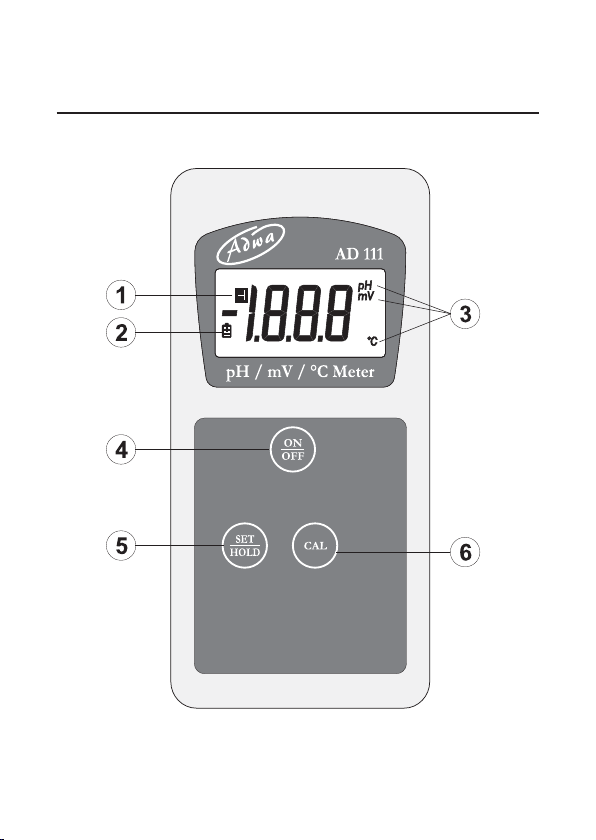
1. H symbol, lights up to indicate that the reading is
frozen on display
2. Battery symbol, lights up to indicate a low battery
condition
3. Measure unit of the displayed reading: pH, mV
(AD111 only) or °C
Keyboard
4. ON/OFF key, to turn the instrument ON and OFF
5. SET/HOLD key, to select measurement range,
confirm calibration points, and freeze reading on
display (keep pressed)
6. CAL key, to enter/exit calibration mode
8
Page 9
MEASUREMENTS
• Each instrument is supplied complete with four 1.5V
batteries. Install the batteries as explained in the
“Battery Replacement” paragraph (see page 14).
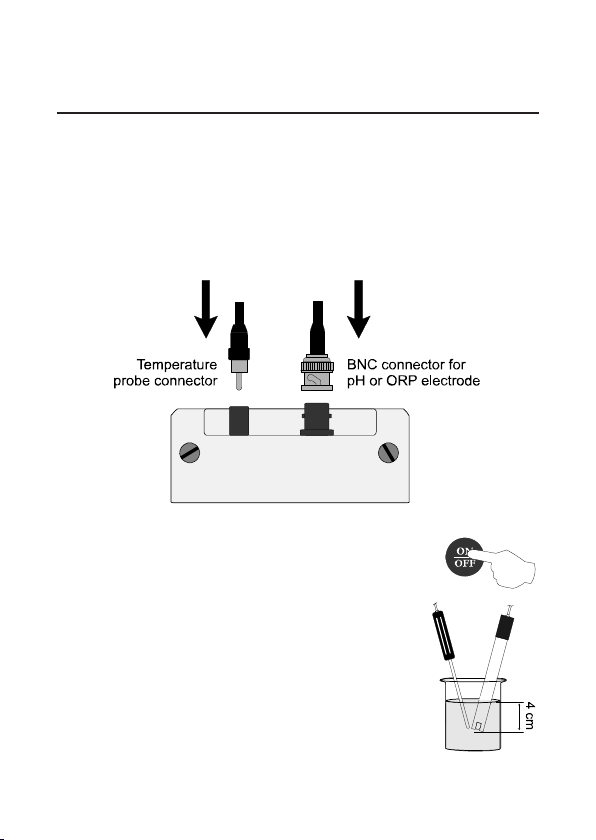
• Attach pH electrode and temperature probe to the
connectors on the top of the instrument.
• Turn ON by pressing the ON/OFF
key.
• Remove the protective bottle from
the pH electrode tip. Immerse pH
electrode and temperature probe in
the solution to be tested, stir gently
and wait for stable reading.
9
Page 10
Note: The pH electrode tip should be submersed at
least 4 cm into the solution.
Note: The temperature probe should be located as near
as possible to the pH electrode.
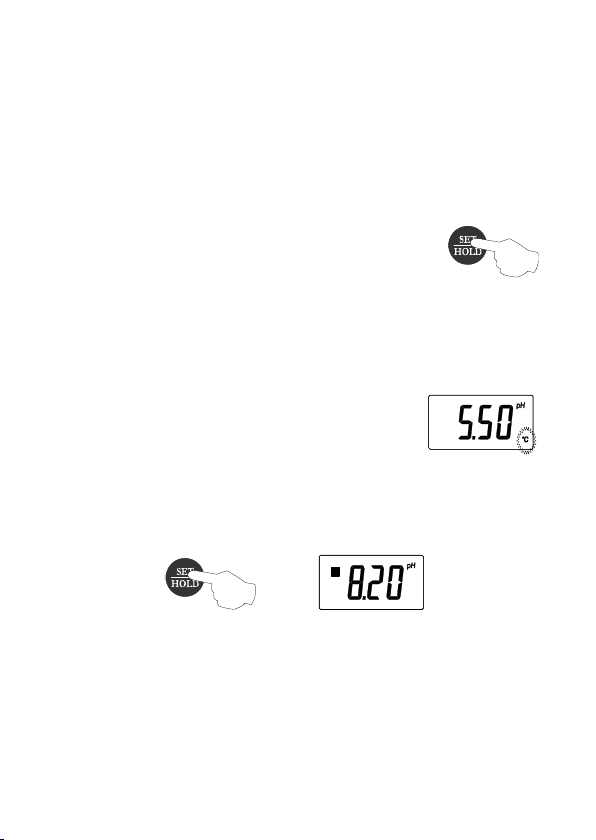
• Press the SET/HOLD key to display
the desired range: pH, mV (only for
AD111 with the proper electrode), or
°C (temperature).
pH readings are automatically
compensated for temperature variations.
• If the temperature probe is not connected, the
compensation is done at a fixed value
of 25 °C (the “°C” tag blinks to advise
the operator).
• To freeze the display , from measurement
mode, press and hold the SET/HOLD key until the “H”
tag lights up.
Press SET/HOLD again to return to normal mode.
• After use, turn the meter OFF by pressing ON/OFF
and disconnect the probes.
10
Page 11

• Clean the pH electrode with water and insert the tip
protection bottle. Never let the electrode tip dry .
See “Electrode Maintenance” paragraph (page 15) for
details.
11
Page 12
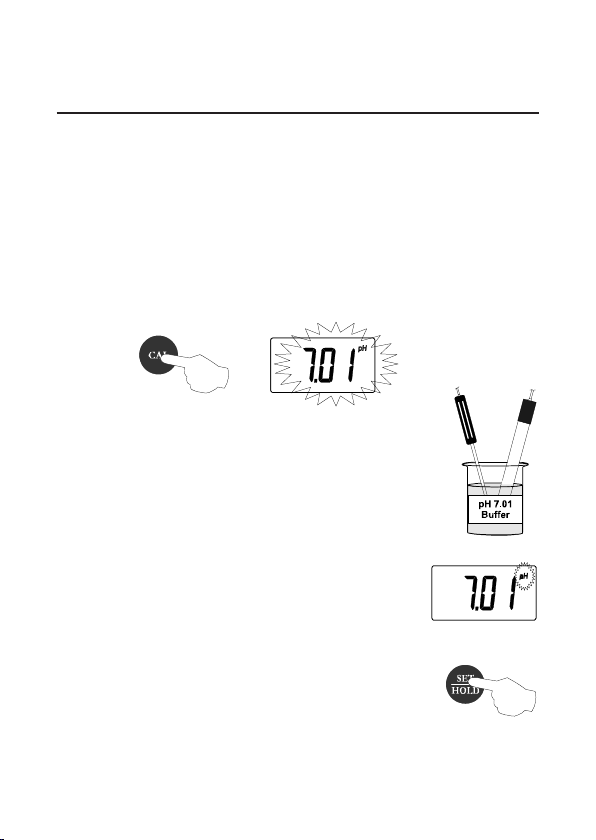
CALIBRATION
The instrument is factory calibrated for mV and
temperature ranges. Contact your dealer for re-
calibration, if necessary .
For pH calibration, proceed as follows:
• Enter the calibration mode by pressing CAL key . “7.01
pH” will start blinking.
• For a single-point calibration, im-
merse pH electrode and temperature
probe in any of the memorized buffers
(e.g. pH 4.01, 7.01 or 10.01).
• The meter automatically recognizes
and displays the buffer value.
• When the pH tag stops blinking, press
SET/HOLD to confirm the calibration
point.
12
Page 13
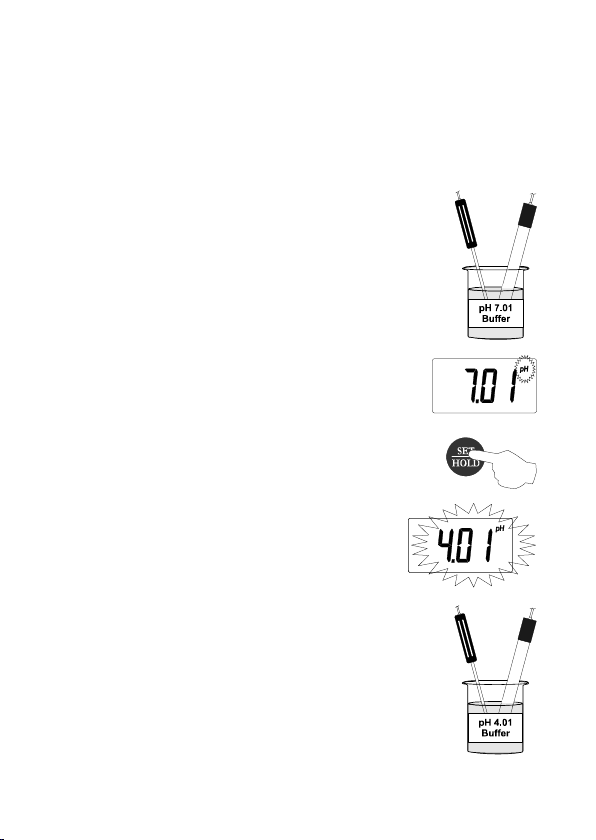
Note: If the pH 7.01 buffer was used, press SET/HOLD
again to exit the calibration mode. Otherwise, if a
different buffer was used, the meter automatically
returns to normal mode.
• For a two-point calibration, immerse
pH electrode and temperature probe
in pH 7.01 buffer.
• The meter automatically recognizes
and displays the buffer value.
• When the pH tag stops blinking, press
SET/HOLD to confirm and store the
first calibration point.
• The meter will then ask for the second
buffer.
• Immerse pH electrode and temperature
probe in pH 4.01 (or pH 10.01) buffer .
13
Page 14
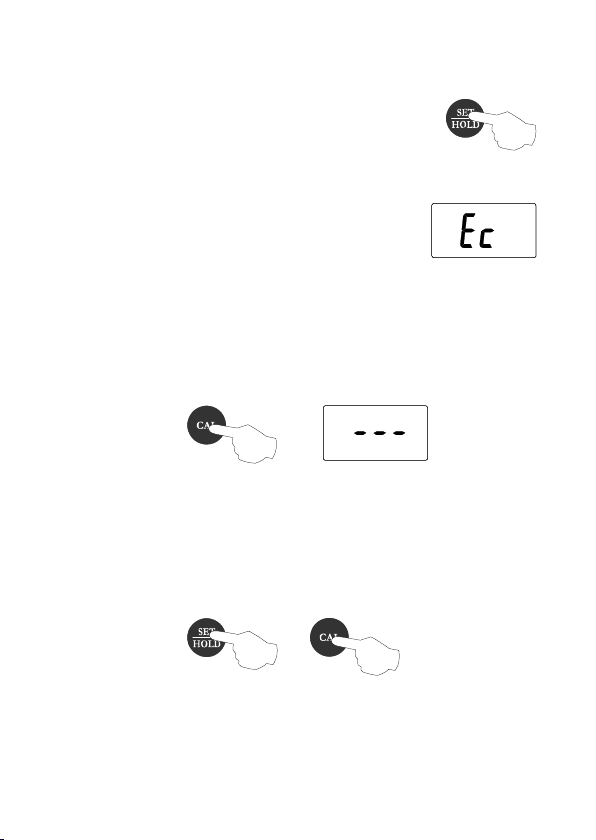
• When also this buffer is recognized,
press SET/HOLD to confirm and
store the second calibration point; the
meter will return to normal mode.
Note: If a solution with wrong pH value
is used as buffer for calibration,
the LCD displays the “Ec”
message.
Note: To exit the calibration mode, press CAL at any
time. The meter will display dashes and then
return to normal measurement mode.
Note: To reset to the default values, after entering
the calibration mode and before the first point is
confirmed (pH tag is blinking), press and hold
the SET/HOLD key, and then CAL.
Note: For better accuracy it is recommended to carry
out a 2-point calibration procedure.
14
Page 15
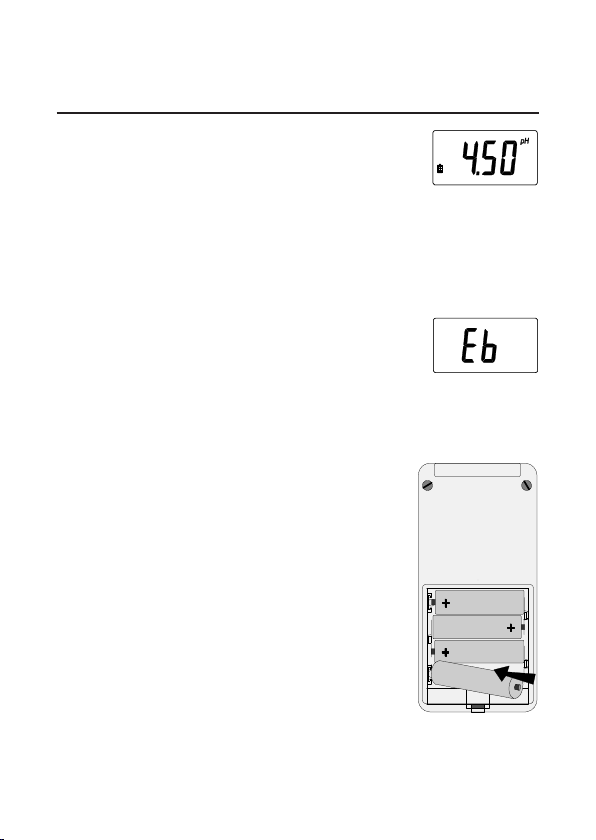
BATTERY REPLACEMENT
When the batteries become weak, the
battery symbol on the LCD lights up.
When the low battery indicator appears only a few hours
of battery life is remaining. It is recommended to
replace the batteries immediately .
In addition, when the battery level is
too low to ensure reliable readings, the
Battery Error Prevention System
(BEPS) warns the user by displaying
the “Eb” message and then switches
the instrument off.
To replace the batteries remove the
battery compartment cover on the
rear of the instrument and replace all
four 1.5V AA batteries while paying
attention to their polarity .
Batteries should only be replaced in
a safe area and using the battery type
specified in this instruction manual.
15
Page 16

ELECTRODE MAINTENANCE
Storage
T o minimize clogging and ensure a quick response time,
the glass bulb and the junction of the pH electrode should
always be kept moist.
When not in use, store the electrode with the tip protective
bottle. If you need to add some solution to the tip protective
bottle, use the AD70300 storage solution.
Periodic Maintenance
Inspect electrode and cable. The cable used for the
connection to the instrument must be intact and there
must be no points of broken insulation on the cable or
cracks on the electrode stem or bulb. If any scratches
or cracks are present, replace the electrode.
Rinse off any salt deposits with water.
Connectors must be perfectly clean and dry.
Cleaning Procedure
Soak in deionized water for approximately 30 minutes,
then rinse the electrode thoroughly with deionized water
and soak it in AD7061 cleaning solution for at least 1
hour before taking measurements.
16
Page 17

PROBES AND SOLUTIONS
AD1230B pH electrode with Epoxy body, tip
protection bottle, BNC connector and 1 m
cable
AD3230B ORP electrode with Epoxy body, tip
protection bottle, BNC connector and 1 m
cable
AD7662 Stainless steel temperature probe with 1 m
cable
AD70004P pH 4.01 buffer solution, 20 ml sachet,
25 pcs.
AD70007P pH 7.01 buffer solution, 20 ml sachet,
25 pcs.
AD70010P pH 10.01 buffer solution, 20 ml sachet,
25 pcs.
AD70300 Sorage solution, 230 ml
AD7061 Cleaning solution, 230 ml
17
Page 18

NOTES
19
Page 19

Page 20

ADW A INSTRUMENTS Kft.
Alsókikötõ sor 11, 6726 Szeged, Hungary
T el. +36 62 317 878
Fax +36 62 550 610
e-mail: [email protected]
www .adwainstruments.com
MANAD110 09/14
 Loading...