

Page 1

IPR-100F Test User Manual
July 5, 2001
I. Overview
The digital equipment “IPR-100F” is the product model of Innotek Inc.: The IPR-100F (Pro Record)
is a Springboard module for the Handspring Visor. It allows you to record voice messages of up to 8
hours length. You can edit the message description. The Hotkey button allows you quick start/stop recording, playing a message and controlling a volume. The IPR-100F has interoperable features among
basic Palm OS programs. Also, the stored voice messages in IPR-100F can be able to upload to PC by
using the upload program that operate at MS O/S, e.g. MS window95, 98 and ME.
II. Test Environments
1. Uploading the recorded voice messages from a Springboard module to a PC
- IPR-100F (Springboard module), Handspring Visor, Cradle, Notebook PC, PC Sof t ware
2. Playing the recorded voice messages with earphone
- IPR-100F (Springboard module), Handspring Visor, Cradle, Earphone
III. How to use for uploading the recorded voice messages
ž VISOR SIDE
1. Insert the IPR-100F into the Handspring Visor external slot.
2. Click the “Home ” button of the Handspring Visor
3. Launch the “ProLoader” program.
ž PC SIDE
4. Run “Voice uploader ” program.
5. Select the voice messages to be desired.
6. Click the “Upload” button for uploading the voice messages.
IV. How to use for playing the recorded voice messagesrecorded voice messages
ž VISOR SIDE
1. Insert the IPR-100F into the Handspring Visor external slot.
2. Insert the earphone into the earphone jack of the IPR-100F.
3. Click the “REC” button for launching the “Pro Record” main program.
4. Click the “Play/Pause” button for playing the recorded voice messages
CF)
— The IPR-100F Firmware Specification REV. 20.00
— Before the tests, the IPR-100F must be prepared the recorded voice messages that can be able
to record by using the voice record processing of the “Pro Record” main program
PROJECT: IPR-100F
1/ 4
Page 2
IPR-100F Test User Manual
July 5, 2001
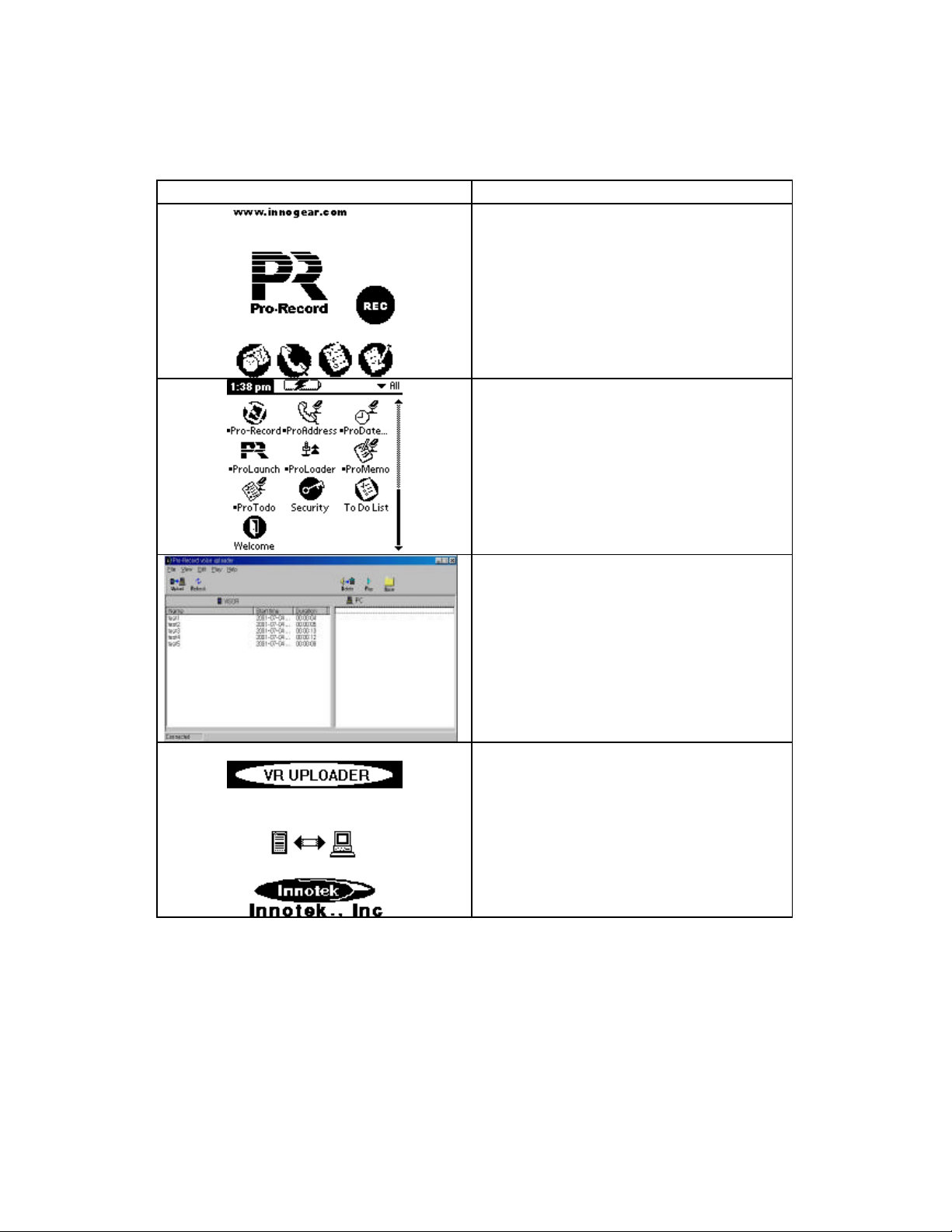
1. Uploading the recorded voice messages from a Springboard module to a PC
PICTURE CONTENT
Uploading Test of the Recorded Voice Messages
(Visor Side)
— Insert the IPR-100F into the Handspring Visor
external slot.
— Click the “ Home” button of the Handspring Visor
PROJECT: IPR-100F
Uploading Test of the Recorded Voice Messages
(Visor Side)
— Launch the “ProLoader” program.
Uploading Test of the Recorded Voice Messages
(PC Side)
— Run “Voice uploader” program.
— Select the voice messages to be desired.
— Click the “Upload” button for uploading the voice
messages.
Uploading Test of the Recorded Voice Messages
(Visor Side)
— Uploading now & EMI test
2/ 4
Page 3
IPR-100F Test User Manual
July 5, 2001
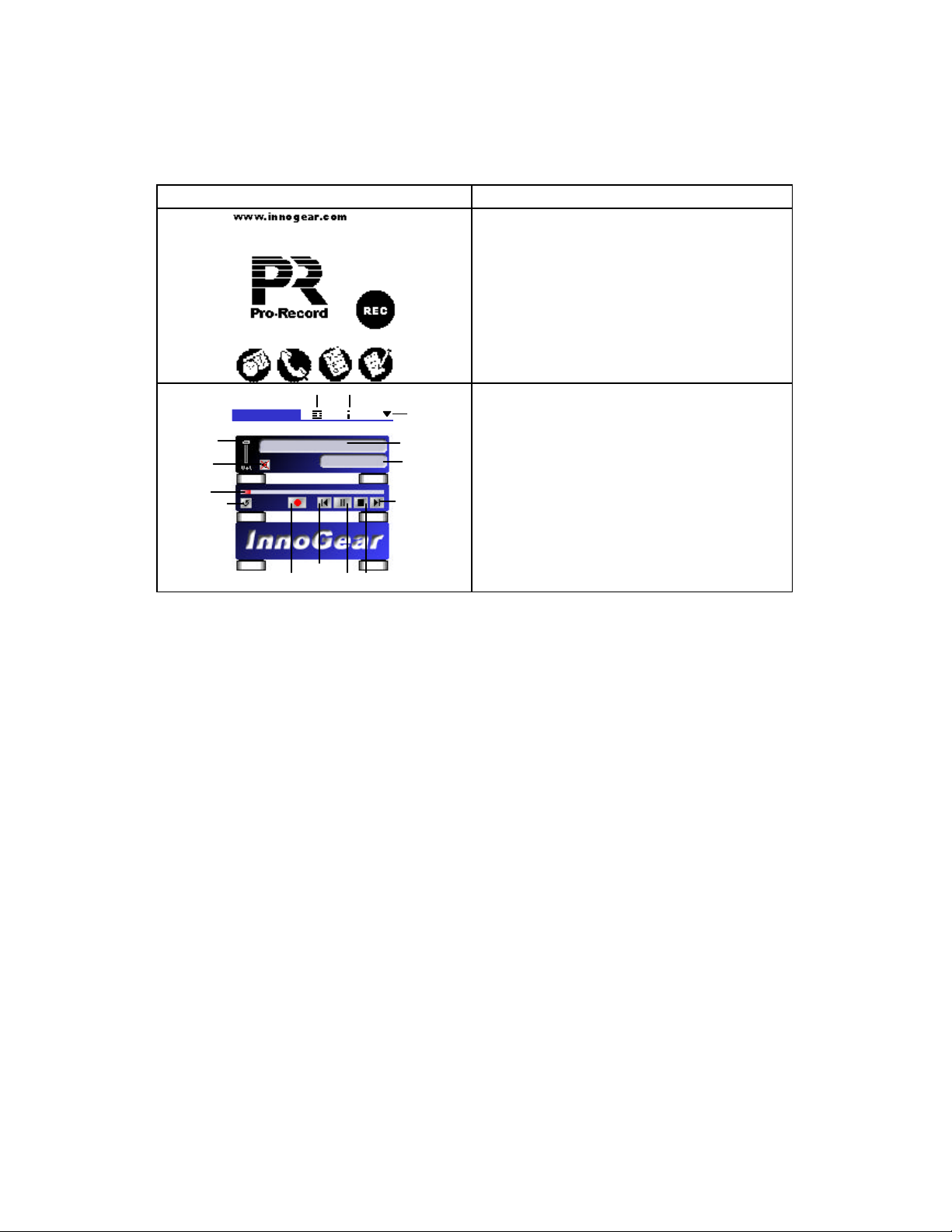
2. 2. Playing the recorded voice messages with earphone
PICTURE CONTENT
Playing Test of the Recorded Voice Messages
(Visor Side)
— Insert the IPR-100F into the Handspring Visor
external slot.
— Insert the earphone into the earphone jack of the
IPR-100F.
— Click the “REC” button for launching the “Pro
Record” main program
Playing Test of the Recorded Voice Messages
(Visor Side)
— Click the “Play/Pause” button for playing the re-
corded voice messages
— Playing now & EMI test
Volume
Mute
Progress/Skip Bar
Repeat Button
ProPro -- RecordRecord
CEO SaidCEO Said
Play List
Information
00 : 20 / 10 : 5000 : 20 / 10 : 50
Other App
Title
Time stamp
Next Button
PROJECT: IPR-100F
Record Button
Previous Button
Play/Pause
Button
Stop Button
3/ 4
Page 4

IPR-100F Test User Manual
July 5, 2001
FCC NOTICE
NOTE: This equipment has been tested and found to comply with
the limits for a Class B digital device, pursuant to Part 15 of
the FCC Rules. These limits are designed to provide reasonable
protection against harmful interference in a residential instal lation. This equipment generates, uses and can radiate radio
frequency energy and, if not installed and used in accordance
with the instructions, may cause harmful interference to radio
communications. However, there is no guarantee that interference
will not occur in a particular installation. If this equipment
does cause harmful interference to radio or television reception,
which can be determined by turning the e quipment off and on, the
user is encouraged to try to correct the interference by one or
more of the following measures:
-Reorient or relocate the receiving antenna.
-Increase the separation between the equipment and receiver.
-Connect the equipment into an outlet on a circuit different from
that to which the receiver is connected.
-Consult the dealer or an experienced radio/TV technician for
help.
NOTE: The manufacturer is not responsible for any radio or TV
interference caused by unauthorized modifications to this equip ment. Such modifications could void the user's authority to
operate the equipment.
PROJECT: IPR-100F
4/ 4
 Loading...