

Page 1
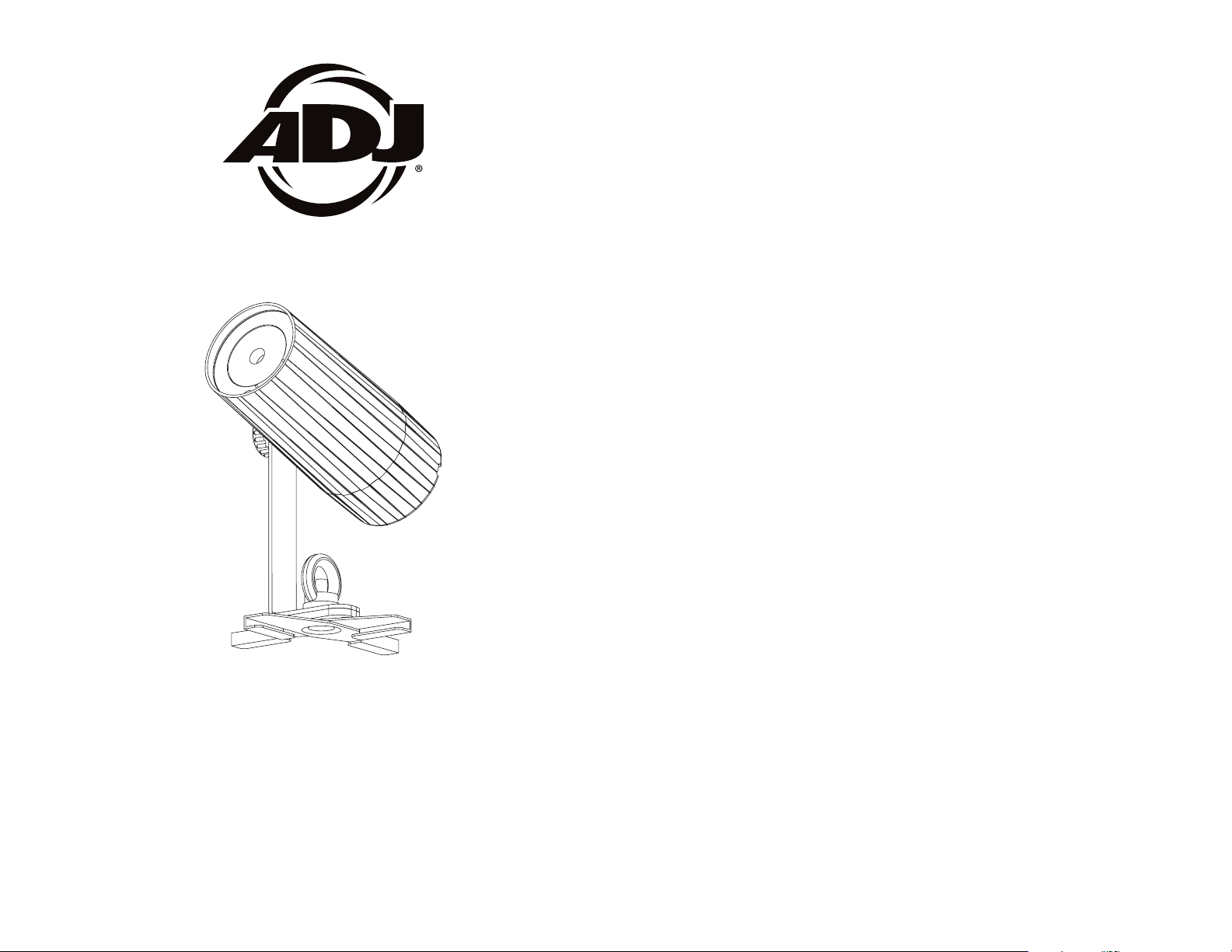
PinPoint Go WW Plus
©2017 ADJ Products, LLC all rights reserved. Information,
specications, diagrams, images, and instructions herein are
subject to change without notice. ADJ Products, LLC logo and
identifying product names and numbers herein are trademarks
of ADJ Products, LLC. Copyright protection claimed includes all
forms and matters of copyrightable materials and information
now allowed by statutory or judicial law or hereinafter granted.
Product names used in this document may be trademarks or
registered trademarks of their respective companies and are
hereby acknowledged. All non-ADJ Products, LLC brands and
product names are trademarks or registered trademarks of their
respective companies.
ADJ Products, LLC and all aliated companies hereby disclaim any and all liabilities for property, equipment, building, and
electrical damages, injuries to any persons, and direct or indirect economic loss associated with the use or reliance of any
information contained within this document, and/or as a result
of the improper, unsafe, unsucient and negligent assembly,
installation, rigging, and operation of this product.
2/17
User Instructions
Europe Energy Saving Notice
Energy Saving Matters (EuP 2009/125/EC)
Saving electric energy is a key to help protecting the enviroment.
Please turn o all electrical products when they are not in use. To
avoid power consumption in idle mode, disconnect all electrical
equipment from power when not in use. Thank you!
Page 2

PinPoint GO WW Plus Introduction
PinPoint GO WW Plus General Instructions
Unpacking: Thank you for purchasing the PinPoint GO WW Plus by
ADJ Products, LLC. Every PinPoint GO WW Plus has been thoroughly
tested and has been shipped in perfect operating condition. Carefully
check the shipping carton for damage that may have occurred during
shipping. If the carton appears to be damaged, carefully inspect your
xture for any damage and be sure all accessories necessary to operate the unit has arrived intact. In the case damage has been found
or parts are missing, please contact our toll free customer support
number for further instructions. Do not return this unit to your dealer
without rst contacting customer support.
Introduction: The ADJ PinPoint GO WW Plus is part of a continuing
pursuit to create high quality intelligent lighting. The PinPoint GO WW
Plus is a bright, battery powered, LED pinspot.
Customer Support: ADJ provides a customer support line, to pro-
vide set up help and to answer any question should you encounter
problems during your set up or initial operation. You may also visit us
on the web at www.adj.com for any comments or suggestions. Service
Hours are Monday through Friday 8:00 a.m. to 4:30 p.m. Pacic Standard Time.
Voice: (323) 582-3322
Fax: (323) 582-3108
E-mail: [email protected]
Warning! To prevent or reduce the risk of electrical shock or re, do
not expose this unit to rain or moisture.
Caution! There are no user serviceable parts inside this unit. Do not
attempt any repairs yourself, doing so will void your manufactures warranty. In the unlikely event your unit may require service please contact
ADJ Products, LLC.
To optimize the performance of this product, please read these operating instructions carefully to familiarize yourself with the basic operations
of this unit. These instructions contain important safety information
regarding the use and maintenance of this unit. Please keep this manual
with the unit, for future reference.
PinPoint GO WW Plus Features
• DC Powered and Battery Powered
• Dimming 0-100%
• Fast Fade and Slow Fade
• Compatible with the ADJ UC IR Remote, Airstream IR App, and
ADJ LED RC3 (All Sold Separately)
PinPoint GO WW Plus Warranty Registration
The PinPoint GO WW Plus carries a two year limited warranty. Please
fill out the enclosed warranty card to validate your purchase. All
returned service items whether under warranty or not, must be freight
pre-paid and accompany a return authorization (R.A.) number. The
R.A. number must be clearly written on the outside of the return package. A brief description of the problem as well as the R.A. number
must also be written down on a piece of paper included in the shipping carton. If the unit is under warranty, you must provide a copy of
your proof of purchase invoice. You may obtain a R.A. number by contacting our customer support team on our customer support number.
All packages returned to the service department not displaying a R.A.
number on the outside of the package will be returned to the shipper.
PinPoint GO WW Plus Cleaning
Due to fog residue, smoke, and dust cleaning the internal and external optical lenses must be carried out periodically to optimize light
output.
PLEASE recycle the shipping carton when ever possible.
ADJ Products, LLC - www.adj.com - PinPoint GO WW Plus User Manual Page 2
1. Use normal glass cleaner and a soft cloth to wipe down the
outside casing.
2. Clean the external optics with glass cleaner and a soft cloth
every 20 days.
3. Always be sure to dry all parts completely before plugging
the unit back in.
Cleaning frequency depends on the environment in which the fixture
operates (i.e. smoke, fog residue, dust, dew).
ADJ Products, LLC - www.adj.com - PinPoint GO WW Plus User Manual Page 3
Page 3

PinPoint GO WW Plus Safety Precautions
PinPoint GO WW Plus Battery Precautions
• To reduce the risk of electrical shock or re, do not expose this unit
rain or moisture
• Do not spill water or other liquids into or on to your unit.
• Be sure that the local power outlet match that of the required volt age for your unit.
• Do not attempt to operate this unit if the power cord has been
frayed or broken. Do not attempt to remove or break o the ground
prong from the electrical cord. This prong is used to reduce the risk
of electrical shock and re in case of an internal short.
• Disconnect from main power before making any type of connection.
• Do not remove the cover under any conditions. There are no user
serviceable parts inside.
• Never operate this unit when it’s cover is removed.
• Never plug this unit in to a dimmer pack
• Always be sure to mount this unit in an area that will allow proper
ventilation. Allow about 6” (15cm) between this device and a wall.
• Do not attempt to operate this unit, if it becomes damaged.
• This unit is intended for indoor use only, use of this product out`
doors voids all warranties.
• During long periods of non-use, disconnect the unit’s main power.
• Always mount this unit in safe and stable matter.
• Power-supply cords should be routed so that they are not likely to
be walked on or pinched by items placed upon or against them,
paying particular attention to the point they exit from the unit.
• Cleaning -The fixture should be cleaned only as recommended by
t he manufacturer. See page 3 for cleaning details.
• Heat -The appliance should be situated away from heat sources
such as radiators, heat registers, stoves, or other appliances (inclu d ing amplifiers) that produce heat.
• The fixture should be serviced by qualified service personnel when:
A. The power-supply cord or the plug has been damaged.
B. Objects have fallen, or liquid has been spilled into the appliance.
C. The appliance has been exposed to rain or water.
D. The appliance does not appear to operate normally or exhibits a
marked change in performance.
ADJ Products, LLC - www.adj.com - PinPoint GO WW Plus User Manual Page 4
1. Handling of Batteries
1.1 Do Not Short Circuit the Battery
Try to never short circuit the battery. It generates a very high current
which could cause the battery to overheat which may result in electrolyte gel leakage, harmful fumes, or explosion. The LIR tabs may
easily short-circuit by placing them on conductive surface. A short circuit may lead to heat build up and damage of the battery. An appropriate circuitry with PCM is employed to protect accidental short
circuit of the battery pack.
1.2 Mechanical shock
Droping the unit, impact hit, bending, etc. may cause failure or shortend life of the LIR battery.
2. Other
2.1 Battery connection
1). Direct soldering of wire leads or devices to the battery is strictly
prohibited.
2). Lead tabs with pre-soldered wiring shall be spot welded to the
batteries. Direct soldering may cause damage of components, such
as separator and insulator, by heat build up.
2.2 Prevention of short circuit within a battery pack
There is enough insulation layers between wiring and the batteries to
provide extra safety protection. The battery pack is constructed in a
way that no short circuit will occur which may cause smoke or re.
2.3 Do No Disassemble the Batteries
1). Never disassemble the batteries.
Doing this may cause a internal short circuit in the battery, which may
lead to harmful fumes, re, explosion, or other problems.
2). Electrolyte Gel is harmful
Electrolyte Gel should not leak from the LIR battery. Should the
electrolyte gel come into contact with the skin or eyes, ush the area
of contact immediately with fresh water and seek medical attention
immediately.
2.4 Do Not Expose the Battery to Heat or Fire
Never incinerate or dispose of the batteries in re. This may cause an
explosion, which would be very dangerous.
ADJ Products, LLC - www.adj.com - PinPoint GO WW Plus User Manual Page 5
Page 4

PinPoint GO WW Plus Battery Precautions
PinPoint GO WW Plus Operating Instructions
2.5 Do Not Expose the Battery to water or liquids
Never soak/drop the batteries in liquids such as water, seawater,
drinks such as soft drinks, juices, coee or other.
2.6 Battery Replacement
For battery replacement please contact ADJ customer support (800)
322-6337.
2.7 Do Not use a damaged Battery
The battery could be damaged during shipping, caused by shock.
Should the battery be found damaged, including damages to the
plastic casing of the battery, deformation of the battery package,
smelling of an electrolyte, or leakage of the electrolyte gel, or other,
DO NOT use the battery. A battery with a odor of electrolyte or a gel
leakage should be placed away from re to avoid re or explosion.
3. Battery Storage
When storing the battery, it should be stored at room temperature,
with a charge of at least 50%. We recommend that during long periods of storage that the battery be charged every 6 months. Doing
this will prolong the life of the battery and will also make sure that the
battery charge does not fall below the 30% mark.
4. Other Chemical Reaction
Because batteries utilize a chemical reaction, battery performance
will deteriorate over time even if stored for a long period of time
without being used. In addition, if the various usage conditions such
as charge, discharge, ambient temperature, etc. are not maintained
within the specied ranges, the life expectancy of the battery maybe
shortened or the device in which the battery is used may be damaged
by electrolyte gel leakage. If the batteries cannot maintain a charge
for long periods of time, even when they are charged correctly, this
may indicate it is time to change the battery.
5. Battery Disposal
Please dispose of battery according to local regulations.
Energy Saving Mode:
There are 3 ways you can set the PinPoint GO WW Plus into energy
saving mode. When the PinPoint GO WW Plus is set into energy saving mode, it will decrease the LED brightness gradually when the battery life is less than 80% to extend the battery life. NOTE: When the
unit is using DC power, the energy saving mode cannot be used.
1. Press the MODE button for 5 seconds to switch between normal
mode and energy saving mode. When the LED flashes 3 times, the
PinPoint GO WW Plus is in normal mode. When the LED flashes for 5
seconds the PinPoint GO WW Plus is in energy saving mode.
2. Using the ADJ UC IR, press the STAND BY button for 5 seconds
to switch between normal mode and energy saving mode. When the
LED flashes 3 times, the PinPoint GO WW Plus is in normal mode.
When the LED flashes for 5 seconds the PinPoint GO WW Plus is in
energy saving mode.
3. Using the ADJ LED RC3, press the BLACKOUT button for 5 seconds to switch between normal mode and energy saving mode. When
the LED flashes 3 times, the PinPoint GO WW Plus is in normal mode.
When the LED flashes for 5 seconds the PinPoint GO WW Plus is in
energy saving mode.
Low Battery Warning:
When the battery power gets below 30%, the LED will flash rapidly for
5 seconds each time the power is switched ON. After the 5 seconds,
the unit will function normally. This is a warning letting you know that
you must charge the unit soon.
Battery Recharge:
To recharge the battery, plug the supplied DC power supply into the
DC input located on the rear of the unit and plug the other end into a
matching power supply. It takes about 6.5 hours to reach full charge
with the power switch o.
Operating Power:
There are two ways to supply power to this unit; battery power or DC
power.
• DC Power - To run the unit using DC power, plug the unit into a DC
power source, and put the POWER switch into the ON position.
ADJ Products, LLC - www.adj.com - PinPoint GO WW Plus User Manual Page 6
ADJ Products, LLC - www.adj.com - PinPoint GO WW Plus User Manual Page 7
Page 5
PinPoint GO WW Plus Operating Instructions
PinPoint GO WW Plus ADJ LED RC3 Remote
• Battery Power - To run the unit using Battery power, put the POWER
switch in the ON position.
Mode Button Lock:
The MODE button will lock itself after 30 seconds if nothing is
pressed. To unlock the unit, press the MODE button for 3 seconds.
Mode Operation:
Each press of the MODE button will cycle through the different operating modes. The operating modes are listed below in the order that
they appear. NOTE: When power is turned OFF and turned back
ON, the unit will start in the last operating mode.
Order of Operating Modes:
• 100% Brightness • 95% Brightness • 90% Brightness
• 84% Brightness • 78% Brightness • 72% Brightness
• 66% Brightness • 60% Brightness • 54% Brightness
• 48% Brightness • 42% Brightness • 36% Brightness
• 30% Brightness • 24% Brightness • 18% Brightness
• 12% Brightness • 6% Brightness • LED Off • Fast Fade • Slow
Fade
Pressing the MODE button again after Slow Fade will return the unit
to 100% brightness. Starting the operating mode order at the begin-
ning.
The ADJ LED RC3 infrared remote (Sold Separately) has many differnet functions and gives you complete control of your PinPoint GO
WW Plus. To control the your desired fixture you must aim the controller at the front of the fixture and be no more the 30 feet away.
BLACKOUT - Pressing this button will blackout the fixture. This but-
ton is also used to switch between normal mode and energy saving
mode. When the LED flashes 3 times the unit is running in normal
mode. When the LED flashes for 5 seconds the unit is running in en-
ergy saving mode. Please see Energy Saving Mode on the previous
page.
AUTO RUN MODE - Press the AUTO RUN button to switch between
Fast Fade & Slow Fade. Press the SPEED button and use the “+” & “-”
buttons to adjust the fade speed. You can press the FLASH button
to activate strobing and use the “+” & “-” buttons to adjust the strobe
speed.
MANUAL MODE - Press the SELECT PROG button to activate WW
color. Use the “+” & “-” buttons to adjust the output intensity. Press
the FLASH button to activate strobing and use the “+” & “-” buttons
to adjust the strobe speed.
PinPoint GO WW Plus Operating Instructions
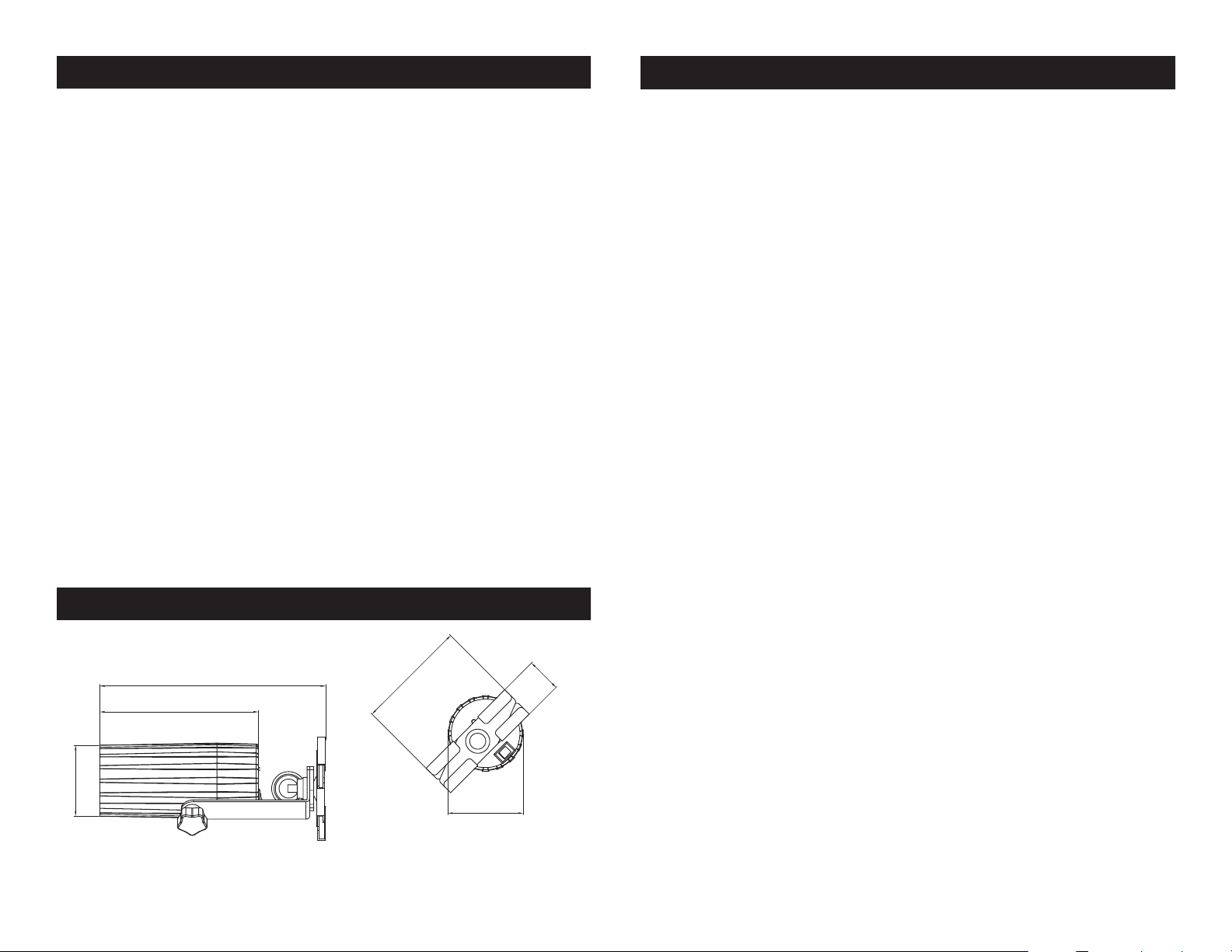
28mm/1.10”
183mm/7.20”
128.5mm/5”
57.5mm/2.25”
ADJ Products, LLC - www.adj.com - PinPoint GO WW Plus User Manual Page 8 ADJ Products, LLC - www.adj.com - PinPoint GO WW Plus User Manual Page 9
90mm/3.55”
61mm/2.40”
Page 6
PinPoint GO WW Plus
UC IR/Airstream Control
PinPoint GO WW Plus Color Filter Install
The UC IR (sold separately) infrared remote gives you control of various functions (See below). To control the fixture you must aim the remote at the front of the fixture and be no more than 30 feet away.
The PinPoint GO WW Plus is also compatible with the Airstream IR app.
The IR transmitter is available through any ADJ dealer or through the
ADJ parts website. Plug the transmitter into the headphone jack of your
iOS phone or tablet. To control your IR fixture you must raise the volume
to the maximum on your iOS phone or tablet and aim the transmitter at
the front of the fixture and be no more than 15 feet away. After you have
purchased the Airstream IR transmitters, the app is a free download
from the app store for your iOS phone or tablet. The app comes with 3
pages of control depending on the IR fixture you are using. Please see
below for IR functions including the corresponding app page.
Works with App page 1.
STAN D BY - Pressing this button will blackout the fixture. Press the but-
ton again to return to the initial state. This button is also used to switch
between normal mode and energy saving mode. When the LED flashes
3 times the unit is running in normal mode. When the LED flashes for 5
seconds the unit is running in energy saving mode. Please see Energy
Saving Mode on the previous page.
FULL ON - Hold this button down to fully light up the unit. When you let
the button go, the unit will return to its previous state.
STROBE - Press and hold this button for strobing.
The PinPoint GO WW Plus comes with 4 color filters and 1 frost filter.
To install one of the filters carefully remove the retainer ring in front of
the lens. Install the filter and replace the retainer ring. Make sure the
filter cut out for the infrared receiver is in the correct place.
PinPoint GO WW Plus Installation
The unit has two ways that it can be installed. The unit includes
a X-Clip so that it can be installed on drop down ceilings. Always
ensure that the unit is rmly xed to avoid vibration and slipping while
operating. Always ensure that the structure to which you are attaching the unit is secure and is able to support a weight of 10 times the
unit’s weight. Always use a safety cable that can hold 12 times the
weight of the unit when doing this type of installation. The safety
cable should go through the eye hole nut that holds the X-Clip base in
place.
You can also install using the magantic base. To do this, remove the
X-Clip base by unscrewing the eye hole bolt. Once removed the xture can be stuck to anything magnetic.
The equipment must be installed by a professional, and it must
be installed in a place where it is out of the reach of people’s
grasp.
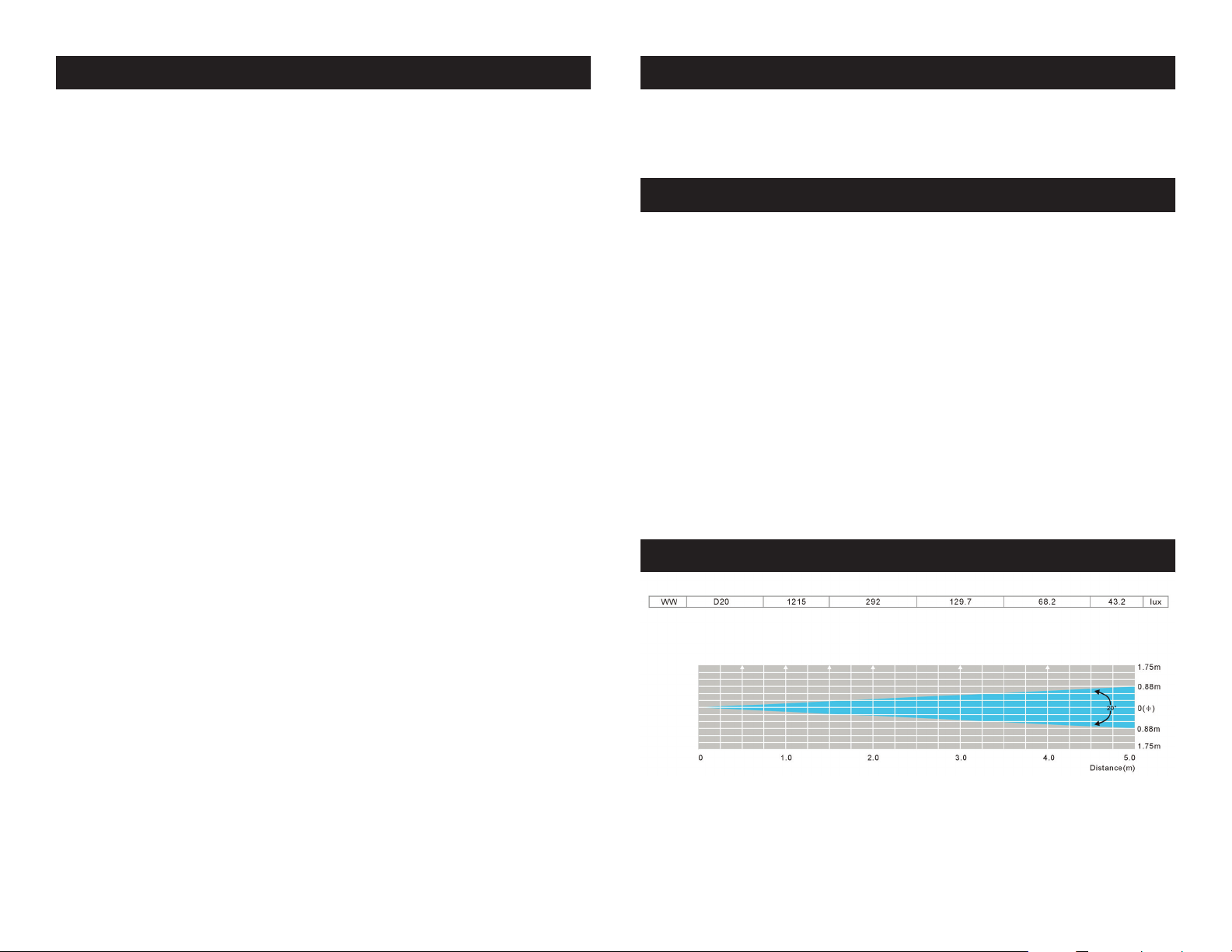
PinPoint GO WW Plus Photometric Chart
FADE/GOBO - This button activates fade mode.
“DIMMER +” and “DIMMER -” - Use the buttons adjust the output in-
tensity in static color mode.
COLOR - This button activates static color mode.
1-9 - Use buttons 1 & 2 to select your desired fade mode.
SOUND ON & OFF - These buttons are invalid for this fixture.
SHOW 0 - Press this button to activate show mode. Use buttons 1 & 2 to
select your desired fade mode.
ADJ Products, LLC - www.adj.com - PinPoint GO WW Plus User Manual Page 10
ADJ Products, LLC - www.adj.com - PinPoint GO WW Plus User Manual Page 11
Page 7

PinPoint GO WW Plus Warranty
MANUFACTURER’S LIMITED WARRANTY
A. ADJ Products, LLC hereby warrants, to the original purchaser, ADJ Products, LLC products
to be free of manufacturing defects in material and workmanship for a prescribed period from
the date of purchase (see specific warranty period on reverse). This warranty shall be valid only if the
product is purchased within the United States of America, including possessions and
territories. It is the owner’s responsibility to establish the date and place of purchase by acceptable
evidence, at the time service is sought.
B. For warranty service you must obtain a Return Authorization number (RA#)
before sending back the product–please contact ADJ Products, LLC Service Department
at 800-322-6337. Send the product only to the ADJ Products, LLC factory. All
shipping charges must be pre-paid. If the requested repairs or service (including
parts replacement) are within the terms of this warranty, ADJ Products, LLC will pay return
shipping charges only to a designated point within the United States. If the entire instrument is
sent, it must be shipped in it’s original package. No accessories should be shipped with the product. If
any accessories are shipped with the product, ADJ Products, LLC shall have no liability whatsoever for
loss of or damage to any such accessories, nor for the safe return thereof.
C. This warranty is void if the serial number has been altered or removed; if the product is modified in any
manner which ADJ Products, LLC concludes, after inspection, affects the reliability of the product; if the
product has been repaired or serviced by anyone other than the ADJ Products, LLC factory unless prior
written authorization was issued to purchaser by ADJ Products, LLC; if the product is damaged because
not properly maintained as set forth in the instruction manual.
D. This is not a service contract, and this warranty does not include maintnance, cleaning or periodic check
up. During the period specified above, ADJ Products, LLC will replace defective parts at its expense
with new or refurbished parts, and will absorb all expenses for warranty service and repair labor by
reason of defects in material or workmanship. The sole responsibility of ADJ Products, LLC under this
warranty shall be limited to the repair of the product, or replacement thereof, including parts, at the sole
discretion of ADJ Products, LLC. All products covered by this warranty were manufactured after August
15, 2012, and bear indentifying marks to that effect.
E. ADJ Products, LLC reserves the right to make changes in design and/or improvements upon its products
without any obligation to include these changes in any products theretofore manufactured.
No warranty, whether expressed or implied, is given or made with respect to any accessory supplied with
products described above. Except to the extent prohibited by applicable law, all implied warranties made
by ADJ Products, LLC in connection with this product, including warranties of merchantability or fitness,
are limited in duration to the warranty period set forth above. And no warranties, whether expressed or
implied, including warranties of merchantability or fitness, shall apply to this product after said period
has expired. The consumer’s and/or Dealer’s sole remedy shall be such repair or replacement as is
expressly provided above; and under no circumstances shall ADJ Products, LLC be liable for any loss or
damage, direct or consequential, arising out of the use of, or inability to use, this product.
This warranty is the only written warranty applicable to ADJ Products, LLC Products and
supersedes all prior warranties and written descriptions of warranty terms and conditions heretofore
published.
MANUFACTURER’S LIMITED WARRANTY PERIODS:
•NonL.E.D.LightingProducts=1-year(365days)LimitedWarranty(Such as: Special Effect
Lighting, Intelligent Lighting, UV lighting, Strobes, Fog Machines, Bubble Machines, Mirror Balls, Par
Cans, Trussing, Lighting Stands etc. excluding LED and lamps)
•LaserProducts=1Year(365Days)LimitedWarranty(excluding laser diodes which have a 6 month
limited warranty)
•L.E.D.Products=2-year(730days)LimitedWarranty(excluding batteries which have a 180 day lim-
ited warranty). Note:2YearWarrantyonlyappliestopurchaseswithintheUnitedStates.
•StarTecSeries=1YearLimitedWarranty(excluding batteries which have a 180 day limited warranty).
•ADJDMXControllers=2Year(730Days)LimitedWarranty
PinPoint GO WW Plus Notes
ADJ Products, LLC - www.adj.com - PinPoint GO WW Plus User Manual Page 12 ADJ Products, LLC - www.adj.com - PinPoint GO WW Plus User Manual Page 13
Page 8
PinPoint GO WW Plus Specifications
Model:
SPECIFICATIONS:
LED: 1 X 3W Single Warm White LED
Power: Rechargable Battery & Power
Adapter (DC 8.7V 1A)
Power Consumption: 3W
10W (When Battery is Charging)
Beam Angle: 20 Degrees
40 Degrees (With Frost Filter)
Weight: 1 lbs./ 0.5 Kgs.
Dimensions: 7.25”(L) x 3.5”(W) x 2.5”(H)
183 x 90 x 61mm
Working Position: Any safe working position
Battery Charge Time: 6.5 Hours (With Power Switch Off)
Battery Life: 10 Hours (Full On)
18 Hours (Energy Saving Mode &
With a Full Charge)
Battery Type: Fixed Lithium Battery
Battery Energy: 32.56WH (Watt Hours)
Battery Weight: 0.41lbs. / 0.19kg
Battery Voltage: 7.4V
Battery Capacity: 4.4AH
Total Lithium Ion Cells: 4pcs
Battery Wrap Material: PVC Sleeving + Highland Barley
Paper
Warranty: 2 Year (730 days)
Please Note: Specications and improvements in the design of
this unit and this manual are subject to change without any prior
written notice.
ADJ Products, LLC - www.adj.com - PinPoint GO WW Plus User Manual Page 14
PinPoint GO WW Plus
ADJ Products, LLC
6122 S. Eastern Ave. Los Angeles, CA 90040 USA
Tel: 323-582-2650 / Fax: 323-725-6100
Web: www.adj.com / E-mail: [email protected]
A.D.J. Supply Europe B.V.
Junostraat 2
6468 EW Kerkrade
The Netherlands
[email protected] / www.adj.com
Tel: +31 45 546 85 00 / Fax: +31 45 546 85 99
 Loading...