

Page 1
ADITION
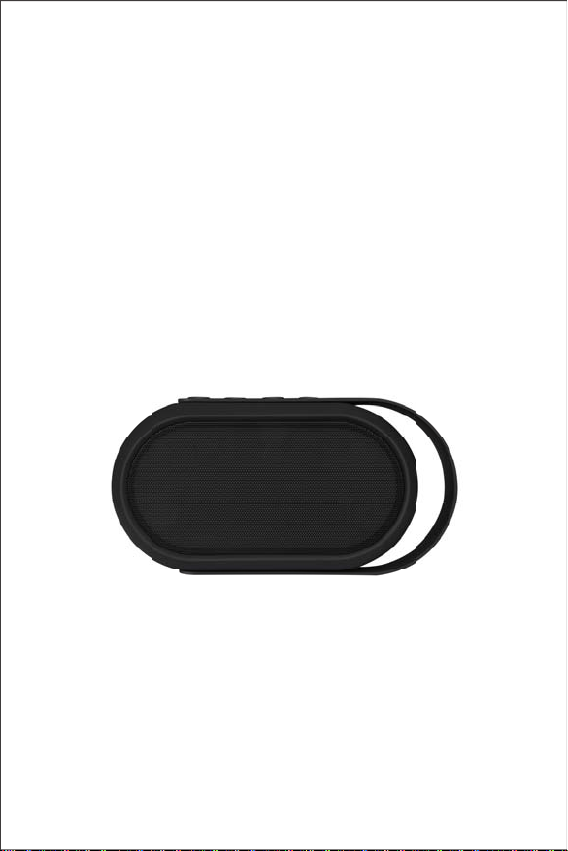
Sound Neon Bluetooth speaker
BS872
User Manual
Page 2
Package included:
Bluetooth speaker x 1
User manual x 1
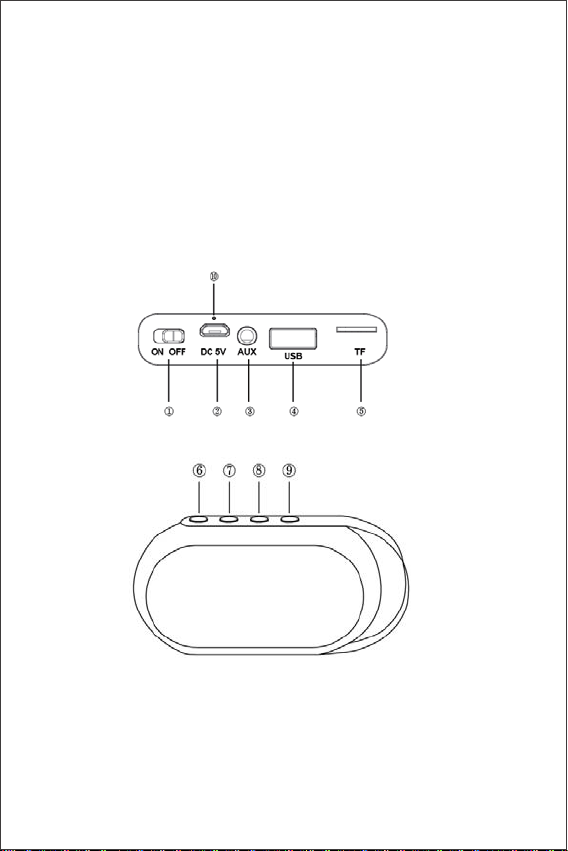
Key and ConnecƟon
㽲 ON/OFF
㽳 Micro USB Charging port
㽴 AUX-IN port
Charging cable x 1
AUX-IN cable x 1
㽵 USB port
㽶 Micro SD card slot
㽷 Mode
㽸 Phone/Pause/Play
㽹 Move to Previous song/ Decrease Volume
㽺 Move to Next song/Increase volume
㽻 Charging Indicator
Page 3

General Opera on
Power On/Oī:
oturnonandoī the unit, switch the ON/OFF bu on.
T
harging:
C
lease use provided USB cable for charging. Plug one side to micro USB
P
her side connects with the PC, wall charger or
port of the unit and the
other 5V charging devices.
ed light Ňashing when unit is working mode; indicator light on the back
L
show red when unit charging, and oī a
ot
er fully charged.
Pairing a Bluetooth Device for the Įrst
1. Turn the unit on. You’ll hear an alert tone
2. Turn on your external device. Refer to its user manual for instruc
on pairing and connec g Bluetooth devices.
3. Using the na ve cont rols o n your Bl uetooth devi ce, select “ Sound Neon ”
in your Bluetooth se
4. If your device requests a password, enter the default password
5. When successfully paired and connected, an alert tone will issue from the
er ini al pairing, the unit will stay paired unless unpaired manually
unit. A
by the user.
NOTE: Should your device become unpaired or you are not able to connect it,
repeat the above steps
Bluetooth opera
If you have used Bluetooth connec on before, the system will start searching
for the device last
re-connect automa
NOTE: Only one Bluetooth device can be connected to the speaker at one
Pause and resume Playback:
In Bluetooth mode, Press Play/Pause bu
from your media device.
gs to pair.
on
connected. When the device is found, the system will
cally.
me
ons
me.
on to start playback or pause music
Page 4

Mode
^ŚŽƌƚƉƌĞƐƐƚŚĞDďƵƩŽŶƚŚĞƵŶŝƚƐŚŝŌĂŵŽŶŐƵdž/Eh^d&ůƵĞƚŽŽƚŚ
>ŽŶŐƉƌĞƐƐƚŚĞDďŽƩŽŶƚŚĞ>ůŝŐƚŚǁŝůůƐŚŝŌĂŵŽŶŐƚǁŽŇĂƐŚŝŶŐŵŽĚĞ
and no light.
Skip Track:
Press the bu
on 㽹 or Ŀ once to skip the track.
AdjusƟng the volume:
Long press the buƩon 㽹 or Ŀ to increase or decrease the speaker volume.
Micro SD or USB OperaƟon
Playing mp3 Įůes from Micro SD or USB Device
Insert the USB drive into USB port or Micro SD card into TF Slot. You will hear an
alert. AŌer a few
seconds playback begins automaƟcally. (Press the M buƩon on the unit to select
Music mode)
NOTE: USB port does not support USB charging for
external device
Aux-in:
Use a 3.5mm Aux-in cable to connect your device through the AUX IN socket
on the side of the unit.
Receiving and ending calls:
When there is incoming call, the unit will pause the playback and ring to alert.
To answer a call, press the phone key to answer.
To end a call, press the phone key again.
In order to maintain the power of baƩery, you need to charge and discharge
every 3 months,even you do not use it.
Page 5

SpeciĮcaƟon
Loud speaker: 3W x2
Frequency: 100Hz-20kHz
SNR:ı 80dB
Input Voltage: DC 5V
BaƩery: 1200mAh
Bluetooth:V4.1
24 led light
TF : 32GB
BaƩery support 4~5h at 70% volume
Charging Ɵme: 2~3 hour
Accessory: IM; 50CM micro charging cable Aux in cable
Page 6

Warranty
30-Day Money-Back Guarantee for Any Reason
You may return your undamaged product and packaging within 30 days of
purchase to receive a FULL REFUND for any reason. If the reason for
return isn’t quality-related, the customer must pay the return shipping costs.
18-Month Warranty for Quality-Related Issues
Requests within country of purchaseƽ
We will take care of all quality-related issues with a REPLACEMENT or FULL
REFUND including any return shipping costs. Please note: Any provided
shipping labels must be used within 20 days of purchase.
Requests fromƽ
We will take care of all quality-related issues with a FULL REFUND or
REPLACEMENT. International shipping costs must be covered by the
customer.
Requests for orders shipped internationallyƽ
We will take care of all quality-related issues with a FULL REFUND
including any return shipping costs. This includes purchases shipped
overseas from the USA via Amazon or eBay.
This product must not be disposed of with your other household
waste. Instead, it is your responsibility to dispose of your waste
equipment by handing it over to a designated collection point for
the recycling of waste electrical and electronic equipment. The
separate collection and re
time of disposal will help conserve
that it is recycled in a manner that protects human health and the
environment.
outside country of purchase
cycling of your waste equipment at the
natural resources and ensure
Page 7

FCC Statement
Changes or modifications not expressly approved by the party
responsible for compliance could void the user's authority to
operate the equipment.
This equipment has been tested and found to comply with the
limits for a Class B digital device, pursuant to Part 15 of the FCC
Rules. These limits are designed to provide reasonable protection
against harmful interference in a residential installation. This
equipment generates uses and can radiate radio frequency energy
and, if not installed and used in accordance with the instructions,
may cause harmful interference to radio communications. However,
there is no guarantee that interference will not occur in a particular
installation. If this equipment does cause harmful interference to
radio or television reception, which can be determined by turning the
equipment off and on, the user is encouraged to try to correct the
interference by one or more of the following measures:
Reorient or relocate the receiving antenna.
1. Increase the separation between the equipment and receiver.
2. Connect the equipment into an outlet on a circuit different from
that to which the receiver is connected.
3. Consult the dealer or an experienced radio/TV technician for help.
This device complies with part 15 of the FCC rules. Operation is
subject to the following two conditions (1)this device may not cause
harmful interference, and (2) this device must accept any
interference received, including interference that may cause
undesired operation.
 Loading...