

Page 1
Ma n u a l a n d us e r Gu i d e
Model WFM 260
Model WFM 270
Transmitter Model WFM TX260
Receiver Model WFM RX260
Receiver Model WFM RX270
TV Talker FM System
MAN 151F ©2011 Williams Sound, LLC
Page 2
2
Co n t e n t s Pa G e
System Overview ................................................................3
System Components............................................................3
Safety Information ..............................................................4
Recycling Instructions ........................................................5
Operating Instructions .........................................................6
WFM TX260 .............................................................6
WFM RX260 .............................................................9
WFM RX270 ........................................................... 11
In Case of Difculty ..........................................................13
Warranty ............................................................................15
System Specications .......................................................16
Page 3
3
sy s t e M ov e r v i e w
Thank you for purchasing the TV Talker FM System from
Williams Sound Corp. Anyone needing auditory assistance to overcome
background noise, reverberation, or distance from the sound source can
benet from the TV Talker FM System.
You can use the TV Talker FM System for hearing assistance in conference rooms, listening to the TV, or with other audio equipment. The
TX260 Transmitter features an Automatic Level Control to adjust for different audio signal levels and to maintain a comfortable listening level.
As with most radio (FM) systems, the transmitter and receiver do not
need to be kept in the same room, the radio signal can pass through
most walls.
Please read through this manual carefully for proper
setup and installation instructions.
If you have problems at anytime with these systems, do not hesitate to
call us toll-free at 1-800-843-3544.
wFM 260 sy s t e M Co M P o n e n t s
• WFM TX260 Transmitter
• Power Supply TFP 042
• TV Microphone (MIC 084)
• WFM RX260 Receiver
• 1m Audio Cable with dual RCA plugs (WCA 078)
• Two Rechargeable Batteries (BAT AP07D)
wFM 270 sy s t e M Co M P o n e n t s
• WFM TX260 Transmitter
• Power Supply TFP 042
• TV Microphone (MIC 084)
• WFM RX270 Receiver
• 1m Audio Cable with dual RCA plugs (WCA 078)
• Two Rechargeable Batteries (BAT AP07D)
• One EAR 013 mini earphone
Page 4
4
sa F e t y in F o r M a t i o n
Hearing Safety:
CAUTION!
This product is designed to amplify sounds to a high volume level
which could potentially cause hearing damage if used improperly.
To protect your hearing and the hearing of others:
1. Make sure the volume is turned down before putting on the earphone
or headphone before adjusting the volume to a comfortable level.
2. Set the volume level at the minimum setting that you need to hear.
3. If you experience feedback (a squealing or howling sound), reduce
the volume setting and move the microphone away from the earphone or headphone.
4. Do not allow children or other unauthorized persons to have
access to this product.
Page 5
5
Pacemaker Safety:
CAUTION!
1. Before using this product with a pacemaker or other medical device,
consult your physician or the manufacturer of your pacemaker or
other medical device.
2. If you have a pacemaker or other medical device, make sure that
you are using this product in accordance with safety guidelines
established by your physician or the pacemaker manufacturer.
re C y C l i n G in s t r u C t i o n s
Help Williams Sound protect the environment! Please take the time to
dispose of your equipment properly.
Product Recycling for Customers in the European Union: Please
do NOT dispose of your Williams Sound equipment in the household
trash. Please take the equipment to an electronics recycling center; OR,
return the product to the factory for proper disposal.
Battery Recycling for Customers in the European Union: Please do
NOT dispose of used batteries in the household trash. Please take the
batteries to a retail or community collection point for recycling.
10/27/08
Page 6
6
se t t i n G u P t h e tX260 tr a n s M i t t e r
NOTICE: THE RECHARGEABLE BATTERIES ARE SHIPPED IN
A DISCHARGED STATE. THE BATTERIES MUST BE CHARGED
OVERNIGHT BEFORE USING THE TV TALKER FM SYSTEM.
The WFM TX260 Transmitter may be placed on top of a TV or shelf.
The maximum operating distance is up to 100 feet (30.48 m).
Any number of receivers may be used with the TX260 Transmitter, but
use only one transmitter per channel in a room at the same time. Otherwise, interference will occur.
Up to three TX260 Transmitters can be used in one room when each
transmitter is set to one of the three channels (A, B or C).
Page 7
7
st e P 1: Co n n e C t t h e tr a n s M i t t e r Po w e r su P P l y
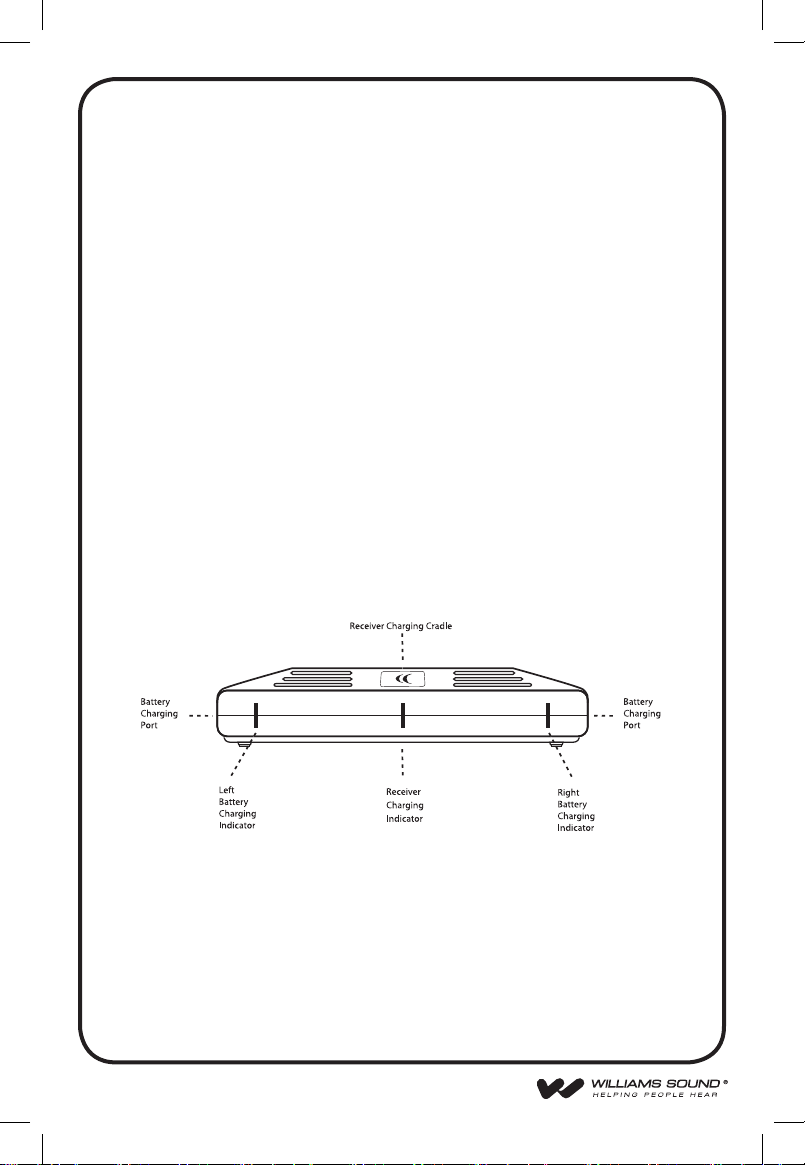
Plug the Power Supply cord into the “DC 12V” jack 1on the back
of the TX260. Then plug the Power Supply into an AC outlet. When
the receiver is placed into the charging cradle built into the top of the
transmitter, the center charging indicator on the front of the TX260 will
turn on. When the spare battery is plugged into the left or right battery
charging port on the transmitter, the corresponding charge indicator light
will turn on.
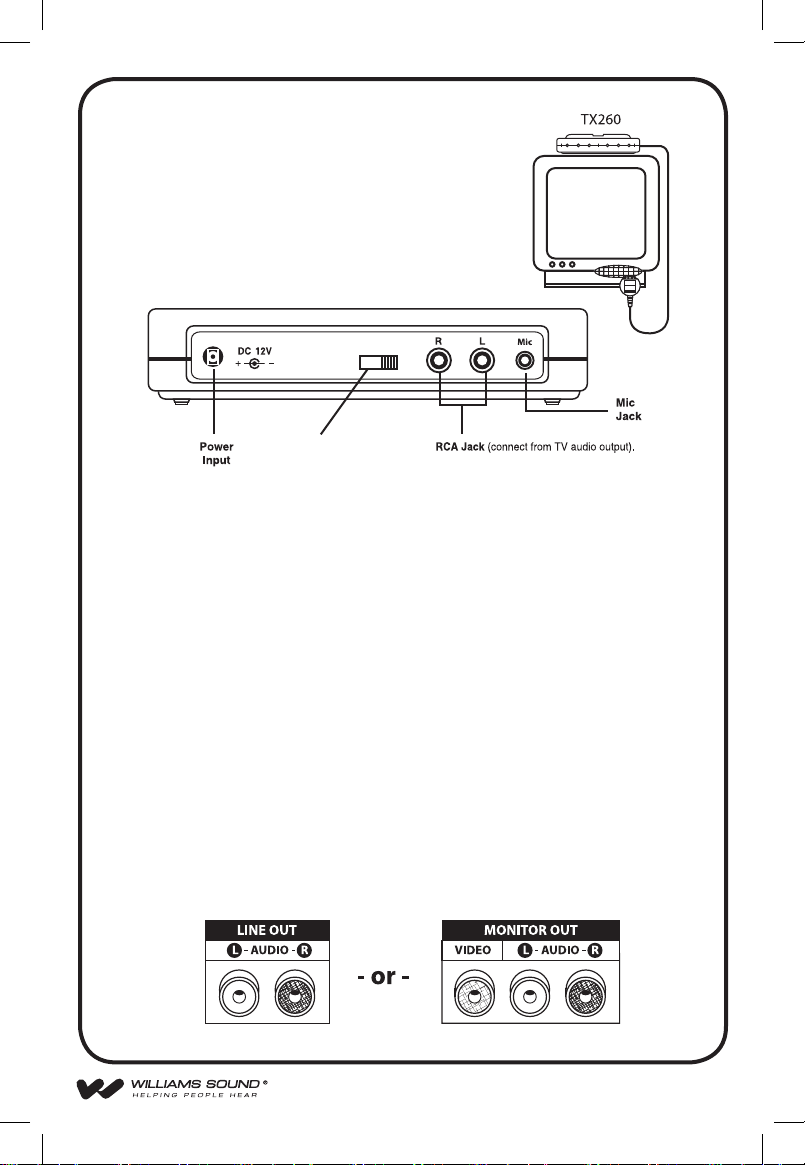
st e P 2: Co n n e C t t h e tr a n s M i t t e r t o t h e au d i o so u r C e
Use the supplied red and white RCA audio cables to connect the TX260
Transmitter directly to the TV, VCR, or stereo “AUDIO OUT” jacks. If
your television does not have “AUDIO OUT” jacks, you will need use
the supplied TV microphone. See page 9 for TV microphone instructions.
A B C
Channel Selector
TX260 Transmitter (Rear View)
TV Microphone
If an RCA connection is unavailable,
use the provided TV microphone
to pickup the sound source directly
from the TV loud speaker as shown
on right.
n
j k l
m
Page 8
8
A B C
A B C
A B C
A B C
ON OFF
A
B
C
A
B
C
st e P 2: (C o n t i n u e d )
NOTE: Some televisions have FIXED output and others have VARIABLE output. If available, FIXED output should be selected. Consult
your television manual for more information. “Fixed” output means the
volume on the television will not change when the volume is increased,
decreased, or muted. “Variable” output means the volume on the television will change when it is increased, decreased, or muted. If variable
output is the only output available on your television, we recommend
using the supplied TV microphone. See page 9 for TV microphone
instructions.
st e P 3
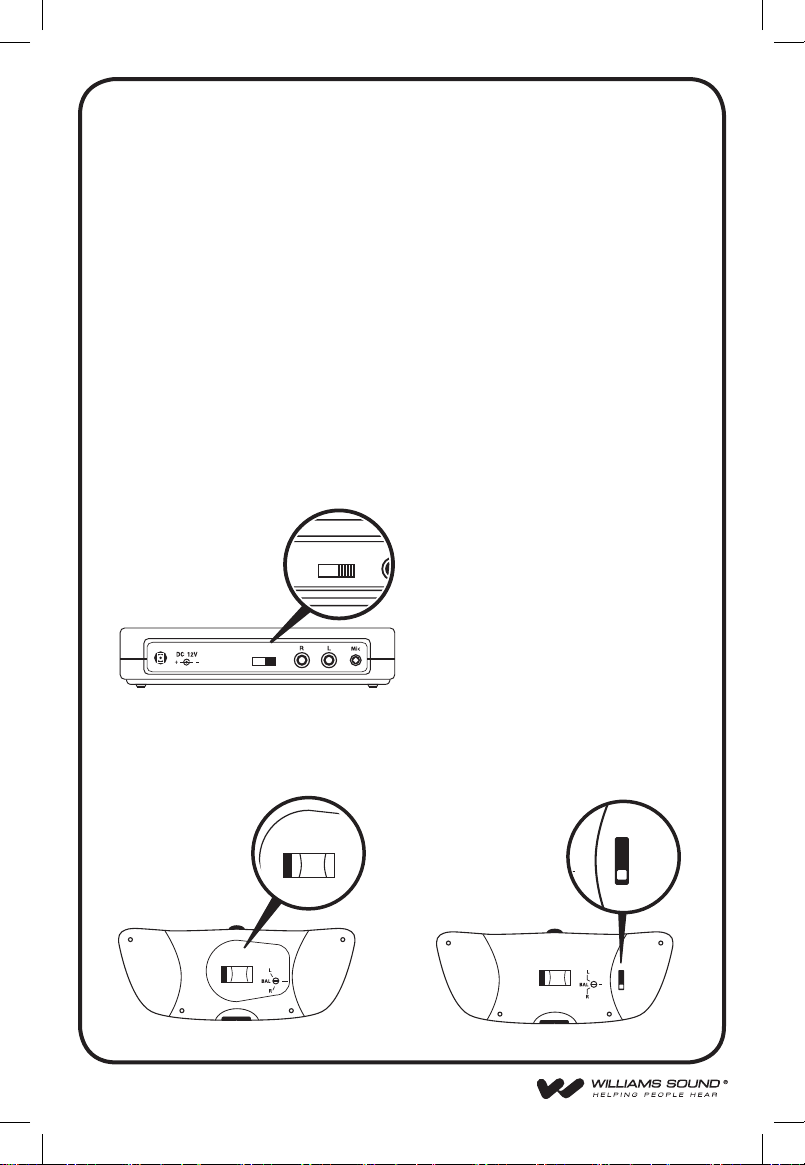
Channel selctor A, B, C
With the channel selector you can change the frequency of the transmitter. If channel A is distorted you can change to another channel.
tr a n s M i t t e r
Note: If the transmitter is switched
to another channel, the receiver also
has to be set to the same channel. (See
specications below.)
The channel selector is located on the rear side of the transmitter or
receiver. Transmitter and receiver must both be set to the same channel.
rX260 re C e i v e r rX270 re C e i v e r
Page 9
9
2.8 MHz (MONO) OPERATION:
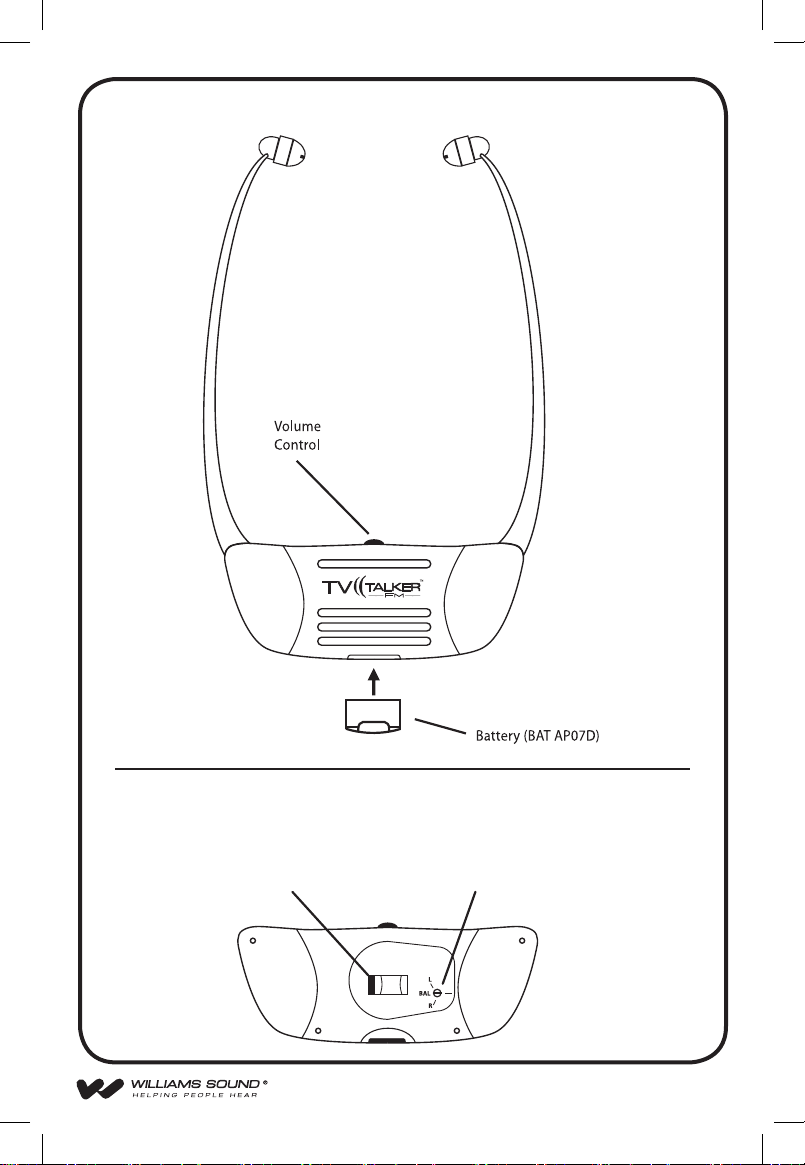
RX260 Receiver
(Front View)
A B C
RX260 Receiver
(Back View)
Channel Selector Balance Control
Page 10

10
st e P 4
If an RCA connection is unavailable, use the provided TV MICROPHONE n
to pickup the desired sound source. Plug in the microphone into the Mic Jack
on the rear of the TX260 Transmitter m. Use the velcro strip supplied to attach
the microphone near the loudspeaker m of your TV or stereo.
The microphone will allow you to play the TV at lower volume for other
listeners and will pick up other important sounds like the telephone or doorbell
ringing.
se t t i n G u P t h e rX260 re C e i v e r
st e P 1: in s t a l l t h e re C e i v e r Ba t t e r i e s
Insert the rechargeable battery into the bottom of the RX260 Receiver
(see page 9). Place the receiver into the charger cradle built into the
top of the TX260 Transmitter and let charge overnight. The spare battery can be plugged into the charging port located on either side of the
transmitter. By keeping the spare battery charged, you can easily swap
batteries when the one in use runs out and always have a fresh battery
ready. A fully charged battery will operate the receiver for approximately 6 hours, depending on the volume setting. The battery should be
changed when you notice the sound getting weak and noisy. The batteries may be left charging when not in use.
st e P 2: us i n G t h e wFM rX260 re C e i v e r
To use the system, rst check to make sure your TV or audio source is
turned ON. Make sure the receiver battery is fully charged. The RX260
Receiver has an automatic on/off function. When you put the receiver
on, it turns on. When you take the receiver off, it turns off. Rotate the
volume control to adjust the volume to a comfortable level.
Return the receiver to the charger when it is not in use.
ad d i t i o n a l re C e i v e r ad j u s t M e n t s
Balance Control: Use a small screwdriver to adjust the loudness balance between the left and/or right earphones. See page 9.
Page 11
11
se t t i n G u P t h e rX270 re C e i v e r
st e P 1: in s t a l l t h e re C e i v e r Ba t t e r i e s
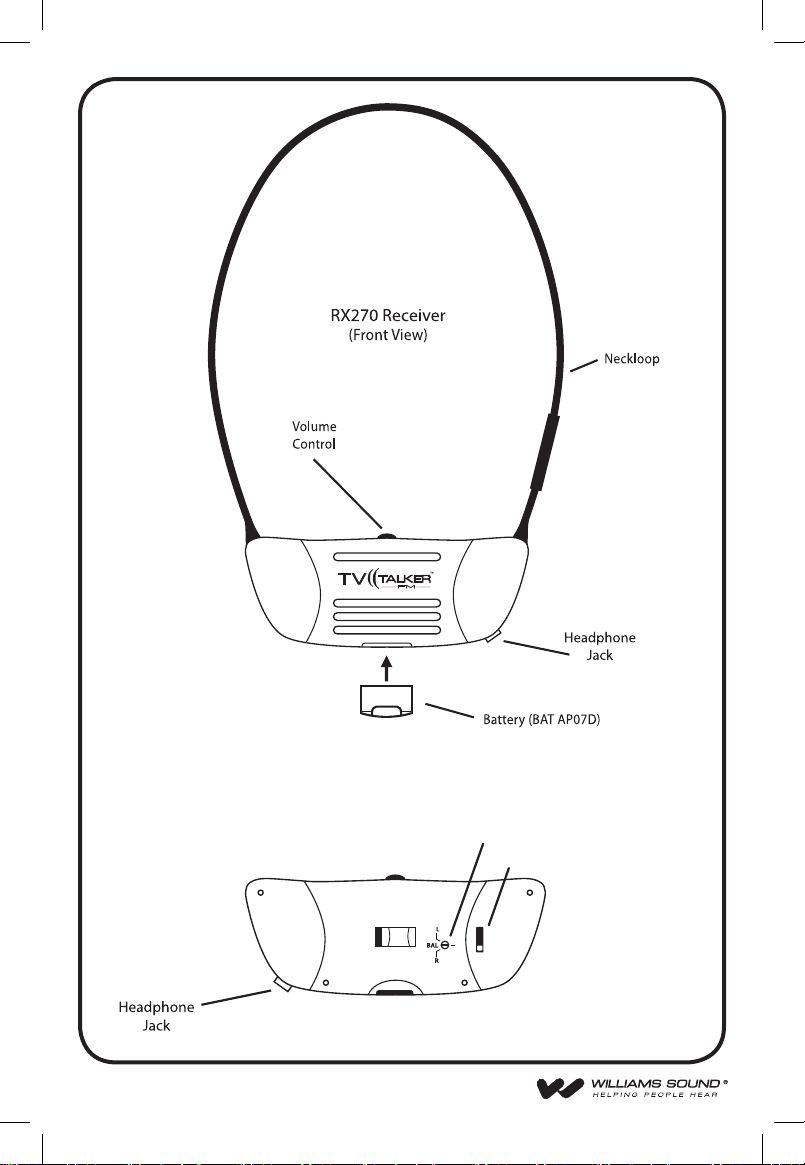
Insert the rechargeable battery into the bottom of the RX270 Receiver
(see page 12). Place the receiver into the charger cradle built into the
top of the TX260 Transmitter and let charge overnight. The spare battery can be plugged into the charging port located on either side of the
transmitter. By keeping the spare battery charged, you can easily swap
batteries when the one in use runs out and always have a fresh battery
ready. A fully charged battery will operate the receiver for approximately 6 hours, depending on the volume setting. The battery should be
changed when you notice the sound getting weak and noisy. The batteries may be left charging when not in use.
st e P 2: us i n G t h e wFM rX270 re C e i v e r
To use the system, rst check to make sure your TV or audio source is
turned ON. Make sure the receiver battery is fully charged. The RX270
Receiver has an on/off switch on the rear side. Rotate the volume control to adjust the volume to a comfortable level.
Return the receiver to the charger when it is not in use.
ad d i t i o n a l re C e i v e r ad j u s t M e n t s
Balance Control: Use a small screwdriver to adjust the loudness balance between the left and/or right earphones. See page 12.
The RX270 will work with hearing aids equipped with a T-coil.
The RX270 can be used with stereo earphones or headphones.
Page 12
12
RX270 Receiver
(Back View)
Balance Control
ON OFF
A
B
C
Channel Selector
Page 13
13
in Ca s e o F di F F i C u l t y
If the system does not seem to be functioning:
1. Read through the manual and user guide carefully to verify proper
setup and installation of your system.
2. Make sure that your television or VCR is plugged in and turned on.
3. Make sure that the TX260 Transmitter’s power adapter is plugged in.
4. If you’ve installed the TX260 Transmitter other than on top of the
TV, make sure that its front panel is facing the receiver.
5. Make sure that the receiver has a fully charged battery.
6. Make sure Transmitter and Receiver channels are set to the same
channel.
7. If you are getting static or radio interference, change Transmitter and
Receiver to one of the other channels.
8. If you are using the TV microphone and not getting a signal, try
turning up the TV volume up slightly. Also, try positioning the TV
mic directly over the TV speaker.
9. If using RX270 with hearing aid, make sure the hearing aid has the
T-coil switch turned on.
10. If the system still does not function, call Williams Sound at:
1-800-843-3544.
Page 14

14
liMited warranty
Williams Sound products are engineered, designed and manufactured under
carefully controlled conditions to provide you with many years of reliable
service. Williams Sound warrants the TV TALKER FM System against defects
in materials and workmanship for TWO (2) years. During the rst two years
from the purchase date, we will promptly repair or replace the TV TALKER
FM System.
Microphones, earphones, headphones, batteries, cables, carry cases, and all
other accessory products carry a 90-day warranty. Chargers carry a one year
warranty.
WILLIAMS SOUND HAS NO CONTROL OVER THE CONDITIONS
UNDER WHICH THIS PRODUCT IS USED. WILLIAMS SOUND, THEREFORE, DISCLAIMS ALL WARRANTIES NOT SET FORTH ABOVE, BOTH
EXPRESS AND IMPLIED, WITH RESPECT TO THE TV TALKER FM SYSTEM, INCLUDING BUT NOT LIMITED TO, ANY IMPLIED WARRANTY
OF MERCHANTABILITY OR FITNESS FOR A PARTICULAR PURPOSE.
WILLIAMS SOUND SHALL NOT BE LIABLE TO ANY PERSON OR
ENTITY FOR ANY MEDICAL EXPENSES OR ANY DIRECT, INCIDENTAL OR CONSEQUENTIAL DAMAGES CAUSED BY ANY USE, DEFECT,
FAILURE OR MALFUNCTION OF THE PRODUCT, WHETHER A CLAIM
FOR SUCH DAMAGES IS BASED UPON WARRANTY, CONTRACT, TORT
OR OTHERWISE. THE SOLE REMEDY FOR ANY DEFECT, FAILURE OR
MALFUNCTION OF THE PRODUCT IS REPLACEMENT OF THE PRODUCT. NO PERSON HAS ANY AUTHORITY TO BIND WILLIAMS SOUND
TO ANY REPRESENTATION OR WARRANTY WITH RESPECT TO THE
TV TALKER FM SYSTEM. UNAUTHORIZED REPAIRS OR MODIFICATIONS WILL VOID THE WARRANTY.
The exclusions and limitations set out above are not intended to, and should
not be construed so as to contravene mandatory provisions of applicable law. If
any part or term of this Disclaimer of Warranty is held to be illegal, unenforce-
able or in conict with applicable law by a court of competent jurisdiction, the
validity of the remaining portions of this Disclaimer of Warranty shall not be
affected, and all rights and obligations shall be construed and enforced as if this
Limited Warranty did not contain the particular part or term held to be invalid.
Page 15
15
If you experience difculty with your system, call Toll-Free for
Customer Assistance:
1-800-843-3544
If it is necessary to return the system for service, your Customer
Service Representative will give you a Return Authorization Number
(RA) and shipping instructions.
Pack the system carefully and send it to:
Williams Sound Corp.
Attn: Repair Dept.
10300 Valley View Rd
Eden Prairie, MN 55344
Federal Communication Commission Interference Statement
This equipment has been tested and found to comply with the limits for a
Class B digital device, pursuant to Part 15 of the FCC Rules. These limits are
designed to provide reasonable protection against harmful interference in a
residential installation.
This equipment generates, uses and can radiate radio frequency energy and, if
not installed and used in accordance with the instructions, may cause harmful
interference to radio communications. However, there is no guarantee that interference will not occur in a particular installation. If this equipment does cause
harmful interference to radio or television reception, which can be determined
by turning the equipment off and on, the user is encouraged to try to correct the
interference by one of the following measures:
. Reorient or relocate the receiving antenna.
. Increase the separation between the equipment and receiver.
. Connect the equipment into an outlet on a circuit different from that to which
the receiver is connected.
. Consult the dealer or an experienced radio/TV technician for help.
FCC Caution : To assure continued compliance, any changes or
modications not expressly approved by the party responsible for
compliance could void the user’s authority to operate this equipment.
(Example - use only shielded interface cables when connecting to
computer or peripheral devices).This device complies with Part 15 of the FCC
Rules.Operation is subject to the following two conditions:(1) This device may
not cause harmful interference, and (2) This device must accept any interference
received,including interference that may cause undesired operation.
Page 16
16
wFM 260
sy s t e M sP e C iF i C at i o ns :
wFM tX260 tr a n s M i t t e r :
Size, Weight, Color: 6.25”L x 4”W x 1.4”H (15.9cm x 10.2cm x
3.6cm), 200g, Silver
Power Input: 12VDC (center is positive), 200 mA
Class II wall transfomer
TFP 042 100 - 240 VAC 12VDC Out
50/60Hz
Subcarrier Frequency:* CH A: 916.25 MHz
CH B: 916.75 MHz
CH C: 917.75 MHz
Range: 100ft. (30.5m)
Power Output: 1mW
Auto Power On/Off: Transmitter shuts off FM after 1.5
minutes when audio signal is removed. Bat-
tery charging functions remain on full time.
Microphone Input: 3.55 mm jack for MIC 084 Electret TV
Microphone, 1.5 kΩ
Line Inputs: 2 RCA jacks for mono or stereo line-level
sources
200 mV min. to 10 V rms max. input level,
5.1 kΩ
Charging Ports: Charges one WFM RX260 Receiver plus
two additional BAT AP07D NiMH battery
packs
Approvals: RoHS, WEEE
Warranty: 2 years*
*Frequencies utilized allow for legal use in the USA.
Page 17
17
wFM rX260 re C e i v e r :
Weight: 59 g
Material and Color: ABS plastic, Silver
Battery Type, Life: BAT AP07D NiMH Battery Pack,
Up to 6 hrs
Modulation Frequency:* CH A: 916.25 MHz
CH B: 916.75 MHz
CH C: 917.75 MHz
Frequency Response: 15 Hz to 20 kHz, ± 5dB
Signal-to-Noise Ratio: 60 dB
Controls: Volume control thumbwheel; screwdriver
adjust balance controls
Acoustic Output: 120 dBA
Compatibility: Compatible with WFM TX260
Power Switch: Built into Arms
Volume Control: Located on top of receiver
Approvals: RoHS, WEEE
Warranty: 2 years, parts and labor*
*Frequencies utilized allow for legal use in the USA.
Page 18
18
wFM 270
sy s t e M sP e C iF i C at i o ns :
wFM tX260 tr a n s M i t t e r :
Size, Weight, Color: 6.25”L x 4”W x 1.4”H (15.9cm x 10.2cm x
3.6cm), 200g, Silver
Power Input: 12VDC (center is positive), 200 mA
Class II wall transfomer
TFP 042 100 - 240 VAC 12VDC Out
50/60Hz
Subcarrier Frequency:* CH A: 916.25 MHz
CH B: 916.75 MHz
CH C: 917.75 MHz
Range: 100ft. (30.5m)
Power Output: 1mW
Auto Power On/Off: Transmitter shuts off FM after 1.5
minutes when audio signal is removed. Bat-
tery charging functions remain on full time.
Microphone Input: 3.55 mm jack for MIC 084 Electret TV
Microphone, 1.5 kΩ
Line Inputs: 2 RCA jacks for mono or stereo line-level
sources
200 mV min. to 10 V rms max. input level,
5.1 kΩ
Charging Ports: Charges one WFM RX260 Receiver plus
two additional BAT AP07D NiMH battery
packs
Approvals: RoHS, WEEE
Warranty: 2 years*
*Frequencies utilized allow for legal use in the USA.
Page 19
19
wFM rX270 re C e i v e r :
Weight: 59 g
Material and Color: ABS plastic, Silver
Battery Type, Life: BAT AP07D NiMH Battery Pack,
Up to 6 hrs
Modulation Frequency:* CH A: 916.25 MHz
CH B: 916.75 MHz
CH C: 917.75 MHz
Frequency Response: 15 Hz to 20 kHz, ± 5dB
Signal-to-Noise Ratio: 60 dB
Controls: Volume control thumbwheel; screwdriver
adjust balance controls
Acoustic Output: 120 dBA
Compatibility: Compatible with WFM TX260
Power Switch: Switch located on rear side of receiver
Volume Control: Located on top of receiver
Includes volume control protector shield
Approvals: RoHS, WEEE
Warranty: 2 years, parts and labor*
*Frequencies utilized allow for legal use in the USA.
Page 20
©2011 Williams Sound, LLC MAN 151F
 Loading...