

Page 1

Lex
1 Year Limited Warranty
Your Adaptivation Lex was carefully tested and inspected before it was shipped
from the factory. W e warrant this product to be free from defects in materials and
workmanship under normal use and service for one (1) year from the date of purchase. In the event of a defect in materials or workmanship, we will either repair
or replace without charge, at our option, any part which in our judgment shows
evidence of such defect within one (1) year of purchase.
This warranty does not apply if the Lex has been misused, abused, altered, or
tampered with. At the end of the warranty period, Adaptivation shall be under no
further obligation expressed or implied.
This warranty gives you specific rights, and you may also have other rights which vary
from state to state.
For repair service, contact Adaptivation's technical dept. to receive a required RMA# (return material authorization number) prior to the return of
the device.
This is not a medical device. It should not be used where incorrect
or faulty operation could reasonably be expected to result in injury
or worse!
LEX
Instruction Manual
The World at a Touch
PRINTED IN U.S.A.
8
10/06
1
Page 2

Table of Contents
INTRODUCTION ................................................... 3
DEVICE OPERA TION ............................................ 3
LEX DIAGRAM....................................................... 4
RECORDING .......................................................... 5
MOUNTING OPTIONS.......................................... 6
TROUBLESHOOTING ........................................... 7
WARRANTY ........................................................... 8
Trouble-Shooting
The Lex does not play back.
-Batteries may be too low .
-Make sure the Lex is in the Play mode.
The Lex is not recording.
-Make sure the Lex is in the REC mode.
-Batteries may be too low .
-Make sure to press down on the Lex the whole
time you are recording, then release when you are
done.
Messages have background noise.
-Speak clearly into the side marked MIC, holding the
Lex about 12 inches away.
-Batteries may be too low.
-Are you near a source of electrical noise such as air
conditioners, electric motors, power lines, etc.?
2
7
Page 3

T alkingMyW ay Communication Cards
The T alkingMyW ay Object Communication Cards are a communication system for individuals whose understanding is enhanced
through objects. The cards consist of an object mounted on a 4"x
6" flexible plastic card. Pairing the Lex with an object card is a
great way to add voice to the cards. By simply attaching the
object card with Velcro to the Lex, you have created a talking card.
The Lex could be activated by either pressing on the card, or
pulling the card off from the Lex will also activate the message.
For more information on the TalkingMyWay Communication
Cards, please refer to our catalog or to our website.
INTRODUCTION
Your Adaptivation, Inc. Lex has been designed to provide easy
access for individuals with physical or mental disabilities to basic
and effective augmentative communication. The Lex allows an
individual to record three different messages on three separate
levels and play them back. Messages are accessed by pressing
anywhere on the blue membrane switch on the top. Because the
Lex is so easily programmed, it is great for promoting interaction
in inclusive settings. Feel free to contact Adaptivation at any
time for assistance using your Lex.
Operating your Lex
Mounting Options
When mounting on a table or other flat surface, Velcro or DualLock can be used as a mounting method.
Adaptivation also has many mounting systems available. The
Magic Arm, Maxess Mounting System, and solutions from
Sensitrac are all great options for mounting your Lex. Please refer
to the Adaptivation catalog or our website for more information.
6
Battery Installation
1. Check to ensure your Lex is turned off by moving the MODE
slide switch to the OFF position.
2. With the device lying face down, open the battery
compartment.
3. Properly insert four AAA batteries. (Inside the battery compartment are "+" and "-" symbols that indicate proper polarities).
Adaptivation recommends using only Alkaline batteries to ensure long battery life.
4. Close the battery compartment
3
Page 4
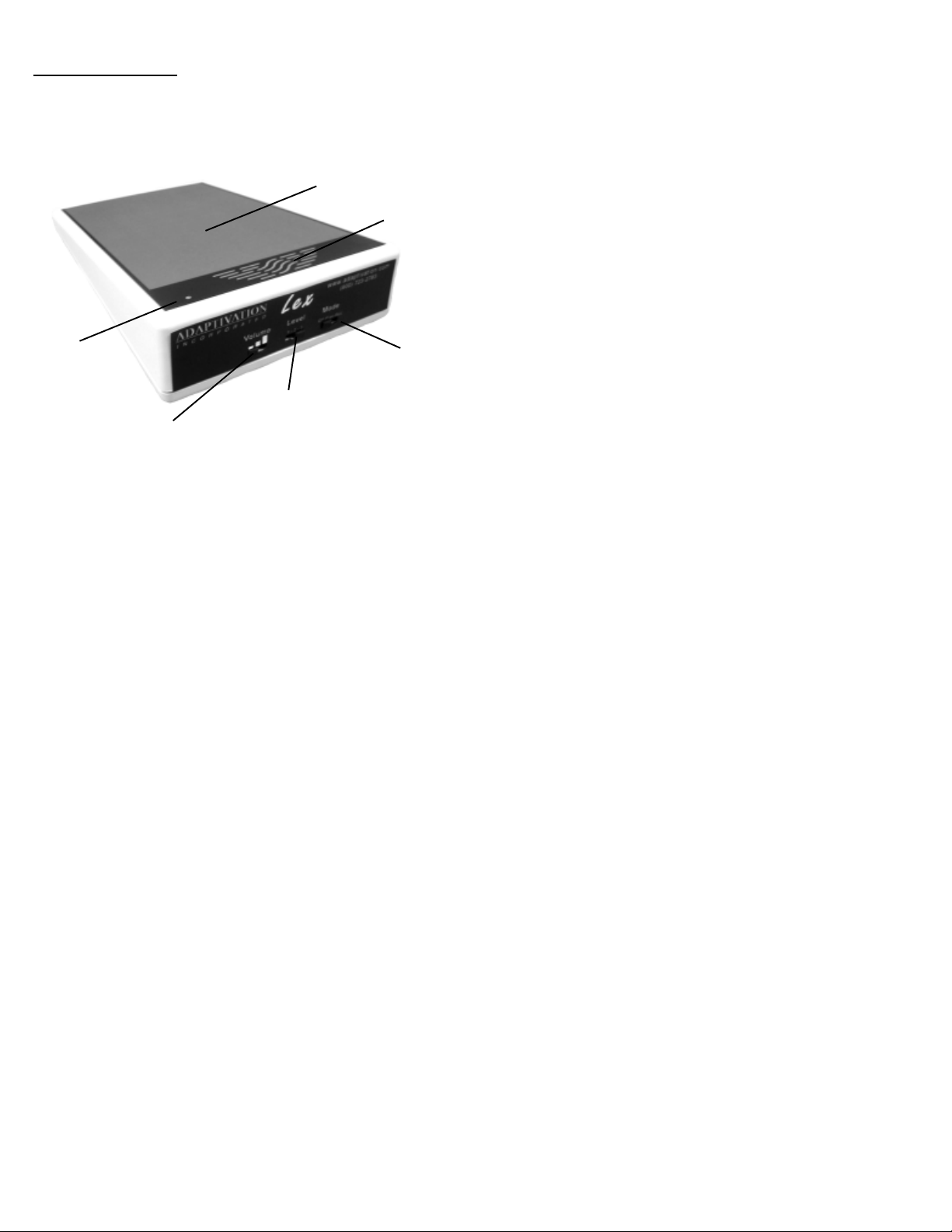
Lex Diagram
Recording a Message
1. Turn on the power by moving the Mode slide switch to the
REC position.
2 . Move the LEVEL slide switch to l.
Microphone
V olume Switch
Membrane Switch
LEVEL Selection
Switch
4
Speaker
MODE Switch
3. Press down on the Lex membrane and speak your message
clearly, about 12 inches away, into the top of the Lex marked
MIC, holding down until the message is finished. The message is automatically limited to a maximum of 20 seconds.
4. Upon releasing the membrane, you should hear an automatic
playback of the message verifying what you just recorded.
5 . To record your next level, move the LEVEL slide switch to 2,
and repeat the process. Each level can be recorded independently at different times, without affecting messages on other
levels.
6. When finished recording, move the MODE switch to Play . Press
down on the Lex, and your message will play back.
7 . To access the other levels, move the LEVEL switch to the de-
sired level.
Note: When you are not using the Lex, we recommend turning
off the Lex to prevent accidental activation and to save on
battery life.
5
 Loading...