

Page 1

The World at a TouchThe World at a Touch
The World at a Touch
The World at a Touch
Bright Box
&
Bright Box T actile
Instruction Manual
1
Page 2

Bright Box Table of Contents
INTRODUCTION..............................................................3
BRIGHT BOX.........................................................4
BA TTER Y INST ALLATION..................................5
AC OPERATION................................................5
USING YOUR BRIGHT BOX..............................6
SWITCH FUNCTIONS.........................................7
EL LIFE & POWER SAVING MODE...................9
TROUBLESHOOTING........................................11
WARRANTY........................................................20
Bright Box T actile Table of Contents
BRIGHT BOX TACTILE.....................................12
BA TTER Y INST ALLATION................................13
AC OPERA TION................................................14
USING YOUR BRIGHT BOX.............................14
SWITCH FUNCTIONS.......................................15
EL LIFE & POWER SAVING MODE.................17
TROUBLESHOOTING........................................18
WARRANTY........................................................20
2
Page 3

Introduction
The Bright Box and Bright Box Tactile add to a long line of high-
quality, durable switches and communication devices offered by
Adaptivation.
The Bright Box family of switches are powered switches operating on one 9-volt battery. These switches provide a visual (and
tactile for Bright Box T actile) cue or feedback when the top surface
of the switch is pressed. There are two main sections to this manual,
one for the Bright Box (p. 4 ) and one for the Bright Box Tactile
(p. 12). They are similar, but are two separate products covered in
this manual.
This manual describes the operation of your Bright Box or Bright
Box T actile switch. Please familiarize yourself with your new switch
by reading this manual. This manual can be downloaded in a PDF
format at www.adaptivation.com.
Your Bright Box or Bright Box Tactile switch is lightweight and
rugged. It can handle being dropped from short distances and is,
overall, a very durable device. However, your switch is not intended for use where liquids can be spilled on it. Damage from
fluids that have reached inside the switch is not covered by warranty. If you must use your Bright Box or Bright Box T actile switch
in an environment where fluids, foods, urine or saliva might be a
problem, then insert the switch in a plastic locking bag or use other
suitable protection that will prevent the fluid from getting on the
switch. As always, please feel free to contact Adaptivation for any
questions or comments that you might have concerning Bright Box
or Bright Box Tactile.
3
Page 4
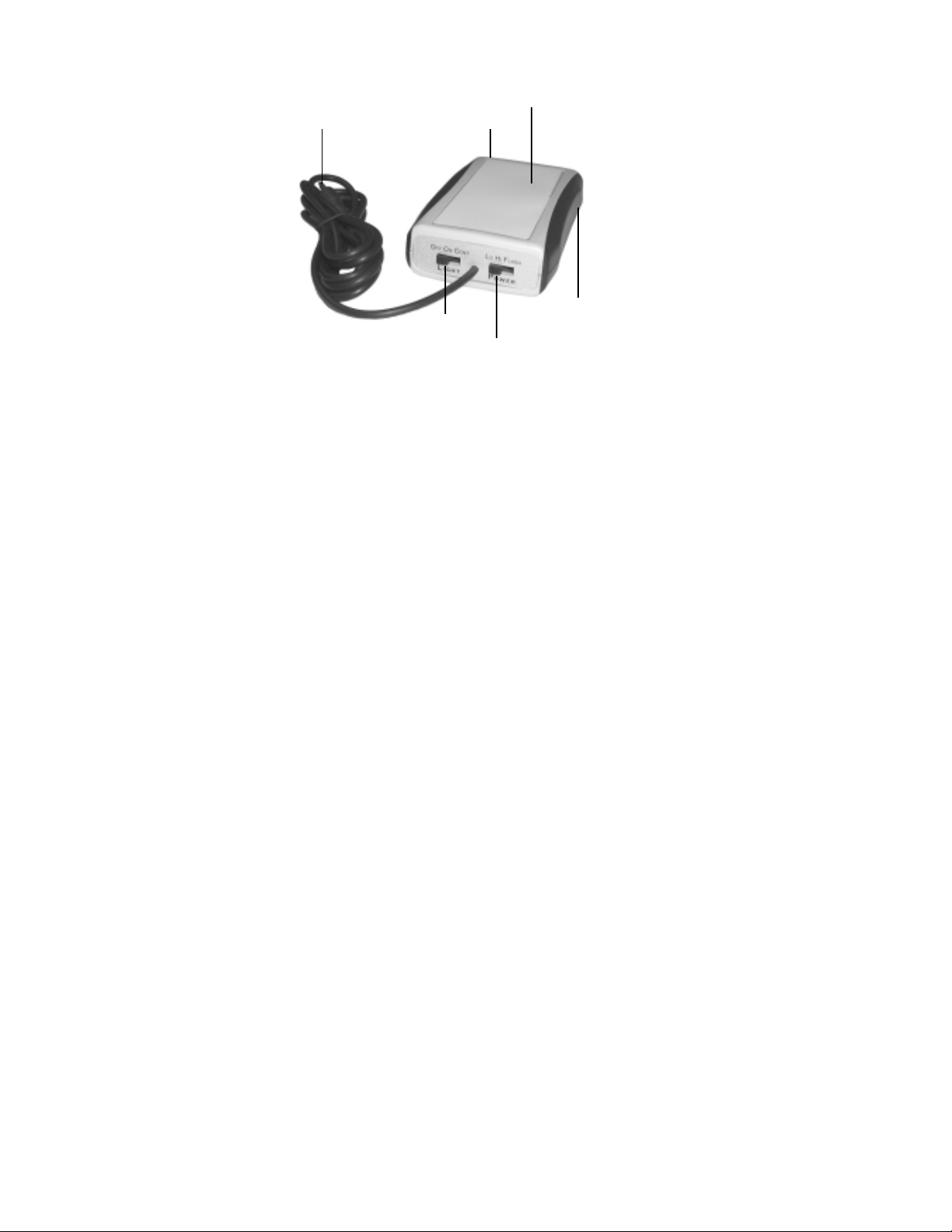
1/8" Plug
Bright Box
(Figure-1)
Electroluminescent Light
Adaptor Jack
Light Switch
Power Switch
Battery Compartment
Introduction
Your Bright Box switch was designed with a large-display
visual cue that is activated when the user presses the top
surface of the switch. This visual cue is comprised of a large,
flat electroluminescent lamp (EL) that glows a bright bluish,
green color.
The Bright Box can be used as a visual cue to aid in locating
the device for persons with low vision or for any nighttime
user. It can also be used as a way to visually attract the
attention of the switch user.
4
Page 5

Battery Installation
The Bright Box switch operates on a single 9-volt battery.
To install the battery, open the sliding battery cover on the
underside of the device. Attach the battery securely to the
battery clip. Place the battery in the battery compartment,
and return the battery cover to its fully locked position.
Battery life of the Bright Box switch varies greatly depend-
ing on the mode being used and on the power setting of
the EL. During typical Continuous operation, the battery
should last from five to nine months, depending on the EL
power setting. For maximum battery life, Adaptivation recommends using an Alkaline battery. Continuous operation
and Momentary Operation are described later in this
manual.
To conserve battery life, turn your Bright Box switch off
when not in use. When storing for long periods of time, it
is best to remove the battery completely.
AC Operation
The Bright Box switch has a jack that accepts power from
an external adaptor, sold separately (Adaptivation catalog
# AC9V). This adaptor plugs into a standard 120-volt AC
outlet, and provides 9-volts, DC power at 300m Amps.
5
Page 6

When the AC adaptor is used, the Bright Box will not draw
power from the battery. Please note that if a battery is installed, the AC adaptor will not char ge it. When the AC adaptor is unplugged, the Bright Box will automatically switch to
drawing power from the battery. A battery is not necessary
when operating with an AC adaptor. The primary advantage
of the AC adaptor is that the battery life is not a factor . This is
especially useful when the Bright Box is used in continuous
mode. DO NOT use an AC adaptor other than the one de-
scribed above, or permanent damage to your Bright Box
switch could result.
Using Your Bright Box Switch
As can be seen in Figure-1, there are two slide switches
that are used to control the operation of the Bright Box, the
Light Switch and the Power Switch.
Attached to the Bright Box switch is a 3-foot cord with
standard 1/8-inch (3.5mm), plug. This plug attaches to most
communication devices, mouse interfaces or switch-adapted
toys.
6
Page 7

Switch Functions
Light Switch: This switch has three functions:
Off: The Bright Box is off and is nonfunctional. To con-
serve power and to avoid false activations, always turn
off your Bright Box when not in use.
On: This is also known as Momentary mode. In this
mode, the electroluminescent lamp (EL) will light while
the top surface is pressed. Also, any device that the
cord is plugged into will be activated. The device will
remain activated as long as the top switch surface continues to be pressed.
Cont: Continuous mode. The EL will be on at all times.
The top surface must be pressed in order to activate the
device. The device will remain activated as long as the
top surface continues to be pressed. When the EL is
low power, it will stay on indefinitely. For other power
settings, the EL will go into Power Saver Mode, see
p. 9.
7
Page 8

Switch Functions, continued
Power Switch: This switch has three functions:
Lo: The EL will be low intensity. Low power is intended
to be used for very low ambient light conditions. When
combining low power with Continuous mode, the
Bright Box functions as a nightlight switch. This is especially convenient for sensory rooms or at one's bedside when a non-lighted switch is difficult to locate.
Hi: The EL will be high intensity. High power is in-
tended for use under normal room lighting. This is the
brightest mode of operation, but also uses the most
power, and most affects the life of the EL. When combining high power with Continuous mode, a two-minute
time-out will be used. See the section, Electroluminescent Lamp (EL) Life & Power Saver Mode, p. 9.
Flash: The EL will flash two quick flashes per second.
Because the EL flashes between off and high power,
this is the mode that is easiest to see. Use flashing
when the other power settings are not satisfactory for
gaining the user's attention. When combining flash with
Continuous mode, a two-minute time-out will be used.
See the section, Electroluminescent Lamp (EL) Life &
Power Saver Mode, p. 9.
8
Page 9

Electroluminescent Lamp (EL) Life
& Power Saver Mode
The EL is a light source that fades as it ages. The more it is
used, the more it fades. This fading is normal to how ELs
function, and is not reversible. It is very difficult to predict
the life of an EL because it depends on how heavily it is
used. In addition, because the EL fades over time, it is hard
to notice the change. The EL will fade more quickly when
using High Power vs. Low Power or Flashing. Continuous
operation has significantly more effect on EL life than does
Momentary operation. This is because during Momentary
operation, the EL is typically on for a very short period of
time compared to that of Continuous mode.
In an effort to conserve both battery life and EL life, the
Bright Box will automatically switch the EL off after two
minutes, and go into Power Saver mode when combining
Continuous mode with high power or with flashing. This
simply means that the EL turns off, and the Bright Box is
idle. During Power Saver mode, the device into which the
Bright Box is plugged will not be activated. To exit Power
Saver mode, press the EL surface of the Bright Box, or
switch the Bright Box off then on again.
The brightness of the EL is also a function of the freshness
of the battery. As the battery gets low, the EL will not be as
bright as it was when the battery was new. As the battery
gets low, your Bright Box may continue to function, but the
EL could be quite dim. A new battery will return the EL to
its normal brightness.
9
Page 10

When the Bright Box is used in Continuous mode with low
power, the EL will remain on until the device is switched
off. Because the EL is powered at a very low level, the life
of the EL is affected but not much. Gradual aging of the EL
occurs, but because the EL is driven at such a low level,
the aging is minimal compared to that at high power.
10
Page 11

Bright Box T rouble-Shooting
The Bright Box doesn't do anything.
-Make sure slide switches are set in proper positions.
See p. 7-8.
-Make sure battery is fresh.
The Bright Box works but it doesn't activate adapted toy
or other device.
-Make sure that the Bright Box plug is fully seated into
toy jack.
-Toy may not be functioning properly. Test it with another switch.
The Bright Box activates toy but the EL is dim.
-Install fresh battery.
-If the battery is fresh, but the EL still seems dim, the EL
may be experiencing normal aging.
The Bright Box makes a buzzing sound when the EL is on
high setting.
-The EL can generate a buzzing sound that should be
able to be heard only when the device is held very
close to your ear. This slight buzzing is normal for EL
displays.
11
Page 12
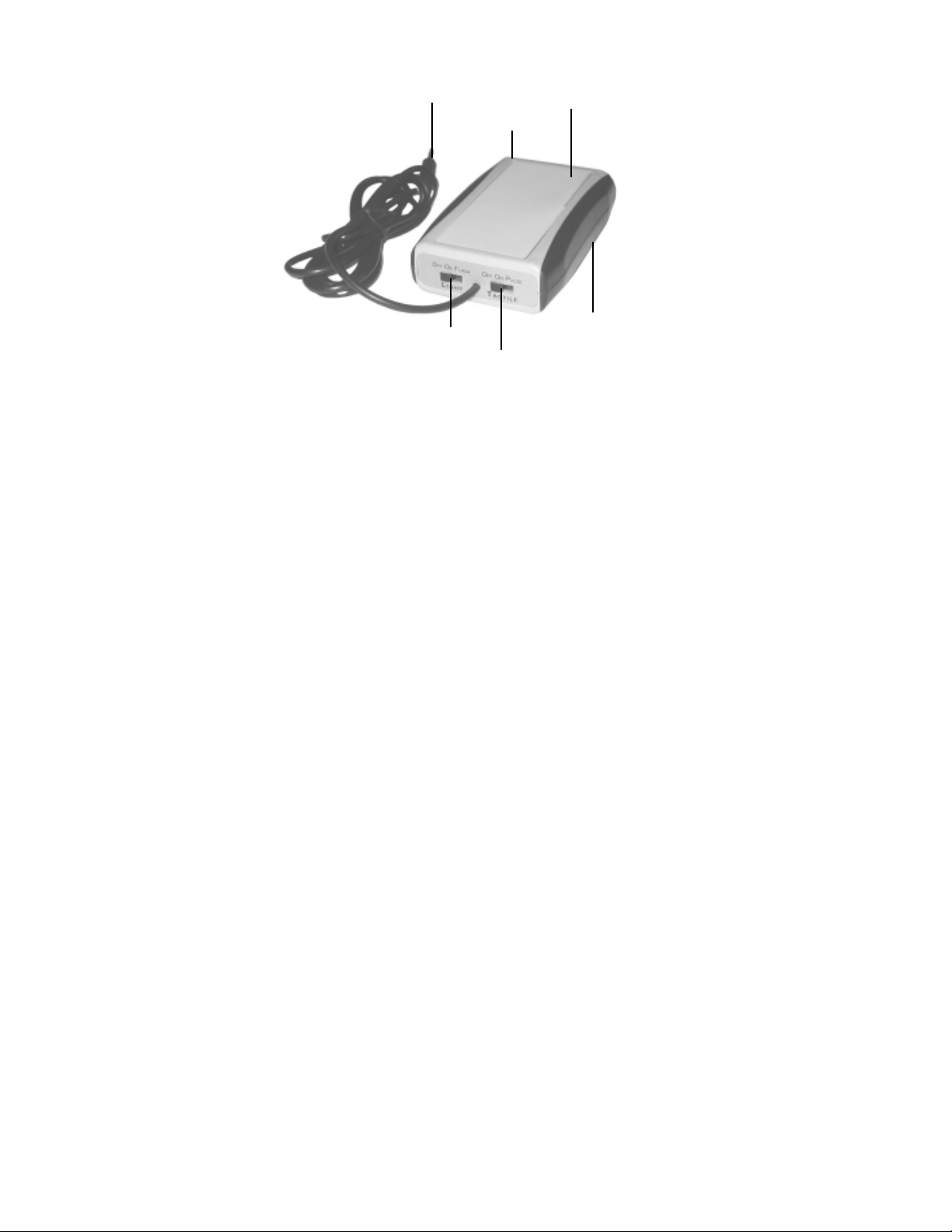
Bright Box Tactile
(Figure-2)
1/8" Plug
Light Switch
Introduction
Your Bright Box Tactile switch was designed with a large-
display visual feedback and with tactile feedback that are
activated when the user presses the top surface of the switch.
The visual feedback is comprised of a large, flat electroluminescent lamp (EL) that glows a bright bluish, green color. The
tactile feedback is a vibration much like that of a cell phone or
pager.
The visual feedback and tactile feedback can be employed
independently of each other. Each can be off, on or in a flashing/pulsing mode.
12
Electroluminescent Light
Adaptor Jack
Battery Compartment
Tactile Switch
Page 13

Switch
Battery Installation
The Bright Box Tactile switch operates on a single 9-volt
battery. To install the battery, open the sliding battery
cover on the underside of the device. Attach the battery
securely to the battery clip. Place the battery in the battery
compartment, and return the battery cover to its fully
locked position.
Battery life of the Bright Box Tactile switch varies greatly
depending on the mode being used. During typical operation, the battery can be expected to last from seven weeks
to over one year, depending on the mode. Tactile operation consumes significantly more energy than EL operation. For EL use alone, typical battery life should be about
one year. For tactile use only, typical battery life should be
about ten weeks. For both EL and tactile operation simultaneously, battery life should be about eight weeks. For maximum battery life, Adaptivation recommends using an
Alkaline battery.
To conserve battery life, turn your Bright Box Tactile
switch off when not in use. This means both slide switches
must be in the off position. When storing for long periods
of time, it is best to remove the battery completely.
13
Page 14

AC Operation
The Bright Box Tactile switch has a jack that accepts power
from an external adaptor, sold separately (Adaptivation catalog # AC9V). This adaptor plugs into a standard 120-volt
AC outlet, and provides 9-volts, DC power at 300m Amps.
When the AC adaptor is used, the Bright Box Tactile will
not draw power from the battery . Please note that if a battery
is installed, the AC adaptor will not char ge it. When the AC
adaptor is unplugged, the Bright Box T actile will automatically switch to drawing power from the battery . A battery is
not necessary when operating with an AC adaptor. The primary advantage of the AC adaptor is that battery life is not
a factor. Do not use an AC adaptor other than the one
described above, or permanent damage to your Bright
Box Tactile switch could result.
Using Your Bright Box T actile Switch
As can be seen in Figure-2, there are two slide switches
that are used to control the operation of the Bright Box
Tactile, the Light Switch and the Tactile Switch.
Attached to the Bright Box Tactile switch is a 3-foot cord
with a standard 1/8-inch (3.5mm), plug. This plug attaches
to most communication devices, mouse interfaces or
switch-adapted toys.
14
Page 15

Switch Functions
Light Switch: This switch has three functions:
Off: The EL function is off. To conserve power and to
avoid false activations, always turn off your Bright Box
Tactile when not in use.
On: In this mode, the top surface will light as it is
pressed. Also, any device that the cord is plugged into
will be activated. The device will remain activated as
long as the top switch surface continues to be pressed.
Flash: Flash mode. The EL will flash (twice per second)
while the top surface is pressed. Also, any device that
the cord is plugged into will be activated. The device
will remain activated as long as the top switch surface
continues to be pressed.
15
Page 16

Switch Functions, continued.
Tactile Switch: This switch has three functions:
Off: The tactile feedback (vibration) function is off. To
conserve power and to avoid false activations, always
turn off your Bright Box Tactile when not in use.
On: In this mode, the tactile feedback (vibration) will be
activated while the top surface is pressed. Also, any
device that the cord is plugged into will be activated.
The device will remain activated as long as the top
switch surface continues to be pressed.
Pulse: Tactile feedback (vibration) will pulse while the
top surface is pressed. Also, any device that the cord is
plugged into will be activated. The device will remain
activated as long as the top switch surface continues to
be pressed.
16
Page 17

Electroluminescent Lamp (EL) Life
The EL is a light source that fades as it ages. The more
it is used, the more it fades. This fading is normal to how
ELs function, and is not reversible. It's very difficult to predict the life of an EL because it depends heavily on how it
is used. The EL will fade more quickly when using normal
(On) setting vs. flashing.
The brightness of the EL is also a function of the freshness
of the battery. As the battery approaches a discharged
state, the EL will not be as bright as it was when the battery
was new. As the battery gets low, your Bright Box Tactile
may continue to function, but the EL could be quite dim. A
new battery will return the EL to its normal brightness.
17
Page 18

Bright Box T actile T rouble-Shooting
The Bright Box Tactile doesn't do anything.
-Make sure slide switches are set in proper positions.
See p. 15-16.
-Make sure battery is fresh.
The Bright Box works but it doesn't activate adapted toy
or other device.
-Make sure that the Bright Box Tactile plug is fully
seated into toy jack.
-Toy may not be functioning properly. Test it with another switch.
The Bright Box activates toy but the EL is dim.
-Install fresh battery.
-If the battery is fresh, but the EL still seems dim, the EL
may be experiencing normal aging.
The Bright Box makes a buzzing sound when the EL is on
high setting.
-The EL can generate a buzzing sound that should be
able to be heard only when the device is held very
close to your ear. This light buzzing is normal for EL
displays.
The Bright Box Tactile activates toy but vibration is
sluggish.
-Install fresh battery.
18
Page 19

Notes
19
Page 20

Bright Box/Bright Box Tactile
1 Year Limited Warranty
Your Adaptivation Bright Box/Bright Box Tactile was carefully tested and
inspected before it was shipped from the factory. W e warrant this product to be
free from defects in materials and workmanship under normal use and service for
one (1) year from the date of purchase. In the event of a defect in materials or
workmanship, we will either repair or replace without charge, at our option,
any part which in our judgment shows evidence of such defect within one (1)
year of purchase.
This warranty does not apply if the Bright Box/Bright Box Tactile has been
misused, abused, altered, or tampered with. At the end of the warranty period,
Adaptivation shall be under no further obligation expressed or implied.
This warranty gives you specific rights, and you may also have other rights
which vary from state to state.
20
10/2008
 Loading...