

Page 1
User Guide (EU)
ACUSTOM® COAX
Designed and crafted in Finland with passion for sound and style
Page 2

We invite you to a world of great sound and design looks. We offer you, years
and years of memorable moments together with your family and friends,
not forgetting – your favourite artists. We promise audio performance that
is lifelike and pure - to a point that it almost feels like you are at the concert.
You can surprise and captivate with the sound and the looks of the Acustom
speakers – at your parties, get-togethers and movie nights.
Whether you have chosen the classic or customized look for your speakers,
we are sure that they will make a wonderful impact in the décor of your home
or ofce. The interchangable speaker covers – domes – will allow you to go
with another look using different collections or other customizations as times
change without replacing the speakers.
Used properly, we guarantee outstanding experiences playing your music,
audiobooks and movies through these Acustom speakers.
If you ever have questions or comments, we are always happy to help
so that you can focus on great sound and looks.
Sincerely and wishing you pleasurable moments,
Pauli Hänninen, Founder
Thank you for choosing Acustom
all-in-one design speakers.
2
Page 3
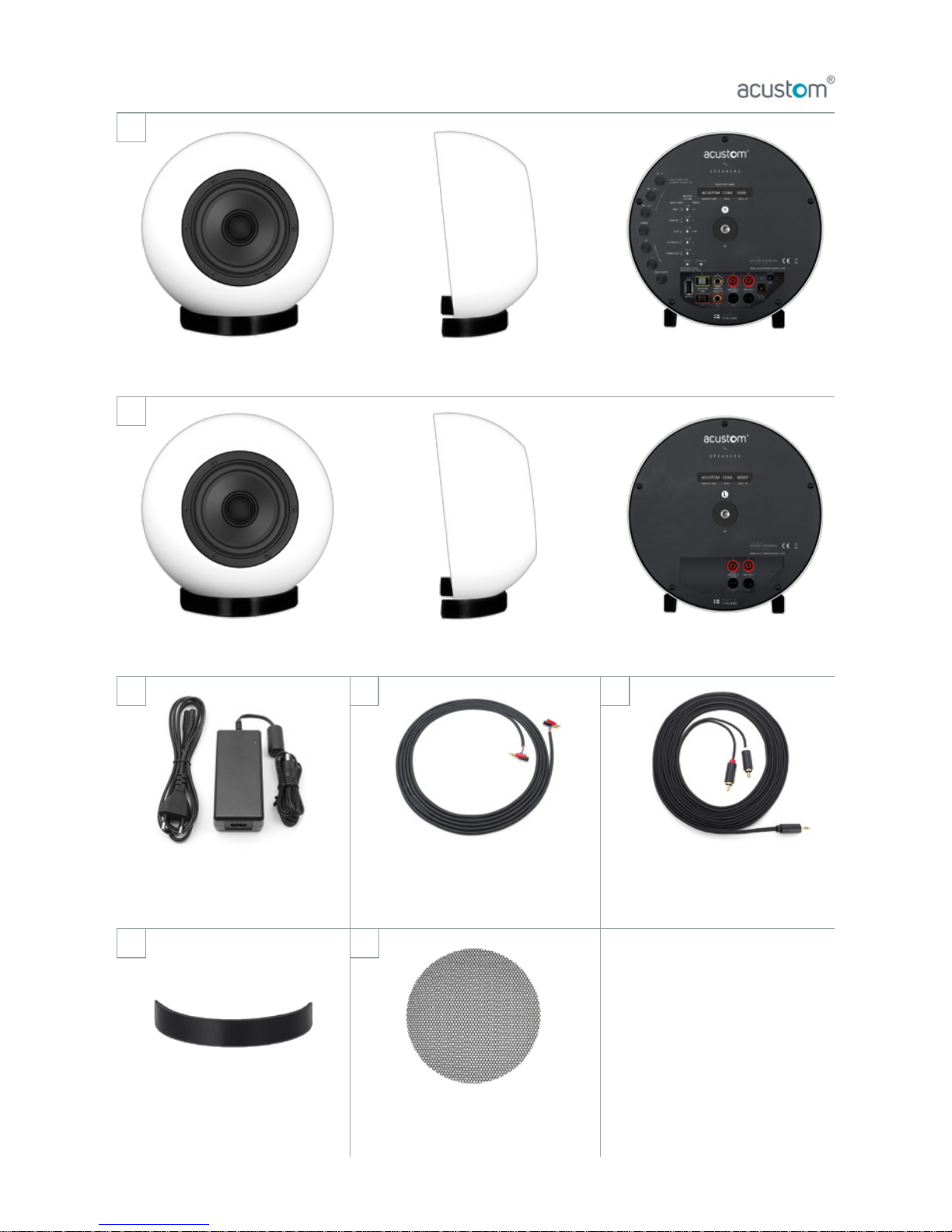
1. In the Box
ACUSTOM COAX – Active speaker with DOME attached, right channel
ACUSTOM COAX – Passive speaker with DOME attached, left channel
ACUSTOM speaker cable 5 m,
for connecting active and
passive unit
3.5 mm – RCA -cable 5 m, for
connecting analog audio devices
external 24 VDC power supply
with power cable 1.8 m,
total length 3.8 m
x1
x1
x1 x1 x1
x2
x2
Check our
other products:
acustom.
ACUSTOM MESH protective
magnetic grill (Sold separately)
ACUSTOM ARCH magnetic
speaker stand
3
Page 4
BASIC
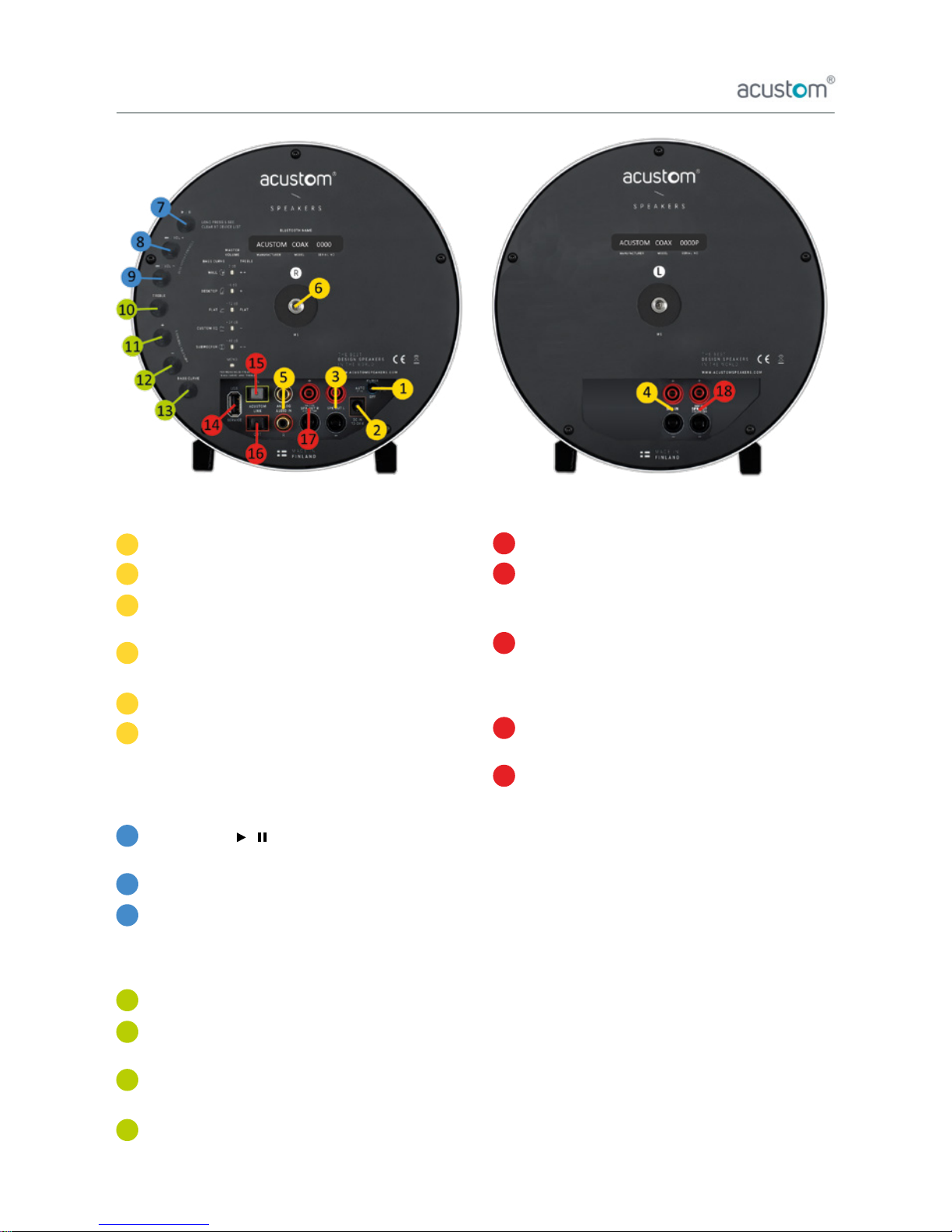
Power switch (AUTO / OFF / ON)
DC Power input
Output from active speaker to passive speaker
(use Acustom speaker cable 5 m)
Input from active speaker output
(use Acustom speaker cable 5 m)
Analog audio input (RCA-IN)
Mounting base
(M5 X 10 mm – internal screw thread)
BLUETOOTH
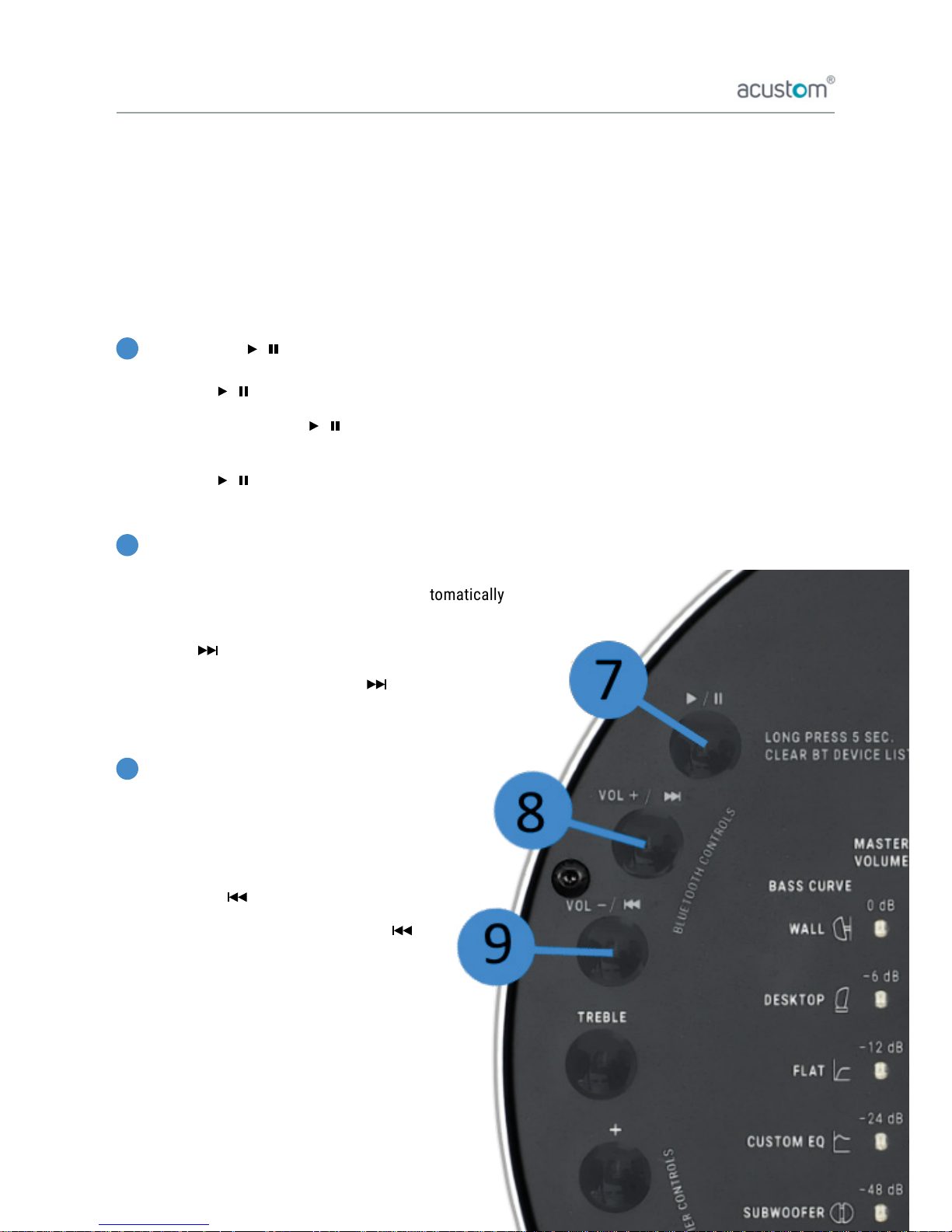
Play / Pause (► / ►► ) OR Clear device list
(Press for 5 sec.)
Volume + OR Next song (Press for 2 sec.)
Volume - / Previous song (Press for 2 sec.)
AMPLIFIER
Treble (Keep pressed and press + or – to adjust)
Increase +
(Adjust master volume or Treble or Bass Curve)
Decrease –
(Adjust master volume or Treble or Bass Curve)
Bass Curve
(Keep pressed and press + or – to adjust)
ADVANCED (professional use)
USB service (Software updates / DSP controls)
Acustom Link IN
(linking Acustom COAX speakers or receiving
24-bit/48 kHz digital signal)
Acustom Link OUT
(linking Acustom COAX speakers or transmitting
24-bit/48 kHz digital signal. Input signal level
dependant output)
Speaker OUT R channel,
only for 4 channel systems (output)
Speaker OUT L channel,
only for 4 channel systems (output)
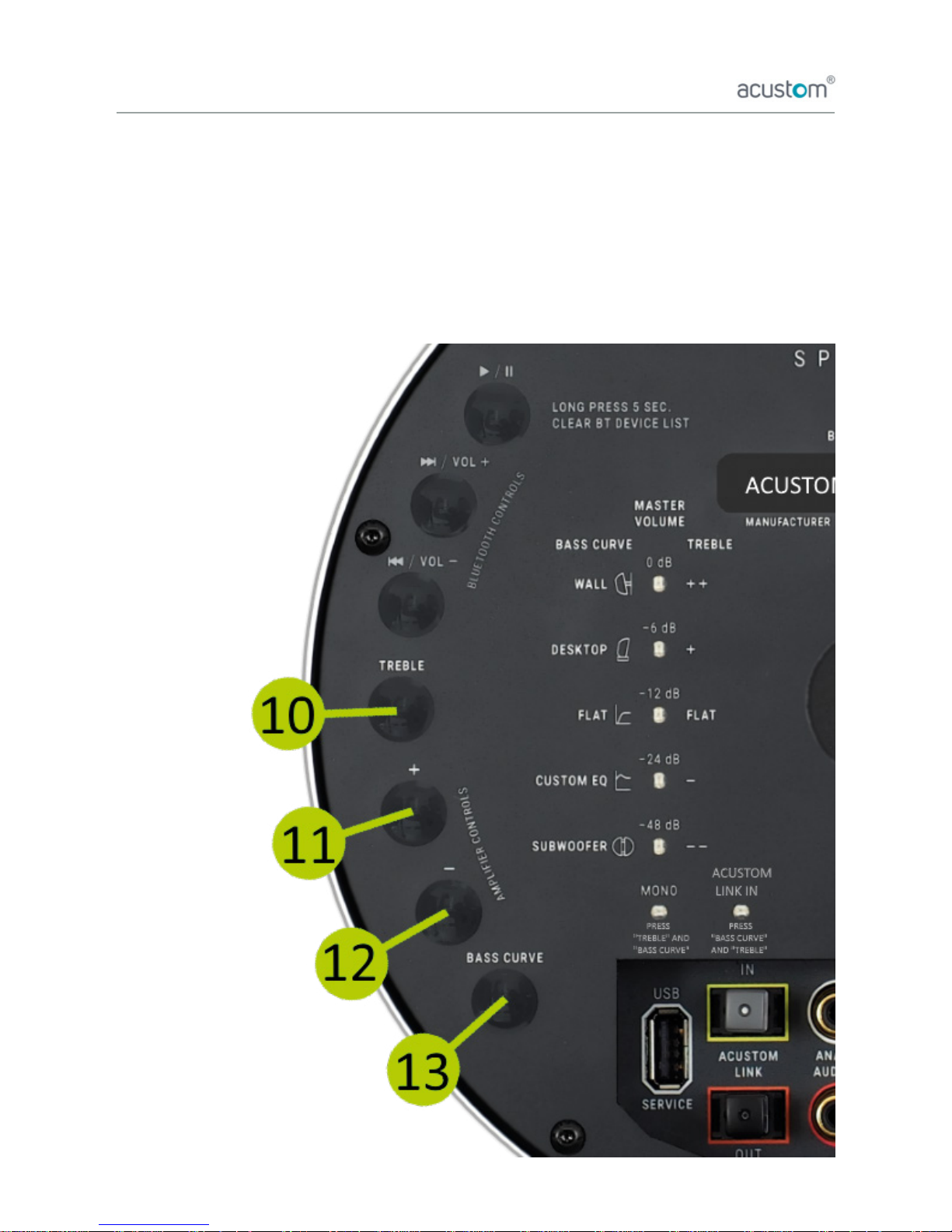
To activate MONO-mode, press buttons 10 and 13
in that order. To deactivate MONO-mode, repeat the
procedure. LED “MONO” indicates status of the mode.
In MONO-mode both speakers play same audio signal.
To activate Acustom Link IN-mode, press buttons
13 and 10 in that order. To deactivate Acustom Link
IN-mode, repeat the procedure. LED “ACUSTOM LINK
IN” indicates status of the mode. Please note that
Analog audio input and Bluetooth doesn’t work when
Acustom Link IN is active.
2. Controls and Connections
1
2
3
4
5
6
7
8
9
10
11
12
13
14
15
16
17
18
4
Page 5
3. Get started
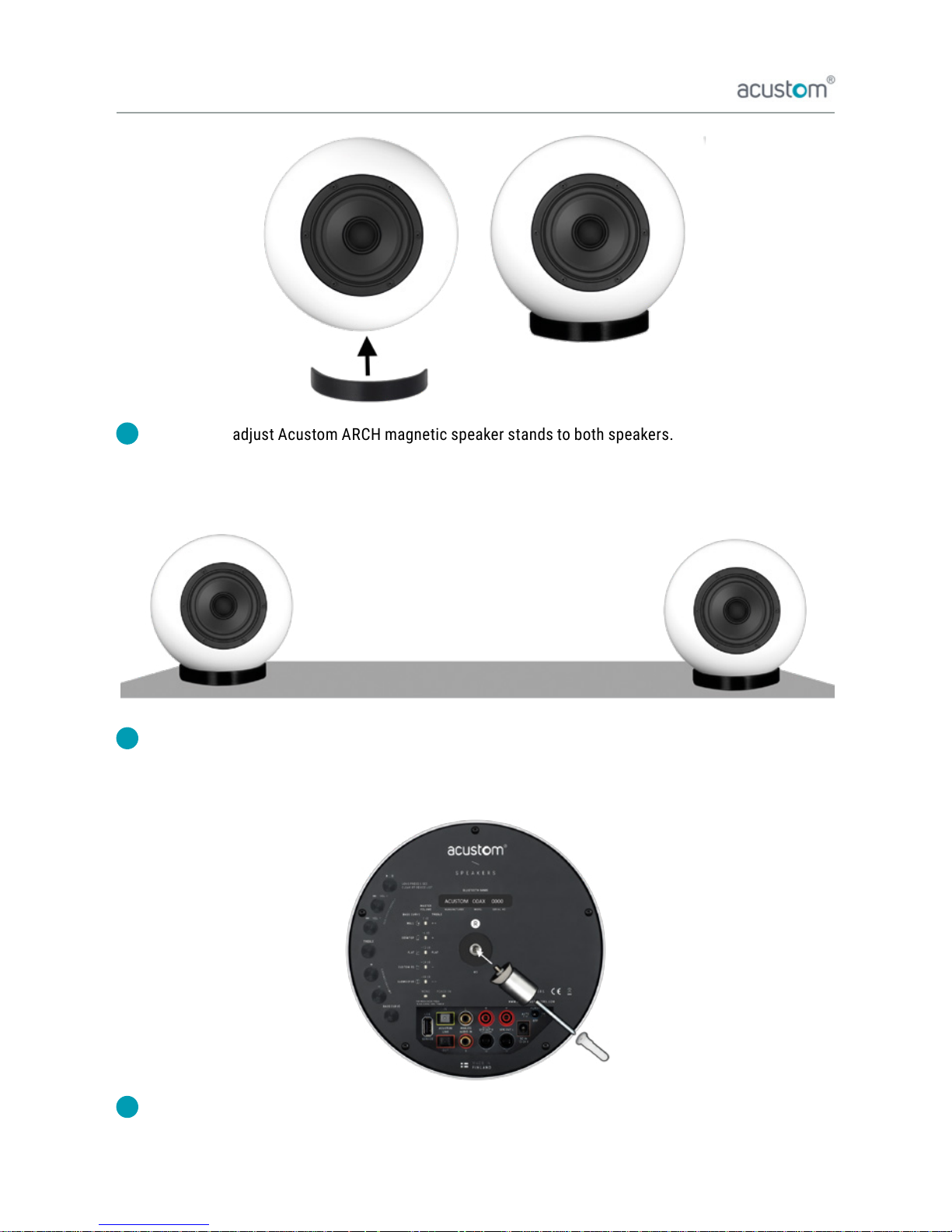
Connect and adjust Acustom ARCH magnetic speaker stands to both speakers.
Please note that all ve [5] small magnet pads should touch the speaker dome.
(instructions also on youtube.com/watch?v=6jyWcGJzCIQ)
Set the speakers on a stable surface such a table, shelf, TV-stand, and adjust angles so that they face
the listener. Place active unit on the right side and passive unit on the left side.
Alternatively, mount the speakers on the wall using Acustom WM01 wall mount (sold separately).
Do not use the Acustom ARCH magnetic speaker stands when mounting the speakers on the wall.
1
2
3
5
Page 6
3. Get started
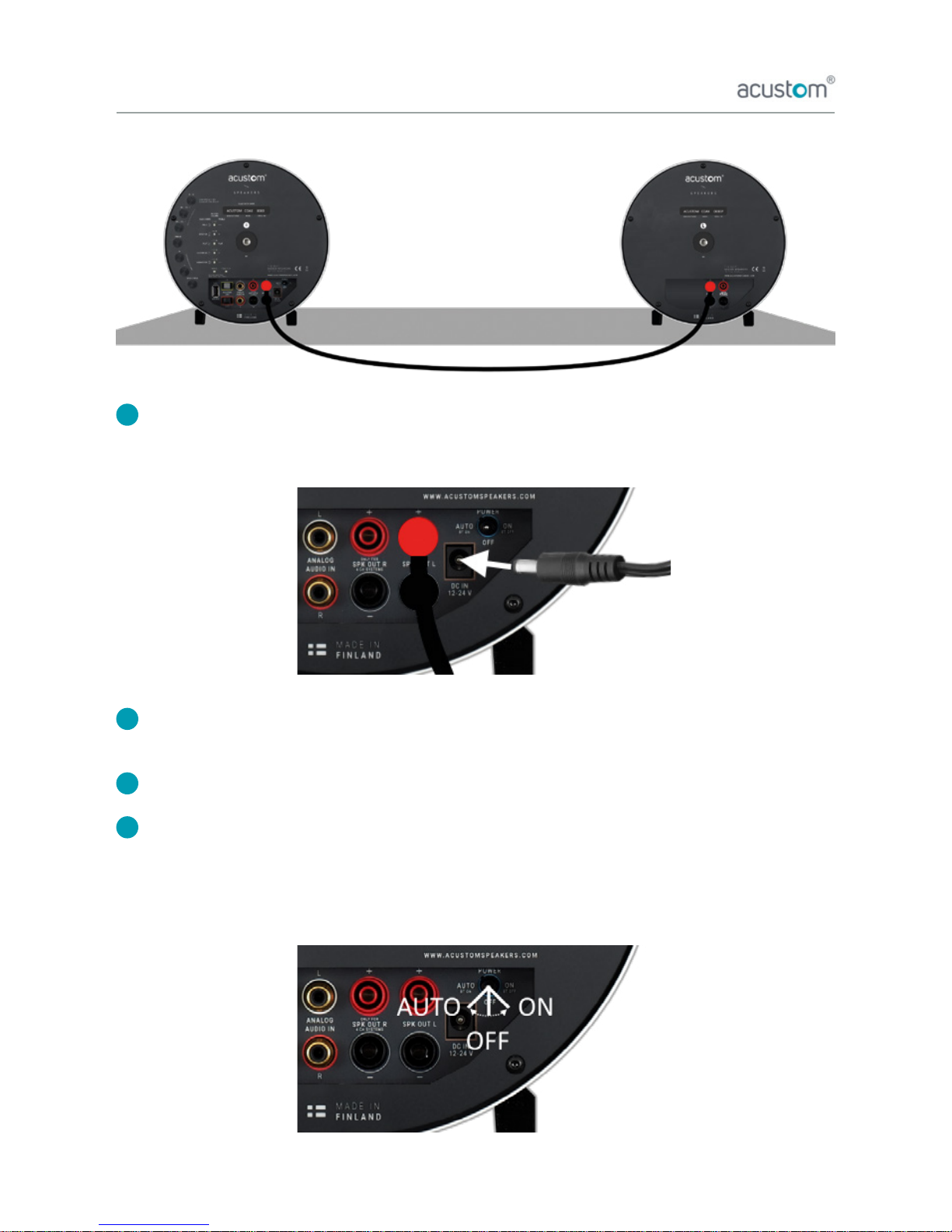
Connect cable from (active) SPEAKER OUT to (passive) SPEAKER IN using Acustom speaker cable.
Note that RED goes RED, and BLACK goes BLACK.
Connect Acustom power cable to external 24 VDC power supply. Then connect power supply to the DC
power input on the speaker. Finally plug the power cable to power supply and the mains power socket.
Connect Analog device to the Analog Audio Input.
To turn power ON, turn to the power switch to “AUTO” (Bluetooth ON) or “ON” (Bluetooth OFF).
To turn power OFF, turn the switch to OFF.
In “AUTO” mode automatic audio source selection is active. In “ON” mode only Analog Audio Input
and Acustom Link-connections are possible.
4
5
6
7
6
Page 7
4. Speaker placement
Acustom COAX speakers sound great placed anywhere in the room. However they are designed to sound
optimal in certain placements.
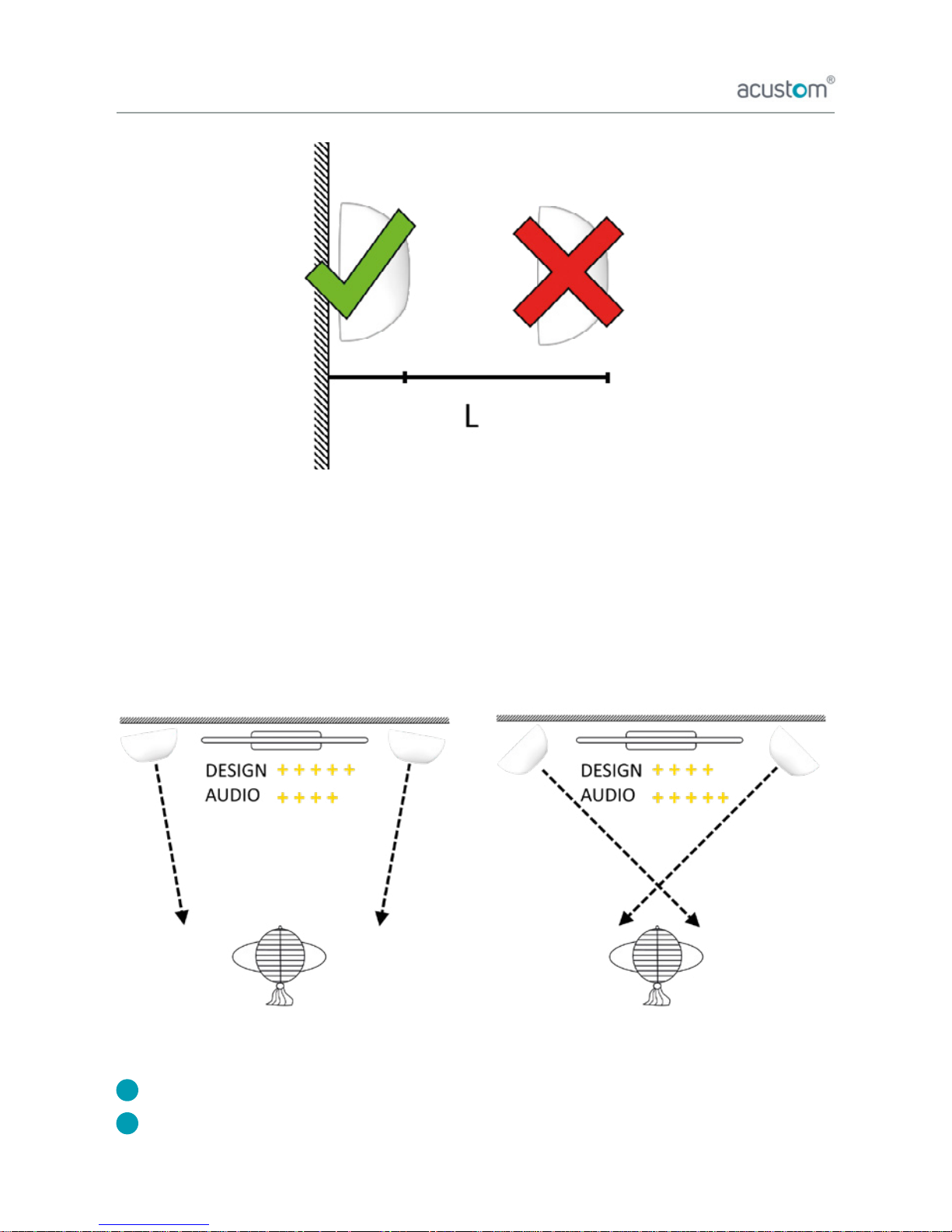
You can enjoy the best performance from these speakers when they are placed close to the wall (see
picture below). The closer the speakers are to the wall, the more bass is produced.
Ideally the speakers face the listener from the same height and distance.
There are two (2) recommended Acustom COAX speaker pair placement options:
Design set-up: Greatest décor looks
Audiophile set-up: Greatest stereo imaging
1
2
7
Page 8
5. Basic Volume and EQ adjustments
Acustom COAX speakers are designed to sound great anywhere in the home or ofce from out-of-the-box,
with factory pre-settings.
To meet the requirements for different set-ups, other than optimal room placement, and guarantee
optimized sound – one can make adjustment with built-in EQ interface in the back-panel of the active
speaker.
To take advantage of the EQ options, please use the buttons 10-13.
8
Page 9

5. Basic Volume and EQ adjustments
Master volume adjustment (Default: -6 dB)
To adjust master volume, please press button “+” (+3 dB) to increase or “-“ (-3 dB) to decrease the overall
output level. Room size and listening distance factor into this adjustment. [max. level 0 dB and min. level
-48 dB].
Thumb rule: the larger room or distance, the more master volume.
Master volume level indicator: When you press the “bass curve” or “treble“ buttons and release them –
indicator LED lights will light up showing the master volume level, and then turn off automatically in ve (5)
seconds.
NOTE: In Bluetooth use, one can adjust extra layer of volume separate from the master volume by pressing
“Vol+” button to increase and “Vol-“ button to decrease. Apple products automatically sync with this volume
setting. On other devices this adjustment works as separate volume control for bluetooth. Default level is
maximum.
Bass adjustment (default: Custom EQ)
To adjust bass, please press button “Bass Curve” simultaneously with either buttons “+” or “-“.
An indicator light will light up for 5 seconds based on the choice of bass curve adjustment: “Wall”,
“Desktop”, “Flat” or “Custom EQ” and “Subwoofer”.
“Wall” setting is best when speakers are mounted to the wall.
“Desktop” when speakers are on a table surface such as desktop and listener is close.
“Flat” setting is for maximum sound output used in very large spaces which require a lot of output.
“Custom EQ” default setting with bass boost (everyday use)
“Subwoofer”, setting for high-pass frequency 120 Hz (professional use). This Bass Curve setting is
recommended for using separate subwoofer. Use “Acustom Link Out” for Digital 24-bit/48 kHz Audio
output for subwoofer. Please refer to our advanced instructions or contact [email protected].
Thumb Rule: Proximity to the wall (see speaker placement) is preferred for all settings for optimal sound
quality.
Treble adjustment (default: FLAT)
To adjust treble, sound brightness, to your preference - please press button “Treble” simultaneously with
either buttons “+” to increase or “-“ to decrease. There are ve (5) Treble settings: “++”, “+”, “FLAT”, “-“
and “- -”.
1
2
3
9
Page 10
6. Daily use
Acustom COAX design speakers are great for easy everyday use. With effective automated features, once
set-up, they are hassle free and you can focus on listening to your choice of audio programs – music, audio
books, and movies.
The most convenient way to use the Acustom COAX speakers is to use your Bluetooth feature on your
device for audio playback. You can also use a 3.5mm to RCA cable (cable included) to hook up any analog
source, such as your TV.
Bluetooth set-up and use
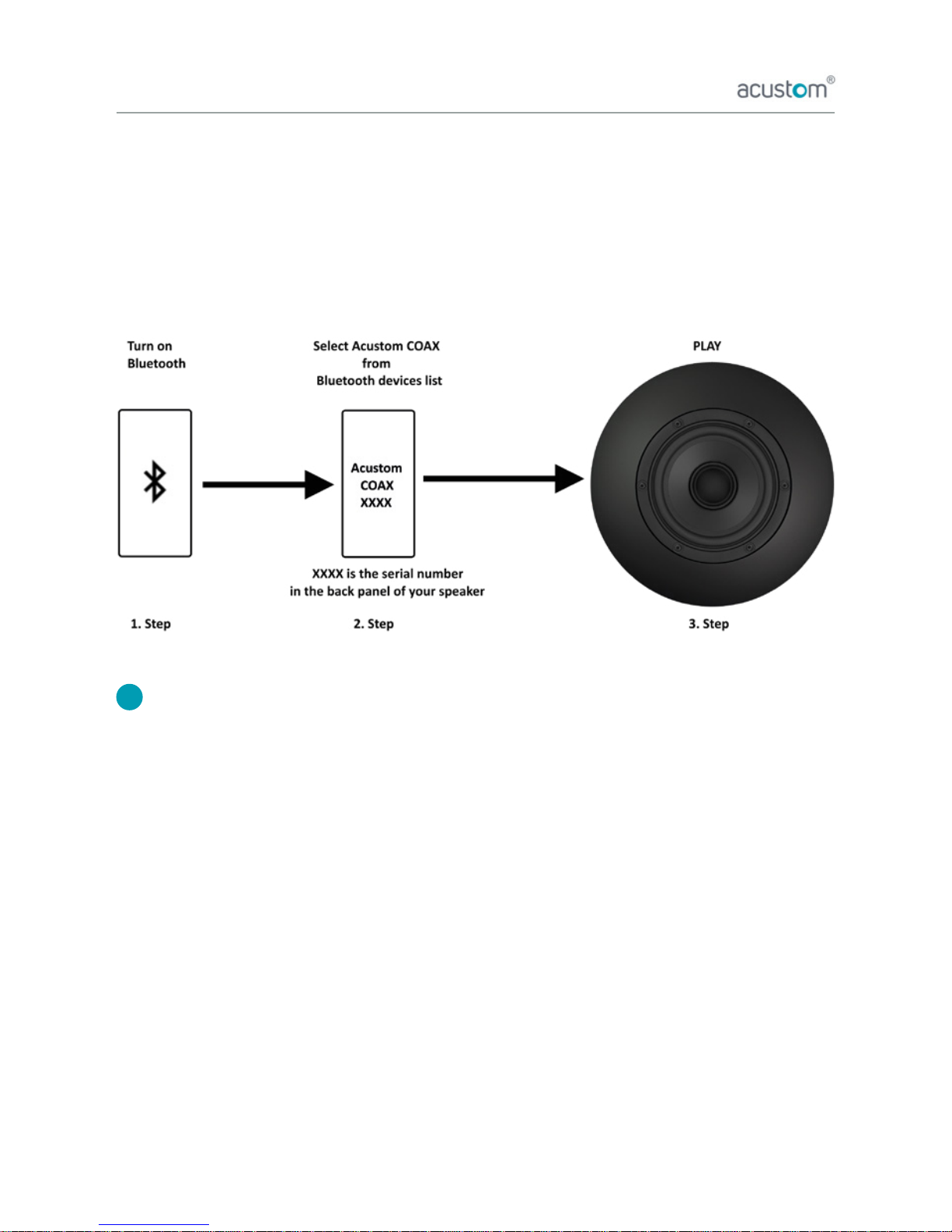
When the power is switched on with “AUTO - Bluetooth ON” option, then you can connect your Bluetooth
device wirelessly to the your Acustom COAX speaker system. You need a Bluetooth capable smart device
such as smartphone, tablet, or computer. Follow three steps below to play your audio programs.
USING BLUETOOTH DEVICES WITH COAX SPEAKERS:
Once a device is paired with Acustom speakers using Bluetooth, it remembers your relationship.
This means that you do not have to always re-pair the device.
COAX allows up to 2 simultaneous device connections. When multiple users use the speakers, Bluetooth
connections must be disconnected to allow new pairing. This will enable that other users can also wireless
play through the Acustom COAX speakers.
To switch between two active devices that are paired, one must pause or stop the playback or close the
application to have the other device take over and play audio program.
NOTE: Depending on OS, using multiple apps simultaneously may require closing some of your background
apps, to allow the current running app to take over the audio.
1
10
Page 11
6. Daily use
USING COAX SPEAKER CONTROLS FOR BLUETOOTH (OPTIONAL)
Acustom all-in-one design speakers are ready out-of-the-box for use with Bluetooth after power is switched
on (AUTO - BT ON). Once a device is connected to the speakers, you are good-to-go with the controls on
your device to set the volume and make song selections, to name of a few.
However, you can take advantage of the Acustom COAX back-panel controls to work with your Bluetooth
audio transmission / playback from your device.
Play or pause ( ► / ►►)
To play or pause a wireless Bluetooth audio signal,
please press “► /► ►” button shortly once for both use cases.
Clear Bluetooth device list ( ► / ►►)
To clear the current list of previously paired Bluetooth devices in speaker memory,
please press “ ►/► ►” for continuously for ve (5) seconds.
Bluetooth Volume adjustment (Vol+)
You can adjust Bluetooth volume by pressing shortly button
“Vol+” (to increase volume). Apple products automatically
sync with the Bluetooth volume setting.
Next song ( ► )
You can play next song by pressing “ ► ”
continuously for two (2) seconds.
Bluetooth Volume adjustment (Vol-)
You can adjust Bluetooth volume by pressing
shortly button “Vol-“ (to decrease volume).
Apple products automatically sync with the
Bluetooth volume setting.
Previous song ( ►)
You can play previous song by pressing “ ► ”
continuously for two (2) seconds.
7
8
9
Page 12

6. Daily use
Television and other analog audio sources
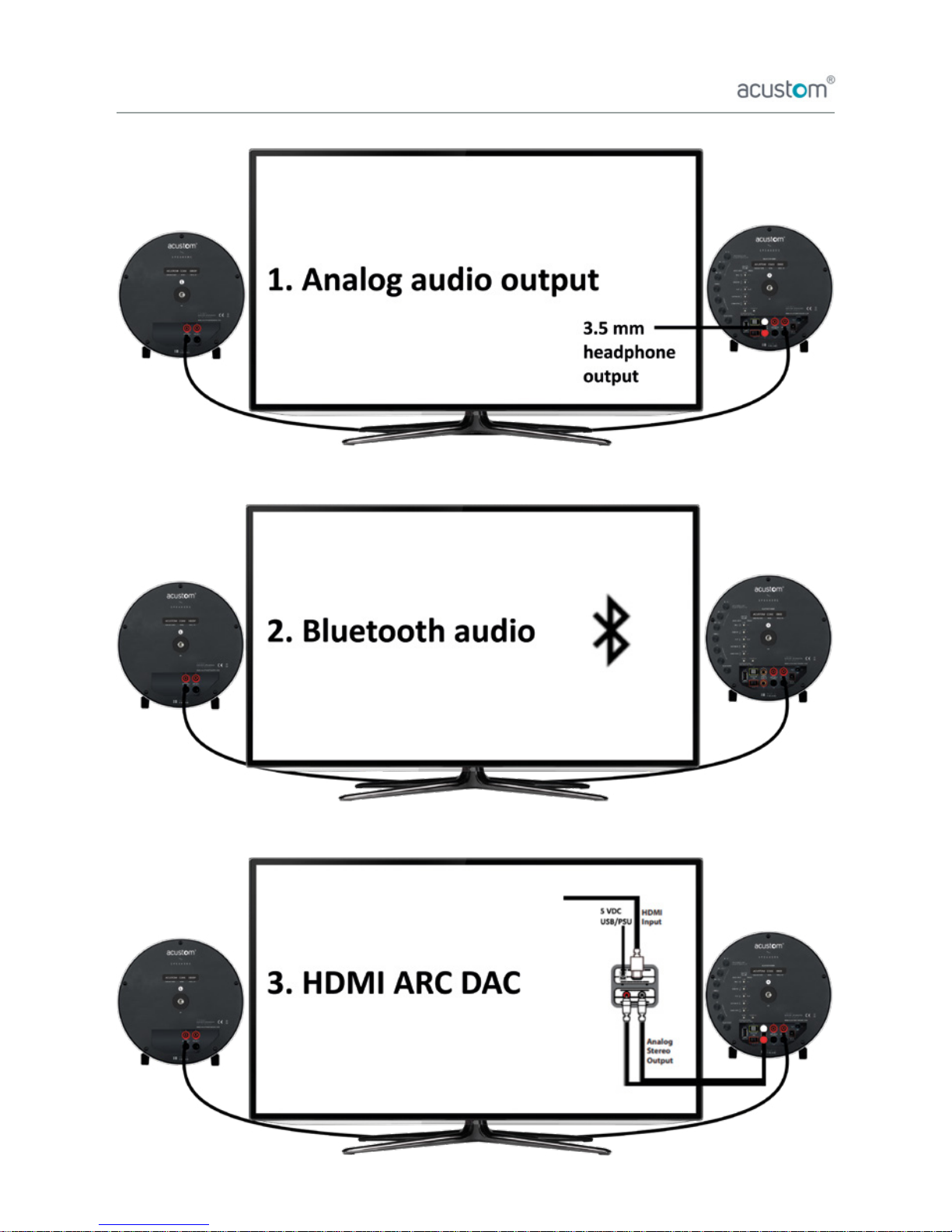
Acustom COAX speakers connect easily to any analog audio source such as the TV.
Please use the “Acustom 3.5 mm to RCA cable” (included in the box) to connect with your TV-set.
Use the headphone output on the TV with 3.5 mm connector and insert RCA connector to
“ANALOG AUDIO IN” (RCA input) on the speaker. Volume adjustment should work with TV
remote control. For more information please study the TV manufacturer’s instructions.
If your TV has Bluetooth, you can alternatively use that function to connect to the Acustom speakers.
Volume adjustment should work with TV remote control. Please follow the instructions for Bluetooth
connection above. For more information please study the TV manufacturer’s instructions.
Speakers can be connected with HDMI ARC-compatible DAC. Plug HDMI connector between HDMI
(ARC) output and DAC. Plug analog audio output from DAC to COAX speaker’s analog audio input.
Then, plug power supply (external PSU or USB) to DAC. Depending on TV, HDMI ARC device audio
source must be chosen and CEC-function (Consumer Electronic Control) may be activated.
Volume level adjustment should work with TV remote control. (HDMI ARC DAC, sold separately).
NOTE: Other analog audio sources with an output (RCA-OUT) can be connected to the speaker (RCA-IN)
with a RCA-RCA cable (not included in the box).
Automatic input selection
A great feature with Acustom speakers is the automatic input selection, which makes life easy and
a remote control redundant.
The COAX speakers detect when primary audio source (Bluetooth) is currently playing. When the primary
audio signal is paused or stopped, the alternative audio source (Analog audio / RCA IN) takes over.
NOTE: Depending on the device and OS, you may need to close the audio application / software
(e.g. streaming service app) for analog audio to take over.
2
3
1
2
3
12
Page 13
6. Daily use
13
Page 14
7. Changing the dome
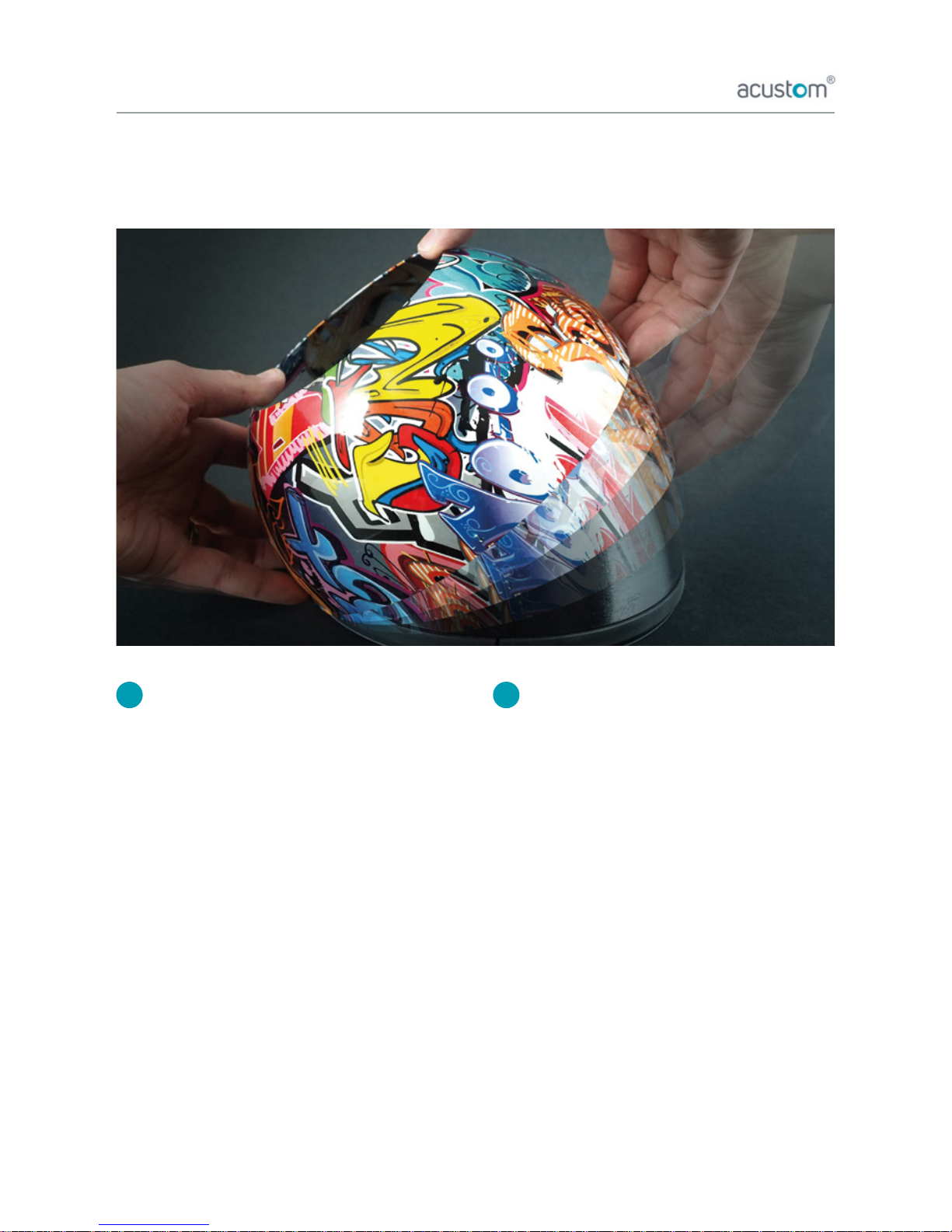
The speaker covers, DOMEs, will enable you to always go with look you want. To see latest collections
please visit acustomspeakers.com. If you are looking for fully customizable domes, please contact
Attaching the DOME
(youtube.com/watch?v=XyvP7MZ8obI)
a. To attach the dome to the COAX speaker, please
make sure that both seal ends are pointing
towards you.
b. Take a good grip from the DOME with your
right hand.
c. Put the left side of the DOME against the
speaker’s left side in a 45-degree angle.
d. Start turning downward the DOME over
the speaker with your right hand.
NOTE: If the DOME does not go straight over the
speaker, you will notice an unequal gap between
the speaker and the DOME. In this case, pull the
DOME’s edge with your ngers and always from
the side where the gap is the biggest.
Detaching the DOME
(youtube.com/watch?v=XyvP7MZ8obI)
a. Put your thumbs over the DOME’s edge.
Thumbs should be located exactly in the
same horizontal line.
b. Put rest of the ngers over the DOME’s edge
on the back-panel side.
c. Take a good grip from the DOME and flip
the speaker against the table
(or other flat surface)
d. Leave your ngers between the DOME and
the table.
e. Press constantly down with your thumbs
until the speaker will touch the table.
f. With your right hand, start turning upward
the DOME until it is in a 45-degree angle.
g. Lift the DOME away from the speaker.
21
14
Page 15
Technical Specication
Model: Acustom COAX
Speaker: 1 x Active (Powered), 1 x Passive
Audio driver: 120 mm, 2-way coaxial
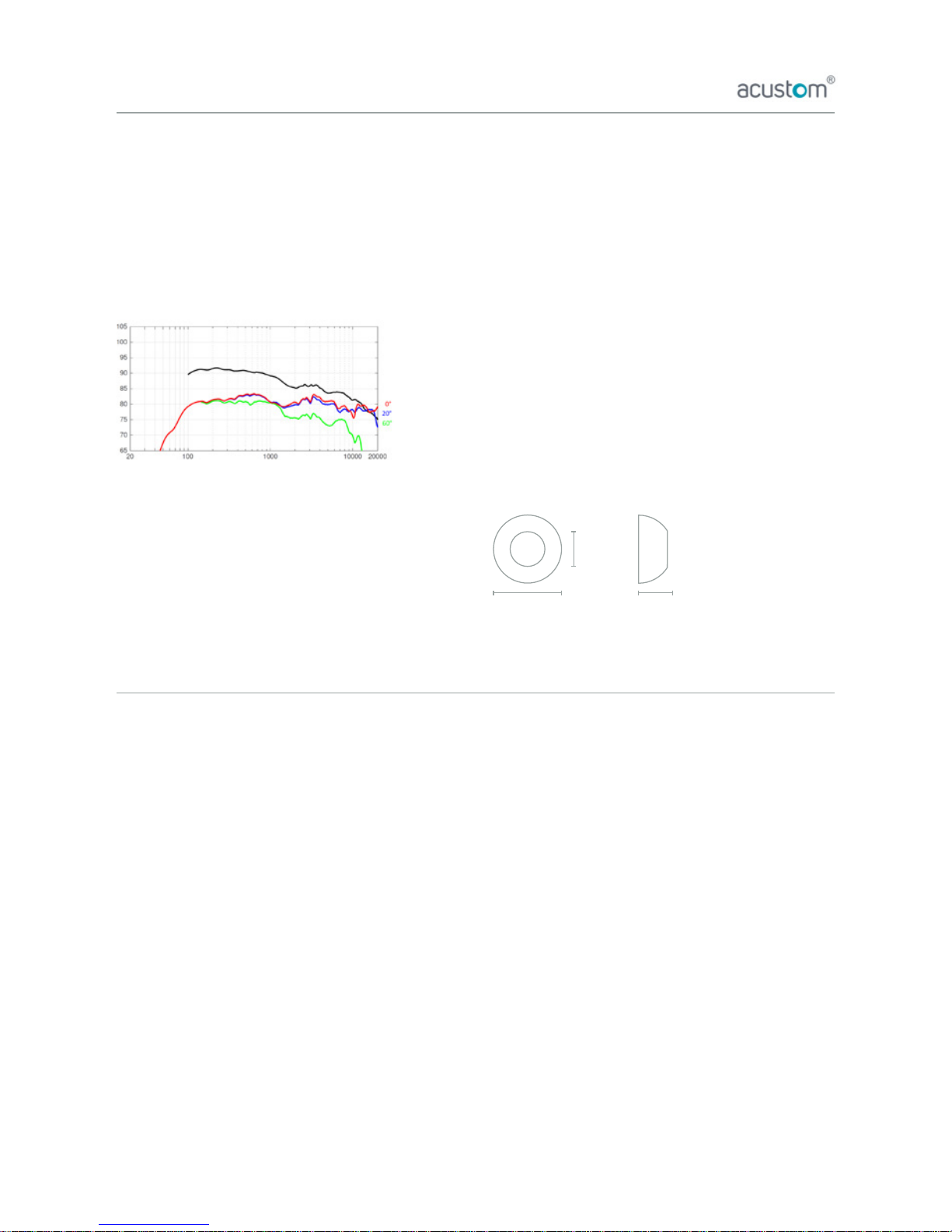
Frequency range: 61 Hz–20 kHz (+/- 3 dB) in
default ”Custom EQ” mode
Digital signal prosessing:
Premium VLSI Solution 24-bit/96 kHz DAC
and 24-bit/192 kHz ADC
Power consumption: (on / standby - no sig 100s)
4,2 W / 1,2W
Amplier: 2 x 50 W (Class-D)
Output options: • SPK OUT L • SPK OUT R
(Only for 4-ch systems) • Acustom Link Out
(24-bit/48 kHz)
Input options: • Bluetooth 4.2 APTX • Analog
Stereo input 1 x RCA • Acustom Link In
(24-bit/48 kHz)
Automatic input selection:
1. Bluetooth 2. Analog Stereo
Universal power supply:
INPUT 100-240 VAC 50-60 Hz OUTPUT 24 VDC
Weight: 2,9 kg per speaker
Dimensions: (without stand)
Manufacturer
Acustom Oy (Ltd)
Huppionmäenkatu 4 V 25, 33720 Tampere, Finland
[email protected], +358 (0) 50 449 7608
Product identication
Every Acustom COAX speaker is identied with individual
product tag.
Each Acustom speaker has a unique product tag, by which it
is possible to retrace the origin of the product.
The product tag is found from the back-panel and is as
follows: manufacturer – model – serial number
Warranty
All Acustom products are engineered with high-quality
manufacturing process and products purchased through
authorised dealers provide warranty against faulty material
and/or workmanship from the date of original purchase
against the purchase receipt for 2 years in accordance with
EU consumer law and proper recommended use.
Warranty does not cover the following:
Incorrect and restricted use including mishandling,
negligence, accident, improper care/installation/
connections/operation/repair/exposure and normal or fair
wear and tear from environmental deterioration on products
and/or product components of Acustom COAX speakers.
Use recommendations and restrictions
Use the product indoors in no excess moisture. Avoid direct
sunlight and heat exposure (temperatures above 35 degrees
Celcius [95 F]).
Use clean and dry or slightly damp cloth to remove dirt and
dust. Be careful not to allow dust build-up on the product or
cables.
Please remove possible grease stains on domes with a clean
and slightly damp cloth. Grease stains can have a detrimental
effect on the holding force of Acustom ARCH magnetic
speaker stands.
Please avoid shock or sharp objects that can damage product
materials.
If transported, please use original boxes or similar with some
protection such as styrofoam or other similar material that
absorbs potential shock.
Do not try to repair the product yourself - contact your
authorized dealer.
dB
Hz
122mm
212mm
94mm
General information
15
Oikeudet muutoksiin pidätetään – [COAXK1801FI]
Page 16

www.acustom.
 Loading...