

Page 1
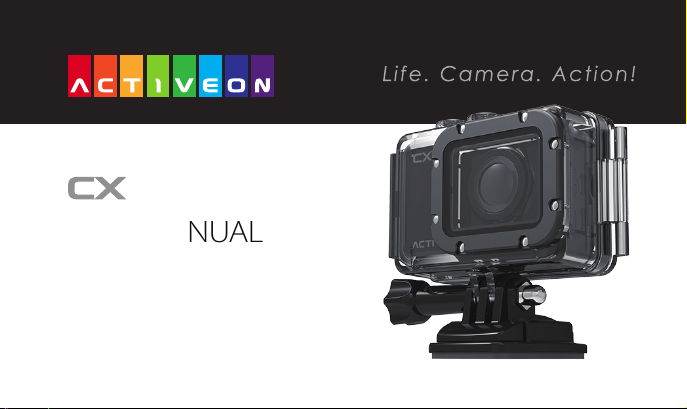
USER MANUAL
www.activeon.com
Page 2

Table Of Contents
1. Name of each part
2. Operation & button description
3. Start the camera
4. LCD screen shot
5. Graphical icon description
6. Video recording
7. Photo shoot
8. User menu
8-1. Playback mode
8-2. User setting
9. Rechargeable Battery
10. Smart phone control
11. Connect ACTIVEON CX to smartphone(using ACTIVEON App)
12. Transferring data to computer
13. Firmware update
14. Features and specications
15. Inside the Package
※ CAUTION
※ FCC RADIO FREQUENCY INTERFERENCE STATEMENT
※ RF Exposure Information (SAR)
1
2
3
4
5
6
7
7
8
9
12
13
13
15
16
17
18
20
20
21
Page 3
www.activeon.com
* Please read this manual carefully before the use!
ENGLISH
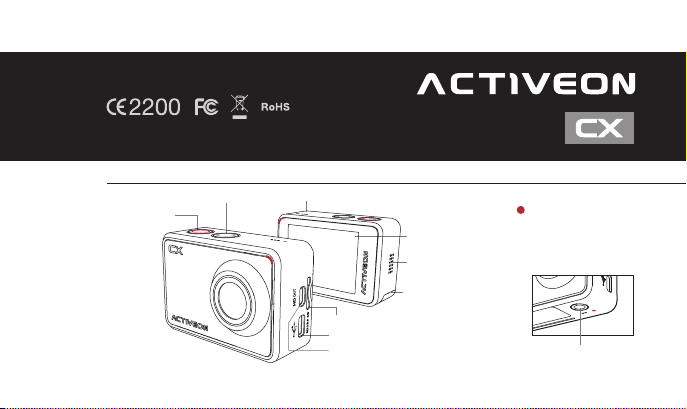
1. Name of each part
Mode / Navigation Internal MIC
Power / Shutter
LCD Screen
Speaker
Li-ion
microSD Card Slot (microSD Card not included)
Mini USB port
HD OUT
* Please use “Micro HDMI" cable on HD OUT port.
* Cable not included.
battery slot
LED Indicator
(Top, Bottom, Front, Back)
Tripod hole (Bottom)
1
Page 4
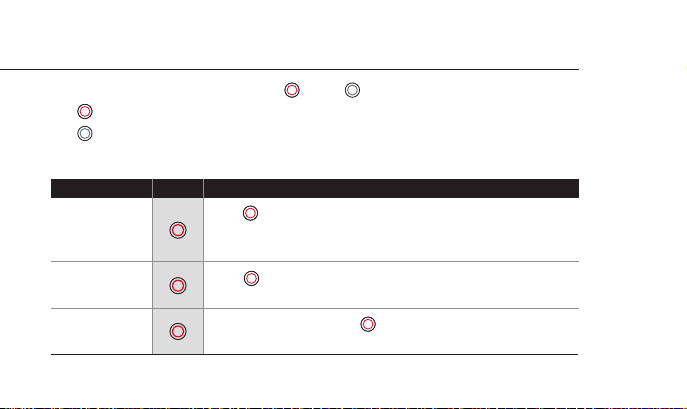
2. Operation & button description
●
ACTIVEON CX is operated by two buttons. ( button , button )
●
( )button features “Power, Shutter and Enter”.
●
( )button features “Mode change, Navigation and User menu”.
●
The feature of buttons are dened as below table.
Function Button Description
Power On / O
Press ( ) button and hold for 2 seconds
* If Auto Power o is set, the camera will automatically shut down in 3 minutes
when there is no operation.
2
REC Start / Stop
Conrm
setting menu
Press ( ) button to start video recording or photo shoot
(Video / Photo / Burst / Timelapse)
Within user setup mode, press ( ) button to enter setting
menu in each category
Page 5
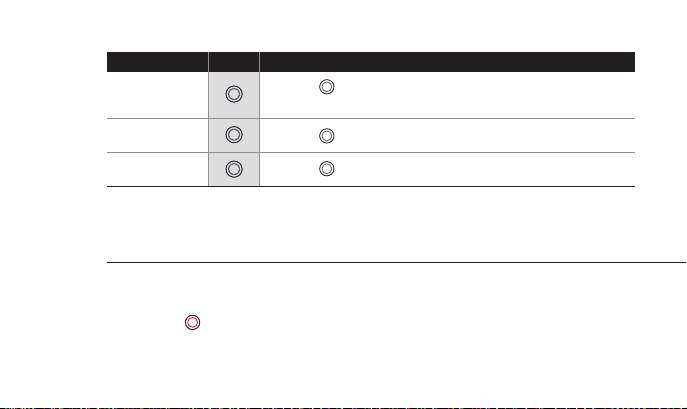
Function Button Description
Press the (
Mode change
User menu Press the (
Navigator Press the (
) button to switch modes
(Video > Photo > Photo burst > Photo timelapse)
) button and hold for 2 seconds to enter user setup mode
) button to move select bar on OSD menu or change setting
3. Start the camera
1. Open the battery cover and insert ACTIVEON CX Li-ion battery.
2. Insert microSD Card on the microSD Card slot.
3. Press the ( ) button and hold for two seconds. (The camera will turn on and LCD screen will display live image.)
(The camera will not record when microSD Card is not inserted.)
3
Page 6
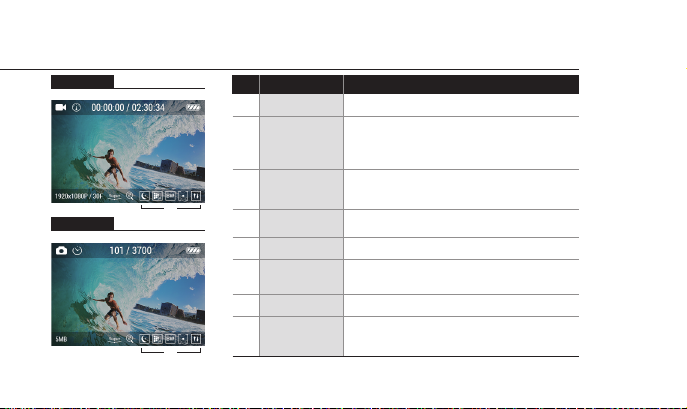
4. LCD screen shot
Video screen
① ② ③ ④
⑥ ⑦ ⑧
⑤
Photo screen
① ② ③ ④
⑥ ⑦ ⑧
⑤
4
Current mode
①
②
Recording time
③
④
⑤
⑥
⑦
⑧
FunctionNo.
Shooting
mode
information
Battery
Resolution
FOV
Zoom
Eect setting
Description
Shows current mode (video or photo)
Shows current shooting mode
(Video - Auto stop / Looping / Timelapse)
(Photo - Self timer / Timelapse / Burst)
Shows recording time information
(Current recording time / Usable recording time)
Shows battery capacity status
Video / Photo Resolution
While shooting video or photo, it shows viewing
angle mode (Super wide / Wide / Medium / Narrow)
Shows current zoom level (None / x2 / x3 / x4)
Shows current eect setting
(Eect / Quality / Filter / AE meter / Upside Down)
Page 7
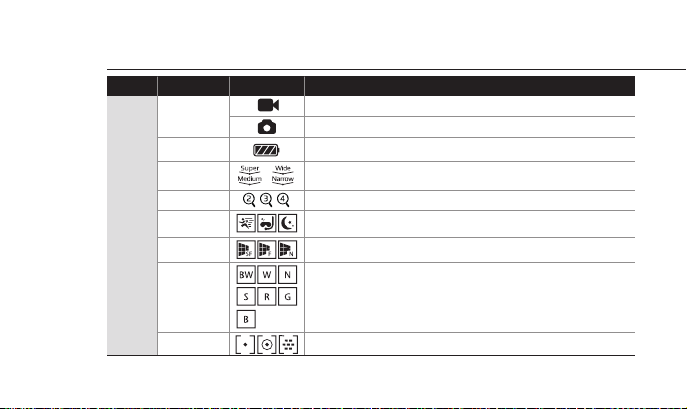
5. Graphical icon description
Function IconsMode Description
Current mode
Battery
FOV
Zoom
Live
screen
Eect
Image quality
Video mode
Photo mode
Shows battery capacity status
Shows FOV setting status (Super wide / Wide / Medium / Narrow)
Shows current zoom level (None / x2 / x3 / x4)
Shows current recording eect status (Sports / Aqua / Night)
Shows current recording image quality status (Super Fine / Fine / Normal)
Filter
AE Meters
Shows current recording lter status.
(O / Black&White / Warm / Negative / Sepia / Red / Green / Blue)
Shows current recording AE meter status (Spot / Center / Average)
5
Page 8
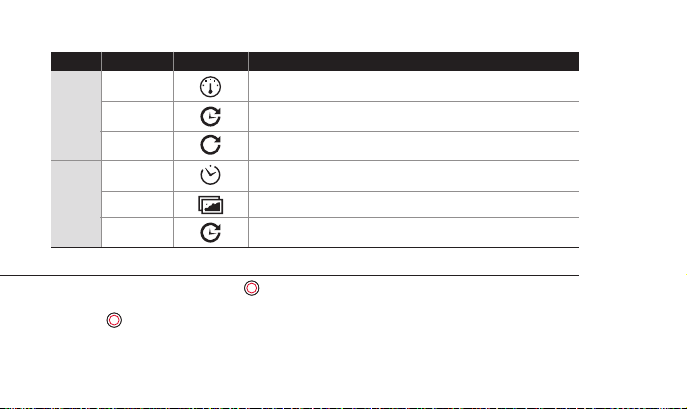
Video
Photo
Function
Auto stop
Timelapse
Looping
Self Timer
Burst
Timelapse
IconsMode
Records video until set time.
(1min / 5min / 10min / 30min)
Captures images in set intervals and creates a timelapse video le.
(1sec / 3sec / 5sec / 10sec /30sec / 60sec)
Continuously records a video for a set time until you stop.
(5min / 20min / 60min / 120min)
Captures an image after a set time.
(5sec / 10sec / 15sec )
Photo burst shooting (3/1sec , 5/1sec)
Captures images continuously in set intervals until you stop.
(1sec / 3sec / 5sec / 10sec / 30sec / 60sec)
Description
6. Video recording
1. After the camera is turned on, Press( ) button to start video recording.
2. When the camera starts to record, LED light blinks* and shows recording time on the screen.
3. Press( ) button to stop recording.
4. You can adjust video settings in “User Menu”.
* If LED o option is selected in user setup, LED light will not blink.
6
Page 9
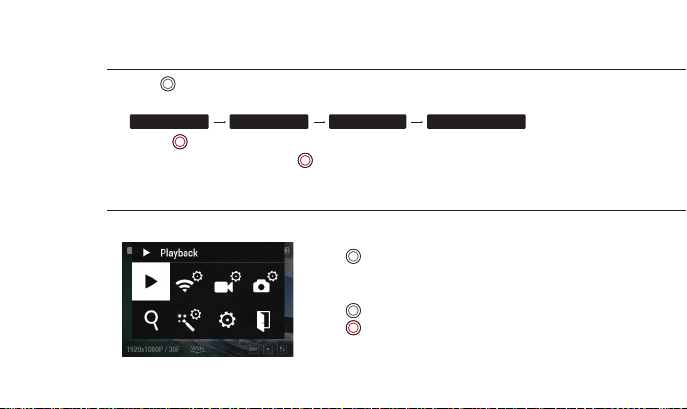
7. Photo shoot
●
Press ( ) button to change to photo mode.
●
Mode changes as
Video mode Photo mode Photo burst Photo timelapse
1. Press ( ) button to shoot photo.
2. In 'Photo Timelapse' mode, Press ( ) button to stop photo shooting.
3. You can adjust photo settings in “User Menu”.
8. User menu
●
You can view recorded video/photo and adjust settings in “User Menu”.
1. Press ( )button and hold for two seconds to enter user menu.
2. User menu is divided into seven categories.
(Playback, WiFi, Video, Photo, Zoom, Eect and General setting)
3. Press ( ) button to move to next option.
4. Press ( ) button to select and conrm each user menu
within sub-menu.
in turn.
7
Page 10
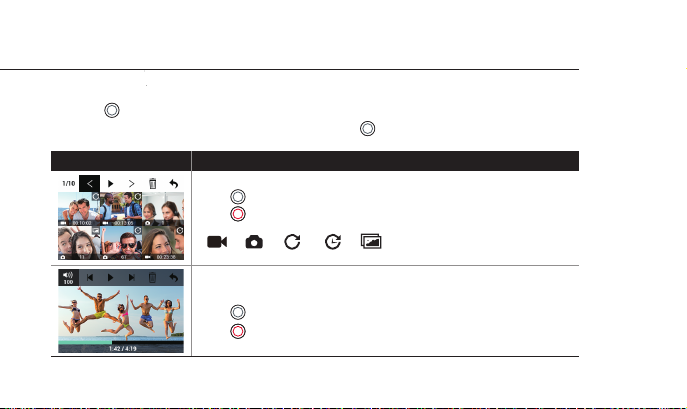
8-1. Playback mode
●
User can view recorded video or photo on the screen.
●
Press ( ) button to select control panel on top menu.
●
While the le is playing, you can call the play control panel by ( ) button.
Function Operation
Thumbnail view
Press ( ) button to choose le.
Press ( ) button to select.
Below icons indicate dierent shooting modes.
( Video / Photo / Looping / Timelapse / Burst )
Video playback
Press ( ) button to use control panel.
Press ( ) button to select.
8
Page 11
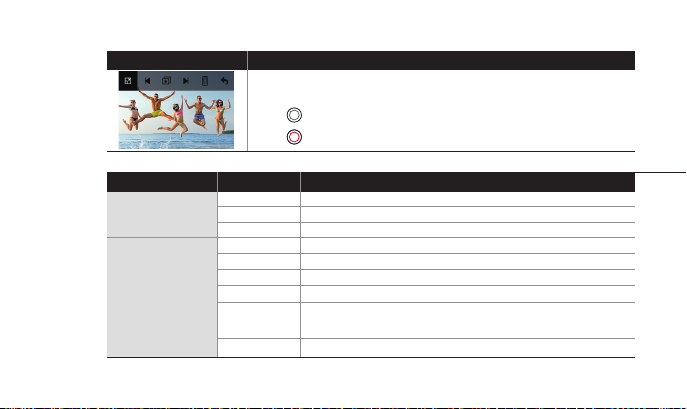
Function Operation
Photo playback
Press ( ) button to use control panel.
Press ( ) button to select.
8-2. User setting
Function Sub menu Description
WiFi
Video Setting
WiFi APP
BACK
Recording mode Manual / Auto Stop / Looping / Timelapse Video
Video Timelapse
Looping
Resolution
BACK Return to previous menu
Turn on WiFi to connect with smartphone
OFF
Turn o WiFi to disconnect with smartphone
Return to previous menu
1min / 5min / 10min / 30minAuto Stop
1sec / 3sec / 5sec / 10sec / 30sec / 60sec
5min / 20min / 60min / 120min
NTSC : 1080p 30fps / 960p 30fps / 720p 60fps / 720p 30fps / 480p 60fps
PAL : 1080p 25fps / 960p 25fps / 720p 50fps / 720p 25fps / 480p 50fps
9
Page 12

Function
Photo Setting
Sub menu
Shooting mode
Self-Timer
Burst
Timelapse
Resolution
BACK
Manual / Self-Timer / Burst / Timelapse
5sec / 10sec / 15sec
3 photos per 1 sec / 5 photos per 1 sec
1sec / 3sec / 5sec / 10sec / 30sec / 60sec
5MP / 4MP / 3MP
Return to previous menu
Description
x1
x2
Zoom
x3
Zoom in (x1/x2/x3/x4)
x4
Super wide / Wide / Medium / Narrow
FOV
EV
Super Fine / Fine / Normal
On / O
Center / Average / Spot
-2.0 / -1.0 / 0 / 1.0 / 2.0
Quality
Eect Setting
Upside Down
AE Meter
* This action camera chipset supports up to 4MP and can be upscaled up to 5MP by optical system settings
10
.
Page 13

Function
Eect Setting
General Setting
Sub menu
Filter
Time Stamp
Eect
White Balance
ISO
BACK
Mic Volume
Speaker
Beep
LED Indicator
TV Out
Memory Format
Time Setting
Auto LCD o
Brightness
O / Black&White / Warm / Negative / Sepia / Red / Green / Blue
Description
On / O
O / Aqua / Sports / Night
Auto / 3000K / 5500K / 6500K
100 / 200 / 400 / 1600 / Auto
Return to previous menu
O / 30% / 70% / 100%
O / 30% / 70% / 100%
On / O
O / Two / Four
NTSC / PAL
Yes / No
MM>DD>YY>HH>MM>AM/PM>DONE
Never / 1min / 2min / 3min
25% / 50% / 75% / 100%
11
Page 14
Function
General Setting
Sub menu
Auto Power o
Default Setting
Version Info
WiFi Info
Never / 1min / 2min / 3min
Yes / No
Displays current camera software version
Displays current WiFi SSID and Password
Description
BACK Return to previous menu
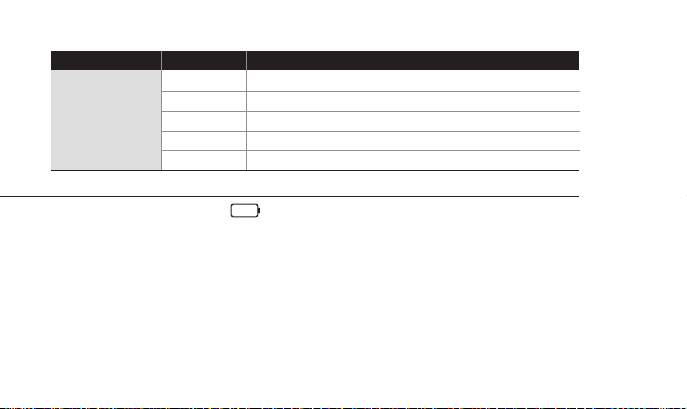
9. Recharging battery
●
LCD will show the low battery icon( ) when the battery is too low and close to the cut o level.
●
The camera will save the le automatically until it is turned o. You must recharge your battery to restart.
●
It will take about 3.5 hours for a full charge by USB port.
●
You can use a Battery Charger (optional accessory) for fast charging.
1. Turn o the camera.
2. Connect the camera USB port to your computer via USB cable.
3. LED will turn on indicating battery is being charged.
4. LED will be turned o when it is fully charged.
12
Page 15

10. Smartphone control
●
Utilizing WiFi APP function of ACTIVEON, user can control the camera through smartphone.
●
Compatible with iOS and Android OS.
●
Before connecting the camera, download ‘ACTIVEON’ application from smartphone app store.
●
Search for ‘AC TIVEON’ in Apple App Store or Google Play Store.
* While smartphone is connected to the camera, camera button operation will be disabled.
* You can take a video and photo, and adjust camera setting on ‘ACTIVEON’.
* ‘ACTIVEON’ features will be upgraded through application update through your smartphone.
11. Connect ACTIVEON CX to smartphone(using ACTIVEON App)
On your camera
●
Turn on ‘ WiFi APP’ function in AC TIVEON CX.
●
The camera screen will display “Waiting for connection”
* If you want to turn o ‘WiFi APP’, Press ( ) for 2 seconds and choose “O ”.
At that time, you can turn o the “WiFi APP” and exit from the black screen.
Waiting for connection
13
Page 16
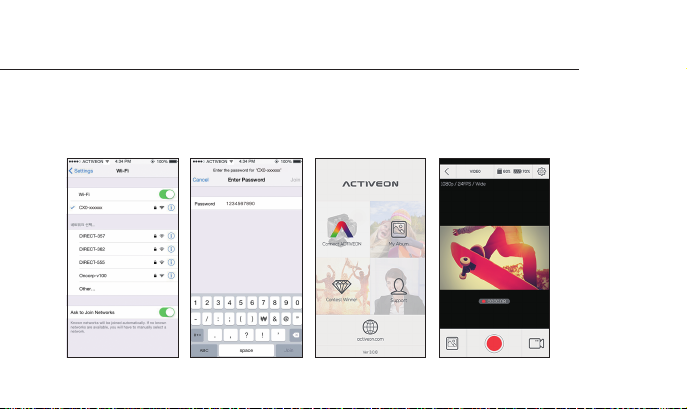
11. Connect ACTIVEON CX to smartphone(using ACTIVEON App)
On your Smartphone
●
On your smartphone or tablet, turn the WiFi on and select the network CX0-xxxxxx under WiFi setting.
●
Default password is ‘1234567890’.
●
Run 'ACTIVEON' app on your smartphone or tablet.
●
Press 'Connect ACTIVEON' on the app, now you can control your ACTIVEON camera.
14
Page 17

12. Transferring data to computer (compatible with both Windows OS and Mac OS)
●
If the camera is connected to a computer or battery charger while it is powered o,
the camera starts to recharge the battery.
●
If the camera is connected to a computer while it is powered on, the camera changes to le–transfer mode.
●
While the camera is connected to a battery charger or car charger for recharge,
the camera can record while it is recharging.
1. Power on ACTIVEON CX.
2. Connect the camera to a computer via USB cable.
3. The camera LCD will display as 'USB Ready'.
4. Go to ‘my computer’ in PC.
5. Search ‘removable disk’.
6. Double click ‘removable disk’.
7. Double click ‘DCIM’ folder.
8. Open the folders to nd video or photo le.
9. Copy and paste les to the computer.
15
Page 18
13. Firmware update (Find the latest firmware at www.activeon.com)
●
You can always nd the latest rmware updates of ACTIVEON products on the website. (www.activeon.com)
●
Firmware upgrade may not available if battery is too low.
●
Recharge up to two cells of battery gauge for proper upgrade.
1. Format the memory card, and copy rmware le to the root directory of microSD Card.
2. Insert the microSD to ACTIVEON CX and turn on the power.
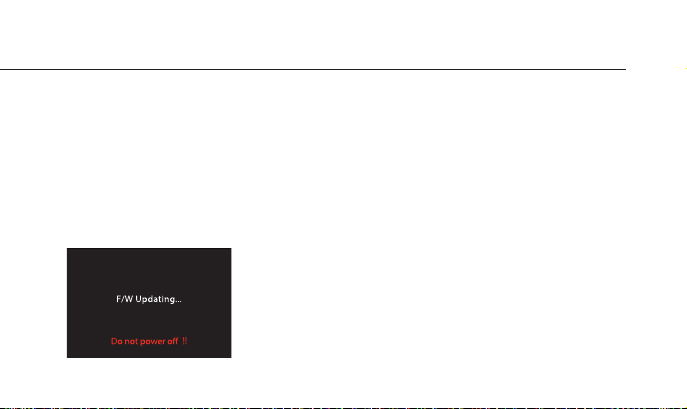
3. Firmware upgrade will automatically start as showing the updating status on the screen.
4. When upgrade is completed, the camera shows ‘F/W Updating’ and automatically turns o.
* Do Not turn o the device or take out the battery during rmware upgrade.
16
Page 19

14. Features and specifications
●
“ACTIVEON CX” 1080p 30fps Action camera
●
Full HD(1920 x 1080) resolution, 30fps recording
●
196ft(60m) waterproof housing
●
4M pixel high precision digital image CMOS sensor
●
170° wide-angle eld of view (FOV) (* Video recording 160 ° FOV)
●
Built-in 2.0” LCD(320x240) screen
●
Built-in WiFi antenna
●
Versatile recording resolution(1080p/960p/720p/480p)
●
Burst photo-shooting (* upto 5 shots in 1 second)
●
H.264 codec, saved as MOV format.
●
Rechargeable Li-ion battery
●
Battery running time : Approximately 120 minutes of continuous recording (1080p 30fps)
* recording time may vary, depends on environmental condition
●
Recharging time : 3.5 hours by USB port / 2.5 hours by AC adapter (Optional Accessory)
●
Easy graphical user interface in LCD display
●
Full line of mounting accessories
17
Page 20
15. Inside the Package
18
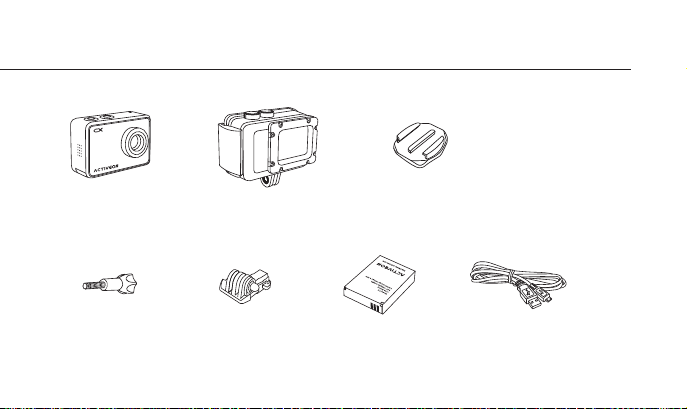
ACTIVEON CX
Action camera
Connecting Screw
Waterproof
Housing
Short Connector
Curved Adhesive
Mount
Rechargeable Li-on Battery
USB Cable
Page 21

19
Page 22

CAUTION
It could be exploded if the battery is inappropriate type. Please insert proper type of battery according to instructions.
The symbol means that according to local laws and regulations your product should be disposed of separatly from household waste. When this product reaches its end of life, take it to
a collection point designated by local authorities. Some collection points accept products for free. The separate collection and recycling of your product at the time of disposal will help conserve
natural resources and ensure that it is recycled in a manner that protects human health and the environment.
FCC RADIO FREQUENCY INTERFERENCE STATEMENT
FCC ID : XOMCCX01
This device complies with Part 15 of the FCC Rules. Operation is subject to the following two conditions:
(1) This device may not cause harmful interference, and
(2) This device must accept any interference received, including interference that may cause undesired operation.
Warning: Changes or modications to this unit not expressly approved by the party responsible for compliance could void the user’s authority to operate the equipment.
Note: This equipment has been tested and found to comply with the limits for a Class B digital device, pursuant to Part 15 of the FCC Rules.
These limits are designed to provide reasonable protection against harmful interference in a residential installation. This equipment generates, uses and can radiate radio frequency energy and, if
not installed and used in accordance with the instructions, may cause harmful interference to radio communications. However, there is no guarantee that interference will not occur in a particular
installation. If this equipment does cause harmful interference to radio or television reception, which can be determined by turning the equipment o and on, the user is encouraged to try to
correct the interference by one or more of the following measures:
●
Reorient or relocate the receiving antenna.
●
Increase the separation between the equipment and receiver.
●
Connect the equipment into an outlet on a circuit dierent from that to which the receiver is connected.
●
Consult the dealer or an experienced radio/TV technician for help.
The device has been evaluated to meet general RF exposure requirement.
The device can be used in portable exposure condition without restriction.00
20
Page 23

RF Exposure Information (SAR)
NOTE : This appliance and its antenna must not be co-located of operation in conjuction with any other antenna or transmitter. A minimum separation distance of 20cm must be maintained between
the antenna and the person for this appliance to satisfy the RF exposure requirements.
This device meets the U.S. government’s requirements for exposure to radio waves.
This device is designed and manufactured not to exceed the emission limits for exposure to radio frequency (RF) energy set by the Federal Communications Commission of the U.S. Goverment.
The exposure standard employs a unit of measurement known as the Specic Absorption. Rate(SAR). The SAR limit set by the FCC is 1.6W/kg. Tests for SAR are conducted using standard operating
positions accepted by the FCC, with the device transmitting at the certied power level in all tested dierent channels.
The FCC have granted an Equipment authorization for this device with all reported SAR levels evaluated as in compliance with the FCC RF exposure guidelines. SAR information on this device is on le
with the FCC, and can be found under the Display Grant section of www.fcc.gov/oet/ea/fddid after searching on
This device is compliance with SAR for general population / uncontrolled exposure limits in ANS/IEEE C95.1-1999 and had been tested in accordance with the measurement methods and procedures
specied in OET bulletin 65 Supplement C.
FCC ID : XOMCCX01
21
Page 24

USA Warranty
www.activeon.com
23
Page 25

ACTIVEON LIMITED WARRANTY
This limited warranty is provided by ACTIVEON to the original end‐user purchaser (“Purchaser”), when delivered in new condition in its original container.
The Product is warranted to be free from manufacturing defects under normal use and service for a period of 12 months from the date of original purchase (“Warranty Period”). Where there
is no evidence of the date of original purchase, ACTIVEON shall consider the date of manufacture as the date of original purchase.
If the Product is returned to an ACTIVEON and ACTIVEON concludes in its discretion that the product is defective in manufacture, ACTIVEON may, at its sole discretion and without charge (a)
exchange the Product for a new Product, or (b) exchange the Product for a refurbished Product.
Exchange or replacement of the Product does not extend the original warranty period of the Product.
TNo warranty shall be provided if the Product is damaged through the negligence or fault of others, abuse, mishandling, improper packaging by you, alteration, accident, electrical current uctuations,
failure to follow ACTIVEON’s operating and maintenance instructions, or if services are performed to the Product by someone other than ACTIVEON or its authorized service provider.
Water, environmental, sand, and corrosion damage; battery leakage, scratches, or damage to the Product will be presumed to have resulted from misuse, abuse or failure to operate the
Product as set forth in the operating and maintenance instructions. No warranty shall be provided if the Product has had its serial number or dating altered or removed.
ACTIVEON SPECIFICALLY DISCLAIMS ANY IMPLIED WARRANTY OF MERCHANTABILITY OR FITNESS FOR A PARTICULAR PURPOSE DURING OR AFTER THE EXPRESS WARRANTY PERIOD STATED ABOVE,
AND NO OTHER EXPERT WARRANTY OR GUARANTY, EXCEPT AS MENTIONED ABOVE, SHALL BE BINDING ON ACTIVEON. (SOME STATES AND PROVINCES DO NOT ALLOW LIMITATIONS ON HOW
LONG AN IMPLIED WARRANTY LASTS, SO THE ABOVE LIMITATION MAY NOT APPLY TO YOU) ACTIVEON SHALL NOT BE LIABLE FOR AND SPECIFICALLY DISCLAIMS LIABILITY FOR INCIDENTAL OR CONSE
QUENTIAL DAMAGES, ANY ACCIDENT, INJURY, DEATH, LOSS OR OTHER CLAIM RELATED TO OR RESULTING FROM THE USE OF THIS PRODUCT, INCLUDING BUT NOT LIMITED TO LOSS OF REVENUES
OR PROFITS, INCONVENIENCE, EXPENSE FOR SUBSTITUTE EQUIPMENT OR SERVICE, STORAGE CHARGES, LOSS OR CORRUPTION OF DATA, OR ANY OTHER SPECIAL, INCIDENTAL OR CONSEQUENTIAL
DAMAGES CAUSED BY THE USE OR MISUSE OF, OR INABILITY TO USE, THE PRODUCT, REGARDLESS OF THE LEGAL THEORY ON WHICH THE CLAIM IS BASED. ACTIVEON SHALL NOT BE LIABLE FOR
WATER HOUSING LEAKAGE OR ANY RESULTING DAMAGES CAUSED BY USER'S RESEALING ERROR. IN NO EVENT SHALL RECOVERY OF ANY KIND AGAINST ACTIVEON BE GREATER IN AMOUNT THAN
THE PURCHASE PRICE OF THE PRODUCT. WITHOUT LIMITING THE FOREGOING, THE PURCHASER ASSUMES ALL RISK AND LIABILITY FOR LOSS, DAMAGE OR INJURY TO YOU AND YOUR PROPERTY
AND TO OTHERS AND THEIR PROPERTY ARISING OUT OF USE OR MISUSE OF, OR INABILITY TO USE, THE PRODUCT NOT CAUSED DIRECTLY BY THE NEGLIGENCE OF ACTIVEON. (SOME STATES AND
PROVINCES DO NOT ALLOW THE EXCLUSION OR LIMITATION OF INCIDENTAL OR CONSEQUENTIAL DAMAGES, SO THE ABOVE EXCLUSION OR LIMITATION MAY NOT APPLY TO YOU). THIS LIMITED
WARRANTY SHALL NOT EXTEND TO ANYONE OTHER THAN THE ORIGINAL PURCHASER OF THE PRODUCT, AND IS THE PURCHASER’S SOLE AND EXCLUSIVE REMEDY.
For assistance (USA) – If you purchased ACTIVEON product in USA and have questions regarding the product or this Limited Warranty, please call 1-858-798-3300. Or visit www.activeon.com.
It is the Purchaser’s responsibility to properly package and send the Product, together with a copy of the original proof of purchase, an explanation of the problem, and a return address to ACTIVEON
at the Purchaser’s expense. If the Product covered by this limited warranty and proven to be defective upon inspection, it will be serviced and returned to the Purchaser at no charge. Any received
Product that is not covered by this limited warranty or is beyond the Warranty Period will be returned as it is.
23
Page 26

EU Warranty
www.activeon.com
19
Page 27

ACTIVEON LIMITED WARRANTY (EU)
The following limited warranty is provided by ACTIVEON with respect to the ACTIVEON product (“Product”) purchased by the original end user purchaser (“Purchaser”), when delivered in new condition
in its original container. Consumers have legal rights under applicable national legislation governing the sale of consumer goods. Such rights are not aected by the warranties in this limited warranty.
The Product is warranted to be free from manufacturing defects under normal use and service for a period of 24 months as from the date of original purchase (“Warranty Period”). Where there is no
evidence of the date of original purchase, ACTIVEON shall consider the date of manufacture as the date of original purchase.
If the Product is returned to ACTIVEON and ACTIVEON concludes in its discretion that the product is defective in manufacture, ACTIVEON may, at its sole discretion and without charge (a) exchange
the Product for a new Product, or (b) exchange the Product for a refurbished Product.
Exchange or replacement of the Product does not extend the original Warranty Period of the Product.
No warranty shall be provided if the Product is damaged through the negligence or fault of others, abuse, mishandling, improper packaging by you, alteration, accident, electrical current uctuations,
failure to follow ACTIVEON’s operating and maintenance instructions, or if services are performed to the Product by someone other than ACTIVEON or its authorized service provider. Water,
environmental, sand, and corrosion damage; battery leakage, scratches, or damage to the Product will be presumed to have resulted from misuse, abuse or failure to operate the Product as set forth
in the operating and maintenance instructions. No warranty shall be provided if the Product has had its serial number or dating altered or removed. Damages deriving from an accident or caused by
the natural wear and tear (including but not limited to accessories and batteries) do not fall within this guarantee or other guarantees.
ACTIVEON SPECIFICALLY DISCLAIMS ANY IMPLIED WARRANTY OF MERCHANTABILITY OR FITNESS FOR A PARTICULAR PURPOSE DURING OR AFTER THE EXPRESS WARRANTY PERIOD STATED ABOVE,
AND NO OTHER EXPERT WARRANTY OR GUARANTEE, EXCEPT AS MENTIONED ABOVE, SHALL BE BINDING ON ACTIVEON. (SOME TERRITORIES DO NOT ALLOW LIMITATIONS ON HOW LONG AN IMPLIED
WARRANTY LASTS, SO THE ABOVE LIMITATION MAY NOT APPLY TO YOU) ACTIVEON SHALL NOT BE LIABLE FOR AND SPECIFICALLY DISCLAIMS LIABILITY FOR INCIDENTAL OR CONSEQUENTIAL DAMAGES,
ANY ACCIDENT, INJURY, DEATH, LOSS OR OTHER CLAIM RELATED TO OR RESULTING FROM THE USE OF THIS PRODUCT, INCLUDING BUT NOT LIMITED TO LOSS OF REVENUES OR PROFITS, INCONVENIENCE,
EXPENSE FOR SUBSTITUTE EQUIPMENT OR SERVICE, STORAGE CHARGES, LOSS OR CORRUPTION OF DATA, OR ANY OTHER SPECIAL, INCIDENTAL OR CONSEQUENTIAL DAMAGES CAUSED BY THE USE OR
MISUSE OF, OR INABILITY TO USE, THE PRODUCT, REGARDLESS OF THE LEGAL THEORY ON WHICH THE CLAIM IS BASED. ACTIVEON SHALL NOT BE LIABLE FOR WATER HOUSING LEAKAGE OR ANY
RESULTING DAMAGES CAUSED BY USER'S RESEALING ERROR. IN NO EVENT SHALL RECOVERY OF ANY KIND AGAINST ACTIVEON BE GREATER IN AMOUNT THAN THE PURCHASE PRICE OF THE PRODUCT.
WITHOUT LIMITING THE FOREGOING, THE PURCHASER ASSUMES ALL RISK AND LIABILITY FOR LOSS, DAMAGE OR INJURY TO YOU AND YOUR PROPERTY AND TO OTHERS AND THEIR PROPERTY ARISING
OUT OF USE OR MISUSE OF, OR INABILITY TO USE, THE PRODUCT NOT CAUSED DIRECTLY BY THE NEGLIGENCE OF ACTIVEON (SOME STATES AND PROVINCES DO NOT ALLOW THE EXCLUSION OR
LIMITATION OF INCIDENTAL OR CONSEQUENTIAL DAMAGES, SO THE ABOVE EXCLUSION OR LIMITATION MAY NOT APPLY TO YOU). EXCEPT WHERE PROHIBITED BY APPLICABLE LAW, (I) THIS LIMITED
WARRANTY SHALL NOT EXTEND TO ANYONE OTHER THAN THE ORIGINAL PURCHASER OF THE PRODUCT, AND IS THE PURCHASER’S SOLE AND EXCLUSIVE REMEDY AND (II) THIS LIMITED WARRANTY
IS LIMITED TO THE COUNTRY OF PURCHASE OF THE PRODUCT.
For assistance (EU) – If you purchased an ACTIVEON product in the EU and if you have questions regarding the Product or this Limited Warranty, please visit www.activeon.com.
It is the Purchaser’s responsibility to properly package and send the Product, together with a copy of the original proof of purchase, an explanation of the problem, and a return address to ACTIVEON.
If the Product is covered by this Limited Warranty and proven to be defective upon inspection, it will be serviced and returned to the Purchaser at no charge. Any received Product that is not covered
by this Limited Warranty will be returned to the Purchaser as it is.
ACTIVEON EU B.V. HULLENBERGWEG 278 1101 BV AMSTERDAM THE NETHERLANDS (Not a visiting address)
25
Page 28

 Loading...