

Page 1
• Important safety information
• Part names and functions
• Detailed illustrations
• Easy-to-follow instructions
• Mounting Accessories
• Troubleshooting
• Technical specifications
• Glossary of technical terms
Please read this guide carefully
and retain for future reference.
Tablet DVD Player
User’s Guide
Page 2

Page 3
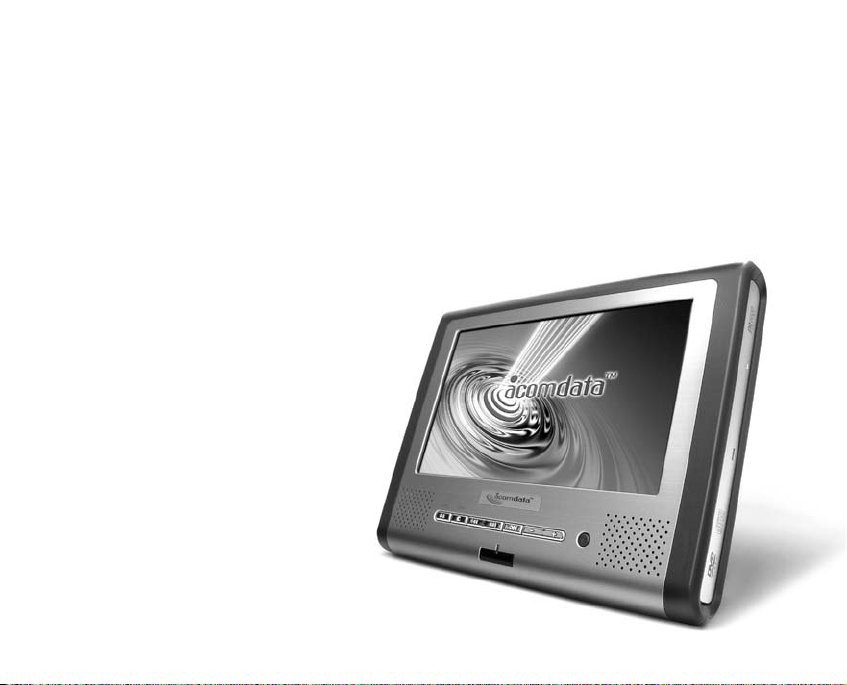
Thank you for purchasing the AWEGO Tablet DVD Player from AcomData, and
welcome to the exciting world of portable DVD. Think of AWEGO as your very
own personal entertainment center. With AWEGO you can
watch movies, listen to music, and view your digital
photos just about anywhere.
With its large complement of value-added
accessories and powerful user-friendly
features, AWEGO is not only portable
and easy to use, but it’s also very versatile. We are confident that you will
get many years of enjoyment and
reliable performance.
Please read this User’s Guide
carefully before using this product.
The guide contains important safety
and usage guidelines, that will help
you get the most from your
AWEGO.
WELCOME TO AWEGO
FROM ACOMDATA
Page 4

Important
Safety Precautions . . . . . . . . . . .5
What’s in the Box . . . . . . . . . . .7
Features Overview . . . . . . . . . . .8
Types of Discs & File Formats
Playable on the AWEGO . . . . . . .9
Part Names and their Functions 10
The Player
Front Panel . . . . . . . . . . . . . . .10
Back Panel . . . . . . . . . . . . . . .10
Left Side Panel . . . . . . . . . . . .11
Disc Tray . . . . . . . . . . . . . . . .11
Bottom . . . . . . . . . . . . . . . . .12
Control Strip . . . . . . . . . . . . . . .9
Remote Controller . . . . . . . . . .13
Battery Pack . . . . . . . . . . . . . .17
Getting Started . . . . . . . . . . . .18
Standing the Player
on a Table-top . . . . . . . . . . .18
Using the Remote Controller . . .18
Installing/Replacing the Remote
Controller Battery . . . . . . . .19
Remote Controller Range . . . . .20
Using the AC Adapter . . . . . . . .21
Connecting the AC Adapter . . .21
Using the Battery Pack . . . . . . .22
Charging the Battery Pack . . . .23
Connecting the Battery Pack
to the Player . . . . . . . . . . .24
Removing the Battery Pack
from the Player . . . . . . . . . .24
Checking the Battery Pack’s
Power Level . . . . . . . . . . . .24
Storing the Battery Pack . . . . .25
Service Life and Disposal . . . . .25
Using Headphones . . . . . . . . . .26
CONTENTS
2 63
Page 5

Connecting the Player to a
TV/Home Theater System . . . .27
Connecting to a TV . . . . . . . . . .27
Connecting to a Dolby Digital/DTS/
MPEG Decoder or an Amplifier
with a Built-in Decoder . . . . . .28
Connecting to other
Digital Amplifiers . . . . . . . . . .29
Connecting to an
Active Speaker System . . . . . .30
Using the Setup Screen . . . . . .31
Opening the Setup Screen . . . . . .31
Language Menu . . . . . . . . . . . .32
Video Menu . . . . . . . . . . . . . . . .33
Audio Menu . . . . . . . . . . . . . . . .34
Parental Lock . . . . . . . . . . . . . . .36
Playing Discs . . . . . . . . . . . . .37
Loading a Disc . . . . . . . . . . . . .37
Playback . . . . . . . . . . . . . . . . .38
Displaying a Disc’s Menu . . . . . . .39
Removing a Disc . . . . . . . . . . . .39
Removing a Disc with no Power . .39
Turning off the Power . . . . . . . . .39
LCD Modes . . . . . . . . . . . . . .40
Aspect Ratio . . . . . . . . . . . . . . .40
Brightness . . . . . . . . . . . . . . . .40
Color Saturation . . . . . . . . . . . .41
Reverse View . . . . . . . . . . . . . .41
Playback Functions . . . . . . . . .42
Pausing Playback . . . . . . . . . . . .42
Skipping to the Next/Previous
Chapter or Track . . . . . . . . . .42
Resume Play Function . . . . . . . .42
Scanning Forward or Backward . .43
Slow Motion Playback . . . . . . . . .43
Single-Frame Advance . . . . . . . .43
Searches . . . . . . . . . . . . . . . . . .43
Repeat Play . . . . . . . . . . . . . . . .44
Repeat Play
Using “in” and “out” Points . . . . .44
Viewing Time Elapsed or Remaining 45
Angles . . . . . . . . . . . . . . . . . . .45
Video Zoom . . . . . . . . . . . . . . . .45
Video Enhance . . . . . . . . . . . . . .45
6-Band Equalizer . . . . . . . . . . . . .46
Page 6

Viewing Digital Photos . . . . . . .47
Loading a Disc . . . . . . . . . . . . .47
Viewing Selected Photos
from the File List Screen . . . . .47
Viewing Selected Photos from the
Thumbnail View Screen . . . . . .47
Viewing Photos Sequentially . . . . . .48
Playing a Slide Show . . . . . . . . . .48
Enhancing Image Quality . . . . . . . .48
Rotating Photos . . . . . . . . . . . . .48
Photo Zoom . . . . . . . . . . . . . . . .48
Using the Car Adapter . . . . . .49
Mounting Options . . . . . . . . . .50
Care & Maintenance . . . . . . . .51
Cleaning the Player . . . . . . . . . .51
Cleaning Discs . . . . . . . . . . . . .51
Storing Discs . . . . . . . . . . . . . .51
Troubleshooting . . . . . . . . . . .52
Technical Specifications . . . . . .54
Glossary of Technical Terms . . .55
One Year Limited Warranty . . .60
Ordering Accessories . . . . . . .63
Contact Information . . . . . . . .64
4 61
Page 7

To r educe the risk of fire
or electric shock:
• Do not expose this appliance to rain
or moisture;
• Do not try to open the enclosure.
Avoid exposure to the laser
The Player employs a laser system. To
prevent direct exposure to the laser
beam:
• Do not try to open the enclosure;
• Do not stare into the beam.
Do not jar the Player
During playback, the disc spins at
high speeds. Sudden movements during playback may damage the disc.
Transporting the Player
Before transporting the Player, be
sure to remove any disc that may be
inside it.
If connecting the Player to a TV or
other equipment:
• Place the Player on a stable surface;
• Do not place the player on top of a
TV or monitor;
• Install the player away from cassette decks or other devices which
are easily affected by magnetic fields;
• Do not place objects on the Player;
• Turn off the power when not using
the Player;
• Depending on the TV reception conditions, stripes may appear on your
TV screen when the DVD Player is
turned on. This is not a malfunction of
IMPORTANT
SAFETY PRECAUTIONS
Page 8

the Player or of the TV. If this should
happen, turn off the Player's power;
• The DVD Player may interfere with
radio reception when the power is on.
Using the Player in vehicles
Do not use the Player while driving a
vehicle. Only passengers should use
the Player. Preferably, passengers
using the Player should be seated in
the back seat so as not to distract
the driver.
Storing the Player
Do not leave the Player or the Battery
Pack in places where the temperature
can reach high or low extremes, such
as inside the passenger cabin or
trunk of a car. Doing so may warp the
outer case or reduce the performance of the Battery Pack.
When carrying on planes…
Heed the airline company's rules.
When carrying in hospitals…
Heed the hospital's rules.
FCC Notice:
This equipment has been tested and
found to comply with the limits for a
Class B digital device, pursuant to
FCC Rules, Part 15. These limits are
designed to provide reasonable protection against interference in a residential installation.
6 59
Page 9
Important Notes:
• If you are missing any items shown above, please contact AcomData
Customer Service via email at [email protected] or call
(909) 348-0680.
• Please retain a copy of your receipt. You will need it if warranty repair
service is required in the future.
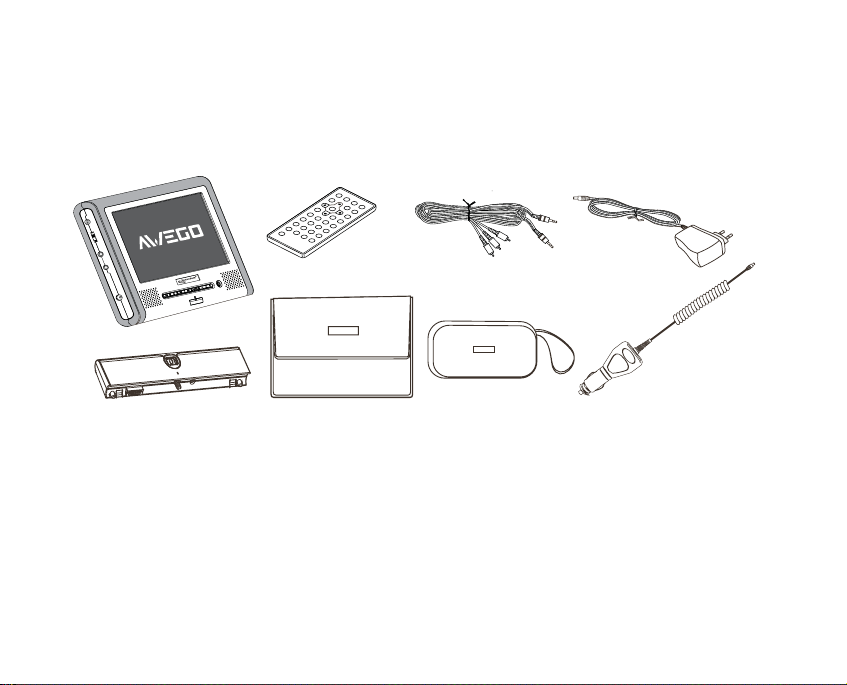
WHAT’SINTHE BOX
AWEGO Player
Remote Control Audio/Video Cable AC Adapter
Battery Pack Soft Carrying Case Car AdapterAccessories Bag
Page 10

FEATURES OVERVIEW
• 7" TFT LCD Screen
(see Glossary, page 58)
• 16:9 and 4:3 Aspect Ratios
(page 40)
• Plays DVD-Video, DVD-Audio,
DVD-R, Video CD, CD/-R/-RW,
MP3, WMA, and JPEG
(see Glossary)
• Angles (page 45)
• Battery Saver Feature (page 25)
• Connecting to a TV/Home Theater
Systems (page 27)
• Dolby Digital AC-3 Decoder
(see Glossary, page 55)
• 6-Band Equalizer (page 46)
• Graphical User Interface
• Language Options (page 32)
• Parental Lock (page 36)
• Photo Zoom (page 48)
• Repeat Play (page 44)
• Resume Play Function (page 42)
• Reverse View (page 41)
• Scanning (page 43)
• Screen Saver (page 38)
• Searches (page 43)
• Single-Frame Advance (page 43)
• Slow Motion (page 43)
• Speech Enhancer
(see Glossary, page 58)
• Stereo Speakers
• Video Enhance (page 46)
• Video Zoom (page 45)
• View Digital Photos (page 47)
• Virtual Surround Sound (VSS)
(see Glossary, page 59)
8 57
Page 11
Disc Types and Formats
• DVD-Video, DVD-Audio, DVD-R,
Video CD (VCD), CD/-R/-RW discs
• 12cm and 8cm discs
• MP3, WMA, and JPEG
See the Glossary on page 55 for
more information.
Disc Structure
DVDs are generally divided into titles
and chapters. Usually, one movie corresponds to one title.
CDs are divided into tracks. Usually,
one track corresponds to one song.
Be aware when using the Player
that not all discs are organized in
this way.
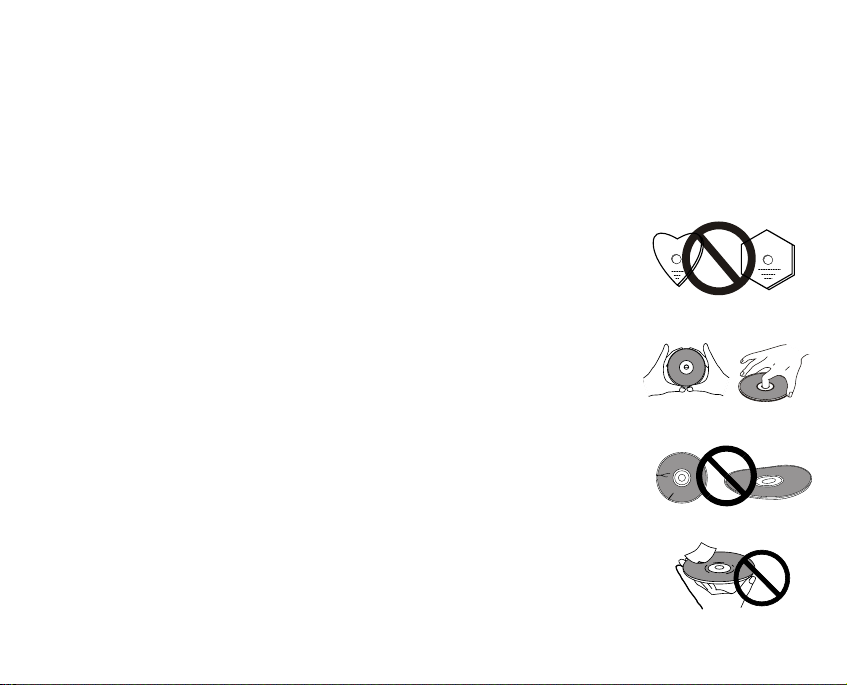
Important Notes on Discs
• Never use irregularly
shaped discs with the
Player. This could damage the Player and void
the warranty.
• Always handle discs by
their edges.
• Do not touch or scratch
the recorded surface or
let it get dirty.
• Do not try to play damaged (cracked or
warped) discs.
• Do not use discs that
have loose labels,
exposed glue or foreign
objects stuck to them.
TYPES OF DISCS AND FILE FORMATS
PLAYABLE ON THE AWEGO
Page 12
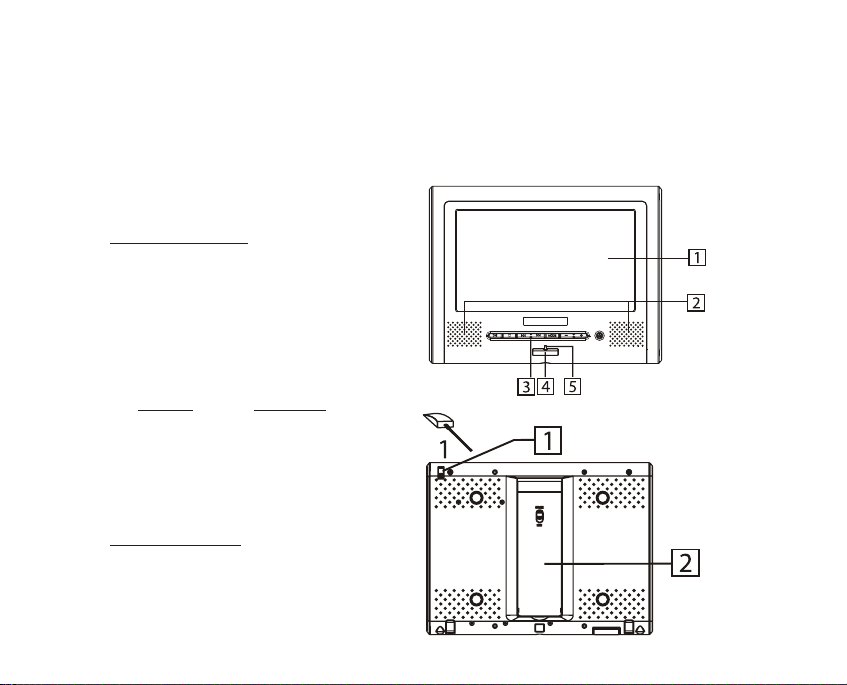
THE PLAYER
Front Panel
1. 7" TFT LCD
2. Stereo Speakers
3. Control Strip
4. Remote Sensor
5. Power Indicator
S
TATUS MEANING
Off: No power
Red: Standby mode.
Blue: Power on.
Back Panel
1. Ejector Stick (See page 39)
2. Adjustable Support
Page 13
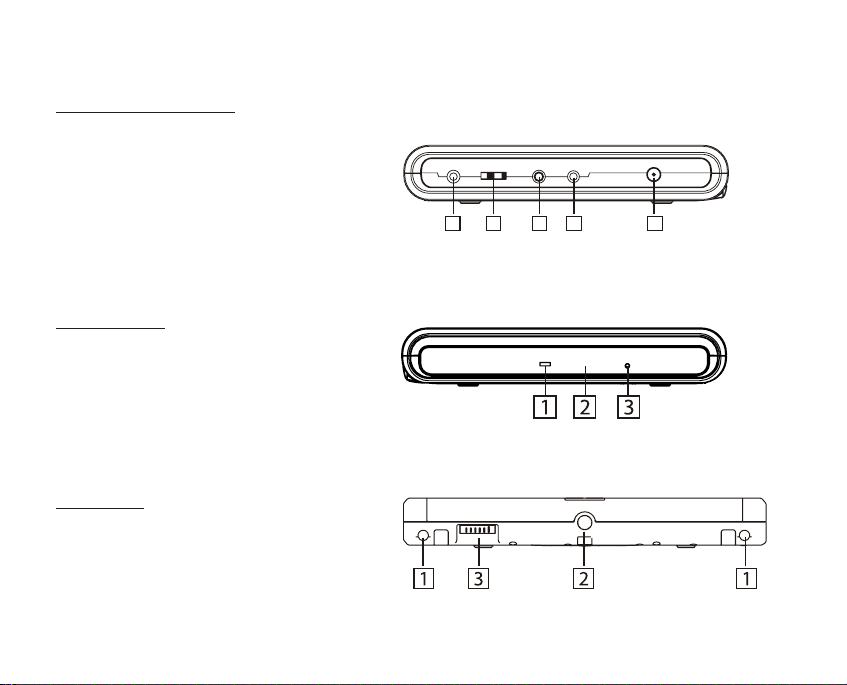
Left Side Panel
1. Headphones Jack
2. Volume Control
3. Video Out Jack
4. Audio/Optical Out Jack
5. AC Adapter/DC In Jack
Disc Tray
1. Loader Status Indicator LED
2. Tray Fascia
3. Ejection Hole (Ejector Stick is
inserted here)
Bottom
1. Battery Guide Holes
2. Threaded bore for Battery Pack
mounting bolt
3. Battery Connection Terminals
1 2 3 4 5
Page 14
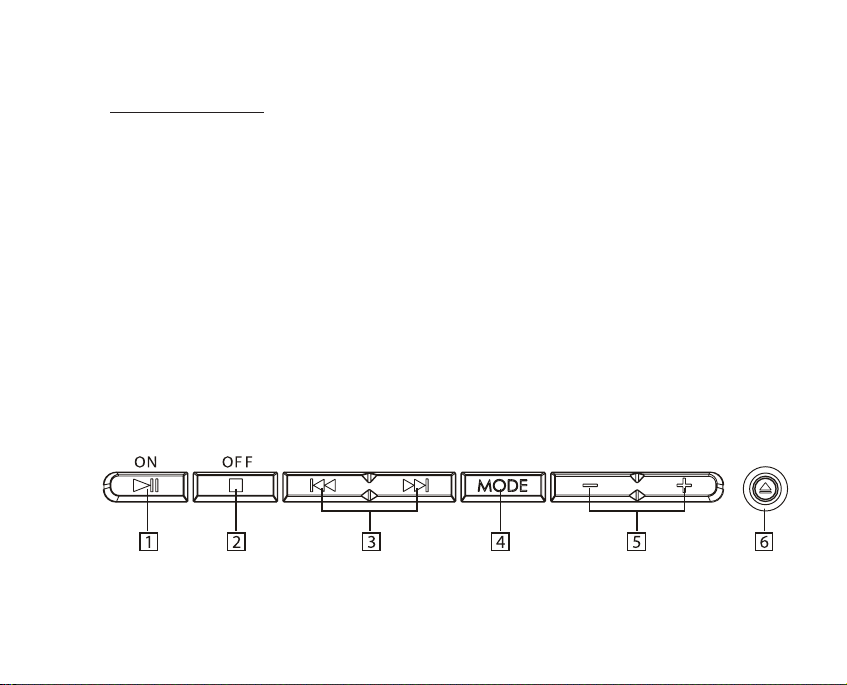
Control Strip
1. ON/PLAY/PAUSE button
• Press for 2 seconds to power on
the Player.
• Press to play a loaded disc.
• Press during playback to pause.
Press again to resume.
2. OFF/STOP button
• Press to stop playback.
• Press for 2 seconds to put the
Player into Standby mode.
3. PREVIOUS/NEXT buttons
Press to skip to the next/previous
track or chapter.
4. LCD MODE button
• Press the LCD MODE button to toggle through the LCD control modes.
• Press the LCD Mode button for 2
seconds to turn off the display.
5. – & + buttons
• Press the + and – buttons to adjust
the setting.
See page 40 for instructions on
selecting LCD modes.
6. OPEN button
Press to open the tray.
12 53
Page 15
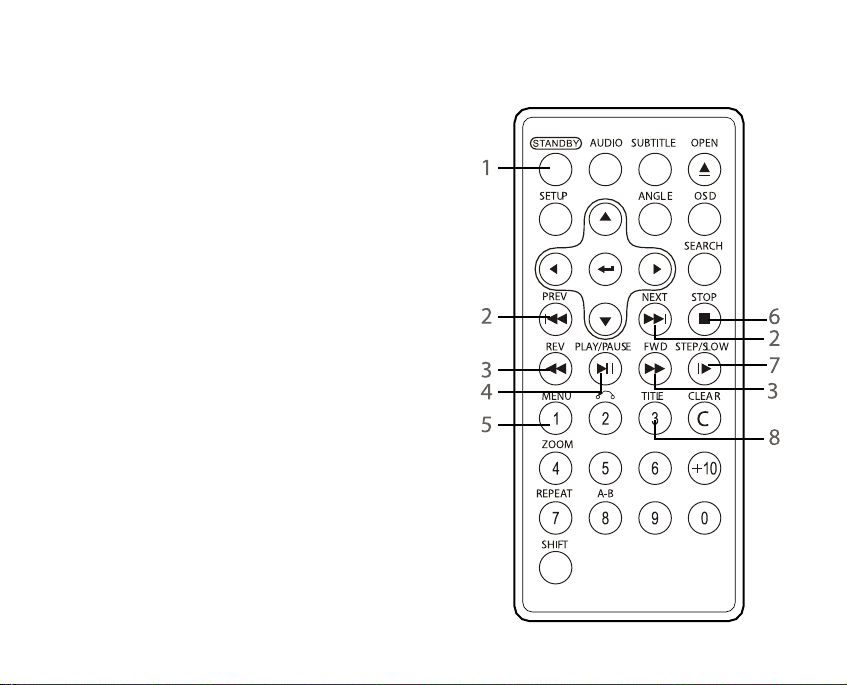
REMOTE CONTROLLER
(Part 1: Frequently Used Buttons)
FYI: Most operations can be performed from
the Remote Controller. However, some operations must be performed from the Player.
1. STANDBY/POWER button
Press to turn the Player on and off.
2. PREVIOUS/NEXT buttons
Press to skip to the previous/next chapter or
track. (See page 42)
3. FORWARD & REVERSE scan buttons
(See page 43)
4 PLAY/PAUSE button
5. MENU button
Press to display a disc’s menu screen.
6. STOP button
7. SLOW/STEP button
Press for slow motion playback and singleframe advance. (See page 43)
8. TITLE button
Press to display a DVD's title.
Page 16
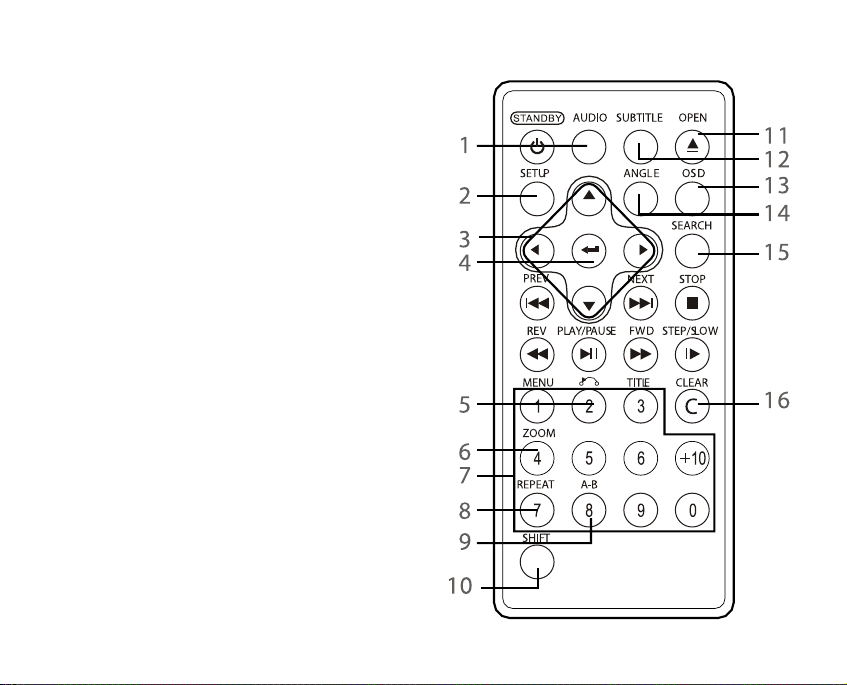
REMOTE CONTROLLER
(Part 2: Other Buttons)
1. AUDIO button
Press to change DVD audio language
and to access special DVD audio features, such as voice over commentaries (if available).
2. SETUP button
• Press when playback is stopped to
display the Setup Screen.
(See page 31)
• Press once during playback to dis-
play the Video Enhance screen.
(See page 45)
• Press twice during music playback to
access the Equalizer. (See page 46)
3. CURSOR buttons
Used for on-screen navigation.
4. ENTER button
Press to enter/exit various functions.
5. RETURN button
Press to return to the previous item
14 51
Page 17

(only for VCDs with playback control).
6. ZOOM button
Press to zoom in on a image .
(See pages 45 and 48)
7. NUMBER buttons
Press these buttons while pressing
the SHIFT button to input numbers.
(For example: when conducting a
time-based search.)
8. REPEAT button
Press to play titles, chapters or
tracks repeatedly.
9. A-B REPEAT button
Press this button during playback to
set “in” and out” points for repeat
playback of a segment. (See page
44)
10. SHIFT button
Some of the buttons on the Remote
Controller have both a function mode
and a numerical mode. For example,
the MENU button is also the “1” button. These buttons can be used to
input numbers for certain tasks, such
as time-based searches.
The SHIFT button is used to toggle
these buttons between function mode
and numerical mode. When you press
the SHIFT button, the current mode
will appear on screen as “Function” or
“Number.” To change mode, press the
SHIFT button again.
11. OPEN button
Press to open the disc tray.
12. SUBTITLE button
Press to change subtitle language
(only works if subtitles are available).
13. OSD (On-Screen Display) button
• Press once to display time elapsed
and time remaining during playback. If
the Player is running off of the Battery
Pack, when OSD is pressed, the
Battery Level Indicator will also
appear.
• Press again to display further disc
information.
• Press again to turn off OSD.
Page 18

14. ANGLE button
Press to switch the DVD's angle or to
view other special on-screen features
that may be available.
15. SEARCH button
Used to find a specific location on a
disc, such as a title or chapter on a
DVD, or elapsed time and track on a
CD. Use the NUMBER buttons to
enter the desired information. Press
the ENTER button to complete selection.
16. CLEAR button
Clears inputted numbers.
Page 19
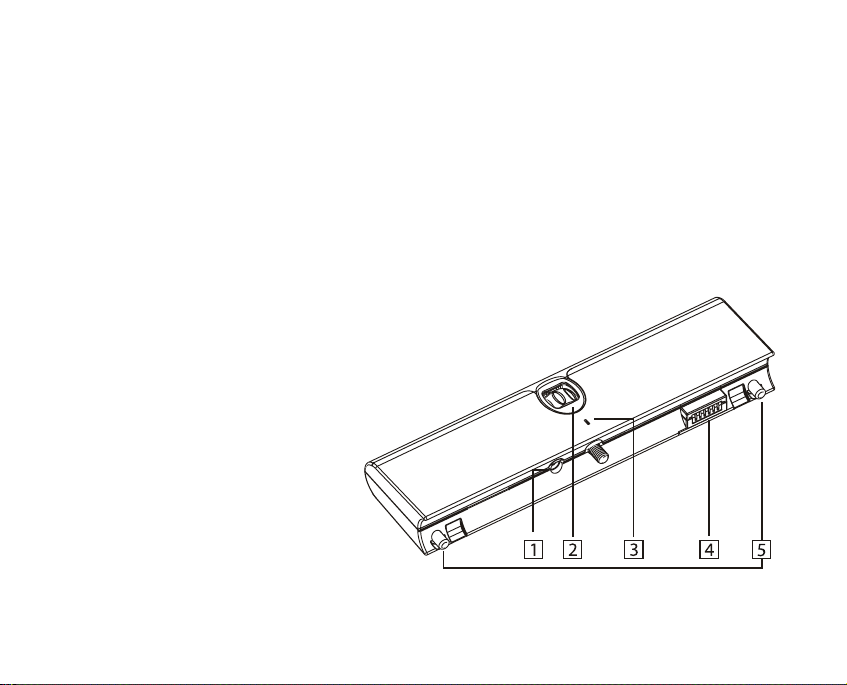
BATTERY PACK
1. AC Adapter Jack
Connect the AC Adapter here to recharge the Battery Pack. (See page 21)
2. Attachment Bolt Knob
Used to tighten or loosen the connection between the Battery Pack and the
Player. (See on page 24)
3. Power Indicator
• Off when the Battery Pack is not in use.
• Glows red during charging.
• Glows green when charging is complete.
4. Power Terminals
Supply power to the Player.
CAUTION: Do not let anything touch the
terminals. This may damage them
or cause a short-circuit.
5. Guide Stems
Used to align the Battery Pack
and the Player. They slide into the
Battery Guide Holes on the Player
when attaching the Battery Pack.
Page 20
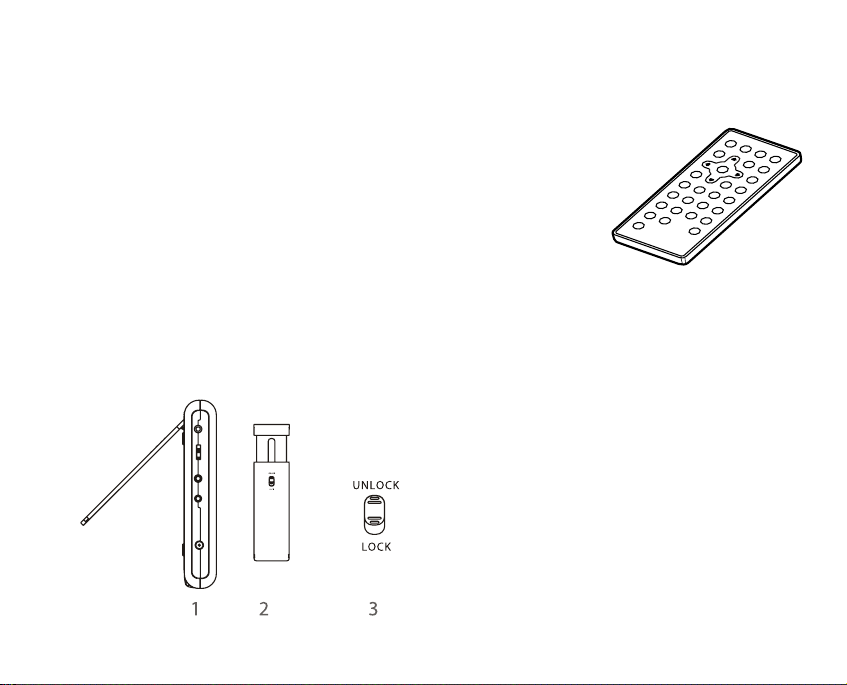
Standing the Player
on a Tabletop
1. Swing out the support.
2. Draw out the support to the
desired length.
3. Use the lock button to lock the
support.
Using the
Remote
Controller
Important Notes:
• Do not drop or step on the
Remote Controller, or subject it to
shocks. Doing so may damage it.
• Obstacles between the Remote
Controller and the Player may
impede remote operation.
• Do not expose the remote sensor
on the Player to strong light.
Doing so could impede remote
operation.
18 47
GETTING STARTED VIEWING DIGITAL PHOTOS
Page 21
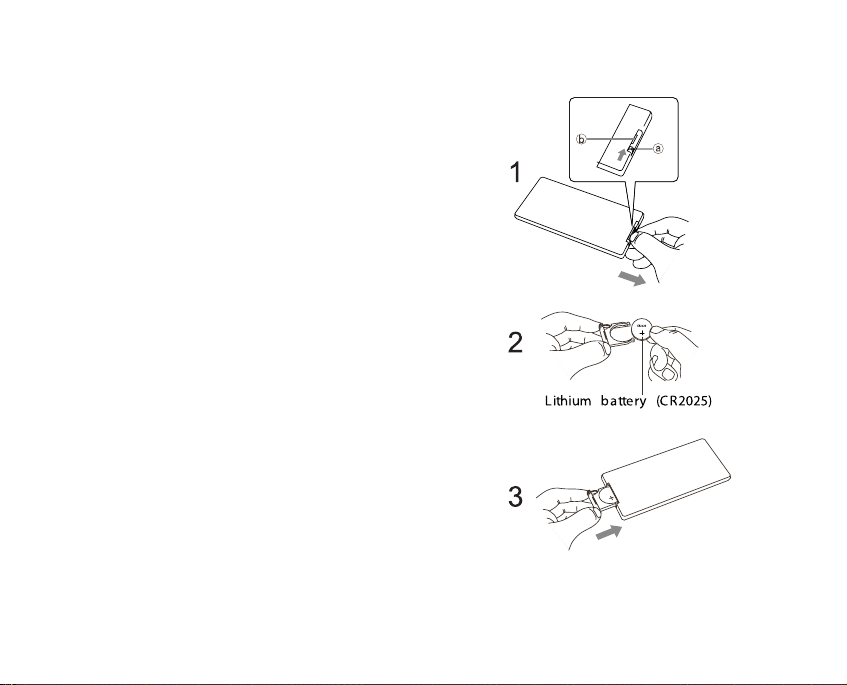
Installing/Replacing the
Remote Controller Battery
1. Use your fingernails as shown to press the
latch (a) in the direction of the arrow, and
pull on the groove (b) to pull out the battery
holder.
2. Remove the old battery, then insert the
new battery into the battery holder with the +
side facing upwards (when the Remote
Controller is face down).
3. Slide the battery holder back into place,
making sure the latch locks.
Important Note:
To prevent leakage of fluid from the battery,
remove the battery when not using the
Remote Controller for periods of one month
or longer. If fluid should leak, remove the battery, carefully wipe any fluid out of the battery case, then insert a new battery.
Page 22
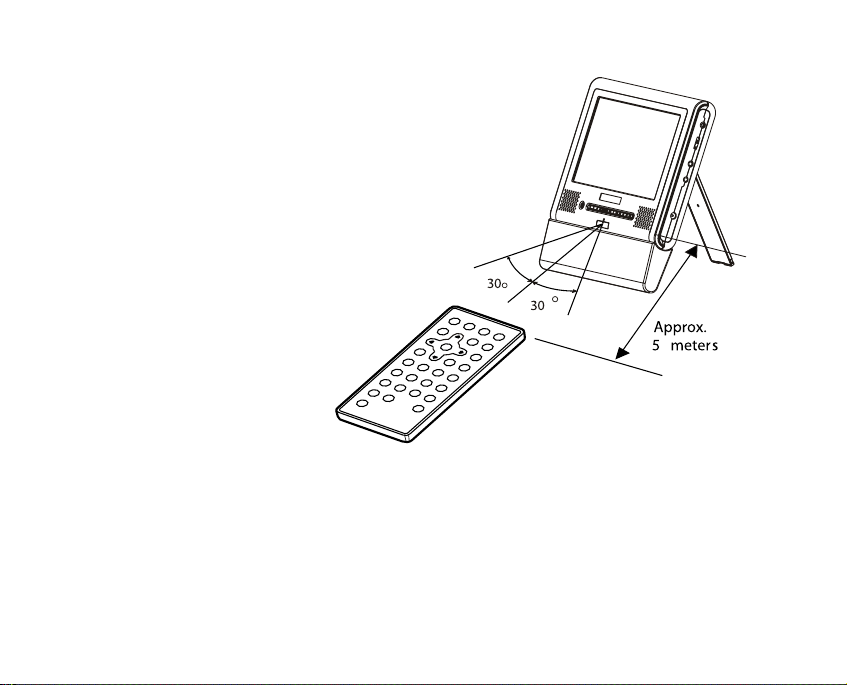
Remote Controller Range
The remote controller has a range of approximately 5 meters (about 16 feet) and works
best when positioned within 60º in front of
the Player.
20 45
Page 23
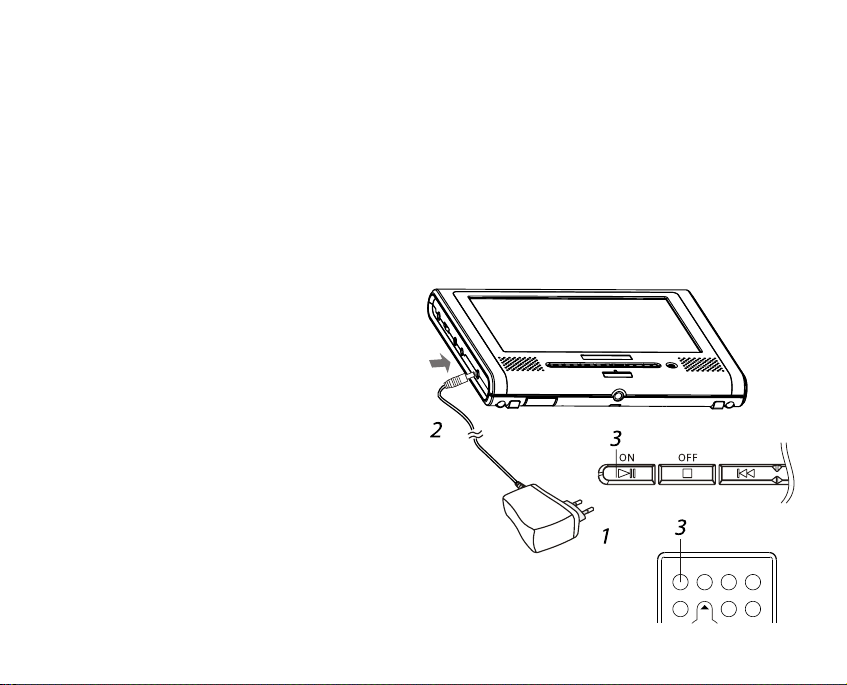
Using the AC Adapter
Important Notes:
• Be sure to use the supplied AC Adapter. Use of a third-party adapter
may damage the Player and void the warranty.
• Never plug the AC Adapter in if the battery is attached and the Player is
powered on.
Connecting the AC Adapter
1. Plug the AC Adapter into a stan-
dard wall outlet.
2. Connect the other end to the AC
Adapter Jack on the Player.
3. Press the ON button on the Player
for about 2 seconds.
When the Player is powered on, the
Power Indicator will glow blue. The Player
can now be used. In the Standby mode (when
the Power Indicator glows red), the power can also
be turned on by pressing the STANDBY/POWER button
on the Remote Controller.
Page 24

Using the
Battery Pack
Important Notes:
• Charge the Battery Pack fully
before using it for the first time.
• Place the Battery Pack on a level,
flat surface when charging.
• The Battery Pack will last for
about 300 charging cycles, though
this can vary depending on operating conditions.
• If the Battery Pack is very warm,
wait for it to cool down before
recharging it.
• If the LED does not light when the
AC Adapter is connected, disconnect and reconnect the AC
Adapter.
• Do not overcharge the Battery
Pack. Repeated overcharging may
deteriorate its performance.
• The Battery Pack gets fairly warm
during charging. This is normal.
• Ambient temperature can affect
charging efficiency. Charging is
most efficient between temperatures of 10ºC and 30ºC.
• A fully-charged Battery Pack offers
up to three hours of playback.
• When the Battery Pack is connected to the Player, after the
Player is powered on, the battery
level indicator will be briefly displayed on screen.
• If the ambient temperature is
high, the Battery Pack may be rendered unusable due to activation
of protection circuitry.
• The Battery Pack and the Player
may get fairly warm during use.
This is normal.
• If the Battery Pack won’t be used
for a long period of time, detach it
from the Player. If left attached,
22 43
Page 25
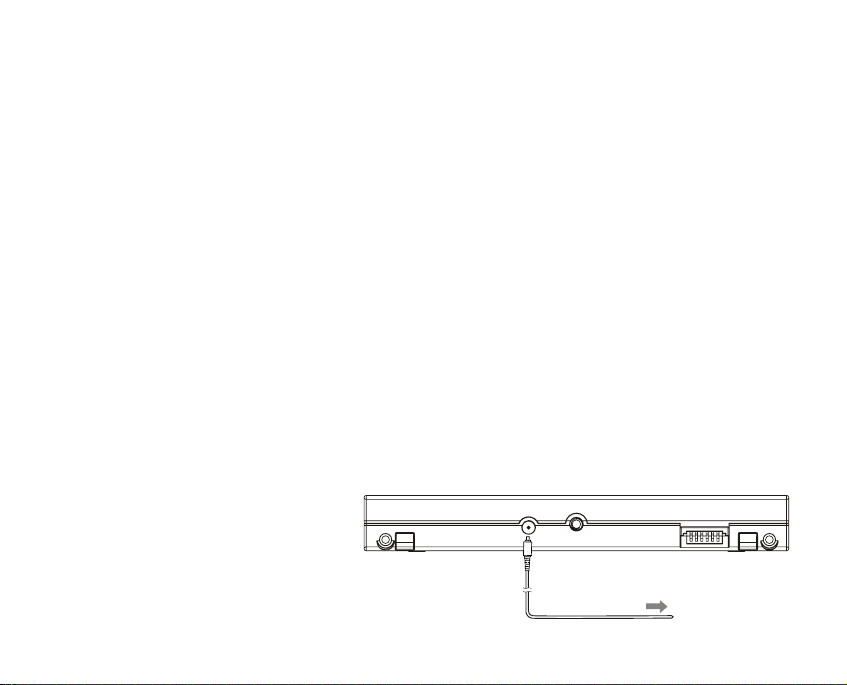
continual flow of weak current may
completely deplete it, and eventually it may be rendered unusable––even when you try to
recharge it later.
• Do not let anything touch the
Power Terminals; this can damage
them or cause a short-circuit.
Charging the Battery Pack
1. Plug the small end of the AC
Adapter into the Battery Pack’s AC
Adapter Jack.
2. Plug the other end into a standard wall outlet.
• During charging, the Power
Indicator glows red.
• When charging is complete, the
Power Indicator glows blue.
• Recharging takes about 4~5 hours.
FYI: The Battery Pack can also be
recharged while it is connected to
the Player; the Player must be
plugged in using the AC Adapter
and the power must be off.
1
2
Page 26
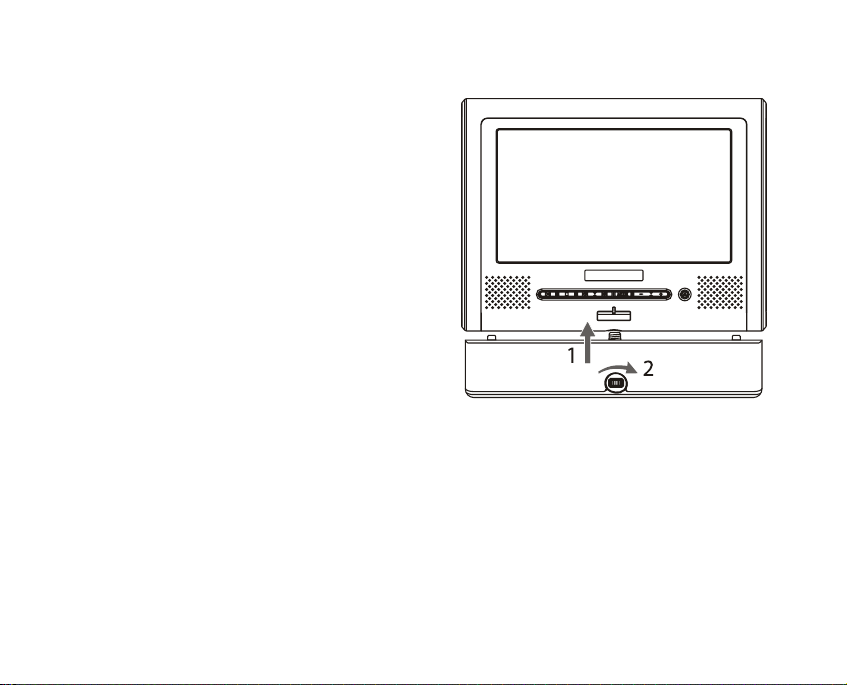
Connecting the Battery
Pack to the Player
1. Place the Battery Pack against
the bottom of the Player as shown
so that the Guide Stems on the
Battery Pack align with the Battery
Guide Holes on the Player.
2. Tighten the Attachment Bolt
Knob until the Battery Pack is
securely attached.
If the Battery Pack is charged, the
Power Indicator on the Player will
glow red, indicating that the Player is
in Standby mode.
Removing the Battery Pack
from the Player
1. Press the OFF button to turn off
the Player.
2. Loosen the Attachment Bolt Knob
on the Battery Pack to remove.
Checking the Battery
Pack’s Power Level
With the Player powered by the
Battery Pack and the power on, press
the OSD button. The Battery Pack
power level indicator will appear on
screen.
24 41
Page 27

Battery Saver Feature
During battery powered operation, if
the Player is powered on but idle for
more than 10 minutes, the Player will
turn off automatically to conserve
power.
Storing the Battery Pack
• The Battery Pack should be stored
where temperatures range between
15ºC and 25ºC. Avoid storing the
Battery Pack under conditions of
extreme humidity or where it may be
exposed to dirt.
• If the Battery Pack is to be stored
for longer than a year, it is recommended that at least once a year it is
fully discharged on the Player. After
the Battery Pack is discharged,
recharge it fully, and then store it
again.
Service Life and Disposal
If charging time or battery life
between charges becomes extremely
short, the Battery Pack may be
reaching the end of its life. To dispose
of a spent Battery Pack, completely
cover the Power Terminals with a
strip of tape and dispose of it in compliance with local regulations.
Page 28
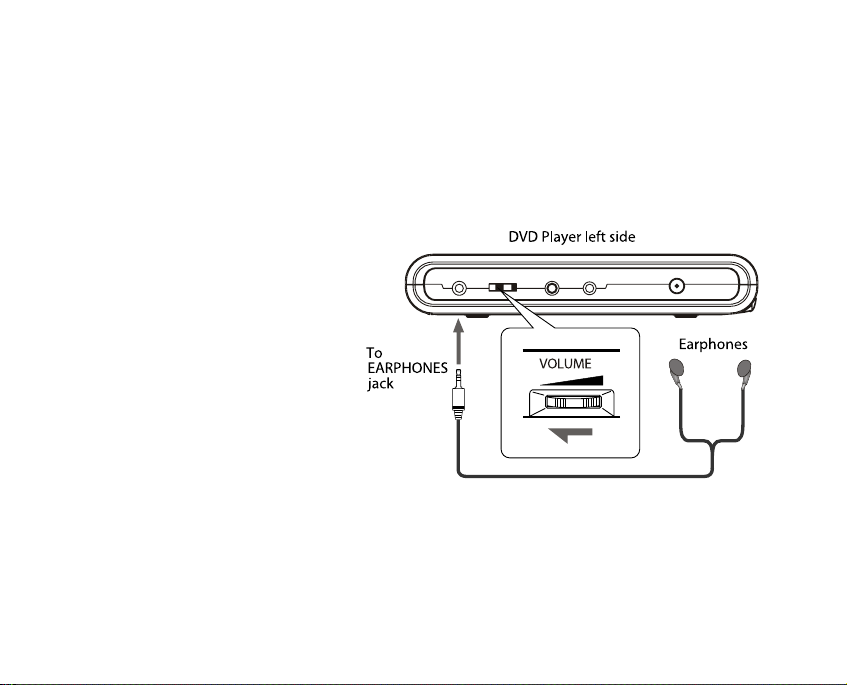
Using Headphones (not included)
1. Plug your headphones into the Headphones jack on the Player.
2. Before you put on your headphones, turn the Volume Control knob
(located on the left side panel of the Player) all the way down.
3. Put on the
Headphones and then
increase the volume to a
comfortable level. Be
careful not to set the volume too high when using
the Headphones.
CAUTION:
It is not recommended
that you listen to the
audio of DTS-compatible
DVDs using headphones.
26 39
Page 29
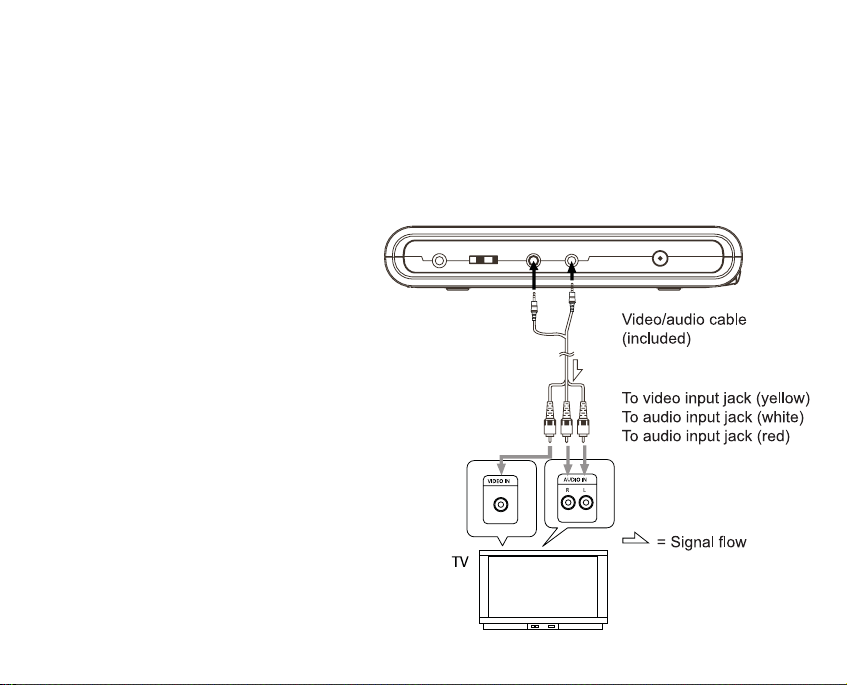
Important Notes:
• Before connecting the Player to
other equipment, turn off ALL
components to be connected.
• Consult the manual(s) that came
with your other equipment to
properly follow manufacturer’s
guidelines before connecting the
Player.
• To turn off the Player’s screen
during playback on a TV, press
the MODE button on the Player
for about 2 seconds. Press the
MODE button again to reactivate
the screen.
• To not hear the audio from the
Player during playback on a TV,
turn the volume all the way
down.
Connecting to a TV
CONNECTING THE PLAYER
TO A
TV/HOME THEATER SYSTEM
Page 30
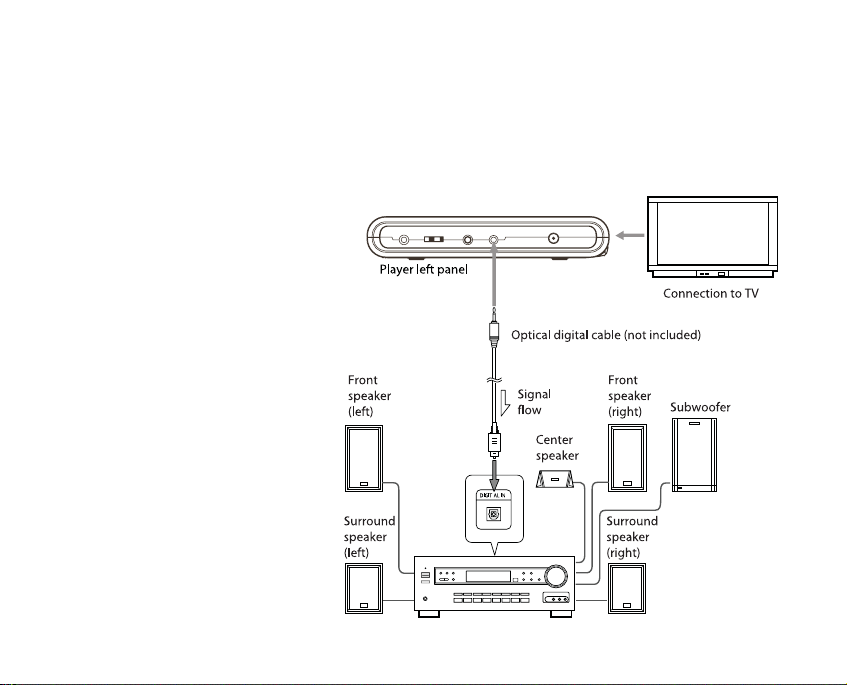
Connecting to a Dolby Digital/DTS/MPEG
Decoder or an Amplifier with a Built-in Decoder
Important Notes:
• A compatible
decoder or amplifier, 5 speakers
(front left/right,
center and surround left/right)
and a subwoofer
are required for
Dolby Digital/DTS
5.1-channel sound.
• Connection to digital components
requires an optical
digital cable (not
included).
28 37
Page 31
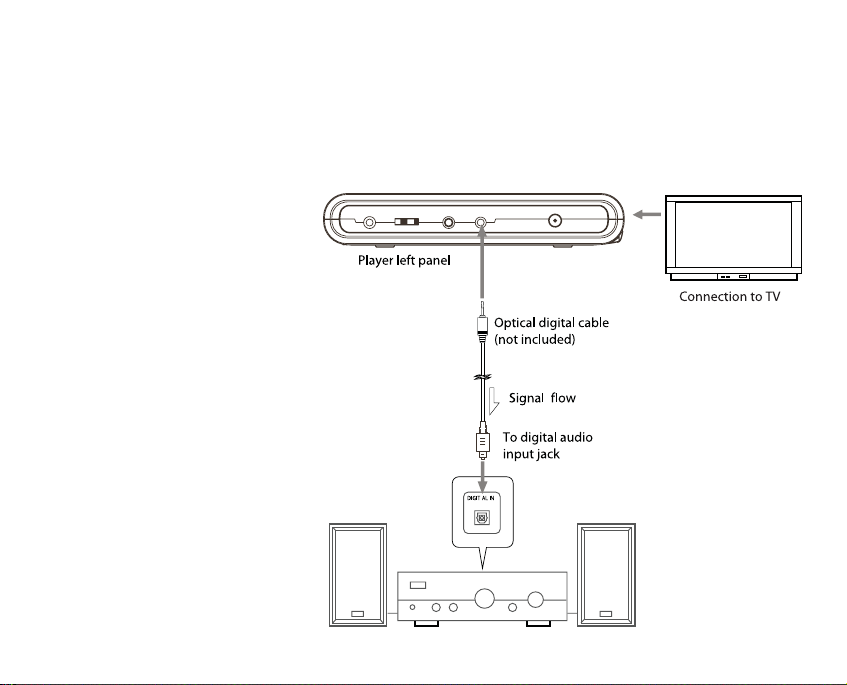
Connecting to a Digital Amplifier that is not
Dolby Digital/DTS/MPEG Compatible
CAUTION:
Carefully check the
Player’s digital output
settings in the Audio
menu of the Setup
Screen (see page 34)
before connecting the
Player to a digital amplifier that is not Dolby
Digital/DTS/ MPEG compatible. If the Player outputs a raw digital signal
which cannot be decoded
by the amplifier, the
result could be strong
noise that may cause
harm to your ears and
speakers.
Page 32
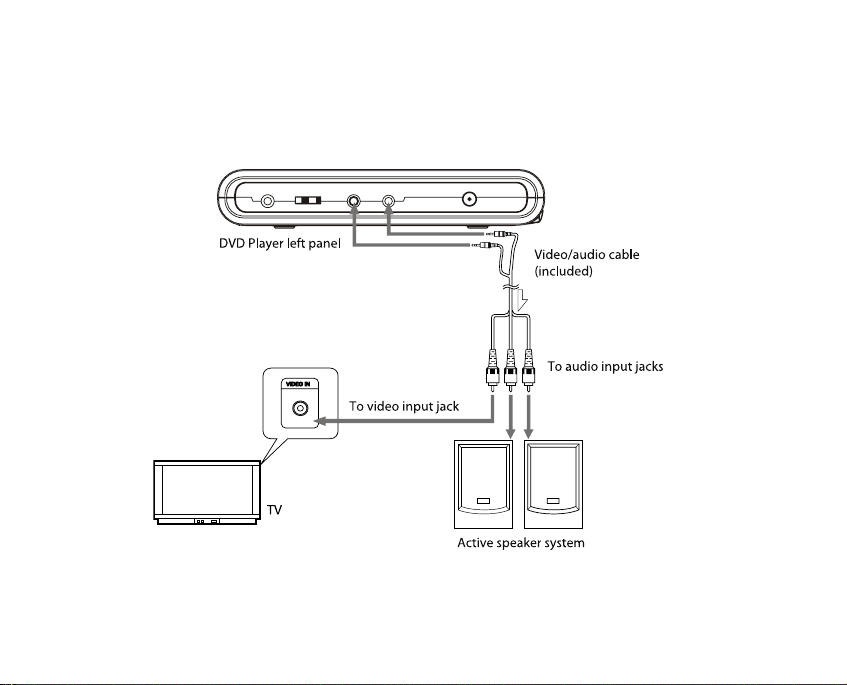
Connecting to an Active Speaker System
30 35
Page 33
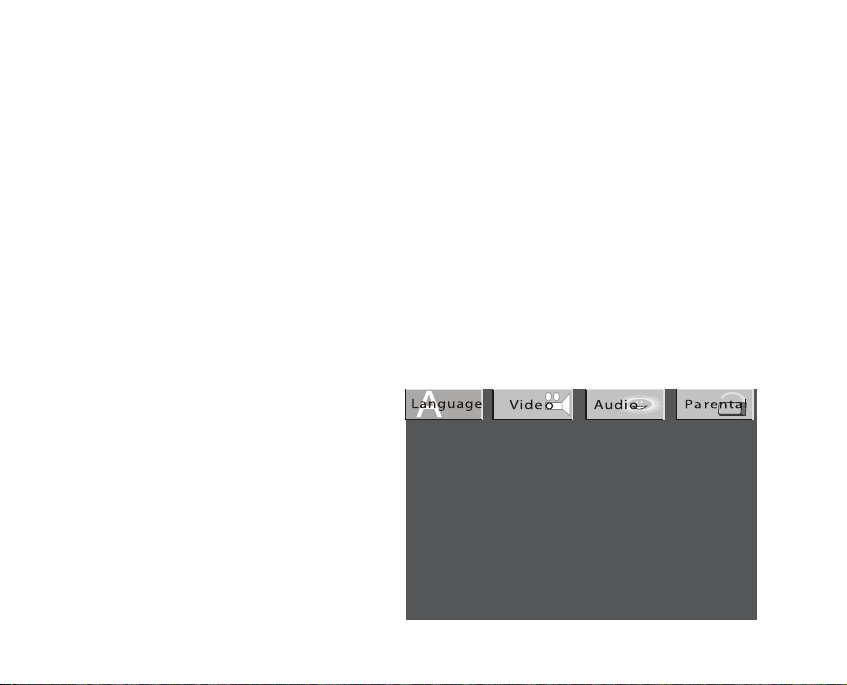
The Setup Screen allows you to customize the operation of your AWEGO
Player by selecting settings from various menus. The menus are Language,
Video, Audio, and Parental Lock.
The Language menu allows you to
select languages for subtitles, audio,
and other functions.
The Video and Audio menus are used
to select the settings needed for
proper connection to a TV/home theater system.
Parental Lock allows you to restrict
what movies your children may watch.
Opening the Setup Screen
1. With playback stopped, press the
SETUP button on the Remote
Controller.
The Setup Screen appears with tabs
for Language, Video, Audio, and
Parental Lock.
2. To highlight a tab, use the Left
and Right CURSOR buttons.
3. When the correct tab is highlighted, press the ENTER button to open
that menu.
USING THE SETUP SCREEN
Page 34
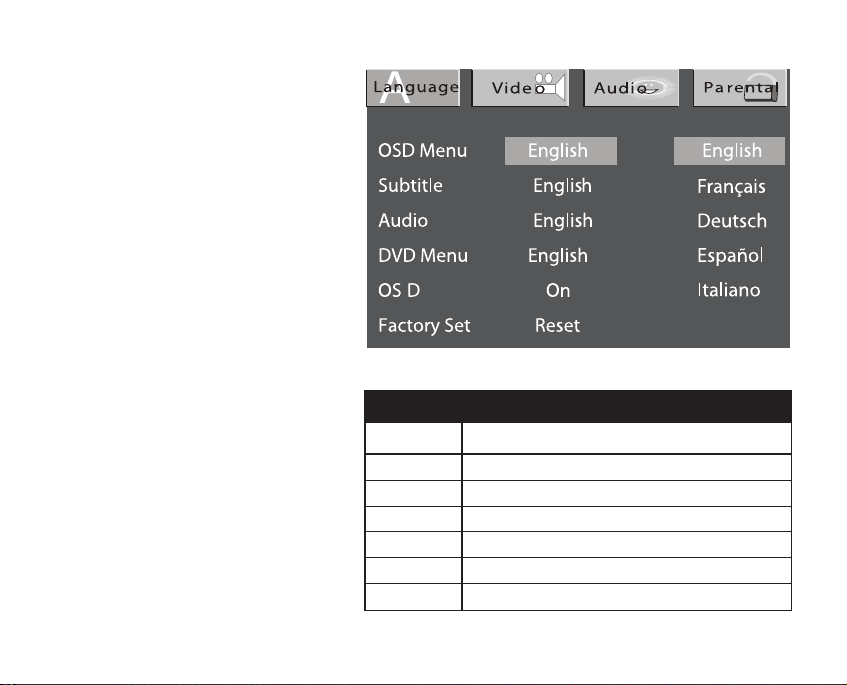
Language Menu
Important Note:
The Subtitle, Audio and
DVD Menu options are
shown in the Setup
Screen; however, your
selection will only work if
those options are actually
available on the disc being
played. For example, if you
want to watch a movie
with French subtitles, then
French subtitles must be
available as an option on
the disc.
1.With the Language menu
open, use the Up and
Down CURSOR buttons on
the Remote Controller to
select a menu item.
The current setting for that
item will be highlighted.
32 33
Submenu
OSD Menu
Subtitle
Audio
DVD Menu
OSD
Factory Set
LANGUAGE MENU OPTIONS
Options
English, French, German, Spanish, Italian
English, French, German, Spanish, Italian, Auto, Off
English, French, German, Spanish, Italian
English, French, German, Spanish, Italian
On, Off
Reset
Page 35

2. When the desired menu item is
highlighted, press the ENTER button
to view the language options for
that item.
3. Use the Up and Down CURSOR
buttons to highlight the desired language option.
4. Press the ENTER button to make
your selection.
5. Use the Up or Down CURSOR
buttons to select another menu
item, or press the Up CURSOR button repeatedly until you exit the
Language menu.
6. To close the SETUP screen, press
the SETUP button.
Video Menu
Use the Video menu to change:
• Screen aspect ratio (TV Shape)
• TV System (NTSC or PAL)
• Brightness
• Edges
1. With the Video menu open, use
the Up and Down CURSOR buttons
to select a menu item.
As you scroll down, the current setting for that item will be highlighted.
2. Press the ENTER button to make
the Video options menu appear.
3. Use the Up and Down CURSOR
buttons to highlight the desired
option.
4. Press the ENTER button to make
your selection.
5. Select another menu item, or
press the Up CURSOR button
repeatedly until you exit the Video
menu.
Page 36
6. To exit the SETUP screen, press
the SETUP button.
Audio Menu
1. With the Audio menu open, use
the Up and Down CURSOR buttons
to select the menu item you wish to
change.
As you scroll through the items, the
current setting for that item is highlighted.
2. Press the ENTER button repeatedly to toggle through the options
for that menu item.
3. Once you make your selection,
use the Up and Down CURSOR buttons to select another menu item,
or press the Up CURSOR button
repeatedly until you exist the Audio
menu.
4. To exit the SETUP screen, press
the SETUP button.
34 31
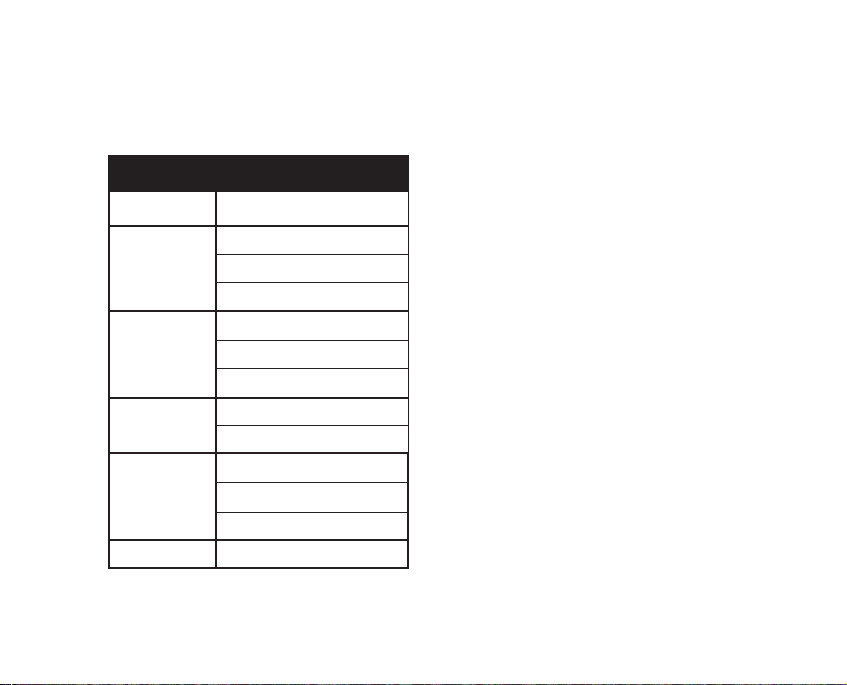
VIDEO MENU OPTIONS
Submenu
TV Shape*
TV System
Brightness
Edges
Video Output
*Selecting different aspect ratios may have no effect on
the image displayed on your TV.
† Composite Video is the only option available.
Options
4:3 Pan & Scan
4:3 LetterBox
16:9
NTSC
PAL
Auto
On
Off
Off
Sharpen
Soften
CVBS (Composite Video)†
Page 37
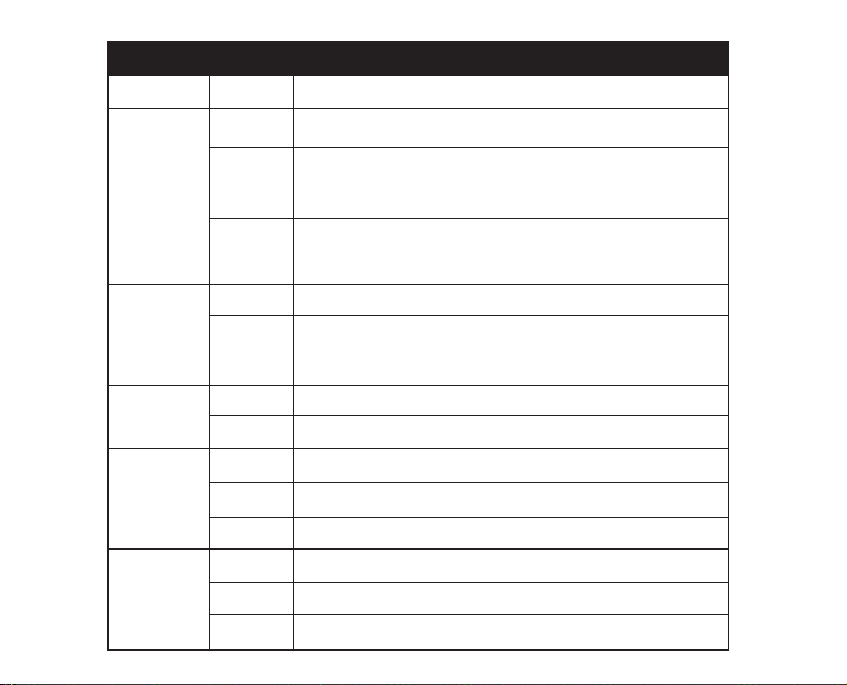
AUDIO MENU OPTIONS
Submenu
Dolby Digital
DTS
MP3/WMA
Others
Pro Logic
Options
Off
PCM
Raw
Off
Raw
Off
PCM
Off
PCM
Raw
Auto
On
Off
Description
Player will not output Dolby Digital audio signals recorded on a disc.
Player outputs Dolby Digital signals in PCM mode. Use this setting if
the Player is connection to a digital amplifier that is NOT
Dolby Digital compatible.
Player outputs raw (unmodulated) Dolby Digital signals. Use this
setting if the Player is connected to a Dolby Digital decoder or an
amplifier with a built-in Dolby Digital decoder.
Player will not output DTS audio signals recorded on a disc.
Player outputs raw DTS audio signals recorded on a disc. Use this
setting if the Player is connected to a DTS decoder or an amplifier
with a built-in DTS decoder.
The Player will not output digital signals.
MP3/WMA signals are output in PCM mode.
Player will not output other digital signals recorded on a disc.
Outputs other decoded signals in PCM.
Outputs other raw digital signals.
Automatically outputs Pro Logic signals if called for.
Turns Pro Logic on.
Turns Pro Logic off.
Page 38

Parental Lock
With the Parental Lock feature you
can create a numerical password to
prevent your children from viewing movies with a certain rating
or higher. For example, if you set
the Parental Lock at the R rating,
any movie with an R rating or
higher will require the viewer to
input the password before the
movie will be played.
Please Note: The password is
only required the FIRST time
you press PLAY after a disc has
been loaded.
1. With the Parental menu open,
press the Down CURSOR button to
highlight the Ratings field.
2. Press the ENTER button repeat-
edly until the desired rating is displayed.
3. Press the Up CURSOR button to
highlight the Password field.
4. Use the NUMBER buttons to
enter a four-digit password.
Important Note: Write your password down somewhere in case you
forget what it is.
5. Press the ENTER button to lock
the password.
6. To exit the SETUP screen, press
the SETUP button.
Change/Delete a Password
1. With the Password field selected,
enter the current password.
2. Press the ENTER button.
Parental Lock is unlocked and the
password will be erased.
3. You may now enter a new password and select a new rating.
36 29
MOVIE
RATINGS
Kid Safe
G
PG
PG-13
PG-R
R
NC-17
Adult
Page 39
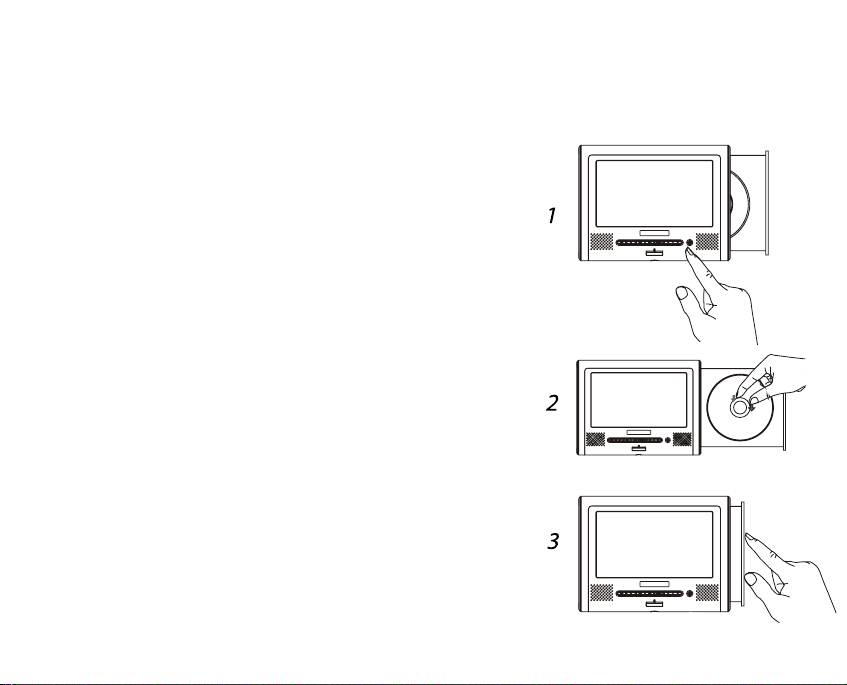
Loading a Disc
Important Notes:
• When loading a disc, make sure it is set securely
on the tray spindle.
• Do not use cracked or warped discs.
• Whether loading a single-sided or a double-sided
disk, place the side you wish to play facing downward.
• Always handle discs by their edges.
1. Press the OPEN button to open the tray.
If there is no disc inside the Player, the tray will open
automatically when the Player is powered on.
2. Brace the backside of the tray with one hand.
With your other hand, place the disc on the spindle
and press down with your fingers near the center
hole to secure the disc to the spindle.
PLAYING DISCS
Page 40

When the disc is properly inserted,
you will here it click in place.
3. Close the tray.
After a disc has been loaded, the
screen will briefly display the disc type
(DVD, CD etc).
Playback
For most discs, playback will start
automatically after a disc is loaded. If
it does not, press the PLAY/PAUSE
button to start playback.
For DVDs with menus and VCDs
with PBC (Playback Control) the
disc’s own menu will appear. Use the
CURSOR and ENTER buttons on the
Remote Controller to make selections.
If you wish to use the NUMBER buttons on the Remote Controller to
make a selection, press the NUMBER
buttons while pressing the SHIFT button.
If a VCD's menu screen includes more
than one page, use the PREVIOUS
and NEXT buttons to select pages.
For VCDs with PBC, it is also possible
to play a disc without displaying the
menu screen.To play from track 1,
press the 1 button on the Remote
Controller.
For Audio CDs, the first track will
begin to play automatically.
Screen Saver
In order to conserve power when playing Audio CDs, the screen will go dark
automatically after about 2 minutes of
playback. Pressing any button will
reactivate the screen.
You can turn off the screen manually
by pressing the MODE button on the
Player for 2 seconds. Press the
MODE button again to reactivate.
38 27
Page 41
Displaying a Disc’s Menu
During Playback
For DVDs, press the MENU or TITLE
button on the Remote Controller.
During PBC playback of VCDs, press
the RETURN button.
For details, refer to the documentation included with the disc.
Removing a Disc
1. Press the STOP button.
2. Press the OPEN button to open
the tray.
3. Remove the disc.
To remove a disc, grab it by the
edges with one hand. With the other
hand, press down with your finger on
the spindle as you pull the disc away.
4. Close the tray.
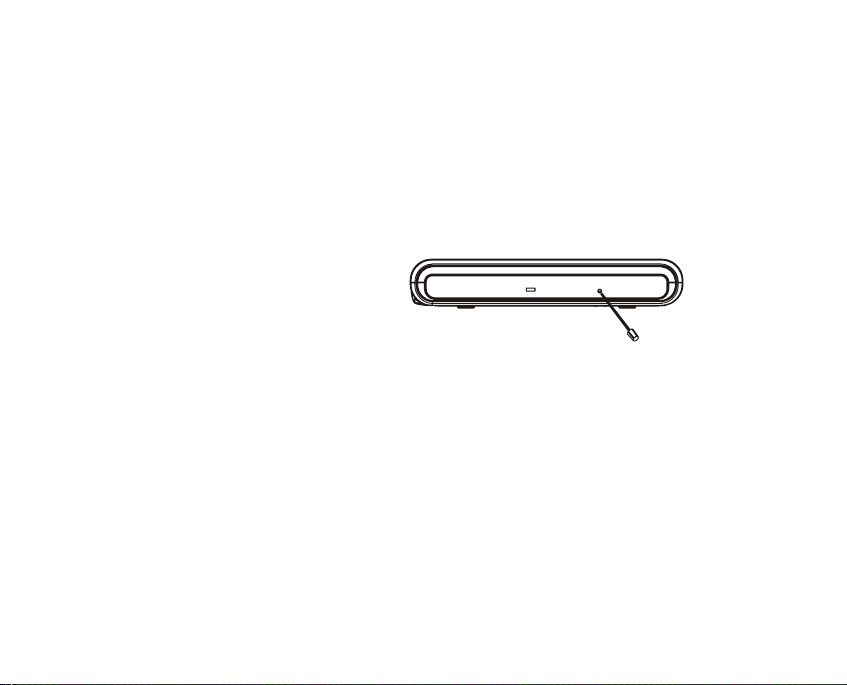
Removing a Disc When
There is no Power
If there is no power to the Player, the
tray will not open. Use the Ejector
Stick to open the tray, by inserting the
stick into the Ejection Hole.
Turning off the Power
Press and hold the OFF button for
about 2 seconds. The Player will go
into Standby mode and the Power
Indicator will glow red.
The power can also be turned off by
pressing the STANDBY button on the
Remote Controller.
Page 42

LCD MODES
Aspect Ratio
You can select either 16:9
(widescreen) or 4:3 (standard TV)
screen proportions regardless of the
format used by the video. However, if
you select 16:9 for a video meant to
be viewed in 4:3, the screen image
will be stretched. Changing aspect
ratios using the Player may have no
effect on video displayed on a TV.
1. Press the LCD MODE button on
the Player once.
“Select TFT Mode” will be displayed.
2. Press the – or + button on the
Player to select the desired aspect
ratio.
Brightness
1. Press the LCD MODE button on
the Player twice to access the
brightness control.
2. Use the – or + button on the
Player to adjust the brightness setting between levels 0 and 8.
Every time you press the – or + button, the brightness increases or
decreases by one level.
40 25
Page 43
Color Saturation
1. Press the LCD MODE button on the Player
three times to access the color control.
2. Use the – or + button on the Player to
adjust the color saturation setting between
levels 0 and 8.
Every time you press the – or + button, the
color saturation increases or decreases by one
level.
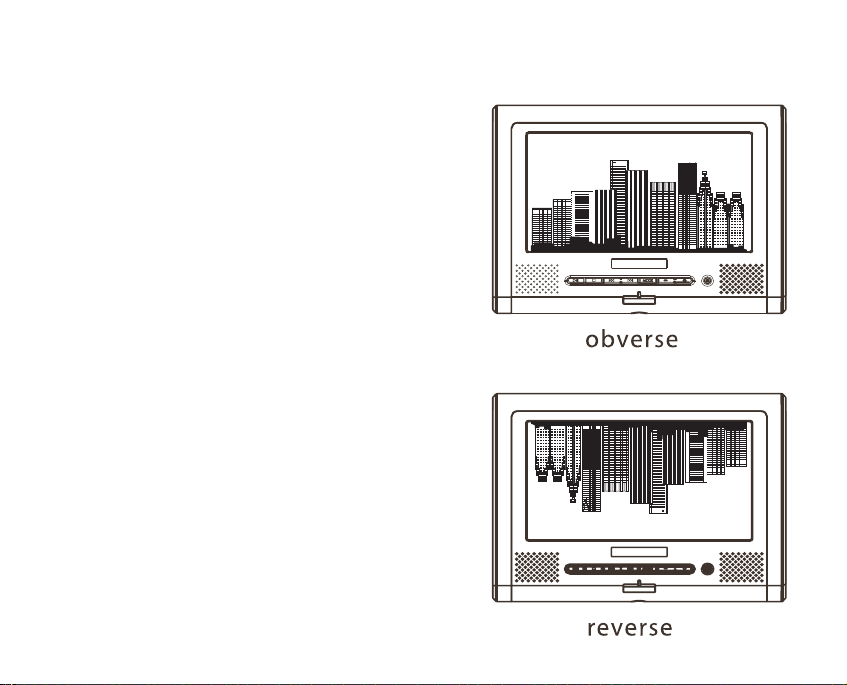
Reverse View
Obverse view is the default setting. When you
select reverse view the image on screen is displayed at 180º.
1. Press the LCD MODE button on the Player
four times to access the view mode control.
2. Use the – button on the Player to select
reverse view. Press the + button to select
obverse view.
Page 44

PLAYBACK
FUNCTIONS
Pausing Playback
Press the PLAY/PAUSE button on the
Remote Controller, or the ON button
on the Player.
To resume playback press the button
again.
Skipping to the Next/
Previous Chapter or Track
Press the NEXT button during playback to jump to the beginning of the
next chapter or track.
Press the PREVIOUS button during
playback to jump to the beginning of
the previous chapter or track.
Resume Play Function
(DVDs and Video CDs)
The Resume Play Function is an automatic feature that resumes playback
of DVDs and Video CDs from the
point at which playback was stopped.
The Resume Playback Function will
even work if you shut down the Player
and leave the disc inside.
The Resume Play Function will not
work if you ejected the disc before
resuming playback or if you press the
STOP button twice. In either of these
two cases, playback will start from
the beginning of the title.
42 23
Page 45

Scanning
Use the FWD and REV buttons to
quickly scan forward or backward
through video or music.
You can select 2X, 4X, 8X, or 20X
speed by pressing the button repeatedly until the desired speed is
reached.
Press the PLAY button to resume
normal playback.
Slow Motion Playback
(DVDs and VCDs only)
Press the SLOW button on the
Remote Controller during playback to
view at 1/2 of normal speed.
Press repeatedly to select 1/4, 1/6
or 1/7 of normal speed.
Press the PLAY/PAUSE button on the
Remote Controller or the ON button on
the Player to resume normal playback.
Single-Frame Advance
Single-frame advance allows you to
progress through a video one frame
at a time.
1. Press the PLAY/PAUSE button
during playback to pause playback.
2. With playback paused, every time
you press the STEP/SLOW button,
the scene will advance by one frame.
Searches
The SEARCH function lets you find a
specific point in a movie or song.
1. Press the SEARCH button on the
Remote Controller.
If you are watching a DVD:
You will see a Time field and a
Title/Chapter field. The time field is
hi-lighted by default.
If you are listening to an Audio CD:
During playback you can conduct a
Page 46

Disc Search or a Track Search. When
playback is stopped you can only conduct a Disc Search. Whether you conduct a Disc Search or a Track Search
you will see the Time field and a Track
field. The Time field is hi-lighted by
default.
2. If you want to input numbers into
a field other than the Time field
select the field using the CURSOR
buttons, then use the NUMBER buttons to input the numbers.
The first number you input will be the
leading number. For example: if you
want to specify a time of - -:26:00
(26 minutes into playback) you need
to input the numbers 2, 6, 0, 0 in
that order. To make a correction,
press the CLEAR button.
3. Press the PLAY or ENTER button.
Repeat Play
The Repeat Play function allows you to
play a title, chapter or track repeatedly and indefinitely.
1. Press the REPEAT button.
The screen will display the word “Off”
indicating that the Repeat Play function is currently off.
For DVDs:
While “Off” is displayed, press the
REPEAT button again to select
“Repeat Chapter”; press again for
“Repeat Title”. Press again to turn the
Repeat Play function off.
For Audio CDs:
While “Off” is displayed, press the
REPEAT button again to select
“Repeat Single”; press again to select
“Repeat All”. Press again to turn the
Repeat Play function off.
44 21
Page 47

Repeat Play
Using “In” and “Out” points
1. During playback, press the A-B
button to set an “in” point.
2. Press the A-B button again to set
the “out” point.
The segment defined by the “in” and
“out” points will play repeatedly.
3. Press the A-B button again to
cancel the A-B repeat function.
Viewing Elapsed Time
and Time Remaining
1. During playback, press the OSD
button on the Remote Controller to
display time elapsed and time
remaining.
If the Player is running off of the
Battery Pack the Battery Level
Indicator will also appear.
2. Press OSD again to display fur-
ther disc information.
3. Press again to turn off OSD.
Angles
(Only for multi-angle DVDs)
Press the ANGLE button during playback to select the desired angle.
Video Zoom
There are three levels of zoom for
video playback.
1. Press the ZOOM button on the
Remote Controller to go zoom level 1.
2. Press again to go to zoom level 2.
3. Press again to go to zoom level 3.
4. Press again to turn zoom off.
Page 48

Video Enhance
Video Enhance allows you to adjust
two settings: Brightness and Edges.
Brightness adjusts the screen brightness. Edges enhances the edge
sharpness of images.
1. Press SETUP during playback to
display the Video Enhance screen.
2. Use the Left and Right CURSOR
buttons to adjust the settings. Use
the Up and Down CURSOR buttons
to select Brightness or Edges.
3. When you are done, press the
SETUP button or the ENTER button
to exit Video Enhance.
6-Band Equalizer
(Audio CDs)
1. During playback, press the
SETUP button twice to access the
on-screen Equalizer control.
2. Press the ENTER button repeatedly to select one of a number of
presets, or to select the adjustable
equalizer.
If using the adjustable equalizer, use
the CURSOR buttons to select individual bands and to make adjustments.
46 19
Page 49

Loading a Disc
When you load a disc containing JPEG
photos, the Player will automatically
play a quick slide-show preview of the
photos. To skip the slide show, press
the STOP button.
When the slide show is finished you
will see a file list screen showing the
names of the files on the disc. You
can also view the list of photos using
the thumbnail view screen.
Viewing Selected Photos
from the File List Screen
1. If the file list is not displayed,
press the STOP button on the
Remote Controller or the OFF button
on the Player to display the file list.
2. The first file in the file list is highlighted by default. You can use the
CURSOR buttons to scroll through
the list and highlight another file.
3. After you make your selection,
press the ENTER button.
Viewing Selected Photos
while in Thumbnail View
1. Press the MENU button to see
the thumbnail view screen. The first
photo will have a circular icon on it.
2. To view that photo, press the
ENTER button, or use the CURSOR
buttons to select another photo.
3. Press the ENTER or PLAY button
on the Remote Controller or the ON
button on the Player.
Page 50

Viewing Photos
Sequentially
With a photo on screen, use the
NEXT and PREVIOUS buttons on the
Remote Controller or the Player.
Playing a Slide Show
If the list menu is displayed, press
the PLAY button on the Remote
Controller or the ON button on the
Player.
If a photo is displayed, press the
STOP button on the Remote Controller
or the OFF button on the Player. The
file list screen will appear. Press the
PLAY button on the Remote Controller
or the ON button on the Player.
The slide show will play once and then
return to the file list screen.
Enhancing Image Quality
You can use the Video Enhance feature to adjust the brightness and
edge sharpness of on-screen photos.
With a photo on screen, press the
SETUP button. The Video Enhance
controls will appear. Use the CURSOR
buttons to make adjustments to picture brightness and edges.
Rotating Photos
Press the ANGLE button to rotate a
photo on screen 90º. Every time you
press the ANGLE button, the photo
will rotate 90º.
Photo Zoom
To zoom in on a photo, press the
ZOOM button. Press repeatedly to
zoom in, zoom out, and turn the zoom
off. There are three levels of zoom-in
and two levels of zoom-out.
48 17
Page 51

If using the AWEGO in your car, the
included Car Adapter allows you to
run the AWEGO off of your car’s own
power rather than off of the Battery
Pack. This is useful for long road
trips, to conserve battery power, or if
you did not have time to recharge a
spent Battery Pack before leaving.
The Player can also be mounted
behind a headrest or to the passenger-side sun visor using one of the
Car Mounting Kits, available as a
separate purchase from AcomData.
CAUTION:
• The Player should NEVER be used
by the driver of a vehicle.
• Passengers using the Player
should not distract the driver by
drawing the driver’s attention to
what is happening on screen.
• Drivers should NOT attempt to
adjust the volume, stop playback, or
perform ANY other operation while
the vehicle is in motion.
• The Player should not be placed
anywhere in the vehicle where it
may interfere with the driver’s ability
to control the vehicle, such as a
center console, dash board or floor.
1. Plug the small end of the Car
Adapter cord into the Player’s AC
Adapter/DC IN jack.
2. Plug the other end into your vehicle’s cigarette lighter.
4916
USING THE CAR ADAPTER
Page 52
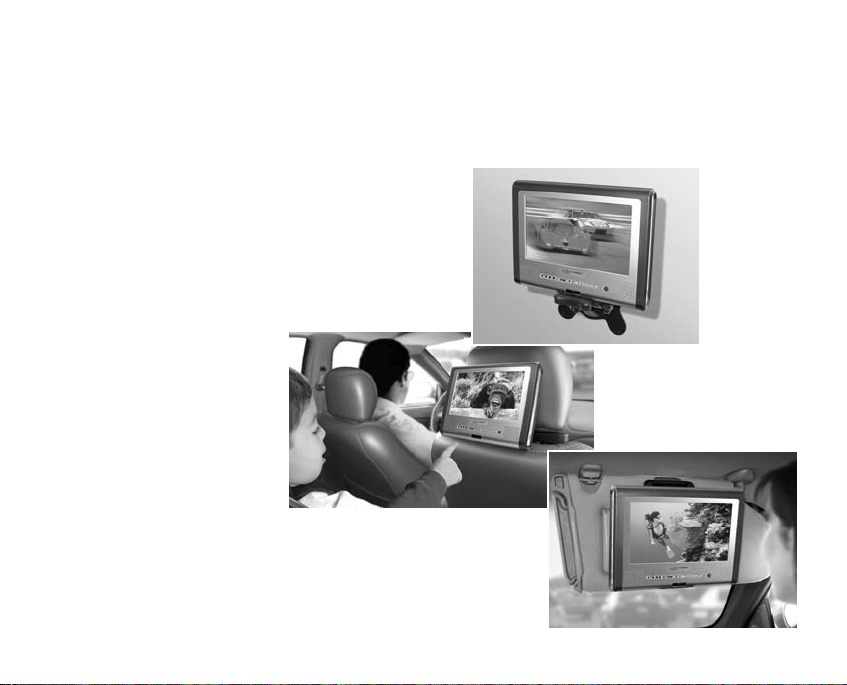
MOUNTING OPTIONS
MOUNTING THE PLAYER ON A WALL OR
IN YOUR CAR USING THE OPTIONAL
MOUNTING KITS
One of the most versatile features of
the AWEGO is the ability to mount the
Player in your car or on a wall using
one of the sturdy, optional Mounting
Kits, available for purchase directly
from AcomData.
AcomData offers
three mounting kits:
1. Wall
Mounting Kit
2. Headrest
Mounting Kit
3. Sun Visor
Mounting Kit
See page 63 for ordering
information.
50 15
1
2
3
Page 53

Cleaning the Player
Always unplug the power cord before
cleaning the player. Clean the player
using a soft, dry cloth. For tough dirt,
dampen a soft cloth with some neutral detergent diluted in 5 to 6 parts
water; wipe off the dirt, then wipe off
the player with a dry cloth. Do not
use alcohol, paint thinner, or other
chemicals; they may damage the surface.
To clean the LCD screen, wipe the
screen gently with a soft, dry cloth
(such as an eyeglass cleaning cloth).
Note that leaving water droplets on
the display for long periods of time
may result in discoloration or stains.
For tough dirt, use a commercially
available liquid crystal display cleaner.
Cleaning Discs
Fingerprints or dust on discs may
impede playback. Clean discs using a
soft cloth by gently wiping the disc
from the center toward the edges.
For tough dirt, use a damp cloth,
then dry the disc with a dry cloth. Do
not use volatile chemicals or solvents.
Storing Discs
• Always place discs in their case and
store them vertically.
• Avoid storing discs in hot or humid
places, places exposed to direct sunlight, or places where temperatures
can become extreme.
• Follow any precautions provided by
the disc manufacturer.
CARE AND MAINTENANCE
Page 54

TROUBLESHOOTING COMMON ISSUES
There is no power to the Player.
• If running off of AC power, make
sure the AC Adapter is securely
plugged in at both ends.
• If running off of the Battery Pack,
make sure the Battery Pack is
charged and securely connected to
the Player.
The Player will not read a disc.
• The disc is scratched or damaged.
• The type of disc you loaded is not
compatible with the Player.
The volume level is different for
DVDs and CDs.
This is due to different recording
methods used for DVDs and CDs.
There is no sound or the sound is
distorted when the Player is con-
nected to a TV, or other equipment.
• Cables are not securely plugged in.
• Plugs or jacks are dirty.
• Digital audio output is connected to
a non-compatible AV amplifier.
The player gets warm during use.
This is normal.
The Remote Controller is not working.
• It is too far from the Player or at
too wide an angle.
• The battery needs to be changed.
• The battery was installed incorrectly.
There is no sound from the speakers or the sound is distorted
• Some discs that use 96 KHz PCM
audio may not work.
• The disc is dirty.
• Playback is paused or in slow motion.
52 13
Page 55

• The volume is set to minimum.
• Headphones are plugged in.
The player may stop operating properly due to static electricity.
If this occurs, unplugging the power
cord then plugging it back in will usually resolve the problem.
With liquid crystal displays, a few
picture elements may be black or
shine a particular color.
This is normal.
When I connect the Player to my TV,
the image is distorted and jittery.
Check to make sure the TV system
setting in the Video menu of the
Setup Screen is set properly.
Interference with TV broadcasts
Depending on the reception condition
of the TV, interference may appear
on the screen while you are watching
a TV broadcast and the unit is turned
on. This is not a malfunction; just
ensure that the unit is turned off
when you watch a TV broadcast.
I can’t change the subtitle or audio
language.
Using different languages for subtitles
and audio only works if the languages
are available on the disc.
I cannot access different angles on
a DVD
• The Angles function only works if
angles are available on the disc.
• Angles may only be available for certain scenes.
Page 56

Model No: PDVD7
Dimensions (L X W X D):
202 x 154 x 26 mm
7.9" x 6.1" x 1"
Weight: (without Battery Pack):
650 g (1.43 lbs)
Power Input:12 VDC/1.5 A
Power Consumption: < 10 W
Display:
Type: Thin Film Transistor, Liquid
Crystal Display
Size: 7"
Pixels: 480 X 234
Aspect Ratio: 16:9 and 4:3
Laser:
Type: Semiconductor GaAIAs
Wavelength: 650/780 nm
Output Power: 5 mW
Beam Divergence: 60 degrees
Video
DAC: 27MHz/10-bit
Output: Composite Video (CVBS)
Audio
DAC: 192KHz/24-bit DAC
Speakers: Built-in stereo speakers
Decoder: Built-in Dolby Digital AC-3
Output: Stereo/Digital Optical
Battery Pack:
Type: Rechargeable Lithium-Ion
7.4 V, 4400mAh
Charging cycles: up to 300
Remote Controller Battery:
Type: Li-ion (CR2025)
54 11
TECHNICAL SPECIFICATIONS
Page 57

AC-3 (Active Coding-3) - An audio encoding technology developed by Dolby Laboratories.
AC-3 provides six channels of audio (known as
5.1) for front left, front right, front center, rear
left, rear right, and subwoofer. AC-3 technology
is used in Dolby Digital surround sound.
Aspect Ratio - The ratio of screen width to
height. The aspect ratio of the standard TV
screen is 4:3. The high-definition TV (HDTV)
format is 16:9. When a widescreen movie is
shown on a 4:3 TV there are two ways to display the image:
• 4:3 Letter Box - The entire original
screen frame is displayed on the TV. However,
this results in extra space (black bars) above
and below the frame.
• 4:3 Pan & Scan: The image fills the
entire TV screen, but in order to do so, the
original frame must be truncated at the sides,
so the viewer does not see the entire original
screen image. When something important
needs to be shown but it is located out of
frame, the view pans over to reveal the hidden
portion of the original image.
Bit Depth - The number of data bits used to
encode a sample analog signal when it is converted into digital data. Higher bit depth means
higher resolution and therefore higher fidelity.
CD (Compact Disc) - A digital audio disc
that contains up to 74 minutes of hi-fi stereo
sound. The most common platter size is
120mm (4.75") in diameter, recorded on one
side, with individual selections playable in any
sequence. Other forms of CDs, such as Video
CD, stem from the original Compact DiscDigital Audio (CD-DA) format.
5510
GLOSSARY OF TECHNICAL TERMSPART NAMES & THEIR FUNCTIONS
Page 58

Composite Video (CVBS) - The recording
and transmission of video which mixes the color
information and synchronization signals together. NTSC, PAL and SECAM are the primary
composite video color TV standards used
worldwide.
DAC (Digital to Analog Converter) – A
device that converts digital pulses into analog
signals. For example, a DVD player will have a
video DAC and an audio DAC that converts the
digital video and audio data stored on a DVD
into analog video and audio signals that can be
seen and heard via the screen and speakers
respectively.
Dolby Digital - See AC-3.
Dolby Pro Logic - A surround system where
a 4-channel audio is recorded as 2 channel and
is then restored to 4 channels for playback.
DSP (Digital Signal Processor) - A
special-purpose processor used for processing digital signals for various applications.
DTS- (Digital Theatre Sound) - A digital
audio encoding technology developed by Lucas
Labs for movie theaters, and subsequently for
home theater. Like AC-3, DTS provides 5.1
channel audio, but uses less compression.
DVD (Digital Versatile Disc) - A type of
optical disc that uses very similar technology as
CDs but has a much greater capacity due to
higher recording density. Whereas CDs
are recorded on only one side, DVDs
can be recorded on both sides and can
contain two recording layers per side for
even greater storage capacity.
DVD-Audio - With the highest possible
sound quality currently available for digital
recordings and the ability to store video and
still images as well as music, DVD-Audio is
touted by some as the next generation in
music discs. Compared to CDs that provide
44.1 KHz/16-bit resolution, DVD-Audio provides up to 192 KHz/24-bit resolution for
higher fidelity sound. Also, where CDs offer
two-channel audio (stereo), DVD-Audio offers
56 9
Page 59

multi-channel (surround sound) audio.
DVD-R (DVD Recordable) - A DVD format that allows a one-time recording of data.
DVD-Video - The type of pre-recorded DVD
format used for movies.
JPEG (Joint Photographic Experts
Group) - Pronounced "jay-peg", it is an
ISO/ITU standard for compressing still digital
images. JPEG uses a lossy compression
scheme, meaning data (image detail) is permanently discarded during the compression
process. Higher compression means more
data is discarded but file size is smaller. With
different levels of compression available, the
loss of image detail and quality can range
from imperceptible to very noticeable.
LCD (Liquid Crystal Display) - An energy efficient, flat-panel display made up of a
liquid crystal that is sandwiched between layers of glass or plastic and becomes opaque
when electric current passes through it. The
contrast between the opaque and transparent
areas forms the image.
Lithium Ion - A rechargeable battery technology that provides about a 10-15%
improvement in charge per pound over nickel
metal hydride.
MP3 - A popular format used for music files
that can be downloaded from the Internet.
MP3 employs a lossy compression scheme
referred to as “perceptual audio coding” to
compress CD-quality sound by a factor of 12.
A CD that would normally hold a dozen or so
uncompressed songs can easily hold 100
MP3s.
MPEG (Motion Pictures Experts
Group) - Pronounced "em-peg", it is an
ISO/ITU standard for compressing video.
MPEG is a lossy compression method, which
means data (image detail) is permanently discarded during the compression process.
MPEG uses the same intraframe coding
method as JPEG for individual frames, but it
Page 60

also uses an interframe coding technique,
which further compresses the video data by
encoding only the differences in the images
between key frames.
PCM - (Pulse Code Modulation) A technique
for converting analog signals into digital form.
Sampling Rate - In Pulse Code Modulation,
the rate or frequency at which samples are
taken when analog signals are converted into
digital code. For example, audio that is encoded
for music CDs is sampled at a frequency of
44.1 KHz (KiloHertz), which means 44,056
samples are taken per second. Each sample
taken is “quantized” or converted into a 16-bit
binary number. The sampling rate, in conjunction with bit depth, gives the resolution.
Therefore the resolution of CD audio is
44.1KHz/16-bit. The higher the resolution,
the higher the fidelity will be to the original.
See “Bit Depth”.
Speech Enhancer - Audio technology that
enhances certain frequencies, to increase
clarity of dialogue, especially when the volume
is low.
TFT LCD (Thin Film Transistor LCD) Known as "active matrix", TFT LCDs have
transistors built into each pixel within the
screen. For example, a 480 x 234 color
screen requires 336,960 transistors; one for
each red, green and blue dot. TFT LCDs provide a sharp, clear image with excellent contrast.
Video CD - A CD format used to hold fullmotion video, developed by Matsushita, Philips,
Sony and JVC. A VCD holds 74 minutes of
VHS-quality video and CD-quality sound using
MPEG-1 compression.
Track - The storage channel on a disk. Tracks
are concentric circles. CD and DVD tracks have
one continuous, spiral-shaped channel starting
near the center and moving outward.
58 7
Page 61

Virtual Surround Sound - VSS technology employs advanced algorithms to
simulate surround sound from stereo
speakers in one of two ways. For
discs with multi-channel audio (such
as Dolby Digital AC-3), the audio signal is converted into a two-channel
signal in such a way as to retain a
surround sound effect. For discs with
stereo sound, the audio is enhanced
to simulate surround sound. The
result is a highly realistic, more trueto-life, and involving entertainment
experience for movies and music.
WMA (Windows Media Audio) Microsoft's proprietary audio codec designed to
compete with MP3. Claims competitive sound
quality at lower bit rates.
Page 62

ONE YEAR LIMITED WARRANTY
AcomData warrants this product (the "Product") against defects in material
or workmanship as follows:
1. LABOR: For a period of one (1) year from the original date of purchase from
AcomData or its local representative supplier, AcomData will repair defective
Product (or, at its option, replace with a new or recertified product) at no
charge. After this 1 year period, you must pay for all labor charges.
2. PARTS: For a period of one (1) year from the original date of purchase from
AcomData or its local representative supplier, AcomData will supply, at no
charge, new or rebuilt replacement parts in exchange for defective parts of this
Product. Any replacement parts will be warranted for the remainder of the original warranty period or ninety(90) days from installation by AcomData. All
exchanged parts replaced under this warranty will become the property of
AcomData.
This warranty only covers the hardware components packaged with the Product.
This warranty does not cover any software contained in, or included with, the
Product; any such software is provided "AS IS". Please refer to any documentation included with the software for your rights and obligations with respect to the
software.
60 5
Page 63

This warranty extends only to you, the original purchaser. It is not transferable
to any one who subsequently purchases the Product from you. Proof of purchase in the form of a bill of sale (which is evidence that the Product is within
the warranty period) must be presented to obtain warranty service.
To obtain warranty service you must take the Product, or deliver the Product
freight prepaid, in either its original packaging, or in a package that provides the
Product with a degree of protection equivalent to that of the original packaging,
to AcomData. Please contact AcomData at the number listed on the reverse
side for further information.
AcomData is not responsible for any damage to, or loss of, any programs, data,
or other information stored on any media or any part of any Product serviced
hereunder. Be sure to remove all features, parts, options, alterations, and
attachments not under warranty prior to returning the Product to AcomData.
AcomData is not liable for any loss or damage to these items.
This limited warranty does not cover: (1) any consumables (such as batteries)
supplied with this product; cosmetic damages; damage or loss to any software
programs, data or removable storage media; or damage due to the Product
such as but not limited to excessive heat or humidity, or modifications of this
Product; (2) improper installation, operation, testing or maintenance of this
Product; (3) power failure or connection to improper voltage supply; or; (4)
attempted repair by any party other than AcomData. This Warranty does not
apply when the malfunction results from the use of this Product in conjunction
with accessories, products or ancillary or peripheral equipment, or where it is
Page 64

determined by AcomData that there is no fault with this Product itself.
This Limited Warranty is invalid if the factory applied serial number has been
altered or removed from the Product.
REPAIR OR REPLACEMENT AS PROVIDED UNDER THIS WARRANTY IS THE
EXCLUSIVE REMEDY OF THE CONSUMER. ACOMDATA SHALL NOT BE LIABLE
FOR ANY INCIDENTAL OR CONSEQUENTIAL DAMAGES FOR BREACH OF ANY
EXPRESS OR IMPLIED WARRANTY, BREACH OF CONTRACT, NEGLIGENCE,
STRICT LIABILITY OR ANY OTHER LEGAL THEORY RELATED TO THIS PRODUCT.
SUCH DAMAGE INCLUDE, BUT ARE NOT LIMITED TO, LOSS OF PROFITS, LOSS
OF DATA, LOSS OF USE OF THE PRODUCT OR ANY ASSOCIATED EQUIPMENT,
DOWN TIME AND PURCHASER’S TIME. EXCEPT TO THE EXTENT PROHIBITED
BY APPLICABLE LAW, ANY IMPLIED WARRANTY OF MERCHANTABILITY OR FITNESS FOR A PARTICULAR PURPOSE ON THIS PRODUCT IS LIMITED IN DURATION OF THIS WARRANTY.
Some states do not allow the exclusion or limitation of incidental or consequential damages, or allow limitations on how long on implied warranty lasts, so the
above limitation or exclusions may not apply to you. This warranty gives you specific rights; you may have other rights which vary from state to state.
62 3
Page 65

Accessories for the AWEGO Tablet DVD Player can be purchased directly from
AcomData by contacting Customer Service:
Via email: [email protected]
By phone: 1-800-470-4495 or (909) 348-0680
Accessor
y Part Number
Wall Mounting Kit . . . . . . . . . .PDVD7-WMK
Sun Visor Mounting Kit . . . . . .PDVD7-CSVMK
Headrest Mounting Kit . . . . . . .PDVD7-CHMK
Replacement Battery Pack . . . .PDVD7-BP
Please contact AcomData Customer Service for pricing and availability information. Prices and specifications are subject to change without notice. Products
are subject to availability.
ORDERING ACCESSORIES
Page 66

CONTACT INFORMATION
AcomData
PO BOX 5499
Diamond Bar, California
91765-7499
Telephone:
(909) 348-0680
Fax:
(909) 598-8663
Web:
www.acomdata.com
Customer Service:
Technical Support:
©2003 AcomData.
The AcomData name and its logos are registered trademarks of AcomData. All other trademarks and logos are the property of their
respective owners.
This product incorporates copyright protection
technology that is protected by method claims of
certain U.S. patents and other intellectual property rights owned by Macrovision Corporation
and other rights owner. Use of this copyright
protection technology must be authorized by
Macrovision Corporation, and is intended for
home and other limited viewing uses only unless
otherwise authorized by Macrovision Corporation.
Reverse engineering or disassembly is prohibited.
Prices and specifications are subject to change
without notice.
64 1
Page 67

Page 68

RocketPod™
Hi-Performance Peripherals
A patented, modular system of
portable USB 2.0 and FireWire
hard drives and other devices
that stack without cables or
power cords.
External USB 2.0 & FireWire/
USB 2.0 Combo Hard Drives
External FireWire
Tape Back-up Drives
USB 2.0 PCI Adapter Card
FireWire PCI Adapter Card
USB 2.0 Hub
Remote Laser Pointer Mouse
Wireless device helps you make
more effective presentations.
MultiFLASH
Memory Card Reader
External USB device reads and
writes 6 leading flash memory
card formats.
miniFLASH
Memory Card Reader
Reads and writes a single
flashcard format. Available in six
models.
MultiMedia Viewer
View digital photos on your TV
directly from your CompactFlash
and SmartMedia cards.
OTHER AWARD-WINNING
ACOMD
ATA PRODUCTS FOR YOUR
WINDOWS PC & M
ACINTOSH:
 Loading...