

Page 1
1
安装
2
接口连接器
5
R
W
Y
4
6
5
RS232
USB
D-Sub
RBG
9
D-Sub
7
2
2
RBG
3
8
1
USB
D-Sub
D-Sub
HDTV adapter
Y
E62405SP
R
注意: 连接器接口因型号规格不同而异。
Page 2
English
简体中文
Quick Start
1
INSTALLATION
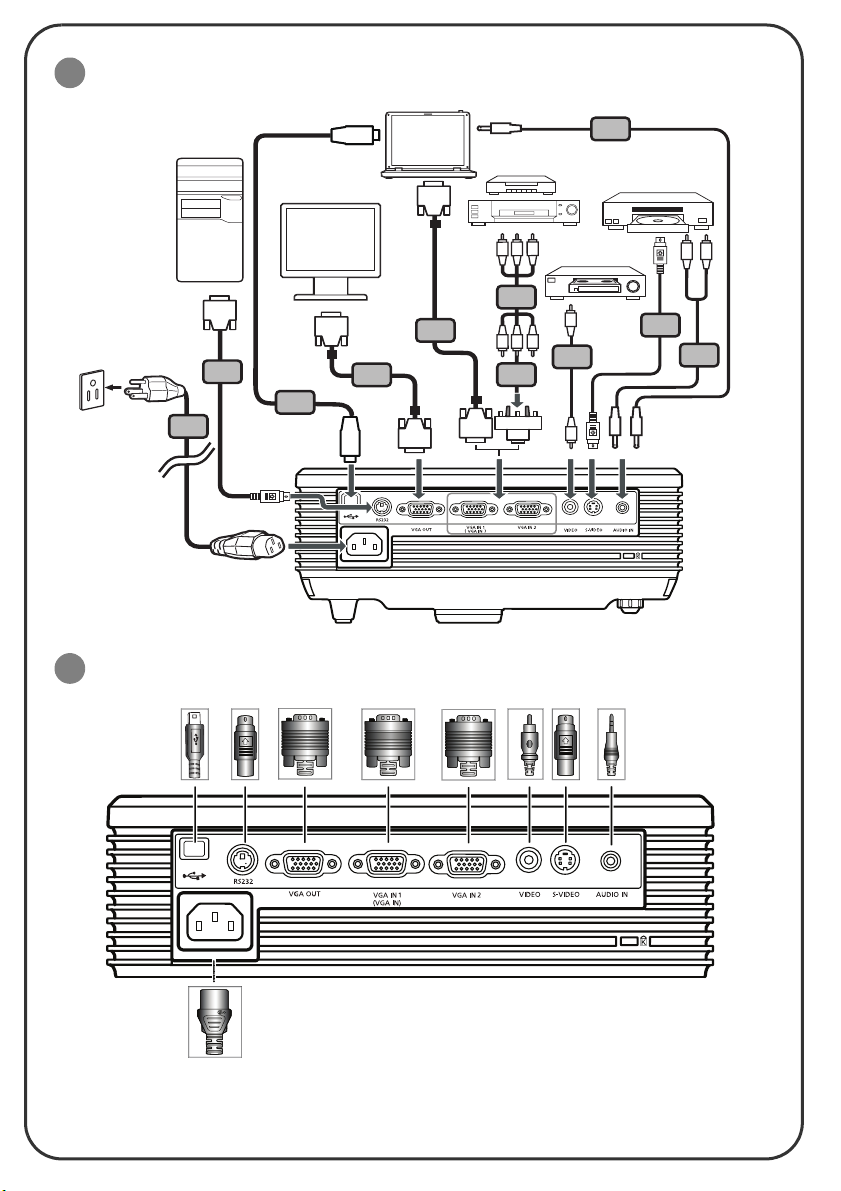
1. Power cord
2. VGA cable
3. VGA to component video/HDTV
adapter
4. Composite video cable
5. Audio cable
6. S-Video cable
7. RS232 cable
8. USB cable
9. 3 RCA component cable
Note: Connector interface is subject to model's specifications
2
INTERFACE CONNECTOR
Connecting to a Computer
1. Ensure the projector and your
computer are turned off.
2. Connect one end of the VGA cable
to the "VGA IN" connector on the
projector; connect the other end to
the VGA connector on the computer
and tighten the screws.
3. Connect one end of the power cord
into the AC power socket on the
projector; connect the other end to
an electrical outlet.
Powering On the Projector
1. Remove the lens cap.
2. Turn on the projector first and then
the computer.
3. Adjust the position, focus and zoom.
4. Run your presentation.
Powering Off the Projector
快速入门
1
安装
1. 电源线
2. VGA 线
3. VGA 转分量视频 /HDTV 转接器
4. 复合视频线
5. 音频线
6. S-Video 线
7. RS232 线
8. USB 线
9. 3 RCA 分量视频线
注意: 连接器接口因型号规格不同而异。
2
接口连接器
连接到计算机
1. 确保投影机和计算机的电源都处于关闭
状态。
2. 将 VGA 线的一端连接到投影机上的
VGA IN 连接器;将另一端连接到计算
机上的 VGA 连接器并拧紧螺丝。
3. 将电源线的一端连接到投影机上的交流
电源插口;将另一端插入电源插座。
打开投影机电源
1. 取下镜头盖。
2. 先打开投影机电源,然后打开计算机电
源。
3. 调整位置、聚焦和变焦。
4. 运行演示内容。
关闭投影机电源
1. 按两次电源按钮。
2. 在投影机风扇停止运转前,请勿从插座
上拔掉交流电源线。
1. Press the power button twice.
2. Do not remove AC power cord from
outlet until the projector fans shut
down.
 Loading...