

Page 1
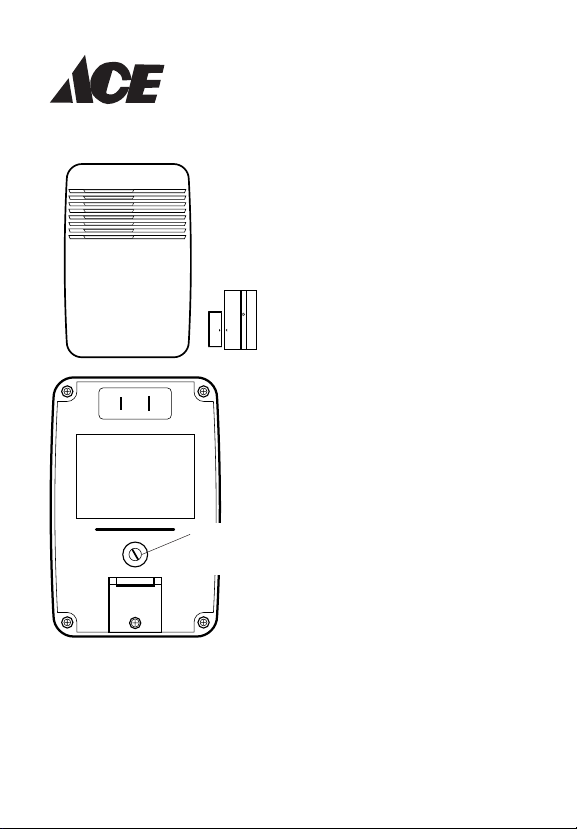
Chime
®
Volume
Control
Wireless Door
Sensor Chime
Model 3003530 (AC-6168)
Your doorbell includes:
• Plug-in doorbell chime
• Door sensor/transmitter with
battery
• Door magnet
• Magnet spacer
• Hardware pack
1. Set the chime volume on the
back of the plug-in chime, if
desired.
2. Plug-in the doorbell chime.
To reduce the risk of electrical shock, this equipment has a polarized
plug (one blade is wider than the other). This plug will fit in a polarized
outlet only one way. If the plug does not fit fully in the outlet, reverse the
plug. If it still does not fit, contact a qualified electrician to install the
proper outlet. Do not change the plug in any way.
© 2003 598-1073-02
Page 2
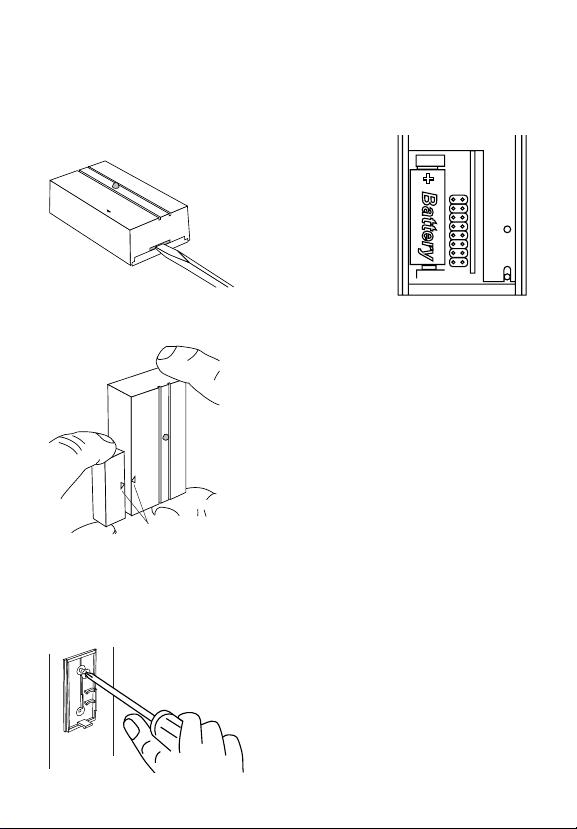
Important considerations: The sensor/transmitter must be mounted to the
Installation
door jamb. The magnet should be attached to the door. To prevent vandalism
and increase battery life, the sensor/transmitter should be installed inside.
To install the battery in the transmit-
ter remove the back of the case
by pushing in the tab on the bottom with a small screwdriver
and rotating the blade.
Install an alkaline type A23 12 Volt battery. The positive terminal should be
positioned as shown.
Test the location of the sensor/transmitter. Hold
the transmitter on the door jamb with one hand,
and the magnet with the other as shown. Take
the magnet away, and the chime should sound.
Alignment Marks
The edge of the magnet must be within 1/2" (13 mm) in. of the edge of the
transmitter, the alignment marks must be positioned as shown, and the front
surfaces of the magnet and transmitter should be as nearly flush with each
other as possible. It may be necessary to use the spacer under the magnet
to obtain the correct spacing.
Use either screws or double-sided tape to mount the magnet
and transmitter.
Attach the back of the case to the door jamb or wall. Snap
the front of the transmitter and magnet back on.
When attaching the magnet or transmitter
using the double-sided tape, make sure the
surface is clean.
-2-
598-1073-02
Page 3

Code and Tune Settings
Note: Most installations will not require you to change any of the jumpers on your doorbell.
WARNING: Disconnect chime unit from power source before opening
code access door. Close door and replace screw before reconnecting
to power.
The transmitter and chime communicate by using a code that can be changed
by removing and/or adding jumpers on both the transmitter and chime. The
code is factory set; however, there are 128 selectable codes that allow you
to expand your system and prevent outside interference. Another wireless
doorbell system or other wireless products may cause interference and the
system may not function properly. Follow the instructions below for setting a
new code.
1. Disconnect the power to the transmitter and chime.
2. Open the cases and locate the jumpers on both the transmitter and chime
(See illustration).
3. The transmitter and chime both have eight different jumper locations. The
jumper positions 1 through 7 are used for setting the code.
4. To change the code, add and/or remove jumpers as needed. There are
128 different combinations. It is recommended to only change one jumper
at a time and then check to see if system is functioning properly. Note:
Jumpers in positions 1 through 7 must be exactly the same for both the
transmitter and chime for this system to function.
Code Settings
598-1073-02
-3-
Page 4

Tune Settings
Your wireless chime has different selectable tunes: Ding (one note), Ding-
Dong (two note), or Westminster (eight note) (Available on selected chimes).
The factory setting is for the Ding-Dong tune (or Westminster, when available). This tune can be changed by following the instructions below.
• Ding (one note tune)
Transmitter: Add a jumper to location 8.
• Ding-Dong (two note tune)
Transmitter: Remove jumper from location 8.
Chime: Remove jumper from location 8.
• Westminster (Eight note tune) (Available on selected chimes)
Transmitter: Remove jumper from location 8.
Chime: Add a jumper to location 8.
Note: All models have both front and back door tune capabilities. You may
purchase any ACE
Remove screw to
open access door
®
wireless push button for a second entrance.
Transmitter Battery Replacement
Install an alkaline type A23 12 Volt battery. See diagram inside push button for
correct battery orientation.
Back of
Chime
12345678
Tune Setting
(Not used on
12345678
Inside
Transmitter
all models)
Note: Some models might require the use of tweezers to remove and replace the jumpers.
* Code Settings 1-7
Must Match Both
Transmitter and
Chime
Tune Setting
-4-
598-1073-02
Page 5

Troubleshooting
Chime does not sound:
• Red light on the transmitter does not light. Check battery polarity. Replace
the transmitter battery.
• Red light on the transmitter does light. Make sure the transmitter and the
chime channels are the same (See page 4). Make sure the plug-in chime
has power going to it.
Battery seems OK, but the chime does not work when installed:
• Do not mount the transmitter on metal or near metal studs. This reduces
the transmitter range. Use 1/4" to 1/2" (6 to 13 mm) wood shims to move
the transmitter off the metal surface.
•Try different locations for the chime closer to the transmitter.
The range of the door sensor system depends on location, temperature, and
battery condition.
Technical Service
If you experience a problem, follow this guide. You may also want to visit our Web
site at: www.desatech.com.
DESA Specialty Products™
P.O. Box 90004, Bowling Green, KY 42102-9004
ATTN: Technical Service Specialty Products
No Service Parts Available for this Product
(Do Not Send Products)
Regulatory Information
This device (Models SL-6166-RX-A and SL-6168-TX) complies with Part 15
of the FCC Rules and RSS-210 of Industry Canada. Operation is subject to
the following two conditions: (1) this device may not cause harmful interference, and (2) this device must accept any interference received, including
interference that may cause undesired operation.
The term "IC:" before the radio certification number only signifies that Industry
Canada technical specifications were met.
The user is cautioned that changes or modifications not expressly approved
by the party responsible for regulatory compliance could void the user's authority to operate the equipment.
598-1073-02
-5-
Page 6

This is a “Limited Warranty” which gives you specific legal rights. You may
FIVE YEAR LIMITED WARRANTY
also have other rights which vary from state to state or province to province.
For a period of five years from the date of purchase, any malfunction
caused by factory defective parts or workmanship will be corrected at no
charge to you. Batteries are not covered. To obtain a refund or a
replacement, return the product to the place of purchase.
Not Covered - Repair service, adjustment and calibration due to misuse,
abuse or negligence, light bulbs and other expendable items are not
covered by this warranty. Unauthorized service or modification of the
product or of any furnished component will void this warranty in its entirety.
This warranty does not include reimbursement for inconvenience, installation, setup time, loss of use, or unauthorized service.
This warranty covers only ACE® assembled products and is not extended
to other equipment and components that a customer uses in conjunction
with our products.
THIS WARRANTY IS EXPRESSLY IN LIEU OF ALL OTHER WARRANTIES, EXPRESS OR IMPLIED, INCLUDING ANY WARRANTY,
REPRESENTATION OR CONDITION OF MERCHANT ABILITY OR
THAT THE PRODUCTS ARE FIT FOR ANY PARTICULAR PURPOSE
OR USE, AND SPECIFICALLY IN LIEU OF ALL SPECIAL, INDIRECT,
INCIDENTAL, OR CONSEQUENTIAL DAMAGES.
REPAIR OR REPLACEMENT SHALL BE THE SOLE REMEDY OF THE
CUSTOMER AND THERE SHALL BE NO LIABILITY ON THE PART OF
ACE® FOR ANY SPECIAL, INDIRECT, INCIDENTAL, OR CONSEQUENTIAL DAMAGES, INCLUDING BUT NOT LIMITED TO ANY LOSS OF
BUSINESS OR PROFITS, WHETHER OR NOT FORESEEABLE. Some
states or provinces do not allow the exclusion or limitation of incidental or
consequential damages, so the above limitation or exclusion may not apply
to you. Retain receipt for warranty claims.
ACE® reserves the right to discontinue and to change specifications at any
time without notice without incurring any obligation to incorporate new
features in previously sold products.
-6-
598-1073-02
Page 7

NOTES _______________________
_____________________________
_____________________________
_____________________________
_____________________________
_____________________________
_____________________________
_____________________________
_____________________________
_____________________________
_____________________________
_____________________________
_____________________________
_____________________________
_____________________________
_____________________________
_____________________________
_____________________________
_____________________________
_____________________________
_____________________________
598-1073-02
-7-
Page 8

NOTES _______________________
_____________________________
_____________________________
_____________________________
_____________________________
_____________________________
_____________________________
_____________________________
_____________________________
_____________________________
_____________________________
_____________________________
_____________________________
_____________________________
_____________________________
_____________________________
_____________________________
_____________________________
_____________________________
_____________________________
_____________________________
-8-
598-1073-02
 Loading...