

Page 1
b-1
ACCUSPLIT, Inc.
6120 Stoneridge Mall Rd., Suite 210
Pleasanton, CA 94588 USA
800-965-2008 • 925-226-0888 • FAX 925-463-0147
www.ACCUSPLIT.com • [email protected]
980-312
ACCUSPLIT®
E X CLUSIVE
AX602FY
STOPWATCH
OPERATING
INSTRUCTIONS
2-3
ACCUSPLIT® AX602FY
DIGITAL 100 MEMORY STOPWATCH
WITH SPLIT AND LAP TIME MEASUREMENT AND
STROKE/FREQUENCY MEASURING FUNCTIONS
FEATURES
The Quartz Stopwatch is a digital
stopwatch featuring memory and
stroke/frequency measuring functions. In addition, the stopwatch
is water resistant. Therefore, it is
suitable for aquatic sports or use
in rainy weather.
• STOPWATCH
The stopwatch can measure up
to 10 hours in 1/100 seconds.
• SPLIT TIME/LAP TIME
MEASUREMENT
Up to 100 split times and lap
times can be measured.
2
• LARGE-SIZED THREE-ROW DISPLAY PANEL
Total elapsed time, split time and lap time are displayed at the same
time in separate rows, and they can be measured successively
without releasing split or lap time measurement.
• MEMORY FUNCTION
Up to 100 measurements can be stored in memory, and they can be
recalled after the measurement is over.
• TIME/CALENDAR DISPLAY
Year, month, date, hour, minutes, and seconds can be displayed while
the stopwatch is not in use.
• BATTERY LIFE INDICATOR
Lithium battery CR2032 or equivalent is used.
• ACCUSPLIT “X” CASE
Exclusive professional case with no-fail buttons.
3
Page 2
4-5
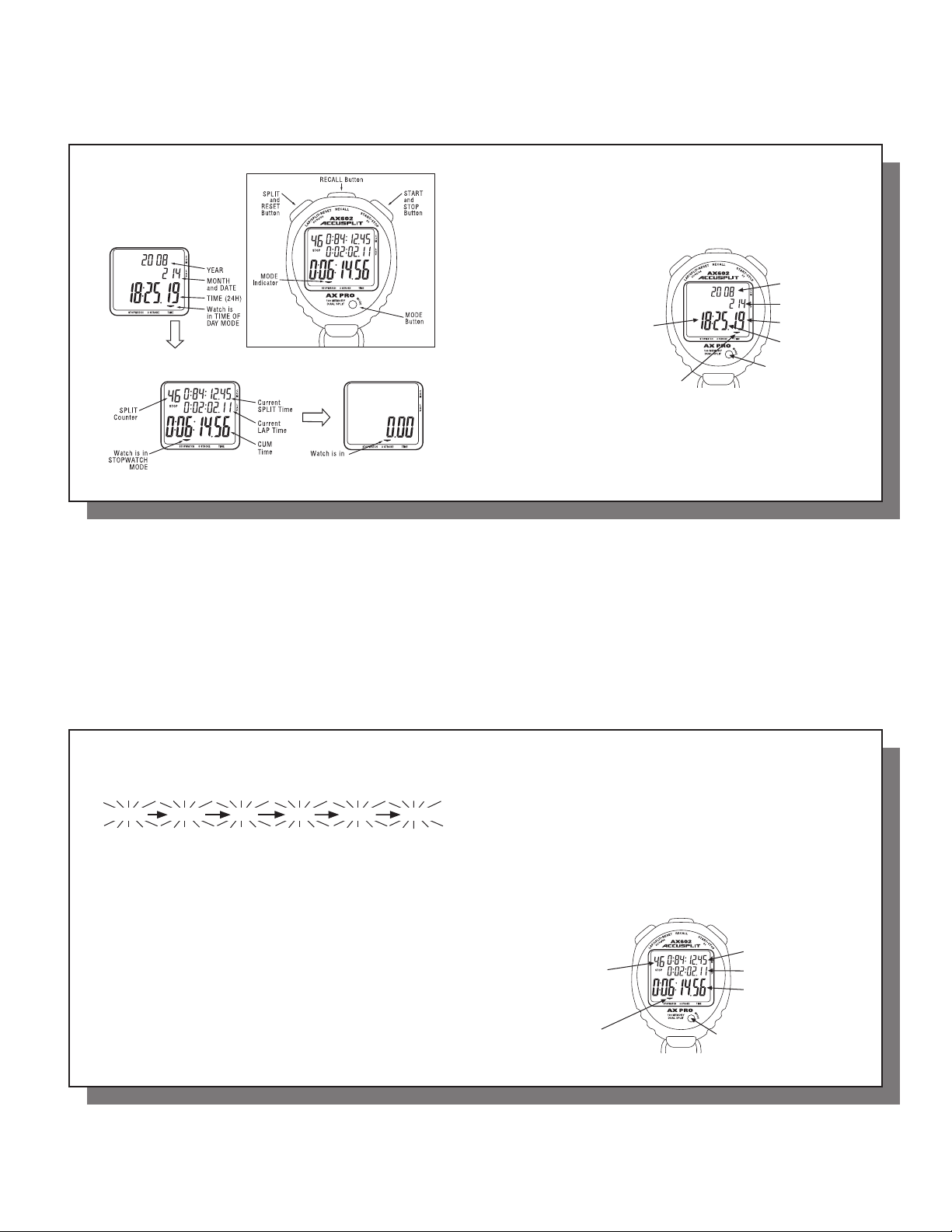
There are four buttons as
indicated in the illustration.
TIME/CALENDAR
display
STOPWATCH
display
4
C
B
STROKE/FREQUENCY MEASURING MODE
A
D
STROKE/FREQUENCY
MEASURING display
TIME/CALENDAR SETTING
ACCUSPLIT products use a common setting procedure known as S1-S2-S3-S4.
S1 (2 sec) - Enter set function OR
S1 (4 sec) - Enter set function &
clear the current settings
S2 – Select fi eld to be set
(selected fi eld will fl ash)
S3 – Set fi eld to desired settings
S4 – Exit setting function
TIME/CALENDAR display mark
1. Press “D” to show the time/calendar display. The time/calendar display
mark will appear.
2. S1 – Press and hold “B” for 2 seconds until seconds display begins fl ashing.
B
Hour
C
A
Year
Month and date
Seconds
Minutes
D
5
6-7
3. S2 – Press “B” repeatedly to select the digits (fl ashing) to be adjusted.
With each press of “B,” the digits to be adjusted change over in the
following order.
seconds minutes hour year month date
Note: The watch exits set mode automatically after setting date.
4. S3 – Press “A” to set the fl ashing digits or reset the seconds to “00”.
• The digits move quickly if “A” is kept pressed.
• When the seconds digits count any number from ”30” to “59” and “A” is
pressed, one minute is added and the second digits are reset to “00”.
5. S4 – After all the adjustments are completed, press “A” repeatedly until watch
exits set mode and returns to the TIME/CALENDAR display.
Notes:
1. Hour digits are displayed in the 24-hour indication.
2. Year digits can be set from 1988 to 2027. The calendar adjusts automatically for
odd and even months including February of leap years.
6 7
STOPWATCH
Press “D” in the TIME/CALENDAR display to show the STOPWATCH display.
The STOPWATCH display mark will appear.
The STOPWATCH can measure up to 10 hours in hours, minutes, seconds and
1/100 seconds.
• Before using the stopwatch be sure to reset the digits to “0:00:00.00”.
When the stopwatch is stopped, press ”B” to reset.
When the stopwatch is counting, press “A” to stop the measurement
and then press “B”.
C
B
Split/lap number
STOPWATCH display mark
A
Split time
Lap time
Total time (accumulated
elapsed time)
D
Page 3
8-9
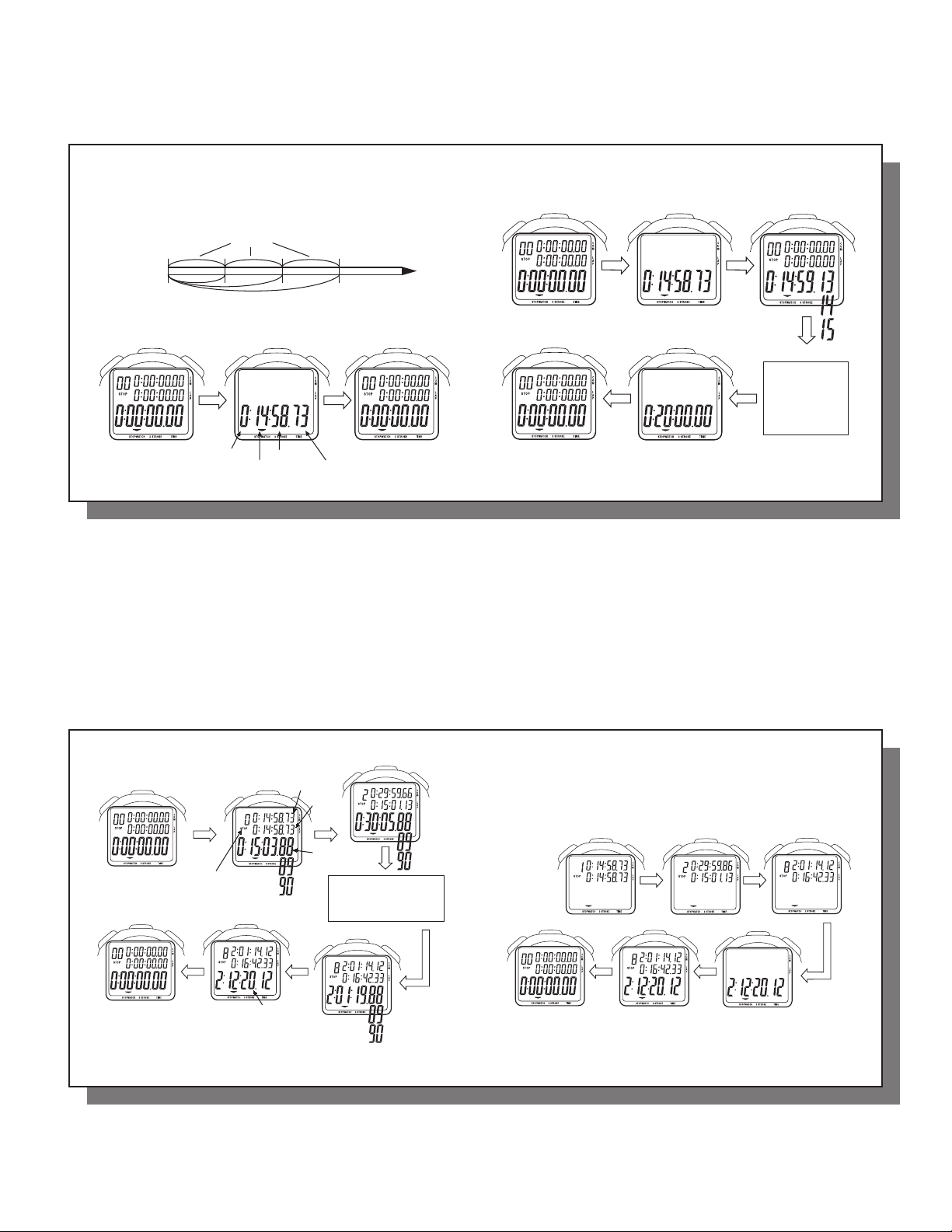
• “Split time” refers to an elapsed time required to cover a distance from
the start to a given point.
• “Lap time” refers to an elapsed time required to cover a given section
of the whole distance.
Lap time
Start
Split time
1. STANDARD MEASUREMENT
START STOP RESET
A AB
Hour Seconds
8
Minutes 1/100 seconds
2. ACCUMULATED ELAPSED TIME MEASUREMENT
START STOP RESTART
AA
RESET STOP
B
A
Restart and stop
of the stopwatch
can be repeated
by pressing “A”.
9
10-11
3. SPLIT TIME/LAP TIME MEASUREMENT
START
RESET STOP
B
A
Split/lap number
Note: When the number of stored measurements
exceeds 90, fl ashing “FULL” appears, and when
it exceeds 100, a warning sound starts beeping.
10
B
SPLIT-LAP 1
Finish time
A
Split time
Lap time
Accumulated
elapsed time
B
SPLIT-LAP 2
B
The split/lap time can
be measured repeated
by pressing “B”.
SPLIT-LAP 8
4. HOW TO USE THE MEMORY FUNCTION
The stopwatch can store up to 100 split times, 100 lap times and total elapsed
time. They are automatically entered into the memory.
• With each press of “C”, the time stored is recalled. The time can be
recalled successively by keeping the button pressed.
B
Reset to “00”
CC
“RECALL” more
A
C
C
Finish time
• To stop the recall of the stored data, press “A”, “B”, or “D”. The
measurements when the stopwatch was stopped will be shown.
Then, press “B” to reset the digits to “00”.
11
Page 4
12-13
• The time stored in the memory can be recalled even while the stopwatch
is measuring.
With each press of “C”
When the stopwatch is stopped Split time and lap time are recalled
starting with the fi rst ones.
When the stopwatch is measuring The times are recalled starting with
the last ones.
• To measure the lap time and split time while the stored data are being
recalled operate the buttons as follows.
B
A
Press “B” to measure new lap time and split time.
Press “A” to stop the measurement.
Press “D” to return to the measurement mode.
Notes:
1. Even if the digits are reset to “00”, stored times are not erased and can be
recalled by pressing “C” unless new measurement is started.
2. If the stopwatch is left untouched with the recalled times shown, the display
will automatically return the STOPWATCH display in 1 to 20 minutes.
12
STOKE/FREQUENCY MEASURING
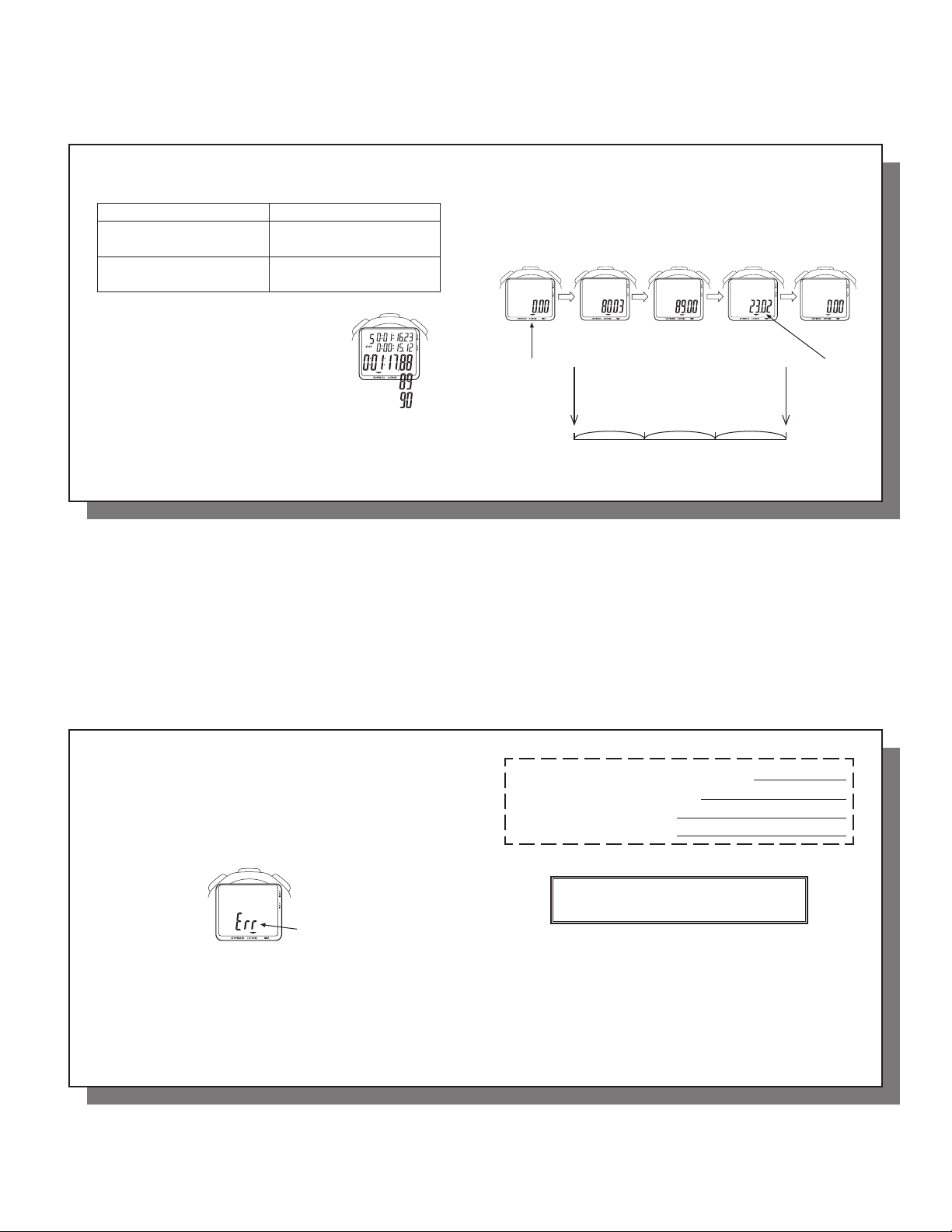
Press “D” to show the STROKE/FREQUENCY MEASURING display.
Start the measurement by pressing “A” and stop the measurement by pressing
“A” after the third stroke was made. The number of strokes per minute will be
displayed.
B
STROKE/
FREQUENCY
MEASURING
mode
Start
A A
Start Stop
Measuring
Stop
Reset
B
The number
of strokes
per minute
(23.2)
13
14-15
Notes:
1. During 1 second after the measurement has been started by pressing “A”,
fl ashing “180.0” is displayed. If the measurement is stopped by pressing
“A” during this period, “Err” will appear. If the measurement is not stopped
by pressing “A” after more than 18 seconds have elapsed, “Err” will
automatically appear. Therefore, note that measurable number of strokes
per minute is between 10 and 180.
Error
2. If “B” is pressed while the measurement is stopped or “Err” is shown, the
digits will be reset “0.0”. Even if the digits are not reset to “0.0” with the
measurement stopped or “Err” shown on the display, the measurement
can be started by pressing “A”.
14
REGISTER NOW Please return
your AX602FY Registration to
the Repair Center address in the
warranty, and we will let you
know about future products.
NO-PROOF-OF-PURCHASE LIMITED WARRANTY
See label on back of unit for details, or check
http://support.ACCUSPLIT.com
Email (preferred)
User
15
 Loading...