

Page 1
YOUR POINT OF VIEW
DISCOVER
key Features
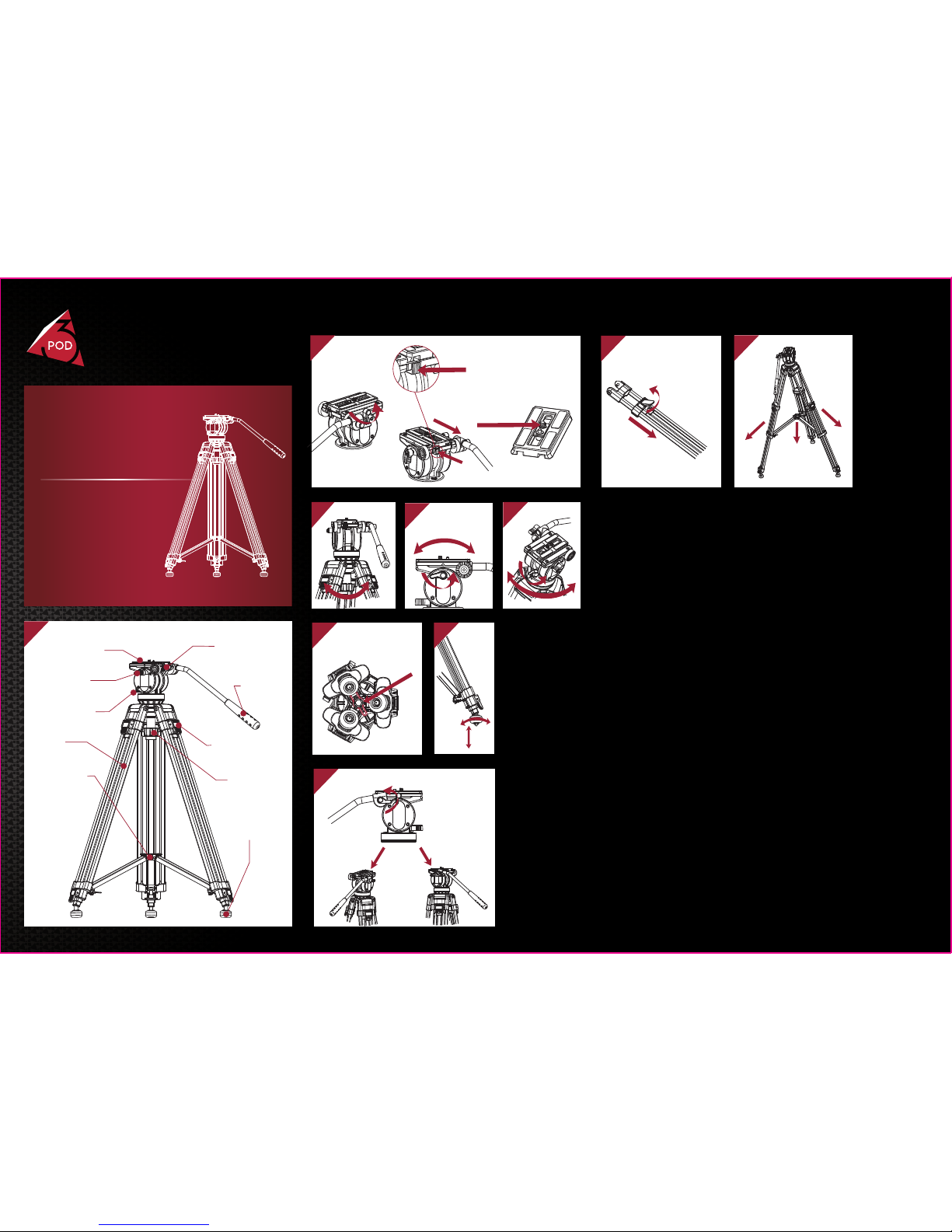
Fig 1:
Fig 2: Remove Quick-Release Plate
On uneven surface, adjust the ball level locking knob to
balance the head. Retighten the ball level lock.
Fig 3: Ball Level
Release tilt locking knob, and move the head up or down to tilt.
Retighten the tilt lock.
Fig 4: Tilt
Release the pan lock and move the head left or right to pan.
Fig 5: Pan
The legs can be held together by xing the transport clip.
Fig 6: Lock Legs
V3AH
Video Tripod
USER MANUAL
2
UNC1/4"
Camera Screw
3
5
4
1
Quick-Release
Plate
Safety Button
Tilt Locking
Knob
Pan Locking
Knob
Legs
Mid-Level
Spreader
Tilt Bar
Leg Flip-Locks
Ball Level
Locking Knob
Retractable
Spiked Feet
8
7
9
10
1. To release quick-release plate, rotate the plate
locking knob as illustrated.
2. Press the safety button, and then remove the plate.
3. Wide-bodied plate design can improves the stability of vedio camera.
This video tripods offer screw-in rubber feet and stainless
steel spiked feet.
Fig 7: Retractable Spiked Feet
The tilt bar can be installed on the left or right by releasing the
knob as illustrated. Retighten the knob.
Fig 8: Tilt Bar
To spread the tripod to the full extension
of the mid-level spreader.
Fig 10: Mid-Level Spreader
Release ip-locks and extend the legs to desired
height and retighten the ip-locks.
Fig 9: Leg Length Adjustment
6
Transport Clip
 Loading...