

Page 1
Middle Range Emitter Instructions 03-2010
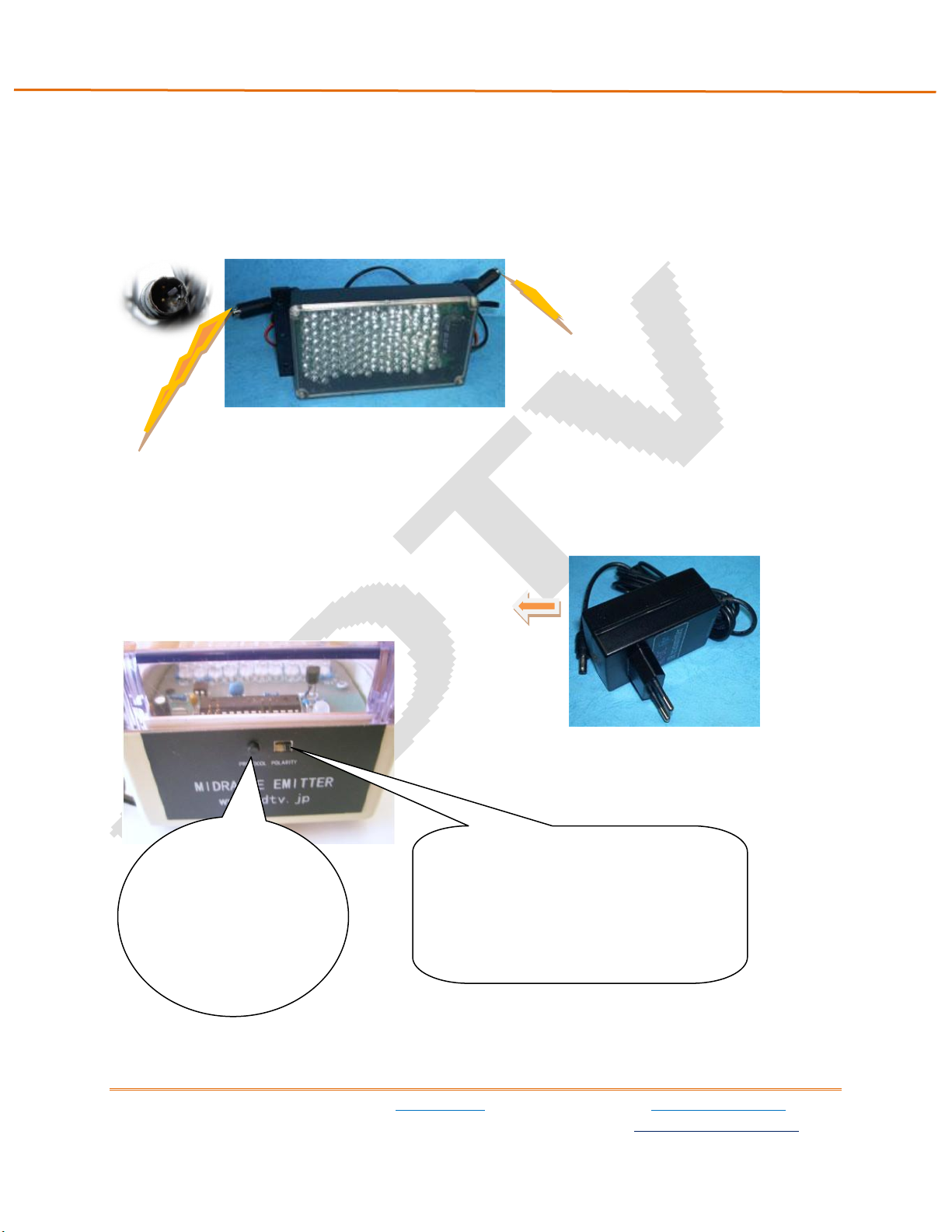
Press“Protocol”
button to change
glasses type.
Flip ”Polarity”button to reverse the
left and right eye images.
Middle Range Emitter Instructions
1、Connectors and switches
B、 AC-DC Power cord
A、VESA Stereo MiniDIN Connector(The VESA MiniDin stereo plug is for use with most Nvidia Quadro cards,
the 3DTV, X3D, I/O Displays PC 3D gaming dongle, recent Mitsubishi DLP 3DTV sets and other devices. )
C、 ~110~240 AC-DC Adapter
D、 Switches
3DTV Corporation www.3dtv.jp www.3dmagic.com
1863 Pioneer PKWY.E.142.Springfield, OR 97477 USA [email protected]
Page 2
Middle Range Emitter Instructions 03-2010
emitter
3DTV
I/O
CENvidia
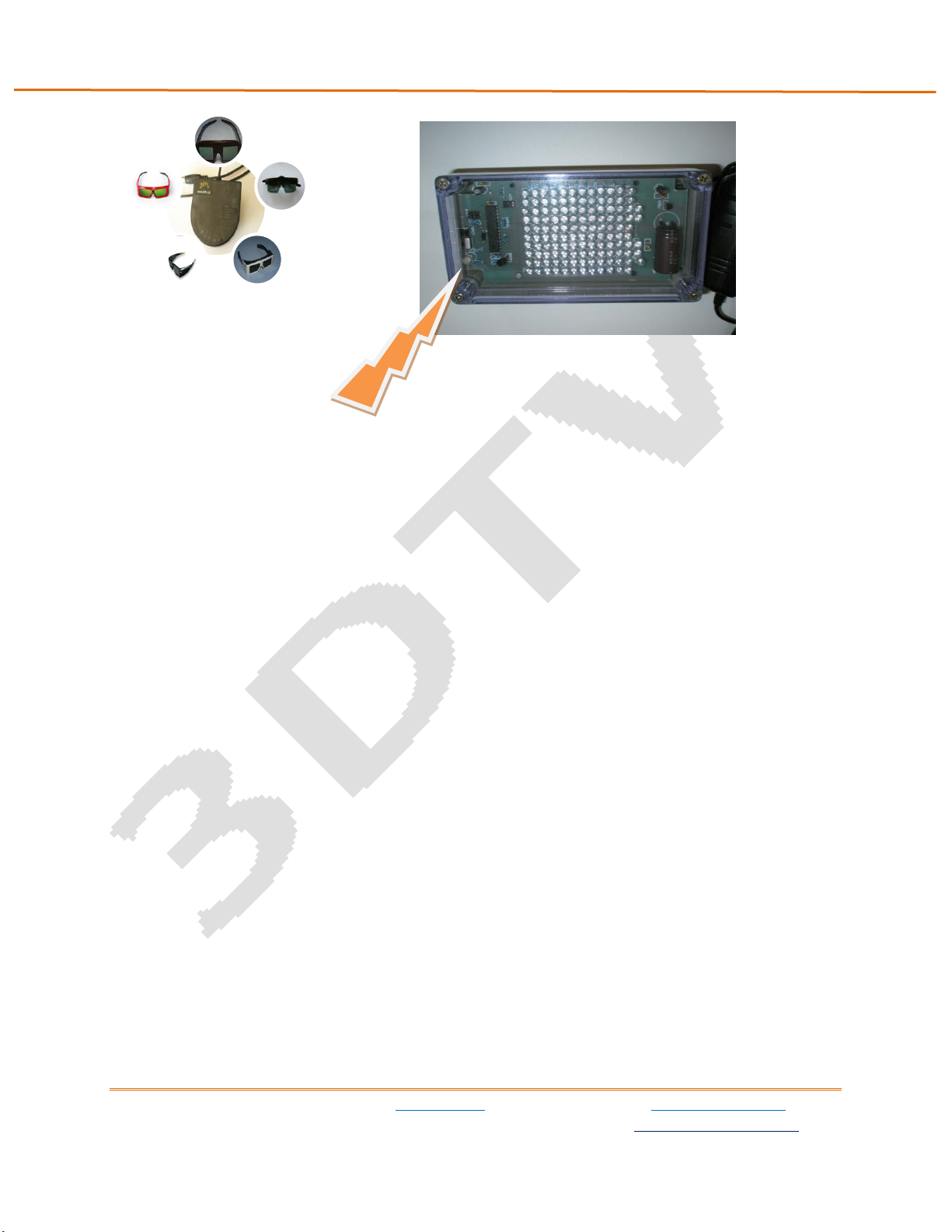
2、LED Color Code
● Red light — CE (Crystal Eyes glasses)
● Green light — Model X (E-Dimensional , 3DTV Model X or I/O glasses)
● Red light blinking — 3DTV Model J, NuVision, Xpand
● Green light blinking— 3DTV Model E
● Orange light –NV (Nvidia glasses)
3、Operation
Step 1 Turn off your computer , TV, or Projector.
Step 2 Plug emitter’s MiniDin plug into your graphic card, MiniDin connector, or 3DTV dongle
(Available to purchase separately. See below).
Step 3 Connect emitter to DC adapter and plug DC adapter into the wall.
Step 4 Turn on computer and start to play 3d content.
Step 5 Unplug the emitter’s MiniDin connector from the graphic card or 3DTV dongle, and then plug
back in.
Step 6 Press“Protocol” button to change LED color to your glasses type. Flip ”Polarity”button to
reverse the left and right eye images if needed.
3DTV Corporation www.3dtv.jp www.3dmagic.com
1863 Pioneer PKWY.E.142.Springfield, OR 97477 USA [email protected]
Page 3
Middle Range Emitter Instructions 03-2010
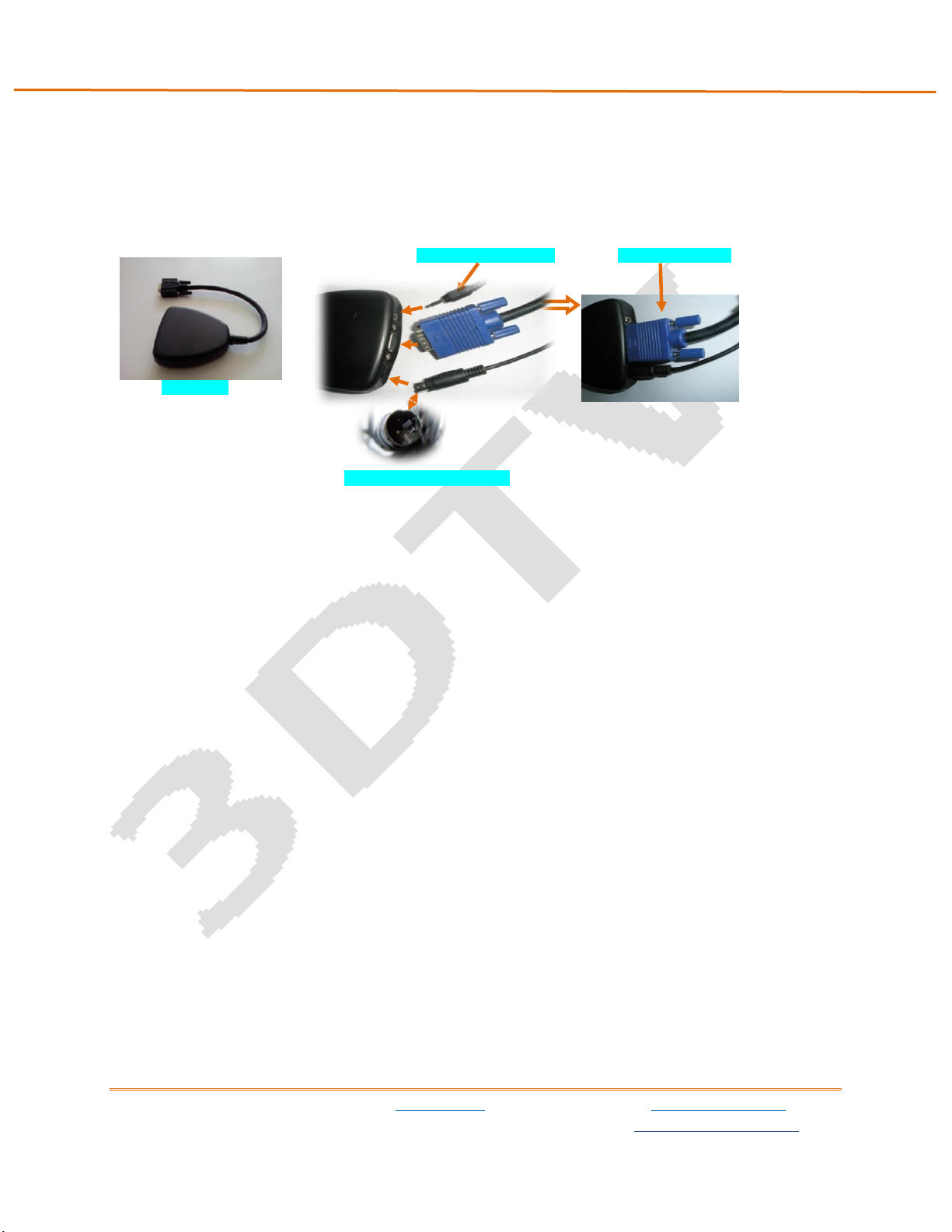
3DTV Dongle
optional wired glasses jack
15pin plug to monitor
MiniDin connector from emitter
4、Working Range
10×10 meters
5、Optional Parts
3DTV Dongle
It should be connected between PC graphic card and monitor ’s or dlp projector’s 15pin plug. It has a
jack for the miniDin plug on the emitter. It also has a mini stereo jack for wired LCD glasses.
6、Troubleshooting
If your glasses do not activate, unplug the Emitter power or miniDin while the 3D program is running
and replug. If this does not work check that the Emitter lights are on and that the TV or PC are in 3D
Mode (so that the MiniDin is activated). Make sure the glasses are on (temples bent all the way out ,
and/or glasses aimed at the Emitter, or power button pressed, or activated by magnet etc, depending on
glasses type). Of course the glasses must have a battery with sufficient voltage, so you may need to
remove it and check with a voltmeter.
WHEN YOU TURN ON THE 3D FUNCTION WITH EMITTER CONNECTED, YOUR REMOTE MAY FREEZE (NOT
FUNCTION) DUE TO INTERFERENCE OF INFRARED USED BY THE EMITTER. IN THIS CASE, COVER THE
EMITTER WITH YOUR HAND OR A CLOTH OR BOX UNTIL YOU ARE FINISHED ADJUSTING THE TV. YOU
MAY ALSO ADJUST THE PICTURE BEFORE ENTERING 3D MODE OR YOU CAN CHOOSE THE 2D MODE
OUTPUT OF YOUR SOFTWARE PLAYER ON YOUR PC OR YOUR BLURAY PLAYER BEFORE PUTTING ON THE
GLASSES AND ENTERING 3D MODE.
WARNING: Under normal operating conditions, the 3D shutter glasses systems are perfectly safe to use for any duration you
would normally view 3D images on your screen. However, some people may experience discomfort that could signal
3DTV Corporation www.3dtv.jp www.3dmagic.com
1863 Pioneer PKWY.E.142.Springfield, OR 97477 USA [email protected]
Page 4

Middle Range Emitter Instructions 03-2010
problems with the hardware, software and /or physical problem with your visual system. Discontinue use of the 3D glasses
and consult a physician if you experience any of the following: headache, eyestrain, blurry vision, double vision, involuntary
movements, eye or muscle twitching, confusion, loss of awareness of your surrounding, dizziness or disorientation. To
minimize the potential for any of the above symptoms to arise, adjust the ambient lights darker. If you are using a computer
system, set the monitor refresh rate to the highest possible setting.
EPILEPSY WARNING: IF YOU OR ANY MEMBER OF YOUR FAMILY HAS A HISTORY OF EPILEPSY, CONSULT A PHYSICIAN
BEFORE USING THIS OR ANY OTHER 3D PRODUCTS.
3DTV Corporation www.3dtv.jp www.3dmagic.com
1863 Pioneer PKWY.E.142.Springfield, OR 97477 USA [email protected]
 Loading...