

Page 1
3DTV Model DLP2 Glasses Instructions
Model DLP2
Overview
Model DLP2 glasses work with all 3D Ready DLP projectors and with all Mitsubishi and Samsung
DLP TV’s. In all 3D Ready Projectors and some recent Mitsubishi TV’s the DLP Link Mode must
be turned on with the remote. In the other TV’s it is always on. Although it is often feasible to
use our IR Shutter glasses and Gen2 Emitter together with DLP Link glasses, there may be mutual
interference and so if either type does not operate properly turn off the DLP Link function or
unplug the Emitter to test for proper operation of the remaining type. All DLP Link glasses are
activated by pressing the button on the left temple and will shut off automatically and all models
can be used together. Some people find that DLP Link glasses will not sync properly
if you turn them on before the 3D program starts. If this happens turn them off
and then on again.
Changing Battery
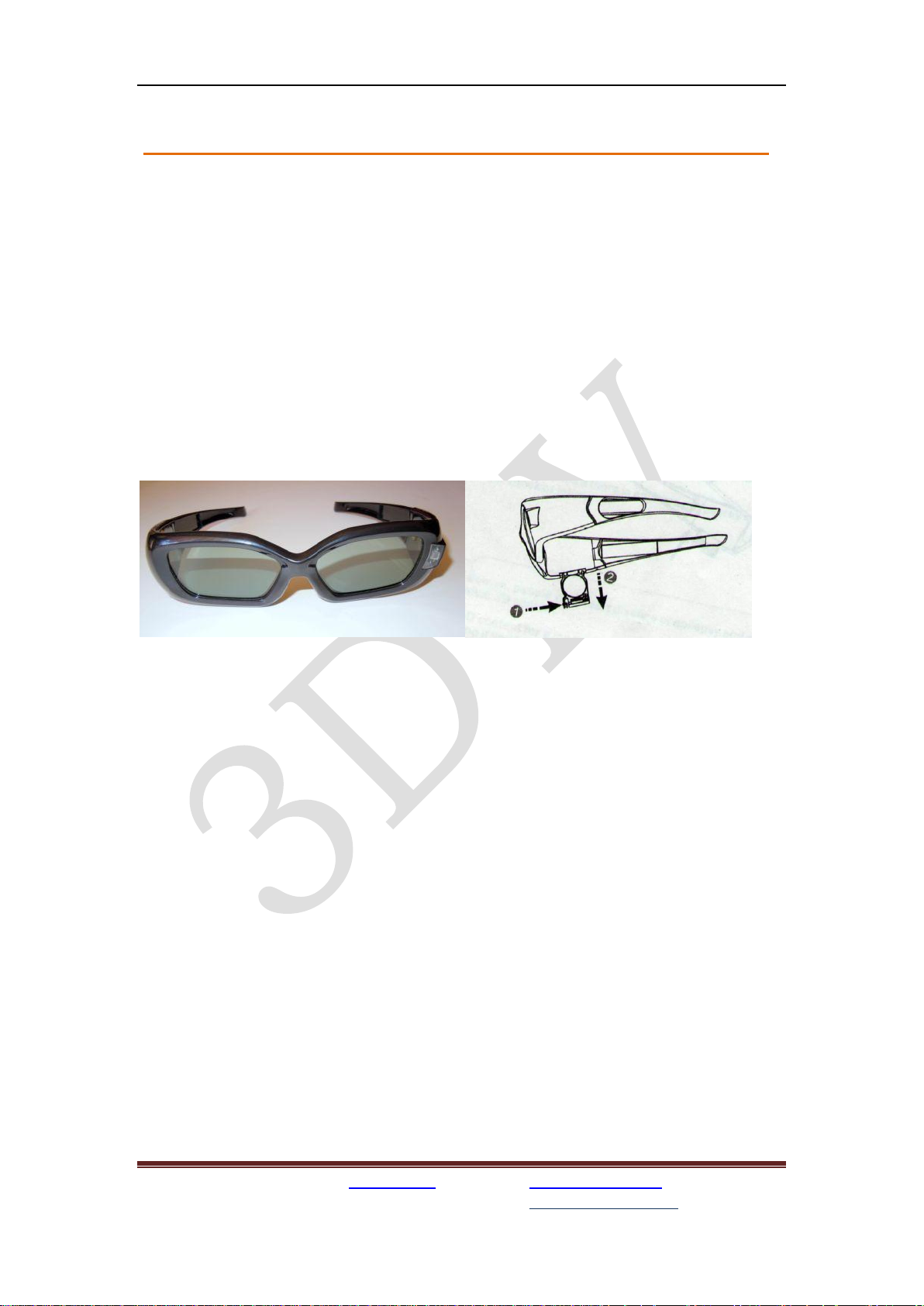
Turn the glasses upside down, depress the tab 1 and while depressed slide out the battery container
as shown. Replace the battery and slide back in. The battery should last several months in normal
use and there are longer life CR2032 batteries available on the net. TURN OFF EMITTER OR TV
WHEN NOT IN USE OR PUT GLASSES IN A BOX OR THEY WILL CONTINUE TO OPERATE!!
Changing Right/Left Eye Polarity If the image looks strange hit key F7 on a PC running 3D Vision
or the white polarity reversal button on the 3DTV Corp Gen2 Emitter or the invert glasses button on
your TV or projector remote.
Nose/Temple Pads Use the supplied Velcro loop dot pads for comfort. They are the loop part which
can be purchased anywhere.
Turn On and Off Press the white power button on the inside left temple to turn on. The lenses go
opaque for 1.5 seconds and then clear. Once on, they will sync automatically when they detect the
Emitter signal and turn off automatically when they do not detect sync for five minutes. Otherwise
press the power button for 2 seconds until the lenses flash 3 times and the glasses turn off.
WITH ALL KINDS OF DISPLAYS AND ALL KINDS OF GLASSES/EMITTERS FROM ANYONE, AND
3DTV Corporation www.3dtv.jp www.3dmagic.com
1863 Pioneer PKWY.E.142.Springfield, OR 97477 USA [email protected] 1
Page 2

3DTV Model DLP2 Glasses Instructions
ESPECIALLY WITH PC SYSTEMS (E.G., NVIDIA 3D VISION OR 3D PLAY) YOU MAY GET PULSING,
FLICKERING OR ERRATIC BEHAVIOR DUE TO INTERFERENCE BY LIGHTS, ESPECIALLY
FLUORESCENTS, FANS, HEATERS AND IN ADDITION TO MINIMIZING THESE, YOU SHOULD
ALSO TRY CHANGING THE FREQUENCY OF THE MONITOR AND TIMING FUNCTIONS, GAMMA,
CONTRAST ETC OF THE VIDEO CARD. IF YOU LIVE IN A COUNTRY WITH 50HZ ELECTRICITY,
TRY CHANGING REFRESH TO 100HZ. WITH ANY SYSTEM TRY OTHER
FREQUENCIES IN THE RANGE OF 95 TO 130 IF YOU EXPERIENCE
IMAGE QUALITY ISSUES. Of course with any glasses it's also feasible to
tape or glue a small piece of filter (e.g., colored paper or plastic) over the
glasses receiver to deal with fluorescent lights etc.
Troubleshooting and FAQs ---I don’t see any 3D effect. --Be sure the programming
you are watching is 3D. If the programming is 3D, you should see two overlapped
identical images without the glasses and one image through each eye when you
close the other eye. Make sure you are using glasses in the Emitter’s or working
range (ca. 10M x 10M for our Gen2 Emitter). If using the Gen2 Emitter, make
sure the Emitter Central LED is the orange steady (i.e., NOT blinking) as described
in the Instructions. Lights, heaters, IR wireless Headphones, Remote control
amplifiers such as the IR Blaster etc. may interfere with the glasses OR the Emitter
may interfere with your REMOTES for any such devices. I sometimes notice a
slight flicker---There may be some slight flicker when watching with bright lights
on, especially fluorescents. Eliminate this by turning them down or off. The 3D
images do not look correct.--You may need to reverse the right/left polarity with
the Gen2 button, the TV remote control, video game or PC software player or F7
key on your PC keyboard.
WARNING: Under normal operating conditions, the 3D shutter glasses systems are perfectly safe to use for any
duration you would normally view 3D images on your screen. However, some people may experience discomfort
that could signal problems with the hardware, software and /or physical problem with your visual system.
Discontinue use of the 3D glasses and consult a physician if you experience any of the following: headache,
eyestrain, blurry vision, double vision, involuntary movements, eye or muscle twitching, confusion, loss of
awareness of your surroundings, dizziness or disorientation. To minimize the potential for any of the above
symptoms to arise, adjust the ambient lights darker. If you are using a computer system, set the monitor refresh
rate to the highest possible setting. EPILEPSY WARNING: IF YOU OR ANY MEMBER OF YOUR FAMILY HAS A
HISTORY OF EPILEPSY, CONSULT A PHYSICIAN BEFORE USING THIS OR ANY OTHER 3D PRODUCTS.
© 2010 Michael Starks Permission is granted to reprint provided credit is given
and nothing is added, changed or omitted.
3DTV Corporation www.3dtv.jp www.3dmagic.com
1863 Pioneer PKWY.E.142.Springfield, OR 97477 USA [email protected] 2
 Loading...