

Page 1
1Control SOLO EVO - Scheda tecnica
Descrizione
1Control SOLO EVO è un dispositivo elettronico che consente
l’azionamento di una automazione radiocomandata, come un
cancello o un garage, utilizzando uno smartphone. SOLO EVO è in
grado di copiare il radiocomando di una automazione e quindi di
controllarla comportandosi come il radiocomando originale.
Controllo di una automazione
SOLO EVO è in grado di copiare il radiocomando di una
automazione e quindi di controllarla comportandosi come il
radiocomando originale.
È in grado di copiare tutti i radiocomandi a codica ssa e la
maggioranza dei radiocomandi rolling-code, nelle bande di
frequenza da 433.0 MHz a 868.0 MHz, utilizzando le modulazioni
AM e FM. I vecchi radiocomandi a bassa frequenza, detti quarzati,
non sono compatibili.
L’elenco completo dei radiocomandi compatibili è disponibile sul
sito 1Control o sulla Guida completa.
Per controllare una automazione è suciente copiare un solo
radiocomando, non è necessario copiare i radiocomandi di tutti gli
utilizzatori.
SOLO EVO comunica con lo smartphone utilizzando il protocollo
Bluetooth LE 4. Non è necessario quindi disporre di una
connessione ad Internet per aprire cancello e garage.
Distanza di funzionamento
La distanza massima tra SOLO EVO e una automazione da
controllare varia in base alla tipologia di radiocomando utilizzato.
Tipicamente tale distanza è compresa tra 20 e 40 metri.
La distanza massima tra SOLO EVO e uno smartphone varia in
base al modello di smartphone utilizzato e tipicamente è circa 1520 metri.
Per massimizzare la portata di SOLO EVO è bene posizionarlo ad
almeno 1 metro da terra e in un posto dove non vi siano ostacoli tra
l’utilizzatore e SOLO EVO.
Muri in cemento armato o scatole metalliche possono indebolire o
bloccare il segnale di SOLO EVO.
Condizioni operative
SOLO EVO è resistente ad agenti atmosferici, non teme pioggia,
neve ed esposizione ai raggi solari. E’ certicato IP66.
Sicurezza
Al primo utilizzo di SOLO EVO è necessario impostare un codice
PIN numerico a 8 cifre. Questo PIN va mantenuto segreto. I
possessori del codice PIN sono considerati amministratori del
dispositivo. E’ possibile reimpostare il codice PIN eettuando un
ripristino di fabbrica di SOLO EVO.
L’amministratore di SOLO EVO può invitare altri utenti ad utilizzare
una automazione, senza dare loro il codice PIN, utilizzando le
funzionalità di condivisione oerte dall’app.
La comunicazione tra SOLO EVO e uno smartphone è protetta
da algoritmi di sicurezza di ultima generazione basati su chiavi
pubbliche e cifratura end-to-end simmetrica con chiavi emere.
La comunicazione tra SOLO EVO e una automazione utilizza gli
stessi algoritmi di sicurezza del radiocomando copiato. Pertanto
il grado di sicurezza oerto in tale comunicazione è lo stesso del
radiocomando.
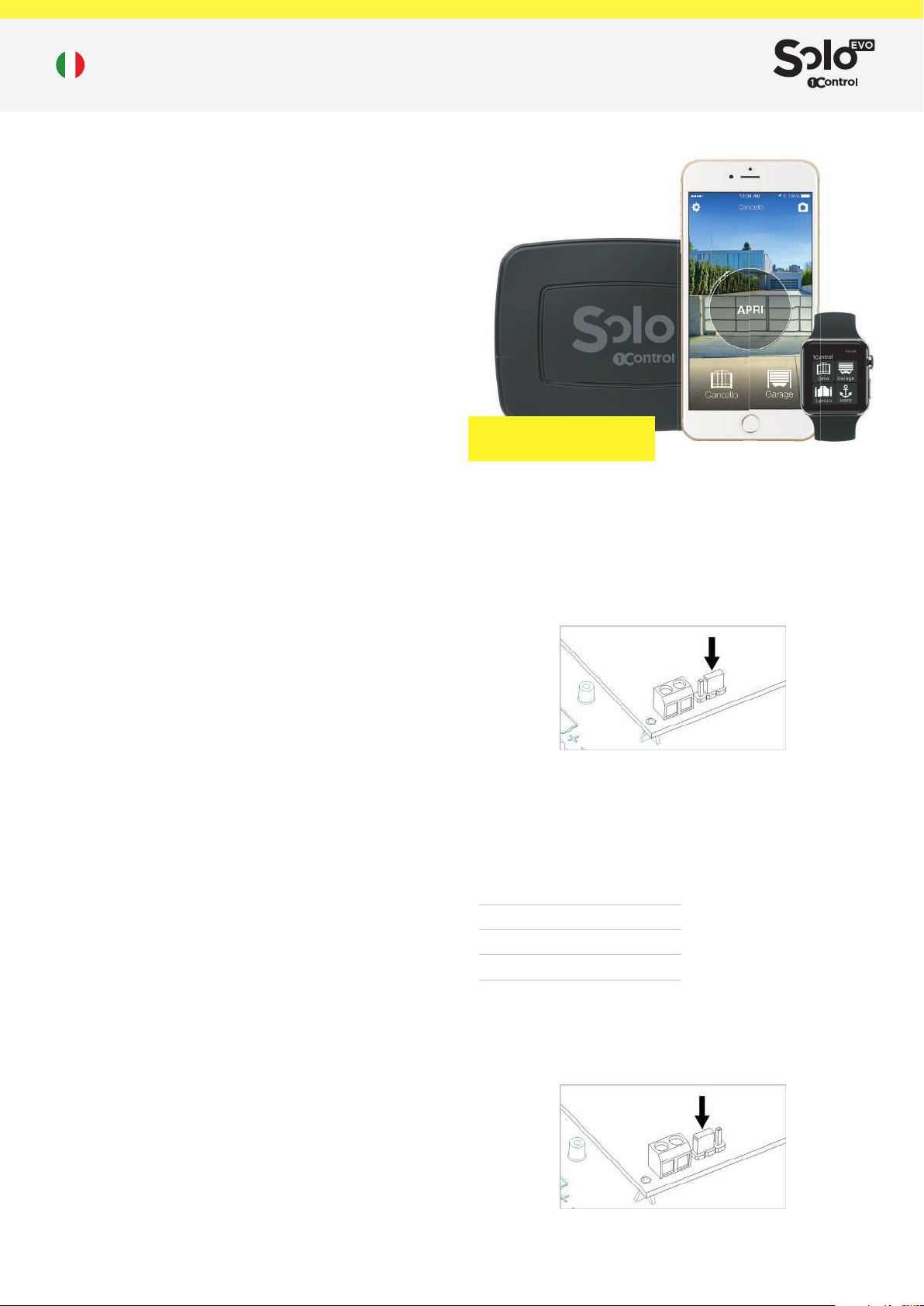
4 CANCELLI o GARAGE
50 UTENTI
Alimentazione a batteria
Per alimentare SOLO EVO mediante batterie è necessario
impostare il selettore jumper sulla scheda sulla posizione “BT” e
rimuovere la linguetta proteggi-batterie. Chiudere il dispositivo
utilizzando le 4 viti fornite nella confezione.
Le batterie possono essere sostituite quando scariche. SOLO EVO
mantiene in memoria i radiocomandi copiati e gli accessi condivisi
anche in assenza di alimentazione. E’ possibile controllare lo stato
di carica delle batterie mediante l’app.
La durata delle batterie varia in funzione del numero di azionamenti
(aperture o chiusure) che si eettuano:
Aperture
giornaliere
4
10
20
Durata
media
48 mesi
24 mesi
12 mesi
Alimentazione 12-24V AC/DC
Per alimentare SOLO EVO mediante fonte esterna 12-24V è
necessario impostare il selettore jumper sulla scheda sulla
posizione “AL”.
Alimentazione
SOLO EVO può essere alimentato utilizzando batterie alcaline
tipo C da 1,5V (già incluse nella confezione) oppure mediante
alimentazione esterna con tensione compresa tra 12V-24V DC o AC.
SOLO EVO ha un assorbimento di corrente massimo di 100mA.
Nella confezione è disponibile un cavo che è possibile utilizzare
per collegare l’alimentazione di SOLO EVO. Il cavo fornito ha
1/2
Page 2
1Control SOLO EVO - Scheda tecnica
una lunghezza di 4 metri ed è resistente all’acqua e agli agenti
atmosferici, pertanto può essere utilizzato in ambiente esterno.
L’ampio range di tensione di alimentazione accettato da SOLO
EVO rende possibile il collegamento all’alimentazione fornita della
maggior parte delle centraline per cancelli e garage.
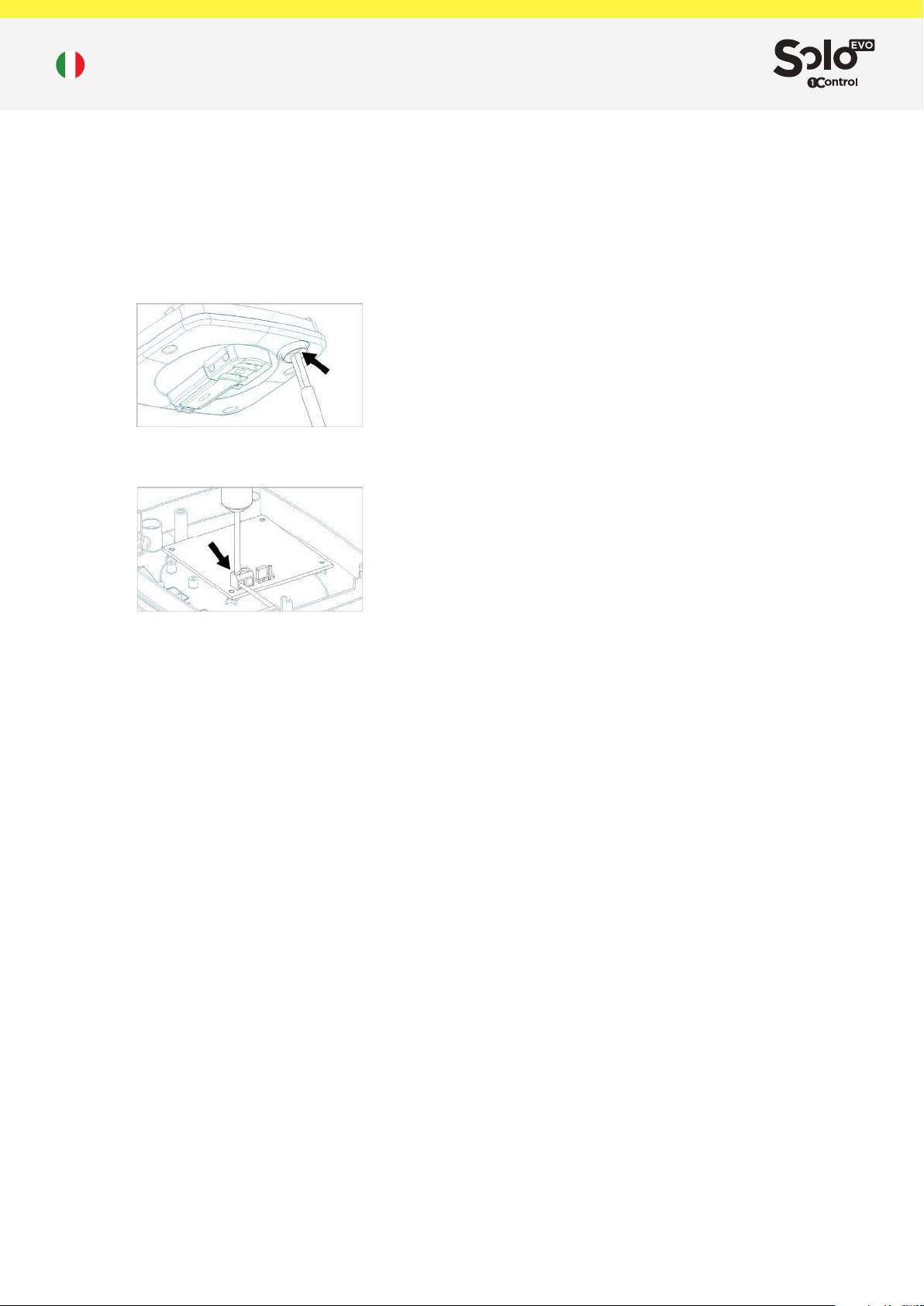
SOLO EVO è dotato di un passacavo IP66 già montato che
deve essere utilizzato per far passare il cavo di alimentazione. E’
necessario rimuovere le batterie e bucare con un piccolo cacciavite
il passacavo prima di inserirvi il cavo di alimentazione.
Collegare poi l’alimentazione al morsetto avendo cura di rispettare
la polarità indicata.
Una volta inserito e collegato il cavo di alimentazione, ssarlo
utilizzando la piccola fascetta in dotazione e chiudere il dispositivo
utilizzando le 4 viti fornite.
Data e orario
SOLO EVO è dotato di un orologio interno che viene utilizzato per
vericare i diritti di accesso temporali degli utenti. L’orologio interno
gestisce l’ora legale europea autonomamente. La data verrà
impostata automaticamente dall’app al primo avvio.
Copia di un radiocomando
La copia di un radiocomando avviene seguendo la procedura
guidata disponibile sull’app.
SOLO EVO è in grado di riconoscere automaticamente il tipo di
radiocomando che si sta copiando e di fornire la procedura di
copia adeguata mediante l’app.
NB: Quando si copia un radiocomando è bene trovarsi nei pressi
del relativo cancello o garage.
L’elenco completo dei radiocomandi compatibili è disponibile sul
sito 1Control o sulla Guida completa.
Condivisioni
Gli amministratori del dispositivo possono condividere una accesso
memorizzato su SOLO EVO mediante l’app.
Tutti gli utenti che desiderano ricevere una condivisione devono
registrarsi tramite l’app inserendo il proprio numero di telefono.
NB: non è possibile utilizzare lo stesso numero di telefono per
registrarsi da smartphone diversi.
L’amministratore può condividere un accesso ad un utente
indicandone il numero di telefono. E’ possibile impostare vincoli
temporali (data di inizio e ne, giorni della settimana, ore del
giorno) alle condivisioni.
Per condividere un accesso non è necessario trovarsi nei pressi
del dispositivo, tale operazione può essere eettuata anche da
remoto.
Ripristino di fabbrica
È possibile eliminare completamente tutti i dati memorizzati su
SOLO EVO ripristinandolo alle condizioni di fabbrica. Per eettuare
il ripristino premere e tenere premuto per più di 10 secondi il tasto
interno. Il ripristino del dispositivo può durare no a 2 minuti.
Il ripristino del dispositivo causa la perdita di tutti i radiocomandi
memorizzati e rende invalide di tutte le condivisioni create.
Servizio post vendita
In caso di problemi scrivere a [email protected] oppure
telefonare al numero +39 329 169 7057
Dati e limitazioni
SOLO EVO può controllare no a 4 diverse automazioni
radiocomandate.
Può essere utilizzato da 50 persone/smartphone, è possibile
acquistare ulteriori utenti dall’app.
App
L’app “1Control” è gratuita ed è scaricabile dagli Store di iPhone e
Android.
È compatibile con i seguenti sistemi:
- Smartphone iPhone 4S o superiore con iOS 9 o superiore
- Smartphone Android con sistema 4.3 o superiore e Bluetooth LE
4
L’app “1Control” può gestire e controllare più dispositivi 1Control
contemporaneamente.
Prima installazione
1. Alimentare il dispositivo (vedere capitolo Alimentazione)
2. Scaricare l’app “1Control” dallo store del proprio smartphone
3. Collegarsi con l’app a SOLO EVO e impostare un codice PIN
segreto
4. Copiare il radiocomando seguendo la procedura guidata
dall’app
5. Posizionare SOLO EVO vicino all’automazione da controllare
Contenuto della confezione
1 dispositivo SOLO EVO
1 passacavo IP66 (già installato)
1 supporto per il ssaggio a muro o a palo
2 tasselli per il ssaggio a muro con relative viti
2 fascette per il ssaggio su palo
2 batterie (già inserite)
4 viti di chiusura
1 cavo alimentazione 4 metri
Altri dati
Dimensioni: 39x102x134 mm
Peso (batterie incluse): 350g
Codice GTIN/EAN: 8056772850154
2/2
Page 3
1Control SOLO EVO - Technical sheet
Description
1Control SOLO EVO is an electronic device that allows the
operation of a radio-controlled automation, such as a gate or
a garage, using a smartphone. SOLO EVO is able to copy the
automation remote control and therefore to control it behaving like
the original remote control.
Control of an automation
SOLO EVO is able to copy the automation remote control and
therefore to control it behaving like the original remote control.
It is able to copy all xed-coded remote controls and most rolling-
code remote controls, in the 433.0 MHz to 868.0 MHz frequency
bands, using the AM and FM modulations. The old low-frequency
remote controls, called quartz, are not compatible.
The complete list of compatible remote controls is available on the
1Control website or in the Complete Guide.
To control an automation, it is sucient to copy a single remote
control, it is not necessary to copy the remote controls of all users.
SOLO EVO communicates with smartphone using the Bluetooth
LE 4 protocol. Therefore it is not necessary to have an Internet
connection to open gate and garage.
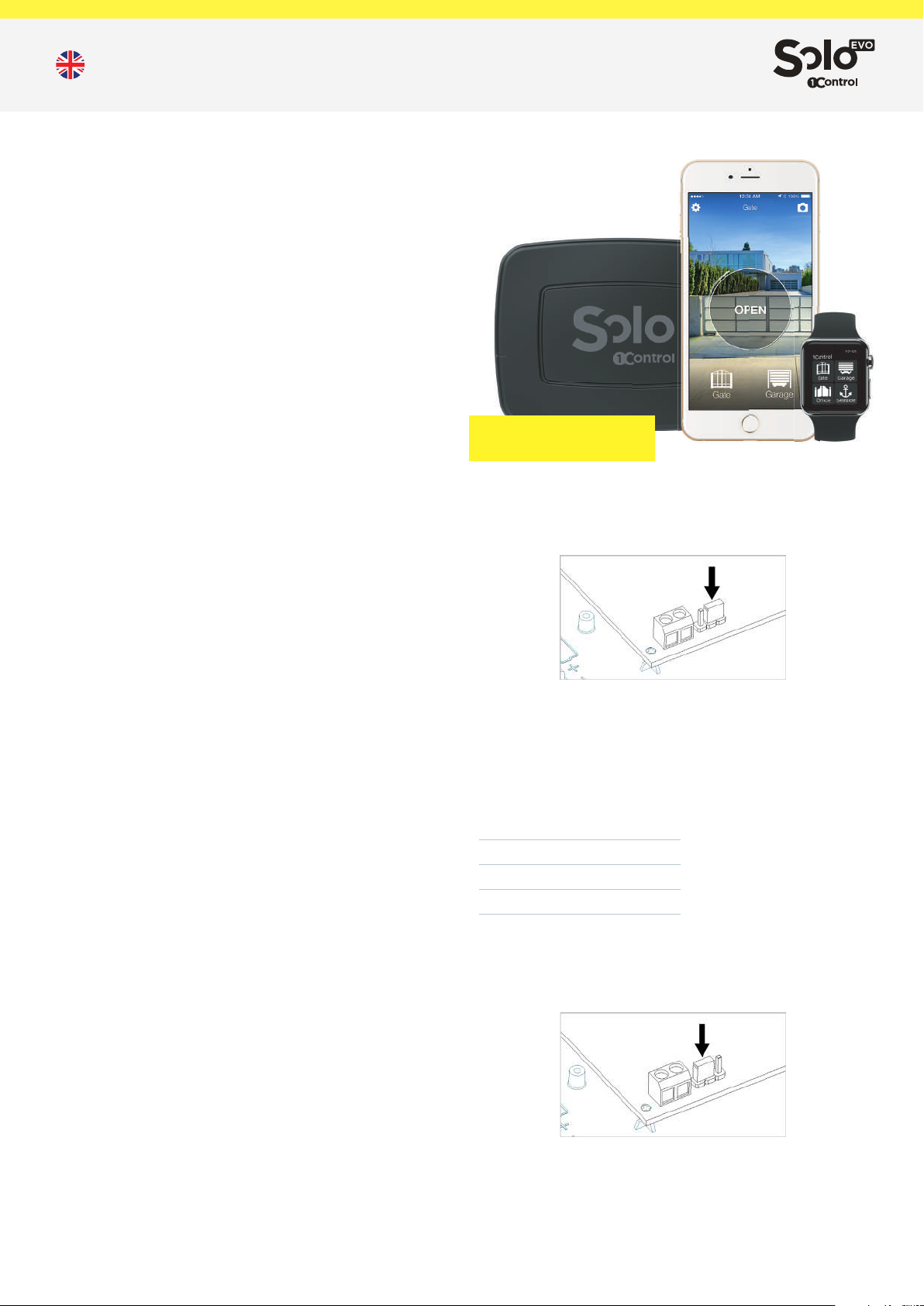
4 GATES or GARAGES
50 USERS
Operating distance
The max distance between SOLO EVO and an automation to
be controlled varies according to the type of radio-control used.
Normally such distance is between 20 and 40 meters.
The max distance between SOLO EVO and a smartphone varies
according to the model of smartphone used and is normally about
15-20 meters.
To maximize the range of SOLO EVO it is advisable to place it at
least 1 meter from the ground and in a place where there are no
obstacles between the user and SOLO EVO.
Reinforced concrete walls or metal boxes can weaken or block the
SOLO EVO signal.
Operating conditions
SOLO EVO is resistant to atmospheric agents, is rainproof,
snowproof and resistant to sunrays. It is IP66 certied.
Security
When using SOLO EVO for the rst time, an 8-digit numeric PIN
code must be set. This PIN must be kept secret. PIN code holders
are considered administrators of the device. It is possible to reset
the PIN by performing a factory reset of SOLO EVO.
The SOLO EVO administrator can invite other users to use an
automation, without giving them the PIN code, using the sharing
features oered by the app.
The communication between SOLO EVO and a smartphone is
protected by latest-generation security algorithms based on public
keys and end-to-end symmetric encryption with ephemeral keys.
The communication between SOLO EVO and an automation
uses the same security algorithms as the copied remote control.
Therefore the degree of security oered in this communication is
the same as that of the remote control.
Close the device using the 4 screws provided in the package.
The batteries can be replaced when they are at. SOLO EVO keeps
the copied remote controls and shared accesses in memory even
when it is not energized.
You can check the charge status of the batteries using the app.
Battery life varies according to the number of drives (openings or
closures) made:
Daily
openings
4
10
20
Average
duration
48 months
24 months
12 months
12-24V AC/DC power supply
To power SOLO EVO through an external 12-24V source it is
necessary to set the jumper selector on the board to the “AL”
position.
Power supply
SOLO EVO can be powered using 1.5V alkaline type C batteries
(already included in the package) or by external power supply with
voltage between 12V and 24V DC or AC.
SOLO EVO has a maximum current consumption of 100mA.
Battery power supply
To power SOLO EVO using batteries, set the jumper selector on the
board to the “BT” position and remove the battery protection tab.
The package includes a cable that can be used to connect the
power supply of SOLO EVO. The supplied cable has a length of 4
meters and is resistant to water and atmospheric agents, therefore
it can be used outdoors.
The wide supply voltage range accepted by SOLO EVO makes it
possible to connect to the power supply provided by most of the
1/2
Page 4
1Control SOLO EVO - Technical sheet
control units for gates and garages.
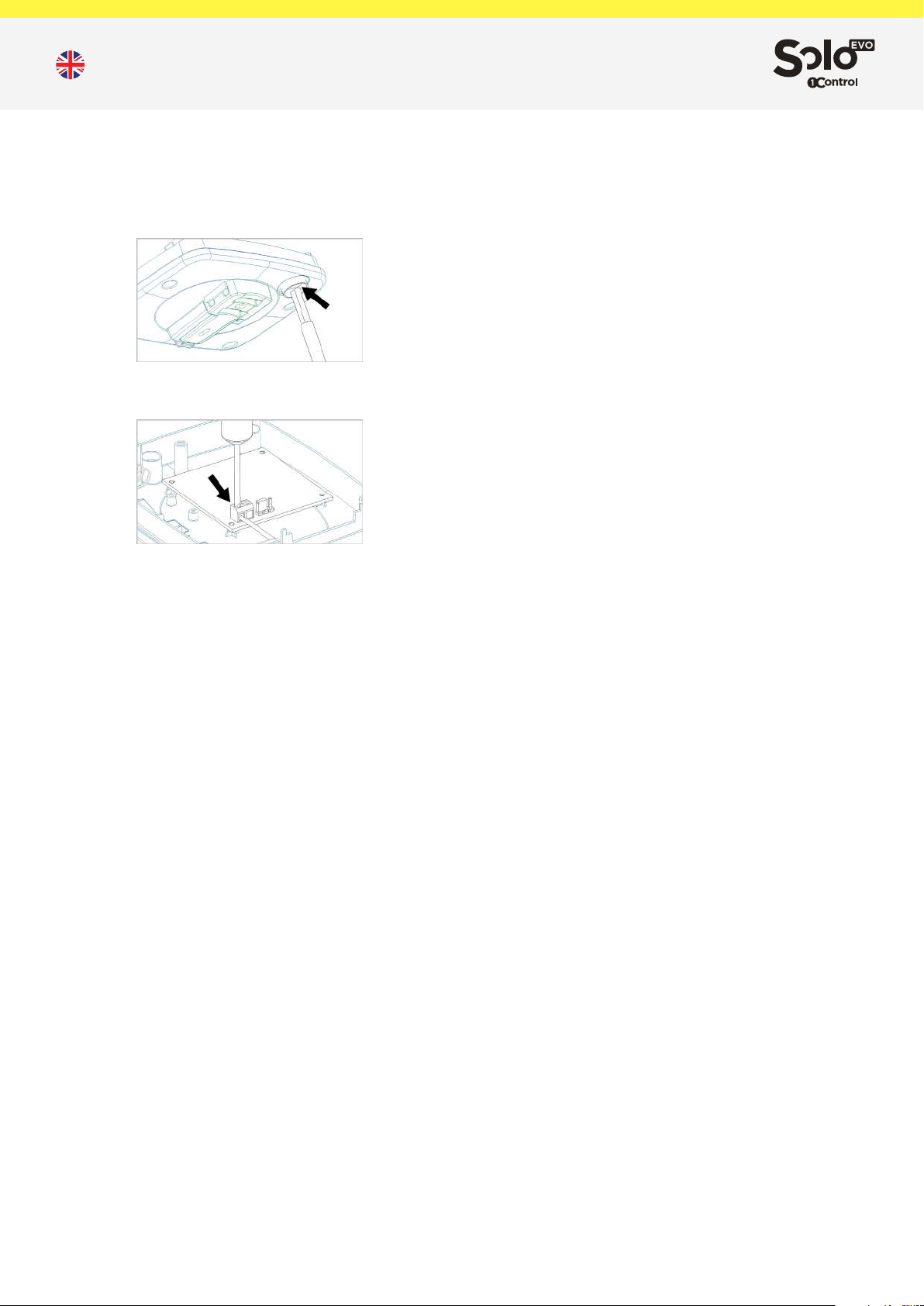
SOLO EVO is equipped with an already mounted IP66 cable gland
that must be used to route the power cable. It is necessary to
remove the batteries and puncture the cable gland with a small
screwdriver before inserting the power cable.
Then connect the power supply to the screw terminal block, taking
care to respect the indicated polarity.
Once the power cable has been inserted and connected, secure
it using the small strap supplied and close the device using the 4
screws supplied.
Date and time
SOLO EVO is equipped with an internal clock that is used to check
the users’ access time rights. The internal clock manages the
European daylight saving time independently. The date will be set
automatically by the app at the rst start.
Data and limitations
SOLO EVO can control up to 4 dierent radio-controlled
automations.
It can be used by 50 people / smartphones, you can buy more
users from the app.
App
The “1Control” App is free and can be downloaded from the Stores
for iPhone and Android.
It is compatible with the following systems:
- Smartphone iPhone 4S or later with iOS 9 or later
- Smartphone Android with 4.3 system or later and Bluetooth LE 4
“1Control” app is able to manage many 1Control devices at the
same time.
procedure through the app.
NB: When copying a remote control it is advisable to be near the
relative gate or garage.
The complete list of compatible remote controls is available on the
1Control website or in the Complete Guide.
Shares
Device administrators can share an access stored on SOLO EVO
via the app.
All users who wish to receive a share must register via the app by
entering their phone number. NB: it is not possible to use the same
phone number to register from dierent smartphones.
The administrator can share an access to a user by indicating his
phone number. It is possible to set time constraints (start and end
date, days of the week, hours of the day) to shares.
To share an access it is not necessary to be near the device, this
operation can also be performed remotely.
Factory reset
You can completely delete all data stored on SOLO EVO by
restoring it to factory conditions. To reset, press and hold the
internal key for more than 10 seconds. Resetting the device can
take up to 2 minutes.
The restoration of the device causes the loss of all the memorized
remote controls and invalidates all the shares created.
After sales service
In case of problems write to [email protected] or call the number
+39 329 169 7057
Pack contents
1 SOLO EVO device
1 IP66 cable gland (already installed)
1 wall or pole fastening support
2 wall fastening anchors with relative screws
2 pole fastening clamps
2 batteries (already tted)
4 locking screws
1 power cable 4 meters
Other details
Dimensions: 39x102x134mm
Weight (batteries included): 350g
GTIN/EAN Code: 8056772850154
First installation
1. Power the device (see chapter Power supply)
2. Download the “1Control” app from your smartphone’s store
3. Connect with the app to the SOLO EVO and set a secret PIN
code
4. Copy the remote control following the guided procedure by the
app
5. Place the SOLO EVO near the automation to be controlled
Copy of a remote control
The copy of a remote control takes place by following the wizard
available on the app.
SOLO EVO is able to automatically recognize the type of remote
control you are copying and to provide the appropriate copy
2/2
Page 5
1Control SOLO EVO - Fiche technique
Description
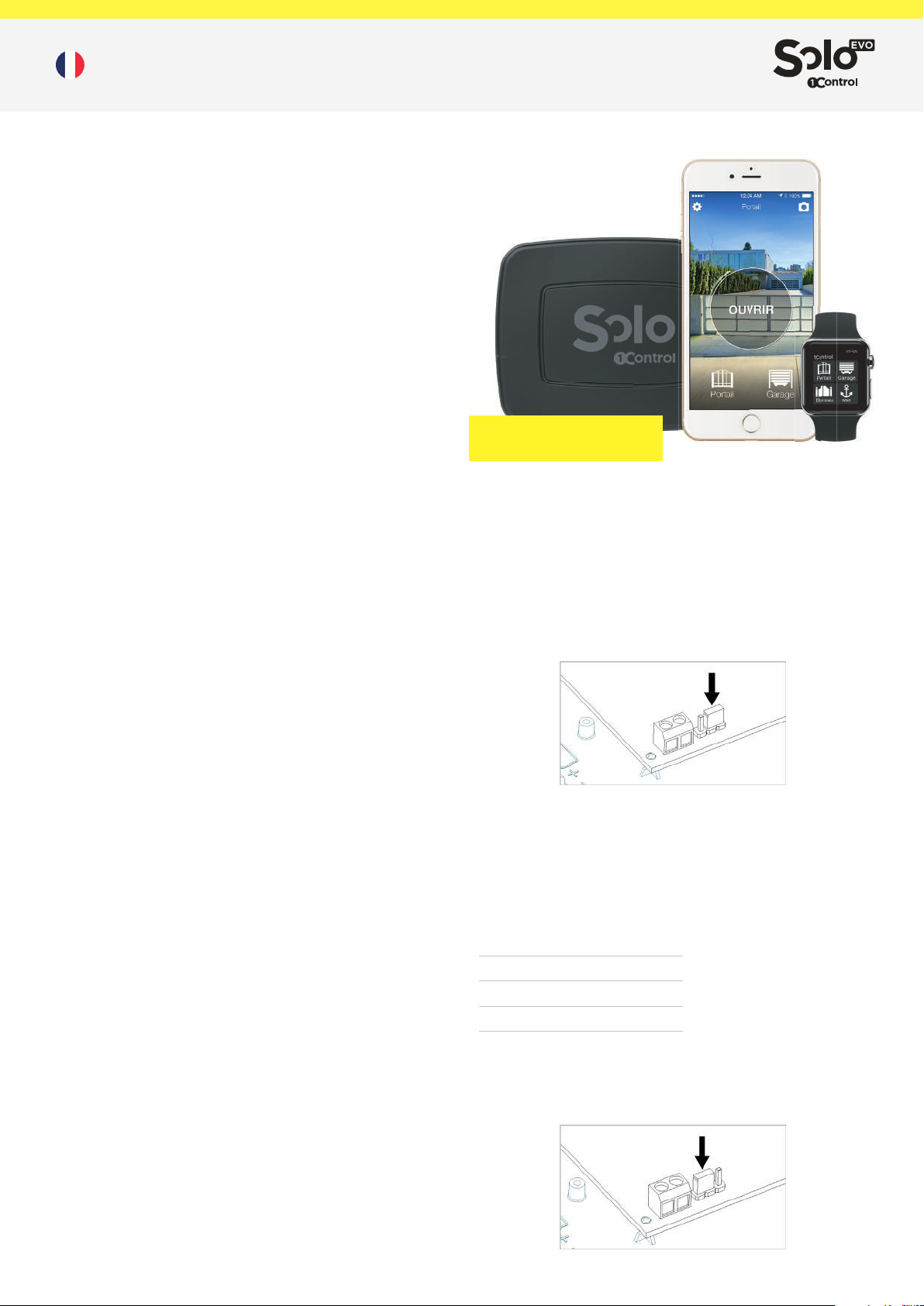
1Control SOLO EVO est un dispositif électronique qui permet le
fonctionnement d’un automatisme contrôlé par télécommande,
tel qu’un portail ou un garage, en utilisant un smartphone. SOLO
EVO est capable de reproduire le signal de votre télécommande
et donc de la contrôler en se comportant comme la télécommande
d’origine.
Contrôle d’une automatisation
SOLO EVO est capable de reproduire le signal de votre
télécommande et donc de la contrôler en se comportant comme la
télécommande d’origine.
Il est capable de copier toutes les télécommandes à codage
xe et la plupart des télécommandes à code tournant, dans les
bandes de fréquences de 433,0 MHz à 868,0 MHz, en utilisant
les modulations AM et FM. Les anciennes télécommandes basse
fréquence, appelées quartz, ne sont pas compatibles.
La liste complète des télécommandes compatibles est disponible
sur le site Web de 1Control ou dans le Guide Complet.
Pour contrôler une automatisation, il sut de copier une
seule télécommande, il n’est pas nécessaire de copier les
télécommandes de tous les utilisateurs.
SOLO EVO communique avec le smartphone via le protocole
Bluetooth BLE 4. Il n’est donc pas nécessaire de disposer d’une
connexion Internet pour ouvrir le portail ou la porte de garage.
Distance de fonctionnement
La distance maximale entre SOLO EVO et une automatisation à
contrôler varie en fonction du type de télécommande utilisée.
Cette distance est généralement comprise entre 20 et 40 mètres.
La distance maximale entre SOLO EVO et un smartphone varie en
fonction du modèle de smartphone utilisé et elle est généralement
comprise 15 et 20 mètres.
Pour optimiser la portée de SOLO EVO, il est conseillé de le placer
à au moins 1 mètre du sol et dans un endroit sans obstacles entre
l’utilisateur et SOLO EVO.
Les murs en béton armé ou les boîtes en métal peuvent atténuer
ou bloquer le signal émis par SOLO EVO.
Conditions de fonctionnement
SOLO EVO est résistant aux agents atmosphériques, il ne craint
pas la pluie, la neige et l’exposition au soleil. Il est certié IP66.
Sécurité
Lors de la première utilisation de SOLO EVO, un code PIN
numérique à 8 chires doit être déni. Ce code PIN doit être
gardé secret. Les détenteurs de code PIN sont considérés
administrateurs de l’appareil. Il est possible de recongurer le code
PIN en eectuant une réinitialisation d’usine de SOLO EVO.
L’administrateur de SOLO EVO peut inviter d’autres utilisateurs
à utiliser une automatisation, sans leur donner le code PIN,
simplement en utilisant les fonctionnalités de partage oertes par
l’application.
La communication entre SOLO EVO et un smartphone est protégée
par des algorithmes de sécurité de dernière génération basés sur
des clés publiques et un cryptage end-to-end symétrique avec des
clés éphémères.
La communication entre SOLO EVO et une automatisation
utilise les mêmes algorithmes de sécurité que la télécommande
copiée. Par conséquent, le degré de sécurité oert dans cette
communication est le même que celui de la télécommande.
4 PORTAILS ou GARAGES
50 UTILISATEURS
de 1,5 V (déjà incluses dans l’emballage) ou par une alimentation
externe avec une tension comprise entre 12V et 24V DC ou AC.
SOLO EVO a une consommation de courant maximale de 100mA.
Alimentation par batterie
Pour alimenter SOLO EVO avec des piles, placez le sélecteur de
cavalier de la carte électronique sur la position “BT” et retirez la
languette de protection des piles. Fermez l’appareil à l’aide des 4
vis fournies dans l’emballage.
Les piles peuvent être remplacées facilement quand elles sont
usagées. SOLO EVO conserve en mémoire les télécommandes
copiées et les accès partagés, même en l’absence d’alimentation.
Il est possible de vérier l’état de charge des batteries depuis
l’application.
La durée de vie des piles varie en fonction du nombre de
actionnements (ouvertures ou fermetures) eectués:
Ouvertures
journalières
4
10
20
Durée
moyenne
48 mois
24 mois
12 mois
Alimentation 12-24V AC/DC
Pour alimenter SOLO EVO via une source externe 12-24V, il est
nécessaire de régler le sélecteur de cavalier de la carte sur la
position «AL».
Alimentation
SOLO EVO peut être alimenté par des piles alcalines de type C
1/2
Page 6
1Control SOLO EVO - Fiche technique
L’emballage comprend un câble pouvant être utilisé pour connecter
l’alimentation de SOLO EVO. Le câble fourni a une longueur de
4 mètres et résiste à l’eau et aux agents atmosphériques. Il peut
donc être utilisé à l’extérieur.
La large plage de tension d’alimentation acceptée par SOLO EVO
permet de se connecter à l’alimentation fournie par la plupart des
unités de contrôle pour portails et garages.
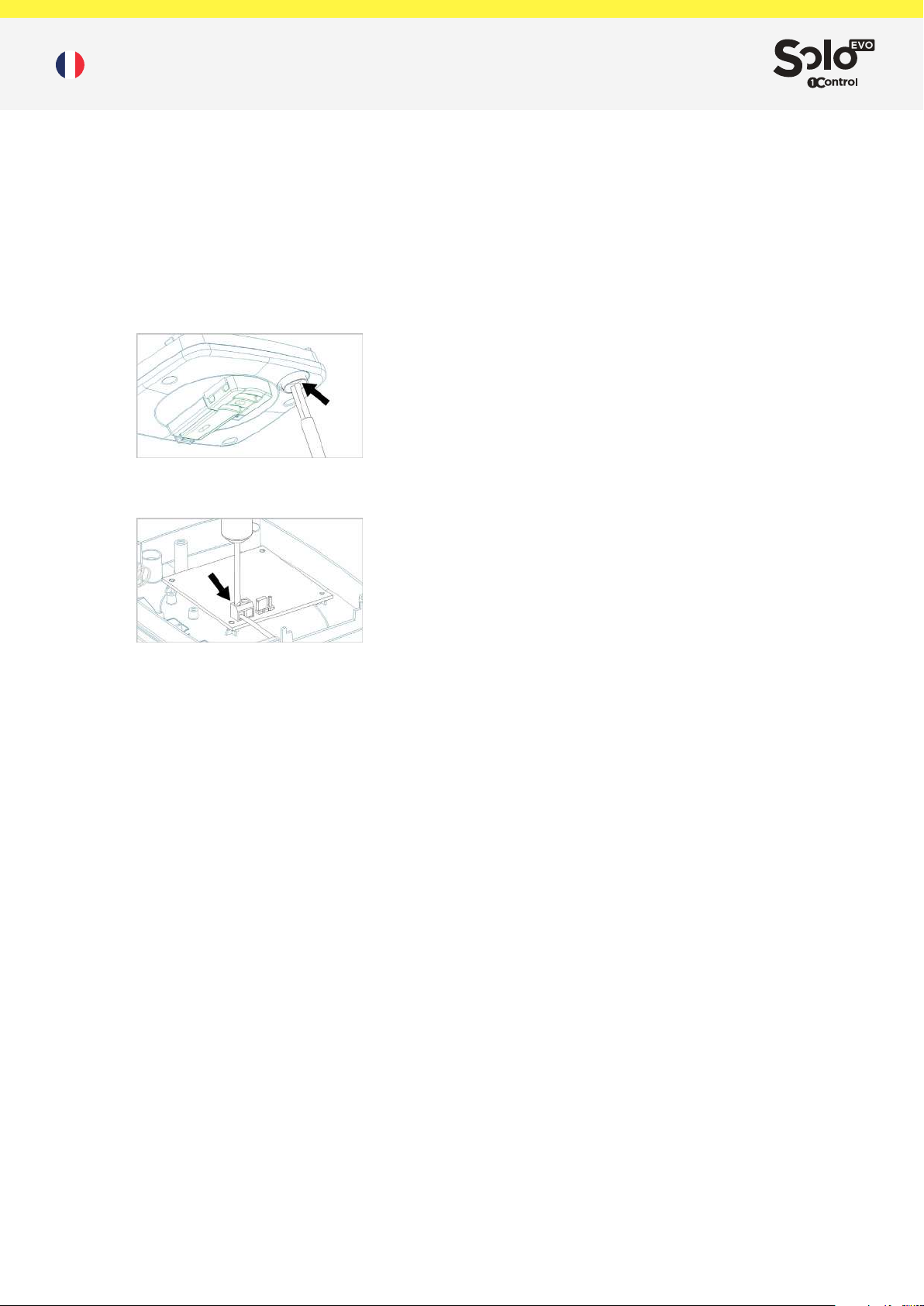
SOLO EVO est équipé d’un presse-étoupe IP66 déjà monté qui
doit être utilisé pour acheminer le câble d’alimentation. Il est
nécessaire de retirer les piles et de percer le presse-étoupe avec
un petit tournevis avant d’insérer le câble d’alimentation.
Connectez ensuite l’alimentation électrique au bornier à vis en
prenant soin de respecter la polarité indiquée.
5. Positionnez SOLO EVO près de l’automation à contrôler
Copie d’une télécommande
La copie d’une télécommande a lieu en suivant l’assistant
disponible sur l’application.
SOLO EVO est capable de reconnaître automatiquement le type
de télécommande que vous copiez et de fournir la procédure de
copie appropriée via l’application.
NB: lors de la copie d’une télécommande, il est conseillé d’être
près du portail ou du garage concerné.
La liste complète des télécommandes compatibles est disponible
sur le site Web de 1Control ou dans le Guide Complet.
Partages
Les administrateurs de l’appareil peuvent partager un accès
enregistré sur SOLO EVO depuis l’application.
Tous les utilisateurs qui souhaitent recevoir un partage doivent
s’inscrire depuis l’application en entrant leur numéro de téléphone.
NB: il n’est pas possible d’utiliser le même numéro de téléphone
pour s’enregistrer à partir de diérents smartphones.
L’administrateur peut partager l’accès à un utilisateur en indiquant
son numéro de téléphone. Il est possible de dénir des contraintes
de temps (date de début et de n, jours de la semaine, heures du
jour) pour les partages.
Pour partager un accès, il n’est pas nécessaire d’être à proximité
de l’appareil, cette opération peut également être eectuée à
distance.
Une fois le câble d’alimentation inséré et connecté, xez-le à l’aide
du petit collier fourni et fermez l’appareil à l’aide des 4 vis fournies.
Date et heure
SOLO EVO est équipé d’une horloge interne permettant de vérier
les droits d’accès temporels des utilisateurs. L’horloge interne
gère l’heure d’été européenne indépendamment. La date sera
automatiquement dénie par l’application lors de son premier
démarrage.
Données et limitations
SOLO EVO peut contrôler jusqu’à 4 diérents automatismes
radiocommandés.
Il peut être utilisé par 50 personnes / smartphones diérents, mais
vous pouvez acheter plus d’utilisateurs depuis l’application.
Application
L’Application “1Control ” est gratuite et téléchargeable sur les App
Stores pour iPhone et Android.
Elle est compatible avec les systèmes suivants :
- Smartphone iPhone 4S ou supérieur doté d’iOS 9 ou supérieur
- Smartphone Android doté d’un système 4.3 ou supérieur et
Bluetooth BLE 4
L’application “1Control” peut gérer et contrôler simultanément
plusieurs dispositifs de 1Control.
Réinitialisation d’usine
Vous pouvez supprimer complètement toutes les données
stockées sur SOLO EVO en les rétablissant aux conditions d’usine.
Pour réinitialiser, maintenez la touche interne enfoncée pendant
plus de 10 secondes. La réinitialisation de l’appareil peut prendre
jusqu’à 2 minutes.
La restauration de l’appareil entraîne la perte de toutes les
radiocommandes mémorisées et invalide tous les partages créés.
Service après vente
En cas de problème écrivez à [email protected] ou appelez le
numéro +39 329 169 7057
Contenu de la boite
1 dispositif SOLO EVO
1 presse-étoupe IP66 (déjà installé)
1 support de xation murale ou sur poteau
2 chevilles pour la xation murale avec vis correspondantes
2 colliers pour montage sur poteau
2 piles (déjà insérées)
4 vis de blocage
1 câble d’alimentation 4 mètres
Autres données
Dimensions: 39x102x134 mm.
Poids (piles comprises): 350 g.
Code GTIN/EAN: 8056772850154
Première installation
1. Alimentez l’appareil (voir le chapitre Alimentation)
2. Téléchargez l’application “1Control” depuis l’App store de votre
smartphone
3. Connectez-vous avec l’application à SOLO EVO et dénissez un
code PIN secret
4. Copiez la télécommande en suivant la procédure guidée par
l’application
2/2
Page 7
1Control SOLO EVO - Technisches Datenblatt
Beschreibung
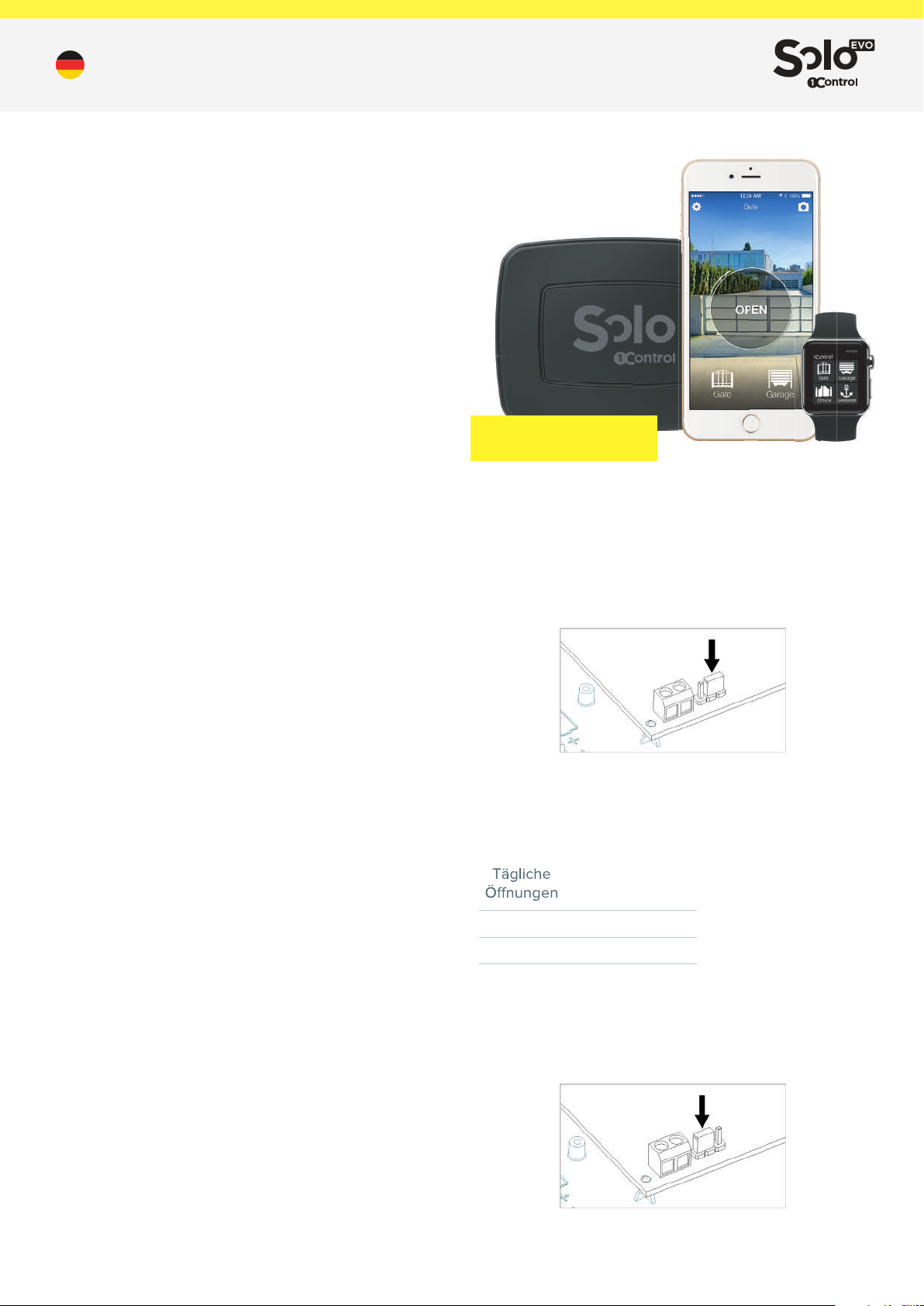
1Control SOLO EVO ist ein elektronisches Gerät, das die
funkgesteuerte Automatisierung von beispielsweise einem Tor
oder einer Garage mit einem Smartphone ermöglicht. SOLO EVO
ist in der Lage, die Automatisierungs-Funksteuerung zu kopieren
und wie die Originalfunksteuerung zu steuern.
Steuerung einer Automatisierung
SOLO EVO ist in der Lage, die Automatisierungs-Funksteuerung zu
kopieren und wie die Originalfunksteuerung zu steuern.
Es ist in der Lage, alle fest codierten Funksteuerungen und die
meisten Rollcode-Funkgeräte in den Frequenzbereichen 433,0
MHz bis 868,0 MHz mit AM- und FM-Modulationen zu kopieren. Die
alten Niederfrequenzfernsteuerungen, die sogenannten Quarze,
sind nicht kompatibel.
Die vollständige Liste der kompatiblen Funksteuerungen nden Sie
auf der 1Control-Website oder im vollständigen Handbuch.
Um eine Automatisierung zu steuern, genügt es, eine einzelne
Fernsteuerung zu kopieren, es ist nicht notwendig, die
Fernsteuerungen aller Benutzer zu kopieren.
SOLO EVO kommuniziert mit dem Smartphone über das Bluetooth
LE 4-Protokoll. Es ist daher keine Internetverbindung erforderlich,
um das Tor und die Garage zu önen.
Bedienentfernung
Der maximale Abstand zwischen SOLO EVO und einer zu
steuernden Automatisierung hängt von der Art der verwendeten
Fernsteuerung ab. Normalerweise beträgt diese Entfernung
zwischen 20 und 40 Metern.
Die maximale Entfernung zwischen SOLO EVO und einem
Smartphone variiert je nach Modell des verwendeten Smartphones
und beträgt normalerweise etwa 15-20 Meter.
Um die Reichweite von SOLO EVO zu maximieren, ist es ratsam,
das Gerät mindestens 1 Meter vom Boden entfernt und an einem
Ort aufzustellen, an dem es keine Hindernisse zwischen dem
Benutzer und SOLO EVO gibt.
Stahlbetonwände oder Metallkästen können das Signal von SOLO
EVO schwächen oder blockieren.
Betriebsbedingungen
SOLO EVO ist witterungsbeständig und fürchtet weder Regen,
Schnee noch Sonnenlicht. Es ist IP66 zertiziert.
Sicherheit
Wenn Sie SOLO EVO zum ersten Mal verwenden, muss ein
8-stelliger numerischer PIN-Code eingestellt werden. Diese PIN
ist geheim zu halten. PIN-Code-Inhaber gelten als Administratoren
des Geräts. Es ist möglich die PIN auf die Werkseinstellungen von
SOLO EVO zurückzusetzen.
Der SOLO EVO-Administrator kann mithilfe der Freigabefunktionen
der App andere Benutzer zur Verwendung einer Automatisierung
einladen, ohne ihnen die PIN mitzuteilen.
Die Kommunikation zwischen SOLO EVO und einem Smartphone
wird durch Sicherheitsalgorithmen der neuesten Generation
geschützt, die auf öentlichen Schlüsseln und symmetrischer End-
to-End-Verschlüsselung mit ephemeren Schlüsseln basieren.
Die Kommunikation zwischen SOLO EVO und einer
Automatisierung verwendet die gleichen Sicherheitsalgorithmen
wie die kopierte Fernsteuerung. Daher ist der in dieser
Kommunikation gebotene Sicherheitsgrad derselbe wie bei der
Fernsteuerung.
4 TORE oder GARAGEN
50 BENUTZER
SOLO EVO hat eine maximale Stromaufnahme von 100 mA.
Batteriebetrieb
Um SOLO EVO mit Batterien zu betreiben, stellen Sie den
Wahlschalter auf der Platine in die Position “BT” und entfernen
Sie die Batterieschutzlasche. Schließen Sie das Gerät mit den 4
Schrauben, die im Lieferumfang enthalten sind.
Die Batterien können bei Entladung ausgetauscht werden. SOLO
EVO behält kopierte Fernsteuerungen und gemeinsame Zugrie
auch ohne Strom im Speicher. Mit Hilfe der App können Sie den
Ladezustand des Akkus überprüfen.
Die Akkulaufzeit variiert je nach Anzahl der vorgenommenen
Steuerungen (Önungen oder Schließungen):
Mittlere
Lebenszeit
4
10
20
Spannungsversorgung 12-24 V AC/DC
Um SOLO EVO über eine externe 12-24 V-Quelle zu versorgen,
müssen Sie den Wahlschalter auf der Platine in die Position “AL”
stellen.
48 Monate
24 Monate
12 Monate
Stromversorgung
SOLO EVO kann mit 1,5 V-Alkalibatterien vom Typ C (bereits im
Lieferumfang enthalten) oder über ein externes Netzteil mit einer
Spannung zwischen 12 V und 24 V DC oder AC betrieben werden.
Im Lieferumfang ist ein Kabel enthalten, mit dem die
Stromversorgung von SOLO EVO angeschlossen werden kann.
1/2
Page 8
1Control SOLO EVO - Technisches Datenblatt
Das mitgelieferte Kabel hat eine Länge von 4 Metern und ist
wasser- und witterungsbeständig, sodass es im Außenbereich
eingesetzt werden kann.
Der von SOLO EVO akzeptierte breite Spannungsbereich
ermöglicht
den Anschluss an die Stromversorgung der meisten
Steuergeräte für Tore und Garagen.
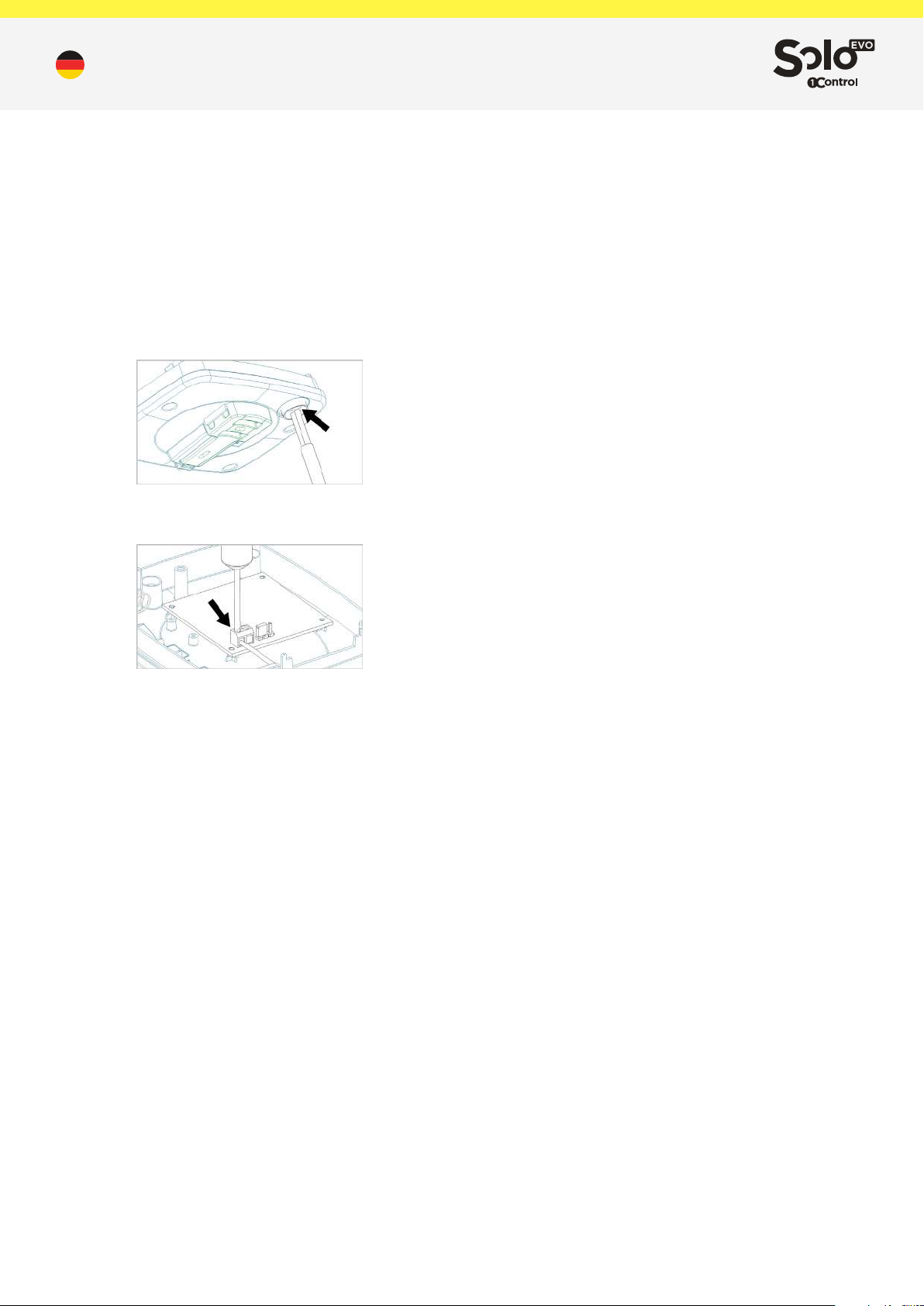
SOLO EVO ist mit einer bereits montierten IP66Kabelverschraubung ausgestattet und muss zum Einführen des
Stromkabels verwendet werden. Bevor Sie das Stromkabel
einführen, müssen Sie die Batterien herausnehmen und das
Kabel mit einem kleinen Schraubendreher durchstechen.
Schließen Sie dann die Stromversorgung an die Klemme an
und achten Sie auf die angegebene Polarität.
Nachdem das Netzkabel eingesteckt und angeschlossen
wurde, befestigen Sie es mit dem mitgelieferten kleinen
Kabelbinder und schließen Sie das Gerät mit den 4
mitgelieferten Schrauben.
Datum und Uhrzeit
SOLO EVO ist mit einer internen Uhr ausgestattet, mit der die
Zeitzugrisrechte der Benutzer überprüft werden. Die interne
Uhr steuert selbständig die europäische Sommerzeit. Das
Datum wird von der App beim ersten Start automatisch gesetzt.
Daten und Einschränkungen
SOLO EVO kann bis zu 4 verschiedene funkgesteuerte
Automatisierungen steuern.
Es kann von 50 Personen/Smartphones genutzt werden und es
können zusätzliche Benutzer über die App erworben werden.
Smartphones herunter.
3. Verbinden Sie sich über die App mit SOLO EVO und legen
Sie einen geheimen PIN-Code fest
4. Kopieren Sie die Fernsteuerung gemäß den Anweisungen in
der App.
5. Platzieren Sie SOLO EVO in der Nähe der zu steuernden
Automatisierung
Kopieren einer Fernsteuerung
Das Kopieren einer Fernsteuerung erfolgt entsprechend dem in
der App verfügbaren Assistenten.
SOLO EVO ist in der Lage, automatisch die Art der
Fernsteuerung zu erkennen, die Sie kopieren und über die App
das entsprechende Kopierverfahren bereitzustellen.
Hinweis: Beim Kopieren einer Fernsteuerung ist es ratsam, sich
in der Nähe des jeweiligen Tores oder der Garage aufzuhalten.
Die vollständige Liste der kompatiblen Funksteuerungen nden
Sie auf der 1Control-Website oder im vollständigen Handbuch.
Gemeinsame Nutzung
Geräteadministratoren können über die App den gespeicherten
Zugri auf SOLO EVO freigeben.
Alle Benutzer, die eine Freigabe erhalten möchten, müssen sich
über die App unter Angabe ihrer Telefonnummer registrieren.
Hinweis: Es ist nicht möglich, dieselbe Telefonnummer zur
Registrierung von verschiedenen Smartphones zu verwenden.
Der Administrator kann einem Benutzer den Zugri freigeben,
indem er dessen Telefonnummer eingibt. Sie können
Zeitbeschränkungen (Start- und Enddatum, Wochentage,
Tageszeiten) für Freigaben festlegen.
Sie müssen sich nicht in der Nähe des Geräts benden,
um einen Zugri zu teilen. Dieser Vorgang kann auch per
Fernzugri ausgeführt werden.
Werksrückstellung
Alle auf SOLO EVO gespeicherten Daten können vollständig
gelöscht und auf die Werkseinstellungen zurückgesetzt
werden. Halten Sie zum Zurücksetzen die interne Taste länger
als 10 Sekunden gedrückt. Das Zurücksetzen des Geräts kann
bis zu 2 Minuten dauern.
Die Wiederherstellung des Geräts führt zum Verlust aller
gespeicherten Fernsteuerungen und führt zur Ungültigkeit aller
erstellten Freigaben.
Kundendienst
Bei Problemen schreiben Sie an [email protected] oder
rufen Sie an unter +39 329 169 7057
App
Die App “1Control” ist kostenlos und kann von den iPhone- und
Android-Stores heruntergeladen werden.
Sie ist mit den folgenden Systemen kompatibel:
- Smartphone iPhone 4S oder höher mit iOS 9 oder höher
- Android-Smartphone mit System 4.3 oder höher und
Bluetooth LE 4
Die App “1Control” kann mehrere 1Control-Geräte gleichzeitig
verwalten und steuern.
Erstinstallation
1. Versorgen Sie das Gerät mit Strom (siehe Kapitel
Stromversorgung)
2. Laden Sie die App “1Control” aus dem Store Ihres
Lieferumfang
1 SOLO EVO-Gerät
1 IP66-Kabelverschraubung (bereits installiert)
1 Wandhalterung oder zur Mastbefestigung
2 Wandbefestigungsdübel mit entsprechenden Schrauben
2 Klemmen für die Mastbefestigung
2 Batterien (bereits eingelegt)
4 Sicherungsschrauben
1 Netzkabel 4 Meter lang
Weitere Daten
Abmessungen: 39 x 102 x 134 mm
Gewicht (einschließlich Batterien): 350g
GTIN/EAN-Code: 8056772850154
2/2
 Loading...