
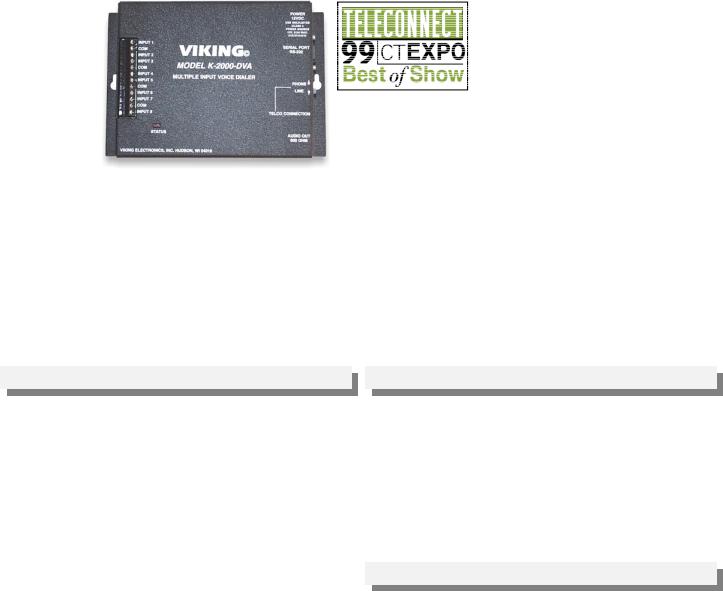
Viking’s K-2000-DVA is a fully
programmable multi-input, multinumber auto dialer and digital
announcer, designed for
emergency and non-emergency
message notification. The K-2000-DVA has eight dry
contact inputs which when tripped will sequentially dial
up to 8 different phone numbers and play a recorded
message corresponding to the input tripped.
The K-2000-DVA can store up to seven 16 digit phone numbers and one 32 digit
phone number (for use with pagers) per input for a total of up to 64 different numbers.
This unit is capable of local or remote recording of up to 8 different messages (one
message per input), with a total recording time of one minute.
ication
The K-2000-DVA can also be configured as a store caster (no dialing), for on-site
promotional or assistance announcements.
• Stores up to (7) 16-digit numbers and (1) 32 digit
phone number per input (64 total)
• 60 total seconds of record time
• Programmable message repeat counter
• Programmable lap counter for dialing groups of
phone numbers
• Eight programmable normally open/closed inputs
• Programmable ring delay for remote programming
and alarm polling
• Pager compatible
• Remote security and access codes
• Programmable store caster mode
• CPC break detection
• Local or remote programming and recording
• RS-232 port for programming via a P.C.
• Compatible with the RC-2A and RC-3 remote DTMF
controllers
Alarm Dialer
• Security/burglar/fire alarm notification
• System alarm or equipment malfunction notification
• Environmental warning notification
• Automatic telephone messaging paging
Store Caster
• Provide assistance or promotional announcements in
department stores, grocery stores, hardware stores,
gas stations, etc. “Customer assistance needed in
aisle 13...”
Specifications
Power: 120V AC/12V DC 500 mA, UL listed adapter provided
Dimensions: 187mm x 127mm x 45mm (7.37” x 5.0” x 1.75”)
Shipping Weight: .68 Kg (1.5 lbs)
Environmental: 0°C to 32°C (32°F to 90°F) with 5% to 95% non-
condensing humidity
Talk Battery: 13V DC
Touch Tone Dialing: 120 ms on/off
CPC Detection Time: 320 ms minimum
Message Record Time: 60 seconds
Sampling Rate: 64 K (equivalent)
Momentary Trigger Input: 100 ms minimum normally
open/normally closed
Connections: (2) RJ11 jacks for 600-ohm audio output and
telephone line/phone, (1) 9 pin RS-232, (1) 12 position screw
terminal block for dry contact trigger inputs
Page 2
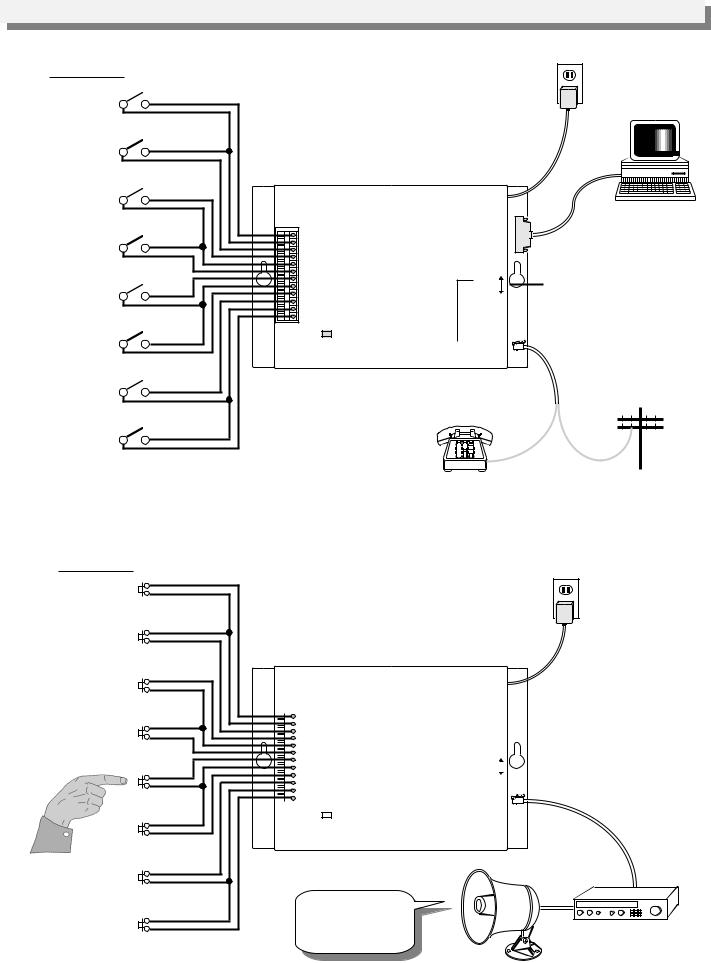
A. Alarm Dialer
Examples:
Security
Alarm
Temperature
Switch
Installation
12V DC adapter
(Included)
K-2000-DVA
Nurse
Call
Alarm
Vending
Machine
Alarm
Alarm
Alarm
(Up to eight inputs)
B. Store Caster
Examples:
INPUT 1
COM
INPUT 2
INPUT 3
COM
INPUT 4
INPUT 5
COM
INPUT 6
INPUT 7
COM
INPUT 8
Access Code: A six digit code required for polling the K-2000-DVA for inputs that were triggered
Input Trigger: An input which when defined as normally closed or open and either momentary or continuous
closures, causes the K-2000-DVA to start dialing and/or playing messages. Inputs are considered triggered if their
contacts are closed/opened for at least 100ms.
before they can be re-triggered.
Lap Counter: A counter used for determining the number of times all phone numbers assigned to an input should
be dialed (programmable from 01 - 99) .
Message: One of eight user recorded announcements associated with each of eight contact inputs (maximum
combined record time is 60 seconds).
Message Repeat Count: The number of times a message is repeated per call (programmable from 01 - 99).
Pager Number: A number up to 32 digits long which can be used to dial pagers (no message is played) and can be
assigned to be the first or last phone number dialed.
Ring Delay: The number of rings the K-2000-DVA waits before answering an inbound call.
Security Code: A programmable six digit code required for entering programming.
Status LED: The Status LED provides a visual indication of operation. The LED is normally “on” and will turn “off”
momentarily with Touch Tones dialed. The LED will remain “off” after answering, during programming or while
programming via a P.C..
Store Caster: A mode where the K-2000-DVA plays messages only (no dialing).
Note: Once reset, the inputs must remain idle for 6 seconds
1. Move the PHONE/LINE switch on the K-2000-DVA to the PHONE position (see Installation section A.) and plug a phone into the TELCO CONNECTION port.
2. After taking the phone off hook, wait for two beeps.
3. Enter programming by entering a ✱ and the six digit security code (factory default is 845464); two beeps
should be heard.
Notes: The security code must be entered within 20 seconds otherwise the K-2000-DVA will time out and
attempt to hang up. Once in programming, if 20 seconds elapse without Touch Tones being entered, the K-
2000-DVA will automatically exit programming and attempt to hang up.
4. Program as shown in Programming sections C. - H.
5. To manually exit programming, hang-up.
2. Remote
1. Move the PHONE/LINE switch on the K-2000-DVA to the LINE position (see Installation section A.) and attach a C.O. line or analog PABX/KSU extension to the TELCO CONNECTION port.
2. Call into the K-2000-DVA on that line. The unit will answer after the set ring delay (see Programming
section E.).
Note: For security purposes, the K-2000-DVA does not provide any feedback after it has answered.
3. Enter programming by entering a ✱ and the six digit security code (factory default is 845464); two beeps
should be heard.
Note: The security code must be entered within 20 seconds otherwise the K-2000-DVA will time out and hang
up. Once in programming, if 20 seconds elapse without Touch Tones being entered, the K-2000-DVA will
automatically exit programming and hang up.
4. Program as shown in Programming sections C. - H.
5. To manually exit programming, hang-up.
Lap counter default = 1
Message Repeat Count default = 1
Pager Number default = No
Contact Input default = Momentary Closure
Phone Numbers = Unprogrammed
Pager Number Order default = First
Page 4
C. Programming the Security Code
Important: Do NOTset the security and access codes the same.
1. Enter programming (see section B).
2. Enter a six digit security code (digits 0-9) followed by #91. Two beeps indicate that the security code has been
accepted. Three beeps indicate that an error has been made.
D. Programming the Access Code
Important: Do NOTset the security and access codes the same.
1. Enter programming (see section B).
2. Enter a six digit access code (digits 0-9) followed by #92. Two beeps indicate that the security code has been
accepted. Three beeps indicate that an error has been made.
E. Programming the Ring Delay, Lap Counter and Store Casting or Dialer Function
1. Enter programming (see section B).
2. Enter a single digit (1-9) for the ring delay [D].
3. Enter a single digit, (0) for dialer mode or (1) for store caster [M].
D M LC #93
Note: If store casting is enabled, all phone numbers programmed and the lap counter are ignored.
4. Enter two digits (01-99) for the lap counter[LC].
5. Enter #93.
6. Two beeps indicate that the parameters have been accepted. Three beeps indicate that an error has been made.
F. Entering Phone Numbers
Up to eight phone numbers are allowed per input. The first phone number is capable of holding 32 digits and the
last seven are capable of holding 16 digits. Each phone number can contain digits 0-9, ✱, #, or four second pauses.
Note: There is a priority scheme involved when acting on triggered inputs. Input 1 is the highest priority and input 8
is the lowest priority. When pending triggered inputs or simultaneous triggered inputs occur, the K-2000-DVA
always looks for the next trigger to act on starting from input 1.
1. Enter programming (see section B).
2. Enter the digits (or pauses) and a # + XY (X = input contact # 1-8 and Y = phone number memory position 1-8).
Two beeps indicate that the parameters have been accepted, three beeps indicate that an error has been made.
3. Programming examples for entering phone numbers:
Programming the K-2000-DVA to...
1. ...dial 555-1212 (for input 1, dialing position 3)
2. ...dial pager number 555-5555, pause, 1234567890
(for input 2, dialing position 1)
Enter Digits
5551212 #13
5555555 ✱7 1234567890 #21
a. To program a single ✱, enter a ✱✱.
b. To program a #, enter a ✱ #.
c. To program a four second pause, enter a ✱ 7.
Note: The double digit codes (
✱✱
etc.) occupy only ONE memory digit position.
G. Programming the Input Specific Parameters
There are five programmable parameters per input. Each parameter consists of 6 digits and a two digit location.
1. Enter programming (see section B).
2. Enter two digits (01-99) for the Message Repeat count [MR].
3. Enter a single digit, (1) if the first phone number is a Pager number or (0) if it is not [P].
Note: No message is played with a pager number.
4. Enter a single digit, (0) to dial the pager number First or (1) to dial the pager number last [F].
Note: This requires that in step 3. a “1” was programmed.
5. Enter a single digit, (0) if the Contact input is normally open, or (1) if the input is normally closed [C].
6. Enter a single digit, (0) if the contact input Trigger is disabled, (1) if the input trigger requires a momentary closure or (2) if the input trigger requires a continuous closure [T].
7. Enter a #, X, 9 (X = input contact # 1-8).
MR P F C T #X9
Page 5
8. Two beeps indicate that the parameters have been accepted, three beeps indicate that an error has been made.
9. Programming examples for input specific parameters:
Programming the K-2000-DVA to...
1. ...play the message twice, using a pager number, dialing the pager number first,
using a normally closed input, with a momentary trigger, on input 2.
2. ...play the message 34 times, no pager number, dialing the number first, using a
normally closed input, with a continuous trigger, on input 1.
Enter Digits
021011 # 29
340012 #19
H. Recording Messages
Eight messages or brief moments of silence must be recorded corresponding to one of the eight inputs. When an
input is triggered, only the corresponding message will be played. When recording messages, each input must have
a recording. For example, if only the seventh input is used, you must make six recordings before input seven’s
recording can be made. If an announcement is not required, record a one or two second moment of silence. The
maximum record time for all messages is 60 seconds.
1. Enter programming (see section B).
2. To start the first recording, enter ✱ 1. One beep should be heard, indicating you may begin speaking into the
handset.
3. To stop recording, enter any Touch Tone and the recording will be saved (minus the Touch Tone entered).
4. To make recordings 2-8, enter ✱ 2. One beep should be heard and the recording can be made. To stop record- ing repeat step 3.
5. When recording is complete, enter ✱ 3, and the messages will be played back beginning with the first recording.
To stop playback simply enter any Touch Tone.
Note: After entering ✱ 3, additional recordings may not be made using ✱2. Any modifications or additions will
require re-recording of all messages (see step 2).
To start recording for message 1 .........................................................................
To make additional recordings for messages 2 - 8 ...............................................
To playback all recordings ......................................................................................
To stop recroding or playback ................................................................................
** X = input contact number 1 - 8, Y = phone number memory position 1 - 8.
Note: See Programming, sections A - H for complete descriptions.
Note: You must always start with the first recording.
Enter digits
✱
6 digits (0 - 9)
6 digits (0 - 9)
✱✱
#
✱
✱7
D+M+LC
1 - 32 digits
1 - 16 digits
MR+P+F+C+T
✱1
✱2
✱3
Any Touch Tone
Memory
Position
Security Code
+
#91
+
#92
+
#93
+
#XY
+
#XY
+
#X9
+
P.C. Programming
Important: Viking Electronics will NOT support computer software or hardware problems. If you experience these
problems, research your hardware/software instruction manuals or contact the manufacturer’s technical support
department.
Page 6
As an alternative method for programming the K-2000-DVA, Viking has provided several methods of programming via
your P.C. All of these require the use of the 9-pin serial communications port on the K-2000-DVA. Using a P.C. and a
serial cable, all parameters may be easily programmed, with the exception of the voice recordings. For more
information, retrieve Fax Back Document 843.
A. Windows 9x Software
Viking has released, at no charge, programming software for Windows 9x. After being properly installed, the
software will provide complete programmability of the K-2000-DVA, both locally or remotely The software is
available only via download from Viking’s web site:
Downloads” and select K-2000-DVA. Complete installation and programming instructions are also available.
http://www.vikingelectronics.com
Click on “Software
B. Serial Communication Software
The K-2000-DVA may be programmed through any P.C. with standard serial communication software (such as
Terminal or HyperTerminal) using a standard ASCII text file. A sample ASCII text file form and programming
environment files are available only from Viking’s web site:
Downloads” and select K-2000-DVA. Complete installation and programming instructions are also available.
http://www.vikingelectronics.com
Click on “Software
Operation
A. A Multi-Input Voice Dialer
When one of the eight dry contact inputs has been triggered for at least 100ms, the K-2000-DVA will begin dialing
the first phone number associated with that input. Three seconds after dialing a phone number, the K-2000-DVA will
begin repeating the recorded message associated with the tripped input. The K-2000-DVA will repeat the message
for the programmed repeat count.
Once the message repeat count has been met, the K-2000-DVA will provide a single “beep” tone to indicate that the
last current message has been delivered. The K-2000-DVA will then pause for five seconds to allow the called party
a final opportunity to exercise one of the following four options:
Touch Tone
1
2
3
9
If no one answers a call initiated by the K-2000-DVA, it will continue to cycle through all the phone numbers
assigned to the triggered input until the programmable lap counter is exceeded.
The K-2000-DVA can also be called into and polled for any past or current triggered inputs. Simply call the phone
line connected to the K-2000-DVA, and it will answer after the programmed ring delay. Enter a “✱” followed by the
six digit “Access Code” (see Programming section D.); two beeps should be heard and the unit can be polled for
information as described in the chart above.
Note that if a Touch Tone “✱” is entered while connected to the call, the K-2000-DVA will exit its current mode, and
if no Touch Tones are entered within 20 seconds, it will hang up and proceed. This 20 second wait is important, so
that an RC-2A or RC-3 can be used in conjunction with the K-2000-DVA. For further information, see the individual
technical practices for the RC-2A and RC-3 and the application note using the RC-2A or RC-3 with the K-2000-DVA
(Fax Back Document 830).
Result
Stops the current message and plays all messages associated with all tripped inputs in order, from first to last.
Stops the current message and plays the next message, if applicable.
Stops the current message, hangs up and continues dialing if applicable.
Stops the current message and resets the tripped input.
B. Store Caster
If configured as a store caster (see Programming, section E), the K-2000-DVA will not attempt to dial, but instead
only play the message corresponding to the tripped input. In this mode, the 600 ohm audio output can be tied into a
paging system for playing promotional or assistance announcements. Only the message repeat counter is in effect
for this mode of operation; the lap counter is ignored.
In this mode, any input trigger will cause the K-2000-DVA to begin playing the message assigned to the triggered
input for the assigned repeat count.
Product Support Line...(715) 386-8666 Fax Back Line...(715) 386-4345
Due to the dynamic nature of the product design, the information contained in this document is subject to change without notice. Viking
Electronics, its affiliates and/or subsidiaries assume no responsibility for errors and/or omissions contained in this information. Revisions of
this document or new editions of it may be issued to incorporate such changes.
Printed in the U.S.A.ZF301040 Rev BFax Back Doc # 303
Loading...
+ hidden pages
You need points to download manuals.
1 point = 1 manual.
You can buy points or you can get point for every manual you upload.
