

Page 1
MANUFACTURING
A
S
D
L
I
S
T
E
CM
O
I
N
N
I
T
A
T
T
S
E
NUMBERS:
9300530
9300532
9300534
93 00571
930 0574
9300575
9300577
9500593
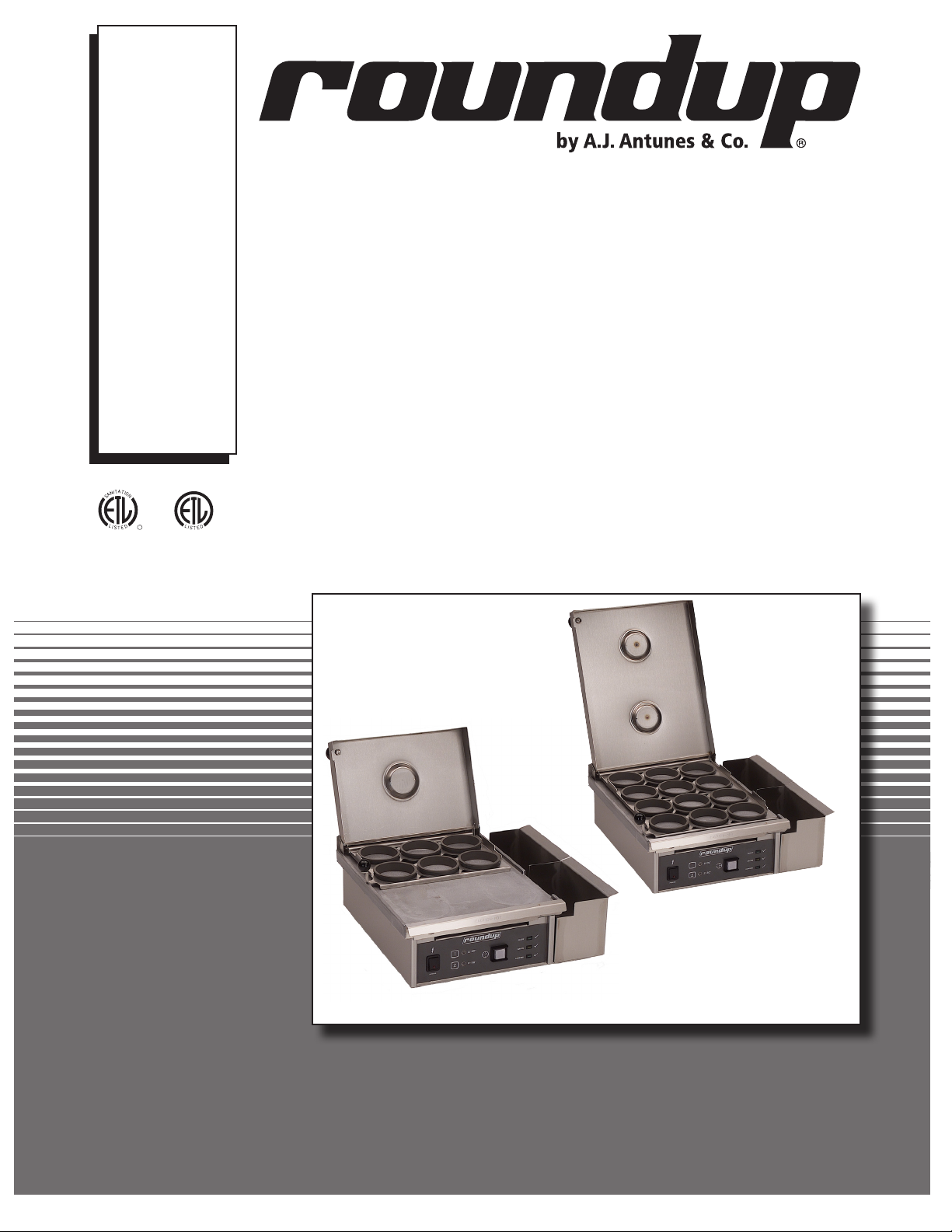
EGG STATION
Model ES-600, ES-602, ES-604, & ES-1200
C
US
L
I
D
P/N 1010883 Rev. K 08/14
ES-1200
ES-600
Owner’s Manual
Page 2

EGG STATION
TABLE OF CONTENTS
Owner Information .....................................................2
General ......................................................................2
Warranty Information .................................................2
Service/Technical Assistance ....................................3
Important Safety Information ....................................4
Specifications .............................................................5
Electrical Ratings .......................................................5
Electrical Cord & Plug Configurations .......................5
Shipping Weight ........................................................5
Net Weight .................................................................5
Dimensions ................................................................5
Installation ...................................................................6
Unpacking ..................................................................6
Equipment Setup .......................................................6
Operation .....................................................................7
OWNER INFORMATION
General
This product cooks/steams eggs (refrigerated) in
approximately 150 seconds and reheats sliced meat
for sandwiches. Eggs within the Egg Rings are cooked
with a combination of heat and steam. With the cover
closed, water is poured into a trough on the cover and
drips onto a hot Platen, producing steam and cooking
the eggs. The unit is equipped with audio/visual signals
for operation.
This manual provides the safety, installation, and operating procedures for the Egg Station. We recommend
that all information contained in this manual be read
prior to installing and operating the unit.
Preparing Unit ............................................................7
Egg Cooking Procedure ............................................7
Bacon Timer* .............................................................9
Maintenance ..............................................................10
Daily Cleaning .........................................................10
Checking Cycle Times (Monthly) .............................10
Checking Grill Platen Temperature ..........................11
Troubleshooting .......................................................12
Control Board LEDs ................................................13
Green LED Blink Codes ..........................................13
Wiring Diagram .........................................................14
Replacement Parts ...................................................15
Notes..........................................................................18
Limited Warranty ......................................Back Cover
The warranty does NOT extend to:
• Damages caused in shipment or damage as
result of improper use.
• Installation of electrical service.
• Installation, calibration, or adjustment.
• Normal maintenance outlined in this manual.
• Consumable parts such as Egg Rings, gaskets,
rubber feet, labels, O-rings, light bulbs, etc.
• Malfunction resulting from improper service or
maintenance.
Your Egg Station is manufactured from the finest materials available, assembled to Roundup’s strict quality
standards, and tested at the factory to ensure dependable trouble-free operation.
Warranty Information
Please read the full text of the Limited Warranty printed
on the back cover of this manual.
If the unit arrives damaged, contact the carrier immediately and file a damage claim with them. Save all
packing materials when filing a claim. Freight damage
claims are the responsibility of the purchaser and NOT
covered under warranty.
IMPORTANT! Keep these instructions for future reference. If the unit changes
ownership, be sure this manual accompanies the equipment.
• Damage caused by improper installation, abuse,
or careless handling.
• Damage from moisture getting into electrical
components.
• Damage from tampering with, removal of, or
changing any preset control or safety device.
• Damage caused by parts or components not
provided by A.J. Antunes & Co.
2
P/N 1010883 Rev. J 08/14
Page 3
OWNER INFORMATION (continued)
EGG STATION
Service/Technical Assistance
If you experience any problems with the installation
or operation of your unit, contact your local Roundup
Authorized Service Agency. They can be found in the
service agency directory packaged with the equipment.
Fill in the information below and have it handy when
calling your Authorized Service Agency for assistance.
The serial number is on the specification plate located
on the rear of the unit.
Purchased From:
Date of Purchase:
Model No.:
Serial No.:
Mfg. No.:
Refer to the service agency directory and fill in the
information below:
Authorized Service Agency
Name:
Phone No.:
Address:
Use only genuine Roundup replacement parts in this
unit. Use of replacement parts other than those supplied by the manufacturer will void the warranty. Your
Authorized Service Agency has been factory trained
and has a complete supply of parts for this unit.
You may also contact the factory at 1-877-392-7854
or 1-630-784-1000 if you have trouble locating your
Authorized Service Agency.
IMPORTANT
A.J. Antunes & Co. reserves the right to change specifications and product design
without notice. Such revisions do NOT entitle the buyer to corresponding changes,
improvements, additions, or replacements for previously purchased equipment.
P/N 1010883 Rev. J 08/14
3
Page 4

EGG STATION
IMPORTANT SAFETY INFORMATION (continued)
In addition to the warnings and cautions in this manual,
use the following guidelines for safe operation of the
unit.
• Read all instructions before using equipment.
• For your safety, the equipment is furnished with
a properly grounded cord connector. Do NOT
attempt to defeat the grounded connector.
• Install or locate the equipment only for its intended use as described in this manual. Do NOT use
corrosive chemicals in this equipment.
• Do NOT operate this equipment if it has a damaged cord or plug, if it is not working properly, or
if it has been damaged or dropped.
• This equipment should be serviced by qualified
personnel only. Contact the nearest Roundup
Authorized Service Agency for adjustment or
repair.
• Do NOT block or cover any openings on the unit.
• Do NOT immerse cord or plug in water.
• Keep cord away from heated surfaces.
• Do NOT allow cord to hang over edge of table or
counter.
The following warnings and cautions appear
throughout this manual and should be carefully
observed:
• Turn the power off, unplug the power cord,
and allow unit to cool down before performing
any service or maintenance.
• WARNING ELECTRICAL SHOCK HAZARD.
FAILURE TO FOLLOW THESE INSTRUCTIONS
COULD RESULT IN SERIOUS INJURY OR
DEATH.
- Electrical ground is required on this
appliance.
- Do NOT modify the power supply cord
plug. If it does not fit the outlet, have a
proper outlet installed by a qualified electrician.
- Do NOT use an extension cord with this
appliance.
- Check with a qualified electrician if you
are unsure if the appliance is properly
grounded.
• If the supply cord is damaged, it must be
replaced by the manufacturer or its service
agent.
• Do NOT clean this appliance with a water jet.
• Do NOT use a sanitizing solution or abrasive
materials. The use of these may cause damage to the stainless steel finish.
• Chlorides or phosphates in cleaning agents
(e.g. bleach, sanitizers, degreasers, or detergents) could cause permanent damage to
stainless steel equipment. The damage is
usually in the form of discoloration, dulling
of metal surface finish, pits, voids, holes, or
cracks. This damage is permanent and NOT
covered by warranty.
• The equipment should be grounded according to local electrical codes to prevent the
possibility of electrical shock. It requires a
grounded receptacle with separate electrical
lines, protected by fuses or circuit breaker of
the proper rating.
• All electrical connections must be in accordance with local electrical codes and any
other applicable codes.
• The following tips are recommended for maintenance of your stainless steel equipment:
- Always use soft, damp cloth for cleaning,
rinse with clear water and wipe dry. When
required, always rub in direction of metal
polish lines.
- Routine cleaning should be done daily
using soap, ammonia detergent, and water.
- Stains and spots should be removed using
a vinegar solution as required.
- Finger marks and smears should be
removed using soap and water.
- Hard water spots should be removed using
a vinegar solution.
4
P/N 1010883 Rev. J 08/14
Page 5
SPECIFICATIONS
EGG STATION
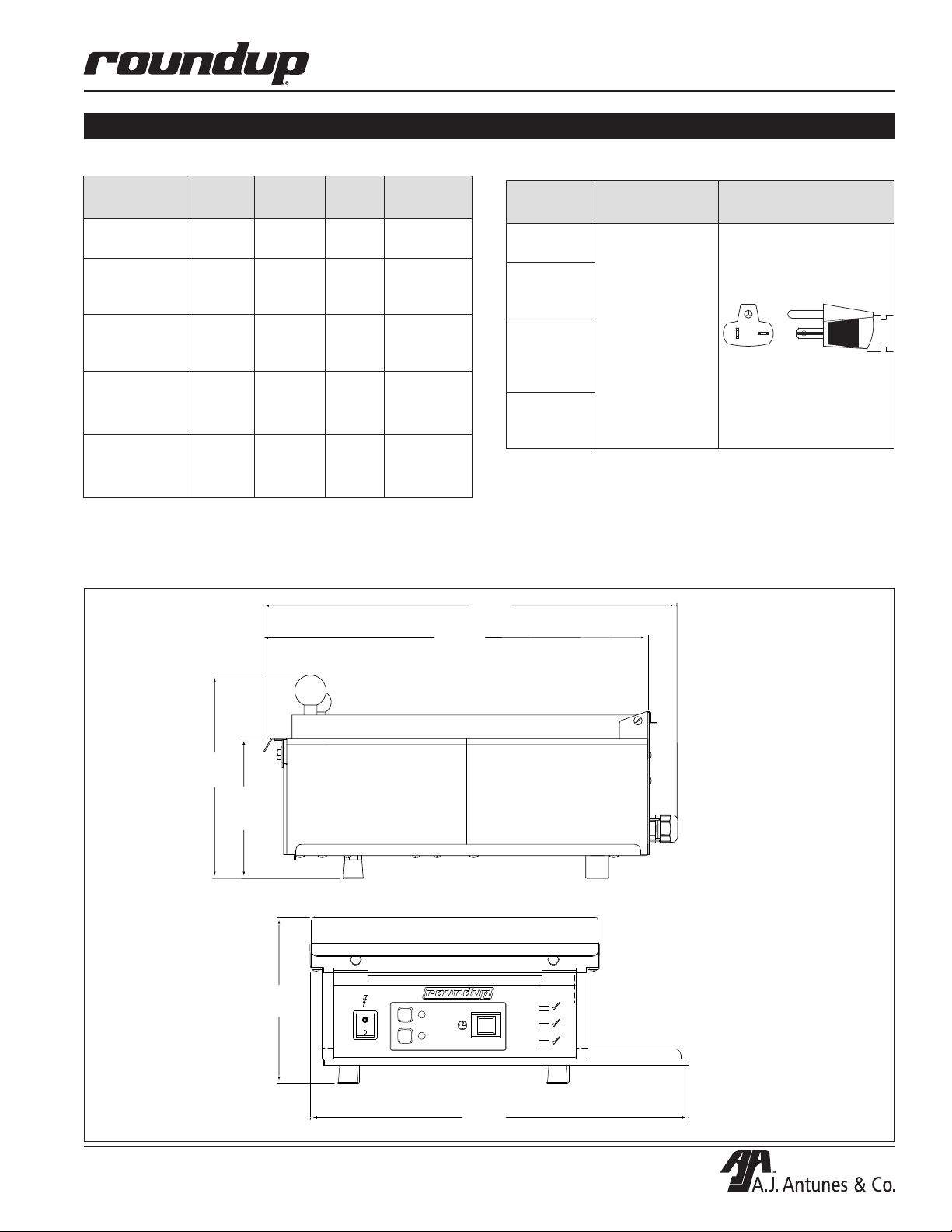
Electrical Ratings
Model &
Mfg. No.
ES-600
9300530
ES-602
9300571
9300577
ES-604
9300574
9300575
ES-1200
9300532
9300534
ES-604
9300593
Volts Watts Amp Hertz
208 2400 11.5 50/60
208 2400 11.5 50/60
208 2400 11.5 50/60
208 2400 11.5 50/60
208/220
- 240~
2400 /
3150
11.5 /
10.9 -
13.1
50/60
Shipping Weight
• ES-600: 48 lbs (21.7 kg)
• ES-602, ES-604 & ES-1200: 50 lbs (22.6 kg)
Dimensions
18 3/16"
(462 mm)
16 15/16"
(430 mm)
Electrical Cord & Plug Configurations
Model &
Mfg. No.
ES-600
9300530
ES-602
93 00 571
9300577
ES-604
93 005 74
9300575
9300593
ES -120 0
9300532
9300534
Description Configuration
6-20P, 20 Amp.,
250 VAC.,
Non-Locking
(Assembly Only)
Net Weight
• ES-600: 41 lbs (18.6 kg)
• ES-602, ES-604 & ES-1200: 43 lbs (19.5 kg)
8 15/16"
(227 mm)
6 3/16"
(157 mm)
7 9/32"
(185 mm)
P/N 1010883 Rev. J 08/14
POWER
2'-00"
1
2'-30"
2
START/STOP
16 5/8"
(422 mm)
READY
BACON
COOKING
5
Page 6
EGG STATION
INSTALLATION
Unpacking
1. Remove unit and all packing materials from
shipping carton.
NOTE: If any parts are missing or damaged,
contact A.J. Antunes & Co. Technical Service
IMMEDIATELY at 1-877-392-7854 (Toll free in the
U.S. and Canada) or 630-784-1000.)
2. Remove information packet.
3. Remove all packing materials and protective
coverings from the unit.
4. Wipe all surfaces of the unit with a hot damp
cloth.
NOTE: Do NOT use a dripping wet cloth. Wring it
out before use.
5. Clean the Egg Rings, Egg Rack, Top Cover, and
Service Pans in hot, soapy water. Rinse in clear
water and allow to air dry.
6. Reassemble all parts to unit.
Equipment Setup
When placing the unit into service, pay attention to the
following guidelines:
• Make sure power is off and the unit is at room tem-
perature.
• Do NOT block or cover any openings on the unit.
• Do NOT immerse cord or plug in water.
• Keep cord away from heated surfaces.
• Do NOT allow cord to hang over edge of table or
counter.
• Place the unit on a sturdy, level table or other work
surface.
• Ensure that the line voltage corresponds to the
stated voltage on the unit’s specification label.
If unsure, have an electrician confirm correct
line voltage before connecting unit.
CAUTION
All electrical service connections must be in
accordance with local electrical codes and any
other applicable codes.
WARNING
ELECTRICAL SHOCK HAZARD.
FAILURE TO FOLLOW THE INSTRUCTIONS IN
THIS MANUAL COULD RESULT IN SERIOUS
INJURY OR DEATH.
• Electrical ground is required on this appliance.
• Do NOT modify the power supply cord plug. If
it does not fit the outlet, have a proper outlet
installed by a qualified electrician.
• Do NOT use an extension cord with this
appliance.
• The unit should be grounded according to
local electrical codes to prevent the possibility of electrical shock. It requires a grounded
receptacle with separate electrical lines, protected by fuses or circuit breaker of the proper
rating.
• Check with a qualified electrician if you are in
unsure if the appliance is properly grounded.
IMPORTANT
When installing the unit, use a leveler to ensure
that the table/cart is level and that the unit is
level when placed. If necessary, adjust the two
front bottom legs of the unit to level it. Failure to
level the table and/or unit may result in unevenly
cooked product.
• Place the unit on a sturdy, level surface.
• Make sure the unit is also level so that water does
not run from one side to the other. Adjust the legs as
needed to level the unit.
6
P/N 1010883 Rev. J 08/14
Page 7

OPERATION
EGG STATION
Preparing Unit
1. Turn the unit on and allow it to warm up for
approximately 20–30 minutes.
NOTE: During warmup, the Ready Indicator Light
flashes. The Ready Indicator Light stays on once
the unit reaches operating temperature.
2. If necessary, install the Top Cover according to
Figure 1.
3. Install the Egg Rack by holding it vertically and
sliding the pins of the Egg Rack into the slots on
the back of the Top Cover.
4. Install the Egg Rings into the Egg Rack (Figure
3). Make sure the Egg Rings are seated flat on
the Platen surface.
5. Ensure that the Egg Rack and Top Cover are in
the down position while the cooker warms up.
6. Add melted butter (or equivalent) to one Service
Pan (if desired) and slide the Service Pan into the
tray on right side of unit.
7. Slide the second Service Pan into the tray for
use for collecting scraps and unused product (if
desired).
Egg Cooking Procedure
To ensure proper cooking, place eggs into rings in numerical
FIFO (First in,
first out) The
first egg in
should always
be the first egg
out
order from 1 to 12 as shown below.
1 0
7
4
1
1 1 1 2
8 9
5 6
2 3
Front of Unit
LILO (Last in,
last out) The
last egg in
should always
be the last egg
out
NOTE: The size and number of
Egg Rings may vary based on
the type of unit installed.
Figure 2. Sample Egg Cooking Procedure
Read these instructions prior to cooking eggs.
1. Make sure the grill is clean and free of all extra
butter, oils, or egg product.
2. Raise the Top Cover and brush the Egg Rings and
Grill surface with melted butter or equivalent.
Slide notch
over tab
The Top Cover
Shown is for
Reference only.
Different units use
different covers.
Figure 1. Installing Top Cover
P/N 1010883 Rev. J 08/14
7
Page 8

EGG STATION
OPERATION (continued)
3. Crack the eggs into the Egg Rings from right to left
as shown in Figure 2, starting at the row closest to
the front of the unit.
6. Break the egg yolks if desired and close the Top
Cover.
7. Fill the troughs on the Top Cover with warm water
until they are completely full. This is very important to get a completely cooked egg with a jelled
yolk. Using less water results in under-cooked
eggs.
8. Select the desired cooking cycle (Figure 4).
All units Except Mfg. No. 9300534:
Use a two-minute cycle for room temperature eggs
or the two-and-a-half-minute cycle for refrigerated
eggs (Figure 4 top).
No. 9300534 Only:
Select 6 for six eggs or 12 for twelve eggs
(Figure 4 bottom)
9. All units EXCEPT Mfg. No. 9300534:
If desired, place sliced meat (Canadian bacon,
ham, etc.) on the front part of the Platen when
Bacon Indicator Light begins to flash and the
audio signal sounds (see Bacon Timer in the
Operation section of this manual).
10. Press the START/STOP button to begin the
cooking cycle.
NOTE: The Cooking Indicator Light will light when
the START/STOP button is pressed and released.
11. At the end of the cycle, when the Cooking
Indicator Light turns off, press the START/STOP
button to turn off the audio signal (Figure 2)
12. All units EXCEPT Mfg. No. 9300534:
Remove the meat from the Platen surface (see
the Bacon Timer section of this manual).
13. Open the cover and raise the Egg Rack about
1 inch (26 mm), then drop the rack to loosen the
eggs.
14. Raise the Egg Rack completely off the eggs and
use a spatula to remove the eggs.
NOTE: Refer to Figure 1. Remove eggs starting
with the first egg added and finish with the last egg
added. This ensures even cooking for all eggs.
15. Scrape and waste from Platen grill surface into
the Service Pan.
16. Lower the Egg Rack and Cover. The unit is ready
for further cooking.
Cover
Assembly
(12 Egg)
Egg
Cracker
Egg Rack
(12 Egg)
Trough
Egg Ring
Egg
Cracker
Egg Ring
Trough
Cover
Assembly
(6 Egg)
Egg Rack
(6 Egg)
Trough
Egg Ring
Cover
Assembly
(6 Egg)
Egg Rack
(6 Egg)
(4 inch rings)
Cracker
Trough
Egg
Figure 3. Cover Assembly (12 Egg Rings, 6 Egg Rings, and 2 Omelet Rings)
8
P/N 1010883 Rev. J 08/14
Cover
Assembly
Omelet Ring
Egg
Rack
Egg
Cracker
Page 9

OPERATION (continued)
START/STOP
POWER
2'-00"
2'-30"
READY
COOKING
BACON
1
2
For Mfg. No. 9300530, 532, 571, 574, & 575:
NOTE: The following are factory pre-set cooking times.
Time 1 Button: 2 minute cooking time.
Time 2 Button: 2 minutes and 30 seconds cooking time.
2'-45"
6
2'-30"
POWER
12
For Mfg. No. 9300534 Only:
NOTE: The following are factory pre-set cooking times.
Time 6 Button (6 eggs): 2 minutes 45 seconds cooking time.
Time 12 Button (12 eggs): 2 minutes 30 seconds cooking time.
START/STOP
Figure 4. Time Selector Switch
READY
COOKING
EGG STATION
Bacon Timer*
(All units EXCEPT Mfg. No. 9300534)
If, during the standby mode, the Bacon Indicator Light
is not lit, it means that the Bacon Timer is disabled. To
enable the Bacon Timer, with the unit turned on, press
the TIME 1 and TIME 2 buttons simultaneously for 3 or
more seconds. The Bacon Indicator Light will turn on.
The Bacon Timer is now enabled.
To disable the Bacon Timer, press the TIME 1 and
TIME 2 buttons simultaneously for 3 or more seconds.
The Bacon Indicator Light will turn off. The Bacon
Timer is now disabled.
USING THE BACON TIMER
If the Bacon Timer is enabled, an audio signal will
sound for a few seconds and the Bacon Indicator Light
will begin to flash 30 seconds before the end of the
cooking cycle.
During this time, the product should be placed on the
front part of the grill so that it will heat for 30 seconds.
The Bacon Indicator Light will continue to flash until the
end of the cooking cycle.
* ES-600 units are designed to operate with the Bacon Timer
enabled. ES-602, ES-604 and ES-1200 units are designed to
operate with the Bacon Timer disabled.
P/N 1010883 Rev. J 08/14
9
Page 10

EGG STATION
MAINTENANCE
WARNING
Turn the power off, unplug the power cord, and
allow the unit to cool down before performing any
service or maintenance.
CAUTION
Chlorides or phosphates in cleaning agents (e.g.
bleach, sanitizers, degreasers, or detergents)
could cause permanent damage to stainless steel
equipment. The damage is usually in the form of
discoloration, dulling of metal surface finish, pits,
voids, holes, or cracks. This damage is permanent and NOT covered by warranty. The following
tips are recommended for maintenance of your
stainless steel equipment:
• Always use soft, damp cloth for cleaning, rinse
with clear water and wipe dry. When required,
always rub in direction of metal polish lines.
• Stains and spots should be removed using a
vinegar solution.
• Finger marks and smears should be removed
using soap and water.
• Hard water spots should be removed using a
vinegar solution.
5. Clean the Egg Rings, Egg Rack, Cover, and
Service Pans in hot, soapy water. Rinse these
items in clear water and allow to air dry.
6. Reassemble the unit.
Checking Cycle Times (Monthly)
(All units EXCEPT Mfg. No. 9300534)
CAUTION: Grill surfaces will be hot. Care should be
taken when operating this piece of equipment.
NOTE: A stopwatch is required for this procedure.
1. Turn the unit on and allow it to warm up for
30 minutes.
2. Ensure that the TIME 1 button is lit. If not, press
and release the TIME 1 button. This button
should now be lit.
3. With the stopwatch in hand, press and release the
START/STOP button and start the stopwatch.
4. Record the time when the Bacon Indicator Light
begins to flash (if the Bacon Timer is enabled).
Then, record the time when the Cooking Indicator
Light turns off.
CAUTION
Do NOT use a sanitizing solution or abrasive
materials. The use of these may cause damage to
the stainless steel finish.
CAUTION
If a chemical cleaner is used, be sure it is safe to
use on cast aluminum. Observe all precautions
and warnings on product label.
Daily Cleaning
1. Turn the unit off, unplug the power cord, and
allow the unit to cool down before proceeding.
2. Scrape the Platen surface clean of any residue.
3. Wipe the entire Platen surface clean with damp
grill cloth.
4. Wipe the entire cooker cabinet clean with clean,
damp cloth.
NOTE: Do NOT use a dripping wet cloth. Wring the
cloth out before use.
5. Repeat this test with the TIME 2 button selected.
When set at 2’-00”, the Bacon Indicator Light
should flash at 1 minute and 30 seconds (90 seconds), and the Cooking Indicator Light should turn
off at 2 minutes (120 seconds).
When set at 2’-30”, the Bacon Indicator Light
should flash at 2 minutes (120 seconds), and the
Cooking Indicator Light should turn off at 2 minutes and 30 seconds (150 seconds).
All times are to be within +/- five (5) seconds.
6. Turn the power off.
10
P/N 1010883 Rev. J 08/14
Page 11

MAINTENANCE (continued)
EGG STATION
Checking Cycle Times (Monthly)
(Mfg. No. 9300534 ONLY)
CAUTION: Grill surfaces will be hot. Care should
be taken when operating this piece of equipment.
NOTE: A stopwatch is required for this procedure.
1. Turn the unit on and allow it to warm up for
30 minutes.
2. Ensure that the TIME 6 button is lit. If not, press
and release the TIME 6 button. This button
should now be lit.
3. With the stopwatch in hand, press and release the
START/STOP button and start the stopwatch.
4. Record the time when the Cooking Indicator Light
turns off.
5. Repeat this test with the TIME 12 button selected.
When set at 2’-45”, the Cooking Indicator Light
should turn off at 2 minutes and 45 seconds (165
seconds).
When set at 2’-30”, the Cooking Indicator Light
should turn off at 2 minutes and 30 seconds (150
seconds).
Checking Grill Platen Temperature
NOTE: A pyrometer is required for this procedure.
WARNING
This procedure exposes you to hot surfaces. Use
extreme care when performing procedure to avoid
personal injury.
1. Remove the cover and the Egg Rack by lifting the
whole assembly until clear of the base.
2. Turn the power on and allow 30 minutes for the
unit to warm up.
3. Using a pyrometer, measure the temperature
at the middle of the Platen surface (Figure
4). The temperature should be 250°F–300°F
(121°C–149°C).
If temperature is within range, proceed to Step 4.
If temperature is above or below the proper
calibrated range, call your Authorized Service
Agency.
4. Turn the power off.
5. Reinstall cover and Egg Rack and Top Cover.
All times are to be within +/- five (5) seconds.
6. Turn the power off.
Grill
Platen
Figure 4. Grill Platen (ES-600 Shown)
P/N 1010883 Rev. J 08/14
11
Page 12

EGG STATION
TROUBLESHOOTING
WARNING
To avoid possible personal injury and/or damage to the unit, inspection, test and repair of electrical equipment should be performed by qualified service personnel. The unit should be unplugged when servicing.
Problem Possible Cause Corrective Action
Unit fails to operate and
control panel lights fail
to signal on.
Unit fails to heat. Loose connections. Contact your maintenance person or an
Eggs do NOT cook
properly.
Eggs sticking to Platen. Dirty Platen. Clean Platen.
Eggs sticking to Egg
Rings.
Not signaling on “Bacon”
or “Ready”.
No power/low power. Make sure the power is on and the power cord
is locked into place. Check the main circuit
breakers.
Inoperable electrical outlet. Plug the power cord into a different outlet of
same amperage rating.
Inoperable power switch. Contact your maintenance person or an
Inoperable power cord.
Loose connections.
Inoperable Platen.
Low voltage.
Inoperable Hi-Limit Thermostat.
Inoperable Thermocouple.
Inoperable Solid State Relay.
Using refrigerated eggs and TIME 1
button selected.
Using room temperature eggs and
TIME 2 button selected.
Incorrect amount of water added to
trough in cover.
Platen temperature too low or too
high.
Loose connections. Contact your Authorized Service Agency.
Unit/table is not level Level the table and unit as necessary.
Insufficient butter being used. Refer to the Operating section of this manual.
Insufficient butter being used. Refer to the Operating section of this manual.
Dirty Egg Rings. Clean the Egg Rings but do NOT use an
Inoperable Egg Ring. Replace Egg Ring.
Inoperable indicator light or audio
signal.
Inoperable control board.
Loose connection.
Bacon Timer is disabled. Enable Bacon Timer according to the Operation
Authorized Service Agency.
Authorized Service Agency.
Use TIME 2 button when using refrigerated eggs.
Use TIME 1 button when using room temperature eggs.
Fill trough in cover with water before starting time
cycle.
Check the Platen temperature according to the
Maintenance section of this manual.
abrasive scrubbing pad.
Contact your maintenance person or an
Authorized Service Agency.
section of this manual.
If the troubleshooting steps listed do not solve your problem, contact an
A.J. Antunes Authorized Service Agency for further assistance.
12
P/N 1010883 Rev. J 08/14
Page 13

TROUBLESHOOTING (continued)
R17
Control Board LEDs
The control Board has three on board LEDs (Figure
5) to determine the status of the unit and to assist in
troubleshooting.
Green (Diagnostic): This LED should be off in normal
operation. If any of the 5 potential faults are detected by
the Control Board, this LED will repeatedly blink either 1
through 5 times with a 2-second pause in between (see
the Green LED Blink Codes section below).
Yellow (Audio): When lit, this LED indicates that the
Control Board is supplying approximately 10-15 VDC
to the audio signal. The audio signal should sound with
this LED is lit.
Red (Heat): When lit, this LED indicates that the
Control Board is calling for heat by supplying VDC to
terminals 3(+)4(-) of the Solid State Relay. When off,
this LED indicates that the grill Platen is up to operating
temperature and satisfied.
Green LED Blink Codes
EGG STATION
YELLOW
BUZZ
STATUS
HEAT
Figure 5. Control Board
LEDs
NOTE: During heat mode, this Red LED is very dim,
so it may be difficult to verify if the Control Board
is or is not calling for heat. It is recommended that
you observe the small round green LED on the
Solid State Relay (Figure 6) for mode and diagnostic purposes. When the green LED on the Solid
State Relay is on, it means that the Control Board is
calling for heat. When off, it means that the Control
Board is NOT calling for heat. Typically, the VDC at
the Solid State Relay will be less than 1.0 VDC when
measured, but may vary because of different quality VOMs. Therefore, it is recommended that you do
NOT attempt to measure the VDC at the Solid State
Relay for diagnostic purposes.
GREEN
RED
CR5
R18
R20
CR3
CR4
Solid State
Relay
LED
TUV
PRODUCT SERVICE
1/L1
Bauart
.
gapruit
4/A2-
50 AMP 24-280 VAC
Crouzet
GN
84137220
3-32 VDC
Figure 6. Solid State
Relay
2/T1
R
+3/A1
Number of Blinks Cause(s) Unit’s State and Resolution
The Green LED blinks
on and off 1 time, pauses for 2 seconds, and
repeats.
The Green LED blinks
on and off 2 times,
pauses for 2 seconds,
and repeats.
The Green LED blinks
on and off 3 times,
pauses for 2 seconds,
and repeats.
The Green LED blinks
on and off 4 times,
pauses for 2 seconds,
and repeats.
The Green LED blinks
on and off 5 times,
pauses for 2 seconds,
and repeats.
The EEPROM memory on the Control
Board is corrupted.
In this state, the unit turns off the control Signal to the Solid
State Relay and disables all front buttons and lights. The
unit will not heat up. This continues until the defaults are
reloaded into memory. To reload defaults, turn the unit off,
press and hold the TIME 2 button, turn the unit on, and
release the button.
The ambient temperature within the
control compartment has exceeded
155ºF (68ºC). Verify that there is
proper air ventilation all around the unit
and that it is not near a significant heat
In this state, the unit turns off the control signal to the
Solid State Relay and disables all front buttons and lights.
The unit will not heat up. This continues until the ambient
temperature within the electrical compartment drops below
140°F (60°C) and the unit is turned off and back on.
source.
Open or disconnected Thermocouple. In this state, the unit turns off the control signal to the Solid
State Relay and disables all front buttons and lights. The
unit will not heat up. This continues until the Thermocouple
is reconnected or replaced, and the unit is turned off and
back on.
The supply voltage to the unit is below
160 VAC or above 265 VAC.
In this state, the unit turns off the control signal to the Solid
State Relay and disables all front buttons and lights. The
unit will not heat up. This continues until the supply voltage
is within the proper limits and the unit has been turned off
and back on.
The 50/60 Hz signal has been lost
due to a disconnected or an open
wire harness/wiring on the AC Isolator
Board, or from the AC Isolator Board to
In this state, the unit turns off the control signal to the Solid
State Relay and disables all front buttons and lights. The
unit will not heat up. This continues until the 50/60 Hz signal is reapplied and the unit is turned off and back on.
the Control Board.
P/N 1010883 Rev. J 08/14
13
Page 14

EGG STATION
SWITCH
MOMENTARY
COOKING
BACON
READY
1
2
T1
T2
SSR
ISOLATOR BOARD
P4P3
P1
P2
T1
T2
CORD
POWER
WHT/BLU
BLK/BRN
GRN-YEL
GRN/
HEATER
NOTE: ALL WIRES TO BE 14 GA. TFE-200°C
22 GA. TFE-200°C
UNLESS OTHERWISE SPECIFIED.
# 18 GA. TFE-200°C
T3T4
COUPLE
THERMO-
SWITCH
BOARD
230VAC 12VAC
TRANSFORMER
GRN
GND
GND
THERMOSTAT
HI-LIMIT
TERMINAL
BLOCK
CONTROL
BOARD
BLK
WHT
WHT
BLK
WHT
WHT
BLK
BLK
YEL #
YEL #
WHT
GRN
ORG
BLK
GRN
BLK
BLUE
BLK
RED
BLK
YEL
BLK
4
3
21
4 5
WIRING DIAGRAM
P/N 1010883 Rev. J 08/14
14
Page 15

REPLACEMENT PARTS
EGG STATION
76
30
3
66
8
1
54
31
51
53
59
60
63
57
62
23
52
2
32
61
18
4
29
64
25
5
26
58
55
24
6
7
33
P/N 1010883 Rev. J 08/14
69
15
Page 16

EGG STATION
28
65
48
9
27
REPLACEMENT PARTS (continued)
28
14
34
10
19
65
15
48
34
27
20
45
11
28
65
48
74
27
16
35
21
45
28
65
48
74
12
27
45
17
34
13
19
28
65
48
74
27
45
18
36
22
45
16
P/N 1010883 Rev. J 08/14
Page 17

REPLACEMENT PARTS (continued)
EGG STATION
Item Part Description Qty.
No.
1 0021327 Nose Piece Weldment 1
2 210K230 Bumper, Recess Leg 1” 1
(Set of 4 including 4 screws)
3 7000379 Grill Platen 1
7000674 Grill Platen 1
(Mfg. No. 9300593 Only)
4 040P138* Lock-nut, Conduit - 1/2” NPT 1
5 040K251 Strain Relief Kit 1
6 2180270 Service Pan 2
(For Mfg. No. 9300530 & 9300532)
7 2180277 Service Pan (For Mfg. No. 2
9300534, 9300574 & 9300575)
8 0502900 Bracket , Sensor 1
9 7000363 Cover, Rack, & Ring Assembly 1
(Incl. All Shown) ES-1200
10 7000261 Cover, Rack, & Ring Assembly 1
(Incl. All Shown) ES-600
11 7000835 Cover, Rack & Ring Assembly 1
(Incl. All Shown) ES-604
12 7000690 Cover, Rack & Ring Assembly 1
(Incl. All Shown)
(For Mfg. No. 9300534 only)
13 7000635 Cover, Rack & Ring Assembly 1
(Incl. All Shown) ES-602
14 7000451 Cover, 12 Egg 1
(Incl. #28, 48 & 65) ES-1200
15 7000453 Cover, 6 Egg 1
(Incl. #28, 48 & 65) ES-600
16 7000836 Cover, 4” Egg Rings 1
(Incl. #28, 48, & 65) ES-604
17 0012204 Cover, 12 Egg 1
(Incl. #28, 48, 65 & 74)
(For Mfg. No. 9300534 only)
18 7000639 Cover, 8” Oval Ring ES-602 1
(Incl. #28, 48, 65 & 74)
19 7000452 Rack, 12 Egg Ring 1
(Incl. #27 & 45) ES-1200
20 7000454 Rack, 6 Egg Ring 1
(Incl. #27 & 45) ES-600
21 7000837 Rack, 4” Egg Rings 1
(Incl. #27 & 45) ES-604
Item Part Description Qty.
No.
22 7000640 Rack, 8” Egg Rings 1
(Incl. #27 & 45) ES-602
23 0021324 Panel, Base 1
24 0021325 Housing, Main 1
25 0504075 Cover, Insulation 2
26 0021326 Rear Panel Weldment 1
27 2100137 Knob Ball 1
28 2100138 Knob-Ball 1
29 0504078 Bracket, Hi-Limit 1
30 0700323 Power Cord, Assembly 1
6-20P
31 1001100 Label, Control 1
31a 1001248 Label, Control (not shown) 1
(For Mfg. No. 9300534 Only)
32 210K122 Adj. Leg Kit (Pack of 4) 1
33 210K108 Rubber Tip Kit (Pack of 4) 1
34 2130111 Egg Ring (Single) 6/12
ES-600/1200
213K101 Egg Ring (Pack of 6) 1/2
ES-600/1200
35 2130176 4” Egg Ring (Single) ES-604 6
213P176 4” Egg Ring (Pack of 6) ES-604 1
36 2130183 8” Round Egg Ring (Single) 1
ES-602
213P183 8” Round Egg Ring (Pack of 2) 1
ES-602
37 306P113* Screw, Mach. 2
#6-32 x 7/8” Sltrshd
38 306P123* Screw, Mach. 4
#6-32 x 5/8” Sltrshd 2
39 306P130* Nut, Hex KEPS #6-32 6
40 308P102* Washer, Int. Tooth #8 1
41 308P104* Scr, Mach 1
#8-32 x 3/8” Sltrshd
42 308P143* Nut, Hex KEPS #8-32 1
43 308P157* Screw, Tap #8-32 x 3/8” 1
44 310P102* Washer, Int Tooth-lock #10 2
45 310P109* Scr, Mach 1
#10-32 x 3/8” Sltrshd
46 310P136* Scr, Mach. 1
#10-32 x 1 and 1/4” Slpanhd
P/N 1010883 Rev. J 08/14
* Available only packages of 10.
17
Page 18

EGG STATION
REPLACEMENT PARTS (continued)
Item Part Description Qty.
No.
47 310P149* Scr, Mach. 1
#10-32 x 7/8” Slpanhd 1
48 325P101* Stud, 1/4-20 x 1-1/2” 1
49 325P104* Washer, Flat 1/4” S/S 1
50 325P109* Scr, Hxcap 1/4-20 x 3/4” 1
51 4010137 Switch, Rocker (25A-250V) 1
52 4010187 Transformer, Stepdown 1
(240V/12)
53 4010190 Switch, Momentary 1
54 4010193 PC-Board, Switch-Two Button 1
55 7000272 Thermostat, Hi-Limit 1
57 7000370 Solid State Relay 1
58 7000136 Terminal Block, 3-Pole 1
59 4060362 LED, Snap-in (Green - Ready) 1
60 4060363 LED, Snap-in (Yellow - Cooking) 1
61 4060385 LED, Snap-in (Blue - Bacon) 1
62 7000520 Control Board 1
62a 7000691 Control Board Kit 1
(For Mfg. No. 9300534 only)
63 7000391 A/C Line Isolator Board 1
64 0400337 Insulation 1
65 2120111 Spacer 1
66 4050214 Thermocouple 1
67 2180111 Plastic Dispensing Bottle 1
(not shown)
68 213K115 Spatula, Scraper and Brush Kit 1
(not shown)
69 0011251 Heat Sink Assembly 1
70 0700648 Wire Set, Main (not shown) 1
71 0700655 Wire Harness/PCB-LEDs 1
(not shown)
72 0700656 Wire Harness/PCB-Isoloator BD 1
(not shown)
73 0700657 Wire Harness/PCB-2 Button BD 1
(not shown)
74 0021401 Handle Weldment 1
75 300P102* Nut, Speed #8-32 “U” 1
76 7000838 Back Bracket Assy. Kit 1
ES-604
* Available only packages of 10.
18
P/N 1010883 Rev. J 08/14
Page 19

NOTES
EGG STATION
P/N 1010883 Rev. J 08/14
19
Page 20

LIMITED WARRANTY
Equipment manufactured by Roundup Food Equipment Division of A.J. Antunes & Co. has been constructed of
the finest materials available and manufactured to high quality standards. These units are warranted to be free
from electrical and mechanical defects for a period of one (1) year from date of purchase under normal use and
service, and when installed in accordance with manufacturer’s recommendations. To insure continued operation of the units, follow the maintenance procedures outlined in the Owner’s Manual. During the first 12 months,
electro-mechanical parts, non-overtime labor, and travel expenses up to 2 hours (100 miles/160 km), round trip
from the nearest Authorized Service Center are covered.
1. This warranty does not cover cost of installation, defects caused by improper storage or handling prior to placing of the Equipment. This warranty does not cover overtime charges or work done by unauthorized service
agencies or personnel. This warranty does not cover normal maintenance, calibration, or regular adjustments
as specified in operating and maintenance instructions of this manual, and/or labor involved in moving adjacent
objects to gain access to the equipment. This warranty does not cover consumable/wear items. This warranty
does not cover damage to the Load Cell or Load Cell Assembly due to abuse, misuse, dropping of unit/shock
loads or exceeding maximum weight capacity (4 lbs). This warranty does not cover water contamination problems such as foreign material in water lines or inside solenoid valves. It does not cover water pressure problems
or failures resulting from improper/incorrect voltage supply. This warranty does not cover Travel Time & Mileage
in excess of 2 hours (100 miles/160 km) round trip from the nearest authorized service agency.
2. Roundup reserves the right to make changes in design or add any improvements on any product. The right
is always reserved to modify equipment because of factors beyond our control and government regulations.
Changes to update equipment do not constitute a warranty charge.
3.
If shipment is damaged in transit, the purchaser should make a claim directly upon the carrier. Careful inspection
should be made of the shipment as soon as it arrives and visible damage should be noted upon the carrier’s receipt.
Damage should be reported to the carrier. This damage is not covered under this warranty.
4. Warranty charges do not include freight or foreign, excise, municipal or other sales or use taxes. All such freight
and taxes are the responsibility of the purchaser.
5. THIS WARRANTY IS EXCLUSIVE AND IS IN LIEU OF ALL OTHER WARRANTIES, EXPRESSED OR IMPLIED,
INCLUDING ANY IMPLIED WARRANTY OR MERCHANTABILITY OR FITNESS FOR A PARTICULAR PURPOSE, EACH OF WHICH IS HEREBY EXPRESSLY DISCLAIMED. THE REMEDIES DESCRIBED ABOVE
ARE EXCLUSIVE AND IN NO EVENT SHALL ROUNDUP BE LIABLE FOR SPECIAL CONSEQUENTIAL OR
INCIDENTAL DAMAGES FOR THE BREACH OR DELAY IN PERFORMANCE OF THIS WARRANTY.
 Loading...