

Page 1

HEALTHCARE
Imaging Services
ReadMeFirst
How to print and add Comments
1 Printing single Pages, Chapters or the complete Manual
IMPORTANT:
This PDF manual is screen optimized – nevertheless it is possible to print single pages,
single chapters or the complete manual on paper size DIN A4 or Letter.
Some pages – especially circuit diagrams for equipment – have been created on paper
size larger than DIN A4/Letter. Printing these pages on DIN A4/Letter may result in
reduced legibility.
Preferably print circuit diagrams on a DIN A3/ANSI B (Ledger) printer, if available.
1.1 Printing single Pages or Chapters
To print single chapters or pages of a chapter proceed as follows:
(1) Click the bookmark of the desired chapter
(2) Write down or remember the shown page number
(3) Go the end of the section or desired range of pages
(4) Select "Print"
(5) Select the page range
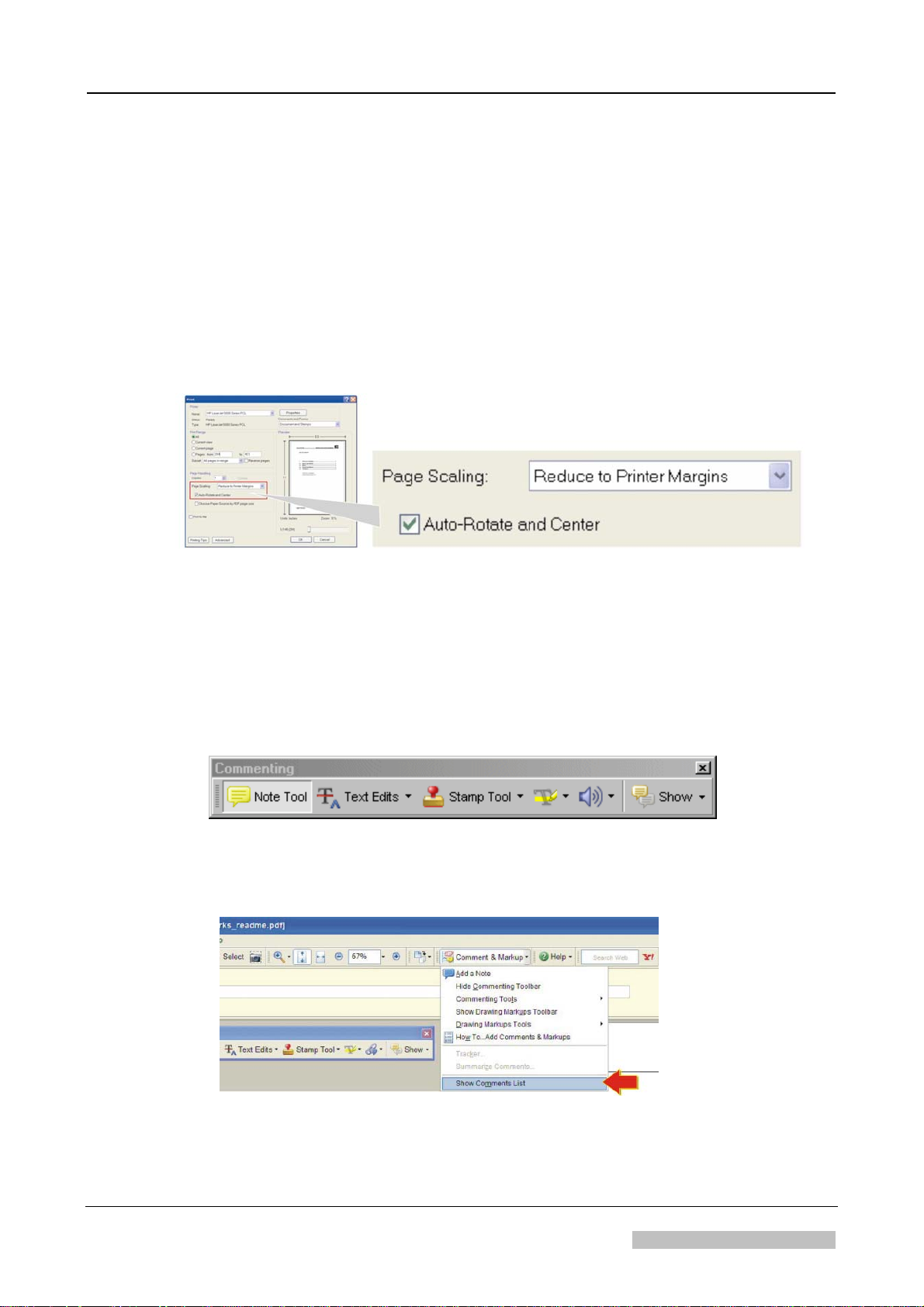
(6) Select "Reduce to printer margins" and "Auto-rotate and Center".
(7) Select “OK”
NOTE:
“Reduce to printer margins” may be named on other Adobe Reader versions
“shrink to printable area” or “shrink oversized pages to paper size”
2007-05-31 printed in Germany
Agfa Company Confidential
Document Node ID:16099429
Copyright © 2006 Agfa-Gevaert HealthCare
Page 2
1.2 Printing the complete Service Manual
To print the complete service manual proceed as follows:
(1) Select "Print"
(2) Select “All”
(3) Select "Reduce to printer margins" and "Auto-rotate and Center".
(see NOTE previous page)
(4) Select “OK”
ReadMeFirst
2 Adding Comments
• If you open this file in an Adobe Reader version ≥ 7, the comment toolbar will
show-up.
• This allows adding comments, to highlight or underline text and many more text
manipulations.
2.1 How to export your Comments
(1) In the drop down menu “Comment & Markup” select "Show comments List"
(2) Select the desired comments: Press the CTRL-key for multiple selections.
The controlled version of this document resides on MedNet. Any printed copy of this document is uncontrolled.
DOCUMENT CONTROL NOTE:
Revision 1 How to print and add Comments Page 2 of 3
2007-05-31 Agfa Company Confidential
Page 3

ReadMeFirst
(3) Select “Options - Export Selected Comments”
(4) Save the file with any name
2.2 How to import Comments
(1) In the drop down menu “Comment & Markup” select "Show comments List"
(2) Select “Options - Import Comments”
(3) Browse for the comments file and press “select”
NOTE:
The imported comments possibly appear on different pages, if the file where the
comments have been imported has a different number of pages.
DOCUMENT CONTROL NOTE:
The controlled version of this document resides on MedNet. Any printed copy of this document is uncontrolled.
Revision 1 How to print and add Comments Page 3 of 3
2007-05-31 Agfa Company Confidential
Page 4

Page 5
HEALTHCARE
Global Services Organisation
Order number: DD+DIS324.00E
*1UFCMM1*
1 piece UFCMM MA1
Edition 5
Technical
Documentation
Classic E.O.S.
Type 5270 / 100
up to SN 4499
Classic E.O.S. CL
Type 5270 / 105
up to SN 1137
printed in Germany 02 / 2005
R
D
C
.
M
A
4
1
0
7
2
5
Page 6

Page 7
HEALTHCARE
Global Services Organisation
Order number: DD+DIS324.00E
*1UFCMM1*
1 piece UFCMM MA1
Technical
Documentation
Classic E.O.S.
Type 5270 / 100
up to SN 4499
Classic E.O.S. CL
Type 5270 / 105
up to SN 1137
Edition 5
Ordering of spare parts Phone: xx49 - (0)89 - 6207 -3760
and spare part kits: Fax: xx49 - (0)89 - 6207 -7388
Ordering of documentation: Phone: xx49 - (0)89 - 6207 -3553
Caution:
This system uses mains voltage. Please observe the pertinent safety instructions.
These instructions describe adjustments and routines which must only be
performed by qualified technical personnel.
Note:
Electrical repairs and connections must only be made by certified electricians.
Mechanical repairs and connections must only be made by certified technicians.
CE Declaration:
According to the medical directives the CE Declaration
(CE Conformity) becomes void if the product is modified without permission of the
manufacturer!
This applies to all parts, not only the safety devices!
R
D
C
.
M
A
4
1
0
7
2
5
printed in Germany 05 / 2005
Agfa Company Confidential
AGFA-GEVAERT AG HE/S&S - GSO
Tegernseer Landstr. 161 D-81539 Munich
Page 8

Contents
0. Order list
1. Installation preparations
2. Controls and connectors
3. Installation / start-up
4. Operating instructions
Pictographs and conventions for this documentation
This documentation uses certain conventions (pictographs, styles) to help you find information
faster and easier.
Meaning of the pictographs
High voltage!
Attention!
Info
Waiting time
Required tools
Removal
5. Theory of function
6. Repair and Service
7. Reference and circuit diagrams
8. Spare parts list
9. Accessories
10. Modifications
11. Technical standard modifications
12. Maintenance
13. Field Service Bulletins
14. Installation planning
15. Glossary / key word index
Installation
Hint
Required
spare part
Required
time
Mechanical adjustment
Electrical adjustment
Calibration
Conventions
Activity Type face Example
Instruction,
Explanation
Mouse activities,
or Return key
Text input via keyboard
required
Switch on machine
<omni-cd.exe>
vips
Switch on machine
Doubleclick the icon
<omni-cd.exe>
Enter vips and click
<Continue>
Agfa Company Confidential
Page 9

DD+DIS440.04E General Information
_
_
Classic E.O.S. / Classic E.O.S. CL (Type 5270/100/105) Edition 5
th
The 5
edition is the Service Documentation applying to the machines < SN4500 (Type 5270/100) or <SN1138 (Type 5270/105)
and includes the information about technical modifications in the machines up to these serial numbers.
th
The 6
edition is the Service Documentation applying to the machines > SN4500 (Type 5270/100) or > SN1138 (Type 5270/105)
All previous information regarding the serial number of Type 5270/105 (SN 1500) to differentiate compatibility is void. The new
valid threshold for compatibility differentiation of Type 5270/105 is the serial number SN 1138. This serial number refers to the
complete documentation.
Software Version EOSUNIV1007 can be installed in all machines up to SN4500 (Type 5270/100) or SN1138 (Type 5270/105),
independent of the Control Boards with label F8.5270.7750._ and F8.5270.7950._
The software detects automatically the control panel installed in the machine and knows which display messages to load.
It allows (analog to Software Version CEOS1714) repeated selection of the application and checks the calibration of the replenishment rates.
TYPE 5270/100
only downward compatible
Software versions:
Techn. characteristics:
Control board:
SN 1001
CEOS1117 - CEOS1801
- 3-key control panel
As of CEOS1714:
- Must calibration
- Selection of application
C210
MC31
R
e
v
D
e
IC57
p
l
ST55
MC29
u
l
C
t
c
h
MC28
MC27
y
l
p
S
p
u
ST63
ST57
D
r
a
i
n
ST89
F
a
n
2
ST90
ST85
SI2
ST66
MC13
ST62
MC2
ST54
S1
MC20
MC34
IC52
F8.5270.7750._
ST64
ST65
ST67
ST68ST69
ST70
ST53
IC51
IC50
ST88
IC63
ST73ST72
ST71
ST81
IC78
ST76
ST79
ST74
ST82
R464
R465
ST15
ST77
ST78ST75
IC79
ST87
IC88
Contrast
Brightness
Film Out
SI9
D48
MC32
MC22
ST4
RS4 RS1RS3
SI8
R477
L11
MC16
MC4
MC17
ST5
TY2
R410
C80
D50
BU9
12V2
+24V2
C64
ST45
C63
Circ.Fan1
RS2
RS9
MC24
MC23
D49
TY1
MC3
+24V
C79
BU1
D2
BU4
IC65
+12MOT
IR
Blowe
HeatF
HeatD
R476
R380
RS19
RS21
RS23
SI12
MC35
MC36
R377
RS20
RS24
R485
RS22
R475
R381
R378
R379
RS6 RS7RS5
RS8
SI1
SI3SI5
SI10
SI11 SI6 SI7
BU10
ST86
XK1
BU7
BU6
fuj07903E.cdr
Software version:
Techn. characteristics:
Edition 5
DD+DIS324.00D/E/F
TYPE 5270/100
SN 2200
Software versions:
Techn. characteristics:
IC57
ST55
MC29
MC28
MC27
Steuerkarten:
ST63
ST89
ST90
ST85
ST66
S1
IC52
F8.5270.7750._
ST53
IC50
ST81
ST82
R464
R465
ST15
IC88
ST87
Contrast
Brightness
Film Out
EOSUNIV1007
- Must calibration
- Selection of application
only downward
compatible
TYPE 5270/105
SN 1001
MEOS1201 - MEOS1401
- 4-key control panel
Software versions:
Techn. characteristics
- Current sensor
- Integrated repair routine
C210
ST57
SI2
ST54
ST64
IC51
IC63
IC78
- Cross-flow fan 24V
R477
D48
L11
MC32
MC31
MC16
e
R
v
l
D
e
p
MC4
MC17
C
l
u
t
c
h
TY2
R410
C80
l
y
p
p
u
BU9
S
+24V2
12V2
C64
D
in
r
a
ST45
C63
F
a
n
2
Circ.Fan1
MC22
MC13
ST62
MC2
TY1
MC3
MC20
MC34
+24V
C79
BU1
D2
ST65
IC65
ST4
ST67
ST68ST69
ST70
+12MOT
ST88
IC79
HeatD
ST73ST72
ST71
R476
R380
SI12
MC35
MC36
ST79
ST76
ST74
RS24
R485
RS22
R475
RS4 RS1RS3 RS6 RS7RS5
RS8
ST77
ST78ST75
SI11 SI6 SI7 SI1
SI10
RS2
BU10
RS9
ST86
BU7
SI9 SI8
ST5
D50
MC24
MC23
D49
BU4
IR
HeatF
Blowe
RS19
RS21
RS23
R377
RS20
R379
R381
R378
SI3SI5
XK1
BU6
fuj07903E.cdr
C210
MC31
D
e
p
l
e
v
R
IC57
ST55
MC29
C
l
u
t
c
h
MC28
MC27
p
p
l
y
u
S
ST63
ST57
D
r
a
i
n
ST89
a
SI2
n
F
ST90
2
ST85
ST66
Fan1
ST62
MC13
MC2
ST54
S1
MC20
MC34
IC52
F8.5270.7950.
ST64
ST65
ST67
ST68ST69
ST53
IC51
IC50
ST88
IC63
ST73ST72
ST71
ST81
IC78
ST74
ST76
ST79
ST82
R464
R465
ST15
ST77
ST78ST75
IC79
ST87
IC88
Contrast
Brightness
Film Out
MC32
BU9
MC22
ST4
ST70
RS4 RS1RS3 RS6 RS7RS5
SI9 SI8
D48
L11
R477
MC16
MC4
MC17
ST5
TY2
R410
C80
D50
+24V2
12V2
C64
ST45
C63
MC24
Circ.
RS2
RS9
MC23
MC3
D49
TY1
+24V
C79
D2
BU1
IC65
BU4
+12MOT
IR
HeatF
HeatD
Blowe
R476
R380
RS19
RS21
RS23
SI12
MC35
MC36
R377
RS20
RS24
R485
RS22
R475
R379
R381
R378
RS8
SI11 SI6 SI7 SI1
SI3SI5
SI10
BU10
ST86
XK1
BU7
BU6
fuj07903E.cdr
only upward
compatible
TYPE 5270/100
Control board:
SN 4500
Edition 6
DD+DIS301.03D/E/F
TYPE 5270/105
SN 1138
CLLC1107
- 4-key control panel
- Current sensor
- Integrated repair routines
- Selection of applications
- Water circulation pump
becomes optional
- Level sensor for fixer tank 2
- Cross-flow fan 230V
C210
MC32
BU9
MC22
ST4
RS4 RS1RS3 RS6 RS7RS5
SI9 SI8
D48
L11
R477
MC16
MC4
MC17
ST5
TY2
R410
C80
D50
+24V2
12V2
C64
ST45
C63
MC24
Circ.
RS2
RS9
MC23
D49
MC3
TY1
+24V
C79
BU1
D2
IC65
BU4
+12MOT
IR
HeatF
HeatD
Blowe
R476
R380
RS19
RS21
RS23
SI12
MC35
MC36
R377
RS20
RS24
R485
RS22
R475
R379
R381
R378
RS8
SI11 SI6 SI7 SI1
SI3SI5
SI10
BU10
ST86
XK1
BU7
BU6
fuj07903E.cdr
p
l
D
e
v
e
R
MC31
IC57
ST55
MC29
c
h
C
l
u
t
MC28
MC27
S
u
p
p
ly
ST63
ST57
r
a
D
i
n
ST89
SI2
F
ST90
a
n
2
ST85
ST66
Fan1
ST62
MC13
MC2
ST54
S1
MC20
MC34
IC52
F8.5270.7890.
ST64
ST65
ST67
ST68ST69
ST53
IC51
IC50
ST88
IC63
ST73ST72
ST71
ST81
IC78
ST74
ST76
ST79
ST82
R464
R465
ST15
ST77
ST78ST75
IC79
ST87
IC88
Contrast
Brightness
Film Out
ST70
5270_10000_003-e.cdr
Edition 5, Revision 6 Classic E.O.S. / Classic E.O.S. CL Chapter 0 / I
Agfa Company Confidential (Type 5270 / 100 / 105)
Page 10

Page 11
Order List for Documentation
Order List for Documentation Classic E.O.S.
Type 5270/100, up to SN4499
Classic E.O.S.
Type 5270/105, up to SN1137
NOTE:
Daily updated order lists are available in MedNet.
Order number for a complete Service Manual:
Order number Edition
DD+DIS324.00E Complete Service Manual 5
Order numbers for separately available chapters of the Service Manual:
Order number Contents Revision
of document
Approval Date
DD+DIS186.04E Chapter 12:
Maintenance Instructions
DD+DIS187.04E Chapter 14:
Installation Planning
DD+DIS022.05M Chapter 8:
Spare Parts List, Classic E.O.S.
DD+DIS060.03M Chapter 8:
Spare Parts List, Thoramat Docking Kit
Access to MedNet GSO Library:
• *IntraNet: http://docs.agfanet/mednetcso-library
• *ExtraNet: http://extranet.agfa.com/bu/mi/mednet/mednetcso.nsf
* to request an account to the MedNet GSO Library go to:
http://intra.agfanet/bu/mi/mednethelp.nsf/EN/gettingaccess.htm
Inquiries:
• Phone + 49 89 6207 3949 Fax +49 89 6207 7274
4 2004-08-06
5 2004-08-06
5 2011-09-02
3 2006-12-08
The controlled version of this document resides on MedNet. Any printed copy of this document is uncontrolled.
2011-09-02 printed in Germany
Agfa Company Confidential
DOCUMENT CONTROL NOTE:
Document Node ID: 14040812
eq_00_orderlist_e_template_v04
Copyright © 2007 Agfa HealthCare N.V.
Page 12

Checklist for Completeness
Checklist for Completeness Classic E.O.S. / Classic E.O.S. CL
Type 5270/100/105
NOTE:
Verify latest level and completeness of your Service Manual by means of this checklist
for completeness.
Only the document numbers listed here are valid. Discard documents with different
numbers if necessary.
Chapter Order number / Designation Revision
of document
Approval date Pages
0 Order list
Checklist for completeness
List of Service Bulletins
0 DD+DIS324.00E 0 200 1-01-16 Cover sheet and list of
1 DD+DIS076.04E 3 2004-08-06 1/I, 1/1 - 1/13
2 DD+DIS076.04E 3 2004-08-06 2/I, 2/1 - 2/7
3 DD+DIS324.00E
DD+DIS076.04E
4 Intentionally left blank - - 5 DD+DIS324.00E 0 2001-01-16 5/1 - 5/29
6.1 DD+DIS076.04E 3 2004-08-06 6.1/I, 6.1/1 - 6.1/8
6.2 DD+DIS076.04E 3 2004-08-06 6.2/I, 6.2/1 - 6.2/14
6.3 DD+DIS076.04E 3 2004-08-06 6.3/I, 6.3/1 – 6.3/23
6.4 DD+DIS076.04E 3 2004-08-06 6.4/I, 6.4/1
6.5 DD+DIS324.00E 0 2001-01-16 6.5/I, 6.5/1 – 6.5/39
6.6 DD+DIS324.00E
DD+DIS076.04E
6.7 DD+DIS116.05E
DD+DIS076.04E
DD+DIS116.05E
- 2011-09-02 0/1-5
contents
0
3
0
3
7
3
7
2001-01-16
2004-08-06
2001-01-16
2004-08-06
2005-05-03
2001-01-16
2005-05-03
3/1 - 3/12, 3/15 - 3/56
3/I-III, 3/13 – 3/14,
3/57 – 3/111
6.6/1 – 6.6/36
6.6/I - 6.6/II, 6.6/37 – 6.6/48
6.7/I - 6.7/II, 6.7/1 - 6.7/2
6.7/3 – 6.7/16
6.7/17
7 DD+DIS073.01E
DD+DIS324.00E
DD+DIS076.04E
F1.5270.7005.0
F1.5272.7007.0
8 DD+DIS022.05M
DD+DIS060.03M
9 DD+DIS314.00E 0 2001-01-29 Cover sheet, 9/I, 9/1 - 9/20
DOCUMENT CONTROL NOTE:
The controlled version of this document resides on MedNet. Any printed copy of this document is uncontrolled.
1
0
3
3
3
5
3
2001-04-11
2001-01-16
2004-08-06
2011-09-02
2006-12-08
7/I
7/1 - 7/2, 7/5 – 7/16
7/3 - 7/4, 7/17 – 7/18
Circuit diagram
Circuit diagram
8/1 – 8/79
8/1 - 8/22
2011-09-02 Classic E.O.S. / Classic E.O.S. CL Chapter 0 / 2
Type 5270/100/105 Agfa Company Confidential
Page 13
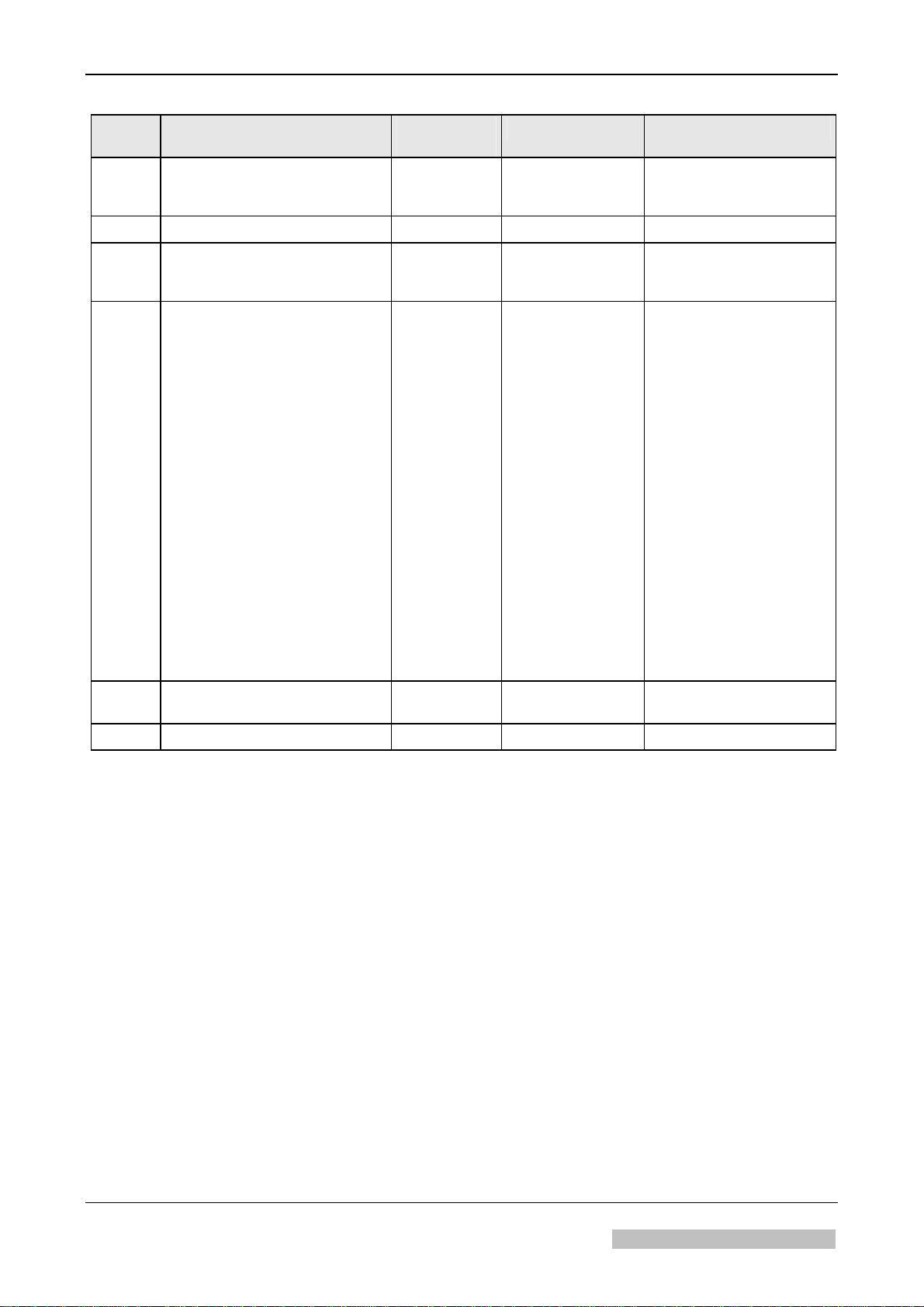
Checklist for Completeness
Chapter Order number / Designation Revision
of document
Approval date Pages
10 DD+DIS324.00E
DD+DIS088.00M
DD+DIS195.00M
11 DD+DIS076.04E 3 2004-08-06 11/I, 11/1 – 11/7
12 DD+DIS186.04E 4 2004-08-06 Cover sheet, 12/I,
13 SB 01 DD+DIS086.01E
SB 02 DD+DIS170.01E
SB 03 DD+DIS019.02E
SB 04 DD+DIS033.02E
SB 05 DD+DIS027.02E
SB 06 DD+DIS239.02E
SB 07 DD+DIS314.02E
SB 08 DD+DIS071.03E
SB 09 DD+DIS099.03E
SB 10 DD+DIS132.03E
SB 11 DD+DIS305.03E (obsol.)
SB 12 DD+DIS327.03E
SB 13 DD+DIS201.04E
SB 14 DD+DIS248.04E
SB 15 DD+DIS276.04E
SB 16 DD+DIS280.04E
SB 17 DD+DIS215.04E
SB 18 DD+DIS428.04E (obsol.)
SB 19 DD+DIS190.05E
SB 20 DD+DIS320.05E
SB 21 DD+DIS040.06E
SB 22 DD+DIS005.07E
SB 23 DD+DIS222.07E
0 2001-01-16
2000-03-20
2000-08-03
0
0
0
0
0
0
0
0
0
0
0
0
0
0
0
0
0
0
0
0
0
0
0
2001-03-28
2001-08-02
2002-02-13
2002-02-26
2002-02-26
2002-09-23
2002-12-17
2003-03-24
2003-04-29
2003-06-16
2003-10-24
2003-11-19
2004-08-04
2004-08-04
2004-08-31
2004-08-31
2004-07-06
2004-12-23
2005-07-14
2006-04-03
2006-01-16
2007-01-29
2007-10-22
10/I
1 - 2
1 - 2
12/1 – 12/27
Annex Page 1-3
13/1-/5
13/1
13/1-3
13/1-3
13/1-10
13/1-/3
13/-5
13/1-4
13/1-4
13/1-4
13/1-3
13/1-/3
13/1-3
13/1-3
13/1-3
13/1-2
13/1-2
13/1-4
13/1-3
13/1-2
13/1-4
13/1-3
13/1-15
14 DD+DIS187.04E 5 2004-08-06 Cover sheet, 14/I – 14/II,
14/1 – 14/41
15 Intentionally left blank - - -
The controlled version of this document resides on MedNet. Any printed copy of this document is uncontrolled.
DOCUMENT CONTROL NOTE:
2011-09-02 Classic E.O.S. / Classic E.O.S. CL Chapter 0 / 3
Type 5270/100/105 Agfa Company Confidential
Page 14
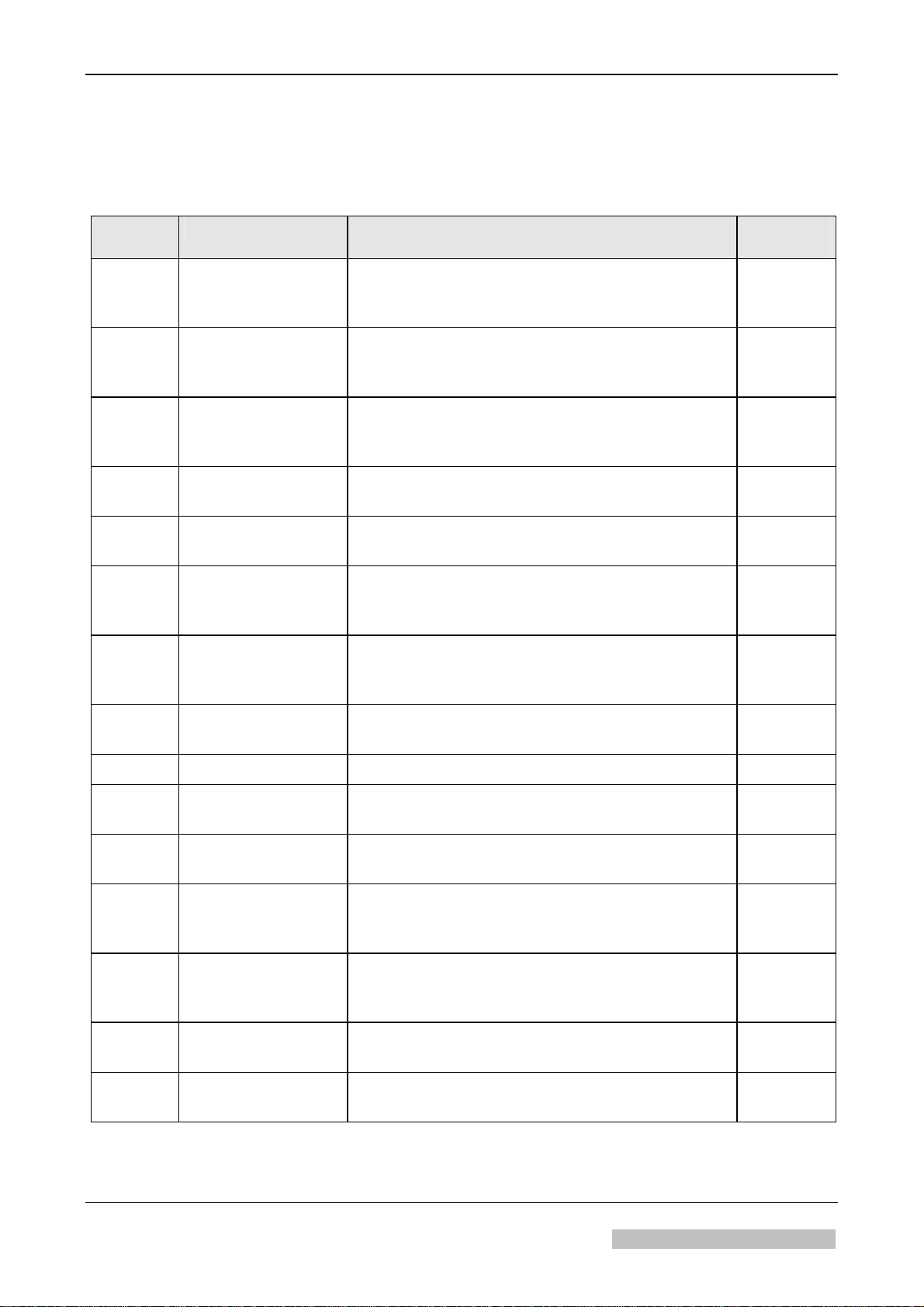
List of Service Bulletins
List of Service Bulletins Classic E.O.S. / Classic E.O.S. CL
Type 5270/100/105
• The following SB’s are valid:
SB Document number Contents Revision
of document
SB 01 DD+DIS086.01E Software Versions: CEOS 1601
(CM+9.5270.7762.0); MEOS 1201
(CM+9.5272.7760.0)
SB 02 DD+DIS170.01E Introduction of the Cross Flow Fan
CM+9.0431.7237.0; Introduction of the Drive
Motor with gear CM+9.5270.1560.1
SB 03 DD+DIS019.02E Introduction of the Software Version
MEOS_1301 EPROM Set IC50/51,
Order Number: CM+9.5272.9010.0
SB 04 DD+DIS033.02E Introduction of improved circulation pumps in the
developer, fixer, and water tank
SB 05 DD+DIS027.02E Introduction of Software CEOS_1714
Order Number: CM+9.5270.9350.0
SB 06 DD+DIS239.02E Introduction of Software MEOS 1401
(Order No.: CM+9.5272.9010.1) and CEOS_1801
(Order No.: CM+9.5270.9350.1)
SB 07 DD+DIS314.02E Overview of Software Versions for
Classic E.O.S. Type 5270/100 and
Classic E.O.S. Type 5270/105
SB 08 DD+DIS071.03E Solution for frequent failures of the
Control Board GS1
0
0
0
0
0
0
0
0
SB 09 DD+DIS099.03E Measures against corrosion 0
SB 10 DD+DIS132.03E Introduction of SOFTWARE EOSUNIV 1007
0
(IC50 / IC51) Order number: CM+9 5270 9350 2
SB 12 DD+DIS327.03E Error Message during the “Teach In” Procedure
0
after Replacement of the GS1 PCB
SB 13 DD+DIS201.04E Introduction of
0
Processor Software EOSU_1102
Order Number: CM+9 5270 9350 4
SB 14 DD+DIS248.04E Introduction of the Control Board GS1
0
incl. EOSU_1102 (Modification Kit)
Order Number: CM+9 5270 7960 0
SB 15 DD+DIS276.04E Magnet Not Sufficiently Fixed in the
0
Machine Cover
SB 16 DD+DIS280.04E Introduction of Anti-Algae-Unit
0
Type: 5279/100
The controlled version of this document resides on MedNet. Any printed copy of this document is uncontrolled.
DOCUMENT CONTROL NOTE:
2011-09-02 Classic E.O.S. / Classic E.O.S. CL Chapter 0 / 4
Type 5270/100/105 Agfa Company Confidential
Page 15
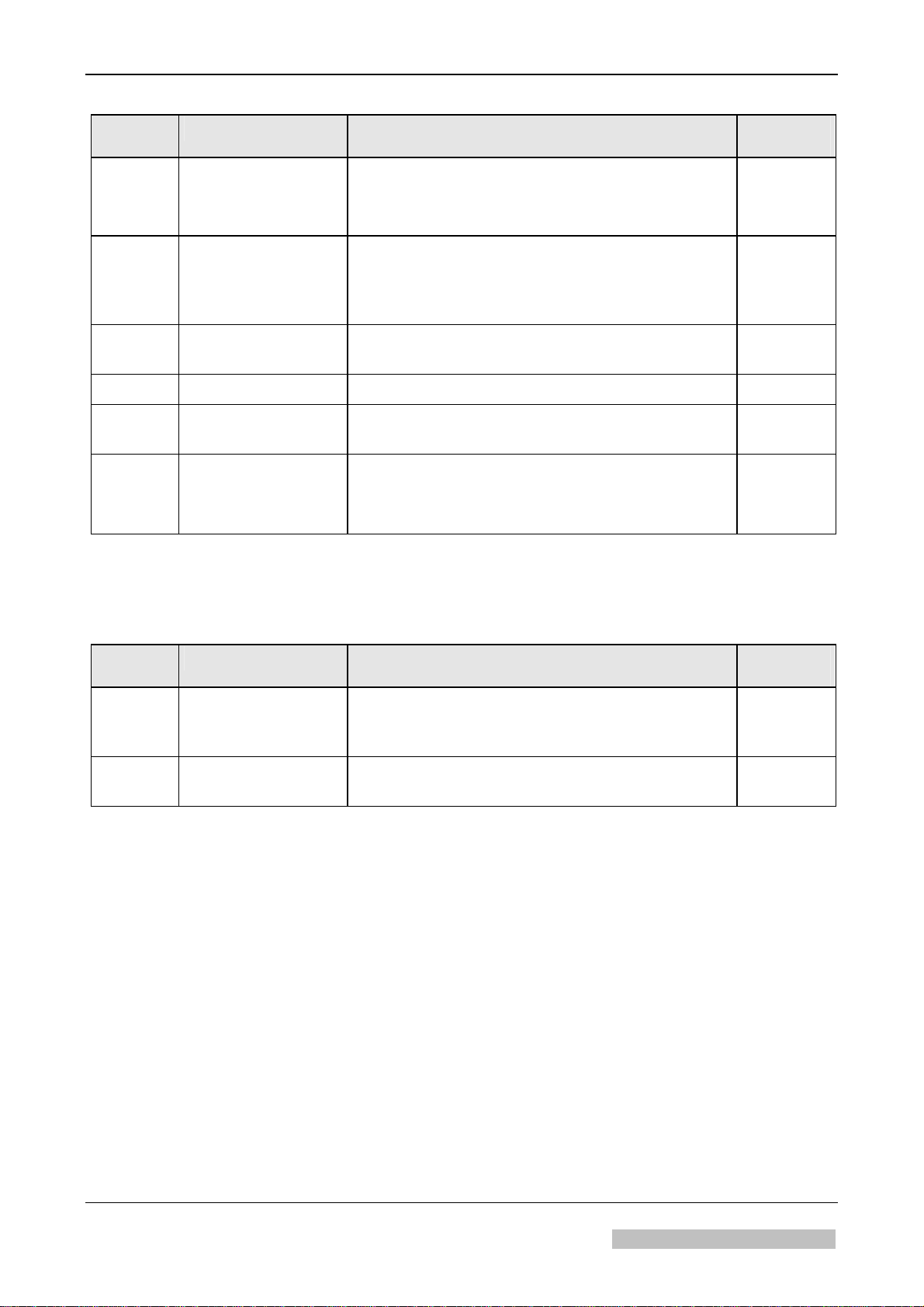
List of Service Bulletins
SB Document number Contents Revision
of document
SB 17 DD+DIS215.04E Installation of the Tank Reinforcement
CM+9 5270 9071 0
This document describes the installation of a tank reinforcement that
prevents bending of the intermediate tank walls.
SB 19 DD+DIS190.05E Service 574:
“IR heater in dryer defective”
due to measuring error caused by wrong cable
positioning at the Current Sensor Board PCB2.
SB 20 DD+DIS320.05E SERVICE 510 and/or 575
Defective Cross-Flow Fan 0.M1/1.M1
SB 21 DD+DIS040.06E New Option: Deactivating the Water Pump. 0
SB 22 DD+DIS005.07E Manufacturer’s Warning about Ground Fault
Interrupters with Possibly Higher Trigger Current.
SB 23 DD+DIS222.07E Empty Battery of the Clock Chip Causes Incorrect
Date and Incorrect Time Display Followed by a
Calibration Request *
* Calibration request only from Software Version CEOS 1714 or EOSU 1007 on
• The following SB's are no longer valid
(integrated in the chapters of the Service Manual, or technically obsolete):
0
0
1
0
0
SB Document number Contents Revision
SB 11 DD+DIS305.03E Error Message After Replacement of the Board
GS1 and “Teach In” Procedure
in the Service Menu
SB 18 DD+DIS428.04E Failure of a Crossflow Fan Preventive Measure to
Avoid Failure of the Fan 0M1
of document
0
0
The controlled version of this document resides on MedNet. Any printed copy of this document is uncontrolled.
DOCUMENT CONTROL NOTE:
2011-09-02 Classic E.O.S. / Classic E.O.S. CL Chapter 0 / 5
Type 5270/100/105 Agfa Company Confidential
Page 16

Page 17

Preinstallation
1
Section 1
contains all important preinstallation data for the machine:
• Inspection of the packing material for transport damage and complete
shipment
• Unpacking and packing notes
• Machine positioning at the installation site
• Requirements on the installation site
• Connection data (electrical, if necessary, connections to chemical supply and
disposal, fiber optic connections)
Make sure to study this section and before starting the installation check if all
preparations have been made as specified.
Section 1
Page 18

Page 19

DD+DIS076.04E Installation Preparations
Chapter 1
Contents
1 Safety.............................................................................................................1
2 Installation Preparations..............................................................................3
2.1 Machine Transport...................................................................................................3
2.2 Checking the Shipment ...........................................................................................
2.3 Transport Check.......................................................................................................
2.4 Checking Safety Indicators on the Machine Box..................................................
2.5 Transport Path..........................................................................................................
2.6 Required Space at the Installation Site..................................................................
2.6.1 Classic E.O.S. Type 5270/100..................................................................................
2.6.2 Classic E.O.S. CL Type 5270/105..........................................................................
2.7 Unpacking.................................................................................................................
2.8 Checking the Type Label.........................................................................................
2.9 Checking the Accessory Box..................................................................................
3
3
3
4
5
5
6
7
8
8
3 Technical Data...............................................................................................9
3.1 Electrical Data ..........................................................................................................9
3.2 Ambient and Climatic Conditions...........................................................................
9
4 Dimensions and Weights ...........................................................................11
4.1 Classic E.O.S. Type 5270 / 100..............................................................................11
4.2 Classic E.O.S. CL Type 5270/105..........................................................................
11
5 Machine Standards and Directives............................................................12
5.1 Radio Interference Suppression...........................................................................12
5.2 Electromagnetic Compatibility..............................................................................
5.3 Certificates and Guidelines...................................................................................
12
13
Edition 5, Revision 3 Classic E.O.S. / Classic E.O.S. CL Chapter 1 / I
Agfa Company Confidential (Type 5270 / 100 / 105)
Page 20

Page 21

DD+DIS076.04E Installation Preparations
1 Safety
General safety instructions
• The machine must only be used as described in the operating instructions. Any other use
may result in damage to the machine or may affect the machine function with the
consequence that the machine can no longer be used as intended, and therefore presents
a risk for patients, user, and environment.
• The machine must only be operated by qualified personnel trained on the machine.
• Ensure that only trained personnel have access to the machine.
• Ensure that the machine can always be supervised and that any tampering is prevented.
• Repairs or modifications on the machine must only be performed by trained service
personnel authorized by Agfa.
• In case of visible damage on the machine housing the machine must not be operated or
used, and must immediately be disconnected from the mains.
• Built-in or external safety devices must not be circumvented or disabled.
• Disconnect the machine from the mains before starting any maintenance.
• If a mains connection is absolutely required these maintenance routines must only be
made by specially trained personnel.
• Like all technical devices, this machine must be operated, cared for and serviced correctly
as described in the documentation provided with the machine.
• If the machine is not operated correctly, or if it is not serviced correctly, Agfa will not be
liable for any resulting disturbances, damage or injuries.
• When installing the machine make sure that either the mains plug or an all-cable
disconnecting device is provided in the internal installation close to the machine and is
easily accessible.
• If the machine is connected with other components or assemblies, Agfa will guarantee
safety only for combinations that are approved by Agfa.
• In case of conspicuous smoke or noises, immediately disconnect the machine from the
mains.
Special instructions for the handling of chemicals
• When handling chemicals, always observe the applying safety and environmental
regulations, as well as the operating and warning instructions pertaining to these
chemicals.
• Wear stipulated protective clothing and safety goggles.
• When disposing of chemicals and waste water, you must comply with the local regulations
concerning waste water and environmental protection.
• If photo-chemicals get in your eyes, proceed exactly according to the warning instructions
and/or the instructions published by the manufacturers of the chemicals. If required,
immediately rinse your eyes with cold water. Afterwards see the doctor immediately.
• Avoid inhaling of chemical fumes. Make sure that there is sufficient ventilation at the
installation site of the machine, i.e. an air exchange that is at least ten times the room
volume per hour.
• Always comply with the installation instructions.
• Verify tightness of all connections for chemicals and water, as well as waste water, on the
machine in regular intervals. At least check whenever suggested in the operating
instructions and/or service instructions.
Edition 5, Revision 3 Classic E.O.S. / Classic E.O.S. CL Chapter 1 / 1
Agfa Company Confidential (Type 5270 / 100 / 105)
Page 22

Installation Preparations DD+DIS076.04E
• If solution gets into the inside of the machine (e.g. by spilling during tank filling), the
machine must immediately be disconnected from the mains and cleaned thoroughly by the
service personnel.
• Do not use chlorine or chlorine containing substances in the film processor. The use of
chlorine or chlorine containing substances may cause irreparable damage in your film
processor. Use of these substances may result in termination of the manufacturer’s
warranty.
The film processor must not be operated in the direct vicinity of the patients as
defined in EN60601-1 and IEC 601-1.
Chapter 1 / 2 Classic E.O.S. / Classic E.O.S. CL Edition 5, Revision 3
(Type 5270 / 100 / 105) Agfa Company Confidential
Page 23

DD+DIS076.04E Installation Preparations
2 Installation Preparations
2.1 Machine Transport
The freight forwarder transports the machine up to the final installation site. The responsible
technician should be present during delivery.
2.2 Checking the Shipment
Compare the labels on the boxes with the customer’s order list and the bill of lading.
2.3 Transport Check
Check the packing material for visible transport damage:
• dented edges
• damaged box
• torn fixing elements (metal straps, screws)
2.4 Checking Safety Indicators on the Machine Box
The machine is shipped on a pallet.
The box has a TILTWATCH indicator (A), a SHOCKWATCH indicator (B), and a packing seal
(C) attached.
They are attached to the outside of the box and indicate if the machine has been tilted, was
exposed to shocks, or has been opened during transport.
Figure 1 - 1
Edition 5, Revision 3 Classic E.O.S. / Classic E.O.S. CL Chapter 1 / 3
Agfa Company Confidential (Type 5270 / 100 / 105)
Page 24

Installation Preparations DD+DIS076.04E
If the machine was tilted, the arrow head in the
circle of the TILTWATCH indicator (A) changed
from white to red.
A
5270_10001_002.cdr
Figure 1 - 2
If the machine was subjected to shocks, the
NC.
I
square field in the middle of the
SHOCKWATCH indicator (B) changed from
white to red.
OF MEDIA RECOVERY,
PRODUCT
INDICATOR INDIKATOR
ROUGH HANDLING WILL CHANGE INDICATOR TO
IMPORTED
BRIGHT RED. IF SHOCKWATCH IS RED NOTE
ON BILL OF LADING. INSPECTION MAY
B
Y / IMPORTIERT D
B
Model/Modell L-65
R R
BE WARRENTE D.
U
RCH
D
A
L
LA
S, TX
.
U
.S.
P
AT.
#
KFURT
N
H, FRA
GMB
X
E
KON
5270_10001_003.cdr
40
68613
IN
A
M
/
Figure 1 - 3
Note possible damage on the installation report!
In case of a damaged machine make sure to keep the packing material for proof
(transport insurance)!
Send the damage report to the insurance company.
2.5 Transport Path
The film processor must fit through all doors and hallways on its transport path to the
installation site.
Classic E.O.S. / Classic E.O.S. CL
smallest door width
(Type 5270/100/105)
without pallet
with pallet
at least 73 cm (29 inch)
at least 82 cm (32 inch)
Chapter 1 / 4 Classic E.O.S. / Classic E.O.S. CL Edition 5, Revision 3
(Type 5270 / 100 / 105) Agfa Company Confidential
Page 25

DD+DIS076.04E Installation Preparations
2.6 Required Space at the Installation Site
2.6.1 Classic E.O.S. Type 5270/100
The required floor space for the film processor (with feed table, chute and the required
clearance on the left) is 1270 x 860 mm (50.03 x 33.88 inch).
The free space indicated in the illustration must be guaranteed for repair and maintenance,
otherwise the time required for service will increase.
Optimum dimensions:
We recommend to plan on this free space.
Minimum dimensions:
Do not go below this minimum space.
2340 (92.19)
5270_10001_004.cdr
310
(12.21)
A
Figure 1 - 4
(A) Operation side
Dimensions in mm (inch)
Edition 5, Revision 3 Classic E.O.S. / Classic E.O.S. CL Chapter 1 / 5
Agfa Company Confidential (Type 5270 / 100 / 105)
Page 26

Installation Preparations DD+DIS076.04E
2.6.2 Classic E.O.S. CL Type 5270/105
The required floor space for the film processor in combination with the Laser Imager LR3300
(with feed table, chute and the required clearance on the left) is 1700 x 860 mm (66.98 x 33.88
inch). In case of an installation of the Laser Imager LR3300 or another daylight system
observe the installation documentation enclosed with the machine.
The free space indicated in the illustration must be guaranteed for repair and maintenance,
otherwise the time required for service will increase.
3120 (122.92)
Optimum dimensions:
We recommend to plan on this free space.
Minimum dimensions:
Do not go below this minimum space.
2710 (106.77)
1910 (75.25)
860 (33.88)
2120 (83.52)
380
1700 (66.98)
(14.97)
40 (1.57)
600
740 (29.15)
400
(15.76)
(23.64)
1710 (67.37)
600
(23.64)
A
400
(15.76)
740 (29.15)
700 (27.58)
300
(11.82)
Figure 1 - 5
(A) Operation side
Dimensions in mm (inch)
600 (23.64)
1000 (39.4)
LR3300
5270_10001_005.cdr
A
Chapter 1 / 6 Classic E.O.S. / Classic E.O.S. CL Edition 5, Revision 3
(Type 5270 / 100 / 105) Agfa Company Confidential
Page 27
DD+DIS076.04E Installation Preparations
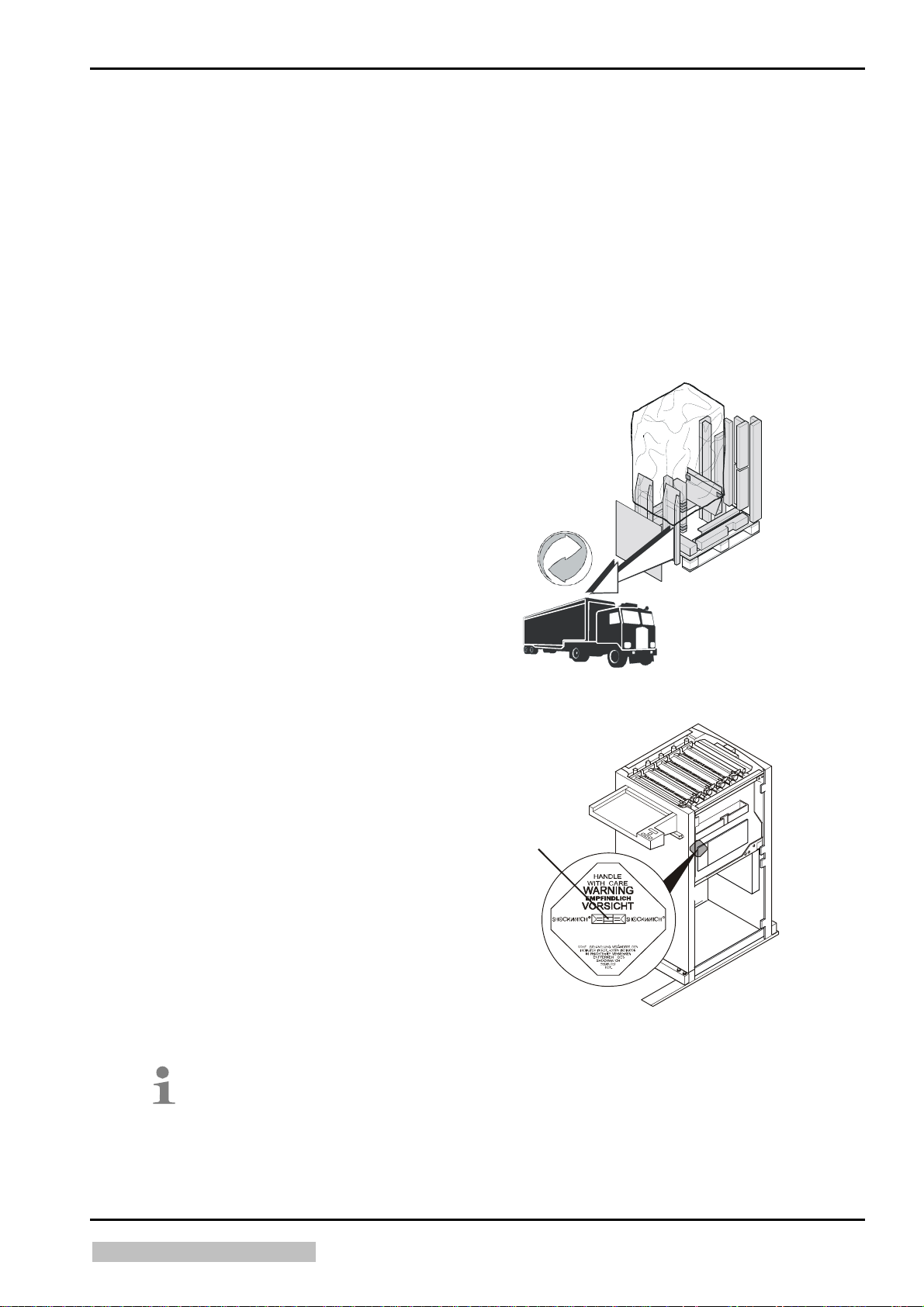
2.7 Unpacking
Unpack according to the illustrated instructions attached to the outside of the machine and
enclosed in the box.
Required tools:
• Knife, scissors, or side cutting pliers to cut the straps
• Phillips screwdriver size 2
• Wrench size 10 mm
• Wrench size 13 mm
• Wrench size 17 mm
• Screwdriver 10 mm
• The forwarder will take back the packing
material and dispose it in compliance with the
local regulations.
527001vh.cdr
Figure 1 - 6
• Check the SHOCKWATCH
indicator (A) inside the machine.
If the machine was subjected to shocks, the
square field in the middle of the
SHOCKWATCH indicator (A) changed from
white to red.
A
C
PRODU
INDICATOR INDI KA TO R
ROUGH HANDLING WILL CHANGE INDICATOR TO
I
M
P
O
R
T
.
D
ALL
INC
,
AS,
TX.
ECOVERY
R
F MEDIA
O
T
BRIGHT RED. IF SHOCKWATCH IS RED NOTE
ON BILL OF LADING. INSPECTION MAY
E
D
B
Y
/
IM
P
O
R
T
I
E
R
U
Model/Modell L- 65
R R
BE WARRENTED.
T
D
EX GMBH, FRANKFURT /
U
N
R
C
KO
H
.
S.
P
A
T.
#
40
6
86
1
3
MAIN
5270_10001_006.cdr
Figure 1 - 7
Note possible damage on the installation report!
In case of a damaged machine make sure to keep the packing material for proof
(transport insurance)!
Send the damage report to the insurance company.
Edition 5, Revision 3 Classic E.O.S. / Classic E.O.S. CL Chapter 1 / 7
Agfa Company Confidential (Type 5270 / 100 / 105)
Page 28
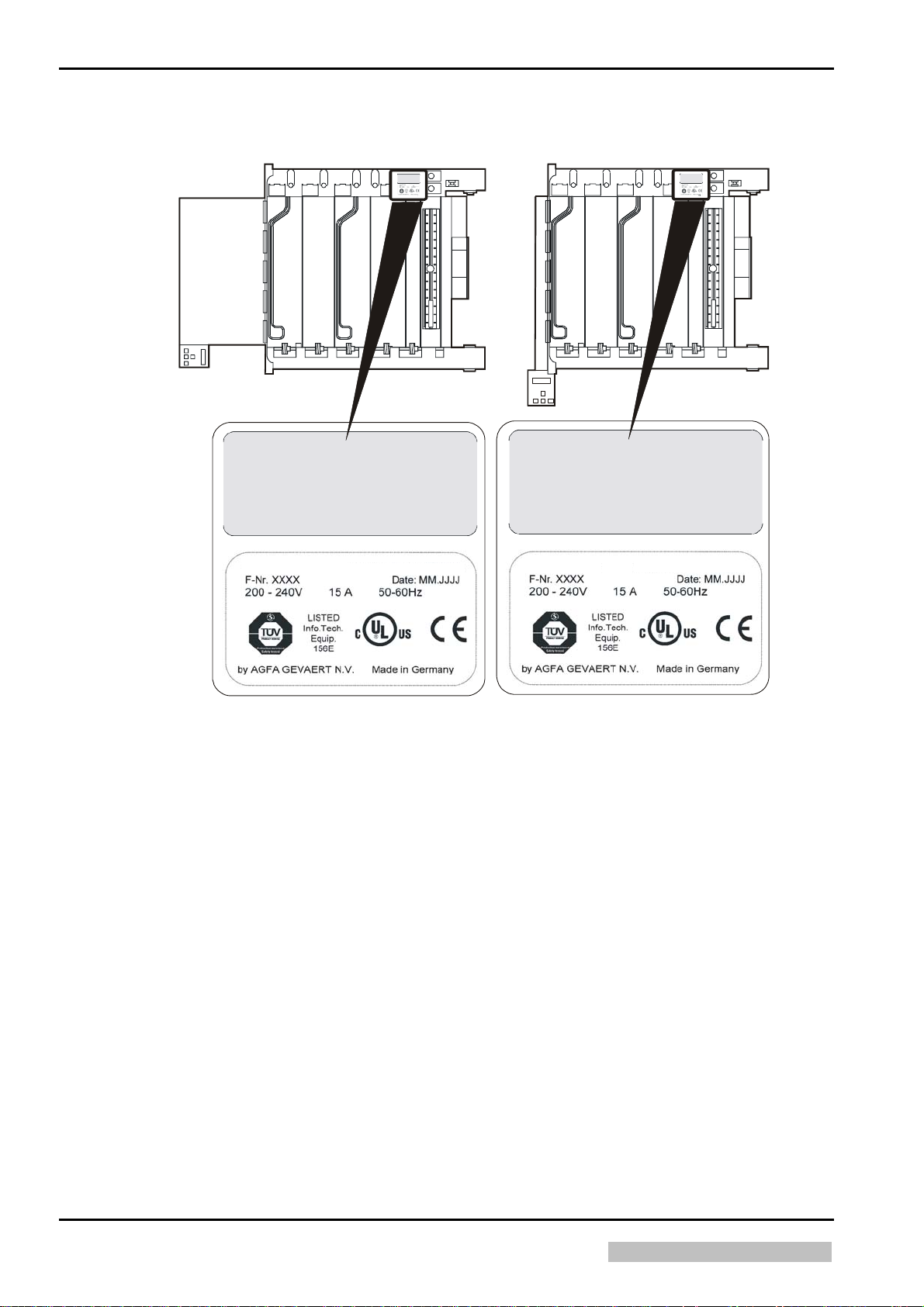
Installation Preparations DD+DIS076.04E
2.8 Checking the Type Label
Classic E.O.S. Type 5270/100 Classic E.O.S. CL Type 5270/105
This device complies with Part 15 of the FCC Rules.
This device complies with Part 15 of the FCC Rules.
Operation is subject to the following two conditions:
(1) this device may not cause har mf ul interference,
and (2) this device must accept any interference
received, including interference that may cause
undesired operation.
Type 5270/100
Operation is subject to the following two conditions:
(1) this device may not cause harmful interference,
and (2) this device must accept any interference
received, inc lu ding interference that may cause
undesired operation.
1009
527301zy.cdr
FUJIFILM FPM 3800AD
11.1999
This device complies with Part 15 of the FCC Rules.
Operation is subject to the following two conditions:
(1) this device may not cause har m ful in terference,
and (2) this device must accept any interference
received, including interference that may cause
undesired operation.
Type 5273/105
Type 5270/105
This device complies with Part 15 of the FCC Rules.
Operation is subject to the following two conditions:
(1) this device may not cause harmful interference,
and (2) this device must accept any interference
received, inc lu ding interference that may cause
undesired operation.
1009
527301zy.cdr
FUJIFILM FPM 3800AD
11.1999
Figure 1 - 8
Explanation of the type label:
F-Nr. xxxx:
Date: MM.JJJJ:
V 200-240 15 A 50-60 HZ:
• Compare the information at "TYPE" and "F-Nr." on the type label with the bill of lading.
• Compare the rated voltage with the power supply at the installation site.
2.9 Checking the Accessory Box
• Compare the contents of the accessory box with the list of contents (included in the
enclosed documentation pack).
5270_10001_001.cdr
is the consecutive manufacturing number (SN)
is the production date (month/year)
mains supply
Chapter 1 / 8 Classic E.O.S. / Classic E.O.S. CL Edition 5, Revision 3
(Type 5270 / 100 / 105) Agfa Company Confidential
Page 29

DD+DIS076.04E Installation Preparations
3 Technical Data
3.1 Electrical Data
This is a summary of the technical data which serve to inspect the installation site.
For further technical, electrical, and climatic data and information regarding the
ambient conditions refer to Chapter 14.
Power connection
1N~ 230 - 240 V; 50/60 Hz (200 - 240 V)
Power consumption:
Standby (room temperature ~ 20 °C)
Operation (film processing)
Fuse protection
Leakage current towards PE
Main breaker
Safety rules
3.2 Ambient and Climatic Conditions
Ventilation
Avoid inhaling of chemical fumes. Make sure that there is sufficient
ventilation at the installation site of the machine, i.e. an air exchange
that is at least ten times the room volume per hour.
0.45 kW/h
2.9 kW/h (10440 kJ/h)
15 A / 16 A
< 3.5 mA
Upon machine installation it must be ensured that
either the mains connector or an all-pole circuit
breaker for the installation on site is located close
to the machine and easily accessible.
Electrical installations in the installation room must
be incompliance with IEC 364 (VDE 0100 / 0107).
A GFI switch: (I
664) is integrated in the machine.
= 30 mA in compliance with VDE
N
Film run
into the room 900 W / 3240 kJ/h
total 2100 W / 7560 kJ/h
Exhaust
Edition 5, Revision 3 Classic E.O.S. / Classic E.O.S. CL Chapter 1 / 9
Agfa Company Confidential (Type 5270 / 100 / 105)
Light-tightness
Acoustic test
ISO 7779 (airborne
noise)
Heat emission
(approx. values)
maximum 2500 Lux
during standby max. 35 dB (A)
during film cycle max. 48 dB (A)
Standby
(max.)
(max.)
connection
into the room 250 W / 900 kJ/h
into the connected exhaust 1200 W / 4320 kJ/h
Integrated exhaust in the dryer is a standard feature.
During film cycle the exhaust runs at full capacity.
During standby mode the exhaust can be set to halfcapacity via the service program.
Page 30

Installation Preparations DD+DIS076.04E
Room temperature
Relative humidity
Floor conditions
Floor load
Cleaning sink
min. 10 °C (50 °F), max. 30 °C (86 °F)
Room temperature min. 5 °C (41 °F) below the set developer
temperature
min. 10 %, max. 80 %, no condensation
Waterproof, chemical-resistant floor covering
(pH value 4 - 11)
A floor drain close to the film processor is recommended.
50 N / cm² (7.75 N / in²)
A cleaning sink with water tap and hose shower should be provided
for maintenance work.
Minimum inside dimensions of the sink:
Width
Depth
Height
70 cm (27.56 inch)
40 cm (15.75 inch)
20 cm (7.87 inch)
Chapter 1 / 10 Classic E.O.S. / Classic E.O.S. CL Edition 5, Revision 3
(Type 5270 / 100 / 105) Agfa Company Confidential
Page 31
DD+DIS076.04E Installation Preparations
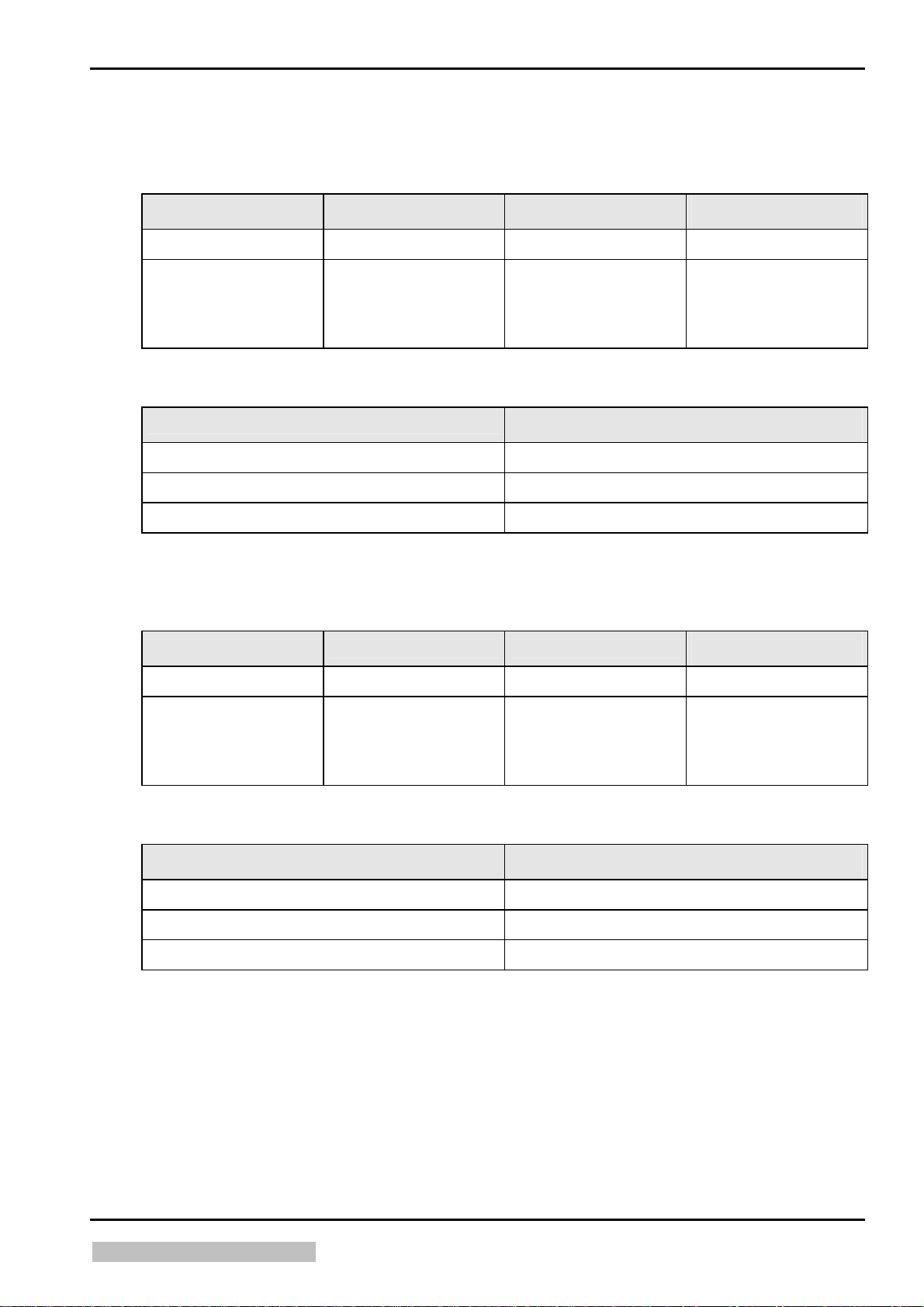
4 Dimensions and Weights
4.1 Classic E.O.S. Type 5270 / 100
Dimensions
Length mm (inch) Width mm (inch)
Height mm (inch)
incl. packing box
without packing
material
(with feed table and
chute)
with packing material
without packing material
with full tanks
Weight
1200 (47.28) 800 (31.52) 1460 (57.52)
1270 (50.03) 710 (27.97) 1130 (44.52)
Weight approx. kg (lbs)
200 (441)
135 (297)
165 (364)
4.2 Classic E.O.S. CL Type 5270/105
Dimensions
incl. packing box
Length mm (inch) Width mm (inch)
1200 (47.28) 800 (31.52) 1460 (57.52)
Height mm (inch)
without packing
material
(with docking unit and
chute)
with packing material
without packing material
with full tanks
Weight
1070 (42.15) 710 (27.97) 1130 (44.52)
Weight approx. kg (lbs)
200 (441)
135 (297)
165 (364)
Edition 5, Revision 3 Classic E.O.S. / Classic E.O.S. CL Chapter 1 / 11
Agfa Company Confidential (Type 5270 / 100 / 105)
Page 32

Installation Preparations DD+DIS076.04E
5 Machine Standards and Directives
Europe
EN 60950 / A11 1997 "Safety of Information Technology Equipment"
(Identical with IEC 950: 1992 and with VDE 0805/ 11. 97).
USA
UL 1950 3. July 1995 "Safety of Information Technology Equipment, Including Electrical
Business Equipment"
Canada
CSA 22.2 No. 950 - 95 "Safety of Information Technology Equipment, Including Electrical
Business Equipment”
5.1 Radio Interference Suppression
Europe
In compliance with EN 50081-1: 1992 "Generic Standard for Emission Requirements",
(identical with VDE 0839, Part 81-1/ 03. 93)
EN 55011 1998, Class B "Radio Disturbance Characteristics of Medical Equipment"
(corresponds to VDE 0878, Part 22 / 04.98)
For equipment in residential areas, business and commercial areas, and in doctors’ offices.
North-America (USA, Canada)
US Standard FCC 47 Part 15, Subchapter B, Class A / Edition 8/ 1976
Equipment considered “Non-Household Appliances”
5.2 Electromagnetic Compatibility
EMVG (German Electromagnetic Compatibility Act) and
EC Regulation 89 / 336 / EEC; EN 50082-1: 1997
EN 61000-3-2 “Limit Values for Harmonic Emissions”
EN 61000-3-3 “Limit Values for Flicker”
Chapter 1 / 12 Classic E.O.S. / Classic E.O.S. CL Edition 5, Revision 3
(Type 5270 / 100 / 105) Agfa Company Confidential
Page 33

DD+DIS076.04E Installation Preparations
5.3 Certificates and Guidelines
CE Medical Device Directive 93/42 EEC
TÜV Product Service Mark "Design tested and monitored"
UL Approbation E 477 50 (M)
C-UL Approbation E 477 50 (M)
"Technical directives for drinking
DIN 1988, Part 4/ 1988 / EN 1717:2001
water installations, protection
against reflux”
General conditions and
administrative regulations for
Appendix 53 – Photographic Processes
(silver halide photography)
minimum requirements on the
disposal of waste water into
public waters, dated 31.01.1994
(Germany)
Ministre de l’environment
(France)
Rubrique No. 2950 2950
Maximum water consumption for
- single-sided emulsions must not exceed 15 l/m
- double-sided emulsions must not exceed 30 l/m
2
*
2
*
* activated in the program <Service Settings /
Replenishment / Wat. Repl. Value>
Edition 5, Revision 3 Classic E.O.S. / Classic E.O.S. CL Chapter 1 / 13
Agfa Company Confidential (Type 5270 / 100 / 105)
Page 34

Page 35

Controls and Connections
2
Section 2
describes the controls and the connectors of the machine:
• Position and function of the controls
• Layout of the connectors and their modalities
Section 2
Page 36

Page 37

DD+DIS076.04E Controls and Connections
Chapter 2
Contents
1 Control Panel...................................................................................................1
1.1 4-Key Control Panel................................................................................................... 1
1.2 3-Key Control Panel...................................................................................................
2 Switches ..........................................................................................................3
2.1 Machine Switches ...................................................................................................... 3
2.2 Safety Switches..........................................................................................................
3 Installation Connections ................................................................................5
3.1 Installation through the Front Panel
(only for Classic E.O.S. Type 5270/100)...................................................................
3.2 Installation through the Bottom................................................................................
3.2.1 Classic E.O.S. (Type 5270/100)...................................................................................
3.2.2 Classic E.O.S. CL (Type 5270/105).............................................................................
2
4
5
6
6
7
Edition 5, Revision 3 Classic E.O.S. / Classic E.O.S. CL Chapter 2 / I
Agfa Company Confidential (Type 5270 / 100 / 105)
Page 38

Page 39

DD+DIS076.04E Controls and Connections
1 Control Panel
1.1 4-Key Control Panel
Classic E.O.S. Type 5270 / 100
Classic E.O.S. CL Type 5270/105
A
Figure 2 - 1
(A)
LCD
The display window consisting of 2 lines with 16 characters each.
Back key
Press this key to exit an input window, dialog box, or a menu. If you press this key
in an input window any modifications made in this window will be canceled and
reset to the initial values.
Scroll keys
use these keys to scroll through the options in the menus or to change values in
input windows.
Enter / Confirmation key
Use this key to show the options in a menu or to confirm a dialog. A confirmed
dialog opens the corresponding input window. Entered data is confirmed and
accepted.
5270_10002_003.cdr
Edition 5, Revision 3 Classic E.O.S. / Classic E.O.S. CL Chapter 2 / 1
Agfa Company Confidential (Type 5270 / 100 / 105)
Page 40

Controls and Connections DD+DIS076.04E
1.2 3-Key Control Panel
A
5270_10002_005.cdr
Figure 2 - 2
(A)
LCD:
The display window consisting of 2 lines with 16 characters each.
Press this key to select a menu (Enter/Confirmation key).
Press this key to select parameters and special functions in the menus.
Press this key to close the menu.
Chapter 2 / 2 Classic E.O.S. / Classic E.O.S. CL Edition 5, Revision 3
(Type 5270 / 100 / 105) Agfa Company Confidential
Page 41
DD+DIS076.04E Controls and Connections
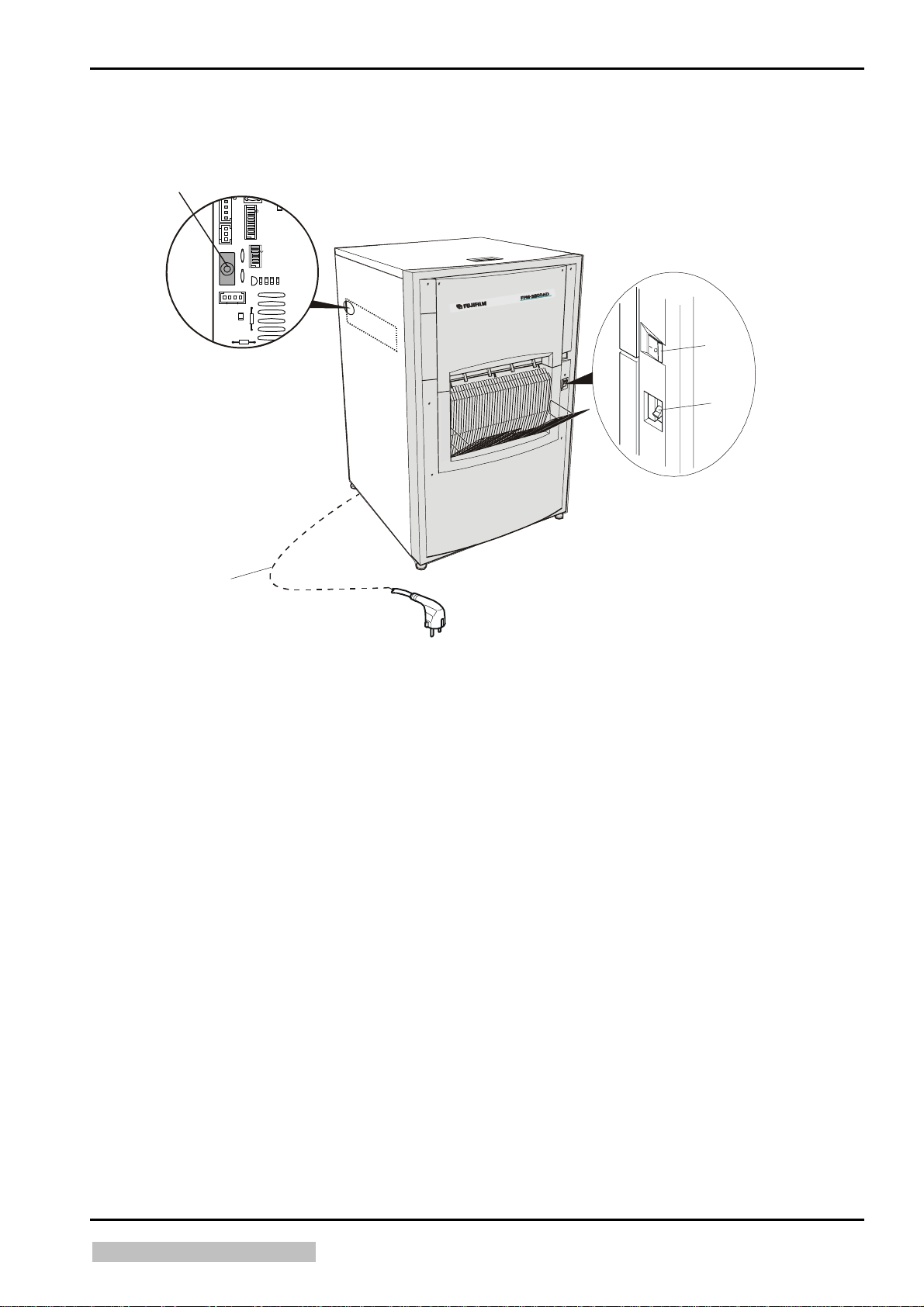
2 Switches
2.1 Machine Switches
D
ST56
ST66 ST55
S1
ST80
ST53
A
B
Figure 2 - 3
(A)
(B)
(C)
(D)
C
5270_10002_006.cdr
Main switch film processor
Ground fault interrupter (GFI switch)
Mains cable (VDE)
0.S1 Reset key GS1
CM+952707850_ (F8.5270.7750._ / F8.5270.7950._)
Edition 5, Revision 3 Classic E.O.S. / Classic E.O.S. CL Chapter 2 / 3
Agfa Company Confidential (Type 5270 / 100 / 105)
Page 42

Controls and Connections DD+DIS076.04E
2.2 Safety Switches
A
B
5273_10002_006.CDR
Figure 2 - 4
(A)
0.S2 Safety switch for the machine cover
(B)
0.S3 Safety switch for the dryer
The machine has two safety switches, which interrupt the circuit when the dryer is
opened or the machine cover is removed.
Even with interrupted safety switches 0.S2 (A) and/or 0.S3 (B), and the
main switch 0.S1 in off position, there is still voltage applied on the
following components as long as the power cord is plugged in:
• GFI switch 0.FI
• Main switch 0.S1
Chapter 2 / 4 Classic E.O.S. / Classic E.O.S. CL Edition 5, Revision 3
(Type 5270 / 100 / 105) Agfa Company Confidential
Page 43
DD+DIS076.04E Controls and Connections
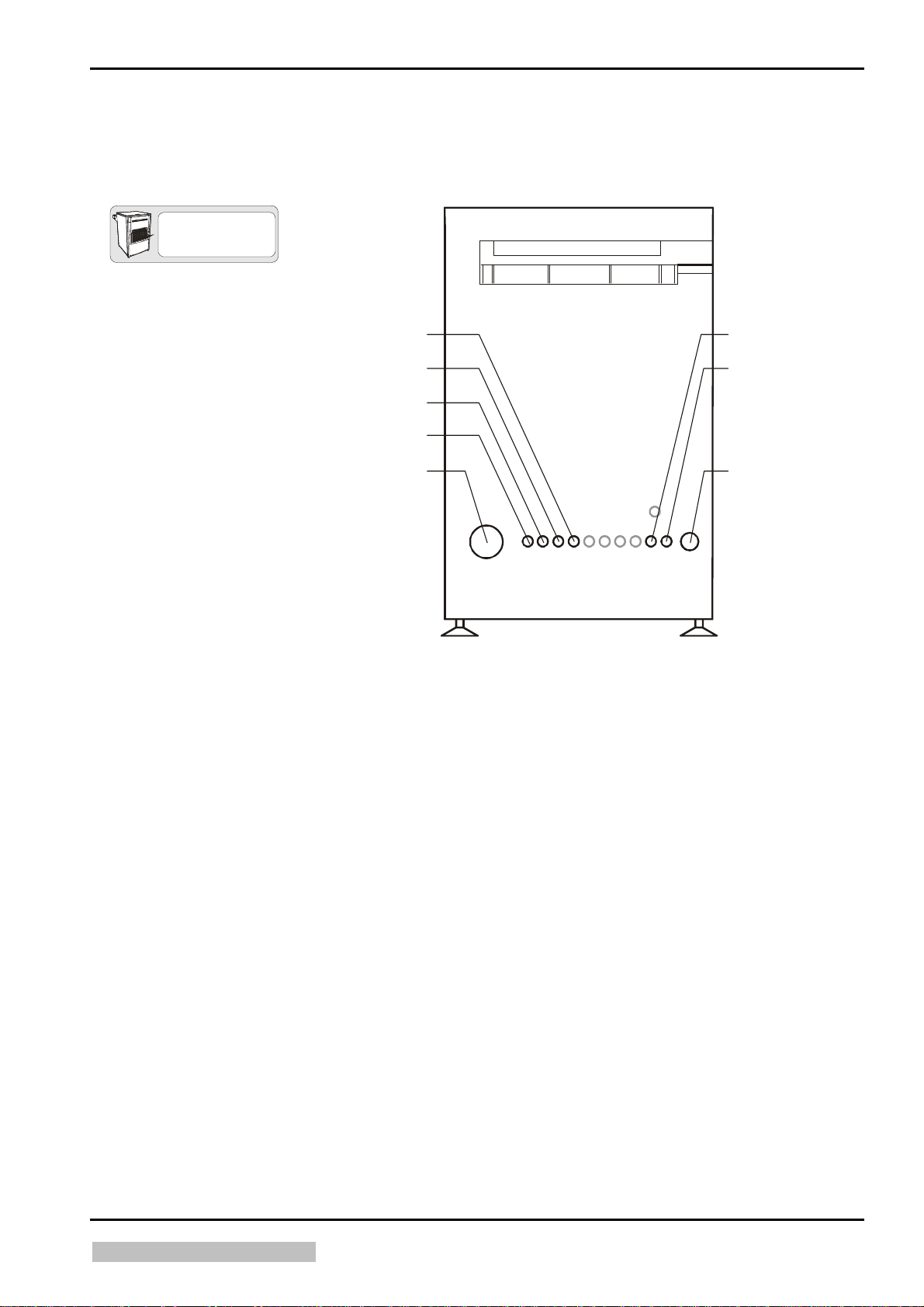
3 Installation Connections
3.1 Installation through the Front Panel (only for Classic E.O.S. Type 5270/100)
TYPE 5270/100
E
D
F
G
C
B
A
5273_10002_004.cdr
Figure 2 - 5
(A)
(B)
(C)
(D)
(E)
(F)
(G)
(H)
Exhaust connection
Developer overflow / drain (DEV)
Fixer overflow / drain (FIX)
Water overflow / drain (WAT)
Tank safety overflow (OVERFLOW)
Developer supply (DEV)
Fixer 2 supply (FIX)
Water supply (WAT)
H
Edition 5, Revision 3 Classic E.O.S. / Classic E.O.S. CL Chapter 2 / 5
Agfa Company Confidential (Type 5270 / 100 / 105)
Page 44

Controls and Connections DD+DIS076.04E
3.2 Installation through the Bottom
3.2.1 Classic E.O.S. (Type 5270/100)
TYPE 5270/105
FIX2 FIX1WAT DEV
I
BA
C
G
5270_10002_002.cdr
Figure 2 - 6
EHF
D
(A)
(B)
(C)
(D)
(E)
(F)
(G)
(H)
(I)
Exhaust connection
Developer overflow / drain (DEV)
Fixer overflow / drain (FIX)
Water overflow / drain (WAT)
Tank safety overflow (OVERFLOW)
Developer supply (DEV)
Fixer 2 supply (FIX)
Solenoid valve (and filter) water supply
Solenoid valve water drain (anti-algae)
Chapter 2 / 6 Classic E.O.S. / Classic E.O.S. CL Edition 5, Revision 3
(Type 5270 / 100 / 105) Agfa Company Confidential
Page 45

DD+DIS076.04E Controls and Connections
3.2.2 Classic E.O.S. CL (Type 5270/105)
TYPE 5270/100
FIX2 FIX1WAT DEV
I
DEHF
Figure 2 - 7
BA
C
G
5270_10002_004.CDR
(A)
(B)
(C)
(D)
(E)
(F)
(G)
(H)
(I)
Exhaust connection
Developer overflow / drain (DEV)
Fixer overflow / drain (FIX)
Water overflow / drain (WAT)
Tank safety overflow (OVERFLOW)
Developer supply (DEV)
Fixer 2 supply (FIX)
Solenoid valve (and filter) water supply
Solenoid valve water drain (anti-algae)
Edition 5, Revision 3 Classic E.O.S. / Classic E.O.S. CL Chapter 2 / 7
Agfa Company Confidential (Type 5270 / 100 / 105)
Page 46

Page 47

Installation / Machine Start-up
3
Section 3
describes the exact routines necessary to start the machine operation.
Before putting the machine in operation you should be familiar with
the information of section 2 (controls and connectors).
Section 3
Page 48

Page 49

DD+DIS076.04E Installation / Startup
Chapter 3
Contents
1 Notes on the "Installation and Startup Procedures" ...................................1
2 Installation.......................................................................................................1
2.1 Slacken the Lock Nuts (Synchro-Drive)................................................................... 2
3 Installation.......................................................................................................3
3.1 Replacing the VDE Power Cable by the UL Power Cable....................................... 3
3.2 Supply / Disposal through Lower Front Panel (only Standalone Version Type
5270/100)..................................................................................................................... 3
3.2.1 Instructions for breaking out the openings................................................................... 3
3.2.2 Required openings for standard installations............................................................... 4
3.2.3 Installing the exhaust connection................................................................................. 4
3.2.4 Installing supply hoses................................................................................................. 6
3.2.5 Installing the disposal hoses........................................................................................
3.3 Supply and Disposal through the Machine Bottom................................................ 9
3.3.1 Hose connections......................................................................................................... 9
3.3.2 Installing the exhaust connection...............................................................................
3.3.3 Installing the replenisher hoses dev / fix and the water supply..................................
3.3.4 Installing the disposal hoses......................................................................................
3.4 Connecting the Level Sensors................................................................................ 18
3.4.1 Replenisher tanks ...................................................................................................... 18
3.4.2 Mixer .......................................................................................................................... 19
3.4.3 Waste tanks ............................................................................................................... 19
3.5 Daylight / Darkroom Installation (only Stand-Alone Version Type 5270/100)..... 20
3.5.1 Machine in daylight, film feed in darkroom................................................................. 20
3.5.2 Machine in darkroom, film output in the daylight........................................................ 24
3.5.3 Light tight wall ............................................................................................................ 26
11
15
17
4 Operation Startup (SN higher than 2200 and Type 5270/105)...................28
8
4.1 Preparing the startup procedure ............................................................................ 28
4.2 Adapting the mains supply ..................................................................................... 28
4.3 Filling the developer and fixer tanks...................................................................... 29
4.4 Switch on the Machine ............................................................................................ 30
4.4.1 Setting time and date in the "Service Settings" program............................................ 30
Edition 5, Revision 3 Classic E.O.S. / Classic E.O.S. CL. Chapter 3 / I
Agfa Company Confidential (Type 5270 / 100 / 105)
Page 50

Installation / Startup DD+DIS076.04E
4.4.2 Resetting the service interval......................................................................................32
4.4.3 Setting all options in the "Service Settings" program (Software Version MEOS
1201) ..........................................................................................................................
4.4.4 Calibrating the supply rates of developer and fixer pumps.........................................
4.4.5 Execute a Teach In.....................................................................................................
4.4.6 Overview of the program "Test & Adjust" (Software Version MEOS 1201)................
4.4.7 Resetting infocounters................................................................................................
4.4.8 Important settings in the "Settings" program ..............................................................
4.4.9 Overview of the program "Info Counters" (Software Version MEOS 1201)................
4.4.10 Overview of the user interface for the "Settings" program (Software Version MEOS
1201) ..........................................................................................................................
35
37
39
43
45
46
35
37
5 Operation Startup (SN up to 2200) ..............................................................39
5.1 Adapting the mains supply......................................................................................39
5.2 Filling the developer and fixer tanks ......................................................................40
5.3 Switch on the Machine.............................................................................................41
5.4 Setup of process parameters ..................................................................................41
5.5 Calibration of the developer and fixer pumps .......................................................43
5.6 SETUP........................................................................................................................45
5.6.1 Default ........................................................................................................................52
5.6.2 Service Program: SETUP (Software Version: CEOS1402)........................................
5.7 Timer Setup...............................................................................................................59
5.8 Reset INFO ................................................................................................................60
53
6 Operation Start for all Machines with SNs up to 4500 or 1500 with 4-
Key Control Panel and Software EOSUNIV1007.........................................63
6.1 Preparing the startup procedure.............................................................................63
6.2 Adapting the mains supply......................................................................................63
6.3 Functional check of the GFI switch 0.FI .................................................................64
6.4 Filling the developer and fixer tanks ......................................................................65
6.4.1 Manual filling (in Type 5270/100 and Type 5270/105)................................................65
6.4.2 Automatic filling with the AUTOFILL function (only in Type 5270/105)......................66
6.5 Switching on the Machine........................................................................................66
6.6 Calibrating the replenishment rate of developer and fixer upon first startup ....67
6.7 Reset after switching on the machine ....................................................................72
6.8 BASEINIT...................................................................................................................73
6.8.1 Only execute a BASEINIT in case of:.........................................................................73
6.8.2 Initiate a BASEINIT:....................................................................................................73
6.9 System Settings........................................................................................................74
Chapter 3 / II Classic E.O.S. / Classic E.O.S. CL Edition 5, Revision 3
(Type 5270 / 100 / 105) Agfa Company Confidential
Page 51

DD+DIS076.04E Installation / Startup
6.9.1 Setting the software switches in the SERVICE program............................................ 74
6.9.2 Setting the process parameters on the control panel.................................................
6.9.3 Access to the SERVICE program ..............................................................................
6.9.4 Setting date and time.................................................................................................
6.9.5 Setting the service intervals in the SERVICE program..............................................
6.9.6 Executing a <Teach In> in the SERVICE program.................................................
6.9.7 Resetting the temporary infocounters in the SERVICE program...............................
6.9.8 Display all <Service Settings> in the SERVICE program with <Quick
Display> ..................................................................................................................
6.9.9 Setting the customer specific settings in the SERVICE program <Service
Settings>................................................................................................................
6.9.10 DEFAULT settings ex factory / after BASEINIT .......................................................
6.9.11 Processes ................................................................................................................
6.9.12 Process data ............................................................................................................
6.9.13 Application dependent process parameter...............................................................
74
77
77
79
81
84
86
87
102
102
103
103
7 Operation Start for all Machines with SNs up to 4500 or 1500 with 3-
Key Control Panel and Software EOSUNIV1007.......................................104
7.1 Preparing the Startup Procedure.......................................................................... 104
7.2 Adapting the mains supply ................................................................................... 104
7.3 Functional Check of the GFI Switch 0.FI.............................................................. 104
7.4 Filling the Developer and Fixer Tanks ................................................................. 106
7.5 Switching on the Machine..................................................................................... 107
7.6 Calibrating the Replenishment Rate of Developer and Fixer upon First
Startup..................................................................................................................... 108
7.7 Reset after Switching on the Machine ................................................................. 112
7.8 BASEINIT ................................................................................................................ 113
7.9 System Settings ..................................................................................................... 115
7.9.1 Setting the software switches in the SERVICE program.......................................... 115
7.9.2 Setting the process parameters on the control panel...............................................
7.9.3 Access to the SERVICE program ............................................................................ 117
7.9.4 Date and time...........................................................................................................117
7.9.5 Resetting the service/maintenance intervals in the SERVICE program................... 118
7.9.6 Resetting the INFO in the SERVICE program.......................................................... 119
7.9.7 Setting the customer specific settings in the SERVICE program <SETUP>............ 121
7.9.8 Default settings ex factory / after BASEINIT............................................................ 134
7.9.9 Processes ................................................................................................................ 134
7.9.10 Process data ............................................................................................................ 135
7.9.11 Application dependent process parameter...............................................................135
115
Edition 5, Revision 3 Classic E.O.S. / Classic E.O.S. CL. Chapter 3 / III
Agfa Company Confidential (Type 5270 / 100 / 105)
Page 52

Page 53

DD+DIS076.04E Installation / Startup
1 Notes on the "Installation and Startup Procedures"
The sequence of listed installation steps depends on the following parameters:
x Size of the installation room
x Type of installation: Daylight / Darkroom Installation Light seal feed table / dryer directly
against the installation wall or light tight wall
x Supply / disposal connections "below the machine" or through the "lower front panel"
x Machine positioned "free in the room" or "left-hand machine side against the wall"
x Person making the installation
Please go through these procedures and arrange a sequence required for your installation.
x The given sequence corresponds to a "standard installation" with the following
parameters:
x Light seal on the film feed table directly against the installation wall
x Installation connections through the floor and through the lower front panel
x Machine is at least 15 cm from the left-hand wall
2 Installation
Height for the
Classic E.O.S. CL: 65 mm.
1
30 (65) mm
2
527203EM.CDR
1. The fine adjustment should only be made
when the machine is in its final
installation site! Adjust a "height" of 30
cm between the lower edge of the
machine and the installation floor.
2. Slacken the lock nut (nut directly located
under the machine foot).
3. Use a wrench to adjust the hex-nut (Ø
17 mm) on the foot to a "height of
30 mm".
Turn clockwise = higher
Turn counter-clockwise = lower
Measure in film transport direction:
4. Place a level
on the top tie rod of the
fixer 2 rack and the water rack. Adjust
the left-hand side first, and then the righthand side. The rack of fixer 1 is lower
than the fixer 2 rack and the water rack.
5. Adjust the height of the rear and front
feet until the machine is level in transport
direction.
Measure across the film transport
direction:
6. Place a second level
on the top tie rod
of the developer rack and then on the tie
rods of the water rack.
7. Adjust the feet height left and right.
8. Re-adjust the foot height in the rear and
front.
Figure 3 - 1
Edition 5, Revision 00 Classic E.O.S. (Type 5270/100/105) Chapter 3 / 1
Page 54

Installation / Startup DD+DIS076.04E
2.1 Slacken the Lock Nuts (Synchro-Drive)
D22
527003AN.CDR
Figure 3 - 2
Remove the lock nuts (D22) of the synchro-drive.
The lock nuts work as a shipping and transport protection.
If the left-hand machine side has a distance of only 15 cm from the wall, the lock nuts
are hard to reach for replacement of the synchro-drive.
Chapter 3 / 2 Classic E.O.S. (Type 5270/100/105) Edition 5, Revision 00
Page 55

DD+DIS076.04E Installation / Startup
3 Installation
3.1
Replacing the VDE Power Cable by the UL Power Cable
The power cable must only be exchanged after the film processor has
been disconnected from the mains.
The installed power cable must not be plugged into an outlet!
VDE and UL cables with a plug for nonheating appliances are included in the
accessory box.
The cable, either VDE or UL, corresponding
to the installation site (country) must be
plugged in.
The clamping screw
always
safety reasons when the
plug
outlet
be tightened for
is plugged into the
.
= connector bracket
must
Figure 3 - 3
3.2 Supply / Disposal through Lower Front Panel (only Standalone Version Type 5270/100)
3.2.1 Instructions for breaking out the openings
It is not necessary to remove the front
panel in order to break out the openings.
1. Mark the recesses to be broken out
with a felt-tip marker (see 3.2.2).
2. The recesses can be opened by a
screwdriver placed against the
groove (from the outside) and a
moderate blow with a hammer.
Figure 3 - 4
Edition 5, Revision 00 Classic E.O.S. (Type 5270/100/105) Chapter 3 / 3
Page 56

Installation / Startup DD+DIS076.04E
3.2.2 Required openings for standard installations
Exhaust connection.
Drain of the overflow tray
Water disposal
Fixer disposal
Developer disposal
Water connection
Developer replenisher connection
Fixer replenisher connection
Figure 3 - 5
3.2.3 Installing the exhaust connection
The film processor has an integrated exhaust unit.
x Exhaust connection: 100 mm
x Dynamic pressure at the free connection piece: 300 Pascal; 100 Pascal after a hose
length of 3 m
x Max. length of the exhaust hose: 5 m (if the hose is longer install an additional fan!)
x Exhaust volume: 80 m³/h
x Exhaust connections to the front through the lower front panel
For functional reasons the exhaust connection must always lead out of the
machine.
Pos Designation Part number Quantity for
A Exhaust duct
B Crossover
CM+9.5270.1174.0
CM+9.5270.1176.0
Quantity for
front wall
floor installation
included included
1 x included 1 x included
C
Exhaust hose 100 mm
D Exhaust connection
CM+0.0000.64.117 by the meter as required
CM+9.5220.3009.1
1 x included 2 (1 x included)
(G) Hose clamp CM+7.0371.9649.0 1 x included 2 (1 x included)
Chapter 3 / 4 Classic E.O.S. (Type 5270/100/105) Edition 5, Revision 00
Page 57

DD+DIS076.04E Installation / Startup
A
S
B
Exhaust duct
Crossover
Flexible exhaust hose 100 mm
Exhaust connections to the front through
the lower front panel
1. Break out the recess
2. Screw the exhaust connection
for the "exhaust" connection (drawing 3.5) as described in 3.2.1.
to the front panel using the 3 Phillips screws enclosed
E
C
Figure 3 - 6
Frame
Exhaust hose into the room ventilation
Hose clamp for the exhaust hose
Fastening screw
D
G
100 mm
in the accessory box.
3. Loosen the fastening screw
4. Push the adapter piece
in the machine between exhaust duct and frame .
on the exhaust duct.
5. Fix the two ducts on the frame by means of the fastening screw.
6. Push the exhaust hose
7. Push the exhaust hose
onto the connection piece located inside the front panel.
onto the exhaust stub and connect it with the room exhaust.
max. 5 m
F
527003BJ.CDR
The adapter
and the flexible connection hose
are pre-assembled and enclosed
in the accessory box.
Edition 5, Revision 00 Classic E.O.S. (Type 5270/100/105) Chapter 3 / 5
Page 58
Installation / Startup DD+DIS076.04E
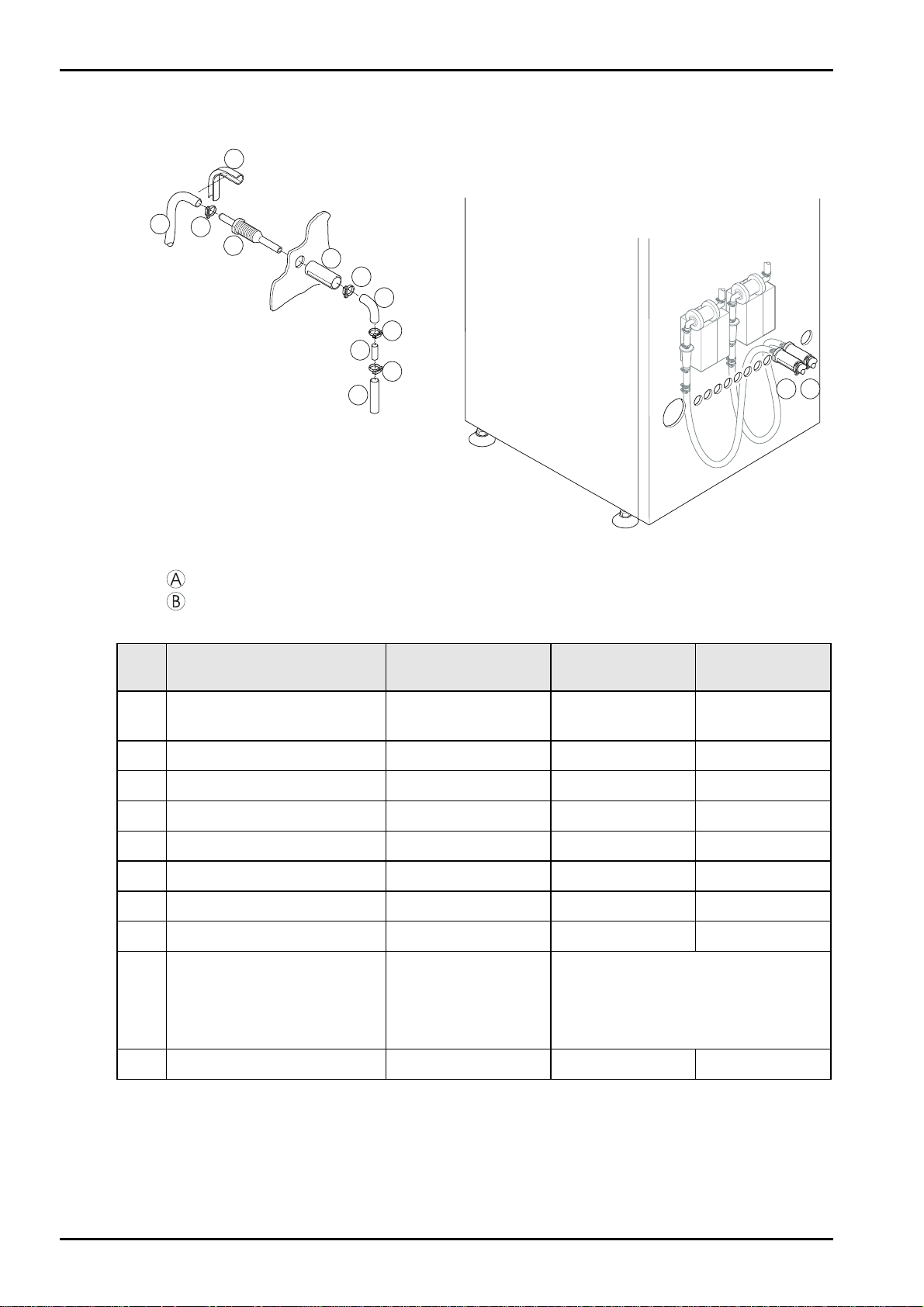
3.2.4 Installing supply hoses
Developer / fixer supply:
2
1
3
4
5
7
6
7
8
10
B
9
A
527003OM.CDR
Figure 3 - 7
= Developer
= Fixer
POS Designation Part number Quantity for
1 PVC hose
DEV installation
CM+0.0000.07.141 included included
Quantity for
FIX installation
Ø 9 x 1.5 mm transparent
2 * Hose positioning CM+7.9460.6458.0 1 x 1 x
3 Hose clamp CM+7.0371.7009.0 1 x included 1 x included
4 Hose connection CM+9.5210.7516.0 1 x included 1 x included
5 Threaded bush CM+9.5210.7505.0 1 x included 1 x included
6 * Hose bracket CM+9.5110.1797.0 1 x 1 x
7 * Hose clamp CM+7.0371.7022.0 2 x 2 x
8 * Pipe CM+9.5110.1792.0 1 x 1 x
9 PVC hose Ø 10 x 3 mm
fiber-reinforced
red
blue
CM+0.0000.64.082
CM+0.0000.64.083
by the meter
as required
10 * Hose clamp CM+7.0372.0023.0 1 x 1 x
* = not included / included
Chapter 3 / 6 Classic E.O.S. (Type 5270/100/105) Edition 5, Revision 00
Page 59
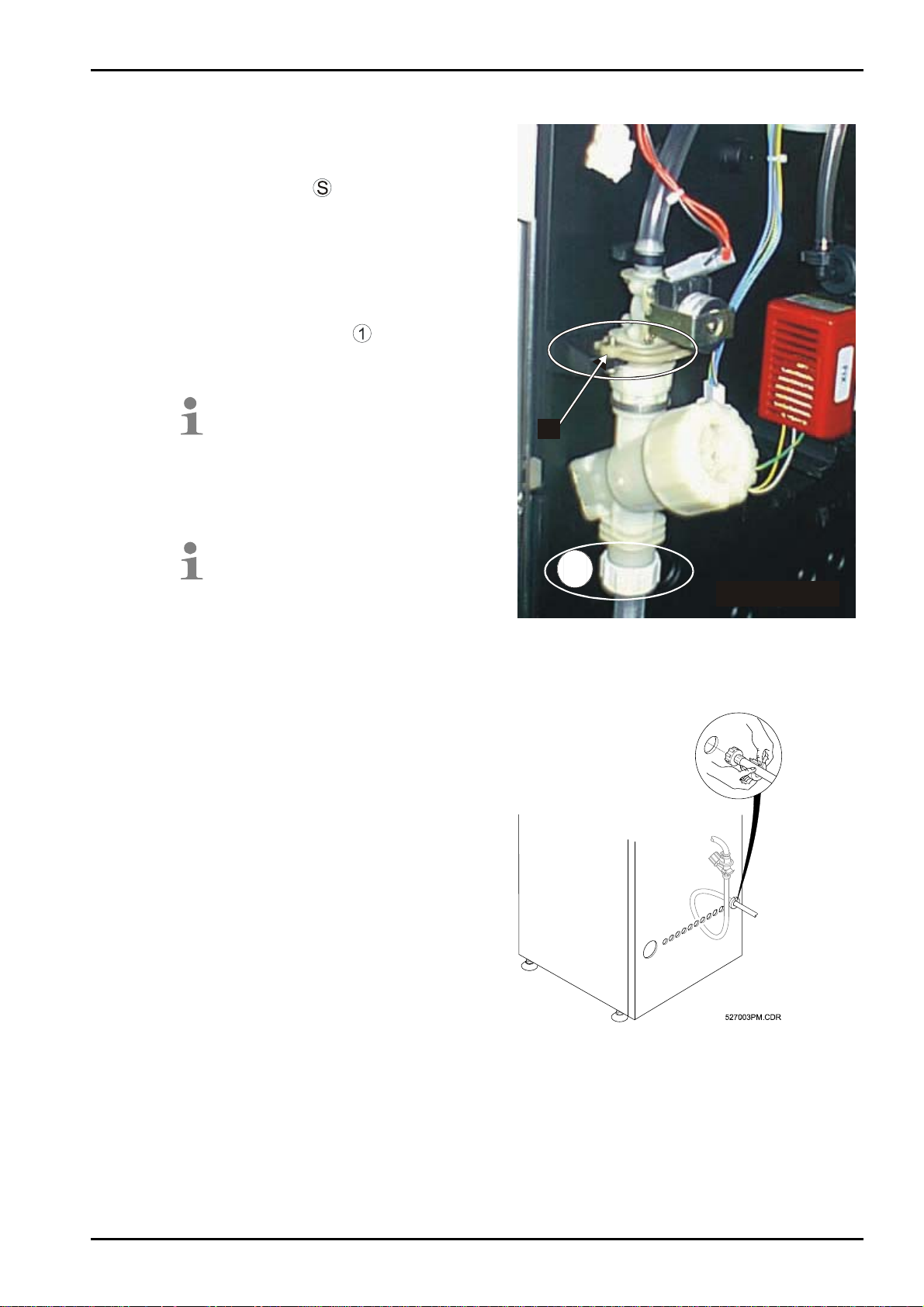
DD+DIS076.04E Installation / Startup
Water pressure hose:
9. Remove the transport protection bracket
(see marking) before installing the water
pressure hose.
Undo the screws
out of its holder, turn it by 180° and mount
it on the front panel.
The water supply solenoid valve then
engages in this bracket.
10. Position the water pressure hose through
the front panel (see figure 3-9).
11. Connect the union nut
pressure hose with the dirt trap.
The dirt trap is hinged for filter
cleaning.
The dirt trap is emptied (water and
dirt particles).
.first. Pull the bracket
on the water
S
If a pressure reducer is included in
the installation, set the pressure to
4 bar.
Install the water pressure hose:
1
527003AJ.CDR
Figure 3 - 8
Figure 3 - 9
Edition 5, Revision 00 Classic E.O.S. (Type 5270/100/105) Chapter 3 / 7
Page 60

Installation / Startup DD+DIS076.04E
3.2.5 Installing the disposal hoses
2
1
3
5
4
527003QM.CDR
6
5
7
5
8
E
F
W
Ü
Figure 3 - 10
Drain in the overflow
tray
Fixer drain (disposal)
Developer drain (disposal)
Water drain (disposal)
The internal hoses including the hose connections
are pre-mounted – but
they are not yet positioned through the front panel.
Position all hoses free of kinks and with continuous inclination
(avoid sagging).
Pos Designation Part number QTY for
1 PVC hose
overfl.
inst.
CM+0.0000.07.025 included included incl. included
Qty for
W inst.
Qty for
FIX
inst.
Qty for
DEV
inst.
Ø 19x2.5 mm transparent
2 Hose clamp CM+7.0372.0040.0 1 x incl. 1 x incl. 1 x incl. 1 x incl.
3 Hose connection CM+9.5210.7504.0 2 x incl. 2 x incl. 2 x incl. 2 x incl.
4 Threaded bush CM+9.5210.7505.0 2 x incl. 2 x incl. 2 x incl. 2 x incl.
5 * Hose clamp CM+7.0371.7021.0 3 x 3 x 3 x 3 x
6 * Elbow CM+9.8896.2952.1 1 x 1 x 1 x 1 x
7 * Pipe CM+9.8195.8061.0 1 x 1 x 1 x 1 x
8 PVC hose Ø 19x4 mm
fiber-reinforced
transparent
red
blue
* = not included / included
CM+0.0000.07.620
CM+0.0000.64.133
CM+0.0000.64.134
by the meter
as required
Chapter 3 / 8 Classic E.O.S. (Type 5270/100/105) Edition 5, Revision 00
Page 61

DD+DIS076.04E Installation / Startup
3.3 Supply and Disposal through the Machine Bottom
3.3.1 Hose connections
Exhaust connection.
connection size 100 mm.
Drain of the overflow
tray: Connection hose 19 x 2.5 mm
transparent; 1.0 m with hose
connection 16/20 mm.
Water disposal:
Connection hose 19 x 2.5 mm
transparent; 1.0 m with hose
connection 16/20 mm.
Area for hose passage
in the machine bottom
Dimensions in mm
Figure 3 - 11
Solenoid valve for
water supply
(Connection with ¾“ external thread on
the dirt trap). Safety pressure hose
included in the shipment.
Fixer 2 disposal:
(connected with pos. 7 via Yconnector)
Connection hose 19 x 2.5 mm
transparent; 1.0 m with hose
connection 16/20 mm.
Water supply
connection
Connection hose 9 x 1.5 mm
transparent;
connected with dirt trap
Edition 5, Revision 00 Classic E.O.S. (Type 5270/100/105) Chapter 3 / 9
Connection hose 9 x 1.5 mm
transparent; 1.0 m with 10 mm hose
connection.
pump
connection hose 9 x 1.5 mm
transparent; 1.0 m with 10 mm hose
connection.
Fixer metering pump
Developer metering
Page 62
Installation / Startup DD+DIS076.04E
Fixer replenisher
connection: Connection hose 7 x 1.5
mm transparent;
connected to the pressure side of
metering pump FIX (B).
Fixer 1 disposal:
(connected with pos. 4 via Yconnector)
Connection hose 19 x 2.5 mm
transparent; 1.0 m with hose
connection 16/20 mm.
Developer
replenisher connection: Connection
hose 7 x 1.5 mm transparent;
connected to the pressure side of
metering DEV
Developer disposal:
Connection hose 19 x 2.5 mm
transparent; 1.0 m with hose
connection 16/20 mm.
.
Chapter 3 / 10 Classic E.O.S. (Type 5270/100/105) Edition 5, Revision 00
Page 63

DD+DIS076.04E Installation / Startup
3.3.2 Installing the exhaust connection
The film processor has an integrated exhaust unit.
x Exhaust connection: 100 mm
x Dynamic pressure at the free connection piece: 300 Pascal; 100 Pascal after a hose
length of 3 m
x Max. length of the exhaust hose: 5 m
If the hose is longer install an additional fan!
x Exhaust volume: 80 m³/h
x Exhaust connections to the front through the lower front panel
For functional reasons the exhaust connection must always lead out of the
machine.
Figure 3 - 12
Exhaust duct
Crossover
Flexible exhaust hose
100 mm
On-site exhaust pipe
Exhaust hose leading
downwards through the machine bottom
(also see drawing 3.13).
Edition 5, Revision 00 Classic E.O.S. (Type 5270/100/105) Chapter 3 / 11
Page 64

Installation / Startup DD+DIS076.04E
Hose clamp
Adapter and exhaust hose are included in the
accessory box.
Pos Designation Part number Quantity for
front wall inst.
A Exhaust duct CM+9.5270.1174.0 1 x included 1 x included
B Crossover CM+9.5270.1176.0 1 x included 1 x included
C
F Exhaust connection CM+9.5220.3009.1 1 x included 2 (1 x included)
(G) Hose clamp CM+7.0371.9649.0 1 x included 2 (1 x included)
Exhaust hose 100 mm
CM+0.0000.64.117 by the meter as required
Qty for floor
installation
Chapter 3 / 12 Classic E.O.S. (Type 5270/100/105) Edition 5, Revision 00
Page 65

DD+DIS076.04E Installation / Startup
Figure 3 - 13
12. Loosen the fastening screw
in the machine between exhaust duct
and frame .
13. Push the adapter piece
on the exhaust duct.
14. Fix the two ducts on the frame by means of the fastening screw .
15. Push the exhaust hose
Figure 3 - 14
onto the exhaust stub and
fix with a hose clamp.
16. Connect the on-site exhaust pipe
with the exhaust stub
and fix with a hose clamp.
17. Tighten the screw connection of the two
exhaust stubs.
Edition 5, Revision 00 Classic E.O.S. (Type 5270/100/105) Chapter 3 / 13
Page 66

Installation / Startup DD+DIS076.04E
Exhaust hose
On-site exhaust pipe
Exhaust connection
Hose clamp
Floor
(core hole for exhaust connection:
t 114 mm)
Chapter 3 / 14 Classic E.O.S. (Type 5270/100/105) Edition 5, Revision 00
Page 67

DD+DIS076.04E Installation / Startup
3.3.3 Installing the replenisher hoses dev / fix and the water supply
The replenisher hoses
Dimensions in mm
Figure 3 - 15
(
, ) coming
from the Mixer or individual tanks can be
installed through the bottom of the machine.
Observe the marked area as shown in the
drawing.
8. Connect the replenisher pumps for
developer
and fixer
on the hose connections
(
- or
- ) of the
corresponding replenisher hoses.
9. Connect the water supply hose (coming
from the shut-off valve) on the dirt filter
at the water supply solenoid valve
.
Area for hose
passage in the machine bottom
Edition 5, Revision 00 Classic E.O.S. (Type 5270/100/105) Chapter 3 / 15
Page 68

Installation / Startup DD+DIS076.04E
Position all hoses free of kinks and with continuous inclination
(avoid sagging).
Pos Designation Part number Qty for
DEV inst.
C-12
B-11
12
11
10 Water supply hose CM+7.0362.6016.0 1 x
* Hose clamp CM+7.0372.0023.0 1 x 1 x
* = not included / included
Hose connection CM+9.5210.7516.0 1 x
included
PVC hose Ø 10 x 3 mm
fiber-reinforced
red
blue
CM+0.0000.64.082
CM+0.0000.64.083
by the meter
as required
Qty for FIX
inst.
1 x
included
Qty for
W inst.
included
Chapter 3 / 16 Classic E.O.S. (Type 5270/100/105) Edition 5, Revision 00
Page 69

DD+DIS076.04E Installation / Startup
3.3.4 Installing the disposal hoses
Figure 3 - 16
Pos Designation Configuration
1 PVC hose Ø 19x2.5 mm
Pre-installed in the machine
(0.75x0.10 inch) transparent
2 Hose clamp
3 Hose connection stub
Ø 20 mm (0.79 inch)
5 Hose clamp Not included in shipment, CM+9037200400
8 PVC hose, Not included in shipment,
Developer (red, fiber-reinforced):
Ø 19x4 mm (0.75x0.16 inch)
can be ordered
CM+0000064133
Fixer (blue, fiber-reinforced):
Ø 19x4 mm (0.75x0.16 inch) CM+0000064134
Water (transparent, fiber-reinforced):
Ø 19x4 mm (0.75x0.16 inch) CM+0000007620
x Shorten the internal disposal hoses if necessary and insert the hose connection stub (3)
again.
x Connect the fiber-reinforced (external) PVC hoses with the hose connection stub (3) of
the internal disposal hoses.
x Position the developer / fixer disposal hoses together through the opening in the bottom
to the central disposal site.
x Combine the hoses of the safety overflow (OVERFLOW) and water (WAT) with a Y piece
and connect them with one drain hose, if this is permitted by the local regulations. Install
the drain hose to the floor drain.
Position all hoses free of kinks and with continuous inclination
(avoid sagging).
Edition 5, Revision 3 Classic E.O.S. / Classic E.O.S. CL Chapter 3 / 17
Agfa Company Confidential (Type 5270 / 100 / 105)
Page 70

Installation / Startup DD+DIS076.04E
3.4 Connecting the Level Sensors
Figure 3 - 17
3.4.1 Replenisher tanks
Connect the level sensors on the Mainboard
(GS1) as follows:
Developer supply ST 71
Fixer supply ST 72
Anti-algae level ST 79
Figure 3 - 18
NOTE:
Call up the program <Service Settings /
Dev Fix SuppCond> and <Service Settings
/ Algcid SuppCond> and adjust the
connected level sensor accordingly (see
Chapter 6.6).
Replenisher tanks
Contents Type ABC Code Contents Type ABC Code
2 x 30 l 8186 / 701 FJ1QL 2 x 80 l 8186 / 101 F98XW
For safety reasons the machine panels can only be opened with tools
(screwdriver) and therefore the operator has no access to the inside of the
machine.
For this reason it is not permitted to place 30 l replenisher tanks inside
the film processor.
Chapter 3 / 18 Classic E.O.S. / Classic E.O.S. CL Edition 5, Revision 3
(Type 5270 / 100 / 105) Agfa Company Confidential
Page 71

DD+DIS076.04E Installation / Startup
3.4.2 Mixer
Figure 3 - 19
Connect the communication cable of the
chemical Mixer (20 m long),
CM+9.5280.3030.1, on the GS1/ST 66.
NOTE:
Select the following option in the program
<Service Settings / [MIXER COND / Mixer
conn.: = YES> (see Chapter 6.6).
3.4.3 Waste tanks
Figure 3 - 20
Figure 3 - 21
Edition 5, Revision 00 Classic E.O.S. Chapter 3 / 19
Page 72

Installation / Startup DD+DIS076.04E
3.5 Daylight / Darkroom Installation (only Stand-Alone Version Type 5270/100)
3.5.1 Machine in daylight, film feed in darkroom
Installation at the wall opening
Darkroom Daylight
Film feed
Dimensions in mm (inch)
Figure 3 - 22
Film output (wire chute)
A 60° chamfer must be
provided on the wall opening.
Wall
Wall base
Light seal
(foam rubber – by the meter)
Order no. CM+0.000.1424.4
Wall opening:
Dimensions in mm (inch)
Chapter 3 / 20 Classic E.O.S. (Type 5270/100/105) Edition 5, Revision 00
Page 73

DD+DIS076.04E Installation / Startup
Figure 3 - 23
Wall
Wall base
Wall opening
Edition 5, Revision 00 Classic E.O.S. Chapter 3 / 21
Page 74

Installation / Startup DD+DIS076.04E
Installation with light tight wall
Darkroom Daylight
Film feed
Dimensions in mm (inch)
Figure 3 - 24
A 60° chamfer must be
provided on the wall opening.
Wall
Light tight wall
Film output (wire chute)
Wall base
Light seal
(foam rubber – by the meter)
Order no. CM+0.0000.1424.4
Chapter 3 / 22 Classic E.O.S. (Type 5270/100/105) Edition 5, Revision 00
Page 75

DD+DIS076.04E Installation / Startup
Wall opening
Dimensions in mm (inch)
Wall
Wall overlap
Wooden board, 20 mm with
opening
Figure 3 - 25
This installation version requires a lighttight wall.
See 3.5.3, Light tight wall
Edition 5, Revision 00 Classic E.O.S. Chapter 3 / 23
Page 76

Installation / Startup DD+DIS076.04E
3.5.2 Machine in darkroom, film output in the daylight
Daylight Darkroom
Film feed
Dimensions in mm (inch)
Figure 3 - 26
Wall
A 60° chamfer must be
provided on the wall opening.
Light tight wall
Film output (wire chute)
Light seal
(foam rubber – by the meter)
Order no. CM+0.0000.1424.4
Wall base
Chapter 3 / 24 Classic E.O.S. (Type 5270/100/105) Edition 5, Revision 00
Page 77

DD+DIS076.04E Installation / Startup
Wall opening
Dimensions in mm (inch)
Figure 3 - 27
Wall
Overlap wall / light tight wall
at least 5 cm on all sides
Wooden board, 20 mm with
opening
This installation version
requires a light-tight wall.
See 3.5.3, Light tight wall
Edition 5, Revision 00 Classic E.O.S. Chapter 3 / 25
Page 78

Installation / Startup DD+DIS076.04E
3.5.3 Light tight wall
Coverage of a wall opening of up to
140 cm x 90 cm is possible.
Dimensions in mm (inch)
Figure 3 - 28
AGFA GEVAERT
does not supply the light tight wall
(wooden board) required for the
installation of a film processor!
Chapter 3 / 26 Classic E.O.S. (Type 5270/100/105) Edition 5, Revision 00
Page 79

Page 80

Installation / Startup DD+DIS076.04E
4 Operation Startup (SN higher than 2200 and Type 5270/105)
4.1
Preparing the startup procedure
For startup procedures up to SN 2200 refer to Chapter 5 "„Operation Startup
(SN up to 2200)".
1. Switch off the machine and disconnect the mains plug.
2. Mount the side panels.
3. Rinse all machine tanks.
4. Do not splash on any other parts (electrical parts)!
5. Rinse the racks well.
4.2 Adapting the mains supply
The machine can be connected to a supply voltage of 200 - 240 V without adaptation.
The machine works at a mains frequency of 50 Hz as well as 60 Hz (frequency independent).
Chapter 3 / 28 Classic E.O.S. (Type 5270/100/105) Edition 5, Revision 00
Page 81

DD+DIS076.04E Installation / Startup
4.3 Filling the developer and fixer tanks
Close the shut-off valves in the developer / fixer / water tanks.
TANK CAPACITIES DEVELOPER TANK FIXER TANK 1 FIXER TANK 2
Liter (l) 8.8 10.0 5.8
Level marking
Figure 3 - 29
NOTE:
Mix the chemicals for the developer and fixer
according to the prescription in a separate
container or in the mixer!
Edition 5, Revision 00 Classic E.O.S. (Type 5270/100/105) Chapter 3 / 29
Page 82

Installation / Startup DD+DIS076.04E
4.4 Switch on the Machine
- The machine executes a RESET (no BASEINIT) after switching on.
- All data in the EEPROM (also customer specific data) is kept.
- The machine checks tank contents developer / fixer / water and refills if necessary.
- Once developer, fixer, and water tank have reached the required level, all circulation
pumps will be triggered. After the water level has been reached the drive motor runs with
standby speed (50 cm/min) during the heating phase. This also applies if the setting in the
program <Service Settings / Drive On Mode is set on FILM.
- After the process cycle end (all IR heaters switch OFF) the machine goes back to the
warm-up phase!
4.4.1 Setting time and date in the "Service Settings" program
First adjust the time in the programs "Service Settings".
Figure 3 - 30
Figure 3 - 31
x Select the dialog "Set Date/Time" in
the "Service Settings" program.
To get from "Service" to
"InfoCounters" press the keys
-and
simultaneously in "Service" and hold
them for at least 3 sec.
x Press the key. The
setup dialog opens.
x Use the
keys
to select the date first.
x Confirm the setting with
.
Chapter 3 / 30 Classic E.O.S. (Type 5270/100/105) Edition 5, Revision 00
Page 83

DD+DIS076.04E Installation / Startup
x Then adjust the time again with the
keys.
x Confirm the settings with
.
x If you want to cancel a setting press
the
key.
Edition 5, Revision 00 Classic E.O.S. (Type 5270/100/105) Chapter 3 / 31
Page 84

Installation / Startup DD+DIS076.04E
4.4.2 Resetting the service interval
To ensure that the machine starts a new service interval after the installation, the service
indicator must be reset.
x Select the "Service Settings"
program and then the dialog
"Maintenance".
To get from "Service" to
"InfoCounters" press the keys
Figure 3 - 32
and
Figure 3 - 33
simultaneously
in "Service" and hold them for
at least 3 sec.
Use the
keys to ensure that the "Service
Indic." dialog flashes.
x Press the key.
The window for the service
indicator opens.
x Use the
keys to set the service
indicator "ON".
Chapter 3 / 32 Classic E.O.S. (Type 5270/100/105) Edition 5, Revision 00
Page 85

DD+DIS076.04E Installation / Startup
Press the key
to confirm the input.
As soon as the service interval
has expired a message will be
displayed.
x Press the
Figure 3 - 34
keys to change to the dialog
"Reset ServIndic.".
Edition 5, Revision 00 Classic E.O.S. (Type 5270/100/105) Chapter 3 / 33
Page 86

Installation / Startup DD+DIS076.04E
x Press the key.
A dialog box opens and the
Figure 3 - 35
service indicator can be reset.
Use the
keys to select "YES".
x Press the
confirm the input.
The service interval has been
reset.
key to
Chapter 3 / 34 Classic E.O.S. (Type 5270/100/105) Edition 5, Revision 00
Page 87

After first installation all other options must be set up in the "Service Settings" program. Use the following graphic.
DD+DIS076.04E Installation / Startup
4.4.3 Setting all options in the "Service Settings" program (Software Version MEOS 1201)
Edition 5, Revision 00 Classic E.O.S. (Type 5270/100/105) Chapter 3 / 35
Page 88

Figure 3 - 36
Installation / Startup DD+DIS076.04E
Chapter 3 / 36 Classic E.O.S. (Type 5270/100/105) Edition 5, Revision 00
Page 89

DD+DIS076.04E Installation / Startup
4.4.4 Calibrating the supply rates of developer and fixer pumps
The supply rate of the developer and fixer replenisher pumps must always
be adjusted during the first installation.
x Hold a measuring glass (250
ml) under the removed elbow
of the replenisher hose for
developer/fixer.
Figure 3 - 37
Figure 3 - 38
x Go to the program "Test &
Adjust" and select the dialog
"DEV Pump CAL" or "FIX
Pump CAL".
To get from "Service" to
"InfoCounters" press the keys
and
simultaneously
in "Service" and hold them for
at least 3 sec.
x Press the
key.
Afterwards the "Start Test?"“
Figure 3 - 39
question is displayed.
x Press the
key
and wait for 30 s during which
the pump pumps replenisher
Edition 5, Revision 00 Classic E.O.S. (Type 5270/100/105) Chapter 3 / 37
Page 90

Installation / Startup DD+DIS076.04E
into the measuring glass.
x After the 30 s check the
supplied amount in the glass.
Figure 3 - 40
Chapter 3 / 38 Classic E.O.S. (Type 5270/100/105) Edition 5, Revision 00
Page 91

DD+DIS076.04E Installation / Startup
x Enter the value in the value
field using the
The NOMINAL supply rate is then obtained automatically by adaptation of
the supply interval.
4.4.5 Execute a Teach In
As the current values depend on the actually applied supply voltages,
they must be read in via the “Teach In”.
Figure 3 - 41
Figure 3 - 42
keys.
x Press the
key
to confirm the input.
The machine accepts the
value and returns to the dialog
"DEV Pump CAL".
x Repeat the individual steps for
the fixer pump calibration.
The “Teach In” procedure must be completed to be able to exit the dialog.
x Go to the program "Test &
Adjust" and select the dialog
"Teach In".
To get from "Service" to
"InfoCounters" press the keys
Figure 3 - 43
-and
Edition 5, Revision 00 Classic E.O.S. (Type 5270/100/105) Chapter 3 / 39
Page 92

Installation / Startup DD+DIS076.04E
simultaneously in "Service"
and hold them for at least 3
sec.
Chapter 3 / 40 Classic E.O.S. (Type 5270/100/105) Edition 5, Revision 00
Page 93

DD+DIS076.04E Installation / Startup
x Press the key.
This is followed by a
Figure 3 - 44
message.
You are prompted to start the
measuring cycle.
Figure 3 - 45
Figure 3 - 46
x Press the
key.
Now the individual voltages
and currents of the loads in
the machine are measured
one after the other.
The first measurement is
carried out and then the result
is displayed.
x Press the
key
to save the measurement.
The program changes to the
next measuring cycle.
x Proceed accordingly for all
further displayed
measurements.
Once all measurements have
been saved, a message
informs about the end of the
"Teach In" procedure.
Figure 3 - 47
x Press the
key
to exit the "Teach In".
The program returns to the
menu "Test & Adjust".
Edition 5, Revision 00 Classic E.O.S. (Type 5270/100/105) Chapter 3 / 41
Page 94

Installation / Inbetriebnahme DD+DIS324.00D
Register 3 / 42 Classic E.O.S. (Typ 5270/100/105) Ausgabe 5, Revision 00
Page 95

DD+DIS076.04E Installation / Startup
4.4.6 Overview of the program "Test & Adjust" (Software Version MEOS 1201)
Edition 5, Revision 00 Classic E.O.S. (Type 5270/100/105) Chapter 3 / 43
Page 96

Figure 3 - 48
Installation / Startup DD+DIS076.04E
Chapter 3 / 44 Classic E.O.S. (Type 5270/100/105) Edition 5, Revision 00
Page 97

DD+DIS076.04E Installation / Startup
4.4.7 Resetting infocounters Deleting the infocounters after an installation or maintenance may be
useful, since film, developer and fixer consumption between the
maintenance intervals may provide information about the condition of the
processor, and developer and fixer, to be expected.
Deleting the infocounters also deletes the temporary data about the
machine!
x The following temporary data will no longer be available:
consumed developer solution
- consumed fixer solution
- processed film
Figure 3 - 49
x Press the key
together with the
key for at least
3 s.
The software switches to the
"Service" program: The
"InfoCounters" menu is
flashing.
x Confirm the "InfoCounters"
menu with the
key.
x Change to the "InfoCounter"
dialog.
x Confirm the "InfoCounters"
dialog with the
key.
Edition 5, Revision 00 Classic E.O.S. (Type 5270/100/105) Chapter 3 / 45
Page 98

Figure 3 - 50
4.4.8 Important settings in the "Settings" program
Proceed according to the User Manual or the graphic "Overview of program settings" in the
section
4.4.10.
x Press the key.
The setup dialog opens. "No"
is flashing.
x Press one of the
keys. The flashing display
changes from "No" to "Yes".
x Confirm the setting with
.
Chapter 3 / 46 Classic E.O.S. (Type
Page 99

Page 100

Installation / Startup DD+DIS076.04E
Chapter 3 / 48 Classic E.O.S. (Type 5270/100/105) Edition 5, Revision 00
 Loading...